
Web Scraping Proxy Guide for AI Pipelines in 2026
Buying more proxies rarely fixes a scraper that's failing for deeper reasons. If the target is scoring IP reputation, request burstiness, cookie continuity, and browser fingerprints together, a bigger pool just gives you more ways to fail expensively. In production, a web scraping proxy is useful, but only as one layer inside a stack that also includes rendering, session control, and retry logic.
The teams that keep pipelines alive at 2 AM stop thinking in terms of “how many proxies do we have?” and start asking “what signal is the target rejecting?” That shift matters even more now that scraping is increasingly tied to AI workflows, where the output has to be clean enough for models, not just technically retrieved.
Why More Proxies Rarely Fixes Your Scraper
The common mistake is treating proxy volume like a universal cure. It isn't. A target that blocks on browser state, cookie continuity, or burst patterns will still reject requests even if every call comes from a different exit node.
The actual failure mode
A proxy changes the network route. It does not render JavaScript, it does not keep cookies alive by itself, and it does not make a client look human. Rotating IPs alone can still leave enough client fingerprints for defenses to fire, especially when the site watches behavior over a full session rather than one request at a time. WebScraper's proxy management guidance makes the same point directly, modern orchestration is session-aware routing, not just IP swapping.
What usually breaks first is the mismatch between the request plan and the target's expectations. A login flow, a cart action, or a paginated search session behaves very differently from a static catalog page. If you rotate too aggressively, you destroy the continuity the site expects, then blame the proxy pool when the problem is really orchestration.
Practical rule: buy fewer IPs first, then lower burstiness, preserve cookies, and only rotate when the session boundary changes.
Why the stack matters more than the pool
Modern anti-bot systems do not look at one field in isolation. They score combinations of IP reputation, timing, browser behavior, and state continuity. That means a “better” proxy can still fail if the rest of the client stack is noisy, while a modest proxy can work if the surrounding session is stable.
That is why experienced teams pair proxies with browser rendering, cookie persistence, and adaptive retry logic. They also tune concurrency before they expand the pool. The order matters, because raw IP churn is the cheapest thing to change and often the least useful.
The mental model that survives real traffic is simple. Proxies move traffic. They do not make it trustworthy on their own. Once you accept that, the debugging path gets much cleaner.
Proxy Types and What Each Actually Does
A proxy type is a reputation choice, a cost choice, and a routing choice at the same time. Pick the wrong one and you either burn money on access you do not need or get blocked for using traffic that looks out of place. The useful question is not which proxy is strongest. It is which proxy fits the target's tolerance for trust, speed, and state, especially once rendering, fingerprinting, and downstream LLM extraction enter the stack.
The main categories
Datacenter proxies come from cloud or hosting infrastructure. They are fast, predictable, and easy to operate, which makes them a good fit for low-friction targets and bulk fetches. They are also easier for anti-bot systems to classify, so the failure mode is usually acceptance first, then blocking.
Residential proxies come from real ISP-assigned consumer addresses. They usually carry more trust with anti-bot systems, which is why they show up in harder targets and geo-sensitive fetches. If you need a deeper operational breakdown of how these pools are structured and why backconnect behavior matters, this guide on residential backconnect proxies is the right reference point.
ISP proxies sit in the middle. They combine stable address behavior with infrastructure-grade control, which helps when you need sticky identity without paying the full cost profile of residential traffic. In practice, they are often the least awkward option when a session needs to stay coherent but still has to look less synthetic than a pure datacenter path.
Mobile proxies route through carrier networks. They are used in cases where the target expects very high trust, because the economics are hard to justify unless success depends on that reputation and the target is especially strict.
Tor pools are a special case. They can still be useful in niche research contexts, but they are rarely the default answer for production extraction because the routing pattern and reliability profile usually clash with repeatable workflows.
If the page needs a browser to execute scripts, the proxy is only one piece of the fetch path. If it is a plain HTML feed, the proxy decision can be much simpler.
How the network path actually looks
For HTTPS traffic, the proxy mostly handles the tunnel and destination metadata through CONNECT semantics, not payload decryption. That matters because the proxy is not a visibility layer into the page itself. It is a way to choose the route and the apparent origin. The site still judges the rest of your client behavior through other signals.
That is why “higher trust” does not mean “better” in every case. Residential traffic often costs more because the access path is bandwidth-heavy and carries a stronger anti-bot reputation, while datacenter traffic is cheaper and faster but more likely to be flagged. The right choice depends on the target, not on which pool looks larger on a pricing page.
For teams deciding between options, the best proxy is the one that fits the actual session shape. A stateless feed, a localized search result, and an authenticated dashboard should not use the same network posture.
Rotation Strategies That Match Target Behavior
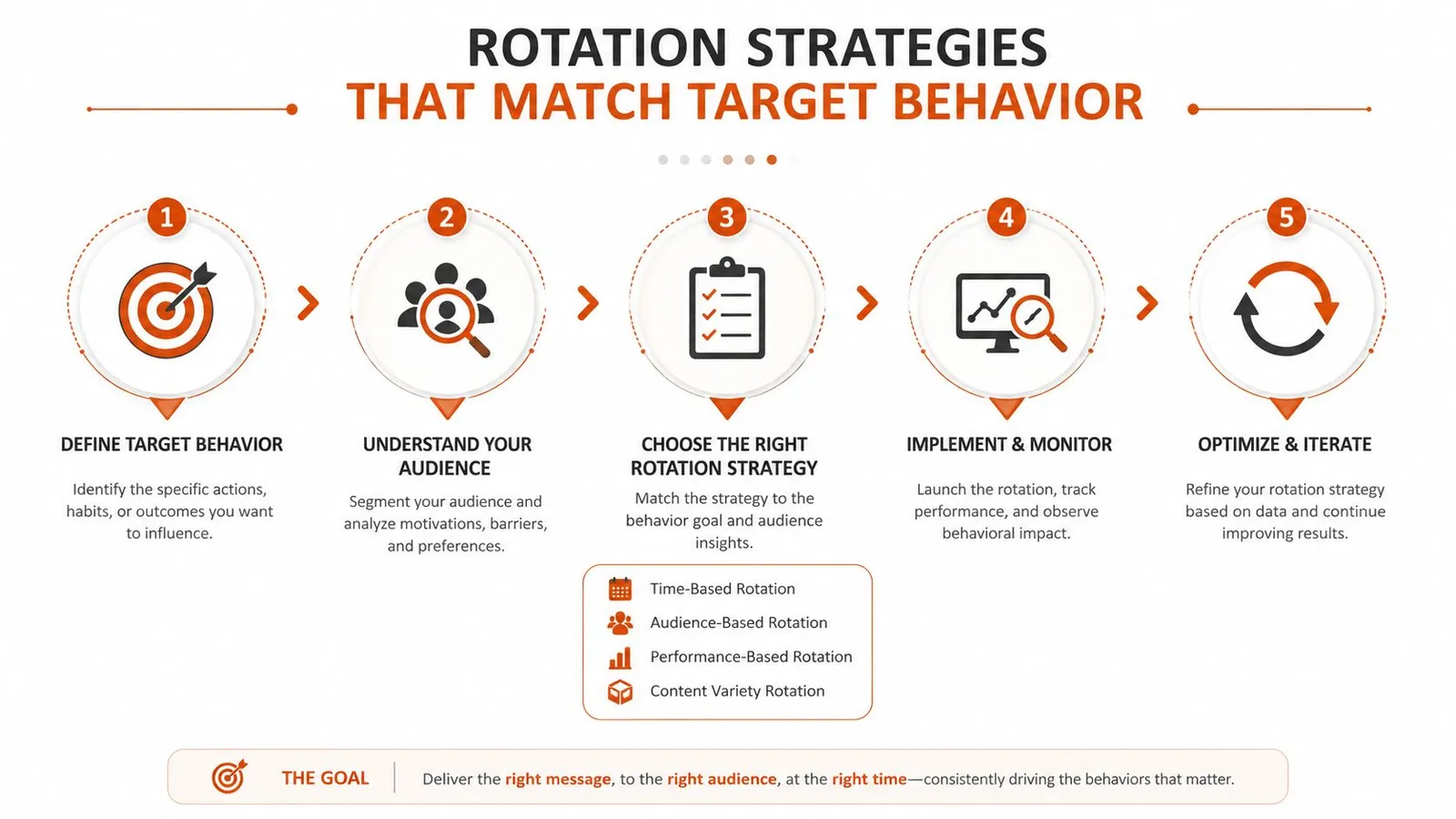
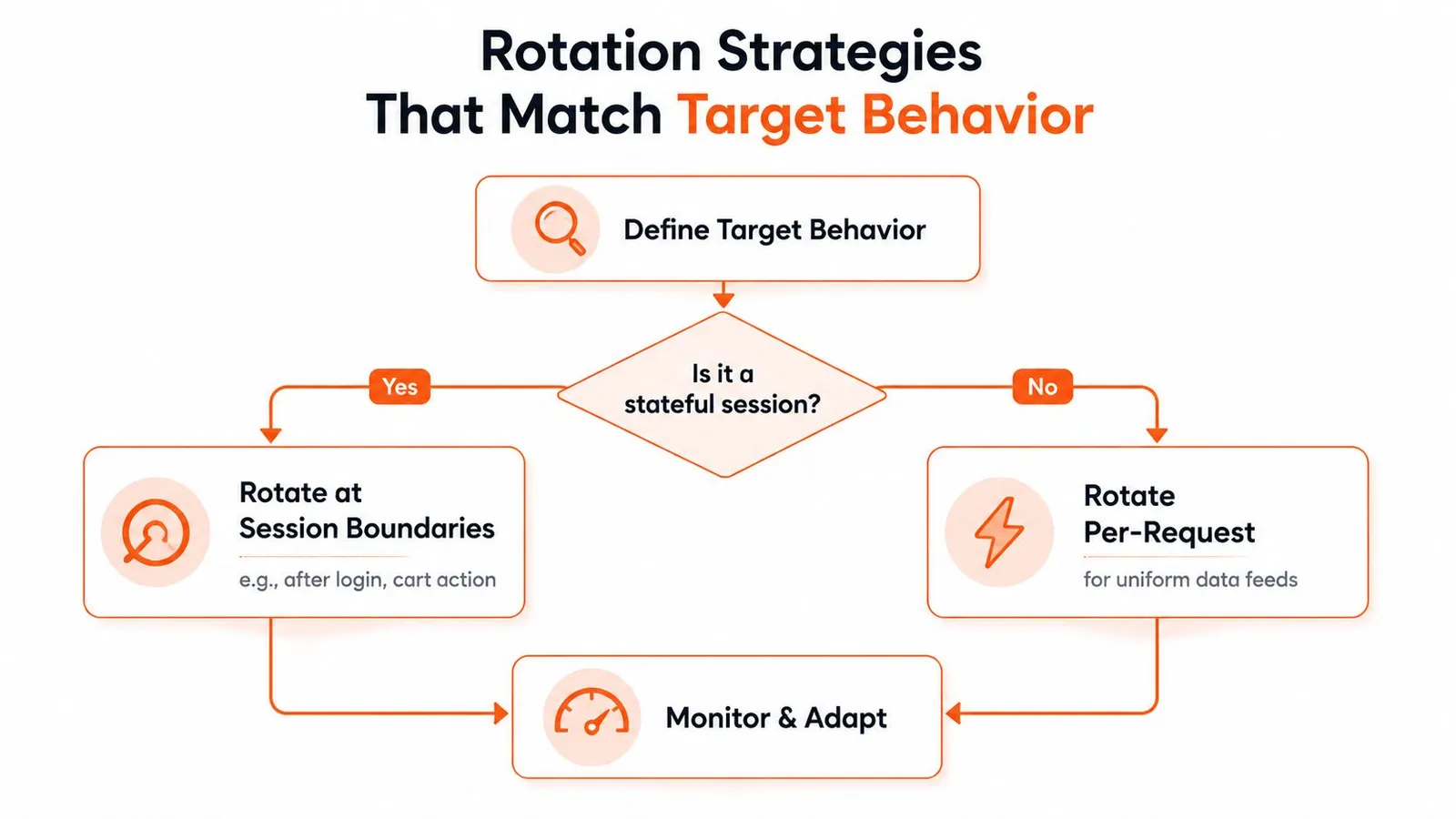
Rotation fails when it ignores how the target keeps state. A stateless page can tolerate per-request switching. A login flow, cart flow, or multi-step form usually cannot, because continuity matters more than novelty.
Rotate at the boundary the site cares about
Rotate at logical session boundaries, not on every request. After login, after checkout, or after a workflow step that naturally resets identity, a fresh proxy can make sense. For uniform data feeds, where the target does not care about session continuity, more frequent rotation is usually fine.
Geography matters as much as timing. A site that returns region-specific results should not be hit from an exit node that sits far from the market you are trying to observe. Matching route geography to the target's behavior reduces noise before proxy volume even enters the conversation, and the same logic applies when you are planning Google-oriented collection paths, such as the routing choices discussed in this guide to proxies for Google.
Rate and concurrency are the other levers. Too many teams try to fix throttling by adding more IPs. In practice, reducing burstiness and smoothing parallel requests is often the first change that pays off.
Practical rule: if a site starts acting erratically, check cookie persistence and pacing before you add another provider.
Keep state where state belongs
Sticky sessions help when a workflow depends on staying recognizable across multiple steps. That does not mean every request should come from the same IP forever. It means the identity should stay stable long enough for the target to accept the interaction as one coherent session.
Authenticated flows usually need a browser, persisted cookies, and proxy routing that stays aligned with the session. If the proxy changes but the browser state does not, or the browser state resets while the IP stays the same, the target can still spot the mismatch. I have seen scrapers fail for exactly that reason, the transport looked fresh, but the session story did not add up.
The useful rule is simple, rotate to preserve credibility, not to chase motion. That sounds backward until you debug a queue that keeps failing because it is too eager to look new.
Cost and Performance Trade-offs by Proxy Type
Proxy pricing only matters when you measure it against successful pages, not raw access. A cheap IP that fails often costs more than a pricier route that reaches the page once and returns cleanly.
| Proxy Type | Pricing Model | Typical Cost | Block Rate | Best For |
|---|---|---|---|---|
| Datacenter | Per IP | Lowest cost option | Usually higher on protected targets | Fast, low-friction pages |
| ISP | Per IP | Mid-range pricing | Middle ground | Sticky authenticated flows |
| Residential | Per GB | Higher cost than datacenter or ISP pools | Lower on harder targets | High-trust and geo-sensitive scraping |
| Mobile | Per GB or per IP | Usually the highest-cost option | Typically lowest, but not always worth it | Extreme-trust targets |
What the pricing model really means
The key split is per-IP versus per-GB. Per-IP pricing usually fits steady, repeatable routing where the payload is light and the target is forgiving. Per-GB pricing shows up where trust matters more than raw throughput, because the access path itself is doing more of the heavy lifting.
That is why the cheapest proxy type is not always the cheapest outcome. If a low-cost pool triggers CAPTCHAs, retries, or failed fetches, the cost per successful page climbs fast. The right metric is not spend per proxy, it is spend per page you can use downstream.
Fit the proxy to the job
A stable catalog crawler does not need the same economics as a protected login flow or a localized search scraper. For one, cost control comes from throughput and concurrency discipline. For the other, success rate depends on reputation and session realism.
That distinction is why mature teams test with a small sample before scaling the pool. They compare success rate, response consistency, and the amount of cleanup needed after retrieval. If the retrieved data still needs heavy filtering, the proxy choice may be hiding a bigger extraction problem.
Proxy choice also changes the shape of the rest of the stack. A site that needs rendering, careful fingerprint control, and clean output for an LLM pipeline can make a low-cost proxy look expensive once you add browser overhead and post-processing. A proxy for downloads can make sense for that kind of workflow because routing, retrieval, and downstream handling stay tied together instead of being tuned in isolation.
Integration Patterns with Scrapers and APIs
The cleanest proxy integration is the one your scraper can survive when the target changes behavior. That means credential handling, browser configuration, and retry policy need to live close to the job, not in a one-off config file nobody revisits.
A simple Python pattern looks like this at the request layer, where the proxy is passed as part of the client setup and not manually reconstructed for every call. In Node.js, the same principle applies, the HTTP client should own the route, while your retry layer owns backoff and recovery. For teams using a managed extraction endpoint, the proxy choice can move up a level so the API call stays small and the routing complexity stays behind the service boundary.
When you're deciding how much to build yourself, it helps to map the stack before you write code. If you're comparing scrapers, browsers, queues, and storage layers, choose your data pipeline stack with the same care you'd use for any other production dependency.
What to wire together
- Proxy credentials: Keep auth outside the code path where possible, then inject it through environment variables or secret storage.
- Session state: Persist cookies and login tokens where the workflow depends on continuity.
- Rendering: Use a browser when the page needs JavaScript, because the proxy alone won't execute it.
- Retries: Back off on transient blocks, then fail fast if the target is clearly rejecting the whole session.
Don't let the proxy layer become the place where all errors look the same. A 403 from a bad fingerprint is a different problem from a timeout on a distant exit node.
If you're using a higher-level API, the proxy decision can be exposed as a parameter rather than a client concern. Webclaw's web scraping API is one way to package fetch, rendering, and routing so the downstream pipeline gets cleaner output instead of raw HTML noise. That kind of abstraction is useful when the team cares more about reliable extraction than about maintaining proxy plumbing.
The practical test is simple. If changing the proxy type also changes the shape of your response data, you've already crossed from networking into extraction design.
The Shift Toward AI-Era Extraction Stacks
AI collection has changed what a successful scrape needs to deliver. It's no longer enough to reach the page. The page has to be turned into context a model can consume without wasting tokens on nav bars, ads, and duplicated boilerplate.
AI workloads increase the value of clean, token-efficient extraction after a page is fetched. Access success and output quality need separate checks.
Why the proxy is only the entry point
A modern AI extraction stack usually needs more than access. It needs rendering for client-side pages, fingerprint realism for protected targets, and output normalization so the next model call doesn't pay for junk text. Raw HTML is often the wrong end state.
That's why hybrid setups are becoming normal. A proxy gets you to the page, a browser gets you the rendered DOM, and an extraction layer turns the result into markdown or structured JSON that's usable. If any one of those steps is weak, the pipeline becomes expensive very quickly.
The useful design goal is token efficiency, not just fetch success. A page that arrives with clean, minimal context is cheaper to index, cheaper to embed, and easier to reason over in retrieval workflows. That's the outcome teams want when they're building LLM pipelines rather than generic crawl archives.
In practice, the best extraction stacks are boring in the right way. They fetch, render, clean, and normalize with as little drama as possible.
Common Pitfalls and How to Debug Them
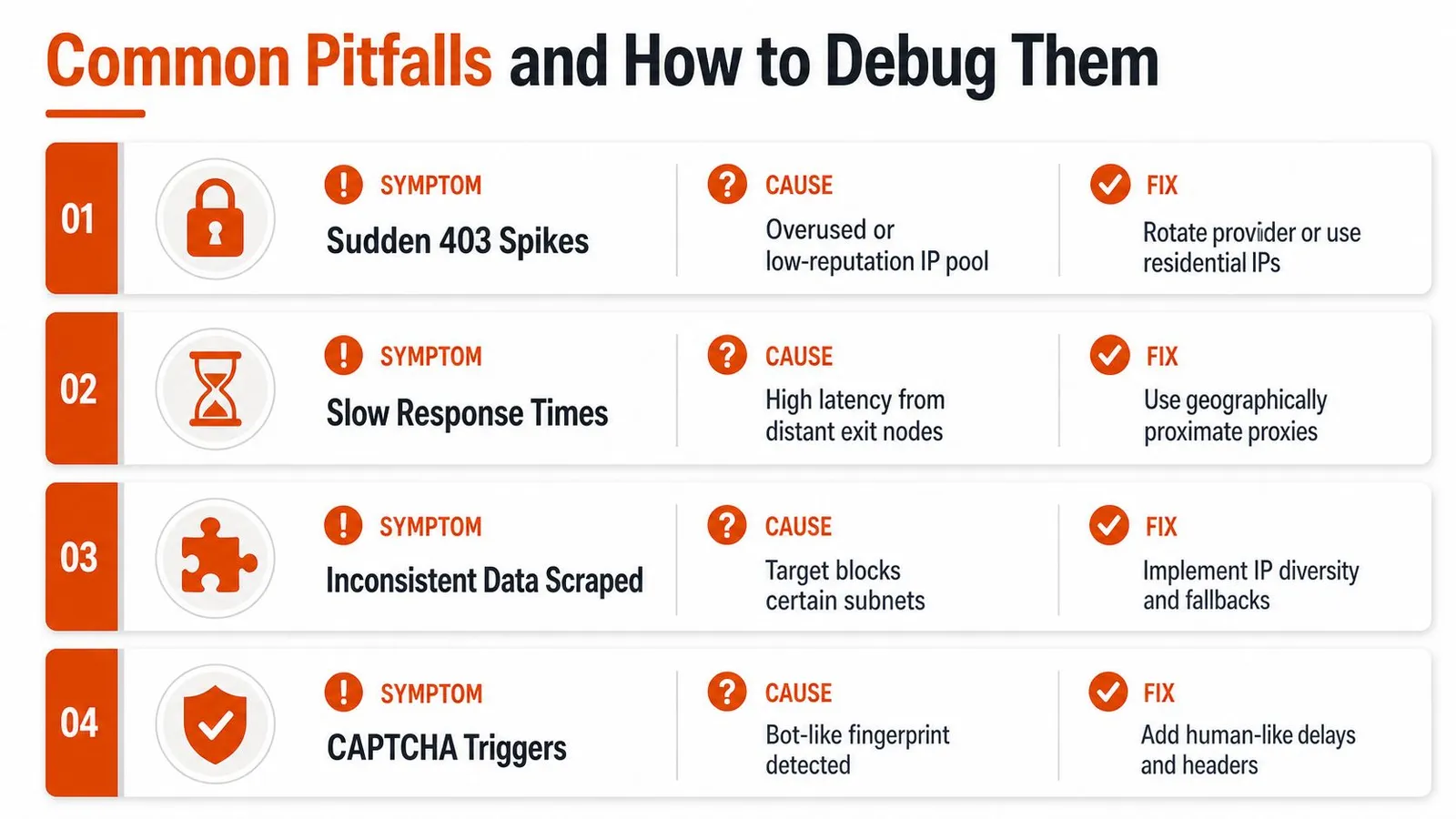
Most proxy failures look like “the proxy broke,” but that's usually too vague to fix. The fastest way to debug is to separate network quality from client behavior, then inspect the session in layers.
Start with the symptom
A spike in 403s usually means the target has started rejecting the identity you're presenting, not that every proxy in the pool is dead. Slow responses can come from distant exit nodes, overloaded providers, or targets that are intentionally dragging out suspicious sessions. Inconsistent data across runs often points to target-specific blocking on subnet or session shape rather than a universal outage.
CAPTCHA triggers are usually the clearest signal that the browser fingerprint is off. The fix is rarely “rotate faster.” It's usually better timing, better headers, a more credible browser state, and a session plan that doesn't look robotic.
For a useful field guide on what a 429 means and how to separate it from other throttling behavior, see Webclaw's 429 error guide. That's the kind of issue that can look like a proxy problem while being a rate-control problem in the target or your own client.
Debug like a systems engineer
Check TLS fingerprints when the blocks are immediate and repeatable. Verify header ordering when the target accepts some sessions and rejects others. Test cookie persistence when authenticated pages fail after the first successful step. Measure request timing patterns when the target starts responding differently under load.
Useful habit: change one variable at a time, then log the response shape, not just the status code.
Proxy pool exhaustion is the last common trap. Teams often assume they need more IPs when they really need better provider diversity or a narrower request envelope. If one subnet keeps getting burned, widening the pool and changing session discipline usually helps more than increasing rotation frequency.
The debugging mindset that works is simple. Determine whether the failure is in origin reputation, browser realism, or session continuity, then fix the first layer that explains the symptom.
If you want a cleaner way to move from blocked pages to usable context, Webclaw handles JavaScript rendering, proxy-backed retrieval, and token-efficient output in one extraction layer. Start with a real target, compare the output to your current stack, and see how much cleanup disappears when the fetch path is built for models from the beginning. Visit Webclaw and try it on the pages that keep breaking your scraper.