
Proxies for Google: A Developer's Guide for 2026
You're probably in one of two situations right now.
Either you built a Google scraper with cheap proxies, watched it work for a moment, and then hit a wall of CAPTCHAs, empty pages, and bans. Or you're evaluating providers and getting the usual vague advice: “use residential proxies” and “rotate IPs.” That advice isn't wrong. It's just incomplete.
Google scraping is a hostile environment. Proxy choice matters, but the bigger issue is failure mode. Some setups fail loudly and immediately. Others fail slowly, by poisoning sessions, burning IPs, and turning supposedly cheap traffic into expensive garbage. If you're serious about proxies for Google, you need to think in terms of success rate, session integrity, geo consistency, and cost per successful request.
Choosing the Right Proxy for Google Scraping
The first mistake is often treating all proxy types as interchangeable. On ordinary sites, you can sometimes get away with that. On Google, you can't.
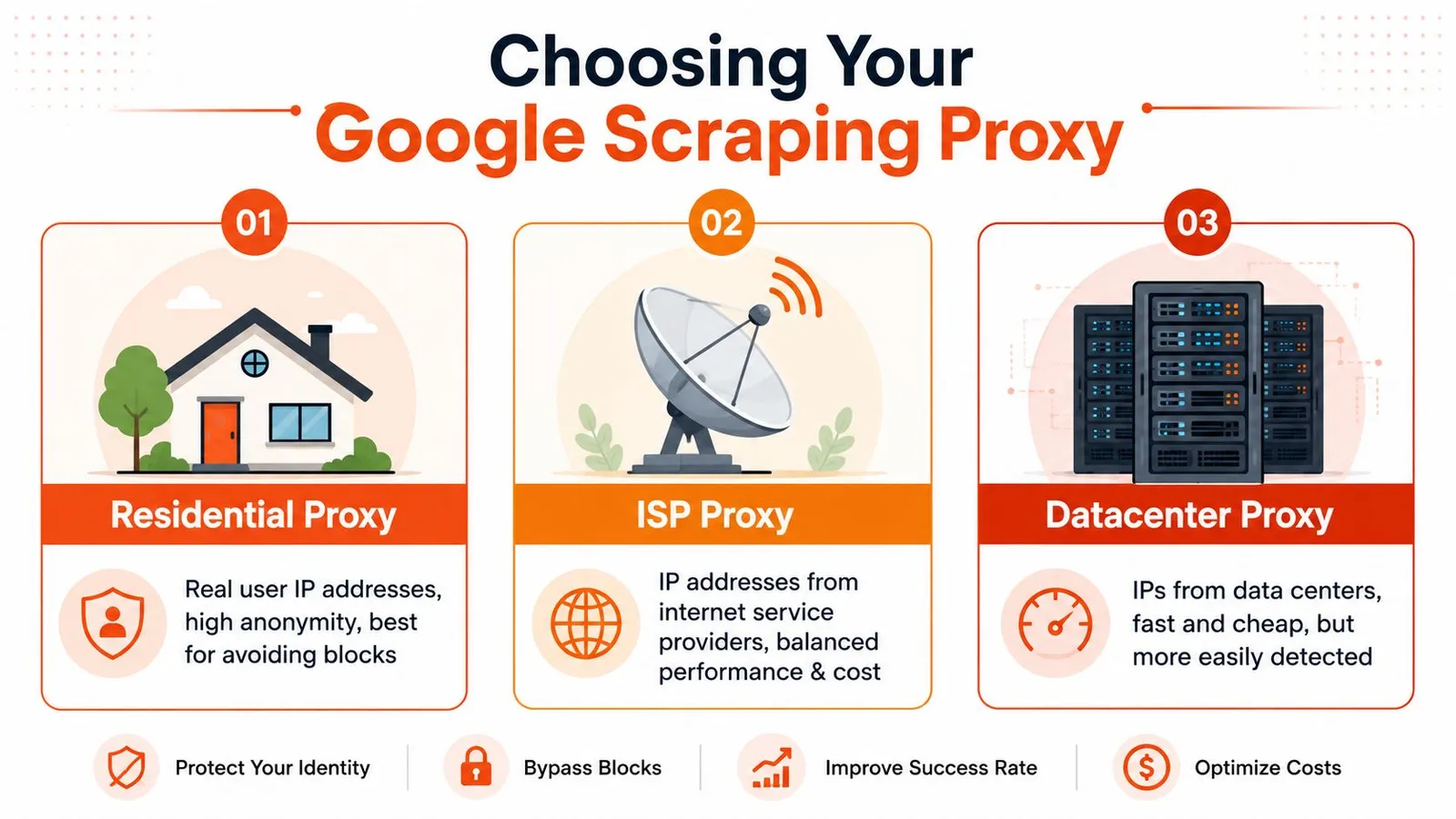
Google identifies bad traffic patterns fast. According to a discussion of proxy types for scraping Google Search, datacenter IPs are often flagged after just a few consecutive searches, while rotating residential IPs are far more effective because they look like normal traffic from real households and mobile devices. That matches what most production systems run into. Datacenter proxies look clean on paper and fail in practice.
What fails first on Google
Datacenter proxies usually fail on reputation and traffic shape. They come from ranges that Google already treats with suspicion, and repeated SERP requests push them into CAPTCHA territory fast. That's why they feel fine in small tests and then collapse once you add concurrency or repetition.
Static ISP proxies sit in the middle. They often look better than datacenter IPs because they come from internet service providers, but a static identity has its own problem. If you keep issuing search queries through the same endpoint, you build a very obvious pattern. They can work for low-volume, tightly controlled tasks, but they're easy to overuse.
Residential proxies are the default choice when the target is Google. They aren't magic, and they still need sane session handling, but they start with the one property you need most: they resemble normal users.
Practical rule: For Google, don't choose a proxy type by price per GB. Choose it by how long it survives under your real search pattern.
A practical comparison by proxy type
Here's the decision table I'd use in production:
| Proxy type | Best use on Google | Main strength | Main failure mode |
|---|---|---|---|
| Residential | SERP scraping at scale, localized search, repeated query workloads | Looks like organic traffic | Burns fast if rotation and fingerprints are sloppy |
| ISP | Lower-volume workflows, controlled sessions, some geo-specific tasks | Cleaner reputation than datacenter, more stable than pure rotation | Static identity becomes detectable under repeated search behavior |
| Datacenter | Usually not worth it for Google SERPs | Cheap and fast | CAPTCHAs and bans arrive quickly |
If your workload is “search term in, parse result page out,” residential is the starting point. If your workload includes longer-lived browser sessions or manual review pipelines, ISP proxies can be useful, but only with conservative usage. Datacenter proxies belong on less defended targets, not on Google.
A lot of teams also underestimate routing hygiene. Mixing proxy classes in the same job creates weird behavior that's hard to debug. One request comes from a residential IP in the target city, the next from a datacenter in another region, and your scraper starts seeing verification pages with no obvious reason. Keep jobs segmented.
There's also a business-side lesson here. Cheap infrastructure that fails repeatedly isn't cheap. That same logic applies outside Google too. If you're comparing specialized proxy workflows for other traffic-heavy tasks, this breakdown on proxy choices for large download workflows is worth reading because the operational trade-offs are similar even when the target differs.
Mastering Rotation and Session Management
A good proxy pool can still fail if you use it like a slot machine.
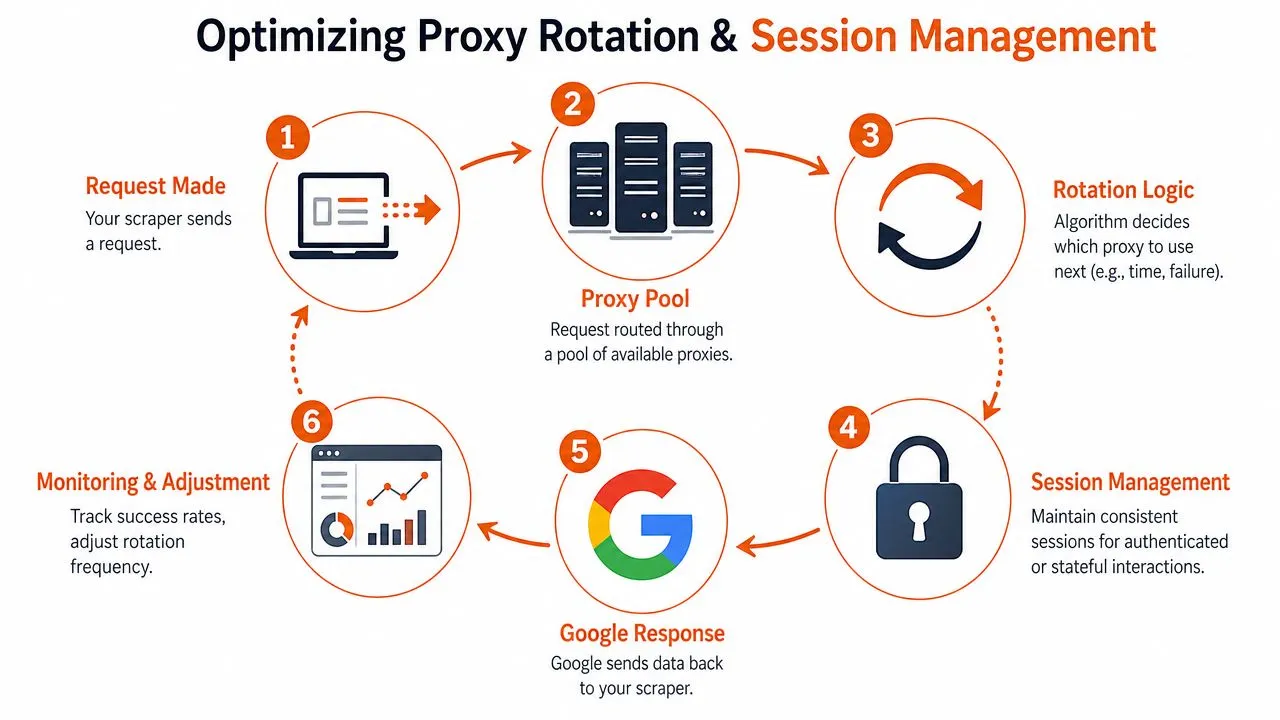
Most Google scraping problems after proxy selection come from bad session logic. Teams rotate too aggressively, or they don't rotate at all. They change the IP but keep stale cookies. They keep the IP but change the user agent. They paginate search results with one identity on page one and a different identity on page two. That's the kind of inconsistency Google notices.
Getting the proxy right is half the job. For the request layer that sits on top of it, see how to scrape Google search results.
When to rotate and when to stay sticky
Use rotating sessions when each request is independent. A single keyword lookup with no follow-up navigation is the obvious example. In that case, fresh identity per request helps spread risk across the pool.
Use sticky sessions when requests belong to one coherent user journey. If you submit a query, click to the next page, refine the search, or fetch related result views, keep the identity stable for that sequence. Same IP, same user agent family, same language preferences, same cookie jar. Don't mutate half the session between steps.
A simple way to think about it:
- Independent SERP fetches: rotate aggressively.
- Pagination or refinement flows: keep sticky state for the full task.
- After a challenge page: retire that session and rebuild cleanly.
A “session” isn't just the proxy. It's the proxy, headers, cookies, language, and browser fingerprint acting like the same person for the life of a task.
That's one reason account automation people eventually learn the same lesson. The mechanics differ, but identity continuity matters everywhere. If you've worked on workflows that automate X accounts with Telegram, the operational principle is familiar: abrupt identity shifts are what get you noticed.
What a stable Google session actually means
Google doesn't only evaluate IP reputation. It looks at the whole request profile. If you're using a browser automation stack like Playwright or Puppeteer, keep the browser context coherent. If you're using plain HTTP, your headers need to stay believable and internally consistent.
A production-safe session usually includes:
-
One query task, one cookie jar
Don't reuse cookies across unrelated identities. Cross-contaminated sessions create weird verification loops. -
Stable request headers
Accept-Language, user agent, and related headers should match the geography and device profile you're simulating. -
Rotation tied to outcome, not just a timer
Time-based rotation is crude. Better triggers are challenge pages, abnormal response templates, or repeated empty result bodies. -
Per-session logging
Track which proxy identity produced which result. Without that, you can't isolate bad pools or poisoned sessions.
If you're building this into an API workflow, keep the session abstraction explicit instead of burying it inside random retry code. A clean request pipeline like the one shown in the Webclaw scrape API docs is the right mental model even if you're implementing your own stack. Request configuration, identity, and retry policy should live in one place.
The biggest anti-pattern is “retry until success” with no identity hygiene. That only teaches Google more about your automation.
Geo-Targeting and Navigating CAPTCHAs
Localized Google data isn't just a matter of adding a location parameter and hoping for the best. Google cross-checks the request context.
According to guidance on Google proxies and localization, accurate localized search results depend on IP geolocation matching the target region closely, including city-level targeting when needed. The same source notes that mismatched geography and inconsistent browser fingerprints frequently trigger verification challenges and CAPTCHAs. That means geo-targeting is part of anti-detection, not a separate feature.
Geo-targeting is part of anti-detection
If you want results that look like they came from Berlin, don't send the request through an IP from another country and slap a German language header on it. That mismatch is exactly the kind of thing Google tests for.
The safe pattern is boring:
-
Match IP to the target market
Country for broad research, region or city for local SEO work. -
Align language and locale settings
Headers should make sense for that geography. Don't ask for city-level results in one place while presenting a browser profile from somewhere else. -
Keep the same profile within the session
Once a search flow starts, don't change the apparent user halfway through.
For local rank tracking, this matters more than people expect. Teams often think the ranking delta comes from normal personalization, when the actual problem is that their own request setup is inconsistent.
What to do when CAPTCHAs appear
CAPTCHAs aren't always a sign that your whole stack is broken. Sometimes they mean a single identity is burned. Treat them as a signal, not a random annoyance.
When a CAPTCHA appears, start with triage:
- Single-session CAPTCHA: drop the session, rotate identity, and retry later.
- Repeated CAPTCHAs in one geography: inspect your geo alignment and header consistency.
- Widespread CAPTCHAs across the pool: the proxy source, browser fingerprint, or traffic rhythm is probably the problem.
In many cases, backing off and retrying with a fresh identity is smarter than forcing every challenge through a solver. Solvers have a place, especially in browser-heavy workflows, but they can also mask a broken setup. If your baseline behavior is bad, paying to solve more CAPTCHAs just scales the wrong thing.
For teams dealing with broader anti-bot friction beyond Google, this guide on Cloudflare Turnstile defenses and handling strategies is useful because the tactical lesson carries over. Prevention beats challenge solving.
Practical Implementation and Troubleshooting
Most Google proxy guides stop right before the ugly part: implementation. The difference between a toy script and a useful scraper is all the error handling wrapped around the request.
Here's what a bare-bones Python setup looks like with requests. It's intentionally simple so the moving parts are obvious.

A basic Python requests setup
import requests
from requests.adapters import HTTPAdapter
from urllib3.util.retry import Retry

session = requests.Session()

retries = Retry(
    total=3,
    backoff_factor=1,
    status_forcelist=[429, 500, 502, 503, 504],
    allowed_methods=["GET"]
)

session.mount("http://", HTTPAdapter(max_retries=retries))
session.mount("https://", HTTPAdapter(max_retries=retries))

session.headers.update({
    "User-Agent": "Mozilla/5.0",
    "Accept-Language": "en-US,en;q=0.9",
})

proxies = {
    "http": "http://username:password@proxy-provider-endpoint",
    "https": "http://username:password@proxy-provider-endpoint",
}

resp = session.get(
    "https://www.google.com/search",
    params={"q": "site:example.com"},
    proxies=proxies,
    timeout=30,
)

print(resp.status_code)
print(resp.text[:500])
That script still isn't production-ready. You'd need per-session cookies, a stronger user-agent strategy, challenge-page detection, logging, retry logic tied to identity changes, and a parser that can distinguish valid SERPs from interstitials. That's why many teams eventually move from raw HTTP to a browser stack, then spend time comparing tools like Playwright and Puppeteer for scraping workloads when JavaScript rendering and fingerprint control start to matter.
Common failures and what usually fixes them
Most failures fall into a few buckets.
-
Proxy authentication errors
If you see407 Proxy Authentication Required, the credentials format is wrong or the provider expects a different auth scheme. Check whether auth belongs in the URL, headers, or an allowlisted configuration. -
Timeouts and connection resets These usually point to overloaded proxies, poor routing, or too-short client timeouts. Don't immediately assume Google blocked you. Sometimes your proxy provider cannot sustain the concurrency you're pushing.
-
SSL handshake problems
These often show up when the proxy endpoint, client TLS handling, and target negotiation don't play nicely together. Confirm the provider supports HTTPS CONNECT properly for your client stack. -
HTML that isn't a SERP
This is the classic silent failure. You get a200response and think the request succeeded, but the body is a challenge page, consent page, or degraded template. Always validate the page structure before counting a request as successful.
A cleaner implementation separates transport success from extraction success. “The request returned” is not the same as “the Google results page was usable.”
Later, if you want to see a browser-based workflow in action, this walkthrough is a useful reference point:
If your logs only track status codes, you're blind. Google failures often arrive as valid HTTP responses with useless bodies.
Monitoring Your Success and Calculating True Cost
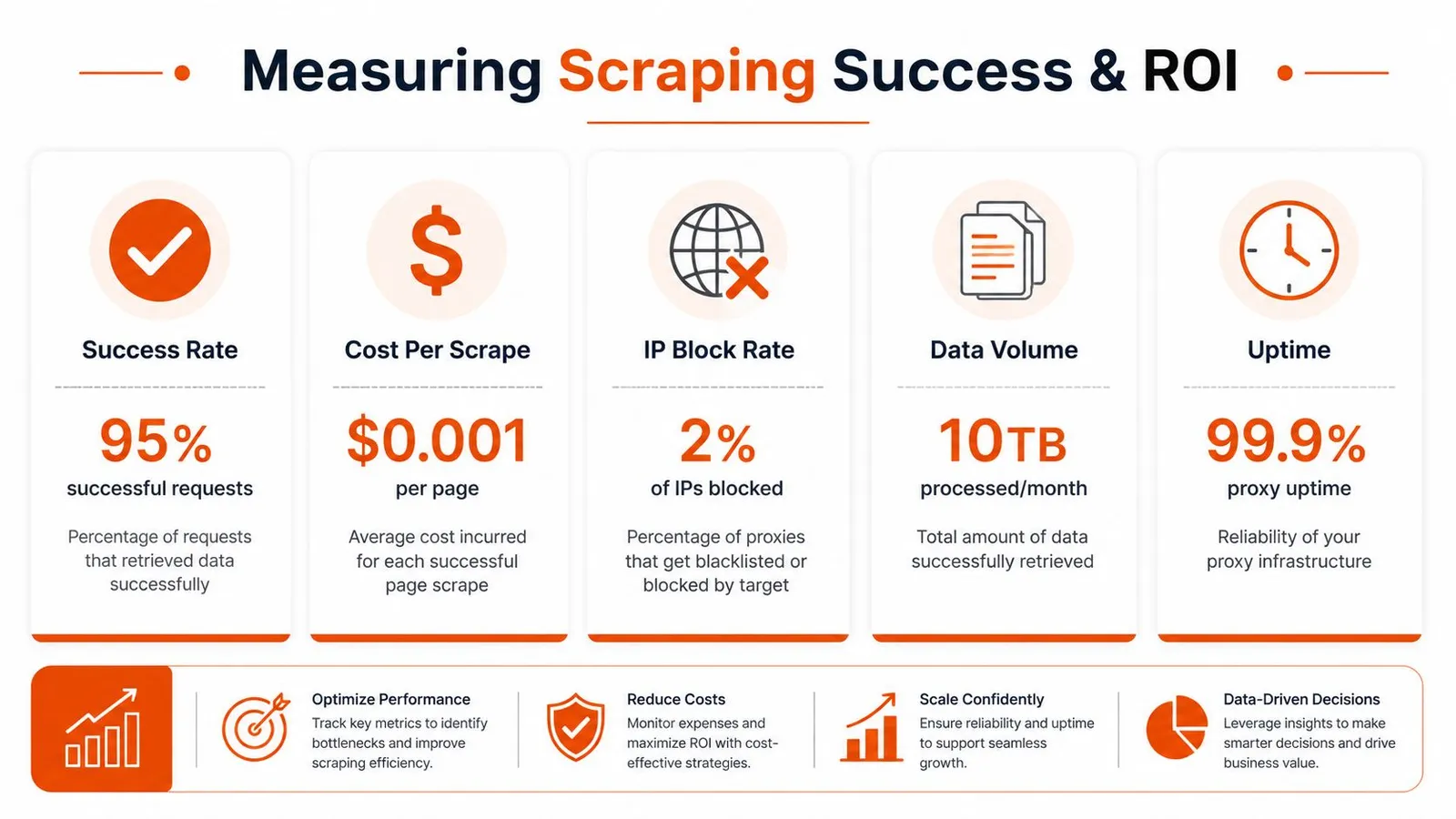
The proxy market loves vanity metrics. Uptime. Pool size. Bandwidth price. Those numbers don't tell you whether your Google scraper is working.
For Google-specific workloads, the number that matters is target-specific request success rate. According to TitanNet's comparison of residential, datacenter, and ISP proxy performance for protected targets, residential proxies can achieve 90 to 99 percent success rates on high-volume Google tasks, while datacenter proxies often land at 40 to 60 percent. The same analysis shows that collecting 1 million valid records would require about 1.67 million total requests with datacenter proxies at a 60 percent success rate, versus about 1.01 million requests with residential proxies.
The metric that actually matters
A “successful request” should mean one thing only: you received a parseable Google result page that matched the task you intended to run.
Track failures by type, not as one blob:
| Failure type | What it usually means |
|---|---|
| Network or proxy error | Provider instability, saturation, routing issues |
| CAPTCHA or verification page | Identity flagged, session hygiene problem, or bad geo alignment |
| Empty or malformed page | Rendering issue, consent flow, or parsing logic mismatch |
| Soft block | Google responded, but withheld usable content |
This level of logging tells you where to intervene. Otherwise, teams waste time replacing parsers when the core issue is burned sessions, or they blame proxies when the problem is malformed retries.
How to calculate effective cost
The useful formula is simple: proxy spend ÷ success rate.
That's the lens that exposes “cheap” datacenter traffic for what it is on Google. A lower per-GB price can still produce a worse cost per usable SERP if too many requests fail or need to be retried. Once retries, delays, and parsing waste enter the picture, bad traffic gets expensive.
Don't budget by request volume alone. Budget by valid records returned.
There's also a deployment lesson in the same source. For protected targets, run pilots at 1 to 10 percent of planned production scale before rollout, then compare providers on actual success under your workload, not on generic uptime claims from marketing pages. If you're operationalizing this across many jobs, batch-level observability becomes important too. This overview of batch processing patterns for web data pipelines is a good companion read because it maps well to SERP collection at scale.
Conclusion The Right Way to Scrape Google in 2026
Google scraping doesn't break because you picked the wrong header. It breaks because the whole system is fragile.
The stable approach is straightforward, even if the implementation isn't. Start with residential proxies when Google is the target. Treat session management as part of identity, not just cookie storage. Align geography, language, and browser profile so the request looks coherent. Count success only when you get valid SERP data back. Then measure cost by successful extraction, not by the sticker price of bandwidth.
That's the part most proxy guides miss. They talk about access, but not reliability. Or they talk about speed, but not what happens after challenge pages, pagination, and localization enter the picture. In production, proxies for Google are a systems problem. Proxy type, rotation policy, fingerprint stability, geo-targeting, parser validation, and monitoring all interact. If one layer is sloppy, the rest won't save you.
There are still teams that can justify building and maintaining this stack themselves. If Google data is core infrastructure for your product, that may be the right call. But if your real goal is feeding clean web data into AI systems, ranking pipelines, or internal tools, owning every brittle moving part usually isn't the best use of engineering time.
That's why the practical end state for many teams is abstraction. Either you become very good at running anti-bot-sensitive extraction infrastructure, or you use a tool that already handles the hard parts. The worst option is staying in the middle. That's where you pay for proxies, spend hours debugging challenge pages, and still don't trust the output.
If you want Google and other hard-to-scrape pages turned into clean, model-ready content without managing the proxy, rendering, and anti-bot stack yourself, take a look at Webclaw. It's built for teams that need reliable extraction and usable output, not another pile of raw HTML.