
429 Error: Rate Limits, Backoff & Scraping Fixes
Your scraper was healthy yesterday. Today the same endpoint is returning 429 Too Many Requests, your queue is backing up, retries are piling on, and somebody is already asking whether the site banned you or whether your own client melted down. In practice, a 429 error is rarely a mystery once you read the headers and traffic shape correctly, but it's often misread in the first five minutes, which is exactly how teams turn a temporary throttle into an outage.
What Happens When Your Pipeline Hits a 429
The first sign is usually boring, then ugly. Requests that were fine an hour ago start failing, the retry count climbs, and your workers begin spending more time waiting than doing useful work. If you're scraping or calling an API in batches, the failure pattern often looks random until you line up timestamps and realize the server is deliberately slowing you down, not failing by accident.
A 429 error is a controlled refusal. The server is saying your client has sent too many requests in the current window, and it wants you to back off before trying again. That's different from a broken endpoint, and it's different from a permission problem. The right mental model is not “the site is down,” it's “the site is still up, and my traffic is crossing a line.”
Practical rule: treat the first 429 as a pacing signal, not as a reason to spam retries faster.
The hardest part in production is that 429s can mean different things depending on the platform. Sometimes you've exhausted a published quota. Sometimes the server is under load and rejecting traffic to protect itself, which is the kind of behavior documented by OpenSearch's 429 guidance through the shared HTTP semantics. And sometimes your traffic pattern looks abusive enough that the target's security layer starts clamping down.
That's why the triage question matters more than the status code itself. If the service sends a clear wait signal, respect it. If the traffic is fresh after a release or crawl expansion, look at concurrency, retries, and identity patterns before you blame the provider. For scraping teams, the operational context in Cloudflare scraping error handling is a useful reminder that blocking and throttling often travel together, even when the response code looks simple.
The Protocol Mechanics Behind 429 Responses
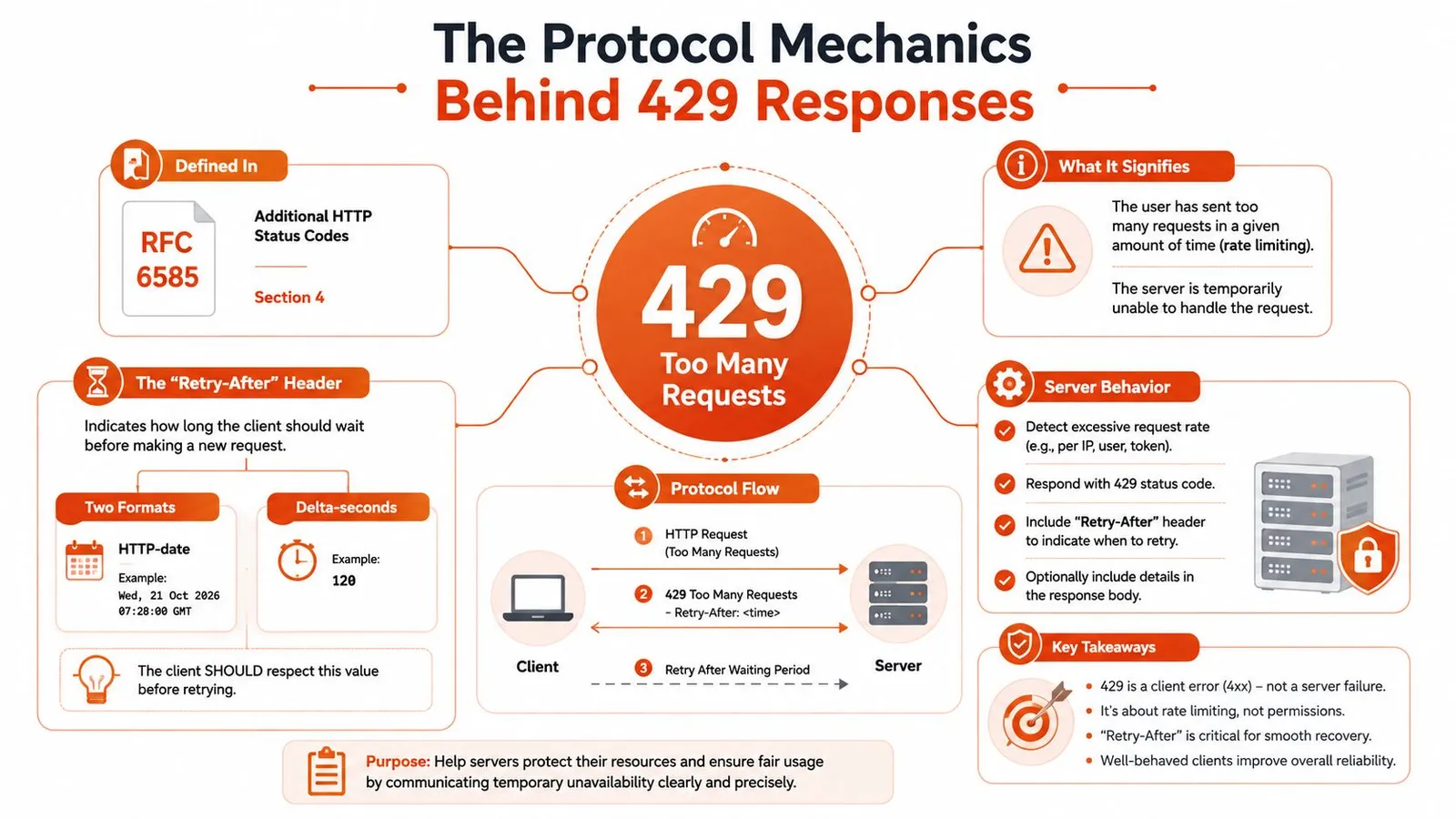
RFC 6585 defines 429 Too Many Requests as the response returned when a client has sent too many requests in a given amount of time. It also says responses MAY include a Retry-After header that tells the client how long to wait before retrying, and that 429 responses MUST NOT be stored by a cache. That cache rule matters more than many teams realize, because a cached throttle response can spread a temporary limit into a broader outage if intermediaries mishandle it. See the protocol text in RFC 6585.
A server can express Retry-After in two ways. One format is a delay in seconds. The other is an HTTP-date, which means the client has to compare the timestamp to its own clock and wait until that moment passes. If the header is missing, you're back to your own retry policy, but that doesn't mean you get to ignore the signal.
A realistic response can look like this:
HTTP/1.1 429 Too Many Requests
Retry-After: 60
Content-Type: application/json

{
  "error": "rate_limit_exceeded",
  "message": "Too many requests in a short window"
}
Or it can use a date-based wait signal:
HTTP/1.1 429 Too Many Requests
Retry-After: Wed, 21 Oct 2026 07:28:00 GMT
Modern APIs often add rate-limit headers such as X-RateLimit-Limit, X-RateLimit-Remaining, and X-RateLimit-Reset. Those headers don't replace the status code, they give you context around it, which is why ignoring them is such a common mistake. If you're working with an API that exposes them, the operational guidance in Webclaw's API scraping overview is the right kind of reminder, read the metadata instead of guessing at the wait time.
Three Root Causes Most Guides Conflate
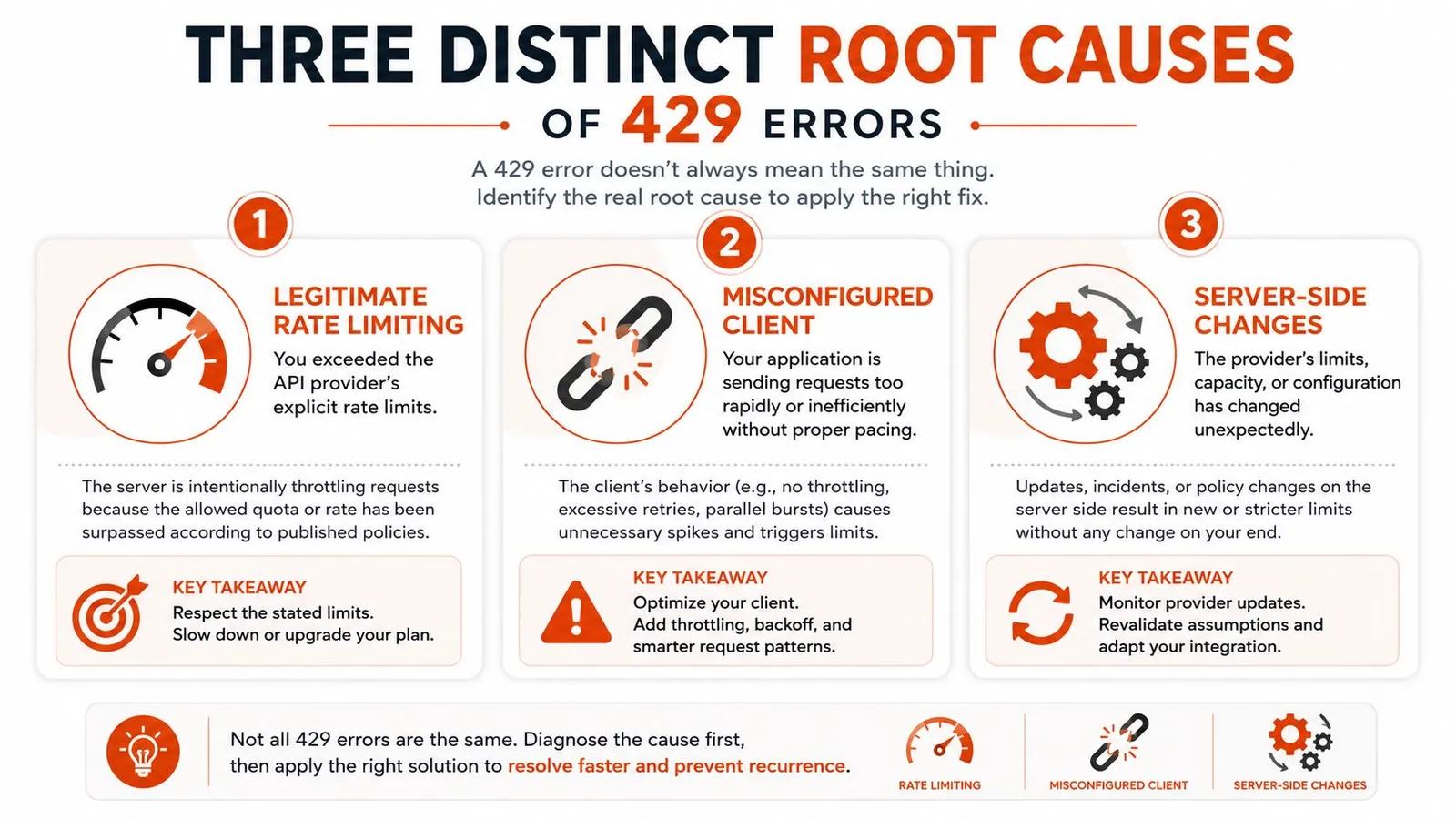
Most guides flatten 429 into one bucket and tell you to slow down. That advice is incomplete. In production, I look for three different stories: documented limit enforcement, resource protection, and abuse detection. They can produce the same status code, but they do not want the same fix.
Legitimate rate limiting
This is the cleanest case. You crossed a documented limit, often by request count, concurrency, or endpoint-specific quota. The server is behaving exactly as designed, and the fix is to obey the published rules, reduce burstiness, or buy more quota if the provider offers it. The operational guidance in Google's Gemini Enterprise Agent Platform 429 docs follows that same logic, smooth the traffic, use the global endpoint when appropriate, and request more capacity when you need it.
Resource exhaustion
This one trips teams up because the target may not be strictly enforcing a quota in the way you expect. Shared hosting, overloaded nodes, or backend saturation can trigger 429 because the service is protecting itself from becoming unresponsive. The user-facing symptom is still “too many requests,” but the underlying problem is capacity pressure rather than a neat rate-limit window. That's why people who only tune retry delay often keep seeing the same failures.
Bot-abuse signals
This is the case most guides miss. A low absolute request volume can still look hostile if it arrives with rapid IP rotation, invalid identities, odd session reuse, or mixed 401 and 403 responses alongside throttling. Operational guidance from Indusface's take on 429 and abuse detection is useful here, because the remediation is not just backoff. You may need to inspect fingerprints, authentication flow, and endpoint selection before you touch retry logic.
If the 429s cluster around login, search, or navigation patterns, assume the server's security posture changed before you assume your code did.
For scrapers, this distinction matters because a proxy pool can hide one symptom while making another worse. A useful reference point for the infrastructure side is residential backconnect proxy behavior, but proxies alone won't fix a request pattern that still screams automation.
Client-Side Handling Patterns That Actually Work
A naïve retry loop is how small throttles become large incidents. The classic failure mode is immediate retry, then immediate retry again, with ten workers doing the same thing at once. That creates a retry storm, burns quota faster, and can push a provider into tighter enforcement just when you need mercy.
Backoff with jitter
Use exponential backoff and add jitter. The exponent stops you from hammering the endpoint, and the randomness keeps every worker from retrying at the same second. Without jitter, distributed clients synchronize beautifully for all the wrong reasons.
A rough Python pattern looks like this:
import random
import time

def sleep_for_retry(attempt, retry_after=None):
    if retry_after is not None:
        time.sleep(retry_after)
        return
    base = min(2 ** attempt, 32)
    delay = base + random.uniform(0, base * 0.2)
    time.sleep(delay)
In JavaScript, the idea is the same:
const wait = ms => new Promise(resolve => setTimeout(resolve, ms));

async function backoff(attempt, retryAfterSeconds) {
  if (retryAfterSeconds != null) {
    await wait(retryAfterSeconds * 1000);
    return;
  }
  const base = Math.min(2 ** attempt, 32);
  const jitter = Math.random() * base * 0.2;
  await wait((base + jitter) * 1000);
}
Honor the header before your own timer
If Retry-After exists, trust it first. If it's a plain number, interpret it as seconds. If it's a date, compute the remaining wait from the current clock. If the header is absent, fall back to your own bounded retry policy, but don't pretend that a guessed 5-second pause is somehow more authoritative than the server's instruction. That's the mistake Postman's 429 guidance repeatedly warns against, and the point stands even when the retry logic lives inside a job runner instead of a test tool.
Add a circuit breaker for bad neighborhoods
A retry loop is not a circuit breaker. If one endpoint starts returning repeated 429s, stop sending traffic there for a cooling window and let other work proceed. That keeps a throttled partner API from starving your entire queue. I've seen this matter most in pipelines that fetch hundreds of items from one service and enrich them with a second service, because one limping dependency can otherwise stall everything behind it.
The practical trade-off is simple. Retries preserve freshness. Circuit breakers preserve throughput. Mature clients need both.
For teams dealing with authentication friction during scraping, captcha-solving tooling discussions often sit in the same architectural bucket, because the underlying question is whether the request should be retried at all or re-authenticated first.
Scraping Pipeline Design for Rate-Limited Targets
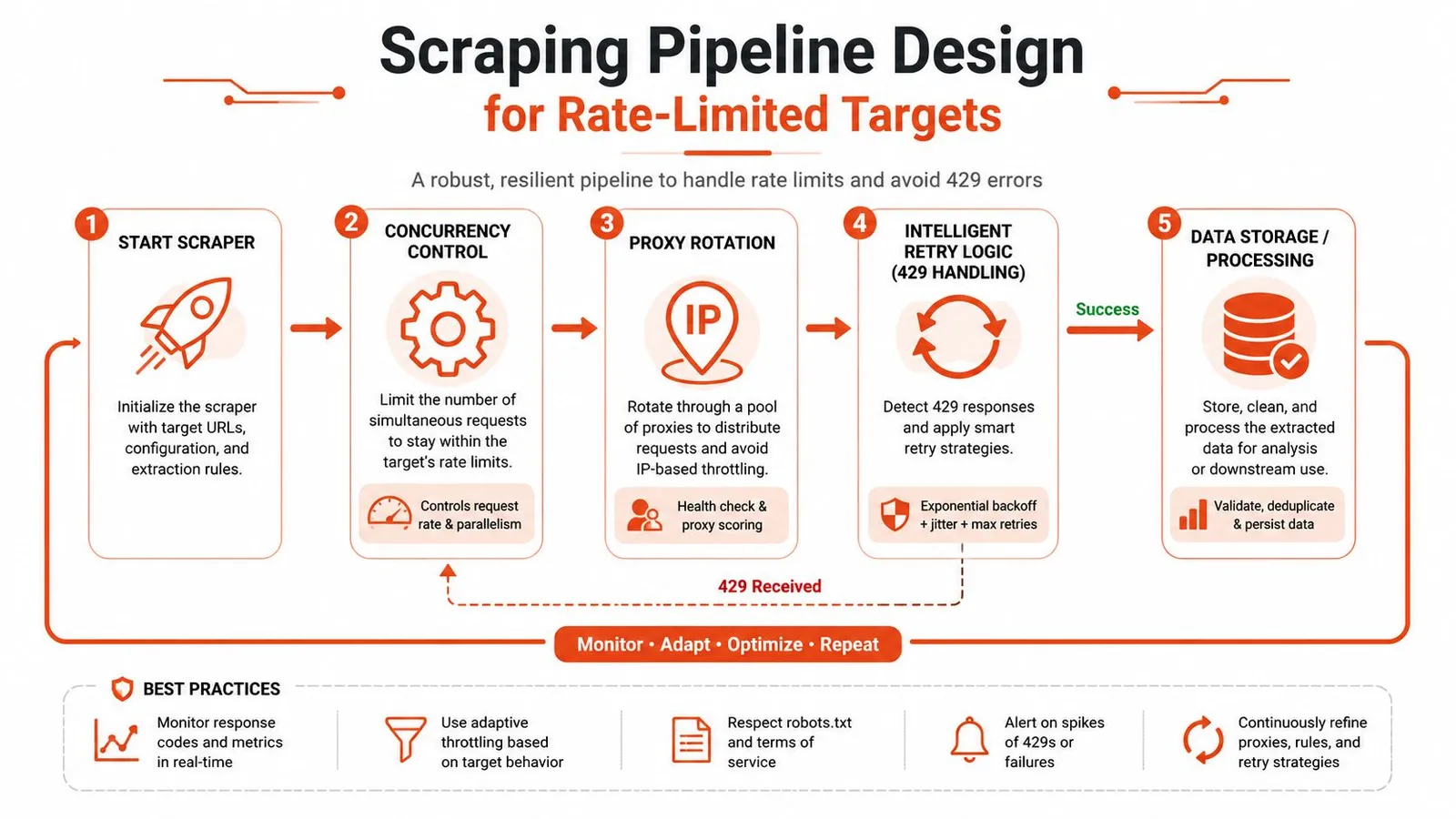
Scraping systems fail when they treat every URL like an independent request. Rate-limited targets care about session behavior, concurrency shape, and how quickly you move from one page to the next. A clean design starts with pacing at the queue level, not with last-second retries after the server has already complained.
A good pipeline separates work into layers. One layer decides what to fetch next. Another controls how many requests can be in flight. A third manages identity, cookies, and proxy selection. The final layer records whether the response succeeded, throttled, or needs a delayed retry.
Concurrency before proxies
A proxy rotation strategy does nothing useful if the scraper still floods the target with too many parallel requests. Concurrency control is the first lever, because a smaller inflight set produces more predictable traffic and makes throttling easier to interpret. Only after that do proxy choice and session reuse start to matter in a meaningful way.
Sessions and pacing
Authenticated targets often behave better when a session stays warm and requests remain tied to a consistent identity. Throwing away cookies every few requests can look more suspicious than holding a single session and pacing it carefully. That's also why the rate-limit docs for marketplace integrations in RealtyAPI are worth reading, because endpoint behavior and quota scopes tend to differ in ways that shape your scheduler design.
Respectful crawling beats brute force
The long game is not evasive tooling. It's a crawler that knows when to wait, when to queue, and when to stop. If a target exposes structured data through an API or through a clean extraction layer, use that path instead of forcing HTML scraping into a shape it wasn't meant to support. The best scraping pipelines are boring in production, because boring means they aren't constantly negotiating with the target's defenses.
For teams that want the extraction layer abstracted away, Webclaw is one option that fetches URLs, handles rendering and blocking behavior, and returns cleaned content that's easier for downstream systems to use.
Debugging Unexpected 429 Spikes in Production
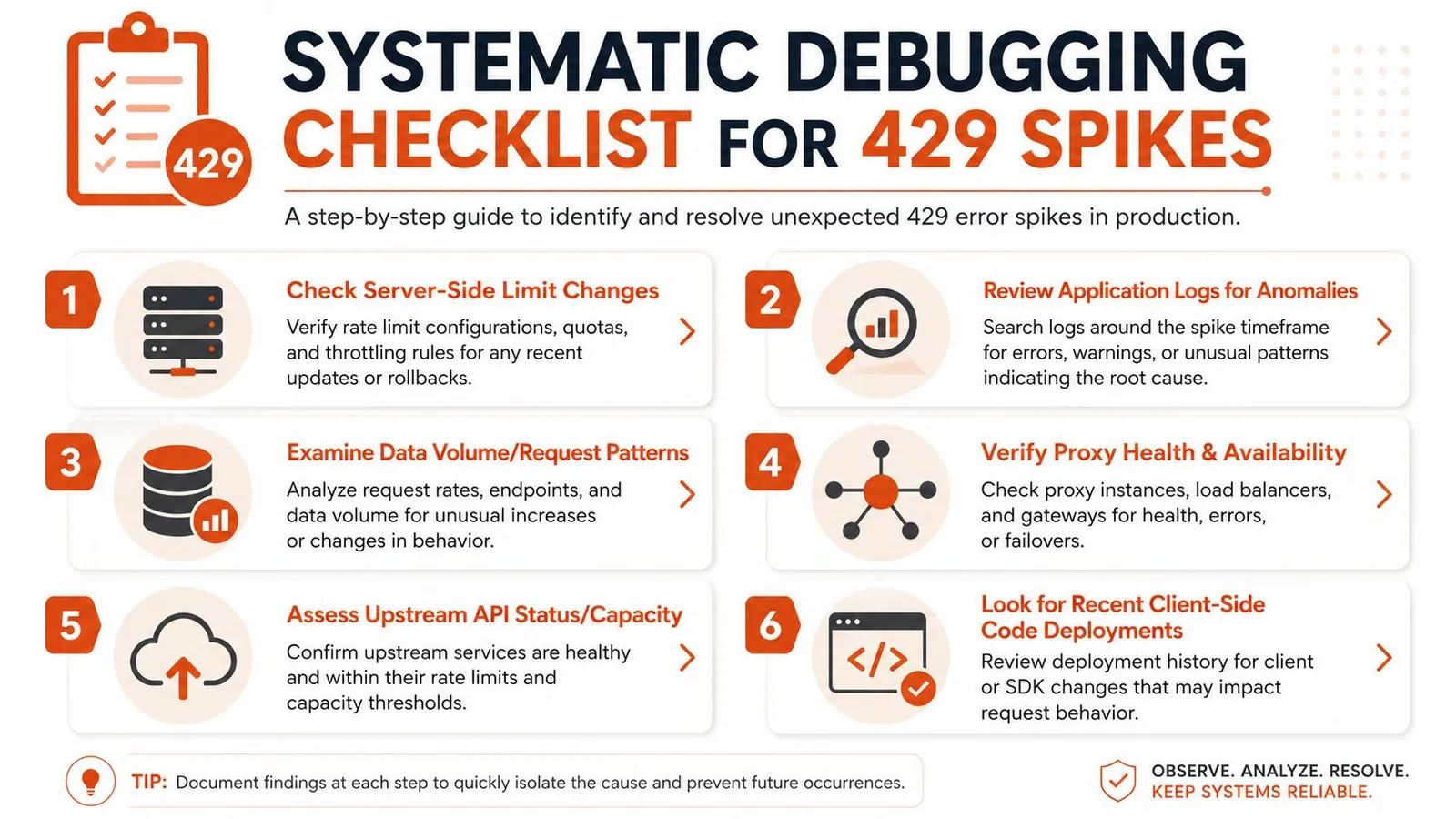
When 429s spike without a code deploy on your side, I start with the provider, then move inward. Services do change limits and capacity behavior, and they don't always announce it in a way that reaches your pager. If your workload was stable for weeks, the question is whether the target changed, your traffic changed, or both.
A practical checklist helps keep the investigation honest:
- Check rate-limit headers first. If the response includes a reset or wait hint, you already know the server's current view of the window.
- Inspect retry behavior. A small incident can become a storm when multiple workers retry the same request path together.
- Look for traffic shape changes. New crawl paths, deeper pagination, or a different launch sequence can change the burst pattern even if total volume looks familiar.
- Audit proxy and session health. Bad rotation can create a pattern that looks automated in all the wrong ways.
- Check shared infrastructure. Another job using the same credentials or outbound identity may be spending the quota.
- Compare with recent deploys. Even a minor client-side change, such as shorter timeouts or new parallelism, can amplify the issue.
The troubleshooting note in Webclaw's Cloudflare scraping diagnostic checklist fits well here because Cloudflare-style throttling, anti-bot behavior, and rate-limiting symptoms can overlap in ways that confuse teams.
Operational habit: alert on the trend, not just the failure count. A slow rise in 429s is usually easier to fix than a sudden wall of blocked work.
If the provider changed limits, adjust your schedule or ask for more quota. If your own retries are multiplying the problem, fix the retry policy first. If the pattern looks like abuse detection, inspect identity, fingerprints, and endpoint behavior before you change infrastructure.
Sustainable Approaches to Web Data Extraction
The durable answer to 429s is not better evasion. It's better architecture. If an API exists, use it. If a target only tolerates light crawling, keep your schedule respectful and your concurrency bounded. If you need extraction at scale, move the hard parts into a service layer so your application isn't reimplementing rate-limit handling on every project.
That also changes the economics of the pipeline. Cleanly extracted content is cheaper to process than raw, noisy HTML, and fewer retry loops means fewer wasted calls. For latency-sensitive data work, the optimization advice from Solana Tracker's RPC latency tips is a good parallel, because the same principle applies, don't fight the network shape if you can design around it.
If you're building a production scraper, Webclaw gives you a way to fetch pages, render JavaScript, and return cleaned web content without stuffing that logic into every service you maintain. It's a practical fit when your team wants extraction infrastructure instead of another fragile retry loop.
If you're debugging 429s in production or trying to build a scraper that doesn't constantly trip rate limits, Webclaw can take the extraction and blocking complexity off your plate. Visit Webclaw to see how it handles web pages, rendering, and clean content delivery for pipelines that need to keep running.