
Residential Backconnect Proxy: Ultimate Guide 2026
Your scraper worked in staging. It even survived a few production runs. Then the target site changed something small and now you're getting login walls, CAPTCHAs, empty product grids, or clean-looking HTML that contains none of the data you need.
It's common to blame the IP first. That's often the wrong diagnosis. On modern sites, the block usually comes from the pattern around the request. Headers don't line up. Sessions jump around. Timing is too regular. Navigation makes no sense. A plain HTTP client hitting a bot-protected page from a fresh address every few seconds doesn't look like a user, even if the IP itself is hard to blacklist.
That's where a residential backconnect proxy stops being a commodity and starts being infrastructure. Used well, it gives your scraper a way to enter the site through real household IP space while the provider handles the ugly parts of rotation, routing, and pool management. Used badly, it becomes an expensive way to generate suspicious traffic.
Your Scraper Is Blocked Not Your IP
A familiar failure pattern looks like this. Your crawler fetches category pages fine, starts opening product pages, then the site begins returning partial responses. A few minutes later, every request gets a challenge page. You swap in a fresh proxy and it works briefly, then fails again.
That doesn't mean one address got burned. It means the site recognized the workflow as automated.
A lot of new teams treat proxies like a bucket of spare tires. One goes flat, grab another. That logic works on weak targets. It breaks on retail, travel, classifieds, marketplaces, search, and any site with serious fraud or abuse tooling. Those defenses don't just score IP reputation. They score continuity, request sequencing, cookies, TLS behavior, navigation path, and whether the whole sequence resembles a human session.
Practical rule: If changing IPs gives you only a short reprieve, the issue is usually fingerprint and behavior, not simple reputation.
A residential backconnect proxy helps because it routes traffic through consumer ISP space instead of obvious server infrastructure. That gives you a better starting trust profile. More important, it lets you control session behavior without manually juggling a long list of individual endpoints.
The mistake is thinking the proxy alone solves the problem. It doesn't. It gives you room to build a believable scraper. You still need sane concurrency, coherent sessions, realistic retries, proper cookie handling, and different flows for listing pages versus authenticated pages.
Teams that succeed in production usually stop asking, “How do we rotate faster?” and start asking, “What does this site expect a normal user journey to look like?”
How a Backconnect Proxy Hides You in the Crowd
A backconnect proxy gives your scraper one stable entry point while the provider chooses the outbound residential IP for each request or session.
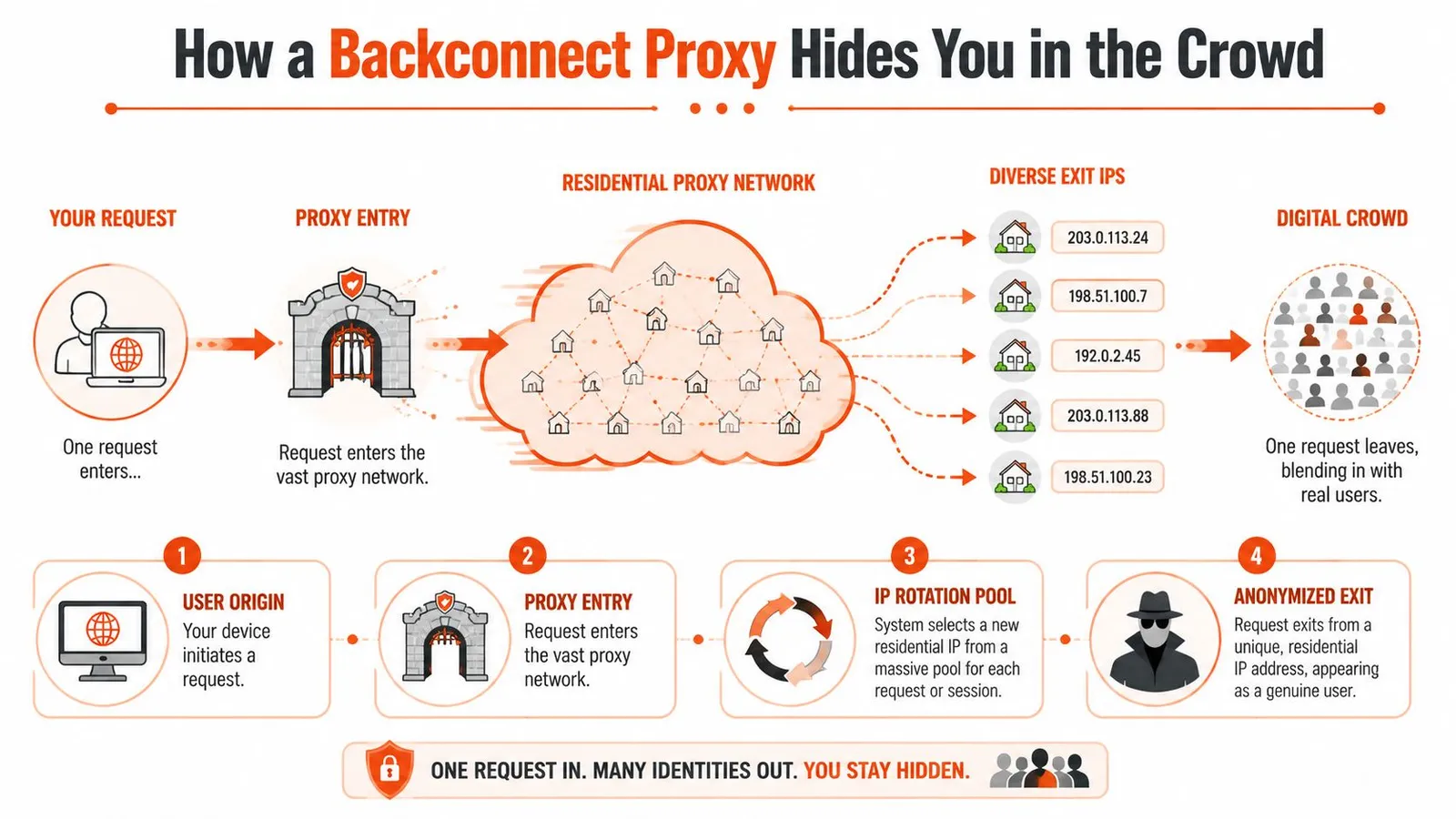
The single gateway model
From the application side, this is simpler than maintaining a large proxy list. Workers send traffic to one gateway and attach routing parameters such as country, city, ASN, or a sticky session token. The provider handles exit selection and rotation behind that gateway.
That operating model matters because it keeps proxy management out of your scraper code. You do not need to distribute thousands of host-port pairs, track dead endpoints across workers, or rebuild your own rotation service. Providers pitch this around very large residential pools and broad country coverage, as outlined in ProxyEmpire's overview of backconnect residential networks, but the production advantage is simpler than the marketing. One endpoint in your app. Many possible exits on the wire.
That simplicity can also hide mistakes.
If every request gets a fresh IP, the target may score the rotation pattern itself as suspicious. A user who changes networks every page view, every asset fetch, or every second does not look like normal traffic. Good backconnect setups use rotation rules that match the job. Keep a session stable for pagination, cart flows, or cookie building. Rotate more aggressively for broad discovery crawls where continuity is less important.
That is also why guides on Google scraping proxy selection usually focus on geo controls, session behavior, and pool quality instead of raw request throughput.
Why residential exits help, and where they fail
Residential exits usually start with better trust than datacenter IPs because they originate from consumer ISP space. On sites that heavily score ASN type, that difference is real.
It is not automatic cover.
Anti-bot teams now look at the full request profile, and many providers overstate what they sell. Some so-called residential inventory is mobile, ISP, or even mislabeled datacenter capacity routed through reseller layers. If the ASN, reverse DNS, TLS profile, and request cadence do not line up, the target will still classify the traffic as automated. Teams that skip ASN validation often pay residential rates for traffic that behaves like cheap server proxy inventory.
Performance is the trade-off. Residential backconnect traffic is usually slower and less predictable than datacenter proxy traffic. Latency and throughput vary by peer quality, geography, and how the provider assigns exits. On hard targets, that is often acceptable because fewer blocks and fewer retries matter more than benchmark speed.
The practical question is whether the proxy gives you stable enough sessions, believable geography, and clean enough IP quality for the target you scrape. If it does, slower requests are usually a good trade. If it does not, rapid rotation just gives you a larger, more expensive failure surface.
Backconnect vs Datacenter vs Static Proxies
Teams often compare proxies as if they were interchangeable. They aren't. You're choosing between three different operating models, each with different failure modes.
Proxy Type Comparison
| Attribute | Datacenter Proxy | Static Residential Proxy | Residential Backconnect Proxy |
|---|---|---|---|
| IP source | Server infrastructure | One long-lived residential IP | Rotating pool of residential IPs |
| Trust profile | Lowest on protected consumer sites | High | High |
| Speed | Fastest | Usually steadier than rotating residential | Slower but acceptable for hard targets |
| Session stability | Good if the site tolerates the IP | Best option for long multi-step sessions | Good only when configured with sticky sessions |
| Scale | Easy to scale | Limited by how many stable IPs you lease | Excellent for broad crawling and geo spread |
| Typical cost profile | Usually cheapest | Usually more expensive than datacenter | Usually expensive because you pay for trust and pool management |
| Best fit | Low-friction targets, internal tooling, broad fetch workloads | Logins, carts, account workflows, repeated identity continuity | Search, retail, geo-targeting, ad verification, distributed scraping |
| Common failure mode | IP reputation gets flagged quickly | Single IP gets burned on a specific target | Rotation itself becomes suspicious if misused |
What usually fails in production
Datacenter proxies fail first on reputation. The request might be perfectly formed, but the target sees server-origin traffic and applies friction immediately. They're still useful. For feed ingestion, public docs, sitemap fetching, and download-heavy jobs, they can be the right economic choice. If your task resembles bulk proxy use for downloads, throughput may matter more than residential trust.
Static residential proxies fail differently. They're excellent when one consistent user identity matters, but they don't give you broad distribution. Once a target scores that IP poorly, your workflow stalls until you replace it.
Backconnect residential proxies cover the middle ground that most scraping systems need. They combine residential trust with centralized rotation and location control. The catch is operational discipline. If you use them like a machine gun, you'll still get flagged.
Here's the practical shortcut I give new teams:
- Choose datacenter first when the target is permissive and cost matters more than stealth.
- Choose static residential when continuity matters more than scale.
- Choose backconnect residential when the target is hostile, geo-sensitive, or large enough that manual pool management becomes a liability.
Use Cases for AI and Web Scraping in 2026
The best use cases are the ones where a normal proxy setup keeps failing for reasons that have nothing to do with parsing. You can write a perfect extractor and still collect nothing if the page never renders the actual content for your session.
Where they earn their cost
E-commerce monitoring is the obvious example. Product pages often behave differently by region, traffic source, and session history. A scraper that looks fine in a browser can still receive alternate HTML, missing price blocks, or challenge pages at scale. Residential backconnect proxies help when you need category traversal, product detail extraction, review collection, and seller monitoring across many locations without maintaining a separate proxy list for each market.
SERP collection is another one. Search pages are sensitive to automation, geography, and repeated query patterns. If you're building ranking monitors, local SEO tools, or AI systems that need search-result grounding, residential exits are often the only practical way to see the page the way a local user would.
Ad verification and localized QA also fit well. Teams use residential routes to check how a campaign, landing page, or localized offer appears from a given country or city. That includes checking whether the right creative renders, whether redirects behave correctly, and whether compliance text appears where it should.
For lighter workflows or rapid prototyping, a no-code scraping platform can be useful to validate selectors and output shape before you commit engineering time to a custom pipeline. That won't replace serious anti-bot handling, but it can shorten the path from idea to working extraction logic.
Where they are the wrong tool
Not every job needs residential traffic.
If you're collecting public documents, fetching APIs with valid credentials, or pulling pages from sites that don't actively defend against bots, residential backconnect proxies can be unnecessary overhead. They add cost and complexity, and they can hide problems in your own crawler design because the proxy absorbs some of the consequences.
They're also not a substitute for a clean search pipeline. If your system needs to discover pages first and scrape them second, it usually makes sense to separate discovery from extraction. A dedicated web search API workflow can handle the first part more cleanly than trying to brute-force discovery with the same crawler that does rendering and parsing.
Use residential backconnect proxies where access is the bottleneck. Don't pay for them where parsing is the real problem.
The Behavioral Footprint Beyond the IP
Most proxy advice is stuck in an older model. Rotate more. Change addresses often. Spread requests across a larger pool. That still matters, but it's no longer enough.
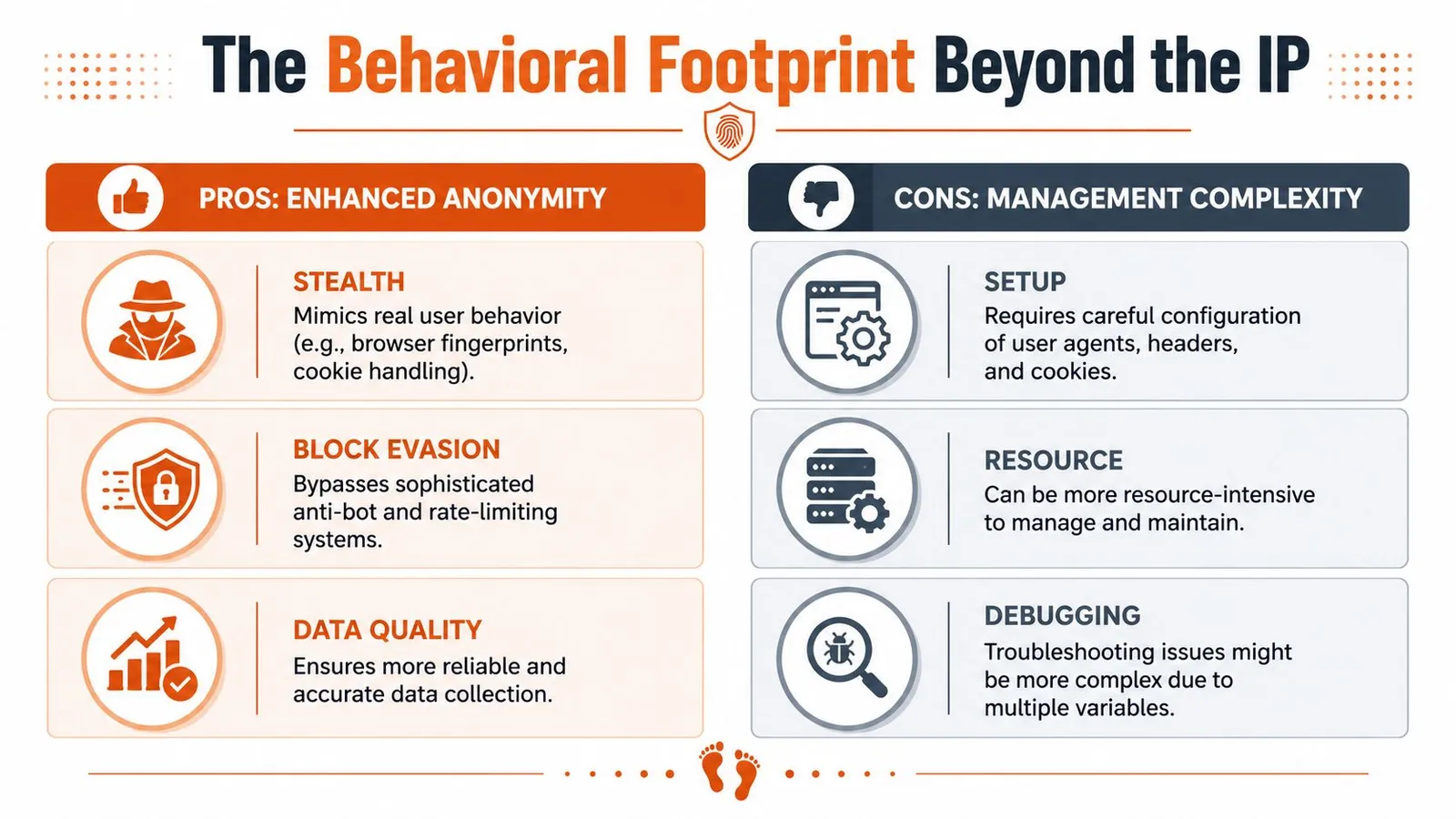
Why high rotation can backfire
A 2025-2026 analysis by Bitsight says defenders are moving away from simple static IP blocking and toward detecting sequential, single-touch interactions where multiple distinct residential IPs perform identical low-volume actions against authentication or checkout endpoints, which flags standard backconnect usage as fraud in sensitive flows, according to Bitsight's analysis of residential proxy services and malware ecosystems.
That should change how you think about rotation.
If one IP loads the login page, another submits credentials, a third loads the account page, and a fourth attempts checkout, you've created a trail no human user would produce. Every step looks low volume in isolation. The sequence looks machine-made as a whole.
This is why some teams say, “Residential worked for listing pages but failed on account pages.” The issue isn't that the network was weak. The session story was incoherent.
A normal user identity has continuity. Geography doesn't jump between steps. Headers stay stable. Cookies persist. Timing isn't perfectly uniform. The browser fingerprint isn't rebuilt every time the page changes.
What to change in your scraper
The fix usually isn't “rotate less everywhere.” It's “rotate according to the page type.”
Use different strategies for different flows:
- Broad discovery pages: Rotation can be aggressive because each request is mostly independent.
- Product detail expansion: Moderate stickiness helps if the site expects a browsing trail from list to detail.
- Authenticated workflows: Keep one coherent identity across the full session.
- Sensitive endpoints: Treat login, payment, account settings, and checkout as continuity-critical.
Don't optimize around IP freshness alone. Optimize around whether the whole session makes sense to the target site.
That often means using sticky sessions, persisting cookies correctly, and running a real browser stack when the site correlates browser-level signals. If your team is testing hardened browsing workflows, material on an undetectable internet browser setup is usually more relevant than another article about proxy rotation frequency.
The hidden lesson is simple. The behavioral footprint is now part of the fingerprint. A residential backconnect proxy improves your starting position, but a chaotic session can still negate that advantage.
Integrating and Managing Proxy Rotation
The good news is that integration is usually simple. The complexity lives in the strategy, not in the first code sample.
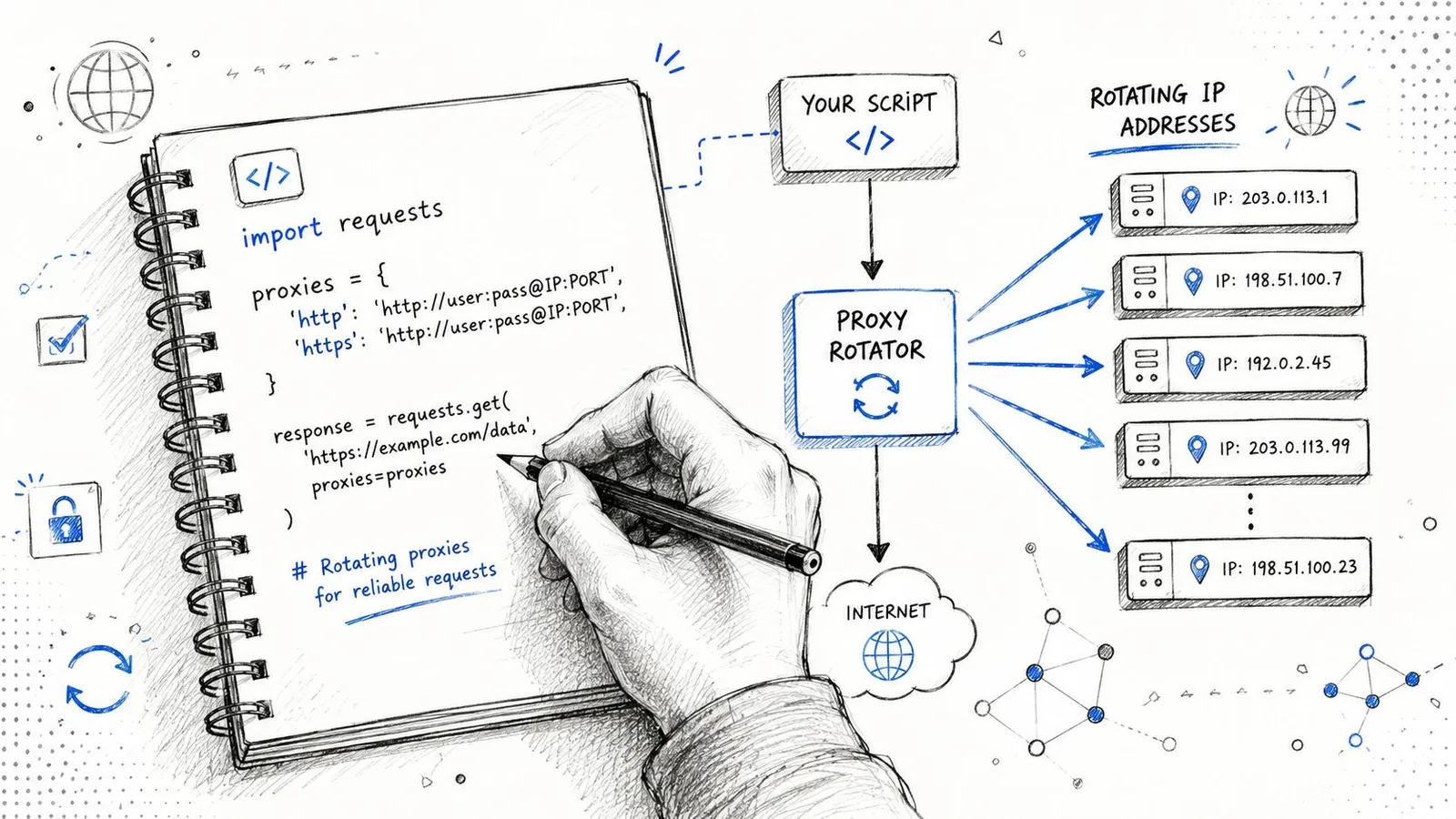
A minimal Python example
Here's the basic pattern using requests:
import requests

proxy_url = "http://USERNAME:PASSWORD@gateway-provider-endpoint:PORT"

proxies = {
    "http": proxy_url,
    "https": proxy_url,
}

headers = {
    "User-Agent": "Mozilla/5.0",
    "Accept-Language": "en-US,en;q=0.9",
}

session = requests.Session()
session.headers.update(headers)

response = session.get(
    "https://example.com",
    proxies=proxies,
    timeout=30,
)

print(response.status_code)
print(response.text[:500])
That's enough to prove connectivity. It isn't enough to survive a difficult target.
The first production improvement is to stop thinking in raw requests and start thinking in sessions. Reuse cookies when continuity matters. Keep headers stable within a session. Bind the session to one sticky proxy identity if the flow spans multiple pages.
The second improvement is to split traffic classes. Don't send your login sequence, category expansion, and image fetching through the same rotation rule. They create different signatures and deserve different policies.
A quick walkthrough helps if you're wiring this into a wider crawler stack:
Choosing between rotating and sticky sessions
A useful operating model looks like this:
- Per-request rotation: Best for independent fetches such as broad search-result collection or one-off page sampling across locations.
- Timed stickiness: Good for a short burst of related navigation, like category page to item page to review page.
- Longer sticky sessions: Necessary for logins, carts, checkout simulations, and account pages.
Where teams usually get burned:
- They rotate on every request because the provider dashboard makes that the default.
- They forget that cookies tied to one IP or one device story may look wrong when replayed from a new exit.
- They retry failed requests through a new geography, which turns a normal timeout into a suspicious identity shift.
If you're building a serious scraper, make rotation a decision in your crawl policy, not just a proxy setting. That one change prevents a lot of false debugging.
How to Choose a Residential Proxy Provider
A provider can look excellent in a sales call and still fail in production within the first hour. The failure mode is rarely obvious. You see intermittent blocks, odd geo mismatches, or sessions that pass once and then collapse on retry. Teams often blame headers, browser fingerprints, or parser bugs first. Sometimes the simpler answer is the provider sold a mixed pool and weak controls.
Start by checking whether the network gives you operational control. You need clear options for geo-targeting, session duration, authentication, concurrency limits, and routing rules. If the provider only exposes a basic rotating endpoint and a sticky toggle, that is a warning sign. Real scraping systems need more than a pool size claim.
Sourcing also matters. Residential traffic can come from peer-to-peer apps, browser extensions, SDKs, or installed client software tied to user consent flows. If a provider cannot explain how endpoints enter the pool, treat that as a procurement risk and a performance risk. Poor sourcing discipline often shows up later as unstable exits, abuse history, and support that cannot answer basic debugging questions.
Pool purity deserves its own check. A technical deep-dive by Bulletproof Dev described cases where IPs marketed as residential included mislabeled datacenter space. That problem is easy to underestimate. One contaminated subnet can make a residential network behave like bargain datacenter inventory on the exact targets you care about.
This also ties back to a point many vendor pages ignore. Anti-bot systems do not only score the IP class. They score the pattern created by your proxy network. If a provider rotates too aggressively, recycles abused exits, or sends inconsistent geos under the same cookie story, the rotation behavior itself becomes part of the detection signal. A large pool does not help if the provider makes your traffic look mechanically unstable.
Ask sales and support questions that force concrete answers:
- How do you source IPs, and what user consent model backs that sourcing?
- How do you verify that residential exits are residential?
- Can I control rotation by request, by time window, and by session token?
- What location granularity do I get: country, region, city, carrier, ASN?
- What happens when a target starts blocking? Do you provide target-specific guidance, or just generic docs?
- Can you show how the network behaves under concurrency, not just single-request demos?
The strongest providers answer with implementation detail. Weak ones fall back to marketing language.
Run your own bake-off before signing anything. Send the same target set through each vendor, keep browser settings and session policy identical, and inspect outcomes beyond raw success rate. Look for captcha rate, cookie continuity, geo consistency, latency spread, and whether retries degrade fast. A structured proxy provider comparison process is far more useful than reading feature tables side by side.
Buy for debuggability. Clean logs, predictable routing, honest sourcing, and precise session controls save more engineering time than an oversized pool claim ever will.
If you're building AI agents or retrieval pipelines that need clean web content from pages normal scrapers can't reach, Webclaw is worth a look. It's built to turn hostile, noisy pages into clean model-ready output, with support for rendering, extraction, crawling, and bring-your-own proxy setups when access gets difficult.