Web Scraper API Guide: What It Is and How to Choose
You've got the pipeline wired up, the chatbot is live, and the first few queries look fine. Then a user asks for a product page, and the model answers with cookie banners, nav links, and three paragraphs of footer text because the scraper returned the page, not the context you needed. That's the practical reason a web scraper api matters in 2026, not as a fetch layer, but as an output layer that turns hostile pages into model-ready data.
For teams building retrieval systems, the failure mode isn't “can it load the page.” It's “can it return something the model can use without wasting tokens or hallucinating over noise.” Clean extraction, JavaScript rendering, anti-bot handling, and structured output all matter, because the downstream cost of bad context is usually higher than the upstream cost of getting the page. If you're debugging that failure mode right now, a good starting point is a Cloudflare-focused diagnostic checklist like Webclaw's scraping diagnostic checklist.
When Your Scraper Returns the Wrong Page
The first time this usually breaks, the scraper didn't fail at all. It fetched the page, returned HTML, and your model politely digested a navigation bar, a cookie modal, and half a footer because the extraction layer never stripped the junk out. That's why a raw page can look “successful” in logs and still be a bad input for retrieval, summarization, or agent workflows.
A lot of teams misdiagnose this as a rendering problem. Sometimes it is. But in practice the failure is often about output shape, not just access, because the model only sees what you hand it. If the response is a pile of boilerplate, the model spends tokens on noise and still misses the actual content.
The other common break is hidden behind a page that looks fine in a browser and empty in your pipeline. Modern sites ship data through client-side requests, and a browser-rendered page can still be the wrong source if the important fields live behind an API call. In those cases, the stronger move is often to inspect network traffic and decide whether to scrape the rendered page or hit the underlying endpoint directly, a tactic covered well in this hidden API discovery guide and usually underused in product writeups.
Practical rule: if your model is reading cookie banners, the scraper succeeded and the pipeline still failed.
The shift in 2026 is that teams no longer judge these tools only by fetch success. They judge them by whether the returned context is clean enough to use downstream without a second cleanup job. That's the difference between a page fetcher and a real extraction service, and it's the lens that makes vendor comparison much more honest.
What a Web Scraper API Actually Does
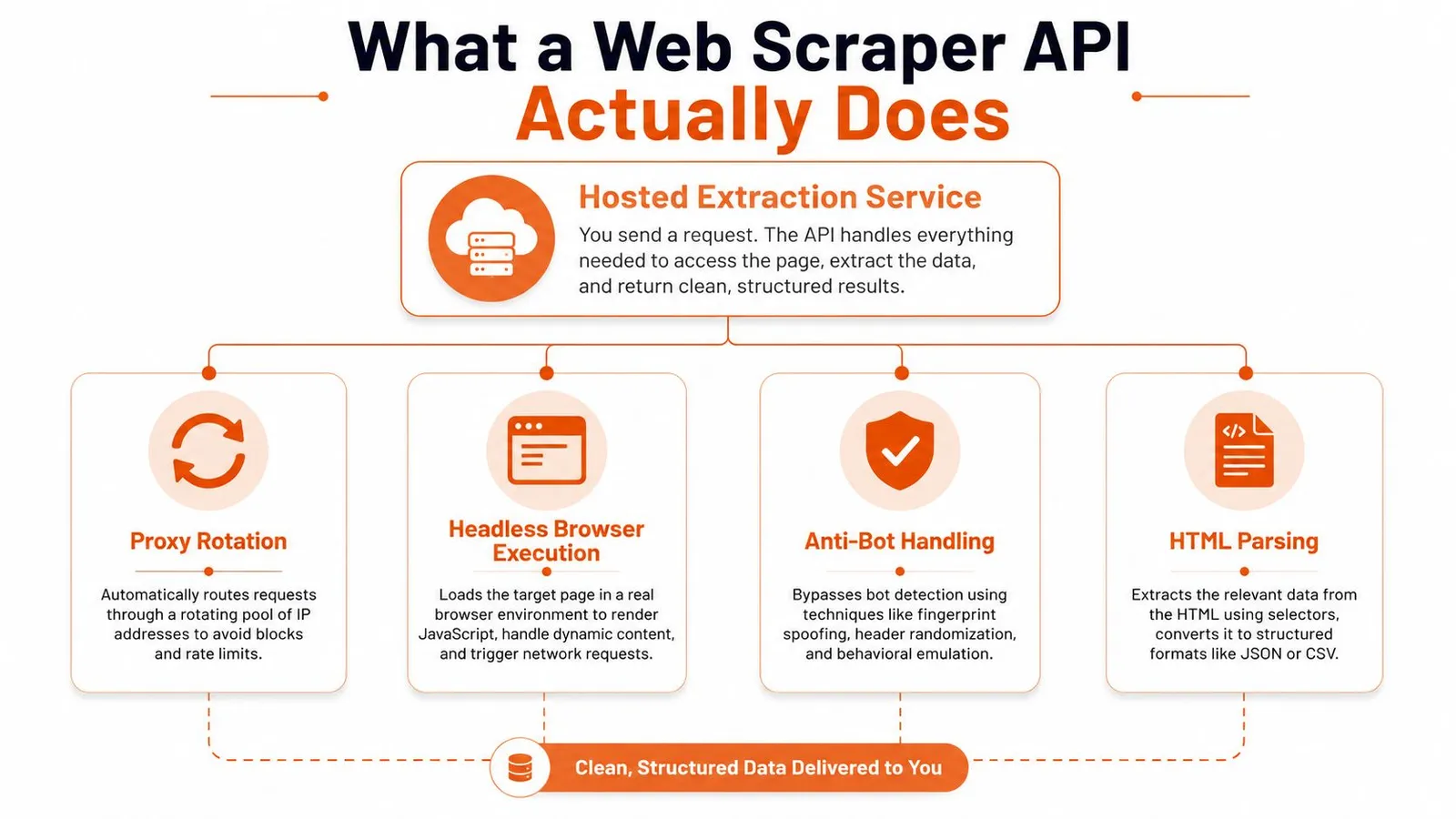
A web scraper api is best understood as a hosted extraction service. You give it a URL, and it handles the hard parts that used to live in your codebase, like proxy rotation, browser rendering, retry logic, CAPTCHA handling, and fingerprint management, then returns cleaned output instead of raw page markup. That centralization matters because modern sites increasingly depend on client-side rendering and anti-bot defenses, so the old model of hand-rolled parsers plus a few HTTP requests has become fragile.
The basic mental model
Think of it as a managed version of the stack you'd otherwise assemble yourself. Instead of wiring a browser, a proxy pool, and a parser together across several repos, the service exposes one endpoint and returns HTML, JSON, CSV, Markdown, or structured fields from the same call. That's why modern providers now advertise JavaScript rendering, automatic proxy rotation, and geo-targeting as baseline capabilities, not premium extras, because those are table stakes for reaching real pages in production.
A web scraper API centralizes extraction infrastructure so developers can send a URL and receive clean data instead of maintaining their own scraping stack.
The output format matters as much as the fetch. For AI work, markdown and structured JSON are usually more useful than raw HTML because they remove navigation noise and reduce downstream parsing work. The category has moved toward model-ready output for exactly that reason, since cleaner context is easier to chunk, embed, summarize, or pass to an agent.
For a product-oriented overview of this category, Webclaw's AI scraper page is aligned with the way teams now evaluate these tools, by output quality and model fit, not just transport mechanics.
What you should expect by default
A credible provider in 2026 should usually make these capabilities feel normal:
- JavaScript rendering so client-rendered pages aren't empty when they arrive.
- Automatic proxy rotation so hard targets don't fall over after a few requests.
- Geo-targeting so region-specific pages can be fetched from the right country.
- Multiple output formats so the same endpoint can serve both humans and models.
- Structured extraction so downstream systems don't have to guess where fields live.
The important shift is that scraping APIs are no longer just fetchers. They're managed extraction systems whose job is to return something usable, not just something reachable.
Inside the Stack, From Proxy to Parsed Output
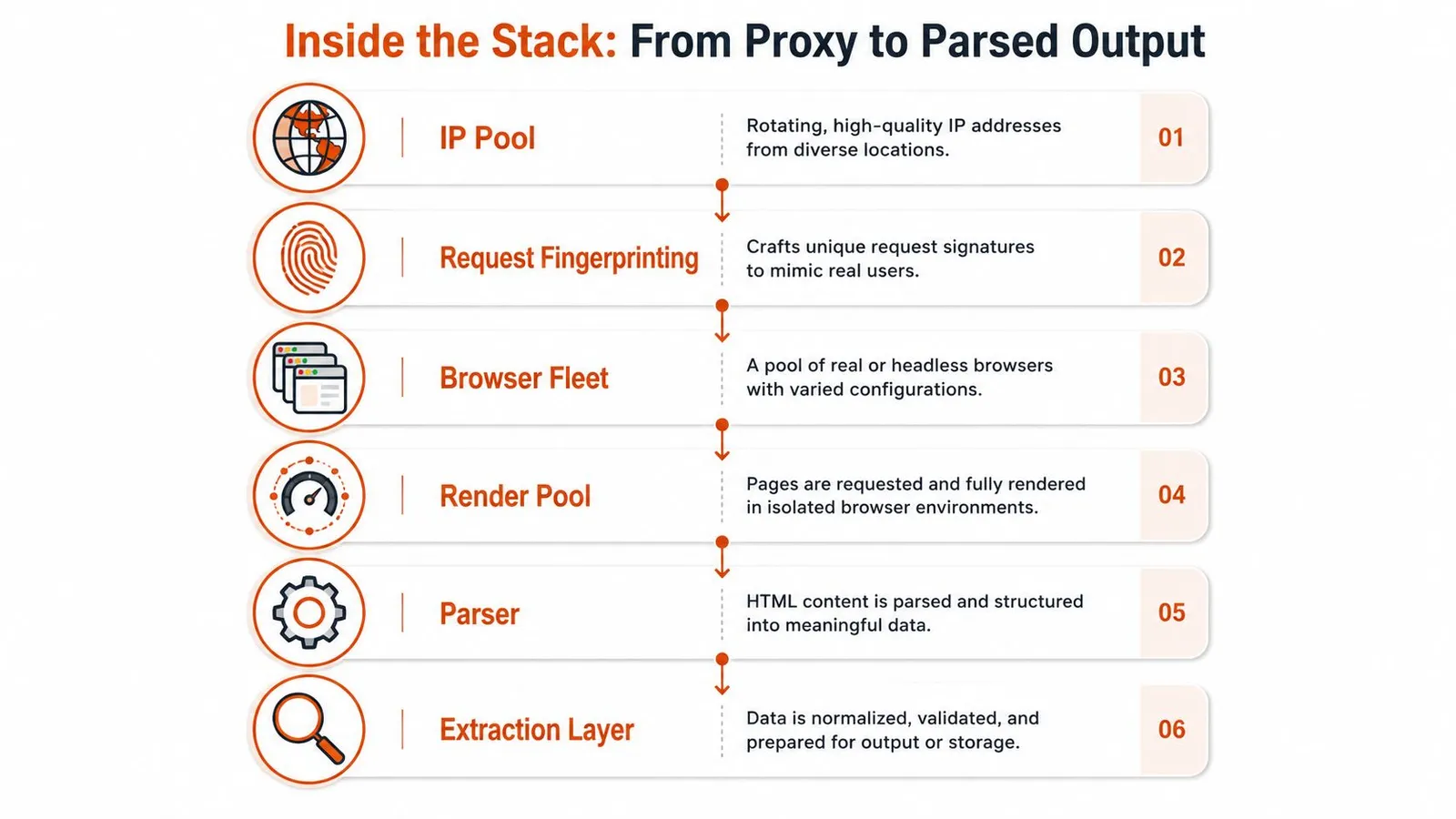
The stack beneath a scraper API is usually where the key differences show up. One vendor might advertise “proxy rotation,” another might advertise “browser automation,” but those are only pieces of a larger path from request to output. If one layer is weak, the whole pipeline starts breaking on the same class of pages every week.
Where failures usually start
At the bottom is the IP pool, which is doing more than just changing addresses. It shapes reachability, geo behavior, and how quickly a target starts blocking requests. That's why enterprise providers talk about large proxy fleets and broad country coverage, because the ability to appear from the right place is part of basic reliability now, not a niche feature.
Above that sits request fingerprinting and browser identity management. This is the layer that tries to make automated traffic look like a normal session, and it's often where basic scrapers fall apart on aggressive targets. A site may load fine for a human browser while rejecting automation that looks too uniform.
The next layer is the browser fleet and render pool. JavaScript is executed here, making dynamic content visible, which is necessary on modern single-page apps and heavily client-rendered sites. If the vendor's render layer is slow or unstable, you'll see flaky results even when the page “works” in a desktop browser.
Parsing is where AI teams feel the pain
The final layers, parser and extraction, decide whether the output is useful or noisy. A service can reach a page and still return a blob of HTML that forces your team to build cleanup logic on top. For AI pipelines, that's the part that matters most, because any extra boilerplate becomes extra tokens, more expensive prompts, and worse retrieval quality.
Operational clue: if a provider only talks about access and never about output cleanliness, you'll probably inherit the cleanup work yourself.
This is also where managed services differ from classic scraping toolchains. A browser library can render the page, but it won't decide whether the best downstream artifact is raw HTML, cleaned markdown, or structured fields. That choice is now a product decision, not just an engineering one, and it's why the category keeps drifting toward token-efficient outputs.
For a deeper proxy-side view of this layer cake, Webclaw's residential backconnect proxy article is useful context.
Build Versus Buy, With Real Trade-Offs
The build-versus-buy decision is sharper for scraping than for a lot of other infrastructure choices, because the hidden work isn't just fetching pages. It's keeping fetches alive when sites change layouts, defenses tighten, and the output shape drifts just enough to break a parser downstream. That maintenance burden grows fastest on hard targets and long-tail sites.
When building still makes sense
Building wins when the target set is small, stable, and highly specific. If you own the target, or the page structure barely moves, a custom scraper can give you tight control over every field and every retry path. It also makes sense when compliance or deployment constraints force you to own the whole stack.
But even then, the maintenance story is the true cost. Scrapers tied to DOM structure break when a site redesigns its layout, changes class names, or adjusts client-side behavior, and those are routine changes, not edge cases. That's why browser automation often turns into a support queue instead of a product asset.
When buying is the better move
Buying usually wins when the target set is broad, the pages are hostile, or the output feeds an AI system. A retrieval pipeline doesn't just need pages to load, it needs clean text, consistent field shapes, and less junk per token. Raw HTML forces your team to pay twice, first for extraction, then again for cleanup and token waste.
The recent market shift reflects that reality. Providers now compete on scale, reliability, geography, and output quality, and published 2026 benchmarks showed top-end performance with 99.96% success rate and 3.23 seconds average processing time per URL for one vendor in a benchmark-style review at ScrapingFish's 2026 benchmark page. That doesn't mean every service is that good, it means the bar for a serious purchase has moved beyond “can it fetch a page.”
A useful way to frame the trade-off is simple. If your team is extracting from a fixed, controlled source, build can be rational. If your team is feeding RAG, agents, research systems, or monitoring workflows, buying is usually the right default because the output problem is more expensive than the fetch problem.
Your First Call, From REST to SDKs
The quickest way to test a scraper API is to make one call and inspect what comes back. If the response still looks like web junk, the rest of the decision is probably pointless. If it returns cleaned markdown or schema-shaped JSON, you're already closer to a usable pipeline.
REST first, because it reveals the shape fastest
A simple request/response call is the best first check because it shows the API contract without hiding anything behind a wrapper. For teams that want to inspect the raw transport, the documentation in Webclaw's SDK docs is the kind of place to confirm request shape, auth flow, and return formats before wiring it into production.
A useful pattern is to try three variants of the same URL, one for basic markdown, one for structured JSON, and one for a harder page that needs rendering. That gives you a quick sense of whether the API is just scraping, or actually doing extraction. If the output already strips boilerplate cleanly, you've saved yourself a cleanup layer.
SDKs help once the shape is stable
Once the endpoint is understood, SDKs make the call safer to use in app code. Python is usually the fastest path for retrieval tooling and evaluation scripts, while TypeScript fits naturally inside a Next.js app or agent service. The main thing to look for is whether the SDK preserves the same response shape as the REST call, because wrapper drift is a common source of integration bugs.
Batch calls matter if your workload is not one URL at a time. Web extraction work often turns into a queue of hundreds or thousands of pages, and at that point you want either synchronous batch processing or an async job with a callback or polling step. Webhook callbacks are useful when crawls run longer than a request window, especially for research and site-mapping jobs.
Practical rule: if the returned format isn't stable enough to parse twice in a row, don't integrate it yet.
For AI agent work, MCP support is worth checking early because it lets the model call the scraper as a native tool rather than forcing a custom bridge. That's especially useful when the agent needs to fetch, summarize, and reason over pages inside the same workflow.
A quick working shape to expect
A healthy first call should give you one of these response styles:
- Markdown for RAG and summarization.
- JSON for field-level parsing.
- LLM-optimized text when context quality matters more than page fidelity.
- Batch results when you're collecting at scale.
If the provider can do all four without making the integration awkward, you're looking at a real extraction platform, not just a browser wrapper.
Five Criteria That Actually Matter When Choosing One
Procurement for scraping tools gets easier when you stop asking whether the vendor can fetch a page and start asking what the output does to your pipeline. A service that reaches the site but returns noisy HTML still creates work, and that work shows up as token spend, cleanup scripts, and failure cases. The five checks below are the ones that hold up under real use.
The scorecard
| Criterion | What to Check | Why It Matters |
|---|---|---|
| Reliability on hard sites | Test pages with JavaScript, geo restrictions, and bot defenses | If it only works on easy pages, you'll still need a fallback stack |
| Token efficiency | Compare markdown or structured output against raw HTML | Less noise means cheaper prompts and less parsing |
| Output cleanliness | Look for boilerplate stripping, not just HTML delivery | Clean context improves retrieval and agent performance |
| Proxy coverage and geo-targeting | Check country support and proxy options | Regional pages and blocked targets need location control |
| SDK and MCP support | Verify REST, SDKs, and agent-friendly tooling | Integration speed matters once the API is inside a product |
How to test without committing
Start with a page that has obvious noise, then inspect the returned shape. If the content still contains nav links, banners, or duplicated elements, your downstream model is paying for the mess. If the provider offers structured output or markdown-first extraction, compare that result to raw HTML and judge the difference by eye before you judge it by price.
Token efficiency is the criterion most developers underweight. That's a mistake, because every unnecessary byte you feed into a model becomes cost and context pressure later. The earlier section on output shape matters here, and it's why model-ready output should be treated as a primary requirement, not a nice-to-have.
For a second outside opinion on selection criteria, Webclaw's AI scraper comparison guide is helpful to sanity-check vendor claims against actual workflow needs.
Practical test: scrape the same page three ways, raw HTML, cleaned markdown, and structured JSON. The version your model handles best is usually the one that saves the most engineering time later.
A vendor that checks the first two boxes but fails on the last three may still be fine for a niche job. For AI pipelines, though, output cleanliness and token efficiency are the part that determines whether the integration feels elegant or expensive.
Where Web Scraper APIs Actually Earn Their Keep
The strongest use cases show up where raw HTML is the least useful format. In those workflows, the question isn't whether the scraper can read the page, it's whether the output is clean enough for the next system to do its job without cleanup. That's why the same API can be trivial in one pipeline and decisive in another.
RAG ingestion and AI agents
For RAG ingestion, clean markdown is the difference between a workable knowledge base and a pile of malformed chunks. If you've ever embedded pages full of nav menus and sidebar junk, you already know why token-efficient output matters more than fetch success. For AI agents, reliability on hard pages and an agent-friendly tool path matter because the model has to act on live data, not just summarize static text.
Research, monitoring, and site mapping
In deep research workflows, structured extraction and batch crawling let teams collect evidence from many pages without hand-curating each one. Site mapping and brand extraction sit a little lower in the stack, but they're useful when you need the site graph, metadata, design tokens, or layout signatures rather than the body copy itself. Those jobs care less about perfect prose and more about predictable field capture.
Rendered pages versus hidden endpoints
The operational decision that gets skipped most often is whether to scrape the rendered page or reverse-engineer the hidden API behind it. If the data is already flowing through XHR or fetch calls, hitting the underlying endpoint can be more reliable and cheaper than rendering the browser at all. The browser is still useful when the endpoint is hard to find or access is gated, but it's not automatically the right answer.
That trade-off is why strong scraping teams keep both options open. They inspect the page, inspect the network, and choose the cheaper path that still gives them stable output.
How Webclaw Fits and What to Compare It Against
Webclaw fits the part of the market that has become most annoying for AI teams, the gap between “the page loaded” and “the model received clean context.” Its positioning is straightforward, model-ready output, JavaScript rendering, bot protection handling, structured extraction, and an MCP server for agents. That combination targets the exact places where a lot of scraper APIs still hand you raw HTML and leave cleanup to your code.
The comparison to make is not “does it scrape.” Plenty of tools can do that on easy pages. The better comparison is whether the service gives you output that is already shaped for retrieval, summarization, or agent reasoning, because that's where the hidden cost lives. If the output strips boilerplate and stays compact, your prompts get cheaper and your downstream parsing gets simpler.
Webclaw is a good fit for AI and LLM teams, agent builders, research pipelines, and anyone who wants a cleaner path from URL to usable context. It's a weaker fit if you only need commodity bulk scraping with no concern for model cleanliness, or if you require a fully self-hosted stack and are comfortable owning every layer yourself. The right choice depends on whether you're buying access or buying output quality.
The same lens applies to every vendor in this category. Ask what comes back, not just whether the page was reached. Ask how much of the response is usable by a model on the first pass, because that's the part that determines whether your pipeline scales cleanly or becomes another maintenance surface.
If you're building retrieval, agent, or research workflows and the current scraper is still handing your model a mess, take a look at Webclaw. It's designed for clean extraction from pages that block naive fetchers, with output formats that fit LLM pipelines instead of fighting them.