Web Scraping API: The 2026 Developer's Guide
You've got the same problem a lot of teams hit in week two of a scraping project, not week one. The first URL worked in your browser, the second one came back with a 200 and almost no useful body, and the third one looked fine until you realized it was mostly nav links, cookie banners, and unrelated page chrome. By the time you've added Playwright, retries, proxy rotation, and a few stealth patches, the question changes from “can I fetch this page?” to “can I get clean context out of it without spending half my time cleaning up the mess?”
That's why a web scraping API matters in 2026. The modern version isn't just a wrapper around HTTP requests, it's a managed extraction layer that absorbs the brittle parts of scraping and returns output you can use, especially if the downstream consumer is an LLM. For a practical Python walkthrough of how people still build crawlers by hand, Captapi's Python web crawlers guide is a useful baseline, because it shows how much plumbing a managed API is replacing. If you're fighting bot protection in production, the shape of the failure matters more than the status code, and a deeper look at Cloudflare bypass patterns helps explain why one fix rarely solves the whole stack.
The Problem Most Scrapers Hit Before They Even Start
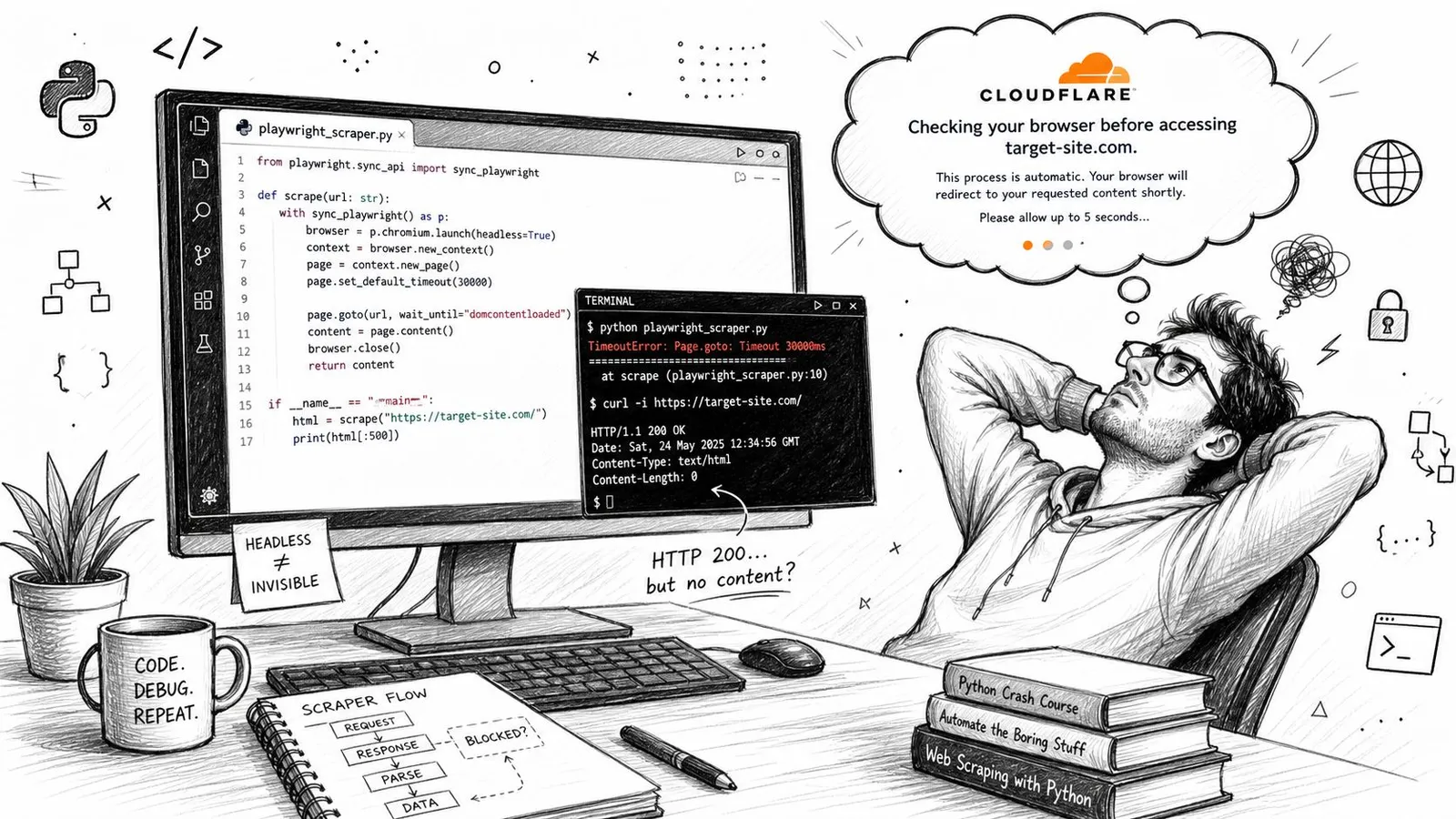
The worst scraping bugs are the ones that look like they succeeded. A plain curl call returns 200, but the body is empty or missing the content you wanted. A Playwright script gets through the challenge page and then times out on the target page. A Puppeteer run finally loads the site, only to hand you a wall of navigation chrome and no meaningful article text.
That's not one bug. It's a stack of failures that all happen at different layers. The request can be fingerprinted at the TLS layer, the page can require JavaScript rendering, the IP can have bad reputation, the browser can look inconsistent, and the page can still come back with post-challenge content that's structurally useless.
Why the failure shape matters
If the server responds quickly with a block page, you're dealing with access control. If the HTML arrives but the content is missing, you're dealing with rendering or extraction. If the page loads in a browser but your scraper still sees the wrong thing, the problem is often fingerprint consistency or session state.
That's why hand-rolled fixes break down. Rotating proxies doesn't solve JavaScript-heavy apps. Rendering the page doesn't solve anti-bot checks. Stealth patches help in some cases, then fall apart when the site changes its detection logic. A managed service exists precisely because teams don't want to maintain that entire failure stack themselves.
A web scraping API becomes the abstraction that swallows those details, so your application can ask for a URL and get back something useful instead of a pile of special cases. That's the primary reason the category exists, not convenience alone.
Practical rule: if you're debugging three different layers just to get one useful page, the problem isn't your parser, it's your fetching stack.
The picture above is exactly why teams move from scripts to managed extraction. When the target pages are dynamic, protected, or inconsistent, the fetching layer becomes infrastructure. The rest of the article exists because AI workflows make that infrastructure choice even more important.
What a Web Scraping API Actually Is
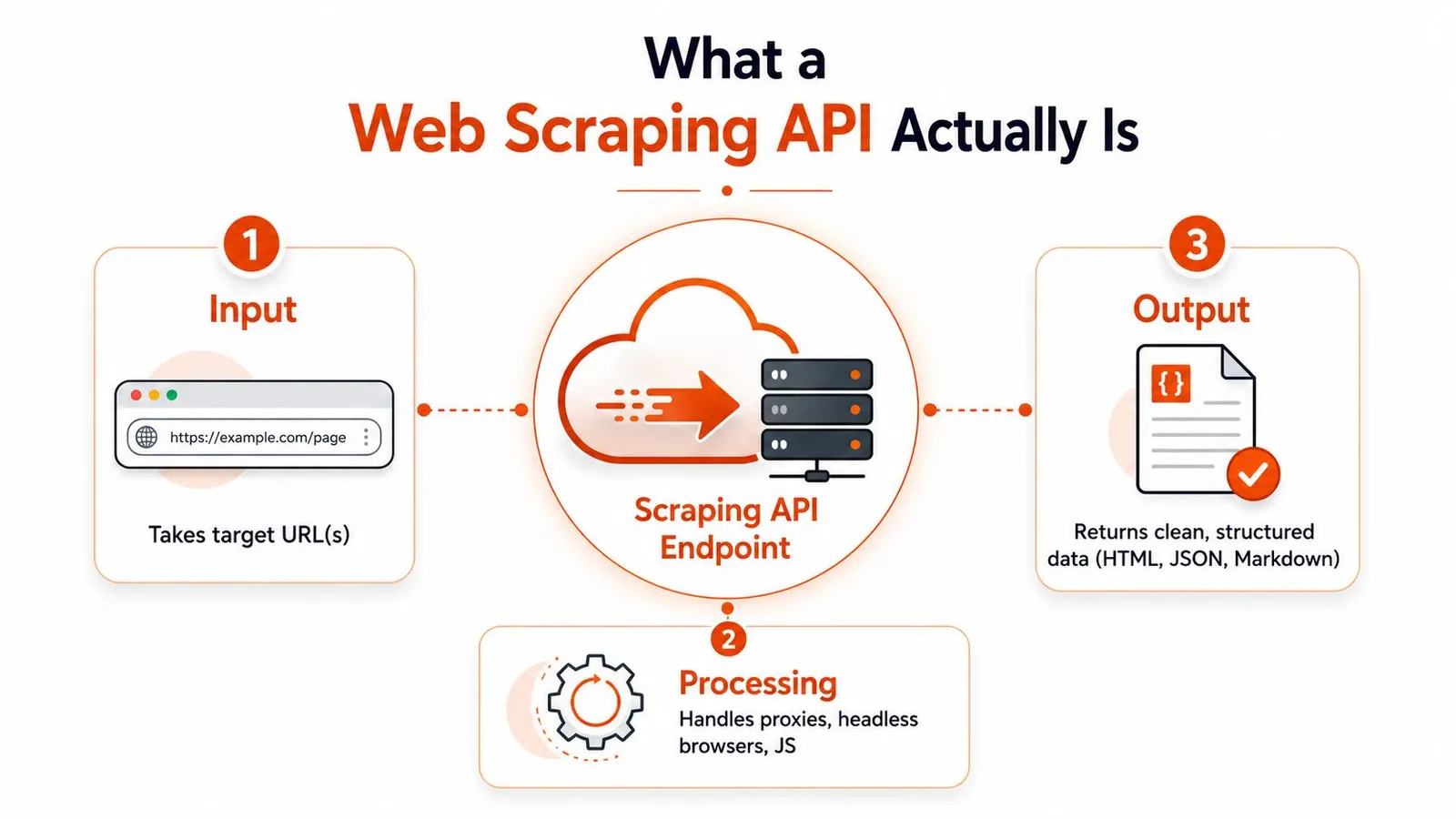
A web scraping API is a hosted endpoint that takes a URL, or a batch of URLs, and returns usable extracted content. Under the hood, it usually handles proxy rotation, headless browser execution, JavaScript rendering, retries, and HTML parsing, so the caller doesn't have to build that pipeline from scratch. Firecrawl's glossary describes this shift clearly, and its framing matches what production teams need, a managed call that gets from URL to output with far less glue code than a custom scraper requires (Firecrawl glossary).
How it differs from the tools people confuse it with
A raw proxy service only changes where the request comes from. It doesn't render the page, solve CAPTCHAs, or clean the output. A headless browser service like Playwright-as-a-service gives you a browser, but you still own orchestration, parsing, retries, and everything after the page loads. An open-source library gives you code, not managed infrastructure.
That distinction matters because the API is closer to a payment provider than a DIY PCI setup. You still own the integration and the business logic, but you're not hand-building the hardest infrastructure layer every time you ship a new scraper.
The Bright Data review of the category shows how far the market has moved by 2026, with single-endpoint, fully managed extraction services packaging HTML, JSON, XML, or Markdown into one call, and some providers supporting bulk jobs of up to 5,000 URLs at once or advertising 100+ and even 1,000+ ready-made scrapers (Bright Data review). That's a strong signal that the category has matured from niche tooling into infrastructure.
The useful mental model
Think of the API as the kitchen, not the recipe. You bring the ingredients, the API handles the messy prep, and the output comes back in a shape you can serve to your application. For scraping, that means less time on browser maintenance and more time on the data you came for.
The shift is even clearer when the output can be shaped for downstream use. A managed endpoint that returns Markdown or JSON isn't just scraping more efficiently, it's reducing the amount of cleanup your code still has to do. Context.dev's web scraping api material is a good reference point for that developer-facing abstraction, especially if you want to compare API-first extraction with hand-rolled browser automation.
In practice, the right definition is simple. A real web scraping API hides the infrastructure burden and gives you structured output in one call.
The Core Features That Separate a Real API From a Pretty Demo
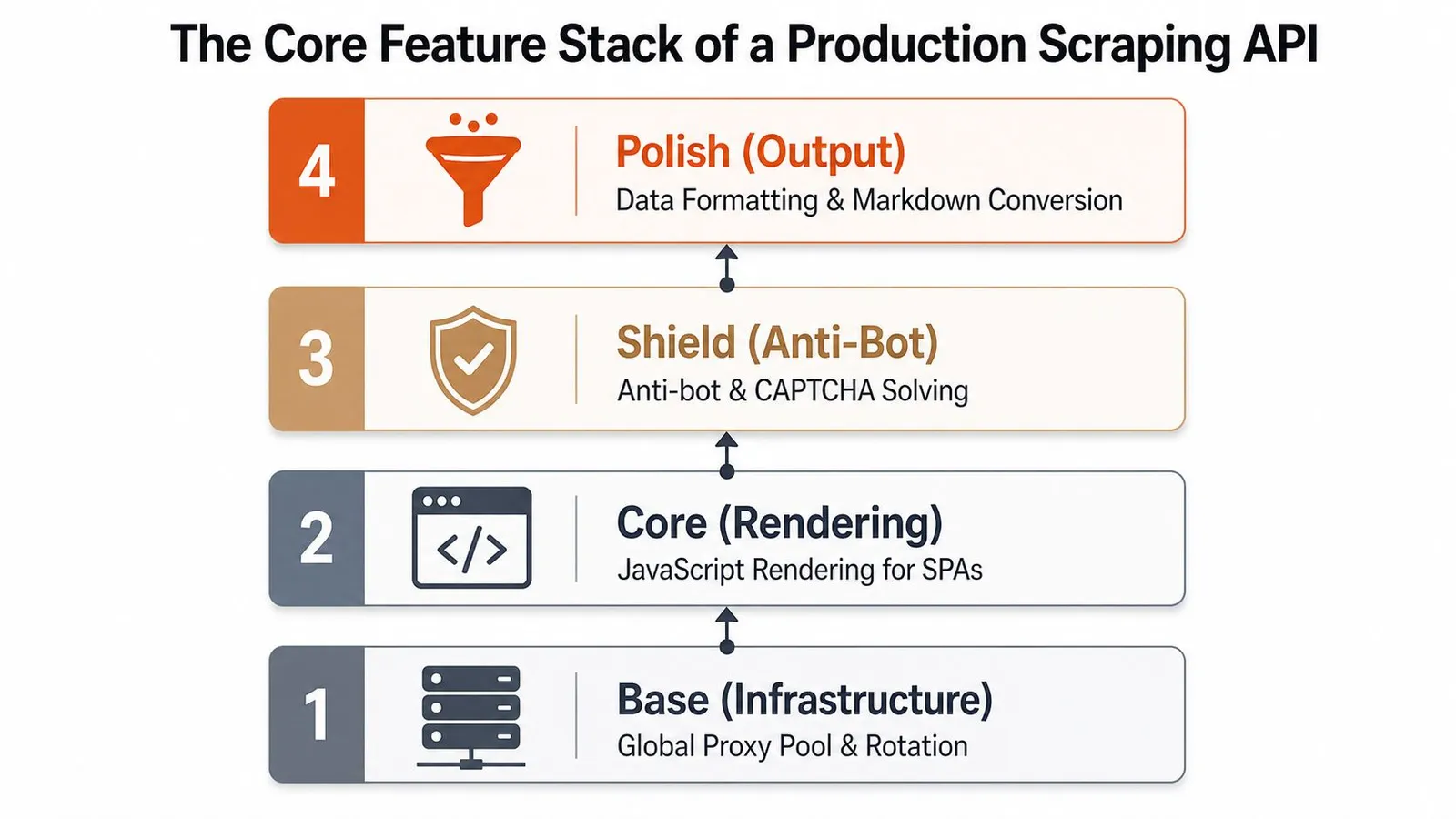
A demo can fetch one page. A production API survives the ugly parts of real web data. That starts with JavaScript rendering, because single-page apps and client-rendered sites often leave the initial HTML almost empty, and the API has to act like a real browser before any useful content exists. It also needs to carry anti-bot handling beyond simple IP rotation, because many failures happen after the request starts, not before it leaves your code.
The capability stack that matters
The first layer is proxy breadth. Residential, ISP, and datacenter coverage each solve different access problems, and geo-targeting becomes important when pages vary by region. The second layer is rendering, which is what makes dynamic sites readable instead of blank. The third layer is resilience, meaning retries, session handling, and bot protection logic that don't collapse the moment the target changes something small.
If a vendor only talks about “success rate” but never exposes the knobs behind it, you'll have trouble diagnosing failures when a site starts fighting back.
The output layer is just as important. A provider that can return HTML, JSON, Markdown, or plain text gives you options for different consumers, especially when an LLM is downstream. The best APIs also return operational metadata, such as status codes, timing, retries, and cost per call, which makes it much easier to debug and compare behavior across large workloads (Blogorama guide).
What separates production from marketing
Batch operations matter when you're scraping many URLs at once, because single-request ergonomics don't tell you anything about parallelism or queue behavior. Crawl controls matter too, especially depth, page limits, and concurrency, since unbounded crawl settings are how teams accidentally turn a small job into a large one. Sitemap-aware discovery is another useful signal, because it reduces wasted crawling on sites with known URL structure.
You should also care about format shaping. If the API can return clean Markdown or structured JSON without forcing you to build a separate cleanup pipeline, that's a real reduction in operational complexity. That's why the category has shifted toward one-call extraction rather than a collection of loosely coupled primitives.
The practical benchmark in 2026 is whether the provider can collapse the whole pipeline into a single endpoint. If the vendor still makes you wire up proxies, rendering, retries, parsing, and post-processing separately, you're not really buying a managed API, you're buying a partial toolkit.
For a concrete product reference, Webclaw's feature overview shows how these pieces show up in a real API surface, not just in a product pitch. The important thing isn't the brand name, it's whether the stack is integrated.
Designing for AI and LLM Workflows
The right question isn't only whether the page can be scraped. It's whether the output is good enough to feed into a model without wasting tokens on junk. Raw HTML is often too noisy for that job, because it carries nav chrome, footer links, repetitive boilerplate, and markup that adds little value to retrieval or generation.
Clean context beats raw completeness
LLM pipelines care about token efficiency and signal-to-noise ratio more than they care about preserving every byte of the original page. A page dump can be technically complete and still be economically bad, because the model has to spend attention on material that doesn't help the answer. That's why APIs that return Markdown or structured extraction are a better default for agentic workflows.
The gap matters even more when you compare raw page shape to model-ready output. A page with repeated navigation, ads, and duplicated fragments can shrink dramatically once it's normalized into Markdown, and that smaller context is easier to index, chunk, and retrieve. Webclaw's RAG pipeline guide is a good companion read here, because it treats cleaned web content as a retrieval asset rather than a scraping byproduct.
The three patterns AI teams actually use
One common pattern is schema-guided JSON extraction. You pass a typed schema, and the API returns a record that downstream code can parse reliably. Another pattern is prompt-based extraction, which is faster to start with but can drift in field names or structure if you rely on it too long. The third pattern is LLM-ready Markdown, which is useful when the next step is RAG indexing, summarization, or agent context assembly.
Practical rule: if another service or model has to parse the result, prefer a schema. If a human or an index will consume it directly, Markdown is usually the cleaner handoff.
That's where the provider decision changes. A web scraping API is no longer just an access tool, it's a context-quality decision. The better APIs now treat clean minimal output as a first-class feature, because AI systems fail less often when they're fed less junk.
Webclaw is one example of that direction, with a default output model that emphasizes minimal context and agent-friendly integration. The broader point is the same across vendors, the output format is part of the product, not an afterthought.
Common Architectures and a Quick Code Sketch
The simplest workflow is still the one many teams start with, a single URL scraped into Markdown or JSON. From there, the shape expands fast. Batch jobs handle many URLs in parallel, crawl jobs walk a site from a seed URL, map jobs discover URLs first, and search jobs combine discovery with extraction. Snapshot workflows track changes over time, and niche extractors can handle things like YouTube transcripts or multi-source research reports.
The operation name should match the job
Use scrape when you already know the page. Use crawl when you want the site explored from a starting point. Use map when you need URL discovery without fetching every page right away. Use search when you want discovery and extraction tied together. Use batch when concurrency matters, and extract or snapshot when the data shape or change detection matters more than the page itself.
The control you care about changes by workflow. For a single scrape, the big lever is output format. For crawl, it's depth and concurrency. For batch, it's job size and retry behavior. For snapshots, it's frequency and diff scope.
| Workflow | API Operation | Key Parameter | Typical Use |
|---|---|---|---|
| Single page | scrape | format | Clean Markdown or JSON from one URL |
| Many pages | batch | parallelism | Parallel collection from a fixed URL list |
| Site traversal | crawl | depth | Discover and fetch linked pages |
| URL discovery | map | sitemap scope | Build a URL list before scraping |
| Discovery plus fetch | search | query scope | Find and extract relevant pages together |
| Change tracking | snapshot | capture cadence | Monitor content drift over time |
The internal docs for Webclaw's scrape endpoint are a useful reference if you want to see how a managed API exposes this pattern in practice, especially for single-page extraction and its format controls. The integration should stay thin.
A thin Python sketch
import requests

resp = requests.post(
    "https://api.example.com/v1/scrape",
    headers={"Authorization": f"Bearer {API_KEY}"},
    json={
        "url": "https://example.com/article",
        "format": "markdown"
    },
    timeout=30,
)

data = resp.json()
markdown = data["content"]

# Feed the cleaned output into a downstream step.
summary_prompt = f"Summarize this page for a RAG index:\n\n{markdown}"
print(summary_prompt[:500])
That's the whole point. The scraping API handles the messy part, and your code stays focused on the next step instead of browser maintenance.
In 2026, good ergonomics also matter. MCP for agents, a CLI for humans, and REST for everything else is becoming the default shape because it keeps both automation and debugging simple.
How to Choose a Provider Without Getting Burned
Start with the hard sites. Ask whether the provider works on JavaScript-heavy pages, bot-protected domains, and geo-sensitive content, not just on clean demo pages. The red flag is vague language like “works on most websites” with no explanation of rendering, proxy strategy, or anti-bot handling.
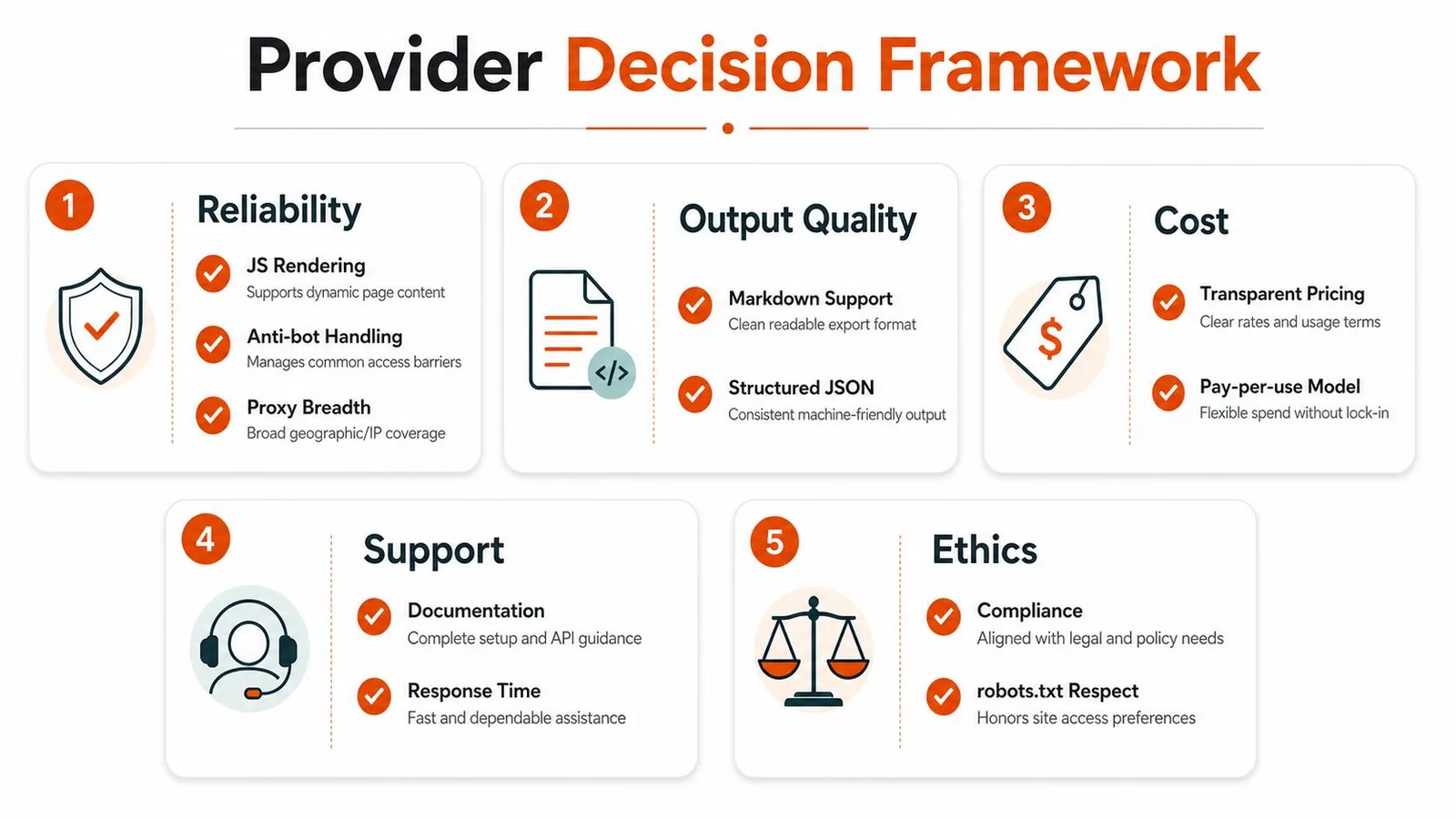
Five buckets worth scoring
Reliability on hard sites. Ask how they handle JS rendering, anti-bot systems, and proxy breadth. If the docs never mention failure modes or fallback behavior, expect surprises in production.
Output quality. Ask whether Markdown is clean, whether structured JSON stays stable, and what metadata comes back. If the output still needs a lot of cleanup, your downstream pipeline becomes the product you're really building.
Integration ergonomics. Look for REST plus SDKs in the languages your team uses, and check whether the provider supports MCP for agents and a CLI for quick tests. If the only path is raw HTTP, your team will spend time rebuilding convenience features.
Operational visibility. Ask about per-call cost, retries, status codes, and latency metadata. If you can't inspect those fields, debugging hard sites gets slower every week.
Flexibility. Check for self-host options, bring-your-own proxies, and vertical extractors for specific site classes. If your use case is unusual, narrow tools can still be the right choice, but only if they admit their limits clearly.
The best comparison docs make it obvious where the service is opinionated. The worst ones bury key constraints in marketing copy and leave the API docs to answer the actual questions later.
A short checklist to copy into your eval doc
- Hard-site support: Does it render JavaScript and survive common bot defenses?
- Output shape: Can it return Markdown or structured JSON without extra cleanup?
- Observability: Do I get status, timing, retry, and cost metadata?
- Integration: Do I get SDKs, REST, and agent-friendly tooling?
- Flexibility: Can I use my own proxies or self-host pieces if needed?
If a provider can't answer those five cleanly, it's probably not ready for a production scraping pipeline. If it can, the next question is whether its output is useful for your downstream system, which is where AI-focused workflows tend to separate themselves from generic crawling.
For a concrete vendor comparison point, Webclaw's best AI web scraper guide shows how the category gets judged when LLM usage is the target instead of just page fetch reliability.
Legal, Ethical, and Politeness Considerations
The responsible question isn't “can I scrape it?” It's “should I scrape it this way?” The legal layer starts with the site's terms of service, copyright issues, and jurisdiction-specific rules such as GDPR or CFAA, and the ethical layer covers impact on the target site, server load, and whether you're touching public or authenticated data. Operational politeness is the part teams control most directly, and it includes rate limits, robots.txt where applicable, and avoiding aggressive traffic during peak hours.
A practical decision rule
If the data is publicly visible without login, the site doesn't explicitly forbid scraping in its terms, and you stay within a reasonable rate, you're on solid ground for most non-personal, non-copyrighted content. If any of those break, slow down and get advice. That rule won't settle every edge case, but it's good enough to prevent the casual mistakes that cause most trouble.
Politeness isn't just ethics, it's engineering hygiene. Good providers help by handling rate limiting, retry backoff, and per-domain concurrency automatically, which reduces the chance that one job hammers a site because your loop was too optimistic.
Where teams get into trouble
The first mistake is overloading a small site with crawler concurrency that looks harmless in a test environment. The second is scraping authenticated or semi-private content without really thinking through permissions or data sensitivity. The third is treating robots.txt as the whole legal answer, when it's only one signal in a broader decision.
Keep the fetch pattern boring. Boring scraping is usually safer scraping.
Managed APIs help because they centralize the rough edges. If the provider exposes rate controls, backoff, and domain-aware concurrency, you don't have to reimplement that logic across every project. That's one more reason the API choice is about more than convenience, it shapes how safely and politely your pipeline behaves in the wild.
If you're evaluating a provider for a production workflow, build that policy into the tool choice, not just the internal docs. Then wire the API into a rate-conscious job runner, keep the output lean, and review your target list before scaling up. A disciplined setup will save you far more time than a clever scraper that breaks the first time a site changes its defenses.
A CTA for Webclaw. If you're building an LLM pipeline, a research tool, or a production scraper that needs cleaner output than raw HTML, test your hardest URLs through Webclaw's scrape, crawl, and search endpoints, then compare the returned context against what your current stack gives you.