Cloudflare Scraping Checklist: Diagnose the Block in 2026
Most Cloudflare scraping failures get worse because the scraper retries too early.
You get a 403. You rotate the proxy. Same 403. You change the User-Agent. Now it is a 503. You launch Puppeteer. It works once. Then it dies on page three. At that point the code is no longer debugging Cloudflare. It is generating more bad traffic for Cloudflare to score.
This post closes the Cloudflare cluster with a checklist. Not a silver bullet. A way to decide what actually failed before you change anything.
If you want the deeper pieces, start here:
- Bypass Cloudflare bot protection
- Cloudflare Turnstile in 2026
- Why Puppeteer stealth stopped working on Cloudflare
- Cloudflare error codes for scrapers
- TLS fingerprinting in 2026
The short version: log the layer first. Then change the layer that failed.
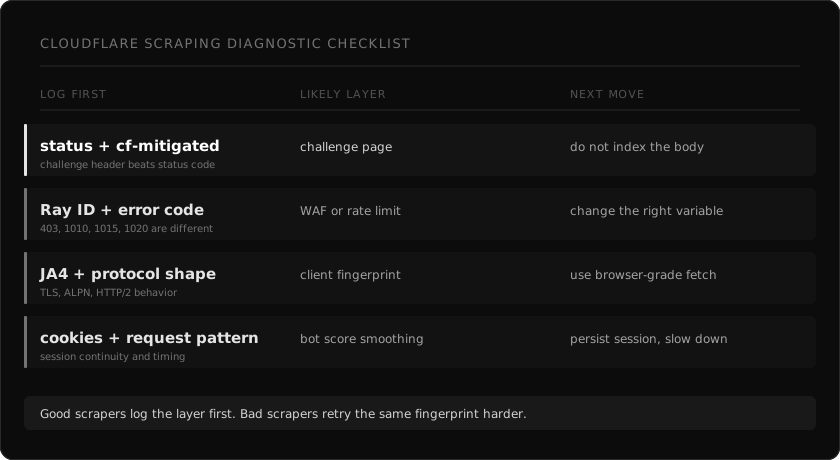
The mistake: treating every block like the same block
A Cloudflare block can come from several places.
Cloudflare's own bot detection engines docs describe multiple engines: heuristics, JavaScript Detections, machine learning, and anomaly detection on some plans. Their ML docs say the model uses request features, headers, session characteristics, and browser signals. The __cf_bm cookie is used to smooth the bot score for a user's request pattern.
That means one scrape can fail because:
- The TLS or HTTP fingerprint does not match the browser you claim to be.
- The request hits a path-specific WAF rule.
- JavaScript Detections failed or never had a chance to run.
- The session has no believable history.
- The IP, ASN, or country is wrong for the target.
- The rate limit fired.
- The body is a challenge page, even if the status code says 200.
Those are different failures. They need different fixes.
What to log on every Cloudflare request
If your scraper does not store these fields, add them before changing the bypass logic.
| Field | Why it matters |
|---|---|
| URL and method | Cloudflare rules are often path-specific |
| Status code | Useful, but not enough by itself |
cf-ray | The only useful handle if a site owner checks logs |
cf-mitigated | Cloudflare sets this to challenge on Challenge Page responses |
| Content-Type | Challenge pages return HTML, even for some fetch/XHR flows |
| First 2 KB of body | Enough to detect cf-turnstile, /cdn-cgi/challenge-platform/, and error codes |
| Response headers | Rate limits, cookies, and challenge markers live here |
| Request headers sent | The bug is often in what you actually sent, not what you meant to send |
| Proxy ASN and country | A clean fingerprint from the wrong network still looks wrong |
| Session ID and cookie age | Fresh sessions and returning sessions are scored differently |
| Duration and retry number | Rate limit and challenge loops look different over time |
Cloudflare's challenge docs give one especially useful signal: Challenge Page responses include the cf-mitigated header with value challenge, and the content type is text/html regardless of the requested resource type. If you index that body as if it were the page, you just poisoned your dataset.
Step 1: classify the response body
Do this before reading the status code.
type CloudflareShape =
  | "real_page"
  | "challenge_page"
  | "turnstile"
  | "waf_error"
  | "rate_limited"
  | "unknown_block";

export function classifyCloudflareResponse(input: {
  status: number;
  headers: Record<string, string | undefined>;
  body: string;
}): CloudflareShape {
  const body = input.body.slice(0, 20_000).toLowerCase();
  const mitigated = input.headers["cf-mitigated"];

  if (mitigated === "challenge") return "challenge_page";
  if (body.includes("cf-turnstile")) return "turnstile";
  if (body.includes("challenges.cloudflare.com/turnstile")) return "turnstile";
  if (body.includes("/cdn-cgi/challenge-platform/")) return "challenge_page";
  if (body.includes("error 1015") || input.status === 429) return "rate_limited";
  if (body.includes("error 1020") || body.includes("access denied")) return "waf_error";
  if (input.status === 403 || input.status === 503) return "unknown_block";
  return "real_page";
}
This is not magic. It is hygiene.
A 200 with a challenge body is not a success. A 503 with /cdn-cgi/challenge-platform/ is not an origin outage. A 1015 is not fixed by another stealth plugin. Your first job is to stop treating all of them as "retry later."
Step 2: read the status and Cloudflare code together
Status code alone is too coarse. Read the body and the Cloudflare error number.
| Signal | Likely layer | First fix to try |
|---|---|---|
cf-mitigated: challenge | Challenge page | Detect as failure, do not parse body |
cf-turnstile in body | Turnstile | Browser or token path may be required |
| 403 without code | WAF or bot score | Inspect fingerprint, headers, IP |
| 1020 | Custom WAF rule | Identify the matched request attribute |
| 1010 | Browser fingerprint classified as automation | Fix TLS and HTTP/2 fingerprint |
| 1015 or 429 | Rate limit | Back off, reduce per-host concurrency |
| 503 plus challenge script | Interstitial challenge | Persist clearance and retry coherently |
| Tiny word count | Shell, challenge, or blocked variant | Do not accept as extracted content |
The goal is not to memorize codes. The goal is to stop changing the wrong variable.
Step 3: check whether the network fingerprint matches the claim
Cloudflare's JA4 Signals post explains the direction clearly. JA4 fingerprints alone are not enough, so Cloudflare also computes inter-request features from traffic over the last hour. The post lists signals such as browser ratio, cache ratio, HTTP/2 and HTTP/3 ratio, request quantiles, and IP quantiles for a JA4 fingerprint.
That matters for scrapers because a request can look wrong before JavaScript ever runs.
Common mismatch:
| Claim | Observable mismatch |
|---|---|
| Chrome User-Agent | TLS ClientHello from Python, Go, Node, or curl |
| Chrome on macOS | Linux container browser surface |
| Browser traffic | No Client Hints or wrong Client Hints |
| Normal session | No cookies, no cache, no asset requests |
| Local user | Proxy country does not match language or site market |
| Human browsing | Direct deep links at machine cadence |
Cloudflare's Detection IDs docs also mention detection tags for categories Cloudflare has fingerprinted, including a go tag for traffic observed from a Go programming language bot. Do not read that as "Cloudflare hates Go." Read it as evidence that implementation fingerprints are visible.
If the connection says "library" and the User-Agent says "Chrome", the lie is the signal.
Step 4: decide whether this needs JavaScript
A lot of teams launch a browser because Cloudflare is involved. That is expensive and often unnecessary.
Ask one question first: does the page content exist in the first HTML response?
If yes, a browser-grade HTTP client is usually the right first move. Match the TLS, HTTP/2, headers, locale, and proxy geography. Then parse the HTML.
If no, you need one of these:
- The underlying JSON endpoint the page uses.
- Browser rendering for the page.
- A token or clearance flow if the page explicitly requires it.
The mistake is making browser rendering the default for every Cloudflare page. It hides the real failure and makes the system slower. Use it when the content or the challenge requires JavaScript, not because the domain uses Cloudflare.
Step 5: keep sessions coherent
Cloudflare's docs say the __cf_bm cookie measures a user's request pattern and helps generate a reliable bot score for that user's requests. Their JavaScript Detections docs also describe a cf_clearance cookie that stores the JavaScript Detections outcome.
For a scraper, this means stateless retry loops are suspicious by design.
Bad pattern:
- New proxy.
- New browser context.
- No cookies.
- Deep product URL.
- Same request every two seconds.
Better pattern:
- Reuse a session per host.
- Keep cookies between requests.
- Keep language and proxy geography aligned.
- Back off after challenge or rate-limit responses.
- Escalate only after classifying the block.
You do not need to fake a full human life story. You do need the request sequence to be internally consistent.
Step 6: separate WAF blocks from rate limits
A 1020 and a 1015 are not cousins.
1015 means rate limit. The fix is mechanical: slow down, respect Retry-After, reduce per-host concurrency, spread requests across more exits if the use case allows it.
1020 means a custom rule matched. Cloudflare's custom rules docs show how site owners can combine bot score with URI path, ASN, country, JA3/JA4 fingerprint, user agent, and other request fields. That is a very different problem.
If you hit 1020, changing speed may do nothing. The rule probably matched what the request is, not how often it runs.
Step 7: write the retry policy last
Retries are useful after classification. They are harmful before it.
Use a policy like this:
| Classified shape | Retry policy |
|---|---|
real_page | Accept only if content markers are present |
challenge_page | Retry with session continuity or escalate |
turnstile | Use a real browser or token path if allowed |
waf_error | Change fingerprint, headers, geo, or path |
rate_limited | Respect backoff and reduce concurrency |
unknown_block | Store body, Ray ID, headers, and stop blind retry |
The worst retry policy is "same request, different proxy, ten times." That creates more negative history for every layer Cloudflare cares about.
A concrete debugging flow
Here is the flow I use when a Cloudflare target starts failing.
- Fetch once with logging enabled.
- Store status, headers, first 20 KB of body, proxy metadata, duration, and session ID.
- Classify the response body.
- If
cf-mitigatedischallenge, stop parsing and mark the run as blocked. - If the body has a Cloudflare error number, route by that number.
- If the response is 200 but the word count is tiny, treat it as a silent block until proven otherwise.
- If the block is fingerprint-shaped, move to a browser-grade HTTP client.
- If the content is JavaScript-only, escalate to rendering.
- If the block is rate-shaped, reduce concurrency before changing fingerprints.
- If it still fails, keep the Ray ID and the exact request. Do not guess.
That flow is boring. Boring is good. Boring means your scraper is producing evidence instead of folklore.
How webclaw handles this
webclaw routes a scrape through the same idea.
The fast path is a browser-grade HTTP fetch. It keeps the request coherent across fingerprint, headers, locale, and proxy geography. The response classifier checks for Cloudflare challenge markers, Turnstile markers, WAF bodies, status codes, content size, and extraction quality.
If the response is a real page, it extracts markdown, text, JSON, or LLM-ready content. If the response is a challenge, it does not hand you that HTML as success. It escalates.
import { Webclaw } from "@webclaw/sdk";

const client = new Webclaw({
  apiKey: process.env.WEBCLAW_API_KEY,
});

const page = await client.scrape({
  url: "https://target.example/product/123",
  formats: ["markdown", "llm"],
});

console.log(page.markdown);
Same thing over REST:
curl -X POST https://api.webclaw.io/v1/scrape \
  -H "Authorization: Bearer $WEBCLAW_API_KEY" \
  -H "Content-Type: application/json" \
  -d '{"url": "https://target.example/product/123", "formats": ["llm"]}'
Full reference: scrape API docs. If you are migrating from a browser-first stack, start with the Cloudflare error code guide and the TLS fingerprinting guide.
What to remember
Cloudflare does not block "scrapers" in one generic way.
It scores requests. It sees fingerprints. It runs JavaScript Detections when configured. It lets site owners write custom rules with bot scores, JA3/JA4, ASN, path, country, user agent, and detection IDs. It has challenge responses that can look like ordinary HTML if you only check status code.
So the fix is not one more header, one more proxy, or one more stealth plugin.
The fix is a scraper that knows what happened.
Log the layer. Classify the block. Change the right thing.