What Is a Scraper API? How It Works and What to Compare
You've probably had the same moment every scraping developer hits. The page opens in Chrome, the data is right there, and then your GET request returns a shell, a 403, or a challenge page that looks nothing like what you saw in the browser. At that point, the problem isn't “how do I fetch a URL,” it's “how do I turn a hostile, dynamic page into something a parser or model can use.”
That gap is why a scraper API exists. It sits between your code and the site, handles the ugly parts of modern web retrieval, and returns something closer to usable content than raw markup. For teams trying to make data accessible to search, research, or AI systems, the right comparison isn't “did the request succeed,” it's “did I get clean, token-efficient context that downstream systems can trust.”
Want to inspect the output before comparing feature grids? Run a representative page through the web scraping API demo. For implementation details, see the Webclaw API overview, scrape endpoint, and pricing.
Why Sending a GET Request Is No Longer Enough
A raw HTTP client still works on some sites, but the easy targets are gone. A lot of modern pages render in the browser, not on the server, so the HTML you get from requests or curl is often just a loading shell. On top of that, bot detection has gotten aggressive, and many sites now put consent walls, challenges, or fingerprint checks in front of the actual content.
That's why a scraper API became more than a convenience layer. It's the practical answer to a stack where simple fetches no longer map to usable data, especially once the target page depends on JavaScript, cookies, or dynamic request paths. If you've ever spent an afternoon recreating a browser session by hand, you already know the shape of the problem.
ScraperAPI's public documentation shows the evolution clearly. It exposes six request paths, including a primary API endpoint, an async endpoint, and a proxy endpoint, and it can fetch pages, API endpoints, images, documents, and PDFs, not just HTML from a browser page ScraperAPI documentation. That breadth reflects how the category moved from “URL fetcher” toward general web content infrastructure.
If you're trying to make scraped pages visible to content discovery systems, it's worth pairing that thinking with distribution and citation strategy. A useful starting point is Get Cited by the AI, since discoverability now depends on whether your content can be retrieved, summarized, and reused cleanly.
For a hands-on companion to the problem of collecting site data, the guide on scraping websites for data is a useful reference point. The common thread is simple. The value isn't the request itself, it's the structured output you can do something with.
Practical rule: If the page needs a browser to become legible, a raw GET request is no longer your real baseline. Your baseline is a service that can emulate the browser side of the exchange and still give you something downstream tools can parse.
What a Scraper API Actually Does
Think of a scraper API like a hotel front desk. You hand over one request, and the desk coordinates everything happening behind the scenes, so you don't have to walk into the back office and manage the keys, the room assignment, the cleaning schedule, and the billing desk yourself. The caller sees a single endpoint, but the service is really running several systems at once.
A modern scraping API is not just a fetcher. Independent industry reviews in 2026 describe the category as a standard abstraction where you send a URL and receive cleaned output while the service handles proxy rotation, CAPTCHA challenges, JavaScript rendering, browser fingerprinting, and retry logic behind the scenes industry review coverage. That's the core product. The endpoint is the interface, not the whole machine.
The four jobs it hides
First, it handles HTTP-level access. That means coherent headers, TLS behavior, and proxy selection that look like a real client instead of a toy script. A lot of failures happen before the page even starts rendering, so this layer matters more than developers expect.
Second, it handles rendering. ScraperAPI's own docs say it can scrape public websites without the caller managing proxies, browsers, or CAPTCHA handling, and that it supports JavaScript rendering to return readable structured JSON instead of raw markup ScraperAPI. That's the point where a blank shell becomes a page with actual content.
Third, it deals with bot evasion. Cookies, challenge pages, retry decisions, and fingerprint shaping usually live inside the provider, not your codebase. That offloads a lot of operational complexity, especially when the target site changes its defenses.
Fourth, it shapes the output. Some providers return cleaned HTML, some return markdown, and some return structured JSON. That choice matters because the output format determines how much cleanup your app has to do before a model or parser can use it.
Practical rule: The provider should remove work from your stack, not just move it into a different language. If you still have to build proxy logic, browser orchestration, and cleanup code, you're paying for abstraction without getting the benefit.
A useful way to compare providers is to ask what they return after the hard part is done. For a benchmark-style overview of how different services package that layer, benchmarked web scraping services can help you see the market through the lens of output quality, not just request success.
Inside the Request Lifecycle
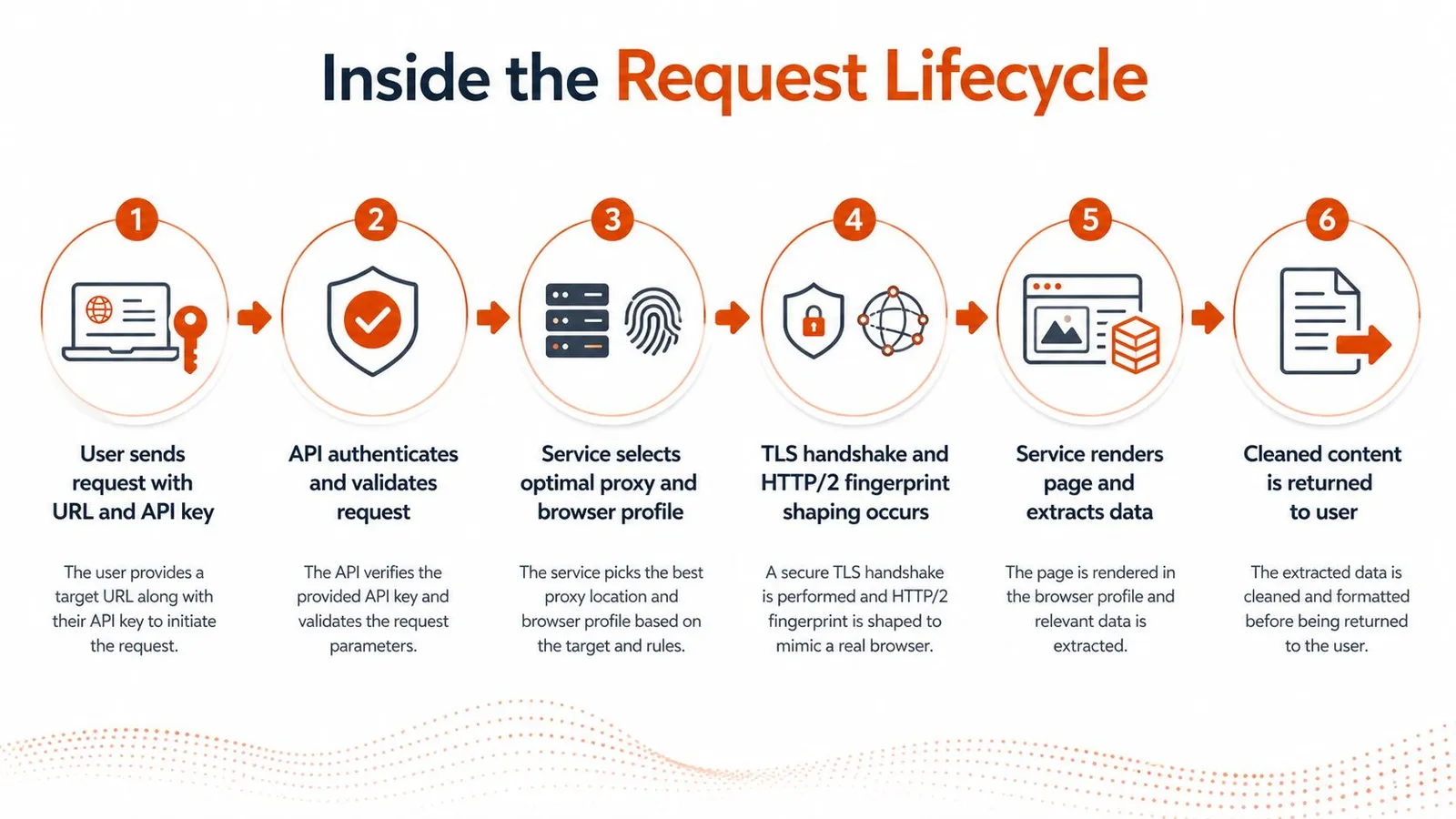
When you call a scraper API, the first thing that happens isn't “download the page.” It's a series of checks that decide whether the request will look believable enough to get a response at all. That includes request validation, TLS negotiation, HTTP fingerprint shaping, and the choice of which network path to use.
From handshake to browser state
The TLS and HTTP/2 layer matters because a site can reject traffic before HTML ever comes back. In practice, the service has to keep the connection pattern coherent, then select a proxy profile that fits the target. That's one reason ScraperAPI's documentation talks about a proxy endpoint alongside its main request paths ScraperAPI documentation.
Once the request is accepted, the provider decides whether the page can be pulled directly or needs a browser. For JavaScript-heavy sites, that browser step is the difference between an empty scaffold and a page with the content loaded into the DOM. ScraperAPI says it can do this without the caller running browsers or CAPTCHA logic locally ScraperAPI, which is exactly the burden most raw HTTP workflows eventually inherit.
A direct HTTP approach gives you control, but it also gives you every failure mode. Puppeteer gives you rendering power, but now you own process management, browser updates, fingerprint drift, and retry policy. A scraper API removes those chores from your app, though it also removes some visibility into what the browser is doing internally.
The important trade-off is not control versus convenience. It's whether you want to maintain browser infrastructure or consume its output as a managed service.
What gets cleaned before the response returns
The final stage is content shaping. That can mean stripping boilerplate, converting to structured JSON, or returning content in a more LLM-friendly form. If the downstream consumer is a model, the service is doing more than extraction, it's reducing prompt bloat and preserving signal.
That distinction is why hidden endpoints matter too. A neutral technical guide on scraping hidden APIs notes that developers often inspect Network and XHR traffic, copy requests as cURL, and pull dynamic tokens from scripts when the site's real data lives behind internal JSON endpoints. Sometimes the browser is just a wrapper around an API, and the cleanest extraction path is to skip the DOM entirely.
The caller still owns the business logic after the response arrives. The API won't decide how to normalize fields, deduplicate records, or rank sources. What it does is remove the lowest-level browser pain so your code can focus on interpretation instead of transport.
Features That Matter in 2026
By 2026, the important question isn't whether a scraper API can hit a page. Most serious providers can do that. The key question is whether the output is shaped for what happens next, especially if that next step is an LLM, a search index, or a structured research pipeline.
Output shape is the first filter
Review coverage in 2026 shows that the category now commonly returns results as JSON, HTML, CSV, XML, or Markdown, with some platforms also supporting large bulk operations and orchestration features industry review coverage. That breadth matters because output format affects your downstream cost. If you feed raw HTML into a model, you're paying for navigation, footers, and duplicated markup you didn't need.
LLM-oriented formats can reduce markup and repeated text. Webclaw supports Markdown and llm output; compare both against the source before treating a smaller prompt as an improvement.
The features that actually change workflow quality
Structured extractors matter when field names need to stay stable. Prompt-based extraction is fine for exploration, but schema-locked JSON is what you want when another service depends on the keys not drifting between runs. The same applies to typed vertical extractors, which are more useful than generic markdown when you're pulling repeatable records from a specific class of pages.
Batching also matters, but mostly because it changes how much orchestration you have to write. Some platforms now support large-scale bulk operations, which is a real advantage when you need to process many URLs in parallel industry review coverage. For AI and research systems, the win isn't just throughput, it's being able to turn a list of pages into a consistent corpus without hand-managed job loops.
For AI pipelines, the features that usually matter most are the ones that reduce context noise, not just the ones that reach harder sites. That includes clean markdown, schema-guided JSON, transcript handling for video content, and output that's easy to validate before it hits a vector store. The cleanup you avoid at extraction time is usually more valuable than any clever downstream parser.
A useful comparison point is the difference between raw HTML output and model-ready context. AI scraper workflows are increasingly judged by how much irrelevant markup they remove before the model sees anything at all.
Checklist cue: If a provider can't give you stable structure, controllable output formats, and a way to batch without writing glue code, it's still a transport tool, not a real data layer.
Real Workflows and Code Patterns
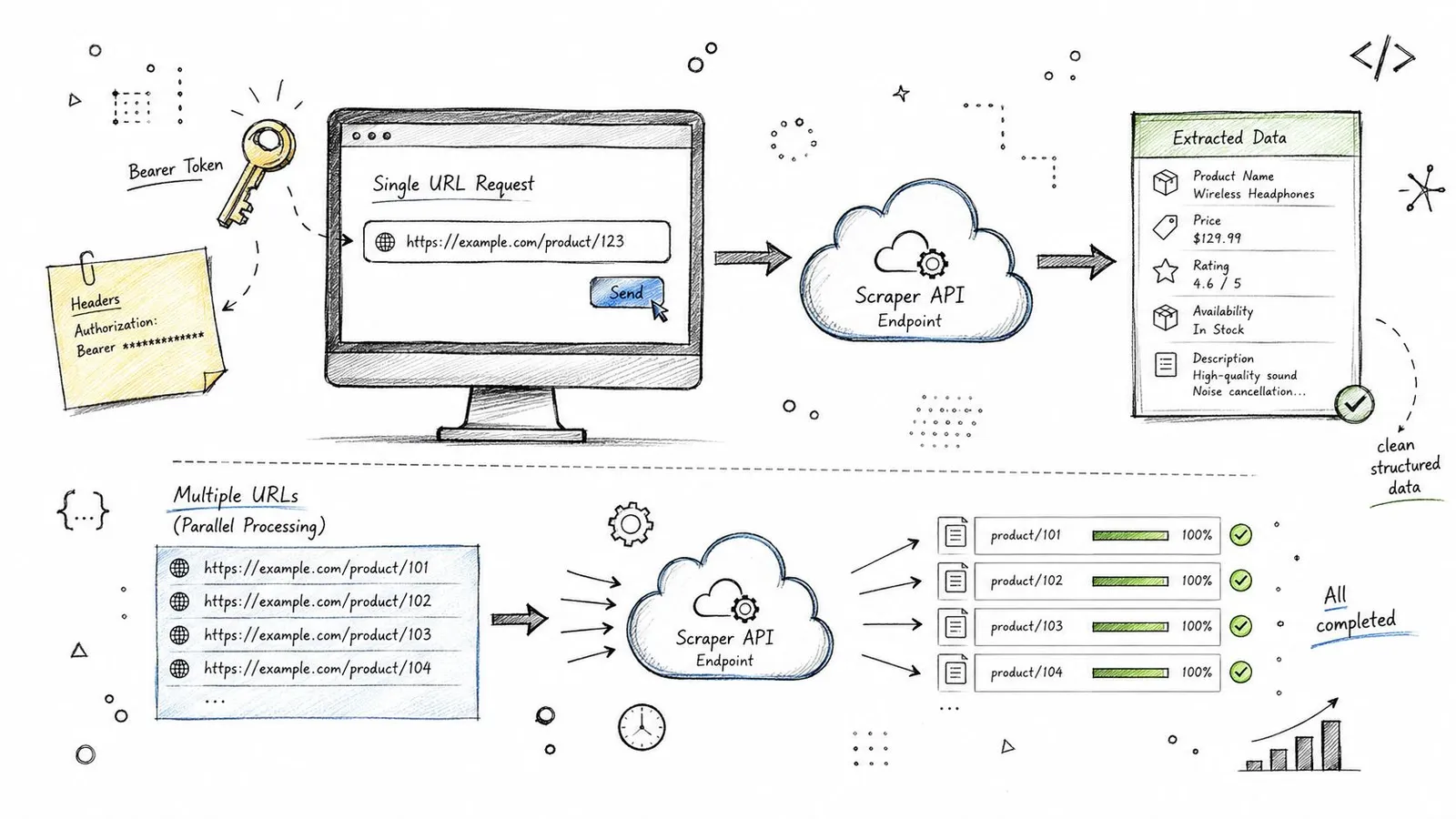
A scraper API becomes easier to understand when you see the shape of the call. The interface is usually small, one URL in, one cleaned response out, but the downstream usage can look very different depending on whether you're feeding a prompt or assembling a report.
Single URL extraction for an LLM pipeline
The first pattern is the simplest one. You request a page in an LLM-friendly format, then pass the cleaned text into your model prompt instead of hand-cleaning HTML first. That keeps the retrieval step and the generation step separate, which is the right boundary for most AI applications.
import requests

resp = requests.post(
    "https://api.example.com/v1/scrape",
    headers={"Authorization": f"Bearer {TOKEN}"},
    json={
        "url": "https://example.com/article",
        "format": "markdown"
    }
)

content = resp.json()["content"]
That shape is enough for a lot of pipelines. The important part is not the client syntax, it's the contract. You're asking the API to do the browser work and return content that's already stripped of the junk your model doesn't need.
Batch research for a cited report
The second pattern is a batch job. You submit a list of URLs, collect structured JSON from each page, and then build a report from the normalized fields. Scraper APIs look less like utilities and more like infrastructure for research workflows.
urls = [
    "https://example.com/page-a",
    "https://example.com/page-b"
]

payload = {
    "urls": urls,
    "format": "json",
    "schema": {
        "title": "string",
        "summary": "string",
        "source": "string"
    }
}
For research or SEO work, that same pattern can be paired with another data source. The SE Ranking API connection guide is a useful companion if you're enriching scraped pages with ranking or keyword data in the same workflow.
If you prefer a guided implementation, the Python scraping tutorial shows the broader call shape in a language most backend teams already use. That's often easier than starting with raw curl examples and then reverse-engineering your own client wrapper.
Compare raw HTML, Markdown, and llm output on your own pages. Record both token counts and retained facts so cost savings do not hide lost information.
Practical rule: Don't optimize scraping only for fetch success. Optimize it for the shape of the payload your model or analyst actually needs.
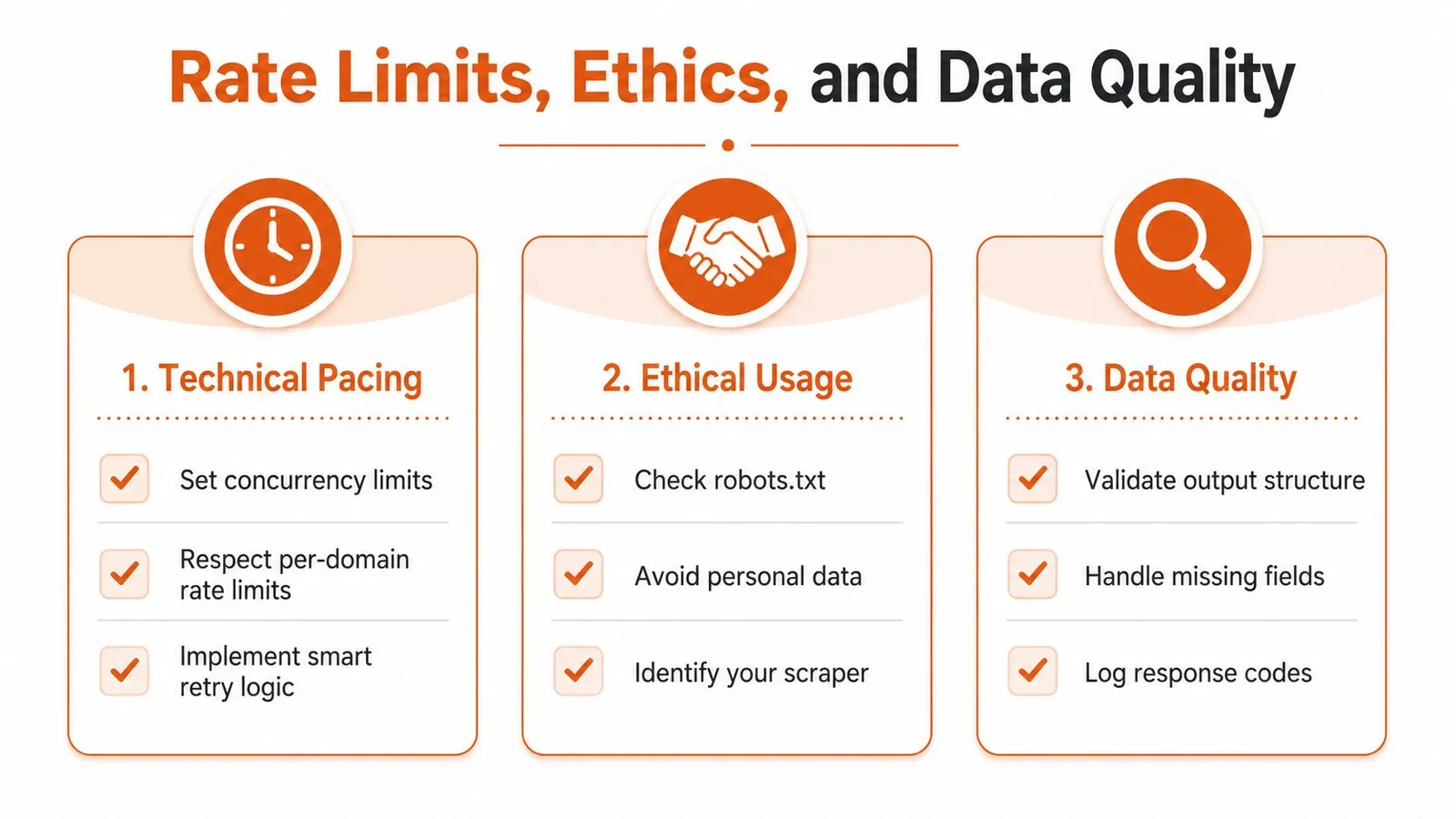
Rate Limits, Ethics, and Data Quality
The biggest production mistake is treating a scraper API like a fire hose. Even if the provider can handle a lot, the target site still has finite capacity, and your own retries can turn a mild slowdown into unnecessary load. Good pacing is part technical discipline, part courtesy.
Pace the traffic before you worry about retries
Start with concurrency limits and then tune around the site's behavior. If a domain is slow or unstable, aggressive retries usually make things worse, not better, because they amplify the traffic against the same bottleneck. Respecting per-domain limits is the difference between a stable job queue and a self-inflicted outage.
The legal and ethical side is just as real. Robots rules, terms of service, and privacy obligations aren't decoration, they're the guardrails that keep data work from becoming a compliance problem. If the page contains personal data, treat it like a regulated asset, not a free-for-all.
Clean extraction beats cleanup later
Data quality is where a lot of teams lose time. If the extraction step returns inconsistent field names, missing values, or noisy boilerplate, the cleanup cost just moves downstream into parsers, vector stores, or labeling tools. That's why schema validation matters so much, it catches bad structure before it contaminates the rest of the pipeline.
Use structured extractors where you can. They reduce the amount of guesswork your code has to do, and they make it easier to log what happened when a page doesn't return what you expected. Missing fields, malformed JSON, and odd response codes are all easier to handle when the shape is predictable.
Practical rule: Fix bad data as close to the source as possible. Every cleanup step you defer makes the next stage more brittle.
For teams that want a managed surface with AI-oriented extraction and clean context, Webclaw is one option in the stack, but the operating discipline stays the same no matter who hosts the API. The tool can help, but the policy decisions still belong to the team running the pipeline.
Choosing a Provider Without Regret
A good scraper API choice usually comes down to five checks. First, ask what it returns by default, because output format is the first thing your downstream stack will feel. Second, test it on JavaScript-heavy and bot-protected pages, not just friendly URLs.
A provider checklist that maps to real work
Third, look at SDK coverage and integrations. A provider that ships a usable Python or TypeScript client is easier to put into production than one that only offers bare REST calls, especially if your team is wiring it into agents or automated research tools. Fourth, check pricing and concurrency limits together, because a cheap API with restrictive throughput can be more expensive in practice.
Fifth, ask whether you can bring your own proxies or target specific geographies. That matters for localization, regional SERPs, and any workflow where the page seen in one country isn't the same page seen elsewhere. If the provider doesn't expose that control, you may end up rebuilding it outside the service anyway.
| Criterion | What to look for | Why it matters |
|---|---|---|
| Output format and LLM readiness | Markdown, JSON, or other clean outputs that remove boilerplate | Reduces token waste and cleanup work |
| Hard-site reliability | JavaScript rendering, anti-bot handling, and stable retries | Determines whether the service works on real targets |
| SDK and integration coverage | Official clients, webhook support, or MCP compatibility | Lowers integration time for product and agent workflows |
| Pricing and concurrency model | Predictable billing and enough throughput for your batch size | Keeps operations and budgeting sane |
| Proxy control and geo-targeting | Bring-your-own proxies or regional routing | Needed for localization and scale |
For AI-first teams, Webclaw-style APIs are a strong fit when the workflow is retrieval, agent input, or research summarization, because the output is designed to be consumed by a model rather than cleaned by hand. For general data-pipeline teams, the trade-off may be different, so compare output shape and operational control before you compare price.
If you're narrowing providers now, the best AI web scraper guide is a useful next read because it frames the choice around downstream use, not just fetch success.
If you're building retrieval pipelines, agents, or research tools that need cleaner inputs than raw HTML, test a URL in the demo or open the API docs. Webclaw returns model-friendly context, structured JSON, and other extraction formats through one API.