
URL Extractor Guide: How to Pull Clean Data from Any Page
Your product team needs competitor pricing pages in a RAG index before tomorrow morning. The first script looks harmless: call requests.get(), parse the returned HTML, and pass the text downstream. Then the output arrives as an almost empty application shell, a consent banner, navigation links, or a page that works in a browser but contains none of the product data you need.
That failure is normal in 2026. A production URL extractor isn't just an HTTP client with an HTML parser attached. It has to reach the page, render client-side content, identify the fields that matter, and return compact, traceable data that another system can use without wasting context on menus and boilerplate.
What a URL Extractor Actually Does in 2026
The modern extraction job has four layers: fetch, render, extract, and shape. Treating them as separate layers makes debugging much easier because each one fails differently.
Fetch handles transport. It resolves the URL, manages redirects, negotiates TLS, sends headers, handles response status, and receives the document. An HTTP client such as httpx is excellent when the server sends the useful content directly. It is fast, inexpensive to operate, and easy to retry. It can't execute the JavaScript that many sites use to load the actual page.
Render runs that JavaScript and waits for the page to become useful. A browser automation layer may need to wait for a product card, a price element, or an API response rather than just sleeping for an arbitrary period. Rendering also introduces browser startup, memory, timing, session, and fingerprinting concerns.
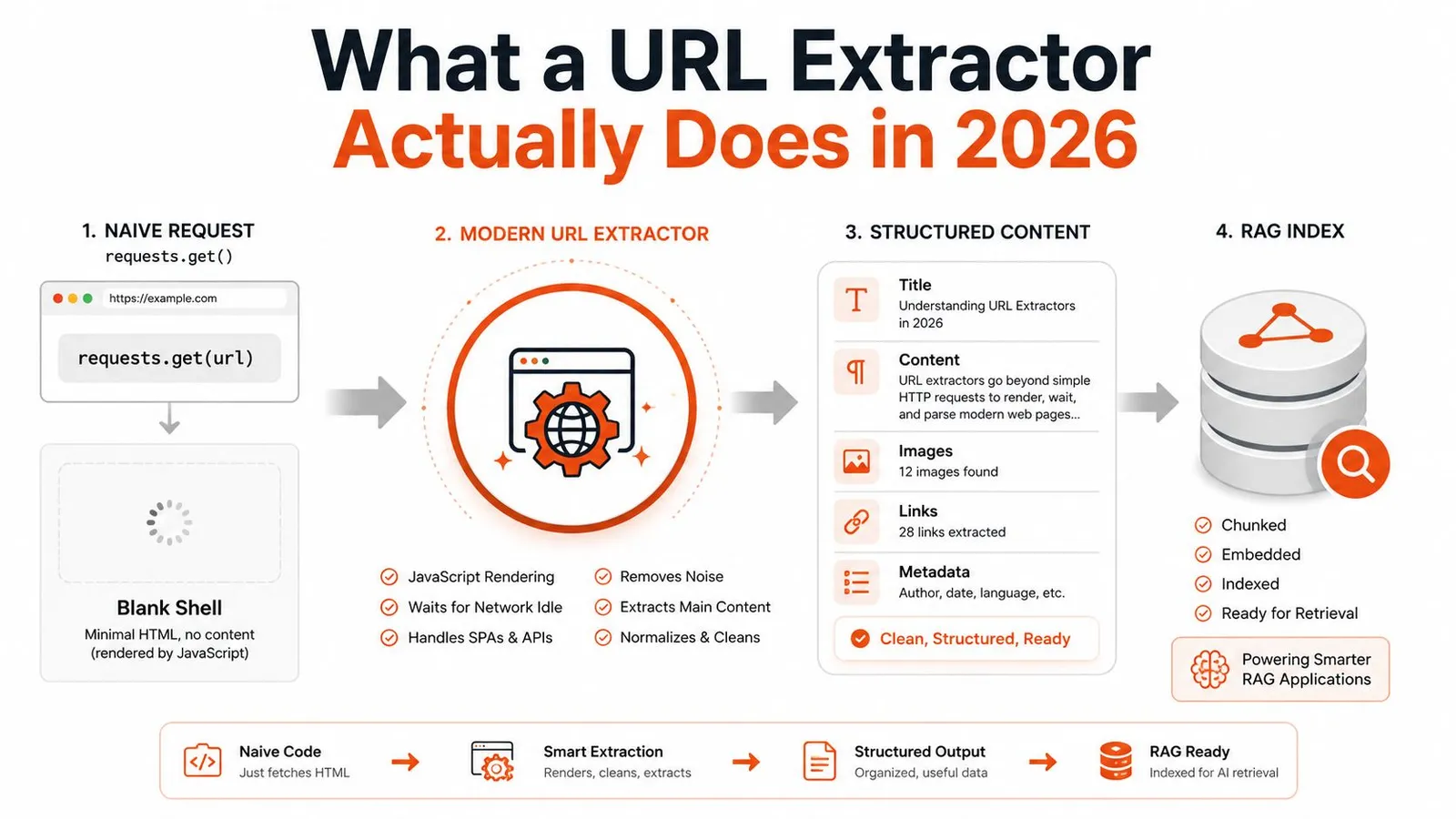
Extract turns the rendered document into meaning. That might mean main-article text, links, tables, prices, author data, or a typed record that matches a JSON schema. A DOM parser can select stable elements, but it won't rescue a selector that breaks after a redesign. Schema-aware extraction gives you a contract to validate, while LLM-based extraction can handle pages where markup carries little semantic consistency.
Shape prepares the result for its consumer. Raw HTML is useful for forensic debugging, not as a default input to a retrieval system. Clean markdown, reader-style text, or structured JSON preserves the useful content while dropping repeated navigation, cookie notices, and layout noise. A practical URL-to-text extraction workflow is usually the right starting point when the downstream task is search, summarization, or question answering.
Practical rule: If you can't say which layer failed, your extractor isn't observable enough for production.
The distinction matters because the web's addressing model is old, while the pages behind those addresses are not. RFC 1738 was published in December 1994 and defined the syntax and semantics of Uniform Resource Locators. Today, commercial extraction systems crawl public pages, parse content, and deliver structured datasets or live feeds for analytics and AI workloads.
The underlying market reflects that shift. One 2026 market estimate places web scraping at USD 1.34 billion in 2025, USD 1.56 billion in 2026, and USD 3.49 billion by 2031, with a 17.39% CAGR over 2026 to 2031, while another estimates about USD 0.99 billion in 2025 and USD 2.28 billion by 2030, with an 18.2% CAGR. These estimates differ, but both point to durable demand for systems that turn changing, dynamic pages into usable data. (Market estimates and methodology)
Choosing the Right Extraction Layer for the Job
The right layer depends less on the language your team uses than on the behavior of the sites you need to reach. An HTTP fetcher is the correct tool for a static documentation site. It becomes the wrong tool when the server returns a shell and the browser fills the page later.
| Dimension | HTTP Fetch | Headless Browser | Managed API |
|---|---|---|---|
| JavaScript-heavy pages | Weak unless an underlying endpoint is available | Strong, with browser execution | Strong when rendering is supported |
| Latency | Usually lowest | Higher because a browser must start and execute | Variable, with infrastructure abstracted |
| Infrastructure | Simple client and retry logic | Browser runtime, pooling, timeouts, sessions | Provider integration, quotas, and monitoring |
| Anti-bot handling | Limited | Better, but still requires proxy and fingerprint work | Often includes proxy and browser options |
| Output readiness | Usually raw HTML or custom parser output | DOM or custom extraction output | Can include cleaned text and schema-shaped data |
| Operational burden | Low | High | Lower for teams that accept provider dependency |
| Best fit | Static, predictable targets | Controlled browser workflows | Mixed targets and production-scale extraction |
A useful internal workload model is a batch of 50,000 pages per month, with 30% requiring JavaScript rendering. The exact price depends on the provider, browser configuration, proxy class, retry policy, and page complexity, so there isn't a responsible universal breakeven figure. The engineering trade-off is clearer: running browsers for every page wastes resources, but maintaining a browser fleet and anti-bot routing for the rendered minority can cost more in engineering time than the request volume suggests.
Use a layered router rather than forcing every URL through one mechanism:
- Start with HTTP for pages that return complete content and have stable response behavior.
- Escalate to a browser when a selector is missing from the initial response but appears after hydration.
- Escalate to a managed endpoint when rendering, proxy selection, session persistence, and schema extraction are all recurring requirements.
- Keep a fallback path for pages whose public APIs, feeds, or embedded JSON are more reliable than visual rendering.
The web crawler tool comparison is useful for mapping those choices to crawl depth, concurrency, and URL discovery requirements.
My decision rule is blunt. If fewer than 5% of targets need rendering and you control the crawl cadence, stay with HTTP and add targeted escalation. If rendering, fingerprinting, or schema extraction dominates the workload, a managed extractor is often the cleaner operational choice, even when its per-page charge looks higher than a raw request.
A Working URL Extractor Pipeline in Python and JavaScript
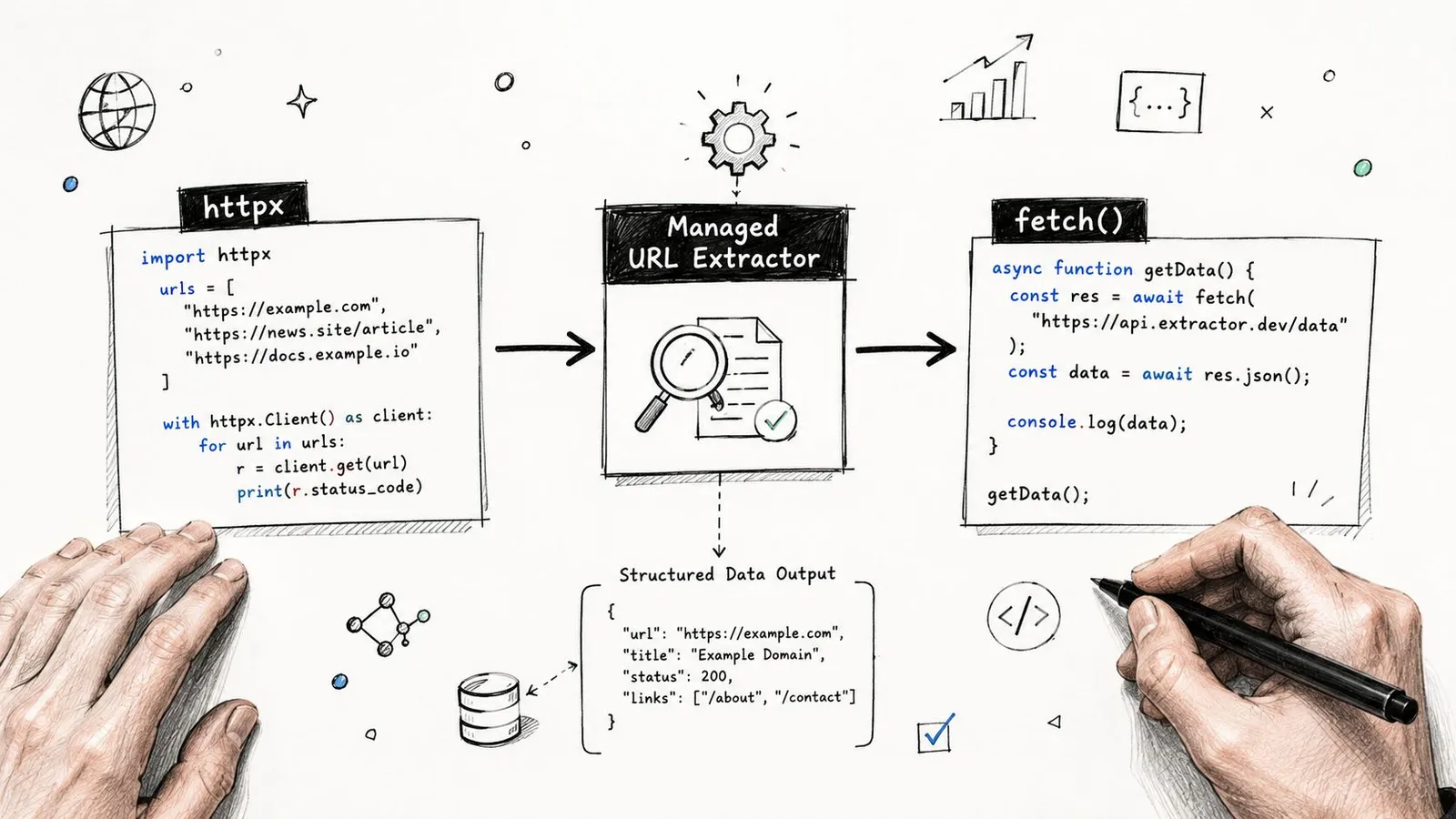
A useful example should show the boundary between your application and the extractor, not pretend that a single parser solves every page. The following pattern uses a generic managed extraction endpoint, with the endpoint and authentication values left configurable for your provider.
In Python, keep the request payload explicit. render controls browser execution, wait_for prevents extraction before the page has hydrated, proxy_region makes geographic behavior deliberate, and schema defines what your application expects back.
import os
import httpx

payload = {
    "url": "https://example.com/products/widget",
    "render": True,
    "wait_for": ".product-price",
    "proxy_region": "us",
    "output_format": "markdown",
    "schema": {
        "name": "string",
        "price": "string",
        "currency": "string",
        "availability": "string"
    },
    "max_tokens": 5000
}

response = httpx.post(
    "https://api.example-extractor.com/v1/scrape",
    headers={"Authorization": f"Bearer {os.environ['EXTRACTOR_API_KEY']}"},
    json=payload,
    timeout=60
)
response.raise_for_status()
record = response.json()
print(record)
The important difference isn't the syntax. A raw fetch may return a document whose useful content exists only inside scripts or after a client-side request. The cleaned response should instead contain a small, typed record, alongside metadata such as the final URL, extraction status, and content hash.
The same request in Node can use the native fetch API:
const payload = {
  url: "https://example.com/products/widget",
  render: true,
  wait_for: ".product-price",
  proxy_region: "us",
  output_format: "markdown",
  schema: {
    name: "string",
    price: "string",
    currency: "string",
    availability: "string"
  },
  max_tokens: 5000
};

const response = await fetch("https://api.example-extractor.com/v1/scrape", {
  method: "POST",
  headers: {
    "Authorization": `Bearer ${process.env.EXTRACTOR_API_KEY}`,
    "Content-Type": "application/json"
  },
  body: JSON.stringify(payload)
});

if (!response.ok) {
  throw new Error(`Extraction failed with ${response.status}`);
}

const record = await response.json();
console.log(record);
A shell request is useful for reproducing a production failure without involving your application:
curl -X POST "https://api.example-extractor.com/v1/scrape" \
  -H "Authorization: Bearer $EXTRACTOR_API_KEY" \
  -H "Content-Type: application/json" \
  -d '{"url":"https://example.com/products/widget","render":true,"output_format":"markdown"}'
Add retry handling around the network boundary, not inside your parser. Cache successful responses by normalized URL and extraction configuration, then log request ID, status, render mode, elapsed time, final URL, and schema validation result. For a practical implementation path in Python, the Python scraping tutorial provides useful context, but production code still needs domain-specific tests and failure handling.
Crawling, Batching, and Structured Extraction Patterns
Single-page extraction becomes a crawler when you add a URL frontier, persistence, and rules for deciding what to fetch next. Start with discovery. Check robots.txt for sitemap declarations, fall back to a conventional sitemap location, parse XML and compressed sitemap responses, and separate child sitemap URLs from page URLs. Normalize entities, remove fragments, resolve relative links, and deduplicate before anything enters the queue.
A frontier needs an explicit policy. Breadth-first crawling is useful when you want broad coverage near the starting domain. Depth-first crawling follows a path and can be appropriate for a focused section, but it can also spend the entire run inside one branch. In both cases, enforce an allowlist, depth cap, content-type checks, and a robots policy that matches your legal and operational requirements.
Consider weekly competitor pricing monitoring. The input is a set of product URLs discovered from sitemaps and known category pages. Each URL should become a typed record containing the product identity, displayed price, currency, availability, source URL, extraction timestamp, and a schema version. Stable selectors can work for a controlled site, but a schema extractor is safer when several competitors use unrelated templates.
Batching should protect both sides of the connection. Use asynchronous concurrency with a bounded worker pool, classify failures, and retry only transient errors. A timeout, a blocked response, and a validation failure aren't the same event, so they shouldn't share one retry policy.
For a support-content RAG corpus, the pipeline looks different. Discover article URLs, extract title, headings, body, breadcrumbs, product area, and update information, then persist each URL as a typed document before chunking. Store the original response reference and content hash so a later crawl can identify unchanged material without re-embedding it.
A crawler should produce records, not a pile of successful HTTP responses.
The WCXB open benchmark contains 2,008 human-reviewed pages across 1,613 domains, covering 7 labeled page types and baseline results from 14 extraction systems. Its practical lesson is more important than any individual score: test across mixed layouts. Article-only tests hide failures on navigation-heavy, media-heavy, and template-shifted pages.
You can also use CSS selectors and XPath for fields with stable markup, but don't make them your only extraction method. The Trafilatura evaluation covers 990 documents with 2,951 text segments and 2,966 boilerplate segments. It reports an F-score of 0.663 for html2text 2025.4.15 and 0.690 for beautifulsoup4 4.15.0, while raw HTML scored 0.667, showing why DOM parsing alone doesn't guarantee good content selection.
Handling Bot Protection and Proxy Networks
Protected targets don't fail for one reason. A site may evaluate IP reputation, TLS characteristics, browser fingerprints, cookie state, request cadence, and interaction behavior together. Changing the IP while sending an identical suspicious client profile won't reliably fix the request.
Use a routing decision rather than a proxy shopping list:
| Target Defense | Proxy Type | Render Mode | Cost per 1k Pages | When to Use |
|---|---|---|---|---|
| Public static content | Datacenter or direct connection | HTTP | Provider-dependent | Stable pages with complete server responses |
| Basic rate limits or regional variation | ISP or residential | HTTP or selective browser | Provider-dependent | Geo-specific content and moderate request controls |
| Session-bound protection | Residential with sticky sessions | Browser | Provider-dependent | Login flows, carts, and multi-request sessions |
| Browser and fingerprint checks | Managed residential or ISP network | Browser-rendered | Provider-dependent | Targets that reject simple clients |
| Persistent challenge pages | Managed endpoint with provider routing | Browser with selector waits | Provider-dependent | Long-tail pages where maintenance cost outweighs custom control |
Residential proxies can help when a site treats datacenter ranges differently from household networks. Mobile networks may matter for targets that apply stronger controls to fixed-line traffic, but they also bring less predictable latency and session behavior. Sticky sessions are essential when cookies or server-side state must survive across requests. Per-request rotation is counterproductive if the target expects one coherent browser session.
Backoff needs jitter, and retries need a budget. Don't retry a deterministic schema failure as if it were a network timeout. Record the response class, preserve the same browser and header profile across a retry sequence, and stop escalating after the route has consumed its allowed attempts.
The legal boundary matters as much as the technical one. Review the site's terms, robots directives, privacy obligations, copyright constraints, and applicable law. A managed service can reduce operational friction, but it doesn't transfer responsibility for what you collect or how you use it.
For a deeper treatment of routing choices, see this web scraping proxy guide. The practical tree is simple: use a cheap path for unprotected pages, move to a residential pool for moderate defenses, and hand stubborn browser-dependent targets to a managed browser endpoint rather than building an endless bypass project.
Output Formats and Optimizing for LLM Pipelines
Choose the output format based on the consumer. Plain text is easy to search but loses hierarchy. Cleaned HTML preserves some structure while retaining markup noise. Markdown is a strong default for articles and documentation because headings, lists, links, and tables remain readable to both humans and models.
Structured JSON is better for fields such as prices, dates, identifiers, and availability. It gives validation something concrete to inspect, but it can become awkward when the source contains long narrative content. An LLM-optimized reader format removes layout repetition and keeps the semantic order without attempting to preserve every visual detail.
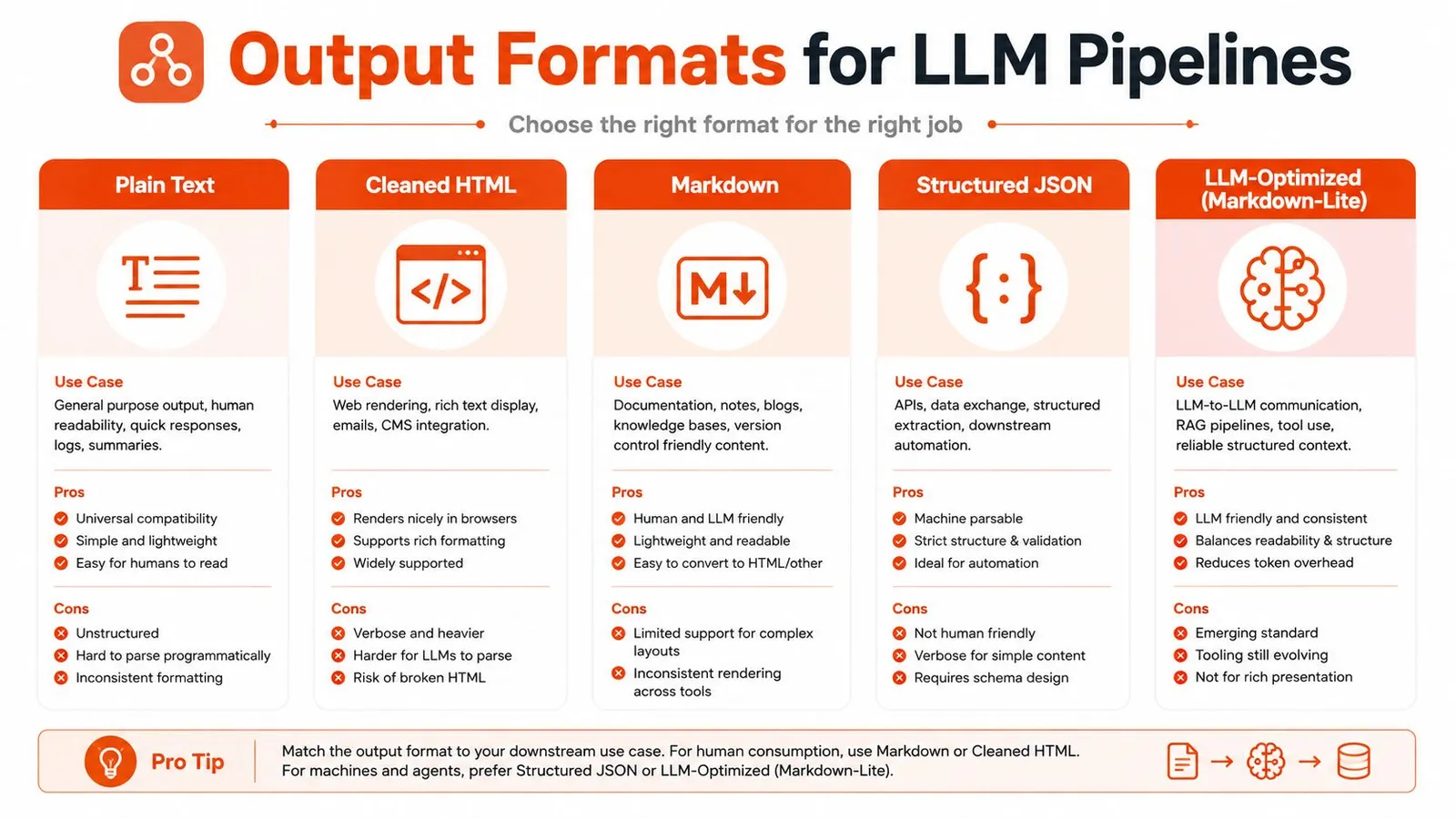
The token difference can determine whether a retrieval pipeline is practical. A raw HTML page with 50,000 tokens can collapse to roughly 4,000 to 6,000 tokens as reader-mode markdown, an 8x to 10x compression described in the extraction brief. That figure isn't a promise for every page, but it illustrates why stripping navigation, advertisements, cookie banners, duplicate links, and styling noise should happen before embedding or prompting. (AI-oriented extraction coverage)
Wrap every extracted payload in a metadata envelope:
- Source identity: Store the requested URL and final URL after redirects.
- Retrieval context: Record
fetched_at, locale, extraction mode, and schema version. - Deduplication: Keep a content hash so unchanged content doesn't create duplicate embeddings.
- Traceability: Preserve section headings, source links, and the extraction request identifier.
- Validation: Reject or quarantine records that don't satisfy required fields.
Chunk by meaning, not by arbitrary character count. Paragraph chunks work for short answers, section chunks preserve documentation context, and sliding windows can protect continuity when a relevant statement crosses a boundary. Keep provenance on every chunk so a generated answer can point back to its source document and section.
LangChain and LlamaIndex can consume markdown documents or typed JSON, while agent tool loops benefit from compact responses with explicit status and provenance fields. Don't pass a giant extraction result directly into an agent. Give the agent the smallest useful representation, expose a way to request more context, and make failed extraction distinguishable from an empty page.
The CSV versus JSON comparison is helpful when deciding whether your downstream system needs tabular export or nested records. For LLM workloads, the default should usually be structured JSON for facts and reader-style markdown for prose, not raw HTML.
Troubleshooting and Best Practices for Production
Production failures become manageable when the response tells the on-call engineer what to inspect next. Keep the symptom, diagnosis, and fix close together.
| Symptom | Likely Cause | Fix |
|---|---|---|
| Empty content on a visible page | JavaScript hydration has not run | Enable rendering and wait for a meaningful selector or response |
| Intermittent 403 responses | IP reputation, fingerprint mismatch, or excessive cadence | Preserve session identity, apply jittered backoff, and route by defense level |
| Fields disappear after a redesign | Selector or page-template drift | Validate schema output and update selectors or schema prompts |
| Context exceeds the model budget | Raw HTML and repeated boilerplate | Request cleaned markdown or reader-mode output before chunking |
| Retrieval returns old answers | Stale cache or unchanged-content logic is wrong | Revalidate with cache metadata, compare hashes, and rebuild affected records |
The deployment checklist should be short enough to use during an incident:
- Cache deliberately: Cache successful content, but revalidate with ETag or equivalent response metadata when available.
- Retry consistently: Keep request headers, session state, and render settings stable across related retries.
- Validate before embedding: Check required fields, content length, language, and obvious challenge-page markers.
- Track unit economics: Monitor cost per 1,000 URLs, retry volume, browser usage, and failure classes.
- Maintain a golden set: Run representative URLs through regression tests after parser, prompt, or provider changes.
- Preserve provenance: Store source URL, retrieval time, schema version, and content hash with every record.
- Alert on quality: A successful HTTP status doesn't prove that the extracted content is correct.
The most dangerous extraction failure is a clean response with the wrong content.
Teams evaluating AI workflows may also find the best AI chat platform updates useful for understanding how model interfaces and tool use are changing. That context matters because URL extraction is becoming an agent capability rather than an isolated batch script. Agentic browsers, smaller on-device models, and MCP-style tool servers are likely to make page retrieval more interactive, but they won't remove the need for routing, validation, caching, and provenance.
The durable architecture remains layered. Fetch only when HTTP is enough, render when the page requires a browser, extract against a schema or meaningful content model, and shape the result for the model that will consume it. In 2026, “pulling data from a URL” means delivering a trustworthy record, not merely downloading a document.
Webclaw provides single-URL extraction that can return clean markdown, plain text, JSON, or LLM-optimized content, with rendering for JavaScript pages and schema-based extraction for typed records. Visit Webclaw to test the workflow on your own difficult URLs, then connect the output to your crawler, RAG index, or agent tool loop.