CSV vs JSON: Which Format to Choose in 2026
You scraped a set of product pages, support docs, or listings. The extraction worked. Now you need to decide what leaves the scraper and enters the rest of your stack.
That choice sounds small until it isn't. Pick CSV and your analyst can open it in Excel immediately, but your app code may spend the next week inferring types and flattening nested fields. Pick JSON and your API layer stays clean, but your spreadsheet handoff gets clumsier. If the data is headed into an LLM, the decision gets even sharper because structure, prompt clarity, and token usage all start to matter.
For many organizations, CSV vs JSON isn't a format debate. It's a downstream reliability decision. The right choice depends less on ideology and more on who consumes the data next, how much structure you need to preserve, and whether you're optimizing for human spreadsheet workflows, application interoperability, or model-ready context.
When to Choose Between CSV and JSON
The most common trigger for this decision is simple. You scraped structured data from a site, and now you need to persist it, move it through a pipeline, or hand it to another tool.
If the output is a flat table such as product name, price, SKU, and URL, CSV is often enough. If the output includes variants, reviews, breadcrumbs, seller info, availability by region, or embedded metadata, JSON usually saves you from a mess later. The mistake isn't choosing one over the other. The mistake is choosing based on habit instead of the next consumer.
A quick rule set works better than a long checklist:
- Choose CSV when the data is naturally tabular, the consumer is Excel, Google Sheets, pandas, Polars, or a bulk import tool, and each row represents one record cleanly.
- Choose JSON when the data has nesting, optional fields, arrays, mixed types, or needs to move between APIs, apps, queues, and LLM workflows without losing meaning.
- Pause before exporting if you're scraping first and cleaning later. The format you choose at extraction time shapes how much cleanup code you carry downstream.
For scheduled crawls and batched jobs, the decision also affects operability. A large flat export that lands in cloud storage nightly is a good CSV candidate. A multi-step enrichment pipeline with transformations, validation, and API reuse usually benefits from JSON from the start. Teams doing batch processing for repeated data jobs learn this quickly. Flat data survives flat pipelines. Real-world web data usually doesn't stay flat for long.
Practical rule: If you need to explain the meaning of multiple columns in a separate document, you're already leaning toward JSON.
Here's the high-level comparison most engineers need early on:
| Dimension | CSV | JSON |
|---|---|---|
| Best for | Flat tabular data | Structured and nested data |
| Human editing | Easy in spreadsheets | Easier in code editors than spreadsheets |
| Typing | Implicit, often string-first | Explicit for common primitives |
| APIs | Awkward | Native fit |
| LLM context | Good for very regular tables | Better when field meaning must stay clear |
| Data pipelines | Fine for simple ingestion | Better for complex transformations |
| Common failure mode | Type inference and dialect issues | Verbosity and deeper parsing logic |
A Visual Comparison of CSV and JSON
A side-by-side example makes the trade-off obvious faster than any definition.
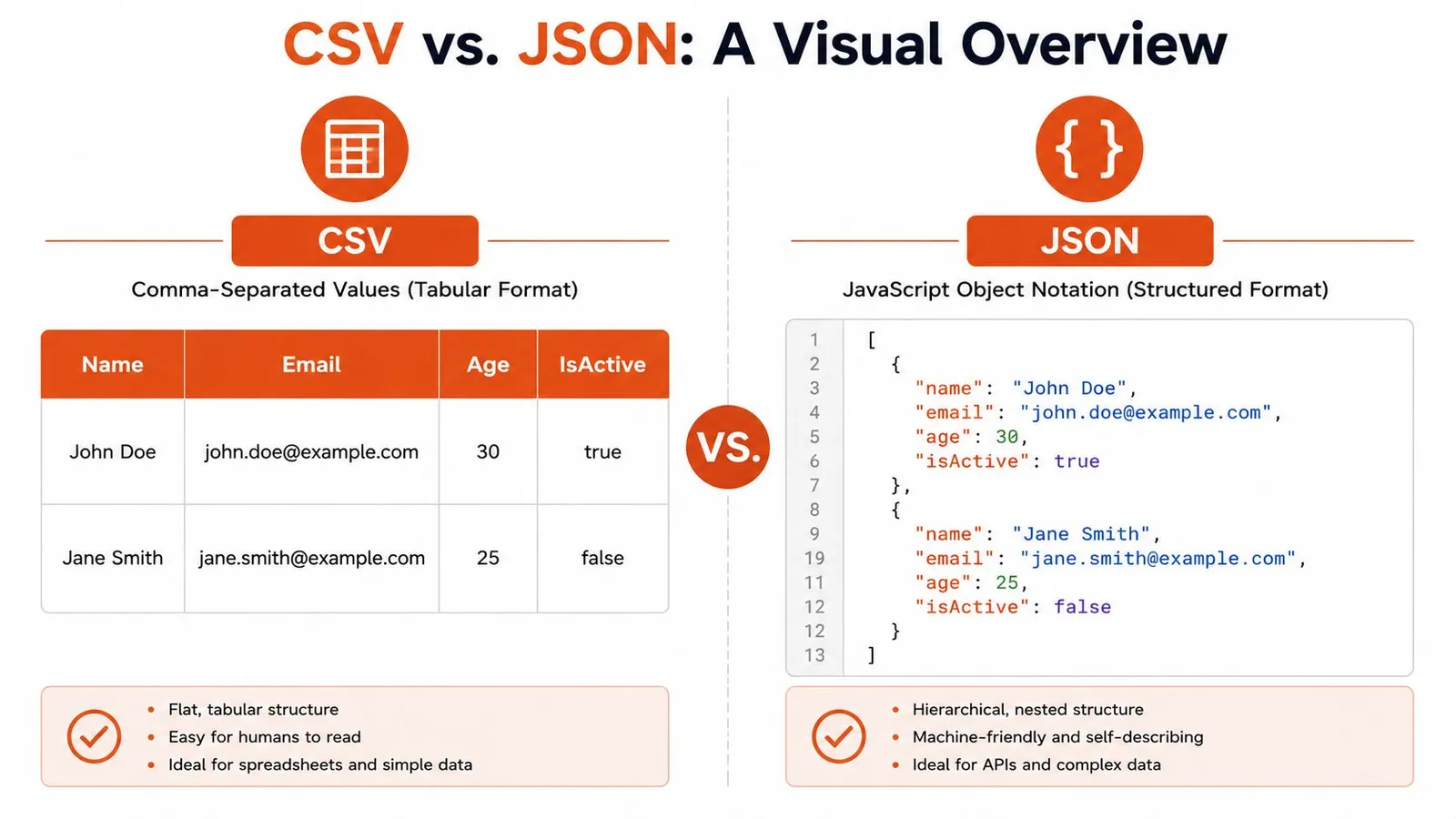
Take a tiny user dataset. In CSV, it looks like a spreadsheet exported as text:
Name,Email,Age,IsActive
John Doe,john.doe@example.com,30,true
Jane Smith,jane.smith@example.com,25,false
In JSON, the same information becomes a list of self-described objects:
[
  {
    "name": "John Doe",
    "email": "john.doe@example.com",
    "age": 30,
    "isActive": true
  },
  {
    "name": "Jane Smith",
    "email": "jane.smith@example.com",
    "age": 25,
    "isActive": false
  }
]
What tabular really means
CSV is row and column data. Meaning comes from header names and column position. That's why it works so well for spreadsheet workflows, bulk import screens, and simple reporting exports.
That simplicity has a cost. CSV doesn't natively say that 30 is a number, true is a boolean, or that one user might have multiple phone numbers. You can represent those ideas, but only through conventions layered on top.
What hierarchical really means
JSON is a tree of objects and arrays. Each field carries its own name, and nested structures stay nested. A user can contain an address object, a list of roles, and an array of recent orders without inventing a flattening scheme.
That extra structure is why developers keep reaching for JSON in app code. The format preserves intent instead of forcing the consumer to reconstruct it.
CSV is great when the table is the truth. JSON is better when the table is only one view of the truth.
The visual difference also hints at the AI-centric angle. A language model can often infer the role of JSON fields directly from keys like name, email, or isActive. With CSV, the model depends more heavily on the prompt or surrounding explanation, especially once headers become less obvious.
Structure Semantics and Data Typing
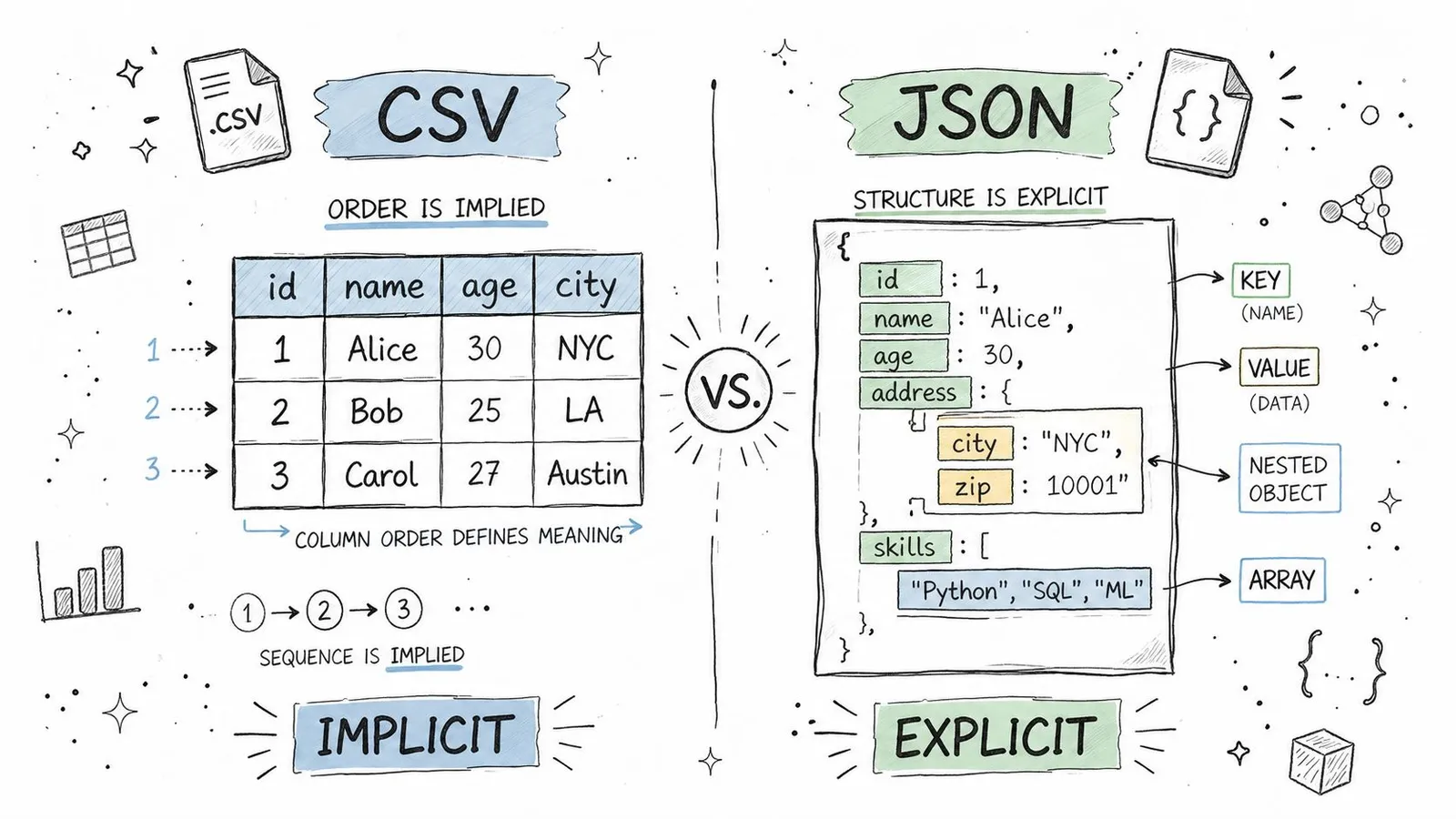
How each format carries meaning
CSV has structure, but it's implicit structure. The third value in a row means whatever the third header says it means. Move a column, drop a header, or export from a tool with different delimiter rules, and consumers can misread the file without any syntax error.
JSON is self-describing. Keys travel with values. If an object contains {"price": 19.99, "inStock": true}, the consumer doesn't need positional assumptions to know what those values represent.
That difference matters in long-lived systems. CSV works best when producer and consumer already agree on the table shape. JSON works better when data crosses service boundaries, teams, or languages.
Why typing bugs show up in CSV pipelines
The biggest practical gap is typing. CSV has no native number, boolean, array, or object semantics. Most parsers read rows as strings first and let you decide what comes next.
That sounds harmless until a pipeline starts making assumptions. ZIP codes lose leading zeroes. Boolean strings vary between true, TRUE, 1, and yes. Empty strings become null in one stage and stay empty in another.
CSV type inference can turn leading-zero identifiers, booleans, and empty values into incorrect types unless the schema is explicit.
The hidden cost of CSV isn't usually file creation. It's the defensive parsing every consumer has to add.
If you're loading JSON in Python, the runtime already preserves common types for you. A straightforward example appears in guides on loading JSON files in Python. With CSV, you have to define that behavior yourself or trust a library's guesses.
What the code actually looks like
CSV consumption usually starts simple:
import csv

with open("users.csv", newline="") as f:
    reader = csv.DictReader(f)
    rows = list(reader)

first = rows[0]
age = int(first["Age"])
is_active = first["IsActive"].lower() == "true"
That code is normal, but notice what's happening. You are doing schema work manually. The parser gave you text. Your application has to recover the intended types.
JSON removes part of that overhead:
import json

with open("users.json") as f:
    users = json.load(f)

first = users[0]
age = first["age"]
is_active = first["isActive"]
In JavaScript the same pattern holds:
const csvRow = { Age: "30", IsActive: "true" };
const age = Number(csvRow.Age);
const isActive = csvRow.IsActive === "true";

const jsonRow = { age: 30, isActive: true };
This doesn't make JSON perfect. You can still get malformed payloads, missing fields, or inconsistent producers. But JSON starts closer to the data model your code wants.
For anything beyond a flat export, explicit structure wins more often than teams expect.
Performance Size and LLM Token Efficiency
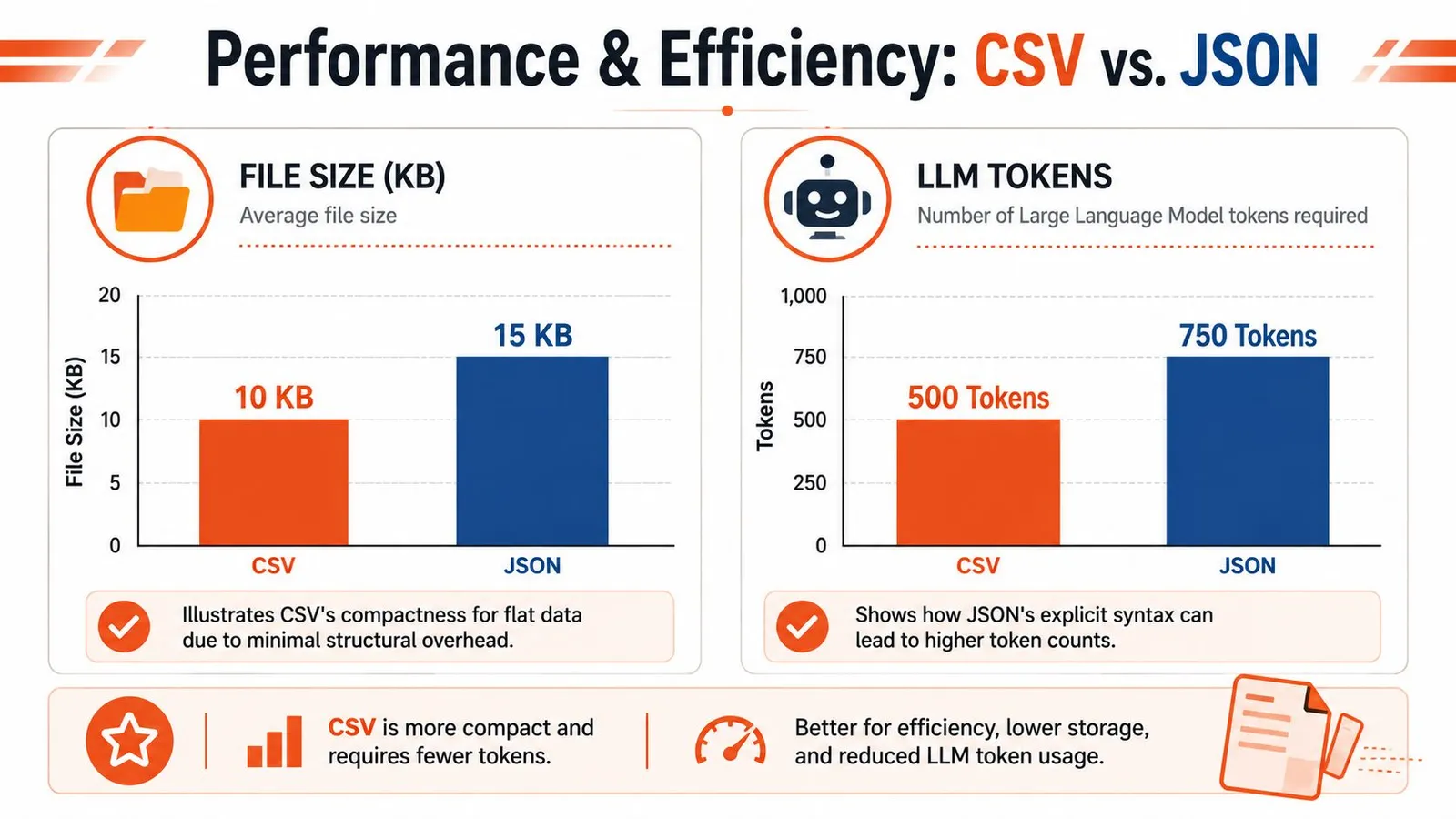
The performance discussion around CSV vs JSON gets sloppy fast because people collapse three different concerns into one: disk size, parsing behavior, and model token cost. They overlap, but they aren't the same problem.
Where CSV stays lean
For flat data, CSV is usually more compact on disk. It doesn't repeat field names for every row, and it doesn't carry braces, brackets, or quoted keys.
A product export with columns like title,price,brand,url often stays very lean in CSV form. If you only need append-friendly records and line-by-line ingestion, CSV is hard to beat for basic storage efficiency.
This matters when you're moving plain tabular exports between systems or archiving raw extracts that nobody needs to query as nested objects.
Why JSON can still be better for model input
The AI use case changes the calculation. Raw token count isn't the only thing that matters. Interpretability per token matters too.
A CSV blob may look shorter, but if the model needs extra prompt text to explain column meanings, special delimiters, missing value rules, or how nested values were flattened, some of that apparent efficiency disappears. JSON often gives the model enough semantic context directly through keys and nesting.
That's why I don't treat file size and LLM efficiency as identical. For a clean, regular table, CSV can be concise and effective. For semi-structured scraped content, JSON often produces more reliable model behavior because the schema is visible in the payload itself.
A lot of teams working on retrieval and enrichment learn this when building RAG pipelines with web data. The best format isn't always the one with fewer characters. It's the one that needs less explanation around it.
Here's a useful mental model:
| Optimization target | Usually better choice |
|---|---|
| Small flat export | CSV |
| Human-readable API payload | JSON |
| Model input with nested fields | JSON |
| Spreadsheet handoff | CSV |
A short walkthrough on the broader trade-off helps here:
Parsing cost depends on access pattern
Parsing performance depends more on access pattern than format tribalism.
- CSV streams cleanly when you want row-by-row processing. That's useful for ingestion jobs that don't need to hold complex structure in memory.
- JSON fits object access better when your code wants nested fields, arrays, and typed values without reconstructing relationships.
- Large JSON documents can become memory-heavy if you load the whole thing at once. In those cases, newline-delimited JSON or chunked processing often works better than one huge array.
- CSV loses time later when every downstream step has to normalize strings into real types.
If your bottleneck is reading rows fast, CSV often helps. If your bottleneck is understanding what each row actually means, JSON usually helps more.
For LLM systems, reliability usually outweighs raw compactness unless the data is clearly tabular.
Common Use Cases in Data Pipelines and Web Scraping
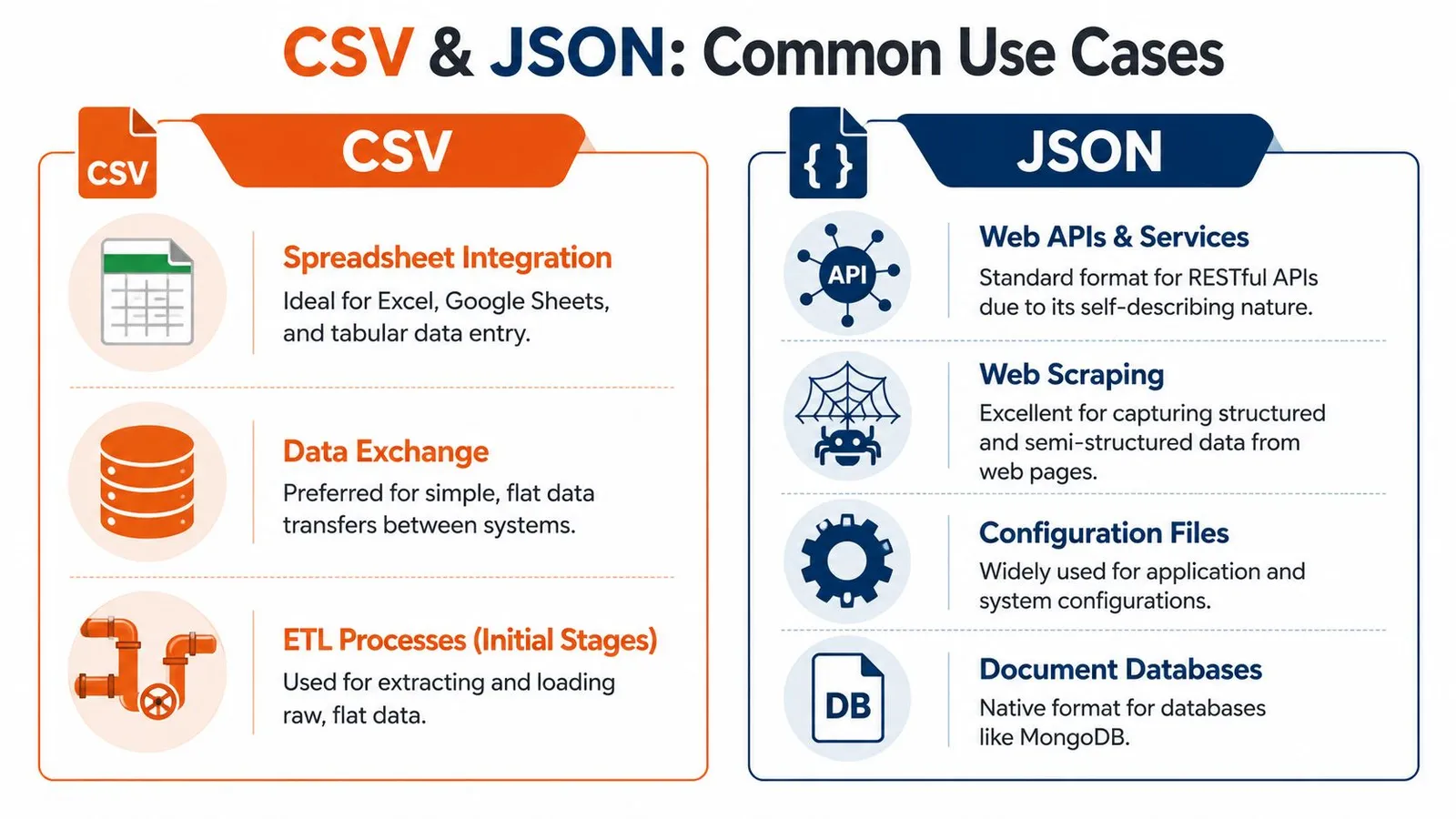
The fastest way to settle CSV vs JSON is to stop asking which format is better in general and ask where the data is going next.
Where CSV is still the practical default
CSV remains the right choice in several very common workflows.
- Spreadsheet operations: If someone needs to filter, edit, or review data in Excel or Google Sheets, CSV keeps the handoff painless.
- Bulk imports and exports: Many databases, CRMs, finance tools, and admin panels still expect row-based uploads.
- Simple feature tables: For basic machine learning prep or analyst workflows, a rectangular dataset is easier to inspect and transform as a table.
- Operational file exchange: Finance and back-office systems still rely on tabular interchange. If you're converting spreadsheet-driven payment data to bank-ready files, tools that streamline SEPA direct debit processing show why CSV and Excel-style inputs still dominate certain business pipelines.
CSV is strongest when each row is one thing and each column is one stable property.
Where JSON is the only sane option
JSON takes over as soon as the data stops being flat.
A scraped product page might contain the base product, a list of variants, multiple images, seller metadata, shipping rules, FAQs, and user reviews. You can flatten that into CSV, but you'll spend the rest of the project inventing separators, duplicating parent rows, or splitting records across multiple files.
JSON is also the natural fit for:
- REST and GraphQL responses
- Configuration exchanged between services
- NoSQL document storage
- Web scraping outputs with optional or nested fields
- App-to-app transport where structure needs to survive intact
When a record contains lists inside it, CSV stops being a format and starts becoming a workaround.
Scraping output should match the consumer
Teams often overcomplicate matters by scraping once, saving one master format, and forcing every downstream consumer to adapt. This approach creates friction for no real benefit.
A better pattern is to match the output to the use case:
- Extract complex page structure into JSON when building apps, APIs, agents, or enrichment pipelines.
- Export a flattened CSV view only for stakeholders or tools that need tables.
- Keep the flattening logic explicit and reversible when possible.
If you're scraping websites for data in production workflows, this split becomes practical quickly. Raw web pages are messy and semi-structured. Your delivery format shouldn't pretend otherwise unless the consumer truly needs a spreadsheet.
JSON preserves optionality. CSV optimizes convenience. Use each where it wins.
A Decision Framework for Choosing Your Format
You don't need a philosophical answer. You need a fast decision that won't create cleanup work next week.
Five questions that settle it quickly
Ask these in order.
-
Is the data nested or hierarchical?
If yes, choose JSON. Variants, arrays, embedded objects, and optional subfields belong there. -
Who consumes it first?
If the next stop is Excel, Google Sheets, or a legacy BI import, CSV is often the shortest path. If the next stop is an API, service, queue, app, or agent tool, JSON is usually the cleaner fit. -
Do types need to be preserved immediately?
If booleans, numbers, arrays, and nulls matter from the start, JSON avoids a whole class of conversion bugs. -
Are you optimizing for the smallest flat export?
For simple row-and-column data, CSV usually has the edge. -
Is an LLM going to read it?
If the model needs field meaning, relationships, or nested context, JSON is usually more dependable than a flattened table.
That last question matters more than many teams expect. Once you're extracting fields directly from pages or documents, it often makes sense to extract structured data from any webpage into a schema-shaped result instead of reverse-engineering meaning from a text table later.
A practical default for modern teams
My default is simple: start with JSON unless spreadsheet interoperability is the top constraint.
That default works because modern systems rarely end at storage. Data gets validated, enriched, merged, indexed, serialized again, and increasingly passed into LLM workflows. JSON holds up better under those transitions because it preserves meaning instead of relying on positional conventions.
Use CSV deliberately, not automatically.
- Choose it for flat business exports.
- Choose it for analyst-friendly tables.
- Choose it when direct spreadsheet compatibility is the indispensable requirement.
For everything else, JSON is usually the safer starting point and the easier long-term format to live with.
Frequently Asked Questions About CSV and JSON
Can CSV store nested data
Not natively. Teams usually work around this by flattening fields, duplicating parent rows, or stuffing JSON strings into a single cell.
That last pattern works technically, but it's often the worst of both worlds. You keep CSV's ambiguity and add JSON parsing inside selected columns. If part of the record is truly nested, store the record as JSON and generate a flat export only when needed.
Is JSON replacing CSV
No. The two formats serve different jobs.
JSON dominates web APIs, structured app data, and machine-to-machine exchange. CSV still owns a lot of spreadsheet workflows, tabular imports, and lightweight data sharing between people and tools. The practical shift isn't replacement. It's that more modern workflows now start with structured data and flatten later.
Which format is better for big data
Usually neither. For large-scale analytics and columnar processing, teams often move to formats designed for that environment, such as Parquet or Avro.
CSV and JSON are still useful at the boundaries. They are interchange formats, debugging formats, and integration formats. They just aren't always the best long-term storage format once volume, schema evolution, and query performance become central concerns.
If you're building with scraped web data and need output that's usable for apps, pipelines, and LLM workflows, Webclaw is worth a look. It can turn pages into clean JSON, markdown, text, or other model-friendly formats, which makes the CSV vs JSON decision much easier because you can start with structured output instead of cleaning raw HTML by hand.