
A Modern Python Scraping Tutorial for 2026
So, you want to get into web scraping with Python. Smart move. It's the go-to language for a reason. At its core, the process is simple: you grab a web page with a library like requests, make sense of the messy HTML with BeautifulSoup, and then pull out the exact data you need.
This guide will walk you through that entire workflow, from setting up your environment to dealing with the tricky stuff like JavaScript-heavy sites and anti-scraping tech.
Why Python for Web Scraping?
This isn't just another "Hello, World" tutorial. We're jumping straight into the practical skills you'll need for real-world projects. Forget theory—we're building a scraper.
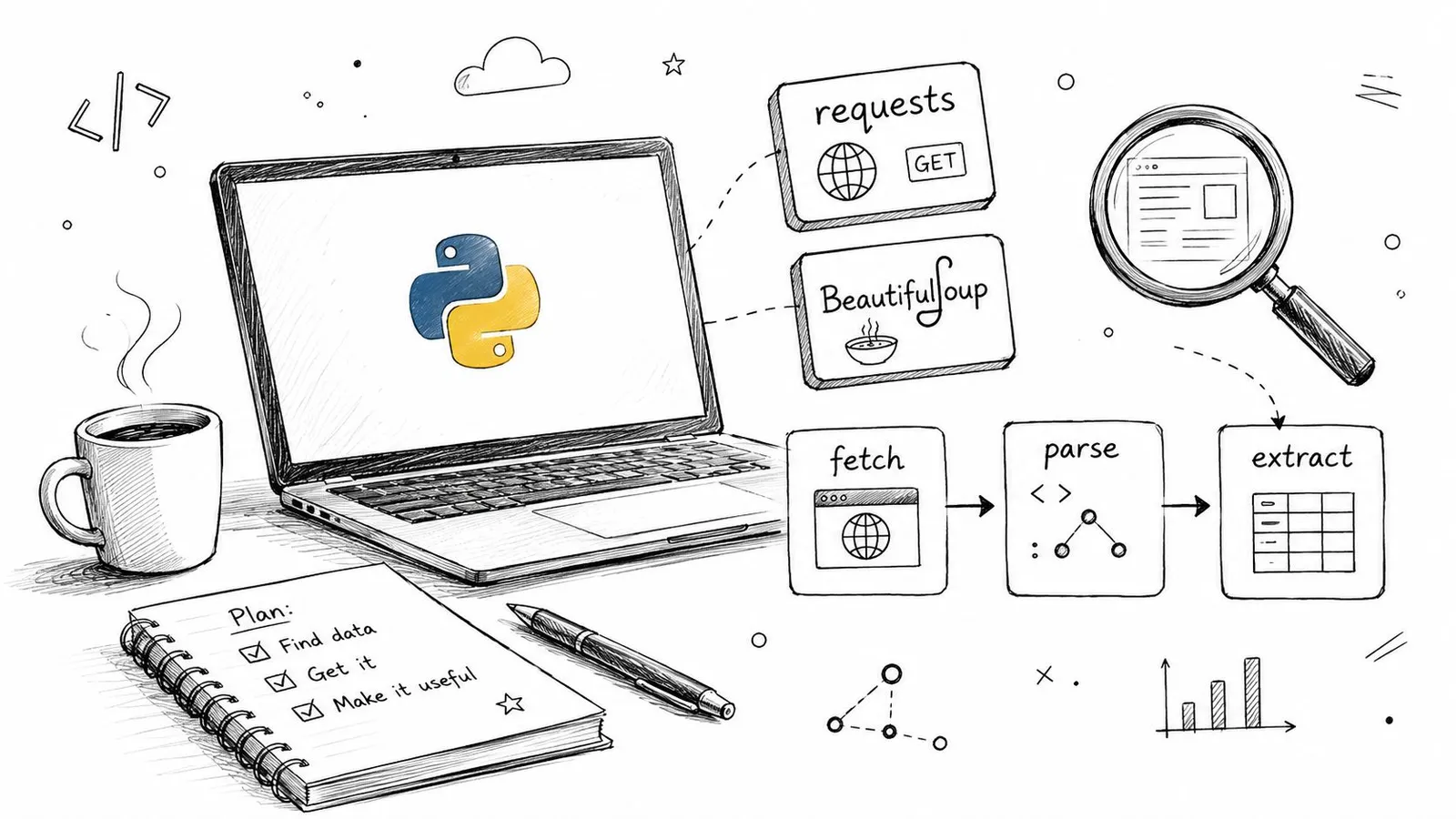
The entire modern scraping workflow in Python revolves around a few key libraries that have become the industry standard. You'll get comfortable with:
- Fetching Content: Using the
requestslibrary to pull down the raw HTML from any URL. This is your first and most fundamental step. - Parsing HTML: Turning that raw HTML into a structured, searchable Python object using
BeautifulSoup. This is where the magic happens. - Extracting Data: Pinpointing the exact information you're after—like product names, prices, or article text—by targeting specific CSS selectors.
Python is widely used for scraping because its ecosystem covers HTTP clients, HTML parsing, browser automation, and data processing.
The core workflow is deceptively simple: fetch, parse, and extract. Mastering these three steps with Python's top libraries gives you a powerful foundation for any data collection project, from simple scripts to complex crawlers.
Before you dive in, it helps to know which tool fits which job. Here's a quick look at the most common libraries and what they're best for.
Choosing Your Python Scraping Library
This table gives you a quick reference for picking the right tool. We'll be starting with requests and BeautifulSoup because they form the foundation for almost everything else.
| Library | Best For | Learning Curve |
|---|---|---|
| Requests + BeautifulSoup | Simple HTML pages, quick scripts, learning the fundamentals. | Low |
| Scrapy | Large-scale crawling, multi-page projects, asynchronous requests. | Medium |
| Selenium / Playwright | JavaScript-heavy sites, interacting with pages (clicks, forms). | High |
| Webclaw API | Production scraping, avoiding blocks, handling JS rendering without managing browsers. | Very Low |
Getting comfortable with the requests and BeautifulSoup combo is the perfect starting point. It gives you a solid base for tackling more advanced challenges later. Once you have the fundamentals down and are ready to build more robust scrapers, you can check out our guide on getting started with a scraping API.
By the end of this tutorial, you'll have a clear roadmap and a practical understanding of why Python is the best tool for pulling data from the web.
Alright, let's get our hands dirty. We'll start with the most common target you'll encounter: the static website. This covers a huge chunk of the web—think simple blogs, basic product pages, or any site where the content you see is baked directly into the initial HTML.
These sites are the perfect training ground for building your core scraping skills.
Your workhorses for this job are two classic Python libraries: requests and BeautifulSoup. The requests library acts like a simple browser; it sends a request to a URL and fetches the raw HTML. Then, BeautifulSoup steps in to parse that messy HTML, turning it into a structured object your Python script can navigate and search.
Finding Your Targets in the HTML
Before you write a single line of extraction code, you need to play detective. This is where your browser’s developer tools are indispensable.
Just right-click on an element you want to grab—a product name, a price, an article title—and hit "Inspect." This pulls up the site's raw HTML, highlighting the exact tag that generates the element you clicked on.
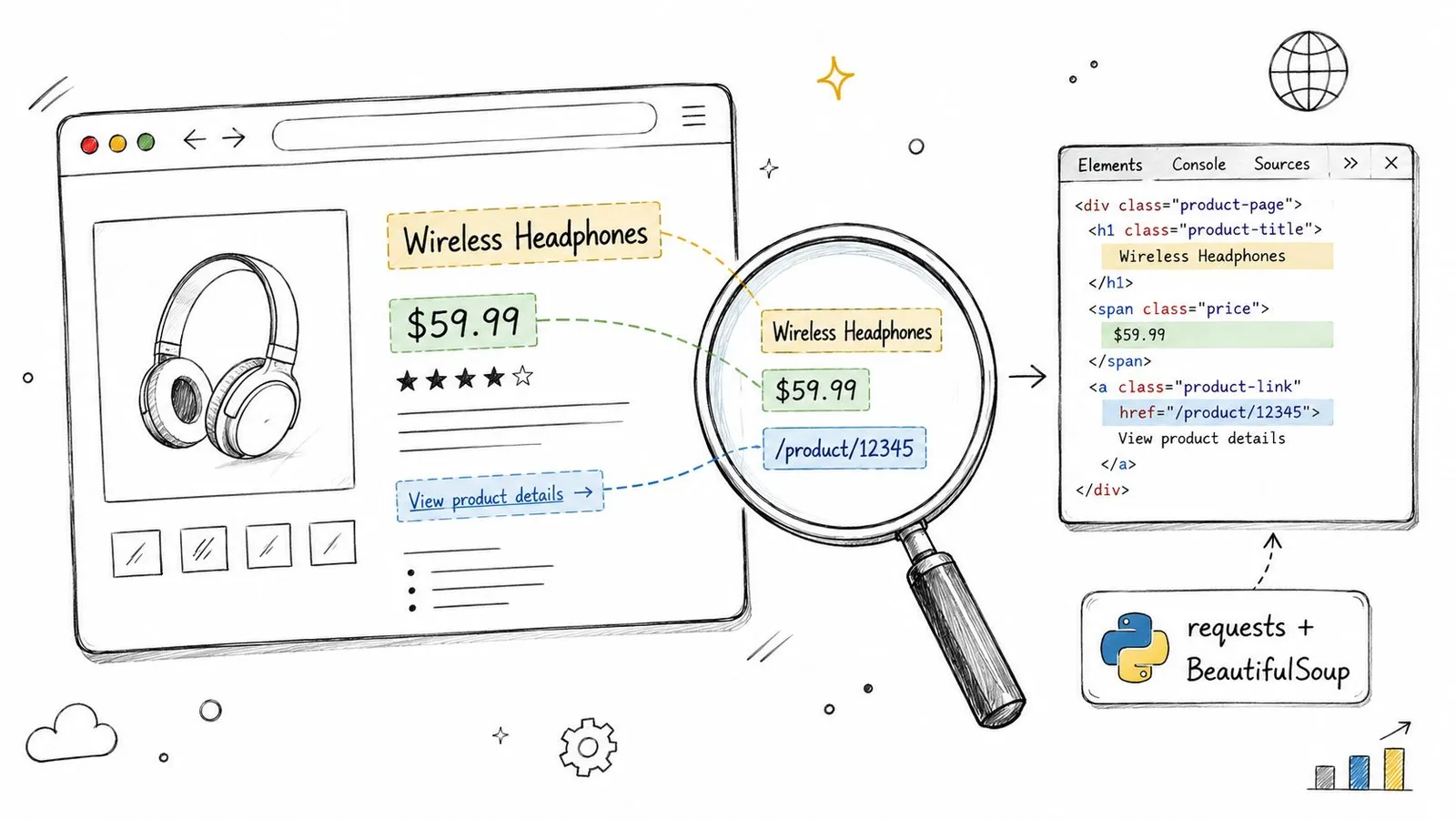
You’re hunting for unique hooks—class names or IDs—that reliably pinpoint the data you need. For instance, you might find that every product title on a page is wrapped in an <h2> tag with a class of product-title. That's your target.
Pro Tip: Don't just inspect one element; inspect several of the same type. If you want every article headline, check three or four. You’ll quickly spot the repeating pattern, like a shared HTML tag and class name. That pattern is the key to grabbing them all in one go.
Extracting and Organizing the Data
Once you have the HTML from requests and know your CSS selectors, BeautifulSoup does the heavy lifting. You can tell it to find every element that matches your selector, then pull out the inner text or an attribute like a link’s href value.
This is the bread and butter of scraping. While CSS selectors are the most common tool for the job, sometimes you need more power for complex documents. You can learn about an alternative in our guide on finding elements that contain specific text using XPath.
The job isn't done once you've pulled the raw text. The final step is cleaning it up. This usually means stripping out extra whitespace, removing currency symbols, and organizing the data into a clean, usable format like a list of Python dictionaries. Now your data is ready for whatever you have planned next, whether that’s saving it to a CSV file or feeding it into another application.
Sooner or later, your requests and BeautifulSoup script will hit a wall. You’ll run it against a page that looks packed with data in your browser, but the script returns a nearly empty HTML file. What gives?
You've just run into a dynamic website. The content isn't in the initial HTML; it's loaded by JavaScript after your browser gets the first response. Simple HTTP clients like requests can't run JavaScript, so they never see the final, data-rich version of the page. This is probably the most common roadblock you'll face today.
To scrape these sites, you need a scraper that thinks like a browser. You need to automate a real browser engine that can load the page, execute the JavaScript, and render the final content. This is where headless browsers come in.
Automating a Real Browser with Playwright
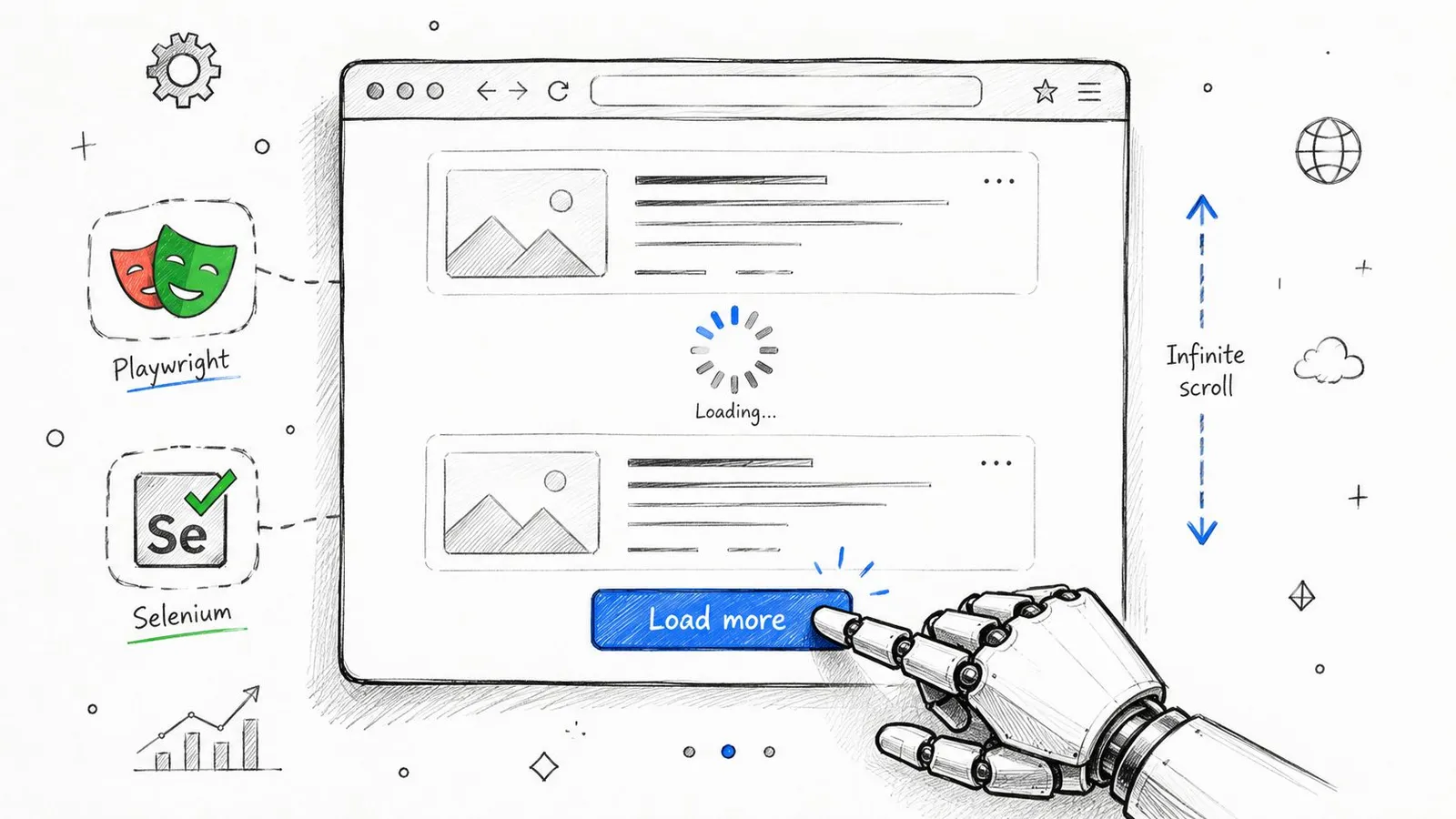
Tools like Playwright or Selenium are built for this. They launch a full browser instance (like Chromium or Firefox) that your script can control from the background. Instead of just fetching a static file, you can now command the browser to act like a person.
Your script can tell the browser to:
- Wait for specific elements to appear before it tries to extract them.
- Click "Load More" buttons or expand accordions to reveal hidden content.
- Scroll to the bottom of the page to trigger infinite-scroll loaders.
This isn't a niche trick anymore; it's an essential part of the modern scraping toolkit. The web has fundamentally shifted. In fact, some studies show that as many as 69% of websites now rely on JavaScript to render their full content. You can read more about this trend and its impact on scraping with Python from Bright Data.
By controlling a browser, your scraper can wait, click, and scroll—accessing data that would be completely invisible to a simpler tool like
requests. This is the key to scraping modern web applications.
Playwright's API is quite intuitive because its commands mirror the actions a human would take. You can write code that clearly instructs the browser on what to do, making even complex interactions scriptable.
Of course, running a full browser adds a layer of complexity and resource overhead to your script. It's a powerful tool, but you need to know when and why to use it. If you're weighing your options, our detailed guide comparing Playwright vs Puppeteer for web scraping can help you decide which tool is the right fit for your project.
As your Python scraping projects get more ambitious, you’re going to get blocked. It’s not a matter of if, but when. Websites actively defend against automated traffic, and navigating those defenses isn't about brute force—it’s about making your scraper behave less like a script and more like a human.
The first wall you'll hit is usually IP-based rate limiting. Send too many requests from one IP address in a short time, and the server will show you the door, either temporarily or for good. The simplest fix is to slow down. Add delays between your requests.
Mimicking Human Behavior
Your first line of defense is to stop your scraper from screaming, "I am a bot!" This all comes down to the request headers you send.
- Rotate User-Agents: The User-Agent is a string that tells the server about your browser and OS. If every request uses the exact same one, it’s a dead giveaway. Cycle through a list of common User-Agents for Chrome, Firefox, and Safari to make your traffic look like it's coming from different people.
- Set Realistic Headers: Real browsers send a whole suite of headers, not just a User-Agent. Look at a real request in your browser's developer tools and you'll see things like
Accept-Language,Accept-Encoding, andReferer. A script sending only a User-Agent is easy to spot. Match the headers a real browser sends.
The goal is to make your scraper's requests indistinguishable from a regular user's. Get this right, and you'll sail past the most basic bot detectors.
Using Proxies for Scale and Access
When managing headers and slowing down isn't enough, you need proxies. A proxy acts as a middleman, routing your requests through different IP addresses. They are essential for getting around IP bans and scraping sites that serve different content based on your location.
Proxies are a deep topic, especially when you start looking at datacenter vs. residential IPs. To get a better handle on how they work, check out our deep dive into how residential backconnect proxies operate.
Finally, smart scraping is ethical scraping. Always start by checking the website's rules. The robots.txt file is a site's way of telling crawlers which pages to avoid. Understanding the guidance from resources like this explainer from Raven SEO on robots.txt is a critical step in scraping responsibly.
When to Use a Scraping API Instead of Building It Yourself
Building your own Python scraper is an essential skill. There's no better way to learn the nuts and bolts of how the web works. But as your project grows, you inevitably hit a wall.
The time you spend managing proxies, reverse-engineering the latest anti-scraping measures, and patching brittle code every time a site changes its layout starts to pile up. This is the point of diminishing returns, where the maintenance overhead begins to swamp the actual goal: getting the data.
This is the tipping point where a dedicated web scraping API becomes a no-brainer. Think of it as outsourcing all the frustrating, failure-prone parts of the job. A good API handles the complex backend infrastructure for you.
- JavaScript rendering can expose content that is absent from the initial HTML response. Confirm that the fields you need are present in the result.
- Hosted fetching can reduce the infrastructure you maintain. Available options and costs depend on the service.
- Error reporting lets you distinguish inaccessible pages from successful extraction. No service guarantees access to every target.
Focus on the Data, Not the Plumbing
When you run into a sophisticated block, understanding the theory behind a proxy server API architecture is one thing. Building and maintaining a robust version yourself is a full-time job. A dedicated service abstracts all that complexity away.
This is especially relevant to AI applications, which need clean, structured information rather than raw HTML.
Webclaw can return Markdown or LLM-oriented output after extraction. Compare the result with the original page: markup removal can save tokens, while aggressive cleanup can also remove useful information.
The question quickly changes from "Can I build this?" to "Should I?" A scraping API frees you up to focus on using the data, not just fighting to get it.
This process is a constant battle against a moving target. The infographic below highlights the core challenges that an API automates away.
Every one of those boxes represents hours of development and maintenance you don't have to do. By offloading these infrastructure tasks, your team can get back to working on your actual product.
To see how this works in practice, you can learn more about the features of a modern web scraping API.
Common Scraping Questions, Answered
Every scraper hits a wall eventually. It's part of the game. Here are the most common roadblocks I see people run into and the practical ways to get past them.
What if the Data Isn’t in the HTML?
This is the classic "it works in my browser but not in my script" problem. You run requests.get(url), print the response, and the data you see in Chrome DevTools is just... gone.
The reason is almost always JavaScript. Your browser runs it; requests does not. The initial HTML you get back is often just a shell, and the actual content gets loaded in a second step by client-side JavaScript.
The fix is to use a tool that can run JavaScript. This means automating a real browser. Your two main options are Playwright and Selenium. They'll spin up a headless Chrome instance, let the JavaScript run, and give you the final, fully-rendered HTML to parse.
Is Web Scraping Legal?
This is a massive grey area, and anyone giving you a simple "yes" or "no" is wrong. Scraping publicly available data is generally considered permissible, but the ethics and legality get complicated fast.
Always start by checking the website's robots.txt file (e.g., example.com/robots.txt) and their Terms of Service. These documents are the site owner's explicit rules. Ignoring them is a bad start.
The core principle is to act like a respectful human, not a DDoS bot. Don't hammer a server with thousands of requests a second. Never scrape personal data, and be very careful with content that's clearly copyrighted. Responsible scraping shouldn't disrupt the website's operation.
How Do I Handle Different Data Formats?
Scraping isn't just about parsing HTML. You'll hit all sorts of data formats in the wild, and you need to know how to handle them.
- JSON Data: A lot of modern websites are just frontends for an API. Open your browser's Network tab, filter by "Fetch/XHR," and watch what happens when you load a page. You'll often find clean, structured JSON being returned from an API endpoint. You can usually call that endpoint directly with
requestsand get perfect data without touching a line of HTML. It's a huge win when you find it. - PDF Documents: You'll often find data locked away in PDFs. The process here is two-step: first, you scrape the page to find the link to the PDF file. Then, you use a library like
PyPDF2orpdfplumberto download and extract the text from the document itself.
Anticipating these issues is what separates a brittle script from a resilient scraper. You learn to check for JavaScript rendering and background API calls before you even write the first line of parsing code.
Webclaw provides an extraction API for supported public pages, with managed rendering and access fallbacks. Results depend on the target page and its restrictions; validate the returned content for your application.