
URL to Text: A Practical Guide for 2026
You have a URL, you need clean text, and the obvious solution looks like a short HTML parsing script. It works on a static page, then fails on the page that matters: the single-page app returns an empty body, a bot challenge replaces the article, or a dashboard produces thousands of navigation and interface strings alongside the useful content.
That failure changes the engineering problem. URL to text isn't a string conversion. It's a reliability pipeline that must reach the page, render the content, identify what matters, and return it in a form your search system or model can use. The output format also affects context quality, token consumption, and downstream behavior.
What URL to Text Actually Means in 2026
A URL is only an address. The useful result is verified, meaningful content retrieved from that address. Between those two points, a production system has to solve three separate problems.
The three layers behind clean extraction
Fetching is the first layer. A basic HTTP client requests the URL and receives a response, but that response may contain a challenge page, a login redirect, incomplete markup, or an application shell with little visible content. Bot defenses make access part of the problem rather than a peripheral concern. F5 Labs reports that bots and other automation represented 10.2% of HTTP requests across sectors and platforms, equal to 21.22 billion automated requests, in its 2025 analysis (F5 Labs' advanced persistent bots report).
Rendering is the second layer. Modern sites often assemble the page in the browser with JavaScript, so the first response isn't the page a user sees. A renderer must execute enough of that application to expose the content, while handling redirects, waiting conditions, scripts, and resource failures.
Extraction is the final layer. The rendered document still includes menus, cookie notices, related links, repeated headers, product controls, and other chrome. The extractor has to preserve the title, headings, paragraphs, tables, lists, and relevant links while discarding boilerplate.
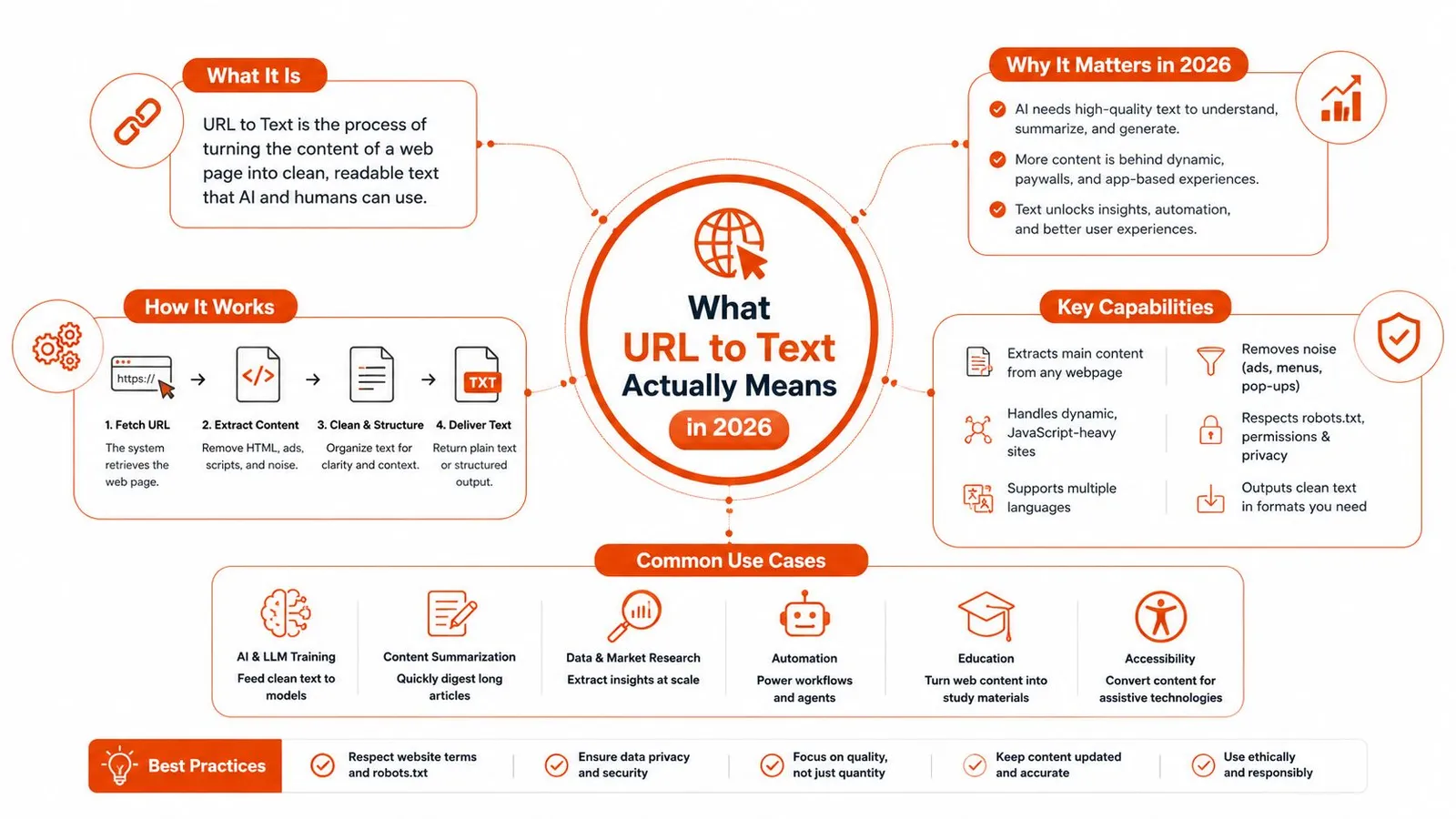
That distinction matters for AI products. A model doesn't need the DOM. It needs compact, ordered, semantically useful context that can be cited, chunked, searched, or transformed without carrying the site's interface along with it. Teams working on answer systems may also benefit from understanding how to build auditable answers in market research, where source quality and traceability matter as much as retrieval.
Practical rule: Size URL-to-text work as fetch, render, extract, validate, and format. If your script handles only fetch, you've built an HTTP client, not a reliable extraction system.
For a useful implementation contrast, see this guide to web-to-text extraction. The mental model is simple: URL in, verified content out, with every transformation treated as a possible failure point.
Your First URL to Text Conversion in Under Five Minutes
Start with one URL and inspect the response before building a crawler. A hosted extraction API keeps the first test focused on content quality rather than browser orchestration. The exact request depends on the provider, but the workflow should look like this:
curl -X POST "https://api.example.com/v1/scrape" \
  -H "Authorization: Bearer $API_KEY" \
  -H "Content-Type: application/json" \
  -d '{
    "url": "https://example.com",
    "format": "markdown"
  }'
Replace the endpoint and public test URL with the service you're evaluating. Ask for Markdown first, because it makes extraction errors visible. Headings, lists, links, and paragraph boundaries help you judge whether the system understood the page rather than merely returning characters.
A typical response should expose four things worth checking immediately:
- Content: The extracted markdown or text that downstream code will consume.
- Metadata: The final URL, title, page information, or other provenance fields.
- Status: Whether fetching, rendering, and extraction completed successfully.
- Diagnostics: Errors, timing details, warnings, or indicators that the provider used a fallback.
An HTTP success code isn't proof that extraction succeeded. A bot page can be returned successfully. So can an empty application shell.
Inspect the output before trusting it
Use a small validation pass on every first request:
- Expected text appears. Search for the title, a distinctive heading, or a phrase you can see in the browser.
- Navigation is limited. Look for repeated menu labels, cookie consent language, footer links, and account controls.
- The length is plausible. A short landing page shouldn't produce a massive response, and a long documentation page shouldn't collapse to a title.
- The final URL makes sense. A redirect to a login screen or challenge endpoint should be treated as a failed extraction, even if the transport request succeeded.
For a copy-paste starting point, follow the Webclaw getting started documentation. The important habit isn't the particular API syntax. It's checking content, metadata, status, and diagnostics before sending anything to an embedding model or agent.
Choosing the Right Output Format for Your Pipeline
The same page can produce four very different artifacts. Consider a product documentation page with a title, headings, explanatory paragraphs, code examples, links, and a navigation sidebar.
Plain text removes formatting and leaves readable words. It's suitable for basic keyword search, rough transcripts, and embeddings where hierarchy isn't central. The downside is that headings, link targets, table boundaries, and code context can disappear, making chunks harder to interpret.
Markdown keeps a useful amount of structure without preserving the full DOM. Headings become visible hierarchy, lists remain lists, and links can retain their destinations. For retrieval-augmented generation, that structure often makes a chunk more intelligible because the model can see whether a passage is a section title, a list item, or supporting prose.
JSON is the right choice when the consumer expects a schema. A typed pipeline may need fields such as title, author, price, date, ingredients, or product attributes. JSON isn't automatically better for general content. It becomes valuable when downstream code needs predictable keys and validation rather than a document to read.
LLM-optimized output prioritizes semantic density. It removes repeated navigation, advertising, boilerplate, duplicate links, and presentation noise so the model receives a smaller context with a higher proportion of useful text. That can improve both cost control and answer quality, but it may discard details that a human-facing archive or a forensic parser needs.
| Format | Best for | Trade-off |
|---|---|---|
| Plain text | Keyword search, embeddings, simple processing | Low structural fidelity |
| Markdown | RAG, readable archives, heading-aware chunking | Retains some formatting noise |
| JSON | Typed extraction and schema-driven workflows | Requires schema design and validation |
| LLM-optimized | Prompt context, agents, token-sensitive applications | Less suitable for exact page reconstruction |
Thirty-second rule: If it goes into a prompt, prefer LLM-optimized output. If it goes into a vector store, prefer Markdown. If a schema exists, prefer JSON. Use plain text when structure doesn't affect the task.
The choice also affects governance. Teams that publish or operationalize generated material should consider AI content governance for brands, especially when extracted sources flow into automated content or decision systems. Preserve provenance even when you minimize the body.
For data interchange decisions beyond extraction, this comparison of CSV and JSON workflows is useful. The same principle applies here: choose the representation around the next consumer, not around what was easiest to serialize.
SDK Examples for Python, JavaScript, and Go
A single URL is enough to test an SDK integration. Keep the first implementation synchronous where possible, print the returned content, and add retries only after you can distinguish an extraction failure from a transport failure.
Python
import os
from webclaw import Webclaw

client = Webclaw(api_key=os.environ["WEBCLAW_API_KEY"])

result = client.scrape(
    url="https://example.com",
    formats=["markdown"],
)

print(result.markdown)
Python is the natural default for notebooks, research scripts, and evaluation harnesses. The main gotcha is response shape. Inspect the returned object once, then handle missing content and error fields explicitly rather than assuming every successful request has the same payload.
TypeScript or JavaScript
import { Webclaw } from "@webclaw/sdk";

const client = new Webclaw({
  apiKey: process.env.WEBCLAW_API_KEY!,
});

const result = await client.scrape({
  url: "https://example.com",
  formats: ["markdown"],
});

console.log(result.markdown);
JavaScript and TypeScript fit web applications, agent runtimes, and event-driven workers. The gotcha is asynchronous control flow. Always await the scrape call and catch rejected promises at the job boundary, otherwise a failed extraction can vanish inside a queue consumer.
Go
package main

import (
	"context"
	"fmt"
	"os"

	"github.com/0xMassi/webclaw-go"
)

func main() {
	client := webclaw.NewClient(os.Getenv("WEBCLAW_API_KEY"))

	result, err := client.Scrape(context.Background(), &webclaw.ScrapeRequest{
		URL:    "https://example.com",
		Formats: []webclaw.Format{webclaw.FormatMarkdown},
	})
	if err != nil {
		panic(err)
	}

	fmt.Println(result.Markdown)
}
Go works well for high-volume batch jobs where you want explicit concurrency, predictable resource use, and straightforward cancellation. Don't turn every URL into an unbounded goroutine. Put requests behind a bounded worker pool and preserve the URL with each result so retries remain traceable.
The Webclaw SDK documentation is the place to verify package names and current method signatures before wiring examples into a production repository.
For ad-hoc extraction, a CLI is often enough:
webclaw scrape "https://example.com" --format text
Use the CLI for debugging, shell pipelines, and quick comparisons between formats. In every language, keep the same boundary: transport errors should be handled separately from empty content, blocked pages, and structurally incorrect extraction.
Production Settings That Actually Change the Outcome
Production failures usually come from a setting that was left at its demo default. The right configuration depends on the site, but four controls deserve deliberate treatment.
Crawl depth and concurrency
A single URL is easier to reason about than link following. Start with one page, then add crawl depth only when the job needs discovery. Following every link expands scope quickly and can pull in login routes, calendars, duplicate URLs, and low-value navigation pages.
Concurrency creates a different risk. Parallel requests improve throughput across independent hosts, but sending too many requests to one host can trigger throttling or expose a pattern that a low-rate test never showed. Watch response latency, status changes, and retry counts by host, not only across the whole job.
Start with: single-page extraction, bounded concurrency, per-host limits, and exponential backoff. Increase parallelism only after the logs show stable latency and clean responses.
Proxy strategy
A datacenter route may be adequate for public, low-friction pages. Geo-specific content or stronger access controls can require ISP or residential routing, but those choices add operational complexity, cost, and another failure surface. A proxy won't fix an incorrect selector or an unrendered application.
Use proxy changes when the symptom is access-specific: the same URL works from one network and returns a challenge, incomplete page, or regional variant from another. Record the route used with the extraction result so debugging doesn't become guesswork.
JavaScript rendering
Disable rendering for static pages when speed and resource use matter. Enable it for SPAs, client-rendered product catalogs, dashboards, and pages whose initial HTML lacks the visible content. Rendering adds latency and can scale costs differently from a plain request, so it shouldn't be the universal default.
A common production pattern is a cheap first fetch followed by conditional rendering when the body is empty, unusually short, or missing an expected selector. That fallback is safer than rendering every URL, but it needs a validation rule that knows what “complete” means for each page family.
A useful default is shallow crawl, restrained concurrency, the simplest proxy that works, and rendering enabled only by evidence. When something breaks, touch one knob at a time. Check access first, then rendering, then extraction rules, and only after that increase retries or concurrency.
Why Token-Efficient Text Beats Raw HTML Every Time
Raw HTML contains the answer and a large amount of material that competes with it. Navigation, style attributes, scripts, cookie banners, repeated links, and layout wrappers consume context without helping retrieval. Feeding that payload directly to a model also makes chunk boundaries less meaningful because the text is mixed with implementation details.
The extraction layer should therefore be evaluated like any other model input transformation. The Web Content Extraction Benchmark covers 2,008 human-reviewed pages across 1,613 domains and 7 page types, using completeness and precision checks across articles, products, forums, listings, documentation, and other page types (the WCXB benchmark). Its design captures the problem that a clean-looking article extractor can still fail badly on a service page or product listing.
More text isn't automatically more coverage
An empirical comparison found that Readability reached a median F1 of 0.970, while Trafilatura recorded macro F1 of 0.883 and micro F1 of 0.867 in the reported evaluation (the extraction algorithm comparison). Those results don't identify one universal winner. They show that extractor choice and page type change the result, and that heuristic systems can remain highly competitive on complex pages.
For model pipelines, the same study found that taking the union of multiple extractors can increase token yield by up to 71% while preserving benchmark performance. It also reported structured content shifting downstream results by up to 10 percentage points on WikiTQ and 3 percentage points on HumanEval. These aren't reasons to blindly concatenate every extractor. They're reasons to measure recall, precision, structure, and token behavior together.
The practical test is straightforward. Save the raw response and the cleaned output for representative pages, compare how much irrelevant material survives, then evaluate retrieval with the same queries. A smaller document that preserves headings and answer-bearing passages can outperform a larger document because the model sees less noise.
For implementation patterns that target model inputs specifically, see this guide to converting HTML to Markdown for LLMs. Treat URL-to-text as a quality layer with regression tests, not as disposable preprocessing.
Troubleshooting the Failures You Will Hit in Production
When a pipeline degrades, don't start by rewriting the extractor. Identify which layer failed.
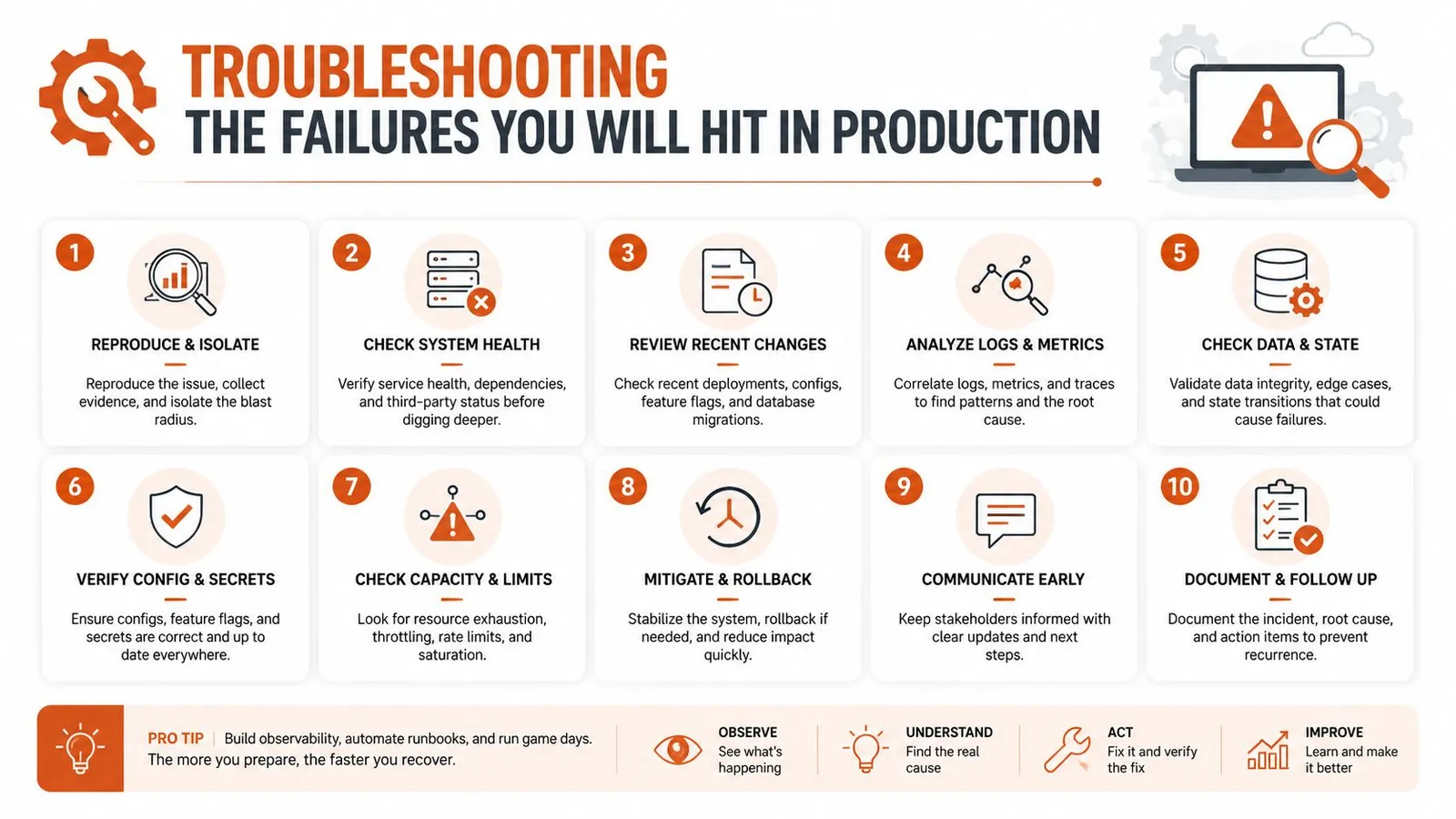
- Empty response: An SPA probably hasn't rendered. Enable JavaScript, wait for the content condition, and compare the rendered DOM with the initial response.
- Partial content: The extractor may have captured a paywall, modal, or shell. Check the final URL, visible title, and expected body text before changing selectors.
- Bot block: Rotate the proxy strategy, lower request pressure, and retain the response body for diagnosis. Repeating the same request faster rarely helps.
- Wrong JSON shape: Recheck the schema, required fields, and extraction instructions. Validate the returned object before writing it to storage.
- Rate-limit storm: Reduce concurrency, add exponential backoff, and enforce per-host limits. Don't let every worker retry simultaneously.
Run the checks in this order: status, final URL, body presence, expected text, boilerplate ratio, rendering state, access route, then concurrency. Log the URL, format, rendering choice, proxy class, response timing, and extraction diagnostics for every failed job. That record turns a vague “the scraper broke” report into a specific fetch, render, access, or parsing incident.
Webclaw offers single-URL extraction in Markdown, plain text, JSON, and LLM-optimized formats, plus rendering, crawling, batch jobs, structured schemas, and SDK support for Python, JavaScript, TypeScript, and Go. If you're building an AI retrieval or agent pipeline that needs reliable, token-efficient page content, visit Webclaw and test the output against your own difficult URLs.