Scraping Websites for Data: A 2026 Developer's Guide
Your scraper worked yesterday. Today it returns empty shells, duplicate rows, or a wall of cookie-banner HTML that's useless for analysis and even worse for an LLM prompt.
That failure usually isn't a parsing bug. It's a pipeline bug. You're no longer just pulling text from pages. You're discovering where the data really lives, deciding when to fetch HTML versus render a browser, staying within ethical and operational limits, validating output, and turning noisy web content into structured data an application can use.
That last part matters more than commonly realized. If your end use case is AI, raw extraction isn't the finish line. You need output that is clean, compact, and consistent enough to feed into retrieval, summarization, classification, or agent workflows without wasting tokens on nav bars, footer links, or boilerplate.
Why Scraping Websites for Data Got Harder
You can still scrape a plain server-rendered page with a simple HTTP request. The problem is that fewer important pages behave that way, and even when they do, the HTML often isn't the essential product you need.
The old model broke
A lot of scraping code still assumes this flow: request URL, parse HTML, select nodes, save CSV. That worked when pages were mostly static and content arrived in the first response. It breaks when the server returns a minimal shell and JavaScript fills the page later, or when the useful data sits behind asynchronous calls, consent flows, or anti-bot checks.
Modern scraping websites for data means treating breakage as normal. Your parser isn't failing because you picked the wrong library. It's failing because the page delivery model changed.
Practical rule: If a scraper depends on one HTML layout and one request path, it's a prototype, not production infrastructure.
There's also a deeper reason scraping became essential in the first place. The core purpose is to turn unstructured web information into structured, rectangular datasets that fit tidy data principles, and automation makes it possible to collect larger amounts of data faster while minimizing errors compared with manual copying, as described in this web scraping curriculum paper.
The real job is data shaping
For AI teams, the challenge isn't only collection. It's deciding what counts as the canonical representation of a page.
A retrieval system doesn't want:
- Navigation chrome: Header links, footers, sidebars, and account menus
- Repeated clutter: “Related posts,” duplicated mobile menus, and sticky UI text
- Presentation markup: Extensively nested tags that add tokens but no meaning
It wants content blocks with stable metadata. Title. Main body. Author when available. Published date when available. Source URL. Section headings. Possibly extracted entities or typed fields.
That's why a resilient scraper starts to look like a pipeline:
- Discover where the data comes from
- Fetch or render using the lightest method that works
- Extract with selectors or schema-based parsing
- Normalize into consistent fields
- Validate for missing or broken records
- Store in a format useful to analysis or LLM workflows
When sites push back, debugging has to move beyond “why is my selector null.” You start checking network activity, response shape, browser behavior, and edge protection signals. A practical reference for that kind of diagnosis is this Cloudflare scraping diagnostic checklist.
Planning Your Scraping Project Strategically
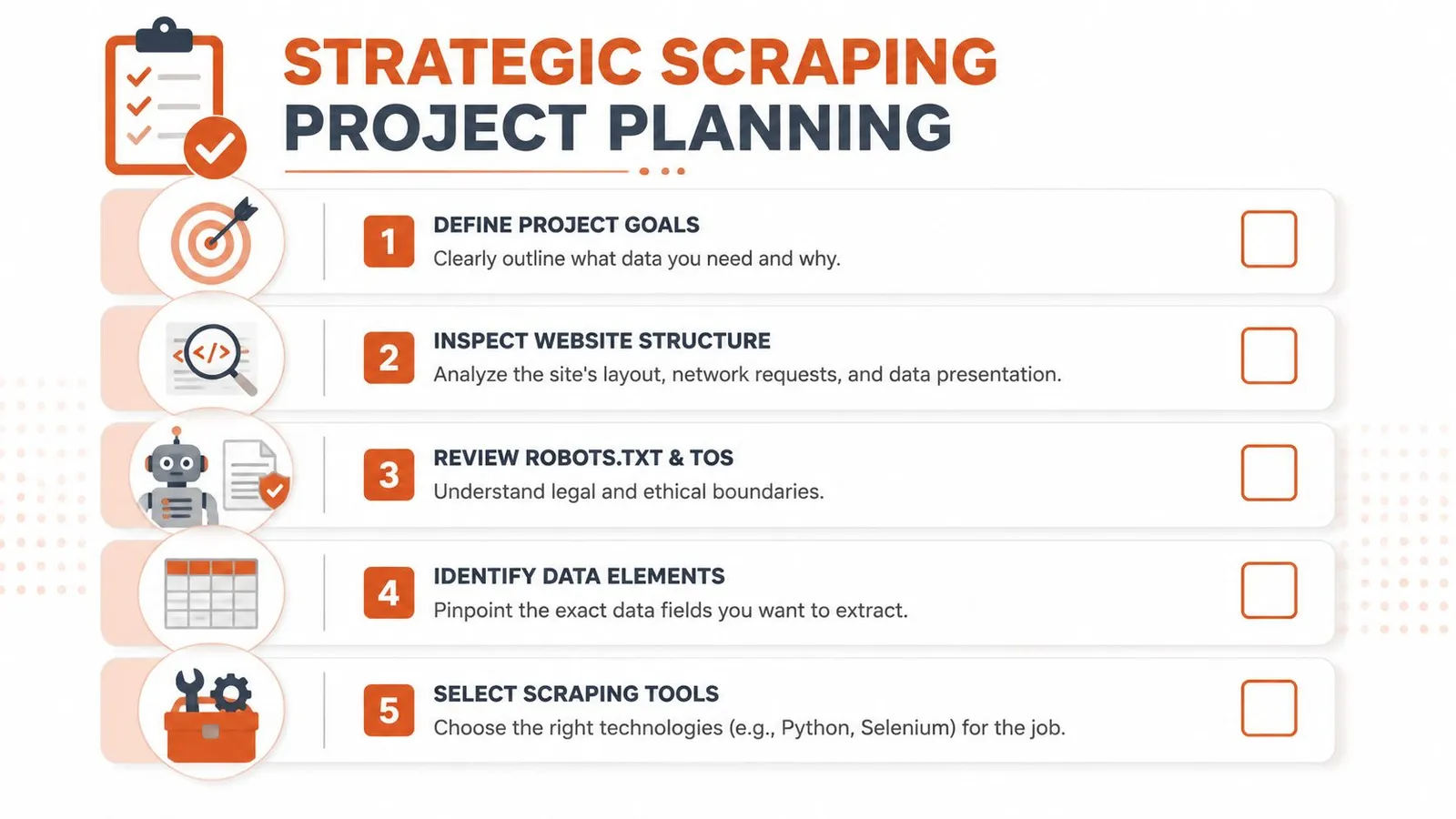
Most scraping failures start before code. The team didn't define the extraction path, didn't lock a schema, or treated legal and ethical review as a cleanup task for later.
Start with the acquisition path
Open browser devtools before you write a script. Reload the page and inspect the network tab. You're looking for whether the visible content comes from:
- Initial HTML: Best case for simple extraction
- A hidden JSON endpoint: Often the cleanest source
- GraphQL or XHR calls: Good candidates if authentication and parameters are manageable
- Client-side rendering only: Browser automation may be required
For hard pages, a practical workflow is to first check whether the page is rendered from a hidden JSON or API response, then compare those network calls against the visible DOM, and only fall back to a headless browser when needed, as outlined in this guide to difficult page types.
If your target is broad, don't think page by page. Think job by job. Group similar URLs, define retry behavior, and decide whether the work runs as a stream or in batches. For larger jobs, this overview of what batch processing means in scraping workflows is a useful mental model.
Define the output before the scraper
A surprising amount of scraping waste comes from collecting fields no one uses. Start with the schema, not the parser.
For each record, decide:
- Required fields: The data that makes the record usable
- Optional fields: Nice to have, but not a reason to fail the page
- Normalization rules: Whitespace cleanup, date parsing, canonical URLs, text deduplication
- Primary key strategy: URL, product ID, article slug, or another stable identifier
For AI use cases, add another layer. Decide the exact output object you want to pass downstream. A common pattern is a content object with url, title, markdown, plain_text, metadata, and extracted_fields. That keeps your scraper from becoming a pile of one-off page parsers.
If you can't describe the final JSON object before implementation, the scraper will drift.
Treat ethics and site impact as design constraints
You can collect public data and still build a bad system. Public-health and university guidance is clear that web scraping raises ethical implications that aren't obvious at first sight. Recommended practice is to check robots.txt, terms of service, bandwidth impact, and to “scrape only what you need”, as explained in Columbia's web scraping guidance.
That advice changes implementation details:
- Reduce request volume: Don't crawl entire sections if a smaller URL set answers the question
- Avoid wasteful rendering: Headless browsers burn more resources on both sides
- Handle sensitive content carefully: Especially if data may be repurposed for analysis
- Log what you collected and why: Teams need a defensible record
A sustainable scraper isn't just one that avoids blocks. It's one you can justify to your own legal, product, and data stakeholders.
Core Extraction Techniques for Static Sites
Static pages are still worth mastering because they teach the cleanest extraction habits. They're also common in documentation, blogs, directories, category pages, and a lot of publishing systems.
Check for JSON before parsing HTML
Even on a page that looks static, inspect the network panel first. Many sites embed a cleaner machine-readable payload than the rendered markup suggests.
The production habit is simple:
- Load the page manually
- Open network requests
- Filter for XHR or fetch calls
- Look for JSON carrying the same fields you see on screen
- Prefer that source if it's stable and complete
This saves maintenance. HTML is presentation. JSON is often closer to the site's internal data model.
A minimal static scraper in Python
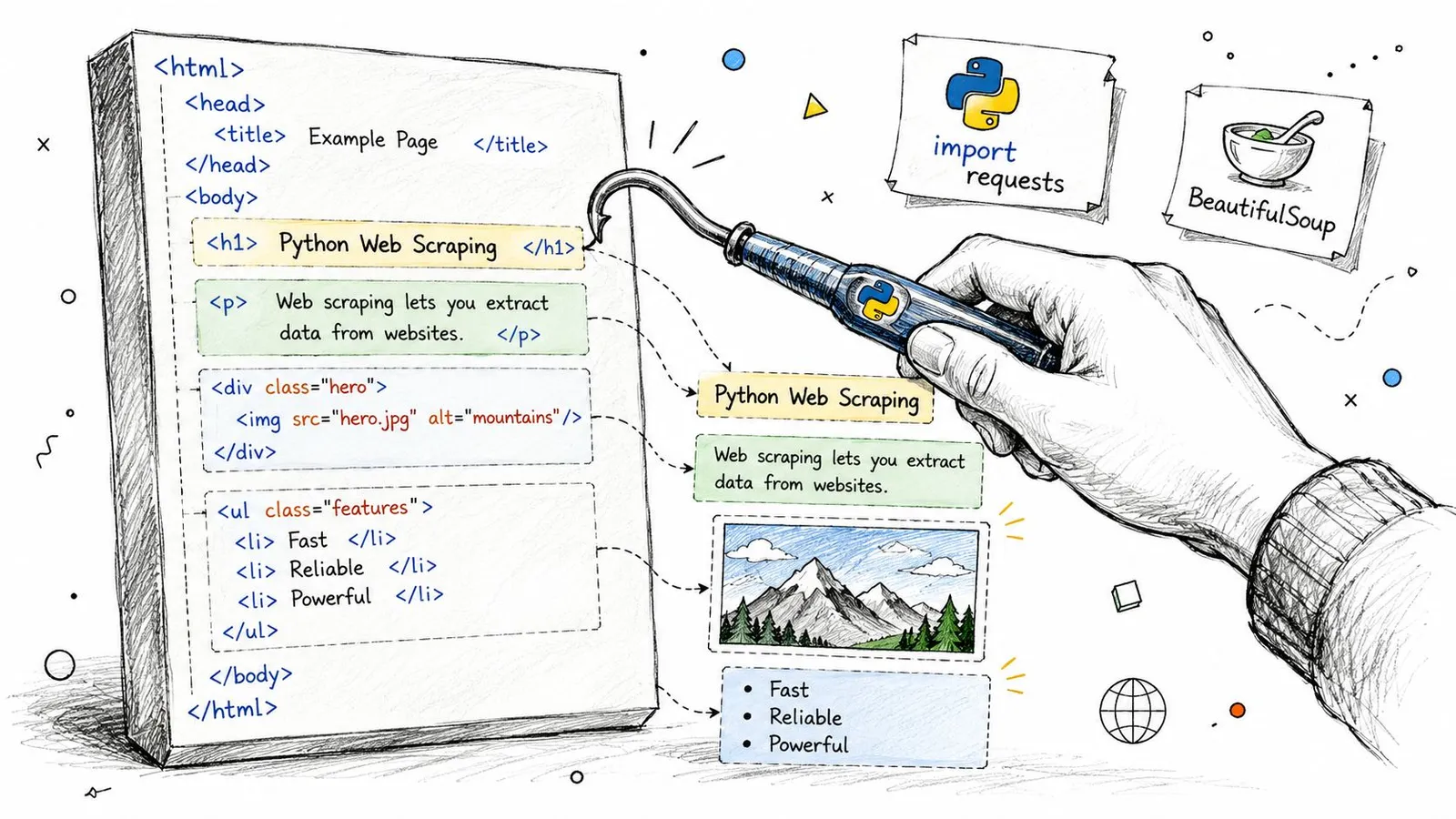
If the page really is server-rendered, keep it boring. requests plus BeautifulSoup is still the right starting point.
import requests
from bs4 import BeautifulSoup
from urllib.parse import urljoin

url = "https://example.com/articles"
headers = {
    "User-Agent": "Mozilla/5.0"
}

resp = requests.get(url, headers=headers, timeout=30)
resp.raise_for_status()

soup = BeautifulSoup(resp.text, "html.parser")

items = []
for card in soup.select("article.card"):
    title_el = card.select_one("h2 a")
    summary_el = card.select_one("p.summary")

    if not title_el:
        continue

    items.append({
        "title": title_el.get_text(" ", strip=True),
        "url": urljoin(url, title_el.get("href", "")),
        "summary": summary_el.get_text(" ", strip=True) if summary_el else None
    })

print(items)
That snippet is intentionally plain. It doesn't solve pagination, retries, or validation. It does show the core extraction pipeline: fetch HTML, locate fields with selectors, and save structured output.
Write selectors that survive small changes
Fragile selectors are the biggest self-inflicted problem on static sites. Avoid selectors tied to presentation order, nested wrappers, or CSS class names that look autogenerated.
Use these rules:
- Prefer semantic anchors:
article,main, heading tags,data-*attributes, stable link paths - Select from the nearest container: Find the record block first, then query within it
- Avoid nth-child unless unavoidable: Layout reorder breaks it fast
- Separate extraction from cleanup: Don't cram text normalization into selector logic
A quick comparison helps:
| Selector style | Better use | Common failure |
|---|---|---|
.product-card .title a | Stable card components | Class names change |
main article h1 | Content pages | Wrapper layout changes |
div:nth-child(4) > span | Last resort | Breaks on minor DOM edits |
CSS selectors usually beat XPath for readability in everyday scraping. XPath becomes useful when you need relationship-aware queries or text-based matching the DOM structure doesn't expose cleanly.
For LLM-oriented pipelines, extract the main content block separately from page metadata. Don't flatten everything at once. You'll want a cleaner pass later that can remove UI fragments without touching title, author, or canonical URL fields.
Handling JavaScript Rendering and Dynamic Content
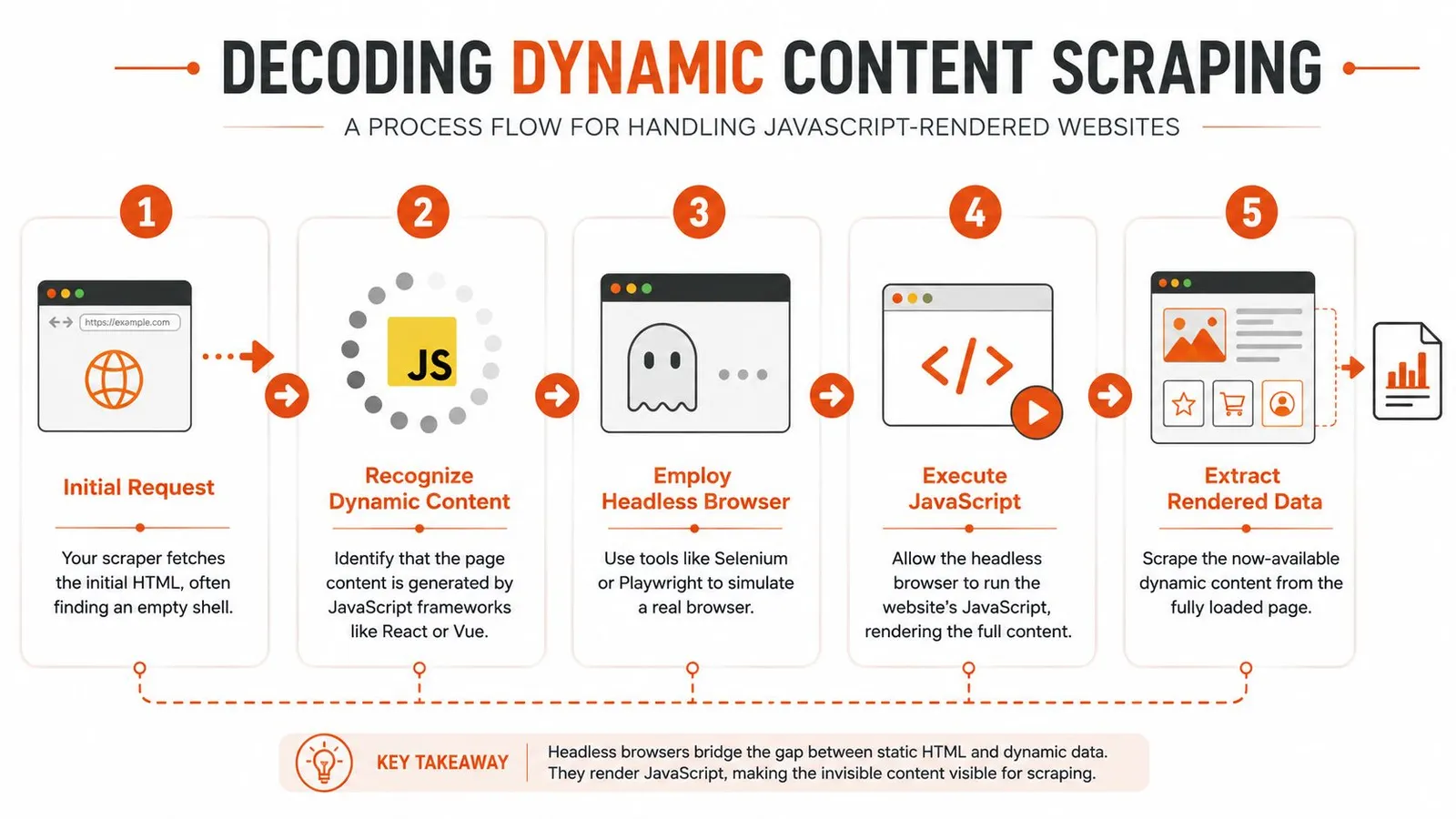
A lot of developers hit the same wall: requests.get() returns HTML, but the content you need isn't there. You inspect the response and find a div with an app root, a few script tags, and not much else.
That's normal on client-rendered sites.
Why requests gets an empty page
On many modern sites, the server sends a shell. JavaScript running in the browser fetches data, builds components, and updates the DOM after load. A plain HTTP client can only see the shell unless you replicate the underlying data calls directly.
Browser automation became necessary because many sites load content dynamically. Tools such as Selenium or Playwright are used to control a browser, fully load dynamic pages, and then parse the DOM, which is described in this web scraping overview.
That changes how you debug. You stop asking “why is the HTML wrong” and start asking:
- Is the data loaded after initial response?
- Which request populates the component?
- Does the page require interaction before the content appears?
- Is a browser needed, or can I call the underlying endpoint directly?
This guide on a JavaScript rendering API with browser fallback is a useful reference if you're designing that decision path.
Here's a short walkthrough before the code example.
A Playwright pattern that works
For dynamic pages, the most reliable pattern is to wait for a meaningful selector, not a generic load event.
from playwright.sync_api import sync_playwright

url = "https://example.com/app-page"

with sync_playwright() as p:
    browser = p.chromium.launch(headless=True)
    page = browser.new_page()

    page.goto(url, wait_until="domcontentloaded", timeout=60000)
    page.wait_for_selector("main article, [data-testid='content']", timeout=30000)

    title = page.locator("h1").first.text_content()
    body = page.locator("main").first.inner_text()

    print({
        "title": title.strip() if title else None,
        "body": body.strip() if body else None,
    })

    browser.close()
What matters here isn't Playwright syntax. It's the waiting strategy. networkidle can be noisy on pages with analytics or background polling. A stable content selector is usually a better signal that extraction can begin.
When browser automation is the wrong choice
Headless browsers solve rendering, but they also add cost and failure modes. They're slower, heavier, and more exposed to fingerprinting than direct HTTP calls.
Use a browser when you need:
- Client-side rendered content
- User interactions: Clicks, scrolls, tab switches, dismissing overlays
- Session-driven state: Authenticated or localized flows
- DOM-only data: Content not exposed through clean API calls
Don't use one by default when:
- A hidden API already returns the fields
- The page is static enough for direct parsing
- You're crawling large volumes where browser cost will dominate
Browser automation should be a fallback with a reason, not your default fetcher.
Bypassing Anti-Bot Protections at Scale
Your first hundred pages may scrape cleanly. Then the job scales up, traffic patterns repeat, and the target starts pushing back. A few workers get 403 responses, others receive challenge pages, and some return 200 with thin HTML that looks valid until your parser turns it into garbage records.
Anti-bot failures rarely come from one rule. They come from a detection stack that checks whether your requests, browser signals, and behavior fit a believable session.
Blocking happens across several signals
A target may score traffic using rate limits, IP reputation, TLS fingerprints, header consistency, browser characteristics, cookie state, and navigation behavior. You can fix one layer and still lose on another.
That is why single-variable fixes waste time. Rotating only the user-agent does little if the proxy range is burned. Swapping proxies does little if every session advertises the same automation fingerprint. Random sleep calls do little if the crawl path jumps between pages in ways a human session never would.
At scale, anti-bot work is less about bypassing one gate and more about keeping the whole request profile coherent.
What holds up in production
Reliable scrapers control pace first. Aggressive concurrency causes more damage than it saves, especially on sites that watch request bursts per IP, per session, or per path.
The basic playbook is straightforward:
- Control request tempo: Keep concurrency and per-origin request rates predictable.
- Retry with backoff: Fast retries often turn a soft block into a hard one.
- Rotate identity as a unit: Proxy, headers, cookies, locale, and browser profile should agree with each other.
- Separate fetch from accept: A successful HTTP status should not mean the page is usable.
- Detect block types explicitly: CAPTCHA, consent wall, login redirect, empty shell, and soft block each need different handling.
If you are building high-volume crawlers in Python, this article on scaling web scraping with Sota Proxy is a useful companion because it focuses on operational failure points instead of parsing alone.
A decision table helps more than a generic checklist:
| Symptom | Likely cause | First response |
|---|---|---|
Frequent 403 responses | IP reputation or request pacing | Lower concurrency, rotate proxy pool, compare request headers |
| Challenge page HTML | Fingerprint mismatch or anti-bot trigger | Switch to browser execution, preserve session consistency |
Empty 200 pages | Soft block, consent wall, or geo variant | Classify page type before parsing, add branch logic |
| High duplicate or partial records | Weak validation and blunt retries | Validate content before acceptance, retry only on recoverable cases |
Measure success at the pipeline level
A scraper that "loads pages" can still fail your data pipeline. For AI and LLM workflows, soft-blocked pages are expensive because they look like content until you clean them, chunk them, and send useless tokens downstream.
Track reliability at two layers. First, fetch outcomes: success, timeout, block, challenge, parse failure. Second, content quality: missing title, suspiciously short body, repeated boilerplate, language drift, and template-only output.
This is the difference between scraping pages and producing usable corpus data.
A practical setup records raw fetch metadata, stores a normalized block reason, and runs content validation before the record enters your cleaned dataset. That last step matters. If anti-bot pages slip into your pipeline, they poison retrieval, inflate token cost, and hide the fact that the crawl is degrading.
Plan for fallback paths
No single fetch mode stays reliable forever. Static HTTP is cheap and fast. Browser automation gets through more flows but costs more and exposes more fingerprint surface. Scraping APIs reduce operational work but add vendor cost and less control over low-level tuning.
Choose the fallback chain before you launch the crawl. Start with the lowest-cost method that returns complete content. Escalate only when validation fails or block signals appear. This guide to anti-bot scraping API patterns and browser fallback signals covers the escalation logic well.
That trade-off matters more than any single bypass tactic. At scale, the winning system is the one that keeps clean records flowing into the rest of your pipeline without wasting proxy budget, browser minutes, or LLM tokens.
Structuring and Cleaning Data for AI
Raw extraction is cheap. Clean context is where the true work happens.
If you feed raw HTML into an LLM pipeline, you pay for every useless token. Menus, footer links, legal text, hidden labels, social widgets, and duplicated mobile navigation all consume context window space while lowering retrieval quality.
Raw HTML is a bad final format
HTML is a transport and presentation format. It is rarely the best storage format for model consumption.
For AI workflows, the output should preserve meaning while dropping noise:
- Markdown for readable, section-aware content
- JSON for typed fields and downstream systems
- Plain text when structure doesn't matter
- Schema-constrained objects for extraction tasks
The right question isn't “did I scrape the page.” It's “did I produce the smallest useful representation of the page.”
A good LLM input keeps headings, paragraphs, lists, and links when they carry meaning. It drops everything that only helped a browser render the page.
If you're building a knowledge base or bot that ingests website content directly, this guide on training AI with website URLs is a helpful example of the downstream format requirements these systems care about.
A practical cleaning pipeline
A production cleaning pass usually includes these stages:
-
Isolate main content Remove obvious non-content regions such as nav, footer, sidebars, banners, and modal leftovers.
-
Normalize text Collapse repeated whitespace, decode entities, and preserve meaningful line breaks around headings and lists.
-
Deduplicate repeated fragments Many pages repeat CTA blocks, breadcrumb labels, or mobile/desktop copies of the same content.
-
Preserve semantic structure Convert headings, paragraphs, list items, and tables into a stable textual representation instead of flattening everything into one blob.
-
Attach metadata Keep source URL, canonical URL if known, title, and extraction timestamp if your system tracks snapshots.
For extraction jobs aimed at analysis, add validation for duplicate records, outliers, and missing items before the data lands in storage. For AI-oriented jobs, also inspect whether the cleaned output still answers the downstream question without needing the original DOM.
Choose storage by downstream use
The storage format should match what happens next.
| Downstream use | Better format |
|---|---|
| Analytics and BI | CSV or tabular JSON |
| Search indexing | JSON with normalized text fields |
| RAG and retrieval | Markdown plus metadata |
| Structured extraction | JSON schema output |
A common mistake is trying to force one universal format for every consumer. Don't. Keep a canonical structured object, then derive the AI-friendly text representation from it. That separation makes reprocessing much easier when your cleaning rules improve.
The Smart Path How Webclaw Solves the Hard Parts
By this point, the pattern is obvious. DIY scraping isn't just writing parsers. You're maintaining fetch strategy, rendering logic, retry systems, anti-bot workarounds, output cleaning, and storage contracts.
That's manageable for a narrow target. It gets expensive fast when you need broad coverage or AI-ready output.

What you maintain yourself
With a manual stack, you typically own:
- Request and browser orchestration
- Proxy and block handling
- Selector maintenance
- Boilerplate removal
- Output shaping for LLMs or structured pipelines
An alternative is to use a scraping API that handles rendering, access, and content extraction as one service. One example is Webclaw's web scraping API, which supports single-URL extraction, crawling, and output formats such as markdown, JSON, plain text, and LLM-oriented content.
Manual Scraping vs. Webclaw API
| Task | Manual Implementation (DIY) | Using Webclaw API |
|---|---|---|
| Fetch static pages | Build requests client and parser | Send URL to API |
| Handle JavaScript pages | Add Playwright or Selenium | Rendering handled by API |
| Deal with anti-bot friction | Manage proxies, headers, retries | Use service that handles blocked normal scrapers |
| Clean output for AI | Write boilerplate removal and formatting pipeline | Request clean markdown or structured output |
| Crawl multiple pages | Build queueing, dedupe, and concurrency controls | Use crawl-oriented API workflow |
| Maintain over time | Update scraping logic per site drift | Shift maintenance to service layer |
That trade-off isn't ideological. It's economic. If scraping is core product IP, building the stack yourself can make sense. If your real product is an AI agent, internal search tool, or research workflow, owning every brittle part of scraping often isn't the best use of engineering time.
If you're building AI or data products and you're tired of turning blocked pages and noisy HTML into usable context, Webclaw is worth evaluating. It's built to return clean, token-efficient web content from a URL in formats that fit real pipelines, not just raw page source.