
Amazon Scraping API: A Developer's Guide for 2026
You're probably here because the straightforward version already failed.
You wrote a quick script with requests, maybe added BeautifulSoup or Playwright, pointed it at a product page, and expected a title, price, rating, and seller info. Instead you got a blocked page, partial HTML, inconsistent pricing, or markup that changed the next morning. That's the normal Amazon scraping experience.
An Amazon scraping API exists to remove that entire operational layer. Instead of spending your time fighting anti-bot systems, rendering JavaScript, rotating proxies, and repairing parsers, you call a service that returns data you can use in your application. For engineering teams, that's the difference between maintaining a brittle scraper and consuming a dependable data interface.
What Is an Amazon Scraping API
A basic Amazon scraper usually fails in one of three ways. It gets blocked immediately, it returns incomplete page content, or it works for a few hours and then breaks when the page structure changes. That failure pattern is why teams often eventually stop thinking about “writing a scraper” and start thinking about “getting reliable Amazon data.”

An Amazon scraping API is a managed layer between your application and Amazon's front end. You send a URL, ASIN, or search query. The service handles browser rendering, session behavior, proxy routing, and anti-bot friction, then returns output in a usable format such as JSON, markdown, or cleaned text.
That distinction matters. If you fetch raw pages yourself, your team owns every moving part. If you use a scraping API, your code can stay focused on catalog sync, price monitoring, seller intelligence, search ingestion, or AI retrieval.
What the API is really abstracting
Under the hood, a serious Amazon scraping stack usually includes:
- Browser execution: Amazon pages often depend on client-side behavior, not just initial HTML.
- Network evasion: Requests need to look like legitimate traffic, not a bot loop from one machine.
- Parser stability: Product pages, search pages, and offer listings all evolve.
- Localization control: The same ASIN can show different availability, currency, and shipping details by region.
A managed API turns that into one call pattern instead of a full scraping platform.
Practical rule: If your product depends on Amazon data, the expensive part isn't the first successful scrape. It's keeping the pipeline working next month.
There's also a broader integration question. Some teams don't need scraping alone. They need marketplace connectivity across order, catalog, and seller systems. In that case, it's worth reviewing unified API strategies for Amazon to understand where scraping fits versus official integration layers.
For developers who want the scraping side to feel like a normal API call, a reference point is a direct scrape endpoint for URL-based extraction. The architectural win is simple. You stop building page acquisition machinery and start consuming data.
Why Is Scraping Amazon So Hard
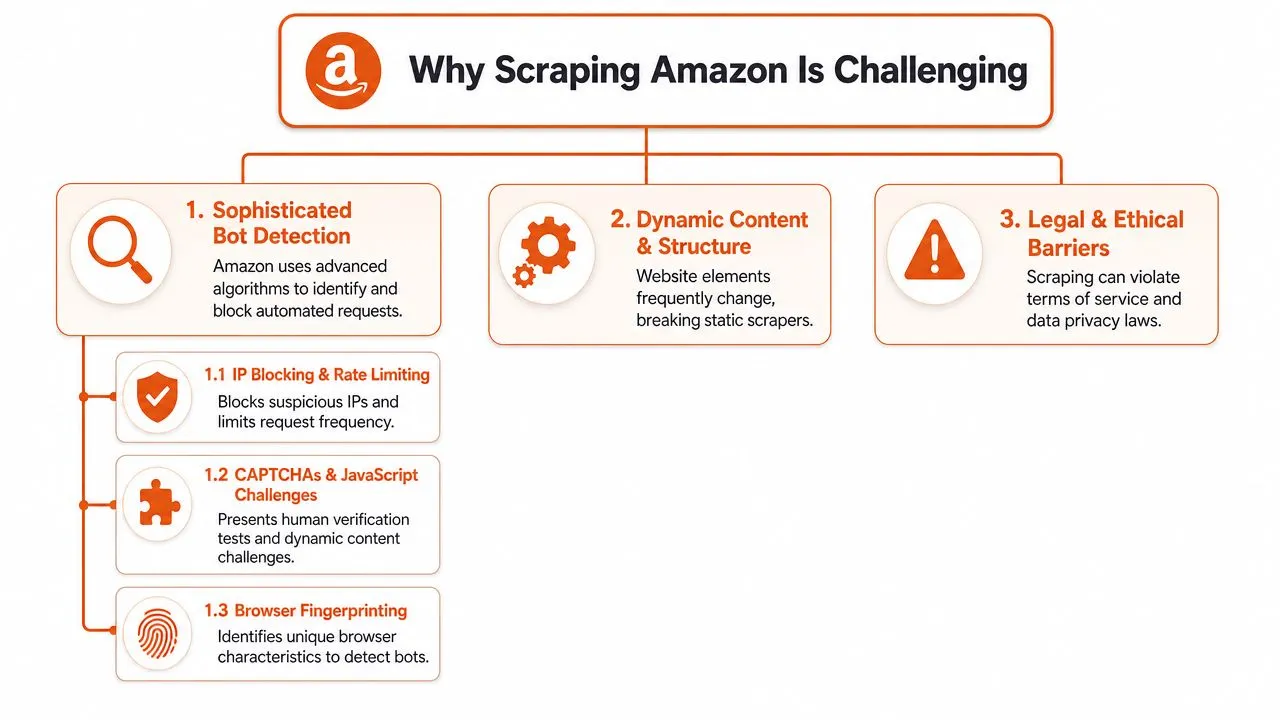
You can get an Amazon page to load in a test script by lunch and still have a broken pipeline by Friday. That gap is the problem. Amazon scraping fails less from basic HTTP mistakes and more from production realities: active bot detection, JavaScript-heavy page assembly, and marketplace-specific variation that changes what the page contains.
Bot detection is a systems problem
Amazon evaluates far more than whether an IP has been used too often. Request timing, TLS and browser fingerprints, cookie behavior, challenge responses, navigation patterns, and session consistency all matter. A plain HTTP client can get blocked fast. A poorly tuned headless browser can get through and still receive incomplete or misleading content.
That changes the engineering decision. The job is not "fetch HTML." The job is "acquire the same page state a normal shopper would see, at scale, without poisoning your own signal profile."
Proxy choice is part of that, but only part. Teams that have dealt with search engines will recognize the same acquisition trade-offs discussed in proxy design trade-offs in search scraping. IP rotation helps. It does not solve fingerprint quality, browser behavior, or challenge handling.
The HTML is often not the product data
A successful 200 response does not mean your scrape worked. Amazon pages frequently assemble key sections after initial load, vary modules by session state, and defer content that only appears after scripts run or requests complete in the browser. If your parser reads the first HTML snapshot and stops there, you can miss price blocks, offer modules, delivery estimates, or sponsored placements.
This is the failure mode that wastes the most time in production. The request looks healthy. Logs show success. Downstream systems ingest partial data, and nobody notices until a pricing model, ranking job, or LLM retrieval workflow starts producing bad output.
That is why the architectural split matters. A DIY stack has to solve rendering, retries, challenge handling, and parser maintenance before it can even discuss data quality. An API-based approach pushes those concerns behind a stable interface and returns either normalized fields or cleaner page content for your own extraction layer.
Amazon is many contexts, not one site
The same ASIN can produce different prices, stock signals, shipping promises, offer counts, and even visible modules depending on marketplace, delivery ZIP code, language, and session history. For engineering teams, "What is the price?" is usually underspecified. A precise query is, "What price does this buyer in this region see under this marketplace context?"
A few consequences matter immediately:
- Search results shift by locale: Ranking, sponsored density, and available listings can change across countries and delivery regions.
- Offer visibility is contextual: Buy Box behavior and seller availability often depend on destination.
- Delivery messaging changes the page structure: Shipping estimates and arrival badges can appear or disappear based on ZIP code.
- Parser portability is limited: Logic that works on one marketplace can quietly fail on another because labels, layout, and field order differ.
This is one reason teams outgrow raw HTML pipelines. You are not scraping one template. You are maintaining a matrix of templates and contexts.
Defensive pressure extends beyond the page request
Amazon also treats suspicious automation as an enforcement problem, not just a traffic problem. That matters if your scraping operation is adjacent to seller tools, account workflows, or anything that could trigger broader scrutiny. The seller side of that reality is visible in these attorney insights into Amazon AI suspensions.
The practical takeaway is simple. Amazon is hard to scrape because page acquisition, rendering, and data correctness are all coupled. That is why build-versus-buy usually becomes an architectural discussion early. A professional scraping API is not just a convenience layer. It is a way to stop spending engineering time on anti-bot survival and start deciding whether you want raw page output, structured commerce fields, or AI-ready content for downstream systems.
Navigating the Legal and Ethical Maze
Scraping Amazon is a technical problem, but it's also a policy and risk problem. The right way to approach it is operationally, not casually. This isn't legal advice. It's the checklist a careful engineering team should work through before shipping anything.
Public product data and private data are not the same
Public product information and private user data belong in separate categories. Product titles, visible prices, public descriptions, rankings, and seller offers are one class of data. Login-protected pages, account details, personal information, and anything tied to an identifiable user are another.
The bright line is simple:
- Public catalog and merchandising data: Often the target for pricing, research, and analytics use cases.
- Private or personal data: A red line. Don't collect it.
- Authenticated content: Treat it as out of scope unless your legal team says otherwise.
- User-generated content with identity signals: Review carefully before ingestion or storage.
A useful primer on the broader mechanics is this explanation of screen scraping, especially if your stakeholders still treat scraping as one monolithic practice.
Terms risk and operational restraint matter
Even if your target data is public, that doesn't erase terms-of-service risk or operational consequences. Teams should involve counsel when the project is material, customer-facing, or high volume. A hobby script and a production data product don't carry the same exposure.
Good engineering hygiene also matters ethically:
- Throttle responsibly: Don't hammer pages because your queue got ahead of you.
- Cache aggressively: Avoid re-fetching unchanged product pages on every run.
- Minimize collection: Pull the fields you need, not everything visible.
- Keep audit trails: Track what your system requested and why.
Responsible scraping starts with restraint. If you can answer the business question with fewer requests and less data, do that.
The strongest teams treat legality, ethics, and infrastructure as one system. If the scraping plan depends on collecting more than the product requires, the architecture is usually wrong.
Building vs Buying Your Scraping Solution
The build-versus-buy decision is where Amazon scraping gets real. On paper, building in-house looks straightforward. In practice, you're signing up for browser automation, anti-bot handling, proxy operations, parser maintenance, and incident response.
If your team already runs stealth browser infrastructure, you may decide to build. If not, the hidden cost is almost always maintenance, not initial development.
What DIY really includes
A DIY stack usually starts with Playwright or Selenium. Then it expands.
You add proxy routing. You add session handling. You tune concurrency so you don't trigger blocks too fast. You write parsers for product details, search results, ratings, and offers. Then Amazon changes markup or interaction patterns, and your “completed” scraper becomes an ongoing operational workload.
That maintenance burden also has a security angle. Once you run browser automation, proxy credentials, scheduled collectors, and storage pipelines, you're operating a real surface area that deserves review. For teams formalizing that stack, affordable SaaS pentesting is a useful reference point for thinking through external exposure.
Build vs Buy Comparison for Amazon Scraping
| Factor | Build (DIY with Libraries) | Buy (Scraping API) |
|---|---|---|
| Initial setup | Fast for a prototype, slower for production hardening | Fast if the provider already handles Amazon well |
| Anti-bot handling | You own browser fingerprints, retries, sessions, proxies, CAPTCHAs | Provider owns the acquisition layer |
| Parser maintenance | Your team updates selectors and extraction logic | Often reduced or eliminated with structured endpoints |
| Geo-targeting | You assemble and manage proxy coverage yourself | Usually exposed as request parameters |
| Reliability | Varies with your infra maturity | More predictable for sustained workloads |
| Speed to market | Good for small experiments | Better for products that need dependable output |
| Total cost of ownership | Lower cash cost at tiny scale, higher engineering cost over time | Higher direct spend, lower internal maintenance |
| Best fit | Research spikes, niche extraction, teams with scraping expertise | Production apps, catalog monitoring, AI pipelines |
If you're evaluating the two paths, a good internal question is this: do you want your differentiation to come from how you fetch Amazon pages, or from what you do with the data after you have it?
For many teams, the answer makes the decision obvious. If the value sits in analytics, repricing, research, or LLM features, then a bought acquisition layer is often the cleaner architecture. For a broader walkthrough of the data workflow side, this guide to scraping websites for data is a good complement.
Integrating an API Into Your Application
A production integration usually starts with one question: what should your application consume. Raw HTML, or a stable product object.
That choice drives the rest of the design. If the API returns structured data, the integration looks like any other upstream service in your stack. You make a request, validate the response, normalize a few fields, and store the result. If the API returns page source, your application also inherits parsing, selector drift, and debug tooling.
Start with one product request
For Amazon, the smallest useful integration test is usually an ASIN-based product fetch. That gives you a clean way to verify authentication, marketplace handling, response shape, and storage before you add search, reviews, or batch jobs.
import requests

API_KEY = "your_api_key"
asin = "B0EXAMPLE123"

resp = requests.get(
    "https://api.example.com/amazon/product",
    headers={"Authorization": f"Bearer {API_KEY}"},
    params={
        "asin": asin,
        "marketplace": "amazon.com",
        "format": "json"
    },
    timeout=30
)

resp.raise_for_status()
product = resp.json()

print(product.get("asin"))
print(product.get("title"))
print(product.get("price"))
This is the practical benefit of buying the acquisition layer. The client asks for a product record and gets data back in a form the rest of the system can use. There is no browser automation in your app, no waiting on selectors, and no parsing logic mixed into business code.
If you prefer a typed client or wrapper instead of hand-rolled HTTP calls, the Python SDK docs for Webclaw are the kind of reference many teams use when they turn a prototype into a maintained service.
Model locale and pagination early
Single-product fetches prove the connection. Real applications usually break later on localization, pagination, and caching.
Geo-targeting affects price, availability, delivery messaging, and even which seller wins the Buy Box. Treat marketplace, country, ZIP code, and language as request inputs that can change the output materially. They belong in your cache key and in your stored metadata.
Pagination needs the same level of care. Search results and reviews are not infinite feeds from an application perspective. They are bounded collection jobs with cursors, retry rules, and stop conditions. If you model them that way from the start, resumability gets much easier.
A practical baseline looks like this:
- Request by stable identifier first: use ASINs when you have them, instead of depending on product URLs.
- Pass locale explicitly: set marketplace and delivery context on every request.
- Persist cursors and request context: page number, filters, locale, and sort order should be recoverable.
- Normalize once: map price, rating, review count, seller, and availability in one place, not in each downstream consumer.
Structured output changes the failure model
Purpose-built Amazon endpoints reduce work in a way that matters architecturally. Your application can validate fields against an expected schema instead of reverse-engineering a page after every fetch.
That changes operations too.
With raw HTML, failures are ambiguous. The page may have rendered partially. The selector may have moved. The response may be a CAPTCHA or a region-specific variant your parser never saw before.
With structured output, the checks are clearer:
- Did the request succeed
- Did the response include the fields this workflow requires
- Did the provider return data for the requested locale
- Should this record be retried, quarantined, or stored as partial
For production systems, predictable schemas usually beat clever parsers.
HTML still has a place, mainly for debugging disputed records or testing extraction edge cases. Keep it as an optional debug path. Do not make it the primary interface your application depends on.
Why Modern APIs Are Built for AI
An Amazon scraper that works for analysts exporting CSVs can still be the wrong interface for an LLM application. Models do not need page chrome, tracking scripts, duplicate navigation, or half-rendered widgets. They need the few fields and text blocks that support a decision, answer, or retrieval step.
That changes what a good API should return.
Raw HTML creates avoidable AI costs
Passing full Amazon HTML into an LLM pipeline is usually a design mistake. The model burns tokens on boilerplate, and your application inherits every inconsistency in the rendered page. One locale might place delivery text near the buy box. Another might move it into a separate module. Sponsored blocks, review snippets, and recommendation carousels add even more noise.
For a human reviewer, that clutter is tolerable. For a model, it reduces precision and raises cost.
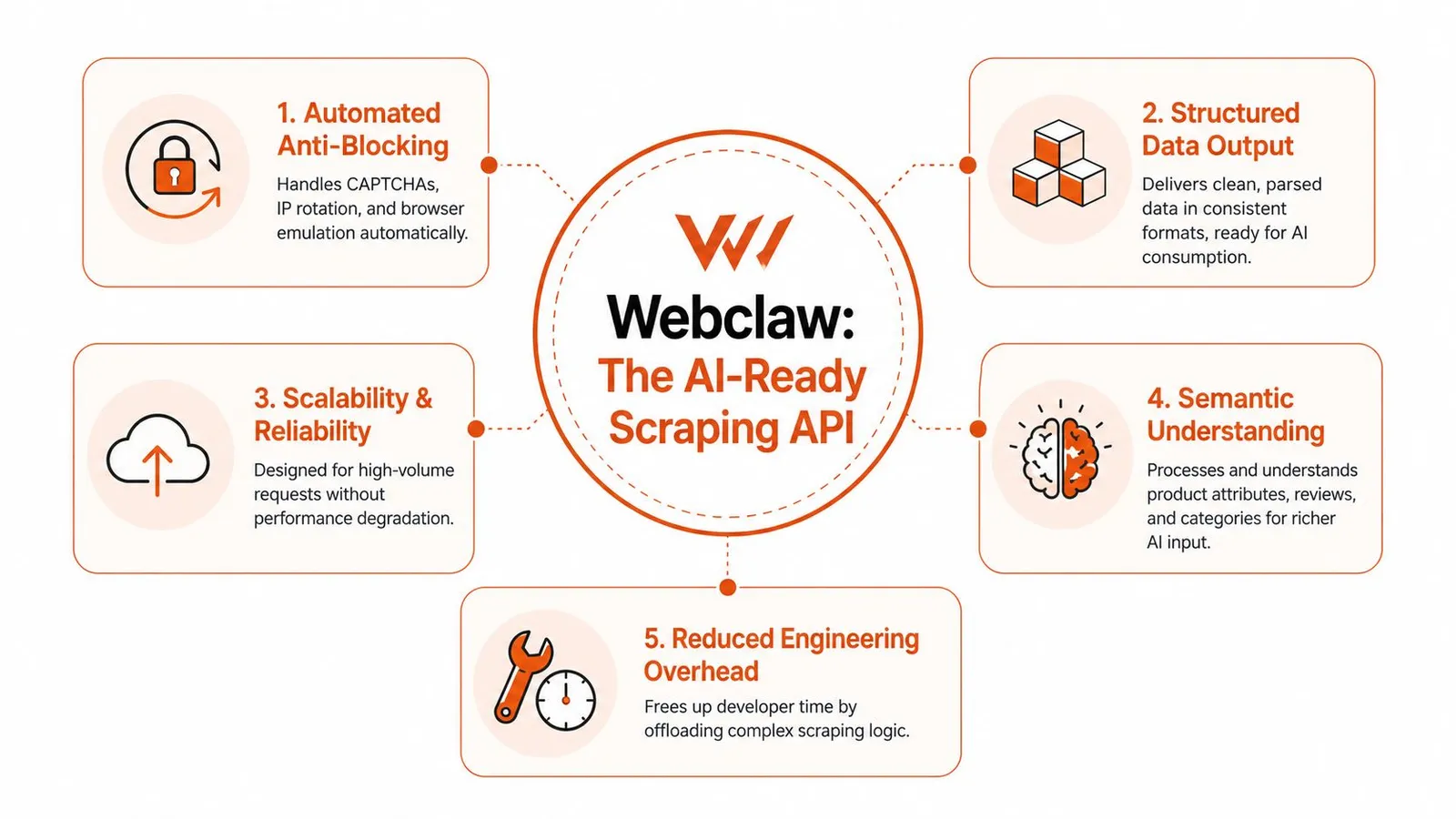
The stronger pattern is to treat scraping and AI ingestion as one system. Fetch the page through a service that handles rendering and anti-bot defenses, then return the small set of fields and content your application uses. That might be title, brand, current price, availability, rating, review count, bullets, seller identity, and selected normalized text for downstream prompts.
AI pipelines need stable inputs, not clever parsers
A prompt chain or retrieval pipeline fails differently from a dashboard export job. If one selector drifts, you do not just get a missing field. You can end up grounding a model on stale prices, mixing marketplace variants, or answering with partial product data that still looks plausible.
That is why modern APIs increasingly act as a machine-consumption layer, not just a fetch layer.
For AI use cases, the design priorities are usually:
- Rendered acquisition: dynamic modules need to resolve before extraction
- Schema-first output: product facts should arrive in predictable fields
- Content filtering: remove navigation, scripts, and repeated boilerplate before the model sees it
- Parser maintenance by the provider: site changes should not trigger emergency fixes in your prompt pipeline
- Consistent normalization: the same concept should arrive the same way across locales and page variants
These choices reduce a very specific class of failure. The model receives less noise, your token spend stays under control, and downstream evaluation becomes easier because the input shape is consistent.
APIs like Webclaw solve the last mile too
This is the practical shift in the Amazon scraping stack. Earlier generations focused on getting past blocks and returning the page. Modern products such as Webclaw are built for teams that need usable output on the other side of the scrape, especially teams building agents, RAG systems, or product intelligence workflows.
That matters because scraping is only half the job. The expensive part often starts after acquisition, when you have to clean, compress, label, and reshape the result for AI consumers. If the API already returns LLM-friendly content or structured product objects, you remove a whole layer of custom transformation code.
For teams deciding between DIY extraction and an API, this is the architectural question to ask: do you want to maintain browser automation plus parsers plus AI-oriented post-processing, or do you want one service that returns data your application can use immediately? For production AI systems, the second option is usually the cleaner design.
Common Pitfalls and Best Practices
Production Amazon scraping usually fails in boring ways. The block rate gets attention, but the expensive problems tend to be stale data, silent parser drift, duplicate jobs, and retry logic that turns a transient issue into a cost spike.
Treat the scraper as one component in a data system, not the system itself.
Design for retries and partial failure
Even with a good provider, some requests will timeout, some pages will come back incomplete, and some records will parse incorrectly because Amazon changed a template or localized a field differently. Build for that from day one.
A simple operating model works well:
- Use exponential backoff: Retry transient failures without sending the same request pattern over and over.
- Separate transport errors from data errors: A timeout, a blocked request, and a response missing price should not follow the same retry path.
- Store failure context: Save request parameters, marketplace, timestamps, and the raw response or error payload so bad records can be investigated later.
- Make jobs resumable: Restart from the failed page or ASIN set, not from the beginning of the crawl.
- Set idempotent write rules: Reprocessing the same product should update one record, not create duplicates.
Keep the pipeline efficient
A strong API can solve acquisition, but teams still waste money after the response arrives. The common mistake is fetching full page output for every workflow, then pushing all of it through parsing, storage, and sometimes an LLM, whether the application needs that data or not.
Use narrower fetch patterns instead:
- Cache by ASIN and locale: The same product can return different availability, shipping, currency, and offer data across markets.
- Fetch the smallest useful unit: Request product details, search results, reviews, or offers separately when the API supports those endpoints.
- Avoid oversized batches: Smaller job units are easier to retry, audit, and replay after a partial failure.
- Validate business fields before accepting the record: Missing price, wrong marketplace, or mismatched seller data should fail validation even if the HTTP request succeeded.
- Version your extraction contract: If your downstream app expects title, price, rating, and review count, define that schema explicitly and alert on drift.
One practical rule helps a lot. Keep raw captures for debugging, but feed downstream systems the normalized fields they use. That matters even more in AI pipelines, where noisy page output increases token cost and makes model behavior less predictable.
If you are evaluating providers, prefer one that returns structured, application-ready output instead of forcing your team to maintain browser automation, parsers, and post-processing code separately. Webclaw is a good fit when the output is headed into a model, a retrieval pipeline, or a production application that depends on consistent structure.