Web Search API: The 2026 Guide for AI Developers
Your agent works in the demo. It fails in production the first time it needs live information.
The usual sequence is familiar. The model gets a question about a recent product launch, a regulation update, or a breaking outage. It calls a web search API, receives a neat list of links, then hits a wall: JavaScript-heavy pages, consent banners, anti-bot checks, or raw HTML so bloated that the useful text is buried under navigation and boilerplate. The model doesn't look stupid because it lacks reasoning. It looks stupid because your data pipeline handed it the wrong shape of web data.
That's the significant shift happening in search infrastructure for AI. A web search API used to mean “search results in JSON.” For AI teams, that standard is outdated. What matters now is whether the API returns model-ready content that can go directly into retrieval, ranking, summarization, and answer generation.
Your AI Agent is Blind Without the Right Web Data
A strong model with weak retrieval behaves like a smart analyst locked in an empty room. It can reason well, summarize cleanly, and follow instructions. But if it can't reliably reach current, relevant web content, it starts guessing.
That failure shows up in ordinary workflows. A customer support copilot needs the latest pricing page. A compliance assistant needs a current regulator notice. A research agent needs a blog post published this morning. In each case, returning ten links is only the start of the job. The hard part is getting usable content out of those links consistently.
Raw links are not retrieval. They're a handoff to another fragile system.
This is why search infrastructure now matters far beyond classic search products. The global search engine market reached USD 280.48 billion in 2026 and is projected to reach USD 474.73 billion by 2031, with AI adoption and programmatic search interfaces cited as major drivers in Mordor Intelligence's search engine market analysis. That tracks with what engineering teams are building: agents, RAG systems, monitoring pipelines, and automation that all need live web access.
Where agents usually fail
- They fetch links, not context. The model still has to open pages and figure out what matters.
- They hit modern websites badly. Client-rendered pages often return partial or useless content to basic fetchers.
- They waste context window budget. Even when scraping works, the result is often full of headers, menus, disclaimers, and duplicate links.
- They lack a retrieval bridge. Tools built for AI agent web workflows need current content in a format the model can consume.
The practical lesson is simple. If your agent depends on the web, your bottleneck isn't the model. It's the data path between search and usable text.
What Is a Web Search API
At the basic level, a web search API is a programmatic interface that lets software send a query and receive search data back in a structured format. That's the familiar definition, and it's still true.
For AI systems, though, that definition is too narrow. A useful web search API isn't just an endpoint for fetching search results. It's a retrieval layer between the live web and a model, agent, or downstream pipeline.
More than a list of results
The old mental model is “Google results, but in JSON.” That works if your application is doing rank tracking, SEO analysis, or storing result pages for later review. It's not enough if your application needs to answer questions grounded in the web right now.
A better mental model is this: a web search API is an intake system for live information. Sometimes that intake stops at titles, URLs, and snippets. Better systems go further and return extracted passages, cleaned article bodies, markdown, metadata, and fields that plug directly into a retriever or prompt.
That shift matters because AI products don't browse like humans do. They don't scan a page, ignore the cookie banner, and visually find the important paragraph. They process whatever text you give them. If you feed them noisy page markup, you get noisy reasoning.
For teams trying to make sense of this broader shift in search, Algomizer's piece on navigating AI-native discovery is a useful companion read because it frames how search behavior is changing around machine consumers, not just human users.
The modern role in the stack
In production, I think about a web search API as serving one of three roles:
-
Result discovery
It finds relevant pages and returns metadata. -
Content acquisition
It extracts the useful text from those pages. -
Model preparation
It packages the result into structured, token-efficient content that an LLM can rank, cite, or summarize.
If an API only does the first part, you still have real engineering work left. If it handles all three, your retrieval stack gets much simpler. That's why docs that show only a search endpoint are incomplete for AI use cases. What matters is the full path from query to model-ready context, not just the request itself. A typical reference point for that workflow is an API spec like the search endpoint documentation.
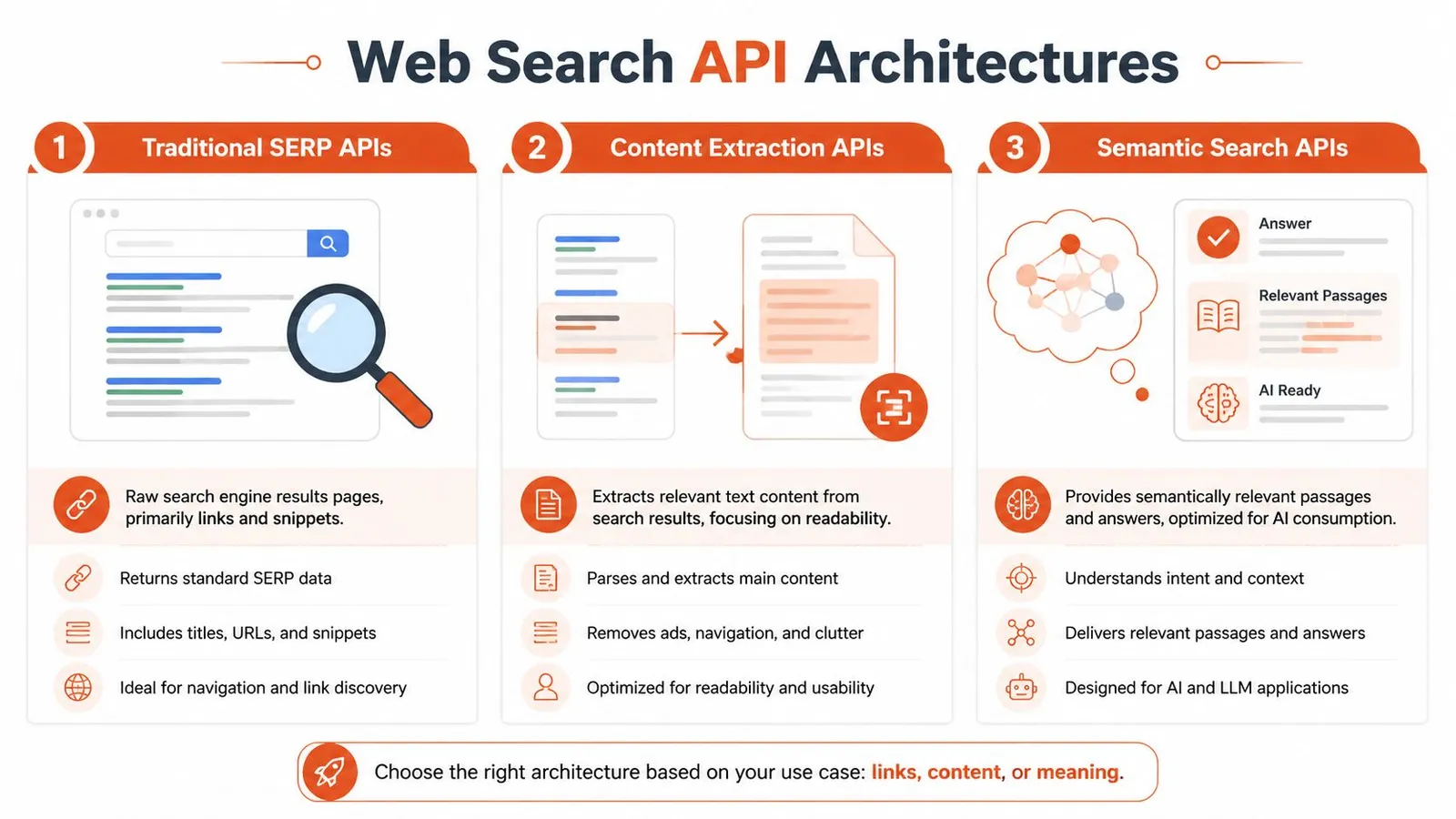
Comparing Web Search API Architectures
Not all web search APIs solve the same problem. The name sounds uniform. The architecture usually isn't.
Traditional SERP wrappers
These APIs wrap a search engine result page and return rankings, titles, snippets, and URLs in structured JSON. They're often the easiest category to understand because they mirror what a human sees on a search engine. If you would rather run the scrape yourself, how to scrape Google search results covers the methods these wrappers use internally.
They work well for:
- SEO monitoring
- Competitor tracking
- Ad and ranking analysis
- Localization-focused result inspection
They work poorly for direct LLM retrieval because the payload is mostly metadata. Your application still has to open the links, scrape the page, clean the content, and then decide what to feed the model.
Their biggest strength is visibility into the result layer itself. Their biggest weakness is that they stop before content acquisition.
Live crawl search APIs
These systems search by crawling or scanning a live index and can be better suited to freshness-sensitive workflows. They often behave less like a SERP mirror and more like a queryable web index.
They're useful when you care about:
- Broader web coverage
- Fresh pages
- Less dependence on one search engine's presentation
- Programmatic retrieval workflows
The trade-off is operational variability. Depending on the provider, result structure can differ across domains and query types. Some providers are great at finding documents but weaker at turning them into clean downstream content.
Integrated search and extraction APIs
This is the architecture AI teams should pay closest attention to. These APIs combine search with content extraction, so the response includes not only the page URL and title but also the cleaned page body or a model-oriented text representation.
Practical rule: If your application ends with an LLM call, evaluate the extraction layer before you evaluate the search layer.
This category is usually the best fit for:
- RAG systems
- Agent research loops
- Fact-checking workflows
- Multi-source summarization
The difference is subtle until you build with it. A plain SERP wrapper says, “Here are relevant pages.” An integrated API says, “Here are relevant pages and the usable text you need.”
That's why architecture matters more than feature lists. Two products can both claim to be a web search API while serving very different jobs. If you're comparing providers, a dedicated search architecture comparison guide is the kind of resource worth checking before you commit to one model of retrieval.
Key Features and Common Limitations
Marketing pages usually emphasize breadth, speed, and simplicity. Production systems expose what really matters: output shape, error handling, consistency, and cost behavior under load.
The market pressure behind this is real. The AI agents market is projected to grow from $5.40 billion in 2024 to $139.12 billion by 2033, and per-query costs in 2026 typically range from $0.001 to $0.025, according to WebSearchAPI.ai's analysis of web search APIs. When teams run agents in loops, those costs stop being trivial.
What actually helps in production
A good API for AI work usually gets these basics right:
-
Structured JSON output
You want stable fields, predictable nesting, and response formats that don't vary wildly by query type. -
Localization controls
Region, language, and time-range filters matter when your answer quality depends on local or recent content. -
Search depth controls
Sometimes you want a few highly relevant documents. Sometimes you need broader recall for synthesis. -
Low-latency retrieval
Fast responses matter because search often sits inside a multi-step loop. Slow tools don't just slow one call. They slow the whole agent. -
Extracted content fields Title and snippet are useful. Clean body text is what feeds the model.
What breaks projects
A lot of failures come from features that looked fine in the sandbox.
| Limitation | Why it hurts |
|---|---|
| Aggressive rate limiting | Agents burst traffic. A few concurrent tasks can turn into retries and partial failures quickly. |
| Inconsistent schemas | Downstream ranking, chunking, and citation logic becomes brittle. |
| Weak JavaScript handling | Modern sites return incomplete content or empty shells to basic fetchers. |
| Hidden pricing edges | Costs climb when every search triggers follow-up extraction or multiple retries. |
The pricing issue is usually underestimated. A cheap query can become an expensive workflow if one user request turns into several searches, several fetches, and repeated cleaning logic. Cost discipline means evaluating the full retrieval path, not the top-line API price.
A low query price doesn't mean a low system cost.
The safest evaluation method is boring and effective: test against the ugliest sites in your target domain, inspect the raw response objects, and measure how much custom cleanup code your team still has to write after the API returns.
How to Integrate a Web Search API for RAG
For RAG, the useful question isn't “Can this API search the web?” It's “Can this API return context my retriever can trust without an extra cleanup pipeline?”
A modern API designed for AI often folds extraction into the search response. Firecrawl describes this pattern as integrating full-page extraction directly into search, reducing latency by sub-second intervals and returning clean markdown or token-efficient content that can be up to 90% smaller than raw HTML in its web search API write-up.

The pipeline that works
The most reliable RAG flow is usually:
- Search the web for the query.
- Receive already-extracted content with each result.
- Rank or filter documents.
- Chunk only the useful text.
- Store or pass the chunks to the model with citations.
That avoids the common trap where search and scraping are separate systems with separate failure modes.
If you need a grounding refresher, Supagen's guide on understanding AI retrieval and RAG is a solid primer on how retrieval quality shapes model output quality.
A practical integration point for many teams is a connector layer such as LangChain-compatible search tooling, where search results can flow directly into retrievers or agent tools instead of being manually transformed.
A simple Python example
This example shows the shape you want. One search call. Extracted markdown in the response. Minimal glue code.
import os
import requests

API_KEY = os.getenv("WEBCLAW_API_KEY")

url = "https://api.webclaw.io/v1/search"
payload = {
    "query": "latest AI infrastructure announcements",
    "limit": 5,
    "format": "markdown",
    "language": "en"
}
headers = {
    "Authorization": f"Bearer {API_KEY}",
    "Content-Type": "application/json"
}

response = requests.post(url, json=payload, headers=headers)
response.raise_for_status()

data = response.json()

documents = []
for item in data.get("results", []):
    documents.append({
        "title": item.get("title"),
        "url": item.get("url"),
        "content": item.get("markdown", ""),
    })

# Example: pass documents into your chunker or vector store
for doc in documents:
    print(doc["title"])
    print(doc["url"])
    print(doc["content"][:500])
    print("=" * 80)
This matters because your retrieval step should produce content, not another queue of work.
The walkthrough below gives a visual sense of what that simplified setup looks like in practice.
Beyond SERPs Why LLM-Ready Content Matters
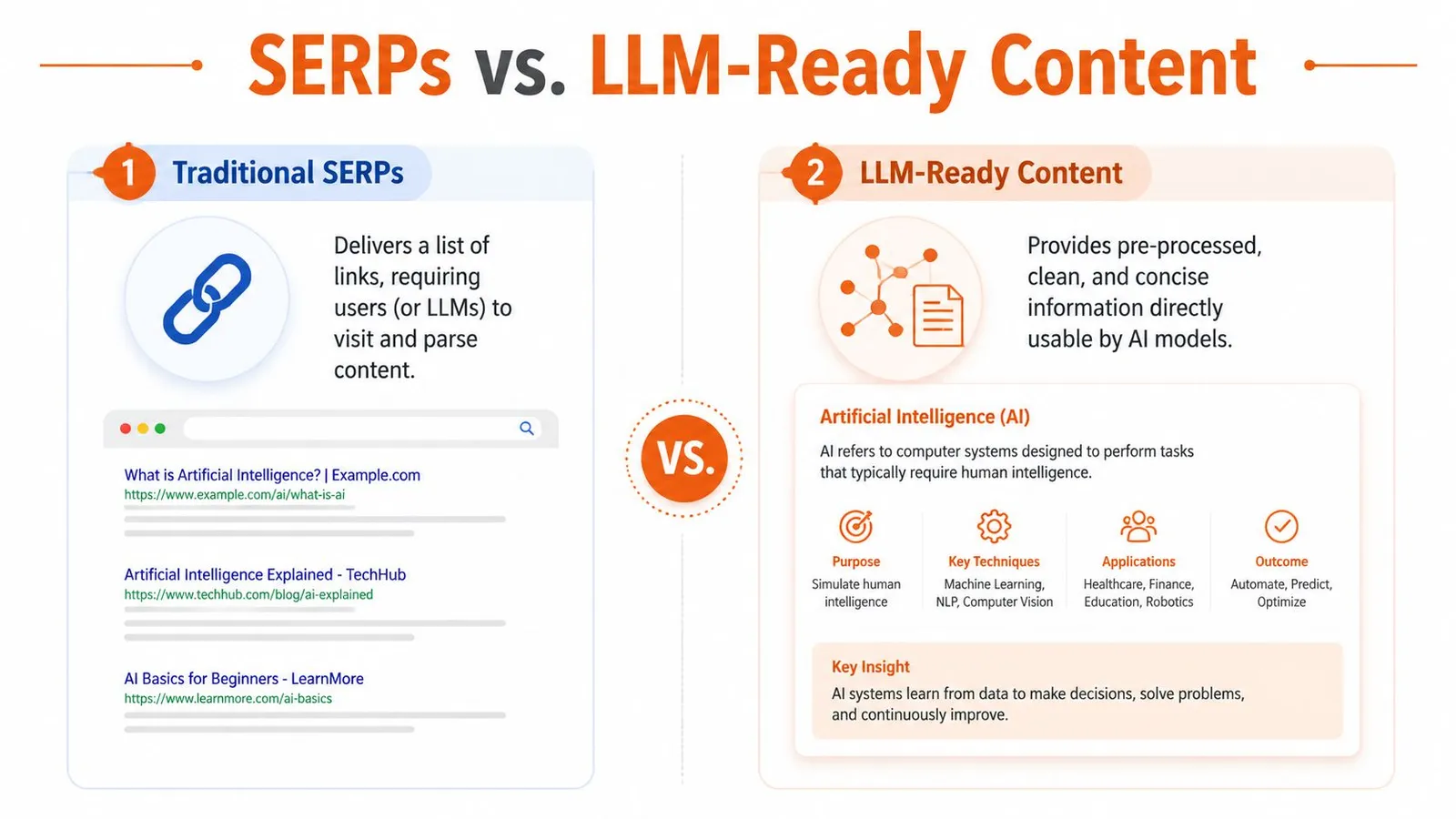
Ten blue links were built for people. LLM applications need something else.
A model doesn't benefit from “discoverability” in the same way a user does. It benefits from clean evidence. If your pipeline returns links first and content later, your system spends time and tokens just getting to the point where reasoning can start.
Links are not knowledge
A separate search-then-scrape loop adds network latency and can send substantially more markup to the model. Measure end-to-end latency and tokens on your own queries before choosing an integrated API.
Those numbers line up with what teams feel operationally. The slowness isn't coming from the model alone. It's coming from orchestration overhead, redundant requests, and noisy page content.
What the better pipeline changes
When the API returns cleaned content directly, a few things improve at once:
- Latency drops because you've removed a second network step.
- Chunking gets easier because the input is already stripped down.
- Prompts get cheaper because you aren't stuffing menus, footer links, and banner text into context.
- Citations improve because each content block stays tied to a source URL from the start.
For teams thinking about generative interfaces more broadly, MyMentions has a useful article on strategies for generative answers that complements this shift from result pages to direct answer inputs.
If your final consumer is an LLM, the best search result is often not a result page. It's extracted text with provenance.
That's also why HTML-to-markdown conversion has become more important than SERP fidelity in AI systems. The hard engineering work isn't finding a URL. It's converting the web into a compact, faithful representation the model can use. A practical example of that transformation is the kind of HTML to Markdown workflow for LLMs many teams now treat as a core retrieval step rather than an afterthought.
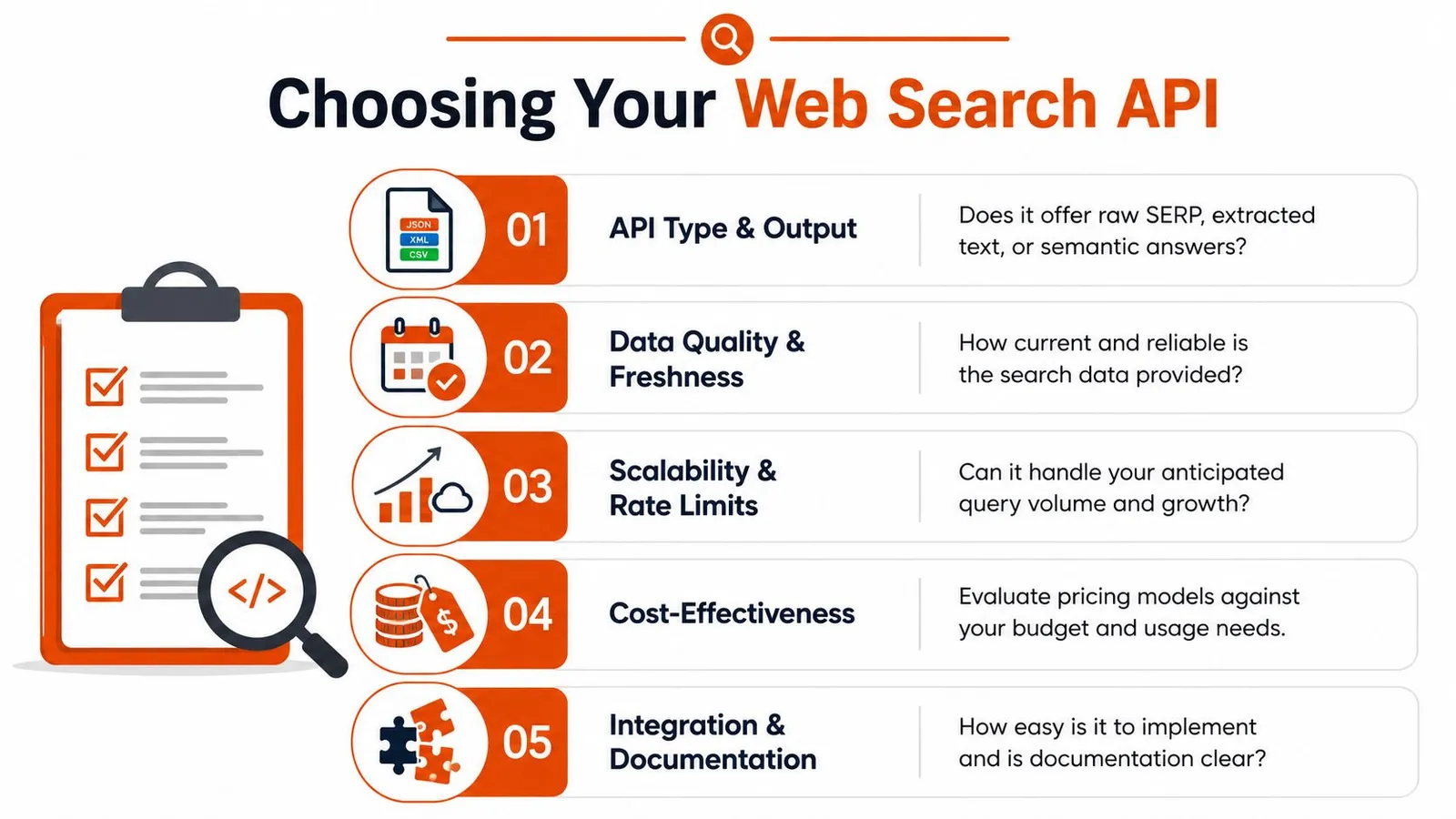
How to Choose the Right Web Search API
The right choice depends on what you're building, not what the vendor homepage emphasizes.
Pick by job to be done
If you're building production RAG or agent workflows, prioritize extracted content quality, stable schemas, and reliability on hard-to-fetch pages. A search result that still needs manual cleanup isn't finished retrieval.
If your use case is SEO or market research, SERP visibility may matter more than cleaned body text. In that case, localization controls, ranking fidelity, and result metadata are more important than markdown output.
If you're prototyping a simple assistant, a lightweight API can be enough. But be honest about where the prototype will go next. A lot of teams start with “just links” and later realize they've built a brittle scraping stack around it.
A simple filter helps:
- Need rankings and snippets? Use a SERP-oriented API.
- Need current documents from the web? Use a search system with strong live retrieval.
- Need model-ready context for LLMs? Use integrated search and extraction.
Choose based on whether the API returns the final artifact your system needs, not merely whether it offers a search endpoint.
Frequently Asked Questions
Some of the hardest implementation questions show up after the first successful API call. That's where retrieval systems either mature or become a maintenance burden.
Practical answers to common objections
Ranking position is not evidence quality. Fact-checking and sensitive RAG workflows should evaluate source authority and corroboration.
That changes how you evaluate providers. You want diversity across sources, clear citation granularity, and enough transparency to avoid grounding answers in a narrow or commercially distorted slice of the web.
| Question | Answer |
|---|---|
| How do I reduce biased search results in RAG? | Don't trust a single top-ranked list. Pull from multiple sources, preserve citations, and favor APIs that make it easier to inspect source diversity rather than only returning a narrow top set. |
| Can a web search API handle JavaScript-heavy pages? | Some can, some can't. This is usually an extraction problem, not a search problem. Test against real client-rendered pages in your domain before committing. |
| Is building in-house cheaper? | Sometimes at tiny scale. At production scale, teams usually underestimate rendering, anti-bot handling, schema normalization, retries, and long-term maintenance. |
| Should I store raw HTML or cleaned text? | For most LLM workflows, cleaned text or markdown is the better default. Raw HTML is useful for debugging, but it's a poor primary format for prompting and retrieval. |
| Do I need search and scraping as separate tools? | Only if your use case truly requires it. For AI retrieval, integrated search and extraction is usually simpler, faster, and easier to maintain. |
Build your evaluation set from the pages most likely to fail, not the pages most likely to impress in a demo.
The mature way to choose a web search API is to judge it by downstream answer quality, not by how pretty the response looks in a console. If your model gets cleaner context with less orchestration, you picked the right abstraction.
If you're building agents, RAG pipelines, or web-scale research workflows, Webclaw is worth a look. It focuses on the part that usually breaks in practice: turning messy, blocker-heavy web pages into clean, token-efficient content that models can use.