Playwright vs Puppeteer: The 2026 Developer's Guide
Neither library is universally faster. Browser version, launch strategy, workload, waits, tracing, and concurrency affect results, so benchmark the exact flow you plan to run.
If you're deciding between Playwright and Puppeteer, you're probably not choosing in the abstract. You're choosing while staring at flaky CI runs, timing bugs in a scraper, a browser process that eats memory, or an AI pipeline that only needs clean page content but somehow ended up managing headless browsers.
That's why most Playwright vs Puppeteer articles miss the practical question. Local scripts are the easy part. The fundamental question is what happens when that script becomes a test platform, a scraping service, or a browser layer behind an API that other systems call all day. Once you think at that level, the choice changes.
A lot of teams start by asking which library has the nicer API. The better question is which problem you're solving. If you need browser control, the trade-off is real. If you need extracted content, a browser automation library may be one layer too low, as I cover in this guide to scraping websites for data.
| Criteria | Playwright | Puppeteer |
|---|---|---|
| Best fit | Complex testing, multi-step automation, cross-browser work | Fast Chrome-only scripts, focused automation, lightweight scraping |
| Browser model | First-class Chromium, Firefox, and WebKit support | Effectively Chromium-first |
| API style | Higher-level, locator-driven, more auto-wait behavior | Leaner, more direct Chrome DevTools oriented control |
| Short script speed | Usually a bit slower on tiny jobs | Often faster on short single-purpose runs |
| Long suite reliability | Better for consistency and lower variance in larger flows | Can need more manual timing and guardrails |
| Install footprint | Larger, about 1 to 1.6 GB with bundled engines | Smaller, about 180 to 400 MB for Chromium bundle |
| Best for AI extraction teams | Good if you must control the browser yourself | Good if you want low overhead on Chromium tasks |
| When neither is ideal | When you really need a managed extraction API instead of raw browser automation | Same |
The Core Decision in Browser Automation
Teams commonly don't struggle because Playwright and Puppeteer are wildly different. They struggle because both are good enough to overlap, while each one breaks down in different production conditions.
Puppeteer came first. Google's Chrome DevTools team shipped it in 2017. Microsoft released Playwright in January 2020 as a next-generation browser automation library built to modernize and extend the same core ideas. By June 2026, Playwright had reached about 90,292 GitHub stars versus Puppeteer's 94,423, despite Puppeteer's multi-year head start, which tells you how quickly Playwright became a first-class option in practice, as documented in this 2026 comparison of Playwright and Puppeteer adoption.
That history matters because the tools still reflect their origins.
Puppeteer feels like a Chrome automation library that grew up into a wider platform. Playwright feels like a reliability-first automation system that started from the assumption that one browser engine isn't enough.
Practical rule: If your automation target is Chromium and your workflow is simple, Puppeteer usually gets you there with less overhead. If the workflow is brittle, multi-step, or likely to grow, Playwright usually ages better.
There's also a third path that engineers skip too often. If your actual goal is extracted content for search, AI, RAG, or downstream analysis, you may not want to own browser orchestration at all. At production scale, the hardest parts aren't click() and waitForSelector(). They're retries, blocked sessions, rendering failures, session isolation, and output cleanup.
That changes the decision from "Which library should I install?" to "Should I even be writing browser code for this problem?"
Understanding Each Tool's Philosophy
Puppeteer and Playwright look similar because they share lineage. They don't behave the same because they were built with different priorities.
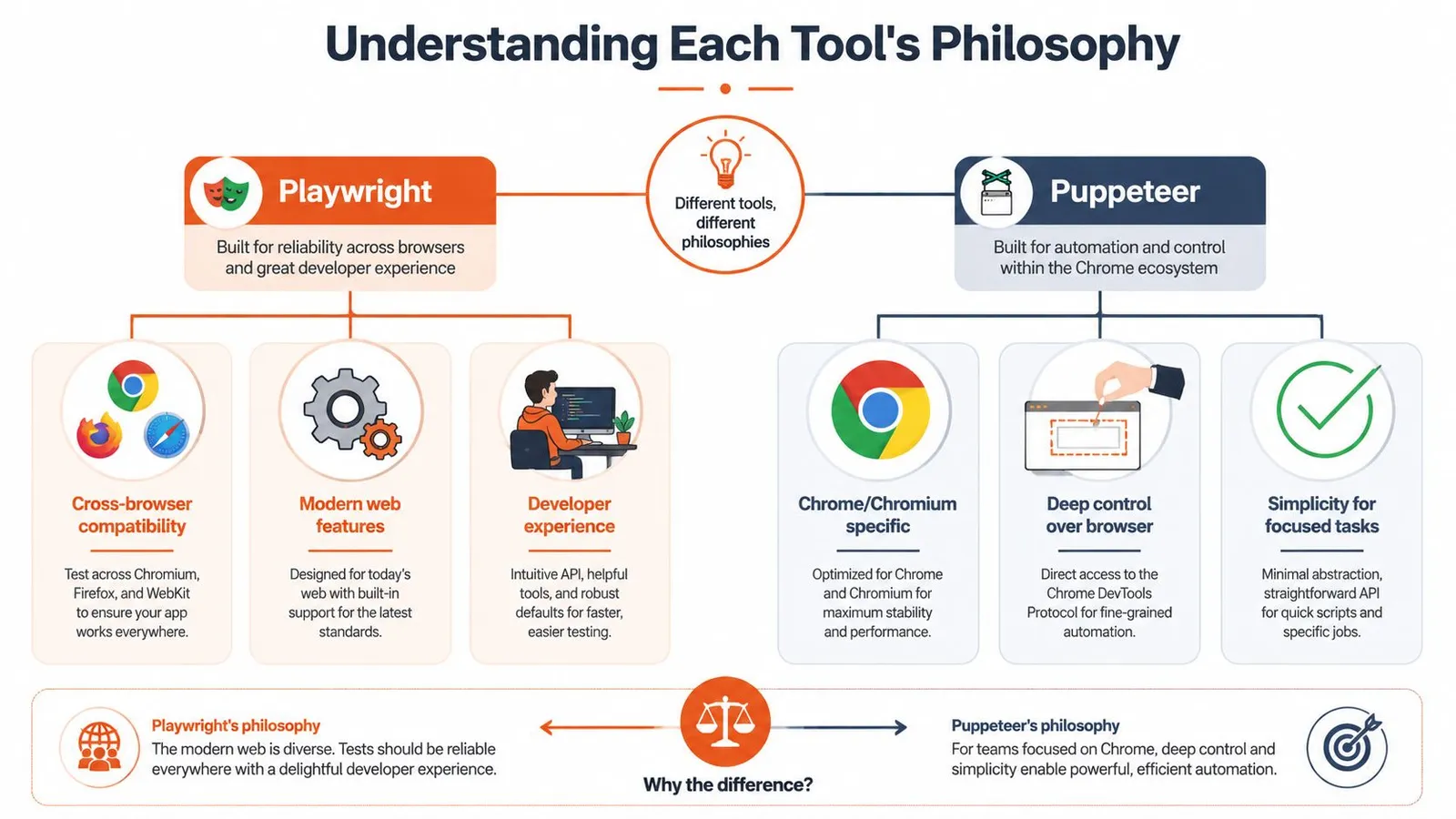
Puppeteer's original job was clear. Give developers a high-level Node API over Chrome's DevTools Protocol and make browser scripting straightforward. That design still shows up everywhere in the product. It feels close to Chromium. It feels fast. It feels like a tool written by people who expected Chrome to be the center of the world.
Playwright started from the pain points that appeared after teams tried to scale that model. Browser differences mattered. Timing bugs mattered. Test flakiness mattered. Cross-browser parity mattered. So Microsoft pushed it toward a more opinionated framework with stronger defaults.
Playwright optimizes for reliability
Playwright's philosophy is that the framework should absorb more of the instability for you. Instead of exposing only primitive actions, it gives you a model that tries to make those actions dependable across browsers and more resilient in dynamic UIs.
That has practical consequences:
- Cross-browser consistency: The same mental model applies to Chromium, Firefox, and WebKit.
- Safer defaults: More waiting and actionability logic happens for you.
- Framework feel: It nudges you toward patterns that reduce brittle scripts.
Puppeteer optimizes for control and minimalism
Puppeteer still appeals to engineers who want less abstraction between the code and the browser.
- Chromium-first focus: That keeps the core path tighter.
- Directness: For many scraping or rendering tasks, that directness is exactly what you want.
- Smaller surface area: There are fewer opinions in the way, which can be good or bad depending on the problem.
Playwright tries to prevent common failure modes. Puppeteer assumes you want sharper tools and don't mind handling more of the edge cases yourself.
Neither philosophy is universally better. The right one depends on whether you're optimizing for raw control, low-latency Chromium work, or a more fault-tolerant automation layer.
Feature Matrix and API Deep Dive
The biggest difference in the Playwright vs Puppeteer debate isn't a checkbox feature. It's how the API pushes you to think.
Browser support changes the real workload
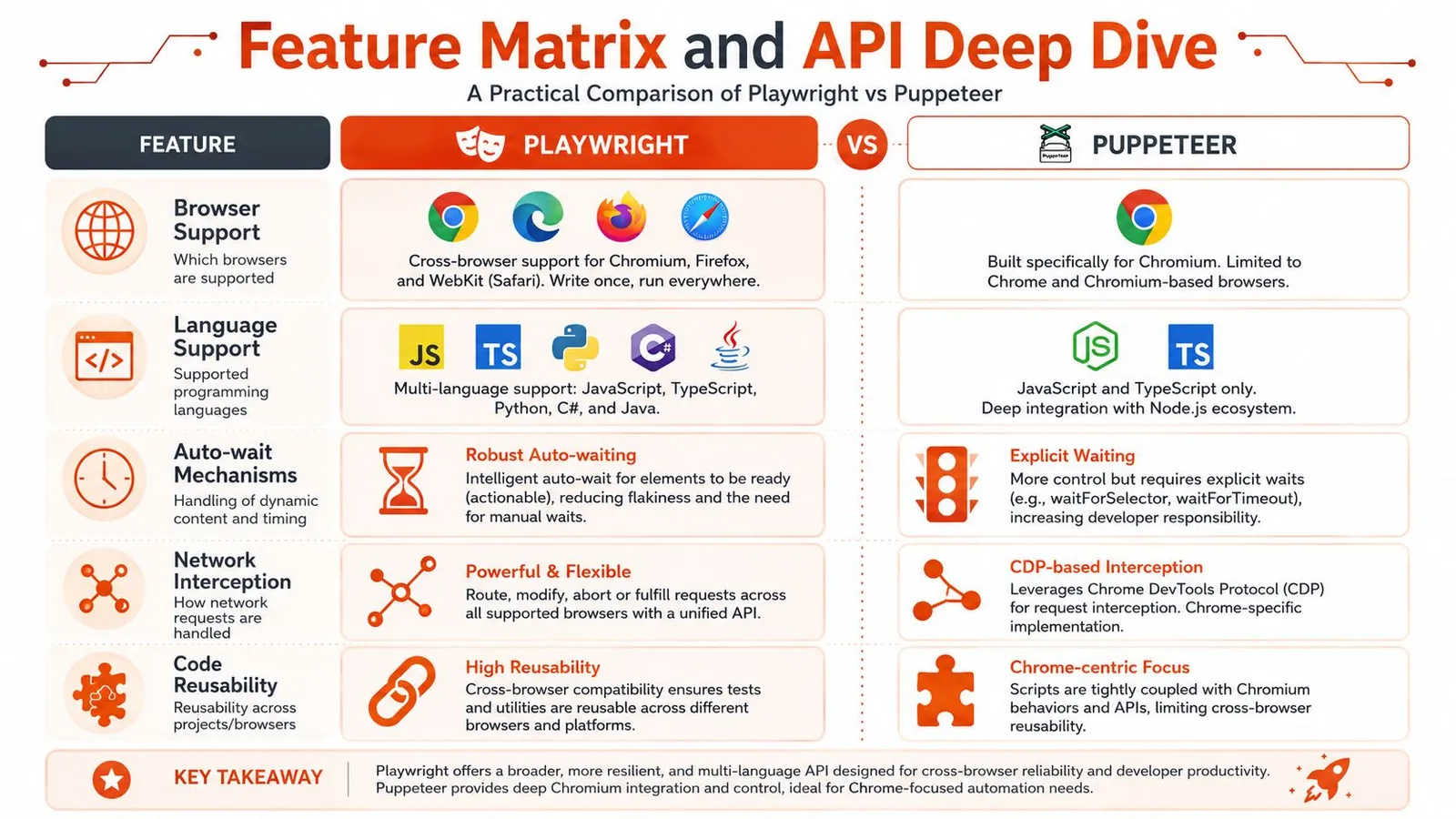
If you only automate Chromium, Puppeteer's narrower scope is a strength. Less abstraction usually means less to reason about. If you need the same test or workflow to run across Chromium, Firefox, and WebKit, Playwright is built for that from the start.
That sounds obvious, but the downstream effect is what matters. Cross-browser support isn't just about compatibility testing. It affects how much custom logic you carry in your codebase, how many environment-specific bugs you chase, and how portable your automation becomes when product requirements shift.
Locators versus handles
Playwright's locator model is often the biggest day-to-day difference. It encourages retryable interactions and built-in waiting behavior. Puppeteer gives you a more direct element-handle style workflow.
A simple contrast makes the difference obvious.
Puppeteer style
const button = await page.$('button.submit');
await page.waitForSelector('button.submit');
await button.click();
Playwright style
const button = page.locator('button.submit');
await button.click();
The Playwright version isn't just shorter. It encodes more assumptions about waiting, element readiness, and retriability.
What this means in practice: Playwright code is usually less flaky by default. Puppeteer code often gives you finer control, but you pay for that control with more explicit timing and state management.
For scraping-heavy workflows, that difference matters on modern frontends. React, Vue, and client-rendered pages often fail in ways that aren't really selector problems. They're hydration problems, overlay problems, or "the node exists but isn't stable yet" problems.
A related workflow matters for Python teams too. If you're building crawlers outside Node, Playwright usually fits multi-language stacks more naturally, while many teams using Chromium-only scraping in Python end up looking at broader architecture questions anyway, like those covered in this guide to crawling in Python.
Here's a useful visual summary before going deeper.
Language bindings and footprint
Playwright also makes a different trade-off at install time. Its default install, including bundled browser engines, can take about 1 to 1.6 GB, while Puppeteer typically lands around 180 to 400 MB for a single Chromium bundle, according to this bundle-size comparison of Playwright and Puppeteer.
That disk footprint isn't just an install annoyance. It affects cold starts, CI image size, and how expensive it is to replicate environments across workers and containers.
A quick matrix helps frame it:
| Area | Playwright | Puppeteer |
|---|---|---|
| Element interaction model | Locator-centric | Element-handle oriented |
| Waiting strategy | More built-in | More explicit |
| Browser footprint | Larger | Smaller |
| Cross-browser reuse | Strong | Limited |
| Low-level Chromium feel | Good, but abstracted more | Excellent |
If you like explicit control and can standardize on Chromium, Puppeteer feels clean. If you want fewer timing bugs and broader browser coverage, Playwright's abstraction usually earns its keep.
Performance and Reliability Under Load
A script that feels fast on a laptop can become the slowest part of a production pipeline once you run hundreds of sessions in parallel, rotate proxies, and deal with pages that load inconsistently. That is the context that matters for AI teams and scraping platforms. Local benchmarks only answer a small part of the question.
Where Puppeteer keeps an edge
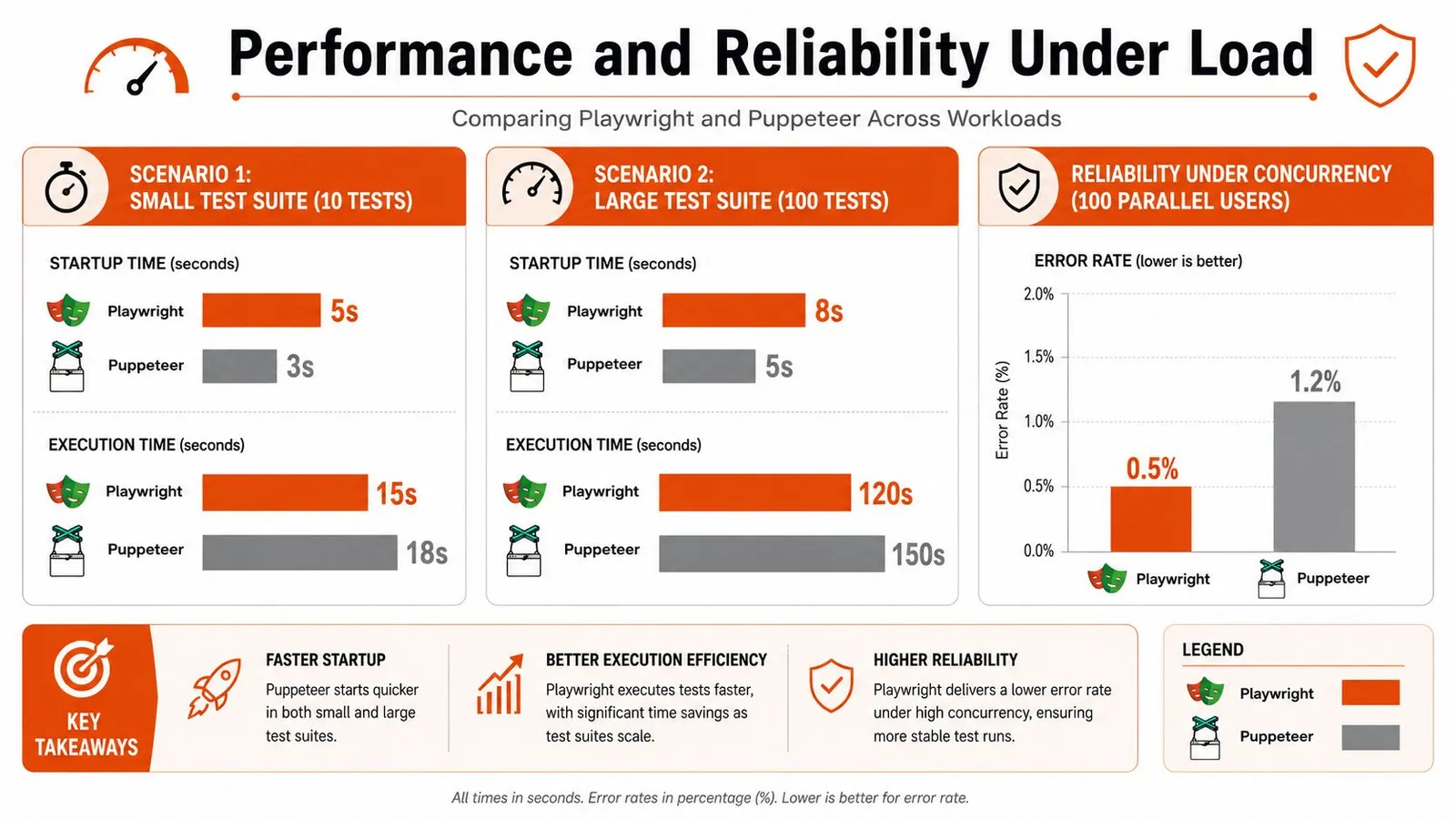
Puppeteer usually feels leaner for short Chromium-only jobs. Launch the browser, open a page, pull a few fields, exit. That path has less abstraction, and in many real scraping scripts it shows.
I have seen the same pattern in production workers that do one job per browser instance. Puppeteer is often the cleaner fit when the page flow is simple, the target is stable, and the team wants tight control over CDP-level behavior. Smaller installs also help in containerized fleets where image size and cold start time affect cost.
This matters outside test automation too. Teams that scrape and validate page performance in the same pipeline often split concerns. Browser automation handles interaction and extraction, while a separate service can automate tests with PageSpeed Plus for performance checks in CI.
Where Playwright earns its overhead
Load changes the trade-off.
Longer flows expose timing bugs, state leakage, and retry churn. Playwright usually handles those cases better because its waiting model and browser-context isolation reduce the amount of custom synchronization code teams have to maintain. That does not make every single run faster. It often makes the whole system more predictable.
Predictability is what operations teams pay for. A worker that finishes slightly later but fails less often will usually deliver more throughput across the day than a worker that is quick on clean runs and noisy under contention.
That shows up in test farms, scraping clusters, and API products. Once jobs are queued across many workers, the actual cost is not just raw execution time. It is the number of retries, the amount of failure triage, and how much code the team writes to paper over race conditions.
Reliability under concurrency is the real separator
Puppeteer can absolutely run at scale. Plenty of large scraping systems still use it well. The catch is that teams usually end up building more of the reliability layer themselves. They add stricter wait helpers, browser recycling rules, request interception patterns, and their own failure recovery logic.
Playwright ships with more of that discipline built in. For browser testing, that often means fewer flaky runs. For scraping APIs, it means fewer edge-case incidents where a page "loaded" but the data dependency did not, or one poisoned session affected the next task.
That production view is the part many Playwright vs Puppeteer articles skip. If you are building something like Webclaw, or using an API that already manages browser pools, fingerprinting, retries, and extraction at scale, the library choice matters less than the behavior of the full system. A higher-level API can abstract the Playwright-versus-Puppeteer decision away entirely, which is often the right outcome for AI teams that care more about reliable data delivery than browser internals.
Anti-bot pressure also changes the answer. If your workload depends on stealth plugins, proxy rotation, and hardened Chromium behavior, the package comparison is only one layer of the stack. That is why engineers working on defended targets end up studying topics like how Puppeteer Stealth interacts with Cloudflare protections instead of treating runtime speed as the whole decision.
Debugging Tooling and Anti-Bot Resilience
When automation breaks, the fastest library stops mattering. The better tool is the one that helps you understand the failure quickly.
Debugging workflow feels different
Playwright has a more integrated debugging experience. Its tooling is designed around replaying what happened, inspecting action timing, and reducing the guesswork around state transitions. For teams that run larger suites or maintain browser code across several services, that matters a lot.
Puppeteer debugging feels more traditional. You lean on Chrome DevTools, screenshots, logging, and whatever instrumentation you build around it. That's not a weakness by itself. Some engineers prefer it because it stays closer to the browser's native debugging model.
Here's one way to understand it:
- Choose Playwright's tooling style if you want a cohesive framework experience with stronger built-in visibility.
- Choose Puppeteer's tooling style if you want to stay close to Chromium internals and don't mind assembling more of the workflow yourself.
If a junior engineer can diagnose a broken flow from artifacts alone, your tooling is doing its job.
Anti-bot is a systems problem
A lot of Playwright vs Puppeteer content becomes misleading because neither tool is a magic bypass for Cloudflare, Akamai, or modern bot detection.
Puppeteer has a longer scraping history and a more familiar stealth ecosystem. That has real value, especially on Chromium-first workloads. But "has stealth plugins" doesn't mean "solves detection." Playwright's newer abstractions also don't, in themselves, make it harder to detect.
The hard truth is that anti-bot resilience usually depends on a stack:
- Identity management: Stable sessions, cookies, and realistic request behavior.
- Network strategy: Residential, ISP, or datacenter routing chosen for the target.
- Browser hardening: Patching automation signals and reducing obvious fingerprints.
- Operational discipline: Rate control, retry policy, and fallback logic.
If you're trying to run serious extraction pipelines, that broader stack matters more than whether the core library is Playwright or Puppeteer. That's also why engineers evaluating browser evasion strategies eventually move beyond package-level tweaks and into topics like undetectable internet browser setups.
When to Use an API Like Webclaw Instead
The sharpest shift in this space isn't inside the Playwright or Puppeteer API. It's one level above them.
The abstraction changed
A lot of AI and data teams don't want browser automation. They want reliable page retrieval, rendered content, and structured output. Those are related problems, but they're not the same.
External extraction APIs let an application request content without operating browsers in-process. The trade-off depends on required browser control, target coverage, and cost.
That tracks with what many production teams learn the hard way. Once an LLM pipeline needs live web context, the annoying part isn't writing a click flow. The annoying part is operating browsers as infrastructure.
What an extraction API replaces
If your end goal is content, a managed extraction layer can replace a surprising amount of custom code:
- Browser lifecycle management: You don't babysit launches, crashes, or pool exhaustion.
- Rendering and retries: The service decides when a static fetch isn't enough and when a browser is required.
- Normalization: You get markdown, JSON, or cleaned text instead of raw page noise.
- Operational overhead: Rate limits, blocking, and concurrency move out of your app.
A service like Webclaw API exposes web extraction over REST and returns cleaned outputs such as markdown or structured JSON, which is often more useful to AI systems than a browser object and raw DOM.
That doesn't make Playwright or Puppeteer obsolete. If you need authenticated workflows, exact browser actions, or deep page interaction logic, you'll still reach for browser automation. But if your team keeps building brittle page scripts just to produce extractable text, you're probably solving the wrong layer of the problem.
For AI pipelines, "can I control the browser?" is often the wrong first question. "Can I get reliable, clean context?" is usually the right one.
The Decision Checklist and Final Recommendation
The cleanest answer is to choose based on the workload, not the hype.
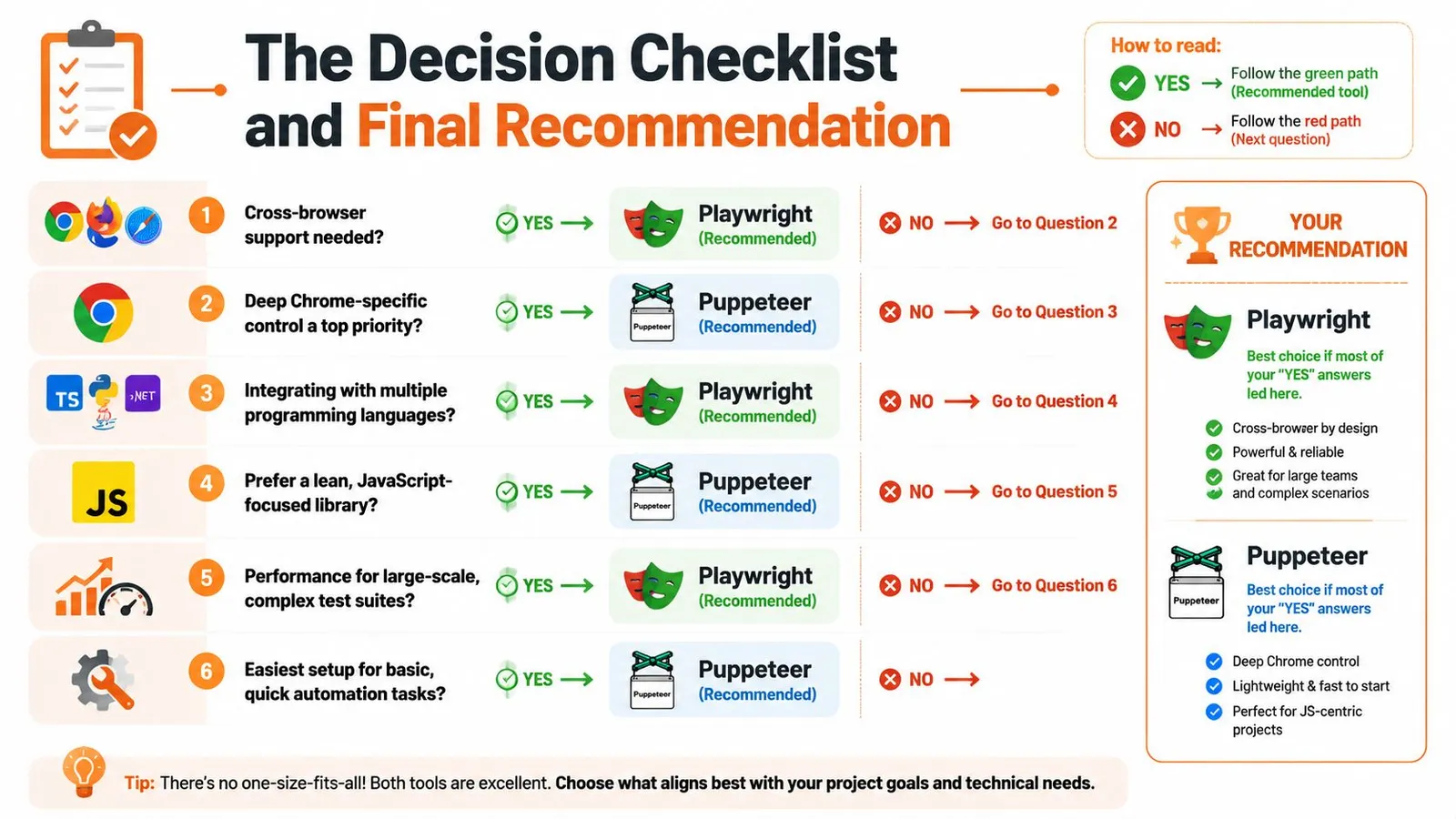
Use this checklist the way an engineering lead would use it. Start with constraints, not preferences.
-
Choose Puppeteer if your world is Chromium, your scripts are short-lived, and raw overhead matters. It's a strong fit for screenshot services, PDF-style rendering tasks, focused scraping jobs, and protocol-oriented Chrome automation where you want a lean path.
-
Choose Playwright if the workflow is long, stateful, or hard to stabilize. It fits end-to-end testing, multi-page flows, browser parity requirements, and teams that want stronger defaults around waiting, isolation, and debugging.
-
Choose an extraction API instead if the browser is only a means to get content. That's common in AI retrieval, RAG ingestion, monitoring, content intelligence, and research tooling where the value sits in the extracted result, not in browser control itself.
A few yes-or-no questions make the choice even simpler:
| Question | Better answer |
|---|---|
| Need Firefox or WebKit without separate tooling? | Playwright |
| Need the leanest Chrome-centric path? | Puppeteer |
| Fighting flaky dynamic UI interactions? | Playwright |
| Building tiny single-purpose Chromium jobs? | Puppeteer |
| Need LLM-ready content more than browser control? | API layer |
My recommendation is straightforward.
For general-purpose modern automation, pick Playwright unless you have a clear reason not to. It gives users fewer ways to shoot themselves in the foot.
For Chromium-only speed and control, pick Puppeteer. It's still the sharper tool when the job is narrow and you care about low overhead.
For AI data extraction, stop defaulting to browser frameworks just because they feel familiar. If you're paying the operational cost of browsers but your application only needs cleaned content, the library choice is often secondary to the service architecture.
Frequently Asked Questions
Is Playwright replacing Puppeteer?
No. The split is clearer than that.
Playwright has become the default choice for many teams building new automation because it handles more of the failure cases that show up in real apps. Puppeteer still has a solid place in Chromium-first environments, especially for narrow jobs where low overhead and direct control matter more than cross-browser support or richer test ergonomics.
A mixed setup can be useful: Playwright for broad automation coverage and Puppeteer for small Chrome-only workers. Keep both only when the additional maintenance serves a concrete requirement.
Is Playwright faster than Puppeteer?
Sometimes, but speed depends on what the script is doing.
For short, simple Chromium scripts, Puppeteer often feels lighter. For longer flows with more waiting, retries, and interaction logic, Playwright can close the gap because more of that work is built into the framework instead of being bolted on in user code.
The mistake is treating a local benchmark as the whole story. At API scale, the bigger variables are browser startup strategy, concurrency limits, proxy behavior, session reuse, and how often jobs need a second attempt. A framework that is slightly faster on a laptop can still lose in production if it creates more flaky runs or more operator time.
Is Playwright better for web scraping?
For modern, JavaScript-heavy sites, I usually give Playwright the edge.
Its locator model and built-in waiting behavior reduce a lot of the brittle interaction code that accumulates in scraping projects. That matters once you are running thousands of jobs and every extra wait, stale selector, or mistimed click turns into retries and support work.
Puppeteer still makes sense for lean Chromium scraping pipelines. If the target renders cleanly in Chrome and the job is straightforward, Puppeteer stays attractive because it is simpler and often easier to trim down.
For AI and data teams, there is a bigger point. Once the job includes anti-bot defenses, proxy coordination, parsing, normalization, and output shaping for downstream models, the browser library is only one layer of the stack.
Can you migrate from Puppeteer to Playwright easily?
Usually, yes.
The APIs are close enough that many core flows port without a full rewrite. The primary migration work is not the method names. It is cleaning up assumptions that grew around Puppeteer over time, especially explicit waits, selector strategy, and Chrome-specific shortcuts.
Typical friction points include:
- Waiting logic: Playwright often lets you remove manual waits that were needed to keep Puppeteer scripts stable.
- Selectors: Locator-based patterns change how interaction code is structured.
- Browser assumptions: Scripts written around Chromium quirks usually need cleanup if you want Firefox or WebKit to behave the same way.
Does cross-browser support matter for scraping?
Usually less than it matters for testing, but it is not irrelevant.
If a site behaves predictably in Chromium, extra browser engines may add little value. If a target breaks differently across engines, fingerprints one browser more aggressively, or renders inconsistently, having Firefox and WebKit available becomes useful very quickly.
This matters even more for teams building scraping infrastructure for other users. A production API has to care about failure isolation and fallback options in a way a one-off local script does not.
What's the hidden cost of running either tool at scale?
Operations. That is the actual bill.
Browser memory usage, queue backpressure, retry storms, blocked sessions, screenshot and trace storage, container maintenance, and time spent debugging flaky jobs usually cost more than the initial library choice. Playwright vs. Puppeteer is a real decision, but at scale it sits under bigger architectural questions about scheduling, observability, anti-bot handling, and extraction quality.
That is why many AI teams should at least evaluate an API layer instead of defaulting to browser ownership. If the application needs cleaned content more than raw browser control, Webclaw can remove a lot of the browser fleet and post-processing work that both Playwright and Puppeteer leave to you.