
Text Extractor from Website: A 2026 Practical Guide
You've got a URL. You need the text. Maybe it's for a RAG pipeline, a content audit, an internal research bot, or an AI workflow that has to read the page before it can do anything useful.
So you fetch the page and get back a blob of HTML, scripts, styles, navigation labels, cookie banners, footer junk, and ten versions of the same link text. On a modern site, you might get almost nothing at all because the actual content only appears after JavaScript runs. That's usually the moment people realize a text extractor from website isn't just a convenience tool. It's a content preparation problem.
The practical goal isn't “pull some text.” The goal is to produce model-ready context. That means visible content, minimal noise, predictable structure, and output you can send straight into an LLM without wasting tokens on boilerplate.
Why Extracting Website Text Is Harder Than It Looks
A lot of extraction projects start with the wrong mental model. People assume the page already contains the text they want and that they only need to “strip tags.” That works on a basic blog post. It breaks quickly on modern websites.
Many pages are built for browsers, not parsers. The browser executes JavaScript, opens network requests, hydrates client-side components, and assembles the final page after the first response arrives. If your extractor only grabs the initial HTML, you often miss the actual article body, product details, or page state entirely.
Raw HTML can contain substantial navigation, styling, scripts, and repeated UI text that increases token use without helping the task.
That's why the actual problem isn't scraping. It's filtering.
A page that looks readable to a human can still be terrible input for a model.
There's also a terminology trap. Teams often mix up text extraction, scraping, crawling, and screen scraping. They overlap, but they aren't identical. If you need a quick refresher on where those boundaries matter in practice, this guide on what screen scraping means in modern workflows is a useful reference.
What usually goes wrong
- Raw HTML is noisy: You get headers, footers, menus, legal text, and duplicated anchor text mixed into the main body.
- Single-page apps hide the content: The initial response may not contain the visible text at all.
- Bot controls interfere: Sites may return degraded content, challenge pages, or inconsistent responses to automated traffic.
- LLMs pay for junk: Every irrelevant token competes with the content you need the model to reason over.
What good extraction actually means
A good extractor from website content should give you something close to what a careful human would copy from the page. It should preserve meaning, remove clutter, and output a format your downstream system can use without cleanup.
That's the shift that matters. You're not just extracting text. You're creating clean context.
Two Paths to Text Extraction DIY Code vs a Dedicated API
There are really two ways to build a text extractor from website content in production. You either write and maintain the stack yourself, or you call a service that handles rendering, extraction, cleanup, and reliability for you.
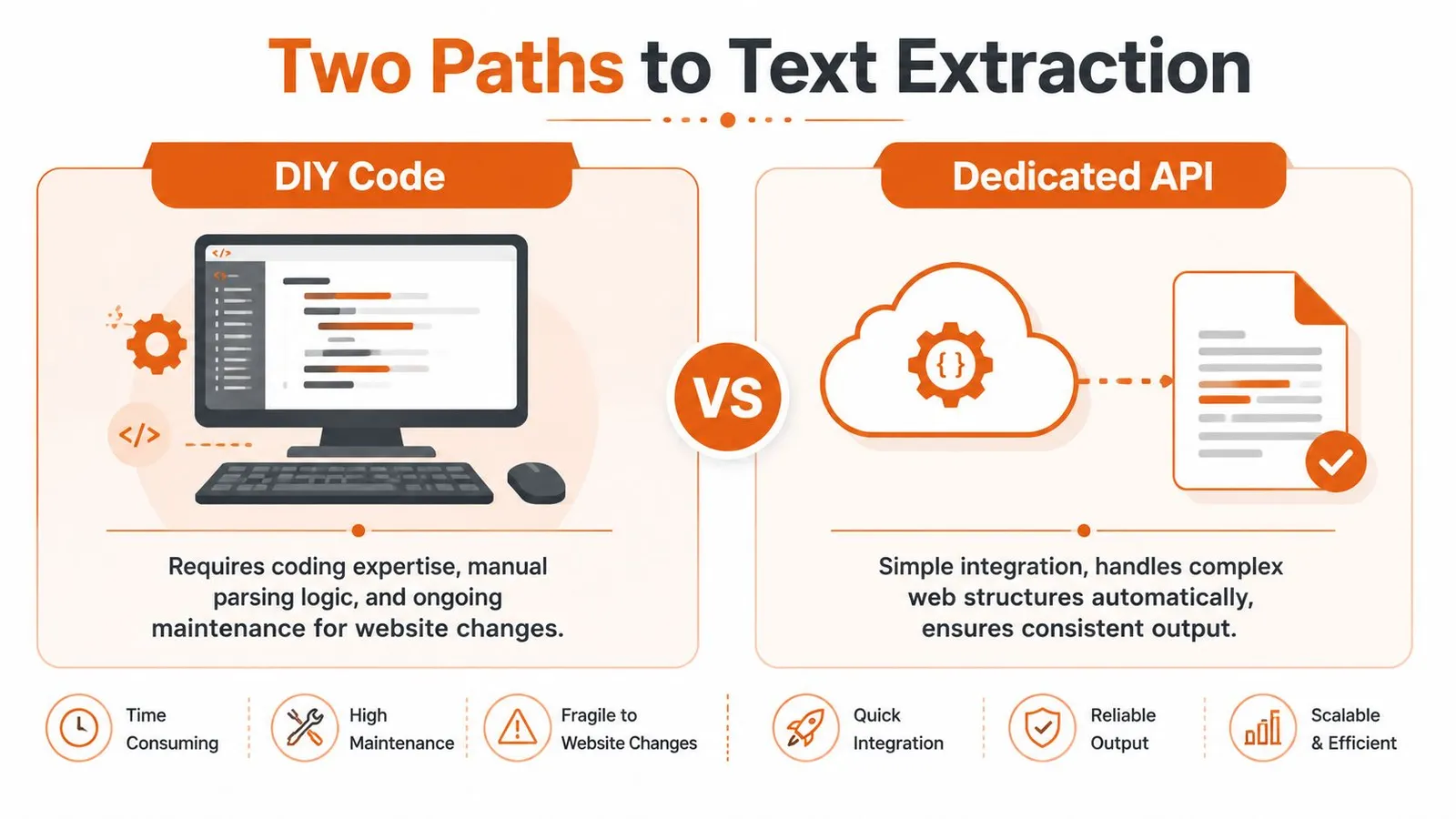
The split in the market is clear. There are manual and browser-driven methods on one side, and automated API-driven solutions on the other. Python with BeautifulSoup remains a standard choice for custom development, but modern tools now need JavaScript rendering and ways to deal with bot protection that break naive fetchers, as described in Databar's 2025 guide to web data extraction.
DIY fits when control matters most
If you're extracting from a small number of predictable pages, DIY can be a reasonable choice. You control selector logic, output format, retry behavior, and deployment. You can tailor extraction to a specific site structure and integrate directly with your data pipeline.
That's useful when:
- You know the target sites well: Internal tools, a few partner domains, or stable documentation sites.
- You need custom rules: You want exact control over which blocks stay or go.
- You already run browser automation: Your team has Playwright or Puppeteer infrastructure in place.
The cost is maintenance. Every site change becomes your problem. So do rendering issues, challenge pages, inconsistent markup, and extraction regressions.
APIs fit when reliability matters more than ownership
A dedicated extraction API is usually the practical choice when you care about throughput, consistency, and time to production. You don't spend engineering time building browser orchestration, proxy routing, extraction heuristics, and cleanup pipelines just to get readable text.
Instead, you send a URL and get back content in a usable format.
Practical rule: If text extraction is core to your product, build selectively. If it's supporting infrastructure, don't over-own it.
DIY Code vs. Extraction API A Head-to-Head Comparison
| Factor | DIY (Python + Libraries) | Extraction API (e.g., Webclaw) |
|---|---|---|
| Initial setup | Install libraries, build fetching and parsing logic, wire retries | Call an endpoint and parse the response |
| JavaScript pages | Requires browser automation | Typically handled by the service |
| Bot defenses | You manage headers, sessions, proxies, and failures | Typically abstracted behind the API |
| Output cleaning | You implement boilerplate removal and formatting | Usually returned as clean text, markdown, or structured output |
| Maintenance | Ongoing selector and workflow upkeep | Lower operational burden |
| Debugging | Full control, but more surface area | Less low-level control, faster path to usable data |
| Best fit | Narrow, known targets and custom rules | Production pipelines, broad coverage, LLM-ready extraction |
The decision isn't ideological. It's operational. If your team wants to spend time on retrieval quality, agent behavior, ranking, or product logic, a dedicated API usually frees up more of that time.
The DIY Approach Extracting Text with Python
The classic starting point is requests plus BeautifulSoup. For a simple static page, that still works well enough and it's the fastest way to understand the mechanics.
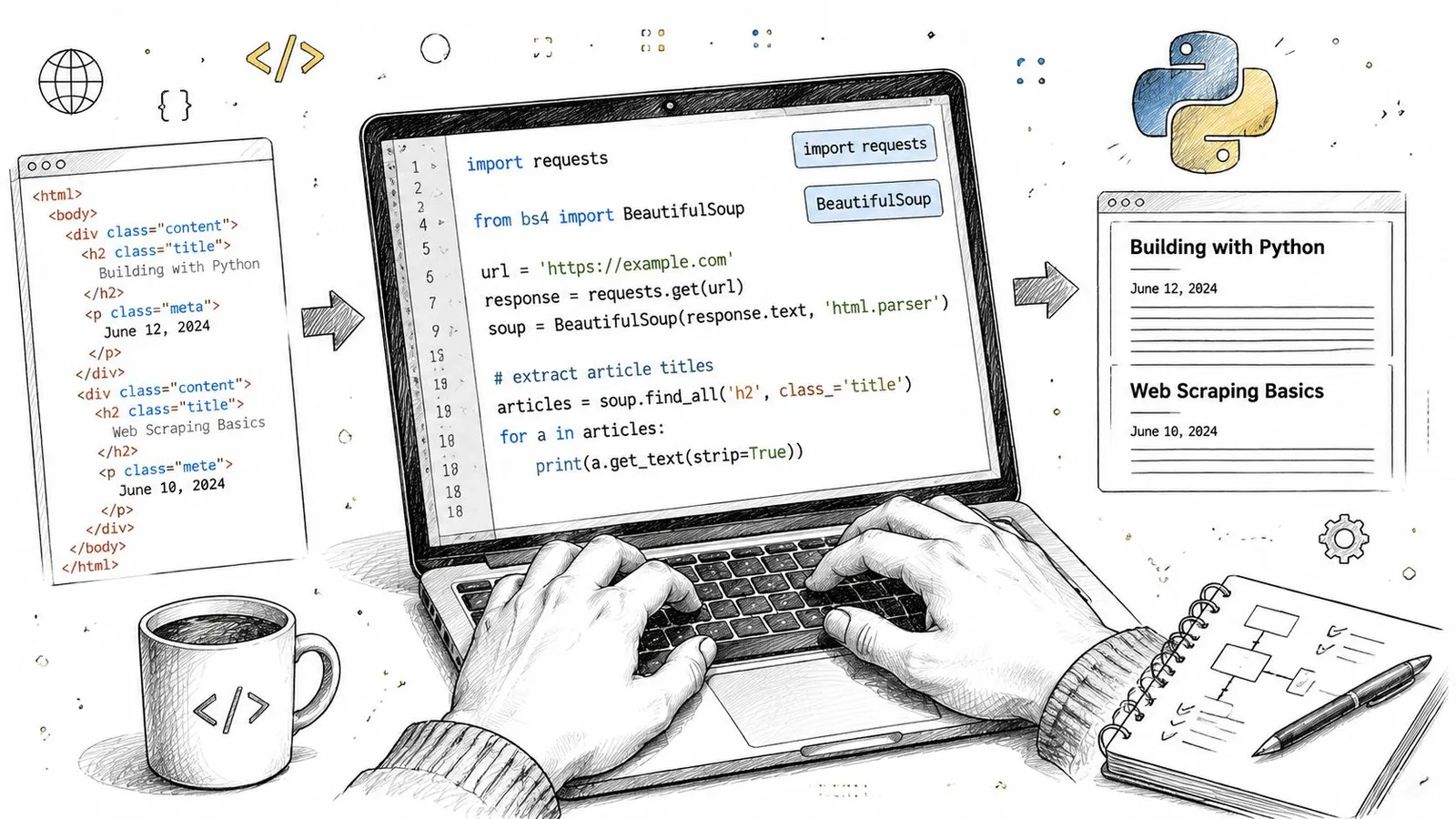
A basic static extraction example
import requests
from bs4 import BeautifulSoup

url = "https://example.com/article"
html = requests.get(url, timeout=30).text

soup = BeautifulSoup(html, "html.parser")

for tag in soup(["script", "style", "nav", "footer", "header"]):
    tag.decompose()

text = soup.get_text(separator="\n")
clean_lines = [line.strip() for line in text.splitlines() if line.strip()]

print("\n".join(clean_lines[:80]))
This is fine for static HTML where the article body already exists in the response. You fetch, parse, remove obvious junk, and flatten the remaining text.
For many first attempts, that feels like success. Then you point the same script at a modern site and the result falls apart.
Where the simple script breaks
On JavaScript-heavy sites, the article body may not appear in the initial HTML. On messy pages, the text output is technically complete but semantically useless because menus, repeated labels, sidebar blocks, and hidden junk dominate the output.
That's where DIY work changes from “parse the page” to “build a content extraction system.”
Layout changes remain a challenge for both rule-based and machine-learning systems. Header, footer, and navigation noise still require explicit evaluation, as discussed in Trends in web data extraction using machine learning.
The real engineering work is in cleanup
Once basic parsing stops being enough, you start layering heuristics:
- Tag removal: Drop scripts, styles, nav, footer, aside, forms, and known ad containers.
- Selector targeting: Prefer
article,main, role-based containers, or site-specific content classes. - Text normalization: Collapse whitespace, remove duplicate lines, and preserve heading structure.
- Fallback logic: If one selector fails, try others before returning noisy full-page text.
If you're building this route seriously, it helps to understand the broader crawling side too. This walkthrough on crawling in Python for structured extraction workflows covers the adjacent pieces teams often forget until they need them.
Here's a useful explainer before you go deeper into custom parsers:
What DIY still does well
DIY extraction is still a good fit when the target is stable and known. A docs site with predictable HTML, a single publisher with repeatable templates, or an internal content source can often justify custom code.
But on the open web, your extractor isn't finished when the code runs once. It's finished when it keeps working after layout changes, rendering differences, and content variants.
Handling JavaScript Rendering and Bot Defenses
Once requests and BeautifulSoup stop working, the next step is usually a headless browser. That means Playwright, Puppeteer, or a similar tool that loads the page like a real browser, waits for scripts to run, and only then extracts the visible content.
That's the point where many teams discover they're no longer building a parser. They're building browser infrastructure.
Rendering the page first
A headless browser solves one specific problem well. It can execute client-side JavaScript and expose the DOM after rendering. For single-page apps, this is often the minimum requirement.
A minimal Playwright workflow usually looks like this:
- Launch a browser context.
- Open the target URL.
- Wait for network activity or a page selector.
- Read the rendered DOM or visible text.
- Run cleanup logic on the final content.
That sounds straightforward until you scale it. Browser sessions consume memory, page events are inconsistent, and “wait until loaded” means different things on different sites.
Waiting is the hard part
You don't just need the page to load. You need the right content state.
If you extract too early, you get shells and placeholders. If you wait on the wrong selector, your job hangs or times out. If you rely on network idle, background analytics calls can keep the page “busy” long after the main content is visible.
Headless browsers solve rendering. They don't solve judgment.
That's why serious extraction systems often combine rendering with content scoring or structural heuristics, rather than copying everything in the final DOM.
Bot defenses are a separate system problem
Even a fully rendered browser can still get blocked. Modern sites inspect traffic patterns, session behavior, browser fingerprints, and IP reputation. A headless browser helps, but it doesn't automatically make your requests look trustworthy.
A plain fetch may miss content assembled by client-side JavaScript, while a rendered page can still be restricted. Inspect the actual response and required source content before choosing a fallback.
That leads to a second layer of work:
- Proxy strategy: Residential, ISP, or datacenter routing depending on the target site.
- Session handling: Cookies, headers, and user flows that don't look synthetic.
- Challenge recovery: Detecting block pages and retrying with different execution paths.
- Fingerprint management: Browser-level consistency across requests.
If you're deciding between browser stacks, this comparison of Playwright vs Puppeteer for web automation work is worth reading before you commit to one tool.
Why DIY gets expensive fast
There's nothing wrong with owning this stack if extraction itself is your product. But if your actual goal is a search agent, content intelligence tool, or retrieval system, browser orchestration can swallow time that should go elsewhere.
The work doesn't stop at successful rendering. You still need to:
| Problem | What you still have to handle |
|---|---|
| Rendered page | Decide when the content is actually ready |
| Dynamic DOM | Find the meaningful block, not the full page chrome |
| Bot protection | Route traffic and recover from blocks |
| Scale | Manage concurrency, browser crashes, and retries |
What experienced teams optimize for
Experienced teams usually stop asking “Can we scrape this page?” and start asking better questions:
- Can we get consistent visible text across many different sites?
- Can we return content in a form an LLM can consume immediately?
- Can we do it without turning browser automation into a full-time maintenance job?
That last question is usually the turning point.
The API Approach Clean LLM-Ready Text in One Call
A dedicated extraction API changes the shape of the problem. Instead of managing rendering, browser state, fallback logic, and cleanup in your own stack, you send a URL and ask for the output format you need.

The key benefit isn't convenience. It's that the extractor is built around the final artifact: usable text.
Extraction can reduce the amount of markup sent to a model. Measure token reduction alongside retention of the facts your application needs; a smaller output is not automatically a better one.
What one-call extraction looks like
Here's the shape often desired.
Curl
curl -X POST "https://api.example.com/extract" \
  -H "Authorization: Bearer YOUR_API_KEY" \
  -H "Content-Type: application/json" \
  -d '{
    "url": "https://example.com/article",
    "format": "markdown"
  }'
JavaScript
const response = await fetch("https://api.example.com/extract", {
  method: "POST",
  headers: {
    "Authorization": "Bearer YOUR_API_KEY",
    "Content-Type": "application/json"
  },
  body: JSON.stringify({
    url: "https://example.com/article",
    format: "markdown"
  })
});

const data = await response.json();
console.log(data);
Python
import requests

response = requests.post(
    "https://api.example.com/extract",
    headers={"Authorization": "Bearer YOUR_API_KEY"},
    json={
        "url": "https://example.com/article",
        "format": "markdown"
    },
    timeout=30
)

print(response.json())
The implementation varies by provider, but the pattern is the same. You request text, markdown, JSON, or an LLM-oriented output instead of fetching raw page markup and dealing with the mess later.
Why format matters more than people expect
For AI systems, plain text isn't always enough. Markdown often works better because it preserves hierarchy. JSON works better when you need downstream field mapping. LLM-focused output works best when you want the extractor to remove token noise before the model ever sees the page.
That's where a service like Webclaw's AI web extraction API fits. It's one example of an API that returns clean web content in formats built for model consumption rather than generic scraping output.
If your next step after extraction is “clean this up for the model,” your extractor hasn't finished the job.
The before and after that matters
Raw HTML is transport format. It isn't reasoning format.
A useful extractor should remove repeated navigation labels, promotional blocks, footer clutter, and decorative wrappers while preserving the actual headings, paragraphs, lists, and page semantics. That gives you content you can chunk, embed, summarize, classify, or feed into an agent without another cleanup stage.
This also helps when your workflow spans multiple content types. If you're handling both web pages and documents, it's worth looking at tools for programmatic PDF processing so your ingestion layer stays consistent across URLs and uploaded files.
When an API usually wins
A dedicated API often makes more sense when:
- You need production reliability: Broad site coverage matters more than custom parser ownership.
- You care about model efficiency: Cleaner output beats larger payloads.
- You're ingesting many sources: Operational simplicity matters more than handcrafted rules per domain.
- You want one integration surface: The rest of your pipeline can stay focused on retrieval and application logic.
For one-off scraping on a stable static site, DIY can still be enough. For modern, defended, AI-bound extraction, APIs tend to align better with the actual outcome teams want.
Integrating Extracted Text into Your AI Pipeline
Clean extraction only matters if the next stage can use it well. Once you have readable, structured text, the usual path is chunking, embeddings, retrieval, and response generation.
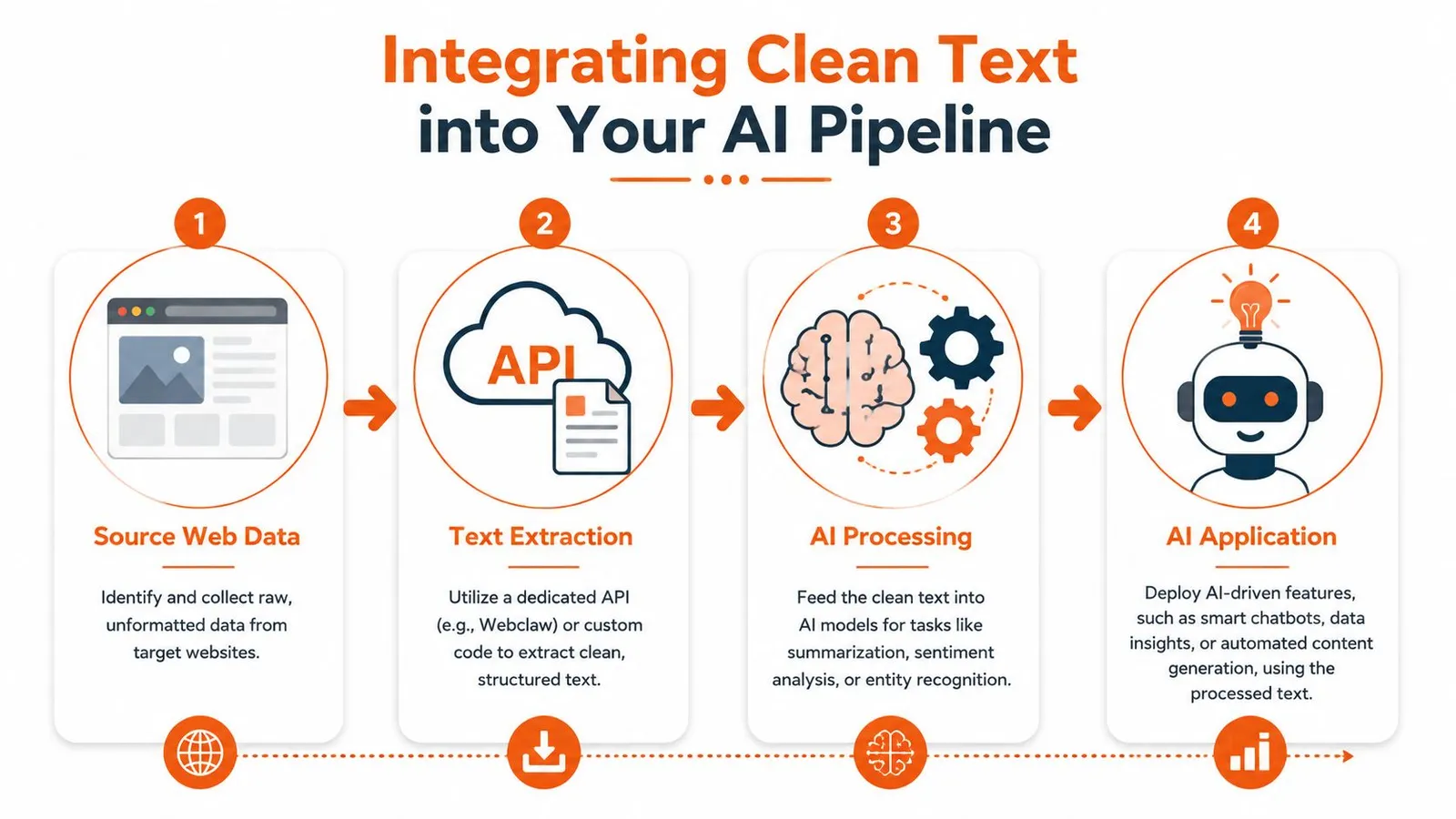
The practical flow
-
Extract the page cleanly
Start with markdown, text, or structured JSON instead of raw HTML. -
Chunk by meaning
Split by headings, sections, or logical paragraph groups rather than arbitrary character cuts. -
Embed and store
Send chunks to your embedding model and index them in a vector database. -
Retrieve with context discipline
Pull only the most relevant chunks into the prompt window.
Cleaner source text can reduce irrelevant retrieval candidates, but downstream accuracy must be measured on the target corpus.
Structure matters after extraction too
Even good extraction can be wasted if the rest of the pipeline is sloppy. If multiple tools, agents, or assistants share the same retrieved material, context boundaries matter just as much as content quality. This guide on managing AI context across assistants is useful if your workflow has grown beyond a single prompt-response loop.
For teams using LangChain-based pipelines, Webclaw's LangChain integration shows the practical handoff from extraction into retrieval workflows.
Clean text helps twice. It improves what you store, and it improves what you send back to the model later.
A text extractor from website content is no longer just an ingestion utility. In AI systems, it's the first quality gate.
If you need a web extraction layer that returns model-ready text instead of raw page clutter, Webclaw is built for that workflow. It handles modern pages, returns clean formats like markdown and JSON, and fits the kind of retrieval and agent pipelines where extraction quality directly affects downstream results.