How to Scrape Google Search Results: 5 Ways and the Rules
You open your terminal, fire off a GET request to google.com/search?q=your+query, and get back a wall of JavaScript with zero search results in it. Or a CAPTCHA page. Or a 429. Welcome to Google scraping in 2026.
This used to be simple. Five years ago you could hit Google with Python requests, parse the HTML, and pull out blue links. That era is over. Google has systematically closed every shortcut. If you're building something that needs search results, whether it's an AI agent, a rank tracker, a lead gen tool, or a research pipeline, you need to understand what changed and what actually works today.
Why Google is hard to scrape now
Google made three changes that broke most scraping approaches.
No more server-rendered results. Google progressively moved search results behind JavaScript rendering. By late 2025, a plain HTTP request to Google Search returns a shell page with JavaScript that loads results client-side. The HTML you get from requests or curl is not the page you see in your browser. The actual search results aren't in the initial response. You need to execute JavaScript to get them.
Aggressive bot detection. Google's bot detection goes beyond IP rate limiting. It inspects TLS fingerprints, HTTP/2 settings, header ordering, cookie behavior, and JavaScript execution patterns. If your client doesn't look like a real browser at the network protocol level, Google knows. Even if you rotate IPs, the fingerprint stays the same and Google sees one bot on many addresses.
Consent and interstitial walls. Depending on geolocation and session state, Google may serve a consent page (GDPR regions), a CAPTCHA challenge, or an unusual traffic warning before showing results. These require JavaScript execution to get through.
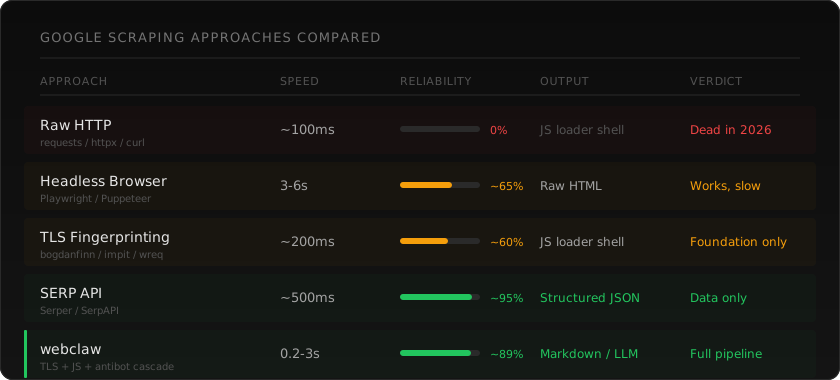
The combination means that any approach based on plain HTTP requests is dead. You need either a real browser, a very convincing fake one, or an API that handles this for you.
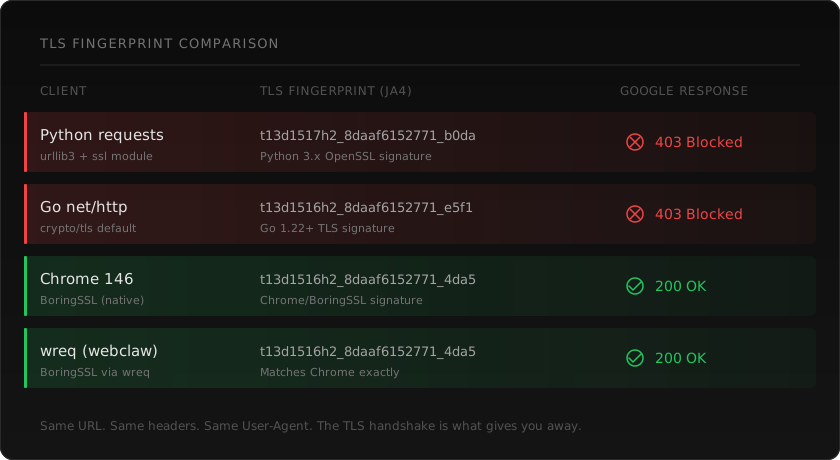
Approach 1: Raw HTTP with Python (and why it fails)
Let's start with what doesn't work, so we can see why.
import requests

response = requests.get(
    "https://www.google.com/search",
    params={"q": "best web scraping api"},
    headers={"User-Agent": "Mozilla/5.0 (Macintosh; Intel Mac OS X 10_15_7)"}
)

print(len(response.text))  # ~60KB of JavaScript loader
print("search results" in response.text.lower())  # False
You get back HTML, but it's Google's JavaScript bootstrap. No search results. No snippets. No links. Just a script loader that fetches actual results client-side.
Even if you could get past the JS requirement, requests has a Python TLS fingerprint that Google recognizes instantly. The User-Agent header says Chrome, but the TLS handshake says Python. Google sees the mismatch and either blocks you or serves degraded results.
This approach is done. Don't spend time trying to make it work.
Approach 2: Headless browser
The straightforward solution. Run a real Chrome instance, navigate to Google, wait for results to render, extract the HTML.
from playwright.sync_api import sync_playwright

with sync_playwright() as p:
    browser = p.chromium.launch(headless=True)
    page = browser.new_page()

    page.goto("https://www.google.com/search?q=best+web+scraping+api")
    page.wait_for_selector("div#search")

    results = page.query_selector_all("div.g")
    for result in results:
        title = result.query_selector("h3")
        link = result.query_selector("a")
        snippet = result.query_selector("div[data-sncf]")

        if title and link:
            print(f"Title: {title.inner_text()}")
            print(f"URL: {link.get_attribute('href')}")
            if snippet:
                print(f"Snippet: {snippet.inner_text()}")
            print()

    browser.close()
This works. A real Chromium instance has the right TLS fingerprint, executes JavaScript, and renders the page like a user would see it.
The problems are practical:
Speed. Each search takes 3-6 seconds. Browser startup, page load, JavaScript execution, DOM rendering. For a one-off query that's fine. For thousands of queries it's a bottleneck.
Resources. Each Chromium instance uses 200-400MB of RAM. Running 10 concurrent searches means 2-4GB just for browsers. On a server, this adds up fast.
Detection. Google has gotten very good at detecting headless Chrome. The navigator.webdriver flag, missing browser plugins, specific rendering quirks. Tools like Playwright Stealth help, but Google updates its detection and stealth patches play catch-up.
Selectors break. Google constantly changes its HTML structure. The div.g selector that works today might not work next month. Google's class names are often obfuscated and change between A/B test variants. You'll spend time maintaining your parser.
If you need a handful of searches per day and can tolerate the overhead, headless browsers work. For anything at scale, you need something lighter.
Approach 3: TLS fingerprinting
The middle ground between raw HTTP (too detectable) and headless Chrome (too heavy). The idea: make your HTTP client produce a TLS handshake and HTTP/2 connection that looks identical to a real browser, without actually running a browser.
When your client connects to Google over HTTPS, it sends a ClientHello message during the TLS handshake. This message contains the list of cipher suites your client supports, in a specific order, along with TLS extensions, elliptic curves, and other parameters. Every HTTP library has a unique combination. Python requests looks like Python. Go net/http looks like Go. Chrome looks like Chrome.
Bot detection systems hash these parameters into a fingerprint (formats like JA3, JA4, or proprietary hashes) and compare against known browser profiles. If your fingerprint doesn't match any real browser, you're flagged before your request headers are even read.
TLS fingerprinting libraries solve this by configuring the underlying TLS implementation to match a real browser's handshake exactly. Same cipher suites in the same order, same extensions, same HTTP/2 SETTINGS frame, same pseudo-header ordering.
The notable libraries
tls-client (Go, by bogdanfinn). The original and most widely used. Built on Go's crypto/tls with custom modifications to control cipher suite ordering and TLS extension parameters. Supports Chrome, Firefox, Safari, and other browser profiles. Has bindings for Python, Node.js, and other languages via a shared library. If you're working in Go or need cross-language support, this is the established choice.
import (
    http "github.com/bogdanfinn/fhttp"
    tls_client "github.com/bogdanfinn/tls-client"
)

jar := tls_client.NewCookieJar()
client, _ := tls_client.NewHttpClient(
    tls_client.NewNoopLogger(),
    tls_client.WithClientProfile(tls_client.Chrome_131),
    tls_client.WithCookieJar(jar),
)

req, _ := http.NewRequest("GET", "https://www.google.com/search?q=web+scraping+api", nil)
req.Header = http.Header{
    "User-Agent":      {"Mozilla/5.0 (Macintosh; Intel Mac OS X 10_15_7)"},
    "Accept":          {"text/html,application/xhtml+xml"},
    "Accept-Language": {"en-US,en;q=0.9"},
    http.HeaderOrderKey: {"user-agent", "accept", "accept-language"},
}

resp, _ := client.Do(req)
impit (Rust, by Apify). Takes a different approach. Instead of patching the TLS library from the outside, impit patches rustls directly to give fine-grained control over the ClientHello construction. Built by Apify, the web scraping platform. Supports a wide range of browser profiles and includes HTTP/2 fingerprint matching. If you're building in Rust and want a pure-Rust solution that doesn't depend on C/C++ TLS libraries, impit is a solid option.
wreq (Rust, by @0x676e67). Uses BoringSSL, which is Chrome's actual TLS implementation, rather than reimplementing TLS behavior from scratch. This means the fingerprint isn't an approximation of Chrome. It's Chrome's own TLS code producing the handshake. wreq supports 60+ browser profiles including Chrome, Firefox, Safari, and Edge variants, with full HTTP/2 SETTINGS and pseudo-header matching. This is what webclaw uses internally.
The philosophical difference matters. bogdanfinn and impit both modify non-browser TLS implementations (Go's crypto/tls and Rust's rustls respectively) to produce browser-like fingerprints. They're very good at this. But edge cases exist, certain TLS extensions, specific BoringSSL behaviors, unusual server responses, where the impersonation diverges from the real browser. wreq avoids this class of bugs entirely by using the actual browser TLS implementation.
TLS fingerprinting alone isn't enough for Google
Even with a perfect Chrome TLS fingerprint, Google's search results still require JavaScript rendering. TLS fingerprinting gets you past the first detection layer, which is significant. Google won't immediately flag you as a bot. But the response you get back still contains the JavaScript bootstrap that loads results client-side.
For sites that serve content in the initial HTML response, TLS fingerprinting alone is often sufficient. Google Search is a special case because results are loaded dynamically regardless of your fingerprint quality.
So TLS fingerprinting is the foundation, not the complete solution. You need it plus JavaScript rendering.
Approach 4: SERP APIs
If you don't need to scrape Google yourself, specialized SERP APIs do it for you and return structured data.
SerpAPI. The longest-running option. Returns JSON with organic results, ads, knowledge panels, featured snippets, "People Also Ask" boxes, and other SERP features parsed into structured fields. Handles Google's bot detection internally. Pricing starts at $50/month for 5,000 searches.
Serper. Faster and cheaper than SerpAPI for most use cases. Returns structured JSON with organic results, snippets, and related searches. $50 for 50,000 queries (credits, not monthly). Good balance of cost and reliability.
Bright Data SERP API. Enterprise-focused with high reliability. Returns structured data with geolocation options. More expensive but handles high volume well.
The trade-off with SERP APIs is that you get structured search data, not the page content. If you need the actual content of the pages Google links to, you still need a scraper. SERP APIs tell you what Google found. They don't give you the content of those pages.
For many use cases, this is exactly what you need. A rank tracker only needs positions and URLs. A keyword tool only needs search volume and related queries. An AI agent doing research needs both: the search results AND the content of those pages.
Approach 5: webclaw
webclaw handles both parts. Search results and page content.
If you want to try the flow before writing code, open the search demo. For a production integration, use the Web Search API and its endpoint reference.
For search results specifically, webclaw's /v1/search endpoint returns structured Google results:
curl -X POST https://api.webclaw.io/v1/search \
  -H "Authorization: Bearer YOUR_API_KEY" \
  -H "Content-Type: application/json" \
  -d '{
    "query": "best web scraping api 2026",
    "num_results": 10
  }'
{
  "query": "best web scraping api 2026",
  "results": [
    {
      "title": "Best Web Scraping APIs for LLMs in 2026",
      "url": "https://webclaw.io/blog/best-web-scraping-api-for-llms",
      "description": "If you're building with LLMs, you need web data..."
    },
    {
      "title": "...",
      "url": "...",
      "description": "..."
    }
  ]
}
For scraping Google directly (or any of the linked pages), /v1/scrape handles the TLS fingerprinting, JS rendering, and bot detection automatically:
curl -X POST https://api.webclaw.io/v1/scrape \
  -H "Authorization: Bearer YOUR_API_KEY" \
  -H "Content-Type: application/json" \
  -d '{
    "url": "https://www.google.com/search?q=best+web+scraping+api",
    "formats": ["markdown"]
  }'
The pipeline does the heavy lifting. TLS fingerprint matches a real browser. If the page needs JavaScript rendering, it escalates automatically. If there's a challenge page, the antibot engine handles it. You don't configure any of this.

CLI
# Search and get structured results
webclaw search "best web scraping api 2026"

# Scrape a specific page from the results
webclaw https://example.com --format llm
Python SDK
from webclaw import Webclaw

client = Webclaw(api_key="YOUR_API_KEY")

# Search
results = client.search("best web scraping api 2026", num_results=10)

for result in results:
    print(f"{result.title} — {result.url}")

# Scrape one of the results
page = client.scrape(results[0].url, formats=["llm"])
print(page.llm)  # LLM-oriented text; verify retained facts
MCP (for AI agents)
If you're building with Claude, Cursor, Windsurf, or any MCP-compatible agent:
{
  "mcpServers": {
    "webclaw": {
      "command": "npx",
      "args": ["-y", "@webclaw/mcp"]
    }
  }
}
Your agent gets search and scrape as native tools. Ask it to "search for X and summarize the top results" and it handles the search, scrapes each page, and gives you clean content. No per-page configuration, no dealing with Google's bot detection.
The common patterns
Rank tracking
Check where your site ranks for specific keywords:
from webclaw import Webclaw

client = Webclaw(api_key="YOUR_API_KEY")
keywords = ["web scraping api", "scrape website to markdown", "mcp web scraping"]

for keyword in keywords:
    results = client.search(keyword, num_results=20)
    for i, result in enumerate(results):
        if "webclaw.io" in result.url:
            print(f"'{keyword}': position {i + 1}")
            break
    else:
        print(f"'{keyword}': not in top 20")
Research pipeline (search + scrape + feed to LLM)
The pattern most AI agents need. Search for a topic, scrape the top results, feed the content to an LLM:
from webclaw import Webclaw

client = Webclaw(api_key="YOUR_API_KEY")

# Step 1: Get search results
results = client.search("TLS fingerprinting web scraping", num_results=5)

# Step 2: Scrape each result
pages = []
for result in results:
    page = client.scrape(result.url, formats=["llm"])
    pages.append({
        "title": result.title,
        "url": result.url,
        "content": page.llm
    })

# Step 3: Feed to your LLM
# Each page is ~800-3000 tokens in llm format
# vs 50,000-200,000 tokens as raw HTML
context = "\n\n---\n\n".join(
    f"# {p['title']}\nSource: {p['url']}\n\n{p['content']}"
    for p in pages
)
With MCP, your agent does this automatically. You say "research TLS fingerprinting for web scraping" and webclaw's research tool handles the search, scraping, and synthesis without you writing the pipeline code.
Batch monitoring
Track a set of queries over time:
from webclaw import Webclaw
import json
from datetime import datetime

client = Webclaw(api_key="YOUR_API_KEY")
queries = ["your brand name", "your product review", "competitor name vs yours"]

snapshot = {
    "date": datetime.now().isoformat(),
    "results": {}
}

for query in queries:
    results = client.search(query, num_results=10)
    snapshot["results"][query] = [
        {"position": i + 1, "title": r.title, "url": r.url}
        for i, r in enumerate(results)
    ]

with open(f"serp-snapshot-{datetime.now().strftime('%Y%m%d')}.json", "w") as f:
    json.dump(snapshot, f, indent=2)
What to watch out for
Rate limiting. Google rate limits aggressively. Even with perfect TLS fingerprinting, sending 100 queries per second from one IP will get you blocked. Space out your requests. Use proxies if you need volume. Or use an API that handles rate management for you.
Geolocation. Google results vary by location. A search from a US IP returns different results than from a German IP. If location matters for your use case (and for rank tracking, it always does), make sure your tool supports geolocation parameters.
Personalization. Logged-in Google results are personalized based on search history. For consistent, unbiased results, always scrape from a clean session without Google account cookies.
Legal considerations. Google's Terms of Service prohibit automated access to search results. The hiQ v. LinkedIn ruling supports scraping publicly accessible data, but Google's TOS is a separate consideration. SERP APIs like SerpAPI and Serper operate in a grey area that's been commercially accepted for years. Consult a lawyer if you're building something where this matters.
SERP structure changes. Google changes its result page layout constantly. Featured snippets, AI overviews, knowledge panels, "People Also Ask" boxes, local results, shopping carousels. If you're parsing Google's HTML directly, expect your selectors to break regularly. Structured SERP APIs abstract this away.
Choosing the right approach
You need search data (positions, URLs, snippets) and don't need page content: Use a SERP API directly. Serper if you want cost efficiency, SerpAPI if you want the most parsed SERP features.
You need search data AND the content of linked pages: webclaw handles both. Search returns structured results, scrape returns clean content from any of those URLs.
You're building an AI agent that needs to search the web: Use webclaw with MCP. Your agent gets search and scrape as native capabilities.
You need full control and don't mind maintaining infrastructure: Headless browser with Playwright, plus a TLS fingerprinting library for the lighter requests. Be prepared to maintain it as Google updates detection.
You need to scrape at massive scale (millions of queries): You probably need dedicated SERP infrastructure. Bright Data, Oxylabs, or a custom setup with residential proxies and distributed browsers.
Frequently asked questions
Can you scrape Google search results with Python?
Yes, but not with basic HTTP libraries like requests or httpx anymore. Google requires JavaScript rendering to display search results, and Python HTTP libraries have detectable TLS fingerprints. You need either a headless browser (Playwright, Selenium), a TLS fingerprinting library (bogdanfinn's tls-client has Python bindings), or a scraping API that handles both layers.
Is it legal to scrape Google?
Google's Terms of Service prohibit automated queries. However, SERP APIs have operated commercially for years in an area that the industry treats as accepted practice. The hiQ v. LinkedIn ruling supports scraping publicly accessible data. The legal landscape is nuanced. If you're building a commercial product that depends on Google data, get legal advice for your specific situation.
What is TLS fingerprinting and why does it matter?
Every HTTP client produces a unique TLS handshake signature based on its supported cipher suites, TLS extensions, and connection parameters. Bot detection systems like Google's hash this into a fingerprint (JA3, JA4) and compare it against known browser profiles. Python requests has a fingerprint that looks nothing like Chrome. TLS fingerprinting libraries modify the underlying TLS implementation to produce browser-matching handshakes, so your client looks like Chrome or Firefox at the network level.
What's the difference between scraping Google and using a SERP API?
Scraping Google means sending requests to google.com and parsing the HTML yourself. A SERP API does this for you and returns structured JSON. SERP APIs are easier, more reliable, and handle Google's bot detection and layout changes. The trade-off is cost and control. If you need custom SERP features or very high volume, scraping directly might make sense. For most use cases, a SERP API is the better choice.
How many Google searches can I scrape per day?
Without proxies or special tooling, maybe 50-100 before Google starts serving CAPTCHAs. With rotating residential proxies and TLS fingerprinting, a few thousand. With a SERP API, it depends on your plan. Serper offers 50,000 queries for $50. SerpAPI offers 5,000/month at $50/month. webclaw's search endpoint handles rate management automatically.
What is the best library for TLS fingerprinting?
The three main options are tls-client by bogdanfinn (Go, with cross-language bindings), impit by Apify (Rust, patched rustls), and wreq by @0x676e67 (Rust, BoringSSL). bogdanfinn's library is the most widely used and has the broadest language support. impit is a good choice for pure-Rust projects. wreq uses Chrome's actual TLS library (BoringSSL) rather than impersonating it, which avoids edge-case fingerprint mismatches.
Does webclaw handle Google's JavaScript rendering?
Yes. When you scrape a URL through webclaw, the pipeline first attempts a fast HTTP fetch with browser-grade TLS fingerprinting. If the response requires JavaScript execution (as Google Search does), it automatically escalates to a JS rendering engine. You don't configure this. It happens transparently based on what the page needs.
Read next: Bypass Cloudflare bot protection | Best web scraping APIs for LLMs | Build a RAG pipeline with live web data