
Batch vs Stream Processing: Which One Your Pipeline Needs
You're probably dealing with a workload that feels wrong for request-by-request processing.
A common example is AI ingestion. You have a long list of URLs, PDFs, docs, or product pages that need to be fetched, cleaned, transformed, embedded, and stored for retrieval. Running each item one at a time through an interactive pipeline works for a demo. It breaks down fast when the job becomes repetitive, bounded, and large.
That's where batch processing still earns its place. Not as a legacy artifact from payroll systems, but as a practical way to push a lot of non-interactive work through a system with less overhead, better scheduling, and clearer operational boundaries. If you're building RAG pipelines, data backfills, offline enrichment, or large scraping runs, you're already in batch territory whether you call it that or not.
An Introduction to Batch Processing
If you need to scrape a massive list of pages for a RAG system, interactive processing is usually the wrong shape for the problem. You don't need an instant answer for each URL. You need the whole job to finish reliably, produce clean outputs, and avoid wasting compute on repeated setup cost for every single item.
Batch processing is the model for that kind of work. You collect a bounded set of inputs, queue the work, and process it together later as a job. That can mean a nightly ETL run, an on-demand content backfill, or a scheduled batch of pages to extract and normalize before indexing.
This isn't a new idea. Batch processing has roots in 1890, when an electronic tabulator was used for the United States Census Bureau, a milestone commonly cited as the first instance of batch processing in computing history, as explained in AWS's overview of batch processing history and concepts. The reason that story still matters is simple. Batch processing was created to handle large, repetitive work without human intervention, and that's still the exact problem many modern data teams have.
For AI pipelines, the pattern shows up everywhere:
If you want a more implementation-focused reference, RenderIO has a concise batch processing guide that maps the concept to modern job execution. For web extraction specifically, a batch scraping API is a practical example of how the old batch model gets packaged into an API-first workflow.
Batch processing isn't old-fashioned. It's what you use when the workload is bounded, repetitive, and more sensitive to cost and reliability than immediacy.
Batch Processing vs Stream Processing
The easiest way to understand the difference is household work.
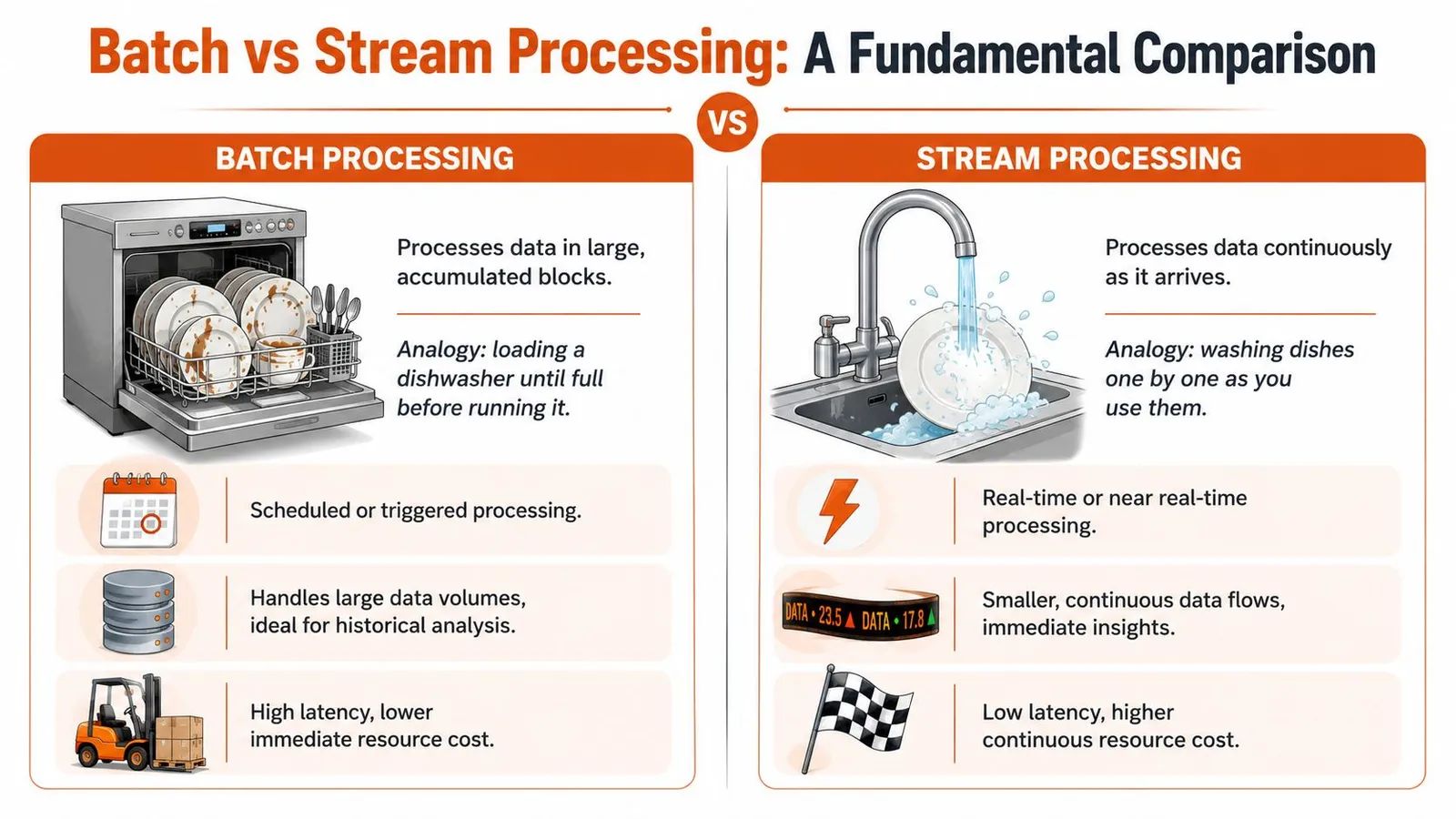
Batch processing is like waiting until the dishwasher is full, then running one efficient cycle. Stream processing is like washing each plate the moment it touches the sink. Neither is universally better. The right one depends on whether speed or throughput matters more.
What each model optimizes for
Batch systems optimize for throughput. They gather a bounded set of records and process them together. Rescale notes that batch processing is a throughput-oriented model, often handling millions of records in a single run during off-peak hours, with latency typically measured in minutes or hours in exchange for efficiency and scale, as described in this overview of batch processing trade-offs.
Stream systems optimize for latency. Data gets processed continuously as it arrives, which makes the model a better fit for fraud alerts, live dashboards, sensor monitoring, and anything else where waiting for the next job window would defeat the point.
A simple way to decide is to ask two questions:
| Question | If yes | If no |
|---|---|---|
| Do you need an answer immediately? | Stream is usually the better fit | Batch is often enough |
| Is the input naturally bounded? | Batch is usually simpler | Stream may fit better |
Bounded work vs continuous work
RAG ingestion usually starts as bounded work. You have a sitemap export, a list of support articles, or a queue of URLs from search results. That dataset has edges. You can count what came in, track what finished, and retry failures in a controlled way.
A live event feed is different. There's no natural end to “incoming user activity” or “new transactions.” That's where streaming earns the added complexity.
For a developer, the practical distinction looks like this:
For example, you might use streaming to capture fresh events and batch to rebuild a searchable knowledge store from web content on a schedule. That hybrid model shows up in many AI systems, especially when teams combine live updates with larger offline rebuilds. If that's your world, this piece on RAG pipelines using web data is a useful companion because it shows why ingestion freshness and processing mode are separate decisions.
Practical rule: If a delayed result is acceptable and the dataset is large, batch is usually the cheaper and calmer system to operate.
The Architecture of a Batch Processing System
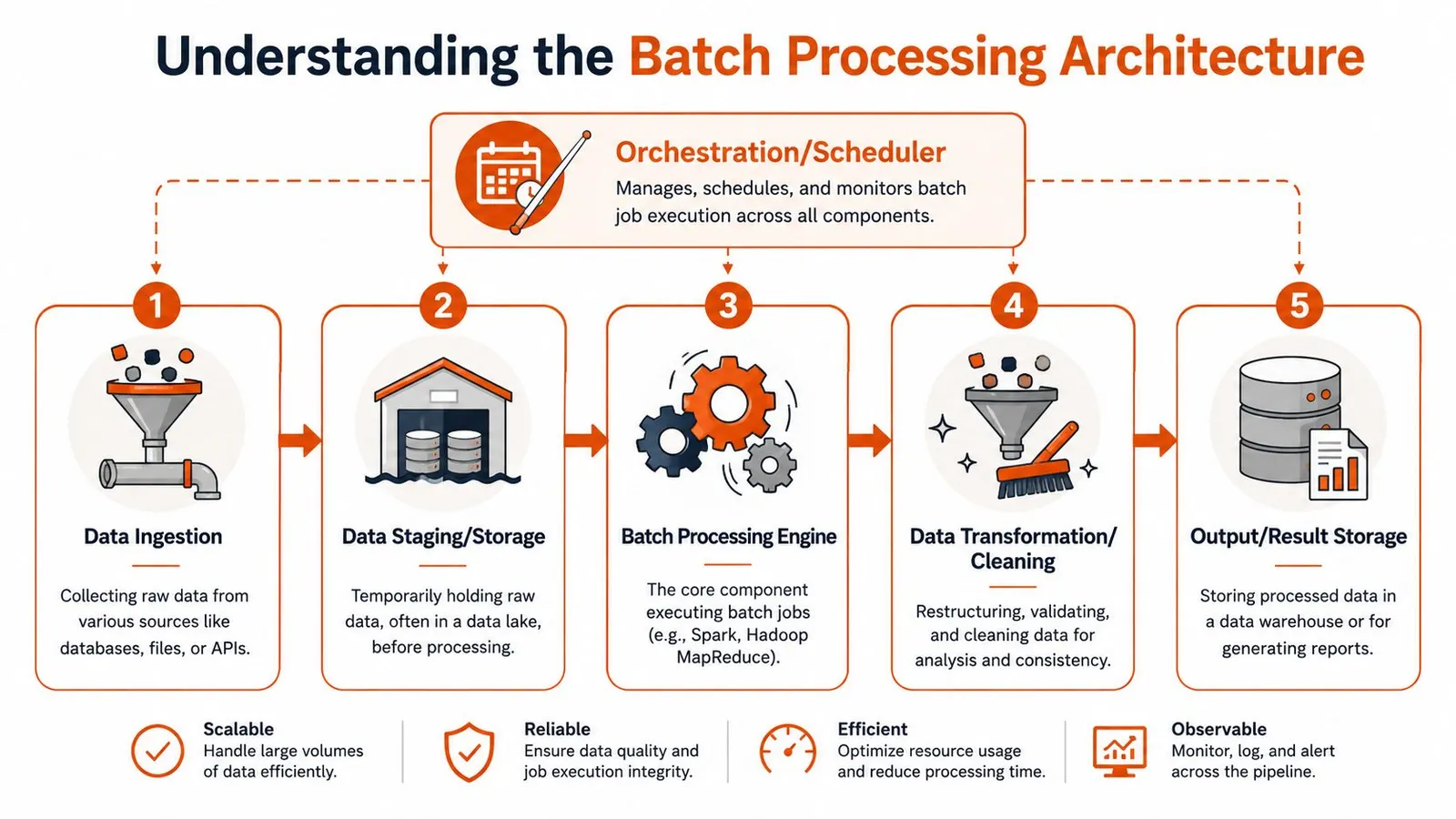
A batch system is easier to reason about when you treat it as a pipeline with explicit stages. Inputs arrive. Data gets stored. A scheduler decides when work starts. A processing engine runs the job. Outputs land somewhere durable.
The five moving parts
- Ingestion
Raw inputs enter the system. The source might be files, database exports, message queues, or API calls. In a scraping pipeline, ingestion often means a list of URLs plus optional metadata like crawl depth, parser settings, or tenant ID.
- Staging and storage
Raw input usually lands in object storage, blob storage, or a staging table. This gives you a stable checkpoint before expensive processing starts. It also helps when you need to replay a failed run or compare input snapshots across runs.
- Orchestration and scheduling
Something has to decide when the job starts and in what order dependent tasks run. That can be a cron job, Airflow DAG, Dagster asset graph, or cloud scheduler. For managed infrastructure patterns, cloud batch execution workflows are useful to study because they show how compute, queues, and job control fit together operationally.
- Processing engine
This is the worker layer that does the primary work. It fetches pages, parses content, validates records, chunks text, generates outputs, and writes status logs. The engine might be Spark, a Python worker pool, or a managed batch service.
- Output storage
Processed results go somewhere downstream can use them. That could be a warehouse table, vector database input bucket, search index feed, or report destination.
Microsoft's architecture guidance emphasizes that batch systems need to scale out for large data volumes while staying automated, and that explicit job boundaries make failures easier to isolate and replay, which is one reason batch remains useful for correctness-focused workloads in Azure batch processing architectures.
Here's a quick visual explainer before going further:
How jobs get triggered
Not every batch job runs on a nightly schedule. In practice, teams use three common triggers:
What works best depends on the business boundary. Monthly billing wants predictable scheduling. A content backfill after a parser fix is usually on-demand. A “process this uploaded archive” workflow is event-driven.
The strongest batch systems aren't just fast. They're replayable.
Weighing the Pros and Cons
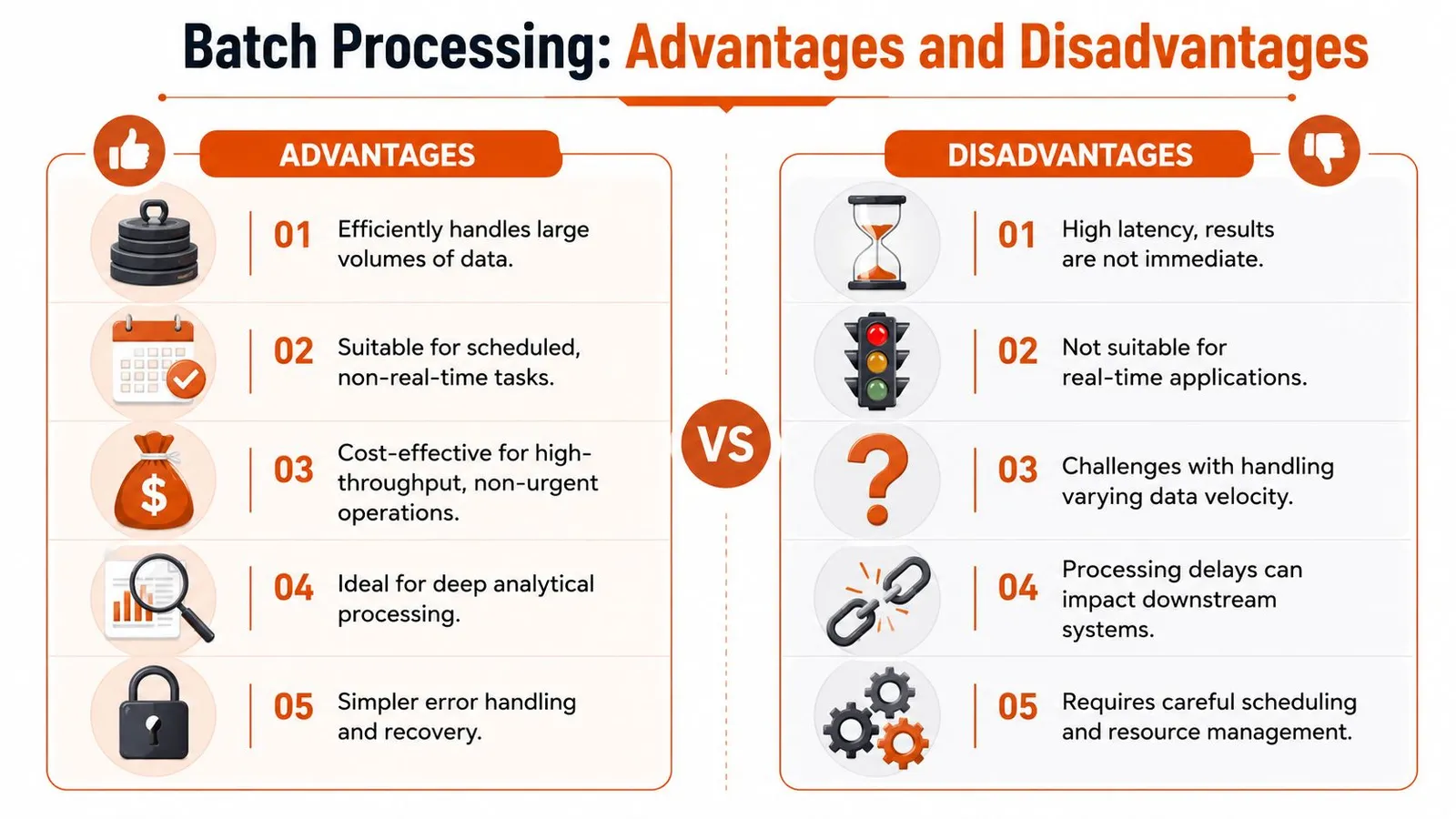
Batch processing gets recommended too casually. It solves real problems, but only when the workload matches the model. The mistake isn't choosing batch. The mistake is using it for jobs that need low-latency answers.
Where batch works well
Batch shines when the dominant concern is processing a lot of work efficiently.
If you're comparing implementation patterns across workloads, the examples in batch-oriented use cases make this clear. Jobs like large extraction runs and offline document preparation usually fit batch more naturally than live request-response systems.
Where batch causes problems
The main downside is delay. If your application needs an answer now, batch is the wrong answer even if it's cheaper.
A few recurring failure modes show up in production:
The business question is straightforward. Is the cost and simplicity benefit worth delayed outcomes? If yes, batch is often the right operational trade.
Real-World Use Cases and Code Examples
Some workloads have been batch jobs for decades because the shape of the problem hasn't changed. Others look modern on the surface but still benefit from the same execution model.
Classic workloads still matter
Payroll, billing, ETL, backups, and reporting are still classic examples because they're repetitive, bounded, and sensitive to correctness. Splunk's explanation is useful here because it frames batch as a deliberate strategy, not just legacy inertia. For many back-office workflows, organizations use batch to compress expensive compute into off-peak windows and maximize infrastructure utilization, even when results arrive later, as described in this piece on why batch still powers critical workflows.
If you work close to operating systems or older enterprise automation, it also helps to understand the simpler scripting side of the story. This roundup of practical batch file automation is a solid reminder that the core idea of grouping work and running it unattended exists at every layer, from shell scripts to cloud pipelines.
A modern example for RAG ingestion
Now take a common AI task. You have a list of pages from documentation, blog archives, changelogs, and support centers. You want to fetch them, clean them, and feed them into an embedding pipeline. That job doesn't need interactive latency. It needs reliable parallel execution, clean outputs, and a way to check progress later.
An API-based batch workflow is a good fit. The basic pattern is:
- Submit a bounded list of URLs.
- Receive a batch job ID.
- Poll for completion.
- Retrieve structured outputs.
- Push the cleaned content into chunking, embedding, and indexing.
The API details vary, but the shape is stable. Web APIs that expose batch job endpoints for scraping package the same pattern you'd otherwise build yourself with queues, workers, storage, and retries.
A simplified Python example looks like this:
import time
import requests

API_KEY = "YOUR_API_KEY"

headers = {
    "Authorization": f"Bearer {API_KEY}",
    "Content-Type": "application/json",
}

payload = {
    "urls": [
        "https://example.com/docs/page-1",
        "https://example.com/docs/page-2",
        "https://example.com/blog/post-1"
    ],
    "format": "markdown"
}

submit = requests.post(
    "https://api.webclaw.io/v1/batch",
    headers=headers,
    json=payload,
)
submit.raise_for_status()

batch_id = submit.json()["id"]

while True:
    status = requests.get(
        f"https://api.webclaw.io/v1/batch/{batch_id}",
        headers=headers,
    )
    status.raise_for_status()
    data = status.json()

    if data["status"] in {"completed", "failed"}:
        break

    time.sleep(5)

if data["status"] == "completed":
    results = requests.get(
        f"https://api.webclaw.io/v1/batch/{batch_id}/results",
        headers=headers,
    )
    results.raise_for_status()
    for item in results.json()["items"]:
        print(item["url"])
        print(item["markdown"][:500])
That pattern is ordinary batch processing dressed in API terms. The system collects work, runs it asynchronously, and returns results when the job finishes. For RAG teams, that's often the right default.
Tools and Orchestration for Batch Jobs
The batch ecosystem makes more sense when you divide it into layers. Instead of one universal tool, the focus should be on having the right tool at the right layer.

Three layers of the batch stack
Processing frameworks
These include Spark, Hadoop MapReduce, and custom worker pools. Use these when you need direct control over execution, partitioning, transformations, and storage integration. They're powerful, but they also hand you more infrastructure responsibility.
Managed cloud batch services
AWS Batch and Azure Batch sit one layer higher. They schedule and run jobs on provisioned compute without forcing you to manage every part of the cluster lifecycle yourself. They're useful when the workload is compute-heavy and bursty.
Workflow orchestrators
Apache Airflow and Dagster coordinate the steps around the actual compute. They handle schedules, dependencies, retries, backfills, and visibility. In many production systems, the orchestrator matters more than the engine because operations fail at the boundaries between tasks, not just inside a single task.
There's also a fourth category that matters more than people admit: specialized managed APIs. These don't replace generic batch systems, but they can replace a lot of custom engineering for a narrow workload. For web extraction, Webclaw is an example of that abstraction. It exposes scraping and content extraction as an API, including batch execution, so teams can submit many URLs without building the worker fleet and scraping infrastructure themselves.
A good mental model is simple:
| Need | Typical tool category |
|---|---|
| Massive data transformations | Processing framework |
| Burst compute for isolated jobs | Managed cloud batch |
| Multi-step dependencies | Workflow orchestrator |
| One narrow batch workload via API | Specialized managed service |
Choose the layer that matches the problem. Don't spin up Spark for a job that's really “fetch these pages and return cleaned text.”
Monitoring Batch Jobs and Best Practices
Batch systems fail unnoticed when nobody watches them. The dangerous jobs aren't the ones that crash loudly. They're the ones that keep running, produce partial output, or miss their expected window and block downstream work.
What to watch in production
Start with a short set of signals you can act on:
A job that “succeeded” but returned incomplete data is still an incident.
Operational habits that prevent pain
The best batch systems are boring to rerun.
Monitor for completion, completeness, and cost. Success status alone isn't enough.
Frequently Asked Questions
Is batch processing outdated
No. It's old as a computing pattern, but not outdated as an engineering choice. If your workload is bounded, repetitive, and doesn't need immediate output, batch is often the simpler system to run.
How do I choose between batch and stream processing
Start with latency. If waiting changes the product outcome, use streaming. If waiting is acceptable and the job benefits from grouped execution, use batch.
Is ETL always batch processing
Not always, but ETL frequently uses batch because transformations often work better on bounded datasets with clear job boundaries.
How does batch processing help with web scraping
It lets you submit many URLs together, process them asynchronously, and retrieve results after completion. That's a natural fit for large ingestion jobs, scheduled refreshes, and backfills for search or RAG systems.
Can batch and streaming work together
Yes. Many production systems use streaming for immediate signals and batch for heavier downstream work like reprocessing, enrichment, reporting, or rebuilding indexes.
If you're building AI ingestion, large scraping runs, or document pipelines, Webclaw is worth evaluating as a practical batch-friendly extraction option. It gives developers an API for fetching and cleaning web content, including multi-URL workflows, without having to assemble the full scraping stack from scratch.