← BACK TO BLOG
Massi

Apify Alternative for LLM Web Scraping and AI Agents

Apify is one of the most practical ideas in web scraping: a marketplace of pre-built actors where someone has probably already done the scraping work for the site you need.

Instead of writing a scraper from scratch, you find the right actor, configure it, and run it.

For specific sites with consistent structure, that is genuinely useful.

But the actor model has a shape that does not fit LLM workflows well.

Your AI agent or RAG pipeline rarely knows in advance which site it will visit. It needs to extract any URL as clean text, on demand, through a consistent API call. The caller should not need to know whether the page is a product listing, a news article, a docs page, or behind Cloudflare.

That is not what actors are built for.

This post covers where Apify excels, where it creates friction for LLM and agent workflows, and when an Apify alternative is the better choice.

For the product comparison, read Webclaw vs Apify.

Quick answer

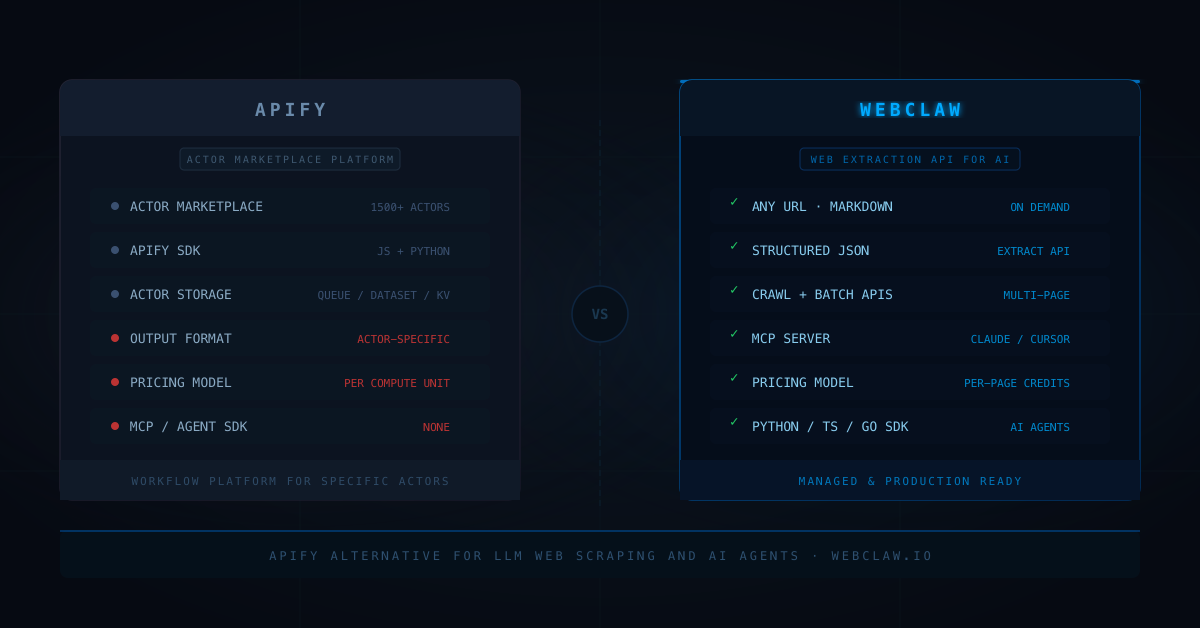
Use Apify when the job is running specific actors: a pre-built scraper for a known site, a custom scraping workflow with complex state, or a marketplace tool that already handles your target.

Use Webclaw when the job is web extraction as an API layer for an AI application:

any URL to markdown on demand
structured JSON extraction
multi-page site crawling
batch URL list extraction
MCP tools for Claude and Cursor
Python, TypeScript, Go SDK for AI agents
per-page pricing without compute unit management

The distinction is actor-based extraction vs API-based extraction.

One is a workflow platform. The other is a web content layer.

If you are looking for the best alternative to Apify for LLM workflows specifically, that distinction is the whole answer: your agent needs a web content layer, not a marketplace of site-specific actors. You can test the flow in the web scraping API demo before reading the rest.

What Apify is actually good at

Apify's actor marketplace is strong for specific scraping jobs.

If someone has already built an actor for the site you need, you inherit that work. The actor handles pagination, login flows, dynamic rendering, and output schema for that specific target. The Apify Store has actors for major e-commerce platforms, social networks, search engines, and hundreds of other specific sites.

Their SDK (available in JavaScript and Python) is also a serious tool for building custom scrapers. The SDK handles request queues, distributed crawling, storage, proxies, and actor lifecycle management.

Good use cases for Apify:

scraping a specific site that has a marketplace actor
building a custom actor with complex state and pagination
workflows that need Apify's built-in storage and scheduling
teams already integrated with the Apify platform

The platform is well-documented and the ecosystem is real.

Where Apify gets painful for LLM workflows

The core friction is the actor model itself.

An actor is a containerized scraper built for a specific purpose. Running one means spinning up a compute environment, consuming CPU and memory for the duration of the run, and paying per ACU (Apify Compute Unit, which combines CPU time and memory).

For an LLM application that needs to extract an arbitrary URL on demand, the actor model is the wrong abstraction.

you do not know which actor to call for an unknown URL
you pay per compute unit, not per page
actor quality varies across marketplace contributors
output format depends on the actor, not a standard schema
no built-in markdown output designed for LLMs
no MCP server for Claude or Cursor integration

The bigger problem is latency and predictability.

An actor run has setup overhead. For a single-page extraction that an AI agent needs in real time, that overhead is not justified.

Webclaw is one HTTP POST. No container boot, no actor selection, no ACU math.

The marketplace vs API-layer distinction

This is the key difference.

Apify's marketplace is strong when you know which site you need and there is already an actor for it.

An LLM application does not usually have that target specificity.

The agent gets a URL from the user, from a search result, from another agent, or from a document. It needs to extract that URL immediately and reliably, regardless of the domain.

That use case needs an API layer, not a marketplace.

The routing logic should live in the scraping layer:

Is this page static or JavaScript-rendered?
Is this page behind bot protection?
Do we need browser fallback?
What is the main content region?
What output format does the caller need?

None of that should be an actor selection problem.

This is the same argument from our anti-bot signals post: the routing and fallback logic belongs in the scraping infrastructure, not in the calling application.

Structured extraction, crawling, and batch jobs

For LLM workflows, the extraction shape usually expands.

start: one URL to markdown
week two: crawl a whole docs site
week four: extract structured data from a product URL list
week six: refresh the whole pipeline on a schedule

That is why Webclaw exposes separate API surfaces for each job:

/v1/scrape     single URL extraction
/v1/crawl      multi-page site crawl
/v1/batch      parallel URL list extraction
/v1/extract    schema-shaped JSON extraction
/v1/summarize  page summarization
/v1/research   deep research job

Each has a consistent input shape and a consistent output format.

Apify can handle all of these, but each one requires finding or building an actor. For a team that wants one API key and one integration to cover all web extraction needs, the API-layer approach is faster to ship and easier to maintain long-term.

Apify alternative decision table

Marketplace actors for specific sitesStrongNot the model
Custom scraper with complex stateStrong via Actor SDKNot the main workflow
Any-URL markdown on demandRequires generic actorBuilt in
Structured JSON extractionActor-specific outputBuilt in via Extract API
Multi-page crawlingCrawlee-based actorsBuilt in via Crawl API
Batch URL extractionActor with request queueBuilt in via Batch API
MCP for Claude and CursorNoBuilt in via MCP server
AI agent SDKsNo native LLM SDKPython, TypeScript, Go
Pricing modelPer compute unit (ACU)Per-page credits
Latency for single extractionActor boot overheadDirect API call
Best fitSite-specific actors and custom workflowsWeb extraction API for LLM applications

Code comparison

Running an Apify actor:

import { ApifyClient } from "apify-client";

const client = new ApifyClient({ token: "YOUR_TOKEN" });

// you need to pick the right actor for the site
const run = await client.actor("apify/web-scraper").call({
  startUrls: [{ url: "https://example.com/article" }],
  pageFunction: async ({ page }) => ({
    html: await page.content(),
    // markdown conversion is still your problem
  }),
});

const { items } = await client.dataset(run.defaultDatasetId).listItems();

Webclaw is a single API call:

import WebclawClient from "@webclaw/sdk";

const client = new WebclawClient({ apiKey: "YOUR_KEY" });

const result = await client.scrape({
  url: "https://example.com/article",
  formats: ["markdown", "json"],
});

console.log(result.markdown);
console.log(result.metadata.title);

For schema-shaped extraction:

const result = await client.extract({
  url: "https://example.com/product",
  prompt: "Extract name, price, variants, and availability",
});

console.log(result.jsonData);

For crawling a docs site:

const job = await client.crawl({
  url: "https://docs.example.com",
  limit: 50,
  formats: ["markdown"],
});

The difference is the integration surface.

Apify gives you a platform for running and managing actors.

Webclaw gives you a web extraction API that returns content your model can use directly.

When I would still use Apify

Apify makes sense when:

there is a specific marketplace actor for your target site
the team is already integrated with the Apify platform
the workflow needs actor-based scheduling, storage, and orchestration
the scraping job has complex state that benefits from the actor model
the team wants a custom scraping workflow with JavaScript or Python

If you are building a scraper for a specific major site and someone has already done the work in the marketplace, that head start is real.

When I would use Webclaw instead

I would use Webclaw when:

the agent needs to extract any URL, not a known list of target sites
the output needs to be LLM-ready markdown or typed JSON
the integration needs to work with Claude, Cursor, or other MCP clients
the team wants per-page pricing without managing compute units
the workflow includes crawl, batch, extract, and research in one API
actor boot latency is not acceptable for real-time agent calls

That is the core difference.

Apify is a platform for running scrapers.

Webclaw is a web extraction layer for AI applications.

For the broader comparison, read Best Web Scraping API for LLMs, Crawl4AI vs Playwright for LLM Web Scraping, and Jina Reader Alternative for LLM Web Scraping.

The rule

Use the tool that owns the right abstraction for your system.

If your system is a workflow platform that runs actors, Apify is a strong foundation.

If your system is an LLM application that needs a reliable web content layer, you need an API, not an actor marketplace.

One call. Any URL. Clean output.

Wiring web extraction into an agent or RAG pipeline? Start with the 7-day Starter trial or grab an API key. The Scrape API and MCP server give your agent one consistent way to read any URL, no actor selection required.

Frequently asked questions

What is the best Apify alternative for LLM workflows?

For LLM applications and AI agents, Webclaw is the most focused alternative. It returns clean markdown and structured JSON for any URL through a single API call, without actor selection, compute unit management, or per-actor output schemas.

What is an Apify alternative for web scraping?

Apify alternatives for web scraping include Bright Data (proxy-focused enterprise), Zyte (extraction-focused), ScraperAPI (proxy-first API), and Webclaw (extraction API for LLM and agent workflows). The right choice depends on whether you need actor-based workflows or API-based extraction.

Is Apify good for AI agents?

Apify can integrate with AI agents that call its API, but the actor model adds overhead: you need to select the right actor per site, manage compute units, and process the output format each actor returns. For agents that need to extract any URL on demand with consistent markdown output, a direct extraction API is a simpler integration.

How does Apify pricing work?

Apify bills per Apify Compute Unit (ACU), which combines CPU time and memory over the actor run. The cost depends on how long the actor runs and how many resources it uses, plus proxy costs if enabled. For workloads where page count is the main variable, per-page pricing tools are more predictable.

Can Apify handle Cloudflare-protected sites?

Apify provides proxy options and browser actors that handle many bot-protected sites. Their proxy network supports residential and datacenter IPs. For teams that want bot protection managed automatically inside the extraction API without choosing proxy tiers manually, a managed scraping API classifies pages and handles fallback internally.

When should I use Webclaw instead of Apify?

Use Webclaw when your application needs a web extraction layer that works for any URL: markdown output, structured JSON, MCP integration with Claude or Cursor, batch and crawl APIs, and predictable per-page pricing. Use Apify when you need site-specific actors or custom scraping workflows with complex state.

Partners

Backing open web extraction

View partners
ColdProxyQuantum ProxiesProxy-SellerRapidProxyColdProxyQuantum ProxiesProxy-SellerRapidProxyColdProxyQuantum ProxiesProxy-SellerRapidProxy