Crawl4AI vs Playwright: Which to Use for Scraping (2026)
If you are searching for crawl4ai vs playwright, you are probably not comparing two versions of the same thing.
You are comparing two layers of a web scraping stack.
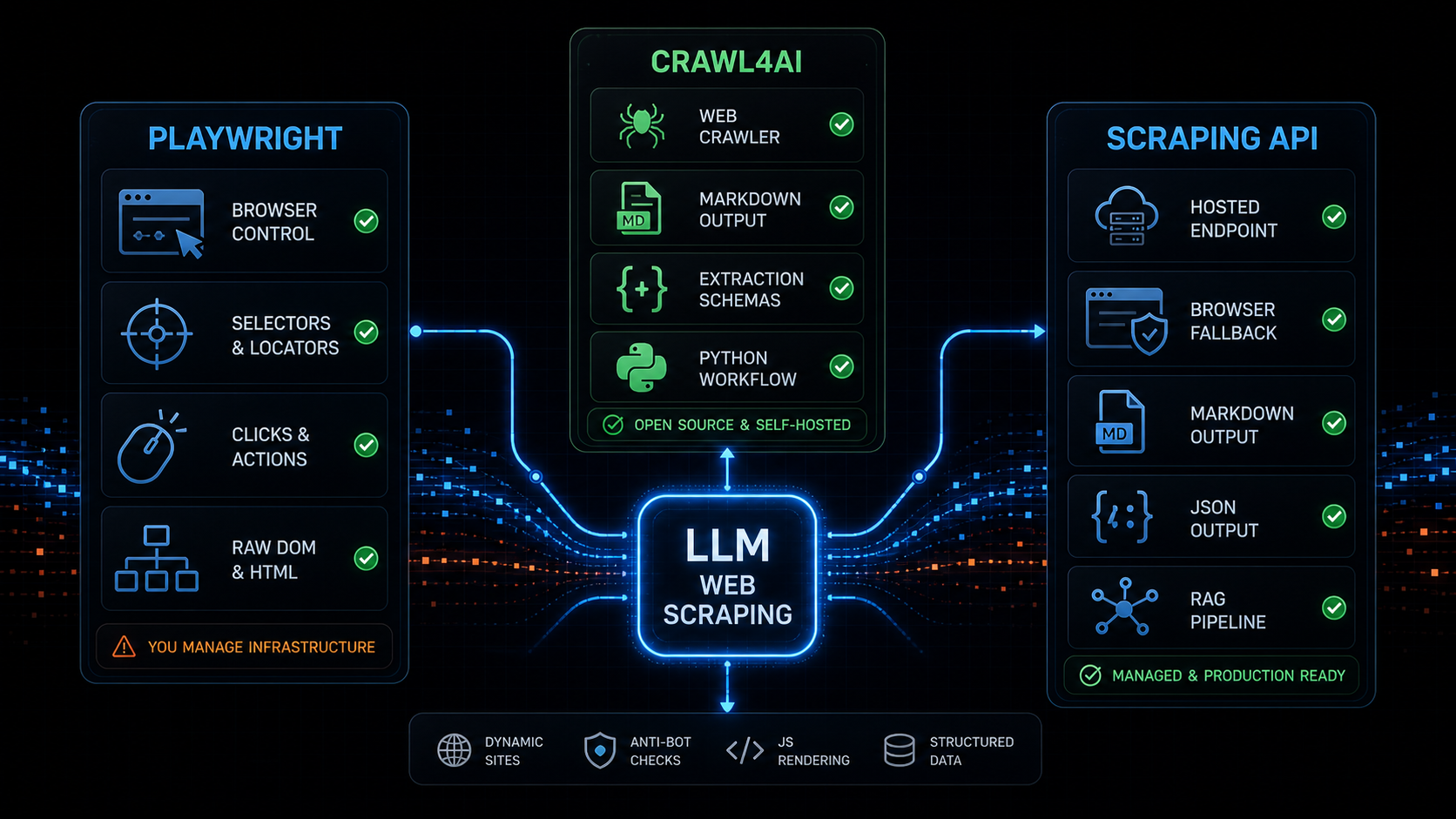
Playwright is browser automation. It gives you a programmable browser: navigate, click, type, inspect locators, wait for UI state, and read the DOM.
Crawl4AI is an LLM-friendly crawler and scraper. It gives you a higher-level Python workflow around crawling, markdown generation, structured extraction, and browser-backed page handling.
License scope matters when deploying it: Crawl4AI’s reviewed LICENSE contains Apache-2.0 text followed by an additional attribution requirement. Read the full file rather than relying only on the repository badge.
That distinction matters.
If you choose Playwright when you really need LLM-ready markdown, you inherit a lot of extraction work.
If you choose Crawl4AI when you really need fine-grained browser control, you may still end up touching the browser layer.
If you choose either one for production without thinking about browser pools, anti-bot checks, output quality, retries, and API ergonomics, the painful part shows up later.
This post compares Crawl4AI vs Playwright for LLM web scraping, headless extraction, dynamic sites, RAG input, and production reliability. I will also show when a hosted scraping API like Webclaw is the better layer to use instead.
For the direct product comparison, see webclaw vs Crawl4AI.
Crawl4AI vs Playwright
The shortest version:
Playwright controls the browser.
Crawl4AI turns crawling and extraction into an LLM-oriented workflow.
Webclaw exposes extraction as a hosted API.
That means the right choice depends on the job.
Use Playwright when the main problem is browser behavior.
Use Crawl4AI when the main problem is crawling pages and converting them into useful LLM input from Python.
Use a scraping API when the main problem is production web extraction and you do not want to operate browser infrastructure, response classification, markdown cleanup, retries, and scale yourself.
This is the practical comparison:
| Need | Playwright | Crawl4AI | Webclaw |
|---|---|---|---|
| Browser control | Strong | Good, through crawler/browser config | Abstracted behind API |
| Click/type/scroll workflows | Locator and page APIs | Browser hooks and crawler configuration | Ordered actions in the managed API |
| Markdown for RAG | Manual work | Built in | Built in |
| Structured extraction | Manual work | Built in | Built in via Extract API |
| Multi-page crawling | Manual orchestration | Built in | Built in via Crawl API |
| Deployment | Local/CI library | Python or Docker API; managed Cloud API listed as closed beta | Hosted API or separate OSS core |
| Production browser ops | You own it | You own it if self-hosted | Managed |
| Best fit | Browser automation | Python LLM crawling | Web extraction API for agents |
What Playwright is actually good at
Playwright is excellent when you need deterministic browser automation.
It is good at:
navigating pages
clicking buttons
typing into forms
waiting for UI state
reading DOM nodes
taking screenshots
testing user flows
interacting with dynamic apps
Its locator model is strong. Its auto-waiting behavior is designed around actionability checks before actions such as clicks and fills. The official docs describe checks like visibility, stability, event receipt, and enabled state before actions proceed.
That is exactly what you want for UI automation.
But web scraping for LLMs is not only UI automation.
After the browser loads, you still need to answer:
Which text is main content?
Which links matter?
What should be removed?
Is this a product page, docs page, or article?
Is the output clean enough for RAG?
Did we get a challenge page?
Did the page only render a skeleton?
Playwright gives you the DOM.
It does not give you an LLM-ready extraction pipeline by itself.
That means a Playwright web scraping stack usually grows extra parts:
browser pool
proxy routing
retry policy
content extraction
boilerplate removal
markdown conversion
schema extraction
block detection
output quality scoring
If you need full browser control, Playwright is the right foundation.
If you need clean markdown or structured JSON for an AI agent, Playwright is only the browser layer.
This is why playwright web scraping often starts simple and becomes an extraction platform.
What Crawl4AI is actually good at
Crawl4AI sits higher in the stack.
The official docs position it as an open-source, LLM-friendly web crawler and scraper. Their quick start uses AsyncWebCrawler, runs a URL, and prints result.markdown. The docs also call out clean markdown generation, structured extraction, advanced browser control, parallel crawling, and an LLM-friendly output philosophy.
That is a different job than raw Playwright.
Crawl4AI is good at:
Python-first crawling
markdown output
RAG-oriented content
structured extraction
multi-page crawling
browser-backed workflows
LLM extraction strategies
self-hosted experimentation
If your team is already in Python and wants an open-source crawler for AI workflows, Crawl4AI is a good fit.
It gives you more of the LLM web scraping pipeline out of the box than Playwright alone.
That matters because html to markdown for RAG is not a small detail. Raw HTML is usually full of nav, footer links, scripts, cookie banners, layout wrappers, and repeated junk. I wrote more about that in HTML to Markdown for LLMs.
Crawl4AI is closer to the output you want.
Playwright is closer to the control layer you may need.
Where both get painful in production
The hard part is not the first successful scrape.
The hard part is the thousandth URL across noisy, dynamic, blocked, slow, regional, or inconsistent pages.
Both Playwright and Crawl4AI can become painful when the production system needs:
browser pool management
memory limits
timeouts
concurrency control
queueing
proxy rotation
anti-bot detection
blocked-response classification
retry strategy
structured errors
output validation
cost control
With Playwright, you own almost all of this directly.
With Crawl4AI, you get a stronger crawling and extraction layer, but if you self-host it you still own the operational surface: dependencies, browser runtime, concurrency, infrastructure, and failure handling.
That does not make either tool bad.
It means you should be clear about the layer you are buying into.
If you want a library, use a library.
If you want a framework, use a framework.
If you want an API boundary, use an API.
This is where browser scraping vs scraping API becomes a real architecture decision. A browser-first stack can work, but every unnecessary browser session adds latency and cost. A classifier-first API can return clean output quickly when the page does not need rendering, and escalate only when it does.
Is Webclaw a Crawl4AI alternative?
Yes. Crawl4AI also provides a self-hosted API, so the choice is about deployment, request contracts and operation of the service.
Crawl4AI is a strong choice when you want:
open-source Python crawling
self-hosted browser-backed extraction
LLM-friendly markdown generation
local experimentation
framework-level control
Evaluate Webclaw’s managed service when you want:
hosted scraping API
markdown or JSON from one request
browser fallback without operating browser infrastructure
structured extraction endpoint
SDKs outside Python
agent and RAG workflow integration
production retries and typed failures
That is the real comparison.
It is not "library good, API bad" or "API good, library bad."
It is:
Do you want to own the crawler stack,
or do you want to call an extraction API?
If you are evaluating that trade-off, start with webclaw vs Crawl4AI, then test the Scrape API and Extract API on the pages your product actually needs.
LLM-ready markdown and RAG output
For LLM web scraping, the output format matters as much as the fetch.
An agent or RAG pipeline usually does not need:
raw DOM
CSS classes
script tags
hydration noise
cookie banners
footer links repeated 20 times
It needs:
clean markdown
source URL
metadata
headings
tables
links
structured JSON when requested
clear failure states
Crawl4AI is strong here because markdown and LLM use cases are central to its product surface.
Playwright is neutral. It can fetch and render the page, but it does not decide what content is useful for a model.
Webclaw is built around returning LLM-ready output from the API:
curl -X POST https://api.webclaw.io/v1/scrape \
  -H "Authorization: Bearer $WEBCLAW_API_KEY" \
  -H "Content-Type: application/json" \
  -d '{
    "url": "https://example.com",
    "formats": ["markdown"],
    "only_main_content": true
  }'
If you want typed fields instead of full page content, use the Extract API. If you want a broader workflow, see Build a RAG pipeline with live web data, Web scraping for AI agents, and MCP web scraping for Claude Code and Cursor.
Dynamic sites, JavaScript rendering, and anti-bot checks
Dynamic websites are where the comparison gets blurry.
Playwright is great when the page really needs browser execution.
Crawl4AI can use browser-backed workflows and page interaction features around crawling and extraction.
But not every dynamic site should become a browser session.
Some pages contain useful server-rendered HTML.
Some pages contain the needed data in JSON-LD.
Some pages are empty app shells until JavaScript runs.
Some pages are not empty because of JavaScript at all. They are empty because you were blocked.
That is why I do not like this decision tree:
page empty -> use browser
The better decision tree is:
page empty -> classify why
For example:
blocked page -> anti-bot fallback
empty app shell -> JavaScript rendering
content in JSON-LD -> parse structured data
content in HTML -> extract directly
bad extraction -> fix extraction quality
Playwright can help with the browser rendering part.
Crawl4AI can help with crawling and extraction around that browser flow.
A scraping API should make the decision for you.
This is the cluster to read next:
- JavaScript Rendering API for Web Scraping
- Anti-Bot Scraping API 2026: signals that force browser fallback
- Puppeteer stealth vs Cloudflare
- Cloudflare error codes for scrapers
One Playwright detail is worth calling out: its docs mark networkidle as discouraged for readiness and recommend assertions instead. That matters for scraping too. Waiting for network silence is not the same as waiting for useful content.
When to use a scraping API instead
Use Playwright when you need precise browser control.
Use Crawl4AI when you want an open-source Python crawler for LLM-friendly markdown and extraction.
Use a managed scraping API when you want another provider to operate the extraction service.
That usually means:
you do not want to operate browser pools
you need predictable API behavior
you want markdown or JSON directly
you need retries and typed errors
you need browser fallback only when required
you are building an agent or RAG product
you work outside Python
you want hosted infrastructure
This is where Webclaw fits:
URL -> response classification -> extraction -> markdown / JSON
If the page is clean, return clean output.
If the page is dynamic, escalate to rendering.
If the page is blocked, classify that separately.
If extraction quality is low, do not pretend the scrape worked.
The caller should not need to know whether a URL needs Playwright, Crawl4AI, a JSON-LD parser, or a browser fallback path.
The API should decide.
That is the main difference between crawl4ai vs playwright as tools and a production scraping API as infrastructure.
Decision table
| Situation | Options to evaluate | Why |
|---|---|---|
| You need to click through a UI flow | Playwright | It is built for browser automation and interaction. |
| You need screenshots or visual state | Playwright, Crawl4AI or a managed browser API | Compare the actual controls and image output. |
| You are a Python team building a self-hosted LLM crawler | Crawl4AI | It gives crawling, markdown, and extraction workflows closer to the target output. |
| You want markdown for RAG from many pages | Crawl4AI or Webclaw | Crawl4AI works well if you want a Python library. Webclaw works well if you want a hosted API. |
| You need structured JSON fields from a URL | Crawl4AI or Webclaw | Both support structured extraction; Crawl4AI also offers a Docker API. |
| You want to avoid managing browsers | Webclaw | The browser/rendering layer is hidden behind the API. |
| You need JS rendering sometimes, not always | Test the configured fetch/browser strategy | Measure content correctness and runtime for each path. |
| You need a Crawl4AI alternative with hosted API behavior | Webclaw | See webclaw vs Crawl4AI. |
Sources and references
- Crawl4AI documentation describes Crawl4AI as an open-source LLM-friendly crawler and scraper with markdown generation, structured extraction, browser control, and crawling workflows.
- Crawl4AI GitHub is the main open-source repository.
- Playwright documentation covers browser automation across Chromium, Firefox, and WebKit.
- Playwright auto-waiting docs explain locator actionability checks and auto-waiting.
- Playwright Page API documents navigation options, including the discouraged
networkidlereadiness mode.
Frequently asked questions
Is Crawl4AI better than Playwright for web scraping?
Crawl4AI is better when you want a higher-level Python crawler that produces markdown and supports LLM-oriented extraction workflows. Playwright is better when you need direct browser automation, interaction, and DOM control. They solve different layers.
Is Playwright enough for LLM web scraping?
Playwright is enough for rendering and interacting with pages, but it does not provide an LLM-ready extraction pipeline by itself. You still need markdown conversion, boilerplate removal, structured extraction, output validation, retries, and failure classification.
Does Crawl4AI use Playwright?
Crawl4AI provides crawler and browser configuration around browser-backed extraction workflows. In practice, it sits above the raw browser automation layer and focuses on crawling, markdown, and LLM-friendly output rather than only browser control.
What is the best Crawl4AI alternative for a hosted scraping API?
If you want open-source Python crawling, Crawl4AI is a strong option. If you want a hosted scraping API that returns markdown or JSON and handles browser fallback behind the API, evaluate Webclaw’s managed API alongside other hosted offerings.
Should I use Playwright for scraping Cloudflare-protected pages?
Playwright can help when browser execution is required, but Cloudflare-style blocking is not only a JavaScript rendering problem. You also need response classification, fingerprint consistency, retry logic, and clean failure handling. See Anti-Bot Scraping API 2026.