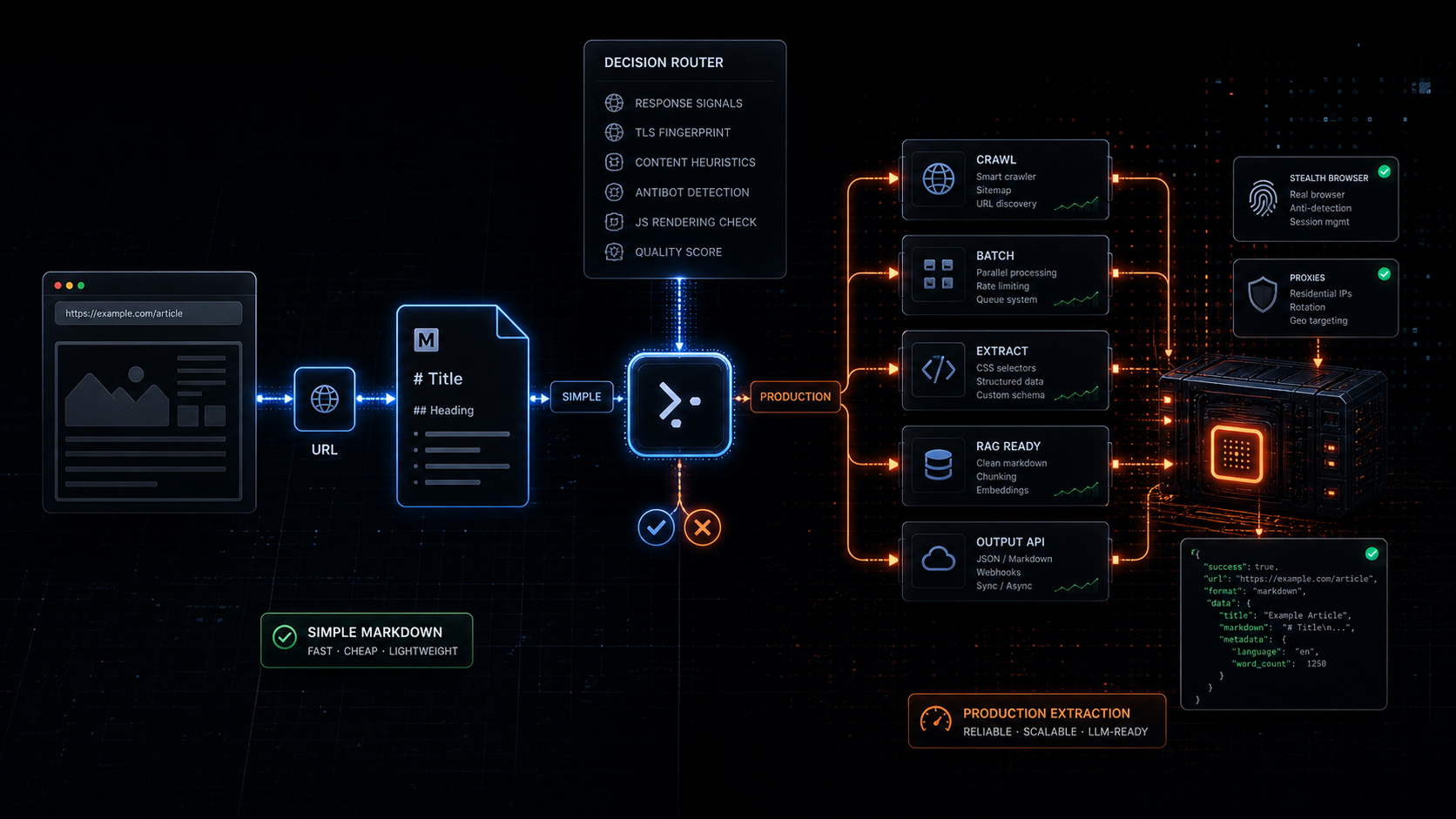
Jina Reader Alternative for LLM Web Scraping
Jina Reader is one of the best ideas in LLM web tooling because it removed almost all ceremony.
Take a URL.
Put https://r.jina.ai/ in front of it.
Get markdown.
That is clean. That is useful. That is why developers like it.
But there is a point where the simple trick stops being the system.
If your product needs one article as markdown, Jina Reader is probably enough.
If your product needs 5,000 pages refreshed weekly, schema-shaped product data, crawler control, batch retries, source metadata, JavaScript rendering decisions, and AI agents that can call the same web layer every day, you are no longer looking for a URL-to-markdown trick.
You are looking for a production web extraction layer.
That is where a Jina Reader alternative starts to make sense.
Quick answer
Use Jina Reader when you need the fastest possible path from one public URL to LLM-friendly markdown.
Use Webclaw when the job needs more than single-page markdown:
crawling
batch scraping
structured JSON extraction
RAG refresh pipelines
agent tooling
MCP access
predictable per-page pricing
JavaScript rendering fallback
anti-bot handlingThe difference is not "markdown vs markdown."
The difference is whether markdown is the final job or just the first step in a larger scraping pipeline.
If you want the product-level comparison, read Webclaw vs Jina Reader. If you want to test the flow first, open the web scraping API demo.
What Jina Reader is actually good at
Jina Reader is strongest when the input is simple and the output format is obvious.
The official pitch is direct: it converts a URL to LLM-friendly input by adding r.jina.ai in front of the URL. The Reader docs also expose s.jina.ai for search results, API key based rate limits, JSON mode, CSS selectors, wait selectors, token budgets, and browser engine options.
For a developer testing a page inside a prompt, that is excellent.
This is the whole mental model:
https://r.jina.ai/https://example.com/articleFor quick experiments, it is hard to beat.
Good use cases:
one-off article reading
small RAG prototypes
manual research
basic URL to markdown
public documentation pages
simple static websitesThe open-source Reader repo also documents the two core modes clearly: Read through r.jina.ai, and Search through s.jina.ai. It can read web pages, PDFs, Office documents, and images. It can self-host through Docker. It can use browser mode or a lighter fetch path.
That is a serious tool.
The mistake is pretending every production scraping problem is still a single URL-to-markdown problem.
Where r.jina.ai gets painful in production
The pain usually starts after the prototype works.
Your first request is simple:
Read this URL.
Return markdown.Then the product needs more.
Read every page under this docs site.
Refresh it every week.
Ignore nav, cookie banners, and duplicate links.
Extract product prices as JSON.
Retry only the failed URLs.
Render JavaScript only when the page needs it.
Keep source metadata for citations.
Expose the same tool to agents.
Track usage by API key.That is a different surface area.
Jina Reader gives you a very elegant read endpoint. A production scraping API needs to own the messy workflow around that endpoint.
This is why the "Jina Reader alternative" keyword is not only competitor search intent. It is architecture search intent.
People are not asking whether markdown is useful.
They already know it is.
They are asking what happens after markdown enters the product.
URL to markdown is only step one
For LLMs, markdown is much better than raw HTML.
We have a full breakdown in HTML to Markdown for LLMs, but the short version is simple:
raw HTML wastes context
markdown preserves useful structure
LLM-ready markdown removes boilerplate before retrievalJina Reader does this well for many pages.
The production question is what else comes back with the markdown.
For a RAG pipeline, the output should include:
final URL
source URL
title
status code
timing
links
page metadata
clean markdown
optional raw HTML
optional JSON
extraction timestampFor an AI agent, the output also needs to be predictable. The agent should not need to know which target needs browser rendering, which target needs a retry, and which target returned a block page instead of content.
That routing decision belongs in the scraping layer.
Webclaw's Scrape API is built around that shape: one request, multiple output formats, and response metadata that downstream systems can trust.
Crawling and batching change the problem
Single-page URL to markdown is clean.
Multi-page web extraction is not.
A real RAG or monitoring job usually starts with a seed URL:
docs site
blog index
help center
product category
competitor pricing page
directory pageThen it needs URL discovery, filtering, scheduling, deduplication, retries, and partial failure handling.
That is why Webclaw splits the workflow into separate API surfaces:
/v1/scrape single URL extraction
/v1/crawl multi-page crawling
/v1/batch parallel URL extraction
/v1/extract schema-shaped JSON extraction
/v1/search search plus optional scrapingUse Crawl API when the job starts from one site and needs many pages.
Use Batch API when your app already has the URL list and wants parallel extraction.
Use Extract API when markdown is not enough and your app needs typed JSON.
That is the difference between a reader and an extraction platform.
JavaScript pages and blocked pages need classification
Jina Reader's docs expose useful controls for harder pages, including browser mode, wait selectors, custom headers, cache bypass, and proxy options. The GitHub README also recommends escalating knobs when sites push back: use an API key, bypass cache, force the browser engine, route through proxy options, or bring your own proxy.
Those controls matter.
But in a production system, most of those choices should not be manual for every request.
The scraping layer should decide:
Did the initial fetch return real content?
Is this only an empty JavaScript shell?
Did the page return a block page?
Is the markdown too small to be trusted?
Do we need browser rendering?
Do we need a retry?
Do we need to fail fast?This is the same argument from our JavaScript rendering API guide: browser rendering should be fallback, not the default.
It is also the reason a production scraping API should not expose every low-level choice as a decision the caller has to make.
Most callers do not want a browser strategy.
They want the page data.
Jina Reader alternative decision table
| Need | Jina Reader | Webclaw |
|---|---|---|
| Fast URL to markdown | Strong | Strong |
| Simple public pages | Strong | Strong |
| JSON response | Supported | Supported |
| Schema-shaped extraction | Limited | Built in via Extract API |
| Crawl a full site | Not the core workflow | Built in via Crawl API |
| Batch many known URLs | Not the core workflow | Built in via Batch API |
| Agent tools | API accessible | API, SDKs, and MCP |
| RAG refresh jobs | Prototype friendly | Production friendly |
| Anti-bot pages | Manual knobs and proxy options | Managed at the scraping layer |
| Pricing model | Token and rate-limit based | Per-page credits |
| Best fit | One URL to LLM input | Production web extraction |
Code comparison
Jina Reader is beautifully small:
curl "https://r.jina.ai/https://example.com/article"Webclaw is the production API shape:
curl -X POST https://api.webclaw.io/v1/scrape \
-H "Authorization: Bearer $WEBCLAW_API_KEY" \
-H "Content-Type: application/json" \
-d '{
"url": "https://example.com/article",
"formats": ["markdown", "json"],
"onlyMainContent": true
}'For schema extraction:
curl -X POST https://api.webclaw.io/v1/extract \
-H "Authorization: Bearer $WEBCLAW_API_KEY" \
-H "Content-Type: application/json" \
-d '{
"url": "https://example.com/product",
"prompt": "Extract title, price, variants, availability, and reviews"
}'For a full site:
curl -X POST https://api.webclaw.io/v1/crawl \
-H "Authorization: Bearer $WEBCLAW_API_KEY" \
-H "Content-Type: application/json" \
-d '{
"url": "https://docs.example.com",
"limit": 100,
"formats": ["markdown"]
}'The tradeoff is obvious.
Jina Reader wins on minimum ceremony.
Webclaw wins when the web extraction job becomes part of your product.
When I would still use Jina Reader
I would use Jina Reader when:
the task is one URL
the target is public
the output can be markdown
the workflow is manual or experimental
the caller does not need crawling
the system does not need schema extractionIt is a great default for quick LLM grounding.
It is also useful as a mental model. A lot of developers still feed raw HTML into models and wonder why retrieval gets expensive. Jina Reader helped make URL-to-markdown feel normal.
That is a good thing.
When I would use Webclaw instead
I would use Webclaw when:
the product needs many URLs
the data needs to refresh
the output needs to be JSON
the target can be JavaScript-rendered
the target can be blocked or geo-sensitive
the workflow needs crawl and batch APIs
the same web layer needs to work for agents
the cost model needs to be predictableThat is why Webclaw exists.
Not because every page needs a giant scraping stack.
Because the pages that matter to a product usually become a pipeline.
For the broader landscape, read Best Web Scraping API for LLMs, RAG Pipeline with Live Web Data, and Crawl4AI vs Playwright for LLM Web Scraping.
The rule
Use the simplest tool that owns the whole job.
If the job is "read this URL as markdown," Jina Reader is a very good answer.
If the job is "keep my product supplied with fresh web data," markdown conversion is only one stage.
You need crawl, batch, extraction, rendering decisions, failure handling, and agent access.
That is the point where a Jina Reader alternative is not a replacement for a prefix.
It is a replacement for the infrastructure you would otherwise have to build around it.
Frequently asked questions
What is the best Jina Reader alternative?
The best Jina Reader alternative depends on the workflow. For one-off URL-to-markdown, Jina Reader is already strong. For crawling, batching, structured JSON extraction, RAG refresh jobs, and AI agents, Webclaw is a stronger production layer.
What is an r.jina.ai alternative?
An r.jina.ai alternative is any tool that converts web pages into LLM-ready content without only relying on the r.jina.ai prefix. Webclaw provides URL-to-markdown, website-to-JSON, crawl, batch, extract, search, and MCP workflows through a hosted API.
Is Jina Reader good for RAG?
Yes, Jina Reader is good for simple RAG prototypes that need clean markdown from public URLs. For production RAG, you usually also need crawling, source metadata, refresh scheduling, retries, and chunkable content across many pages.
Can Jina Reader handle JavaScript-rendered pages?
Jina Reader supports browser-mode fetching and wait selectors for JavaScript-heavy pages. The production question is whether your application should decide those settings manually or let the scraping layer classify each page and render only when needed.
Can r.jina.ai bypass Cloudflare?
Jina Reader documents proxy and browser options for difficult sites. Results depend on the target, headers, cache state, API key, and proxy path. If protected pages are central to your product, use a scraping API designed to classify blocked responses and handle fallback automatically.
When should I use Webclaw instead of Jina Reader?
Use Webclaw when the job needs more than single-page markdown: crawl jobs, batch extraction, schema-shaped JSON, RAG refresh pipelines, AI agent tools, MCP access, JavaScript rendering fallback, and predictable per-page pricing.

