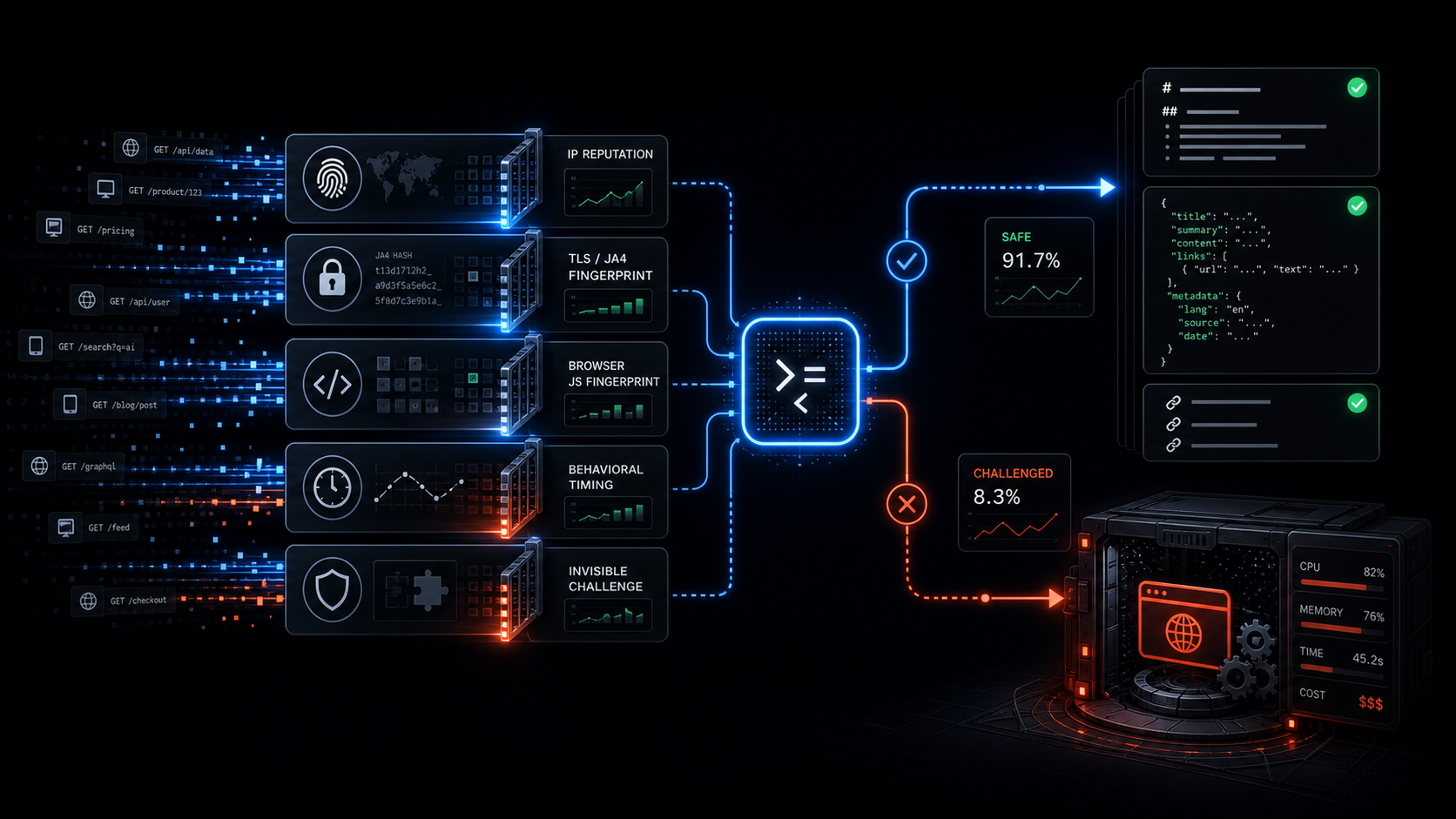
Anti-Bot Scraping API: Browser Fallback Signals
I used to treat headless Chrome as the default for every scrape.
It worked until Cloudflare, Akamai, DataDome, and PerimeterX started winning.
In 2026 those systems do not rely on one check. They stack signals: IP reputation, TLS fingerprinting with JA4, browser fingerprinting through JavaScript, behavioral timing, and invisible challenges. Most scraping APIs still fire a full browser on every request because "it just works." The result is high latency and a bill that scales with every job.
When we shipped Webclaw, I set one rule:
Browser is fallback only.
The classifier must earn every session.
The API should start with a clean browser-like fetch, classify the response, and decide quickly whether the page actually needs browser rendering. That architecture is the difference between an anti-bot scraping API that scales and one that quietly becomes an expensive bottleneck.
For the broader architecture, read browser fallback, not browser-first. This post is the lower-level version: the signals that force escalation.
Quick answer
A scraping API should escalate to browser fallback when the response shows one or more of these signals:
403, 429, or 503 with challenge markers
TLS or HTTP/2 fingerprint mismatch
tiny HTML shell with almost no real text
anti-bot cookies or headers
Turnstile, reCAPTCHA, or challenge scripts
cleaned content quality below threshold
If none of those flags fire, the API should return clean markdown or structured JSON immediately. No browser spin-up. No extra wait. No unnecessary compute.
The request starts cheap
The first request should not be a Chrome session.
It should be a coherent browser-like HTTP request:
realistic User-Agent
matching TLS and HTTP/2 behavior
correct Accept headers
language preferences that make sense
cookie persistence when needed
no Python requests defaults
no generic library fingerprints
The important part is consistency. A Chrome User-Agent with a Python TLS fingerprint is not Chrome. It is a lie across layers, and modern bot systems are good at reading that mismatch.
If you want the deeper protocol explanation, see TLS fingerprinting in 2026. If you are debugging Cloudflare specifically, start with Cloudflare error codes for scrapers.
The six checks
Once the response comes back, the classifier should inspect the raw response before extraction.
Not after the LLM sees it.
Not after the crawler indexes it.
Before.
1. Status code plus immediate block markers
Status code alone is not enough, but it is still a useful first signal.
The obvious escalation candidates:
403
429
503
Those become much stronger when paired with challenge markers:
cf-mitigated
__cf_bm
ak_bmsc
/cdn-cgi/challenge-platform/
cf-turnstile
challenges.cloudflare.com
A bare 403 can mean many things. A 403 with challenge markup means your scraper did not get the page. It got the bouncer.
That should never return as success.
For a more complete decision tree, see Cloudflare scraping checklist and Cloudflare Turnstile scraping.
2. TLS and HTTP/2 fingerprint mismatch
Modern anti-bot systems read the connection before the HTTP body exists.
They can score:
JA4 fingerprint
TLS extension order
cipher suite order
ALPN
HTTP/2 SETTINGS
header order
client hints
If a target only accepts real-browser fingerprints and the fetch path does not match, browser fallback becomes more likely.
This is where a lot of scraping tutorials are outdated. Changing the User-Agent does not change the TLS handshake. A request can say Chrome in the header and still say Python at the transport layer.
That is why Puppeteer stealth stopped being enough. Stealth patches browser JavaScript leaks. It does not fix every lower-level request signal.
3. Content size and structure
Some blocked responses are tiny.
You asked for a product page, docs page, or article. You got:
6 KB of HTML
almost no text nodes
no article body
no product schema
no JSON-LD
no expected title
That is usually not a small page.
It is an interstitial, empty shell, consent wall, or challenge path.
This check catches a lot of fake success. The HTTP request succeeded. The extraction would run. The output would be garbage. The classifier stops that before the result gets treated as real content.
This is the same reason we tell people to stop testing scraping APIs on toy pages like example.com. Use the pages your product actually depends on. The evaluation checklist is here: How to evaluate web scraping APIs for AI agents.
4. Anti-bot headers and cookies
Headers and cookies are noisy, but useful.
The classifier should scan for known anti-bot families:
cf-ray
cf-mitigated
__cf_bm
ak_bmsc
px cookies
__ddg markers
challenge redirects
WAF body fingerprints
The point is not to blindly match one string and panic. The point is to build a combined score.
A suspicious cookie plus tiny content plus missing expected schema is a much stronger signal than any one marker alone.
Good anti-bot detection is not a magic bypass trick. It is response classification.
The API needs to know whether it received the target page or a defensive artifact pretending to be a page.
5. JavaScript requirement heuristic
Some pages are not blocked. They are just empty until JavaScript runs.
The classifier can detect this without launching a full JS runtime immediately.
Fast string scans catch many cases:
empty app roots
hydration-only shells
missing window.__INITIAL_STATE__
missing __NEXT_DATA__ payloads
script tags that load Turnstile or reCAPTCHA
data attributes that only hydrate client-side
If the page clearly needs client-side execution, browser fallback is justified.
But the important thing is sequencing. You do not need to start Chrome to discover that every time. A cheap scan can decide whether browser time is worth spending.
For LLM pipelines, this is especially important because empty shells look deceptively harmless. The model gets a clean-looking page with no real content and starts reasoning from nothing.
6. Final content quality score
The last check happens after extraction.
Even if the raw HTML did not scream "blocked," the cleaned output can still tell you something is wrong.
Signals:
very low token count
low entity density
missing title
missing expected JSON-LD
missing price, review, or article blocks
too much repeated navigation
too little main content
If the cleaned markdown or JSON looks like an empty shell, escalate.
This is the part many scraping APIs skip. They treat extraction as the end. In production, extraction output is another signal.
Bad data is worse than failed data. A failed scrape can be retried. Bad data gets indexed, summarized, billed, and trusted.
What happens when no flags fire
If none of the checks fire, Webclaw returns clean output immediately:
markdown
JSON
metadata
links
tables
structured fields
No browser session. No hidden headless mode. No extra wait.
From the API side, the call is boring:
curl -X POST https://api.webclaw.io/v1/scrape \
  -H "Authorization: Bearer $WEBCLAW_API_KEY" \
  -H "Content-Type: application/json" \
  -d '{
    "url": "https://example.com",
    "formats": ["markdown"],
    "only_main_content": true
  }'
If you want typed extraction instead of full content, use the Extract API. If you want the full scrape endpoint reference, start with the Scrape API docs.
What happens when flags fire
When the classifier has enough evidence, it escalates.
That can mean browser rendering, challenge handling, or a more expensive fallback path. The important part is that the expensive path is earned by signals, not used as the default for every URL.
The session should close as soon as the data is captured.
Browsers should not sit idle.
The API should return either clean data or a clear error. It should not hand a challenge page to an agent and call that a successful scrape.
A real production shape
One real pattern we see often:
retail product page
Cloudflare or PerimeterX layer
first fetch returns fast
headers and content shape look challenged
classifier escalates
browser fallback returns rendered product data
The useful output is not "HTML." It is structured product data:
title
variants
price
reviews
availability
metadata
A browser-first service pays the browser cost on every request, including the pages that never needed it.
A classifier-first service pays it only when the site forces its hand.
That is the whole margin difference.
Why this matters for AI agents
AI agents make fake success more expensive.
If the fetch layer returns a challenge page, the agent may summarize the challenge.
If the fetch layer returns an empty app shell, the agent may confidently reason from nothing.
If the extraction layer returns navigation and cookie text, your RAG pipeline embeds garbage.
Agents do not need raw HTML. They need trustworthy web context.
That means the extraction API has to care about:
response classification
clean markdown
structured JSON
source URLs
metadata
typed errors
browser fallback only when needed
For the output side of this problem, read HTML to Markdown for LLMs and Web scraping for AI agents.
The rule
Anti-bot vendors spent the last two years making full-browser sessions deliberately expensive.
The winning move is to avoid them until the site forces your hand.
That is the rule behind Webclaw:
Clean data first.
Browser only when the site demands it.
One POST to /scrape with a URL and optional schema. You get back either clean data, rendered data, or a clear failure.
No manual "headless mode" flag.
No browser-first tax.
The classifier decides.
That single rule is still the difference between an API that scales cleanly and one that becomes another expensive bottleneck.
Frequently asked questions
What is browser fallback in a scraping API?
Browser fallback means the API starts with a cheaper HTTP fetch, classifies the response, and only escalates to browser rendering when the target page actually requires JavaScript execution, challenge handling, or rendered DOM state.
Why not use headless Chrome for every scrape?
Headless Chrome can work, but browser-first scraping makes every request pay the most expensive path. That increases latency, infrastructure cost, and queue pressure even for pages that could have returned clean markdown or JSON from a direct fetch.
What signals usually force browser fallback?
The strongest browser fallback signals are challenge status codes, anti-bot cookies, TLS or HTTP/2 fingerprint mismatch, tiny HTML shells, missing expected structured data, Turnstile or reCAPTCHA scripts, and cleaned content that looks empty or low quality.
Is JA4 fingerprinting enough to block a scraper?
JA4 is one signal, not the whole decision. Modern anti-bot systems combine transport fingerprints with headers, cookies, JavaScript browser fingerprints, reputation, behavior, and content flow. A good scraping API has to classify across layers.
How does Webclaw handle anti-bot scraping for AI agents?
Webclaw classifies the response before handing content to an agent. Clean pages return markdown, JSON, metadata, links, and structured fields quickly. Challenged or empty pages escalate to the right fallback path instead of returning garbage context as a successful scrape.