Cloudflare Error 1020, 1015, 403, 503: Causes and Fixes
You are staring at a 403. Or a 503. Or a 1020. Maybe a 1015 with a Retry-After header. Your scraper is broken, but it is not broken in the same way each time. Same target, different days, different codes, different fixes.
Cloudflare error codes are noisy on purpose. The Ray ID and the four-digit number are a debugging gift if you read them. They tell you which layer of Cloudflare's stack rejected your request. That tells you what to actually change in your scraper, instead of trying random user agents until something works.
This post is a reference. For the wider playbook on getting past Cloudflare in the first place, the pillar is bypass Cloudflare bot protection. For the specific case where the block is Turnstile, see the Turnstile guide. For why your old Puppeteer-stealth setup stopped working, see why Puppeteer stealth stopped working.
Cloudflare error codes: quick answer
Do not treat every Cloudflare block as the same retry problem.
| Code | What it usually means | First fix to try |
|---|---|---|
403 | WAF block, failed challenge, or bad request signature | Inspect the body and Ray ID before retrying |
503 | JavaScript challenge or I'm Under Attack mode | Detect cdn-cgi/challenge-platform and persist cookies |
1020 | Custom firewall rule matched your request | Change the exact signature that triggered the rule |
1015 | Rate limit | Slow down and honor Retry-After |
If the body contains cf-turnstile, go to the Turnstile guide. If Chrome loads but your scraper gets blocked, read the TLS fingerprint guide.
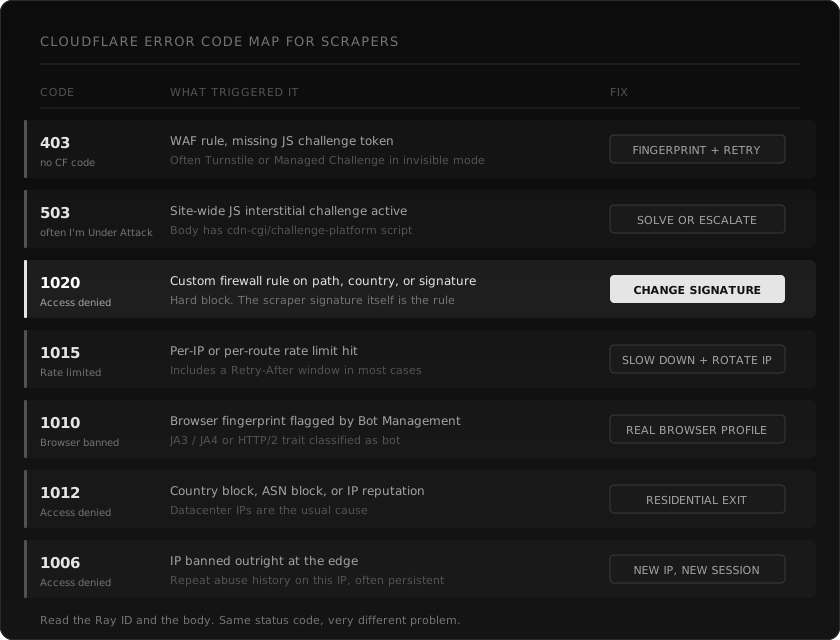
How to read a Cloudflare error response
A real Cloudflare block has three things you should look at before changing any code.
- The HTTP status. 403, 503, 429. The status alone is not enough. Cloudflare reuses the same status for multiple block types.
- The Cloudflare error code in the body. The big four-digit number on the error page (1006, 1010, 1012, 1015, 1020). This is the layer that fired.
- The Ray ID. A short hex string, usually at the bottom of the body or in the
cf-rayheader. If you ever email a site owner about being blocked unfairly, they need this.
The body itself also helps. A challenge page contains /cdn-cgi/challenge-platform/. A Turnstile page contains cf-turnstile or challenges.cloudflare.com/turnstile. A bare WAF block has none of those, just the error number.
If you only log the status code, you are throwing away most of the signal.
403, generic forbidden
This is the most common and the least specific.
A 403 from Cloudflare usually means a WAF rule denied the request, or an invisible challenge (Managed Challenge or Turnstile) failed to issue a token. There is often no four-digit error number on a 403. The body might be a Cloudflare-branded page, or it might be the site's own custom error template.
What it tells you: the request reached the edge and got rejected at the application or bot layer, not at the network or rate limit layer.
What to change:
- Check whether the response body contains
cf-turnstileorcdn-cgi/challenge-platform. If yes, the page wants a token you did not provide. See the Turnstile guide. - If the body is a clean WAF block (no challenge script), your TLS or HTTP/2 fingerprint is being scored as bot. Switch to a browser-grade fingerprinted client.
- If everything looks fine and you still get 403, the WAF rule may be path or country specific. Try a different geo or a different page on the same site to confirm.
What not to do: do not just rotate the User-Agent header and hope. Cloudflare scores the full handshake before it even reads the User-Agent.
503, usually "I'm Under Attack"
A 503 from Cloudflare on a scraping target rarely means the origin is down. It usually means the site has a JavaScript interstitial active, either site-wide ("I'm Under Attack" mode) or for the specific path.
What it tells you: the edge is asking you to run a JavaScript challenge before forwarding the request to origin. The body almost always includes the cdn-cgi/challenge-platform/ script.
What to change:
- Detect the challenge body, do not treat the 503 as a soft retry.
- If the page does not need authentication, escalate to a fingerprinted fetch first. Many "I'm Under Attack" pages pass on the second request from a coherent browser-grade client because the first one collected the cookie.
- If the challenge is a real interactive one, you need a token solver or a real browser session.
- A 503 that returns a normal HTML body with no challenge script is the rare actual outage. Back off and try later.
What not to do: do not retry the same request immediately with the same client. You already got scored.
1020, access denied
This is the hard one. 1020 means a custom firewall rule explicitly matched and rejected your request.
The trigger is usually one of:
- Your IP, ASN, or country is on a denylist.
- Your User-Agent matches a known bot pattern (libraries that ship with
python-requests/X.YUA collect a lot of 1020s). - A specific URL path is gated to logged-in users only.
- Some signature in your request (headers, missing fields, JA4) matches a custom rule the site owner wrote.
What it tells you: the rule fired on something specific to your request. Random retry will not help.
What to change:
- Get the Ray ID and check the literal request you sent. Curl it with
-vto see exactly what went out. - If the User-Agent says
python-requestsorGo-http-client, fix the User-Agent first. That alone fixes a lot of 1020s. - If the path is gated (login, account, internal), 1020 is the correct response. You probably should not be scraping it anyway.
- If you have already changed the User-Agent and the IP, the signature is likely deeper. Move to a TLS-fingerprinted client. See why Puppeteer stealth stopped working for what "deeper signature" means.
What not to do: do not assume 1020 means "they hate Rust" or "they hate Python." It means a specific rule matched. Find the rule.
1015, rate limited
The friendly one. 1015 means the per-IP or per-route rate limit hit. Cloudflare almost always sends a Retry-After header with it.
What it tells you: your scraper is too fast for this target. The fix is mechanical.
What to change:
- Read the
Retry-Afterheader and respect it. - Add a per-host rate limiter to your scraper. One target, one bucket. Do not let a parallel queue hammer the same domain.
- Rotate IPs. Rate limits are scoped per IP, so a residential pool with 50 rotating exits gives you 50x the headroom.
What not to do: do not retry without backoff. 1015 hardens fast on repeat offenders.
1010, browser banned
1010 is the bot management code that says: your browser fingerprint was classified as automation. It is not about the User-Agent string. It is about the JA3 / JA4, the HTTP/2 SETTINGS frame, the header order, the Client Hints, and any combination of those that does not match the browser you claim to be.
What it tells you: the network-layer fingerprint is wrong. Cloudflare scored it as bot before any application-level check ran.
What to change:
- Switch to a TLS-fingerprinted HTTP client. Standard
requests,axios,fetch, and Go'snet/httpwill all keep getting 1010 on aggressive Cloudflare configs. - If you already use a fingerprinted client, the profile may be stale. Real Chrome ships every six weeks. A fingerprint from Chrome 130 is no longer Chrome.
- Verify the HTTP/2 SETTINGS order matches the browser, not just the cipher list. Some libraries get TLS right and HTTP/2 wrong.
What not to do: do not add another puppeteer-extra-plugin-stealth. Stealth patches the browser surface, not the network surface.
1012, access denied (geo, ASN, IP reputation)
1012 fires on coarse network-level signals. Wrong country. Datacenter ASN. Known abuse history on the IP.
What it tells you: the request was blocked before bot management even looked at it. Coarse network signal, not subtle behavior.
What to change:
- Use a residential proxy with a country that matches the site's primary geo.
- If your proxy provider gives you ASN tagging, prefer mobile or residential ASNs over datacenter.
- Check whether the proxy IP is on public abuse lists (Spamhaus, AbuseIPDB). Some proxy pools recycle dirty IPs.
What not to do: do not stack User-Agent rotation on top of a bad IP. Cloudflare is not reading the User-Agent yet.
1006, IP banned
1006 is the heaviest network-level block. The IP is on Cloudflare's deny list across many sites or has a long abuse history with the specific zone.
What it tells you: this IP is done. Not for this request, for the foreseeable future from this account or zone.
What to change:
- Get a new IP. New session. New cookies.
- If you are seeing 1006 on a new residential IP, your proxy provider sold you a recycled, burned address. This is common with cheap pools.
What not to do: do not retry. Do not back off and try again in 60 seconds. The IP itself is the problem.
A worked example
A real debugging session, simplified. You are scraping product pages on a mid-size e-commerce site behind Cloudflare.
First request, plain Python requests.
You get a 403 with a small body. The body says "Sorry, you have been blocked" and shows a Ray ID. No four-digit code visible. WAF rule.
You change the User-Agent to a real Chrome string and retry.
Second request. Same 403. Now the body has the four-digit code: 1020. Custom firewall rule matched. Probably the WAF rule was looking at HTTP/2 SETTINGS order or JA3, both of which a UA change does nothing about.
You switch to a TLS-fingerprinted client (curl-cffi, tls-client, or a Rust client like wreq).
Third request.
Now you get 200, but the body is a Cloudflare interstitial with cdn-cgi/challenge-platform/ in it. The status code lied to you. You did not get the page, you got a challenge.
You add cookie persistence and re-request the page after a 1.5s delay.
Fourth request. 200 with real HTML. You parse it, save it, move on.
You scale up to 200 concurrent requests against the same site.
Fifth wave.
1015 with Retry-After: 60. Rate limited per IP.
You add a per-host rate limiter, drop concurrency to 5 per IP, rotate across 40 residential IPs.
Now it is steady. Five different Cloudflare responses in one session. Each meant a different fix. Random retries would not have got you here.
How webclaw classifies these in routing
When you call /v1/scrape, the routing layer reads the response body before it returns anything to you. The classifier looks for:
cdn-cgi/challenge-platform/script tagcf-turnstileorchallenges.cloudflare.com/turnstile- The four-digit error number in the body
- The status code as a fallback signal
- Specific WAF body fingerprints (DataDome, AWS WAF, Akamai, PerimeterX)
If the body looks like a challenge, the request does not return as success. It triggers an internal escalation: fingerprinted retry first, then a token solver, then a real browser session if the page actually needs JavaScript. You see a clean markdown response or a typed error, not a 200 OK with a challenge page in it.
This matters because a 200 with a challenge body is the most common silent failure in scraping. It is the bug that poisons RAG indexes. Detecting it correctly is half the job.
import { Webclaw } from "@webclaw/sdk";

const client = new Webclaw({ apiKey: process.env.WEBCLAW_API_KEY });

const page = await client.scrape({
  url: "https://target.example/product/123",
  format: "llm",
});

console.log(page.markdown);
If the page is challenged, you get an error you can branch on. If the page is real, you get the markdown. There is no third state where "200 OK" silently means "you scraped a captcha."
Full endpoint reference is in the scrape API docs. Get started in the dashboard, or grab an API key.
When to give up and use a real browser
Some pages will not pass any of the above. Usually they combine:
- Real Turnstile widget that requires a token, plus
- Content injected by JavaScript only after Turnstile passes, plus
- A secondary anti-bot layer (PerimeterX, DataDome) that inspects browser APIs.
For those, a TLS-fingerprinted client gets you a 200 OK with a challenge page in it, and there is nothing you can do at the network layer. The fix is a real browser on a residential exit, with a token solver wired in.
Use this as an explicit fallback when response evidence shows it is needed, rather than as the default request path.
Frequently asked questions
What is the difference between a 403 and a 1020?
A 403 is the HTTP status. 1020 is the Cloudflare-specific code that tells you which layer rejected you. Almost every 1020 is also a 403, but not every 403 has a 1020 (some are bare WAF, some are Turnstile, some are custom origin rules).
How do I get the Ray ID from a Cloudflare block?
Two places: the cf-ray response header, and the bottom of the HTML error body. Always log it. If you ever need to ask a site owner why you are blocked, that is the only useful piece of information.
Does retrying a Cloudflare 503 ever work?
If the body has a cdn-cgi/challenge-platform/ script and you persist cookies, sometimes the second request passes because the JS challenge already set a token in the first one. If the body is a real outage page (no challenge script, no Cloudflare branding), retry with backoff. If neither, do not retry blindly, you will burn the IP.
Can I bypass Cloudflare 1020 by changing my User-Agent?
Sometimes, if the rule was matching on a default library UA like python-requests/2.x. Most of the time no, because the rule is matching on TLS or HTTP/2 fingerprints that a UA change does not touch. See bypass Cloudflare bot protection for the layered fix.
What does Cloudflare error 1015 mean?
You hit a rate limit. Per IP, per route, or per zone depending on the site's config. Read the Retry-After header. Slow down, rotate IPs, run a proper per-host rate limiter.
Why does the same scraper get a 403 today and a 1020 tomorrow?
Cloudflare bot management updates rules continuously. The same request can match different rules on different days as the model retrains and as site owners tune their config. This is also why "it worked in January" is meaningless data in April.
Should I treat all Cloudflare codes as the same kind of failure?
No. They tell you which layer to fix. A 1015 is fix-by-rate-limiting. A 1020 is fix-by-changing-signature. A 1006 is fix-by-getting-a-new-IP. Treating them all as "blocked, retry later" is how scrapers stay broken for weeks.
Does webclaw return a typed error for each Cloudflare code?
The classifier returns success only when the body is real content. When the body is a challenge or a hard block, you get a typed failure with the detected category (challenge, rate limit, IP block, custom WAF). You branch on that, not on the raw status.
What if the site is using Cloudflare on top of another anti-bot?
Common with high-value targets. The Cloudflare layer will return its own codes, and the layer behind it (DataDome, PerimeterX) will return its own challenge body. The decoder reads both. The fix usually needs a residential IP plus a token solver plus a fingerprinted client. This is where the Turnstile guide and the Puppeteer post connect.
Are Cloudflare error pages legally meaningful?
A block is a signal that the site does not want your traffic. That is not the same as a contract. If the data is public and your scraping is legal in your jurisdiction, a 1020 is a technical fact, not a legal one. Talk to a lawyer for your specific case, not a blog.
Read next: Bypass Cloudflare bot protection | Cloudflare Turnstile in 2026 | Why Puppeteer stealth stopped working