What Is a CAPTCHA Solver? How It Works, Types, and APIs
A CAPTCHA solver is an interception-and-tokenization system that detects a challenge, extracts inputs like the site key and page URL, sends them to a backend, receives a short-lived response token, and injects it back into the browser session for server-side verification. In practice, the solver has to finish that whole loop fast enough that the token is still valid when the site checks it.
If your actual goal is page content rather than CAPTCHA infrastructure, test the target with the web scraping API demo or review the managed Web Scraping API before building a solver into your own stack.
You're usually staring at a blank page, a 403, or a challenge widget instead of the content you expected. The annoying part is that the browser may look “fine” while the session is already marked as suspicious, which is why the page can fail before your scraper even gets to the data you wanted.
Why Your Scraper Hits a Wall and What a CAPTCHA Solver Does
The failure mode is familiar. Your Playwright script loads the page, waits for the selector, and then the site returns a challenge instead of the article, search result, or checkout step you were trying to reach. On some sites the page looks normal until submission, then the server rejects the request because the browser never produced a valid token.
Modern CAPTCHAs are not just little image puzzles bolted onto a form. They are background verification systems that can evaluate the session before the page fully behaves like a real browser session, which is why the “content is there, but hidden” problem keeps showing up in scraping logs. A solver exists to move your automation through that verification layer, while the site still decides whether the session looks trustworthy enough to continue.
What the solver is actually doing
A useful mental model is a token service. It watches the page for a challenge in the DOM, extracts the parameters the target site expects, sends them to a backend, and gets back a short-lived token that has to be injected into the same browser session that triggered the challenge. That token then gets submitted to the site's verification flow.
That distinction matters because a solver can “work” in a sandbox and still fail in production if the browser context changes. Session binding, page state, and time window all matter, which is why a solver is not finished until the site accepts the token on the server side. The architecture described in Webclaw's scraping API overview is relevant here because protected pages often need more than a raw HTTP fetch.
Practical rule: if the page is protected, do not debug only the solving step. Debug the browser context, the hidden field, and the server response together.
The solver's job is narrow but critical. It connects the browser finding a challenge to the server accepting a trust signal, and that connection can break at either end.
The Four Stages of the CAPTCHA Token Lifecycle
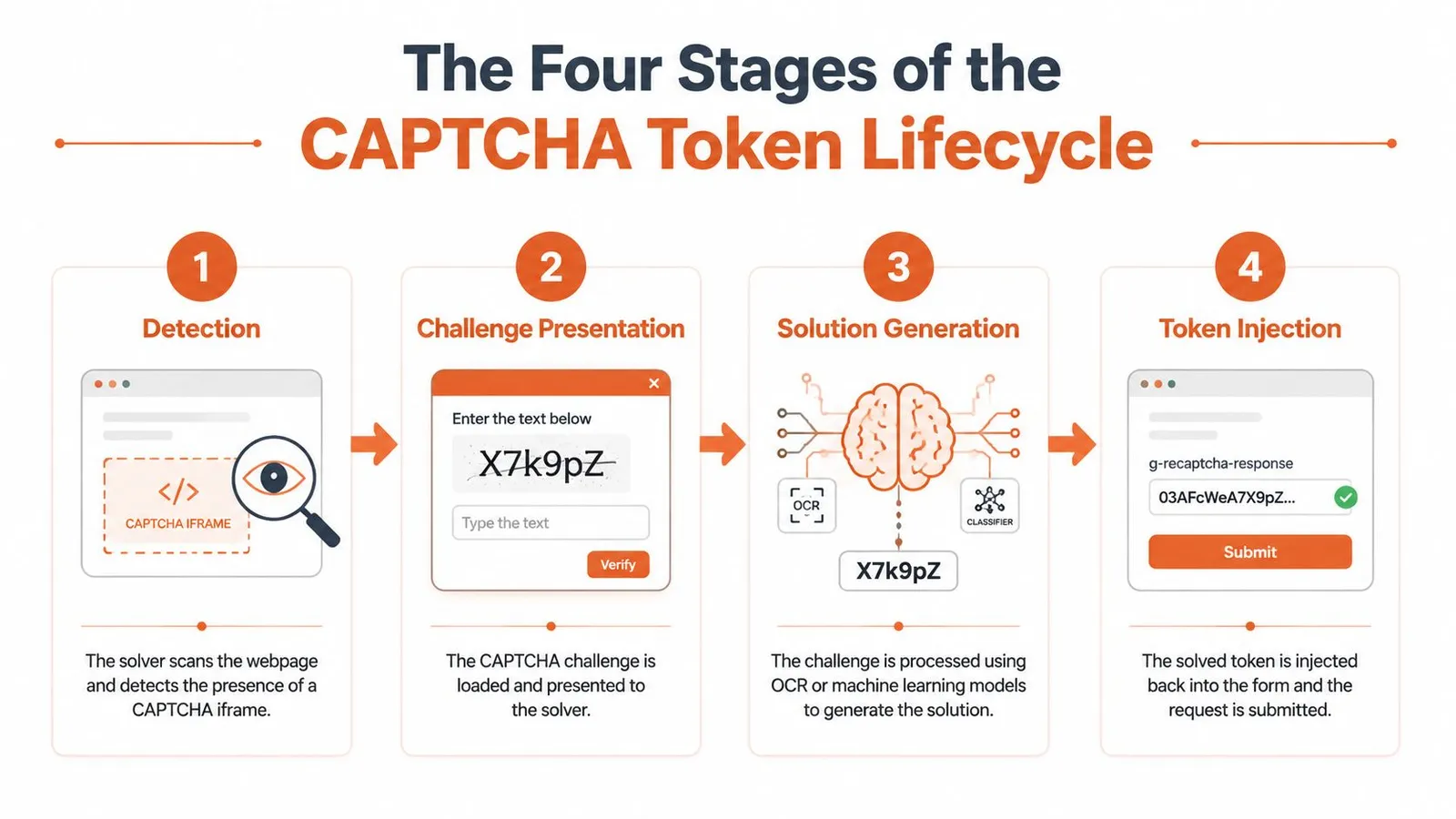
A CAPTCHA flow usually fails in one of four places, and the failure looks the same from the outside, a blocked request, a redirect, or missing content. That is why treating solving as one step leads to bad debugging. The actual work is a lifecycle: detect the challenge, present the right data to the solver, generate a response, inject the token, and then wait for the site to verify it on the server side. As described in Steel.dev's overview of captcha solving, the browser and the verification endpoint have to stay in sync, or the token is rejected even if the solver produced a valid answer.
Detection comes first
The solver has to notice that a challenge exists at all. That usually means scanning the DOM for an iframe, hidden fields, or challenge-specific markers, then pulling out the site key, page URL, and any other parameters the target expects. If detection is wrong, every step after it is wasted work.
Detection failures often get blamed on “unsupported site” behavior. In practice, the page may have changed structure, or the challenge may be embedded in a way your automation layer never inspected. Production integrations usually treat detection as its own stage because the page does not always make the challenge obvious.
Solve, submit, verify
Once the challenge is identified, the solver generates a response. Modern systems are often hybrid, using machine learning, browser automation, token handling, and sometimes human fallback to deal with mixed challenge stacks. The result then has to be injected back into the right browser session, with the right cookies and the right page state.
The caller does not care which stage failed. A stale token, a bad site key, or a broken submit step all look like a blocked page.
The last stage happens on the target site's side. Server-side verification decides whether the token is valid in that exact context. If your session changed, if the browser reloaded, or if the token expired before submission, the request fails even though the solver returned an answer. For a concrete example of how session state and verification interact on protected pages, see Webclaw's Cloudflare Turnstile guide.
How Solvers Crack Different Challenge Types
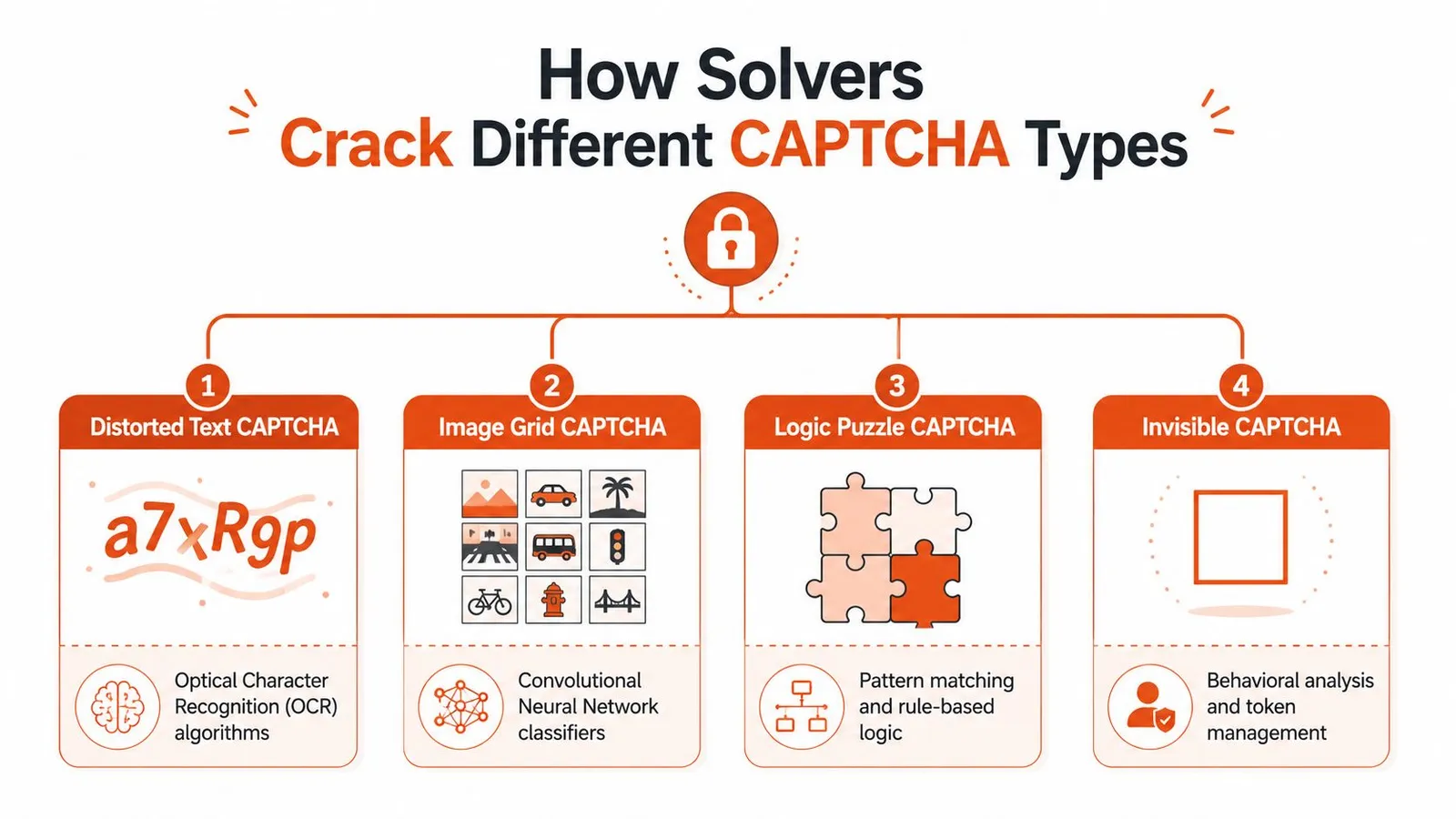
Different challenge types force different solving strategies. A stack that only knows how to read distorted images will look fine in a lab and fail fast on a site that uses invisible checks or session-bound tokens. Production solvers route each challenge to the mechanism most likely to work, then return either a token or a direct answer depending on the CAPTCHA type.
Distorted text and audio paths
Older CAPTCHAs often relied on distorted text. OCR still has a place there, but the problem is mostly recognition, not browser behavior. Audio variants exist for accessibility, so some solvers add audio processing as a fallback when image recognition is unreliable.
That mix explains why a solver with decent OCR can still fail on modern pages. The site may stop using plain text entirely, or it may hide the trust check behind invisible verification that never shows a traditional puzzle to the user. A 2026-oriented explainer on CAPTCHA solvers notes that the tooling has moved from simple recognition into AI, OCR, and human-worker systems, which matches what production integrations look like today Aussie Wire Hub's technical explainer.
Image grids and invisible checks
Image-grid challenges, such as traffic lights, buses, or crosswalks, are where machine-learning classifiers do the heavy lifting. They do not classify one image in isolation. They route a set of tiles through a recognition pipeline that decides which squares match the instruction. If the classifier misses the right tiles, the solver fails before token submission ever matters.
Invisible checks are a different problem. For systems like reCAPTCHA v3 or Cloudflare-style flows, the solver often depends on browser automation and token handling rather than visible puzzle solving. Session context matters here. A token that looks valid in one browser state can fail in another if cookies, headers, or page timing no longer match. For a concrete reference on that behavior, see Webclaw's Turnstile guide.
Engineering takeaway: route by challenge type first. OCR, classifier, and browser automation are different engines, and the wrong one will fail cleanly but uselessly.
For teams choosing an implementation path, the question is not whether a solver can crack a CAPTCHA in isolation. The useful question is whether it can detect the challenge correctly, solve it, submit it into the same session, and survive verification on the target site before the session changes or the token expires. The human in the loop workflow guide is a useful background reference for why manual fallback still shows up in mixed challenge stacks.
Automated Solvers Versus Human Services Versus API Solutions
There are three practical ways teams handle CAPTCHA barriers. The right choice depends on how often you hit them, how much latency you can tolerate, and whether you want to own the failure modes yourself. A human-in-the-loop workflow can help with edge cases, and Zilo AI's human in the loop workflow guide is a useful background reference for understanding why that pattern is still common when automated confidence drops.
| Approach | Speed | Cost per Solve | Reliability | Integration Effort | Best For |
|---|---|---|---|---|---|
| Automated solver | Fast when the challenge is familiar | Usually lower operational overhead | Good on known patterns, weaker on novel ones | Medium to high | High-volume automation with repeatable CAPTCHA types |
| Human-powered service | Slower because a person has to review it | Higher because manual labor is involved | Strong on edge cases | Medium | Low-volume, high-value workflows |
| API-based solution | Fast for the caller once integrated | Depends on the service model | Good when the provider handles challenge variety | Lower if the API owns the stack | Teams that want the problem abstracted away |
Automated solvers are attractive because they fit into scripts cleanly. They're the right choice when you already know the challenge family and the page flow is stable. The trade-off is that once the target site changes its verification pattern, your automation inherits that burden.
Human services are the opposite. They're slower and operationally heavier, but they can carry oddball challenge pages that confuse classifiers. API-based scraping services sit on top of both ideas, hiding the solver logic behind a higher-level extraction workflow, which is why some teams prefer them for protected sites. Webclaw's own scraping stack is one example of that broader API pattern, and its best AI web scraper overview is relevant if your real goal is clean extraction rather than solver maintenance.
The decision isn't philosophical. If your pipeline is time-sensitive, automated or API-based options tend to fit better. If your data is rare and the challenge variety is messy, manual fallback can be the only thing that keeps the workflow stable.
Integrating a Solver Into Your Scraping Stack
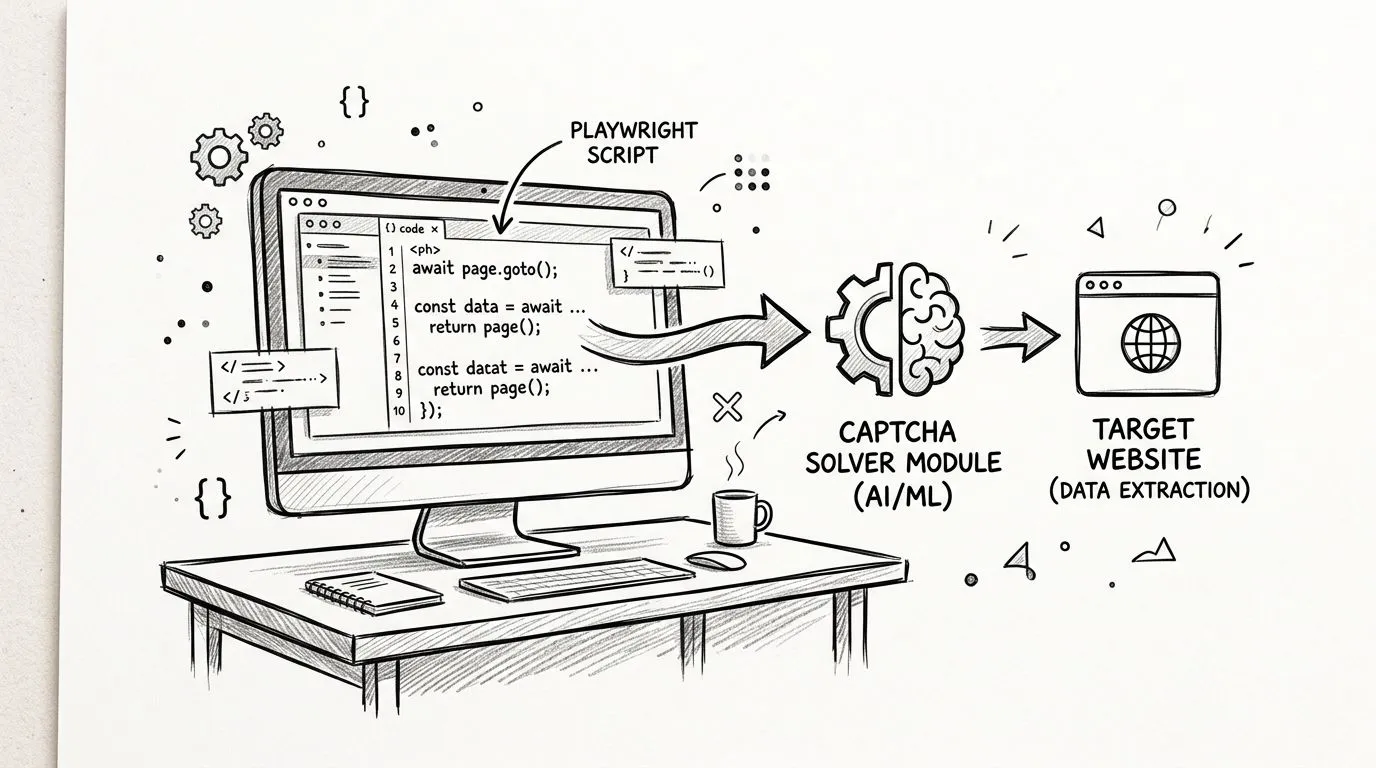
A solver sits inside the browser automation flow, between challenge detection and the page action that depends on a valid token. In Playwright or Puppeteer, the browser loads the page, the script detects the challenge, the backend requests a token, and the token is injected before the form submit or next navigation step. That sequence has to stay intact. If the session context changes before verification, the site can reject the request even when the solver returned a valid answer.
The integration pattern that holds up
The pattern that holds up is straightforward, and it still fails when teams skip the boring parts. Detect the challenge, call the solver API, wait for the result, inject the token, and submit while the same browser session is still alive.
The failure mode is usually not the solve step itself. It is token expiry, a page that changed state before submission, or a mismatch between the token and the browser context that generated it.
That is why solver integrations are usually built as task-based APIs with polling and retry logic instead of one-shot responses. The backend may need time to finish, the page may require the exact session state, and verification may only accept the token inside the original context window. Under concurrency or network jitter, a script that looks correct on paper can still fail because the token no longer matches the page that asks for it.
Where a scraping API fits
A scraping API makes sense when you do not want to maintain challenge handling yourself. Webclaw's API docs are the right reference if you want that model, because the service absorbs more of the rendering, extraction, and challenge work instead of forcing you to wire every solver step by hand.
A solver adds moving parts. It also gives you a fallback when protected content will not render through plain automation.
That trade-off matters in production. A standalone solver gives you more control and more failure modes. A higher-level scraping API gives you less to maintain, but less visibility into the token lifecycle when the target site changes its verification behavior.
Legal and Ethical Risks You Cannot Ignore
CAPTCHAs exist because site owners want a boundary between normal users and automated abuse. Solving them can be legitimate in some workflows, but it can also cross lines quickly, especially when the automation is used for account creation, credential stuffing, spam, or aggressive scraping that degrades service. The legal exposure depends on jurisdiction, site terms, and the exact use case, so there isn't a single safe blanket answer.
The ethical line is usually easier to see than the legal one. Scraping public pages for research or competitive analysis sits in a different category than hammering a login or checkout flow. Even then, responsible automation means respecting rate limits, avoiding unnecessary load, and not pretending the site owes your bot the same path a human user gets.
That's where a lot of teams get sloppy. They treat a solver as permission, when it's really just a technical capability. The fact that a page can be bypassed doesn't mean you should bypass it, and the more fragile the target system is, the more likely your automation is to create operational noise for the site owner.
If you're unsure where the line is, read the site's terms, review your jurisdiction's computer access rules, and think about the impact of your traffic pattern. Webclaw's screen scraping overview is a useful reminder that collection methods matter, but so do consent, load, and purpose.
Choosing Between Building In-House or Using a Service
The right path depends on how much pain you're willing to own. If CAPTCHAs are rare, a custom integration is often more work than the problem deserves. If they show up often and the site mix changes, the maintenance burden of rolling your own climbs fast, because token handling, browser state, and verification logic all have to stay in sync with the target site.
A simple decision frame
- Build in-house if you need full control over browser state, token handling, and retry logic, and you have the engineering bandwidth to maintain it.
- Use a third-party solver service if you want moderate control without owning the entire recognition stack.
- Use a scraping API if your real goal is extraction and you'd rather not manage bot protection plumbing yourself.
A solo builder usually gets the best results from the simplest path that still produces reliable output. A startup team can often justify a solver service if a protected source matters to the business and the challenge pattern is stable enough to support integration work. Enterprise pipelines tend to favor the option that cuts operational burden, especially when multiple sites and multiple CAPTCHA families are involved.
A concrete example makes the trade-off clearer. If your pipeline runs 10,000 requests per day against sites with rotating CAPTCHA types, a solver service will save more engineering time than a custom build, because the work is not just solving one challenge, it is keeping the session context intact across detect, solve, submit, and verify.
What to optimize for
Start with runtime, tolerance for delay, and the amount of debugging time you can spend when a token stops validating. Those answers usually point to the right choice faster than feature lists do.
Maintenance decides the rest. If your team cannot own session handling, challenge detection, and verification retries, the custom route tends to accumulate hidden cost. If you need the data more than you need the machinery, a service or API will usually be the better operational trade.
The failure mode that matters most is session drift. A solver can return a valid token in isolation, then fail in production because the cookie jar changed, the browser fingerprint shifted, or the token was submitted outside the original context. If your workflow keeps breaking at verification, the issue is often not the solver itself, it is the handoff between browser, token, and request flow.
If you're building on protected sites and want less time spent wiring together browser automation, challenge handling, and extraction, Webclaw is the place to start. It's built to return clean context from URLs that block normal scrapers, including pages with bot protection and CAPTCHAs. Use it when you want the scraping pipeline to stay focused on data, not token plumbing.