
Web to Text: A Practical Guide to Clean, LLM-Ready
You've scraped a site, received successful HTTP responses, and still ended up with an LLM that can't answer basic questions about the pages. The vector store fills with navigation labels, cookie notices, footer links, duplicated headings, and markup. Retrieval looks busy, but the model sees very little useful context.
That failure usually gets blamed on chunking or embeddings. Often, the problem happened earlier. Web to text is a context-engineering decision, and the extractor, fetch method, and output format determine what your model can see, how much it costs to process, and whether the surviving content still makes sense.
A production pipeline has two separate jobs: get the page and shape what comes back. A browser may be required to render the page, but a browser dump isn't automatically useful text. A parser may be fast, but it can miss client-rendered content. A clean markdown document may work well for retrieval, while a product page may need typed JSON instead.
By 2009, the web had reached 100 million total websites, and it crossed 1 billion websites in 2014–2015, according to The History of the Web timeline. Automatic extraction became foundational infrastructure because the web expanded far beyond what people could clean manually. The hard part today isn't downloading bytes. It's deciding which bytes deserve a place in the model's context.
Why Most Web to Text Pipelines Feed Models Garbage
An engineer starts with a reasonable plan. They collect thousands of URLs, fetch the HTML, store each response, split it into chunks, and push those chunks into a vector database. The crawler reports success, the ingestion job finishes, and the first retrieval test returns a page title, a cookie-policy paragraph, three navigation links, and half of the article the user asked about.
The pipeline didn't fail at fetching. It failed at content selection.
Raw HTML contains the document's meaning alongside implementation details and repeated interface elements. A language model doesn't need a menu copied into every page, a consent banner repeated across every chunk, or a footer full of unrelated links. Those elements consume context and can look deceptively relevant during retrieval because they contain common words, brand names, and topic terms.
Practical rule: A successful response status proves that you received a page. It doesn't prove that you received the page's useful content.
Clean text is a downstream contract
For an LLM, clean text isn't just HTML with tags removed. It should preserve the relationships a model needs to interpret the page:
- Document hierarchy: Titles, headings, paragraphs, lists, and section boundaries should remain recognizable.
- Semantic completeness: The extraction should retain the main argument, qualifications, tables, code, and relevant metadata.
- Noise control: Navigation, advertisements, cookie banners, duplicate links, and decorative text should be excluded or isolated.
- Stable structure: Similar pages should produce comparable output, so chunking and retrieval don't change unpredictably.
- Traceability: The stored text should remain connected to its URL, fetch time, and extraction result.
A text dump can be smaller than HTML and still be wrong. It may flatten a table into an unreadable sequence, lose list nesting, merge sidebar content into the article, or discard captions that explain an image. The model then receives a compact document with damaged meaning.
The scale of the web also makes a universal extractor unrealistic. A benchmark described in the web content extraction algorithm comparison notes that “main content” has no clear-cut universal definition, no single extractor consistently wins, and heuristics can outperform neural methods on complex pages. That matters because teams often optimize for one impressive demo page, then deploy against layouts the demo never represented.
Separate fetching from shaping
Treat the pipeline as two contracts:
- Fetching contract: Can the system reach the page, execute the required JavaScript, handle redirects, and survive the site's access controls?
- Shaping contract: Can it identify the meaningful content, preserve useful structure, remove boilerplate, and emit a format suitable for the next model or database?
This distinction changes debugging. An empty body points toward rendering or access. A body filled with navigation points toward extraction. A complete article with broken tables points toward output representation. A high token count with accurate content points toward context shaping rather than retrieval.
For a practical comparison of conversion options, see this web-to-text converter guide. The key question isn't “Did the scraper work?” It's “What context did the model receive?”
The Three Core Approaches to Getting Web Content
There are three useful starting points, and they aren't interchangeable. Headless rendering behaves like a browser, HTML parsing works directly on downloaded markup, and structured feeds consume publisher-provided discovery or content formats. The right choice follows the site's delivery model, not the library your team already knows.
| Approach | Best for | Common failure | Token cost of output |
|---|---|---|---|
| Headless rendering | Single-page applications, client-rendered pages, interactive content | Slow runs, browser failures, access challenges, resource overhead | Usually high unless extracted after rendering |
| HTML parsing | Server-rendered articles, documentation, stable pages, high-throughput jobs | 403 responses, empty shells, missed lazy-loaded content, boilerplate | Low to high, depending on extraction quality |
| RSS, Atom, and sitemaps | Publisher feeds, URL discovery, recurring content collection | Missing body text, stale entries, incomplete coverage, links without content | Low for feed content, minimal for sitemap-only discovery |
Headless rendering
Playwright, Puppeteer, and browser farms execute JavaScript and wait for the page to become usable. They handle cases where the initial HTML contains an application shell and the article arrives later through client-side requests. They also expose rendered text that a simple HTTP client can't see.
The trade-off is operational. Browsers consume more memory, take longer to start, and introduce timing problems. A page might render its title immediately while lazy-loaded sections appear only after scrolling or interaction. A browser snapshot can also preserve every visible navigation element unless a separate extraction step identifies the main content.
Use rendering when the page needs it. Don't use a browser for a static document just because browser automation is familiar.
Direct HTML parsing
Requests with Beautiful Soup, Cheerio, or lxml are often the right first attempt for server-rendered content. They're fast, easier to parallelize, and simpler to observe. Article extractors can score elements by text density, link density, tags, and layout signals, then remove boilerplate before producing markdown or plain text.
They fail when the server returns a JavaScript shell, a consent interstitial, or an access-denied page with a successful transport response. They can also return technically valid text that omits content loaded through deferred requests.
A web crawler tool can help when discovery and extraction need to be coordinated, but the same rule applies: inspect the returned content instead of trusting the request result.
Feeds and sitemaps
RSS and Atom feeds can provide clean titles, summaries, publication metadata, and sometimes full article bodies. Sitemaps are valuable for finding URLs, identifying update timestamps when available, and avoiding blind link traversal. Neither guarantees the complete content you need.
A sitemap is a map, not an article. A feed is a publisher-controlled representation, not necessarily the canonical page. Use both as efficient inputs to a broader workflow, especially for discovery and change tracking.
A practical decision sequence is simple:
- Does the response contain the content without JavaScript? Start with direct parsing.
- Does the page depend on client-side rendering or interaction? Use a browser-backed fetch.
- Does the publisher expose a reliable feed? Prefer it for recurring ingestion where its coverage is sufficient.
- Do you need discovery rather than content? Start with the sitemap, then fetch selected URLs.
- Does the page resist all of the above? Treat access handling and extraction as separate engineering requirements.
Calling an Extraction API with REST and SDKs
A useful baseline should be boring to call. Send a URL, authenticate with a bearer token, select an output format, and log the response metadata before you build retries, queues, or agent loops around it.

The REST shape should remain explicit. A representative request looks like this:
curl -X POST  \
  -H "Authorization: Bearer $API_KEY" \
  -H "Content-Type: application/json" \
  -d '{"url":"https://example.com/article","format":"markdown"}'
The endpoint and payload depend on the provider, so treat this as the request pattern to adapt, not a universal URL. Always set the format deliberately. If you omit it, you may receive a default representation that is valid for a human browser but wasteful for a model.
TypeScript and JavaScript
A TypeScript SDK should make the same choices visible in code:
import { Webclaw } from "@webclaw/sdk";

const client = new Webclaw({
  apiKey: process.env.WEBCLAW_API_KEY,
});

const result = await client.scrape({
  url: "https://example.com/article",
  format: "markdown",
});

console.log(result.content);
Check the provider's official SDK documentation for the installed package name, method signatures, and response fields. Don't assume every field exists on every successful response. Keep the raw response metadata, status, and extraction mode alongside the content.
Python and Go
Python is convenient for ingestion scripts:
import os
from webclaw import Webclaw

client = Webclaw(api_key=os.environ["WEBCLAW_API_KEY"])

result = client.scrape(
    url="https://example.com/article",
    format="markdown",
)

print(result["content"])
A Go client typically follows the same request model:
client := webclaw.NewClient(os.Getenv("WEBCLAW_API_KEY"))

result, err := client.Scrape(ctx, webclaw.ScrapeRequest{
    URL:    "https://example.com/article",
    Format: "markdown",
})
if err != nil {
    log.Fatal(err)
}

fmt.Println(result.Content)
For teams working with marketplace data or seller workflows, an API guide for Amazon sellers is a useful example of how REST authentication, request payloads, and response handling fit into an applied automation flow.
Don't bury operational details inside the SDK call. Record request duration, response status, selected format, extracted length, and whether rendering or proxy routing was used. Respect rate-limit headers when the service provides them, and back off on throttling rather than immediately increasing concurrency.
The same extraction capability can also sit behind an MCP server, allowing an AI agent to call web extraction as a native tool instead of embedding HTTP logic in every prompt loop.
Shaping Output for LLM Context Windows
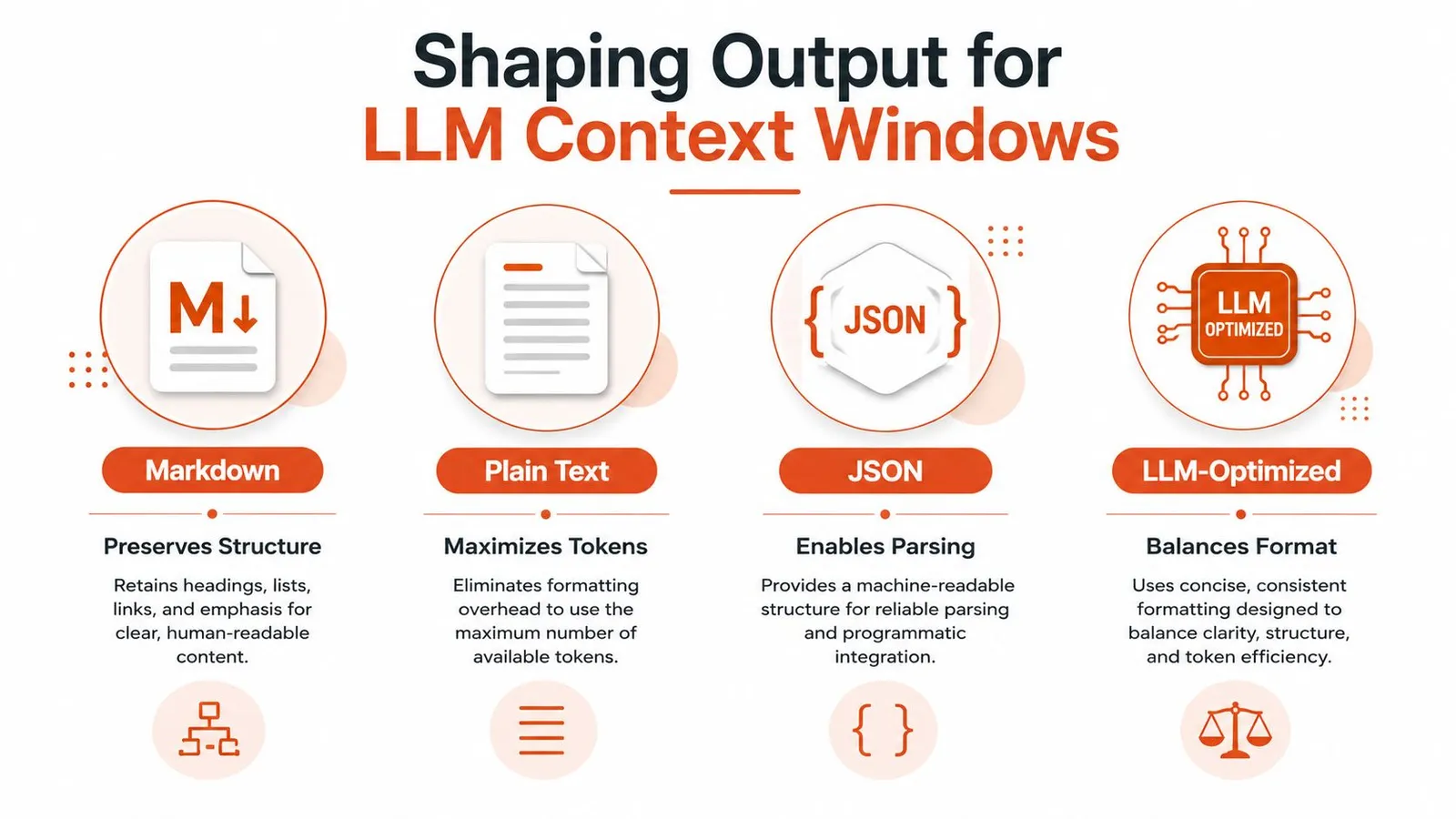
Fetching a page gives you material. Output shaping decides what the model can afford to read. The same source can become structured markdown, dense plain text, typed JSON, or a minimal context document, and each representation changes retrieval, parsing, and token usage.
Choose the format by the next operation
Markdown is the default for articles, documentation, and research notes. It keeps headings, lists, links, tables, and code blocks legible without carrying the implementation noise of HTML. It gives a model enough structure to distinguish a section title from a paragraph.
Plain text suits keyword search, lightweight classification, and systems where formatting creates more noise than value. It maximizes readable content density, but it can lose boundaries that matter for long documents.
JSON is the right output when the page has a known schema. Product pages, jobs, events, company profiles, and property listings often need fields such as title, price, location, requirements, or availability. Generic markdown may preserve those values, but structured JSON makes validation and downstream joins safer. For a practical discussion of formats, compare CSV and JSON for extracted data.
LLM-optimized text removes markup and repeated interface content to reduce prompt size. Webclaw supports this output alongside Markdown and plain text. Compare retained facts as well as token counts before choosing it for a collection.
Preserve meaning, not visual decoration
Removing noise isn't the same as deleting everything that looks secondary. A table may encode the only comparison on a page. A code block may be the actual answer. A warning beneath a heading may qualify the claim above it. Extraction should reduce repetition while preserving relationships.
Use a schema or prompt-based extraction when the question is already typed. Ask for a JSON object with explicit fields, validate required properties, and retain the source document for audit. Use markdown when users may ask varied questions and the model needs the page's broader narrative.
A good selection rule is:
- Open-ended question answering: LLM-optimized text or markdown.
- Citation-friendly research: Markdown with headings, links, and source metadata.
- Filtering and database writes: JSON with validation.
- Simple lexical search: Plain text.
- Mixed workloads: Store a canonical cleaned representation, then derive specialized views.
Don't optimize only for smaller output. Optimize for useful information per token. A short extraction that loses table headers can be more expensive downstream than a slightly larger one that preserves the data model.
Batching, Crawling, and Concurrency Without Getting Banned
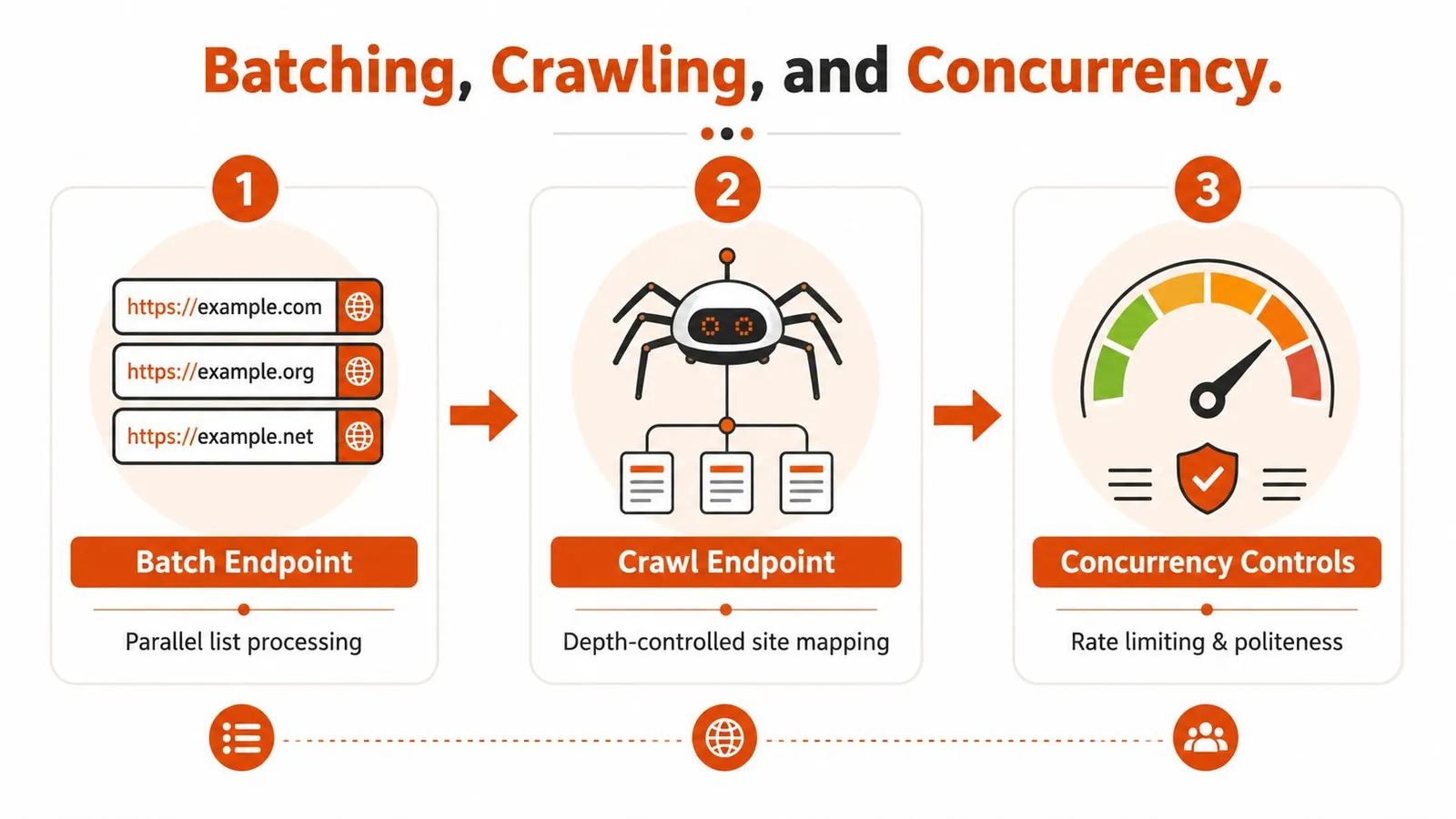
Single-URL scraping is the easy path. Production jobs process URL lists, follow internal links, revisit changed pages, and recover from partial failures. The architecture needs separate controls for batching, discovery, and request pressure.
Batch known URLs
A batch endpoint is useful when you already have a list of pages. Submit the list, associate each result with its input URL, and make failures item-level rather than job-level. One timeout shouldn't discard successful extractions from the rest of the batch.
Deduplicate before submission. Normalize URL fragments where they don't affect content, preserve meaningful query parameters, and maintain an idempotency key for retries. If a batch returns fewer results than requested, compare input and output identifiers before marking the job complete.
Crawl for controlled discovery
A crawl endpoint follows links from a starting page. Depth, page limit, allowed domains, URL patterns, and concurrency determine whether the run maps a useful part of a site or wanders into search pages, calendars, and tracking URLs.
Sitemaps provide a cleaner discovery path when available. Use them to create a candidate set, then apply inclusion rules and fetch only the pages relevant to your index. A site map can also support recurring jobs that compare known URLs instead of rediscovering the entire link graph.
Teams designing SEO ingestion often benefit from studying Dooza's SEO automation workflow, particularly the separation between discovery, processing, and reporting.
Control pressure per host
Concurrency is not a badge of performance. It's a load setting. Cap simultaneous work per host, add politeness delays where appropriate, and use exponential backoff for 429 responses. Track redirects and retries so a crawler doesn't repeatedly hit the same failing URL through different queue paths.
Partial crawls are especially dangerous because they can look successful. Persist progress, record excluded and failed URLs, and expose completion counts in job status. For larger runs, stream results to durable storage rather than retaining every page in memory.
Hard domains may require both browser rendering and IP diversity. A bring-your-own proxy setup can route through residential, ISP, or datacenter networks for different geographic and volume requirements. That doesn't remove the need to respect site policies or throttle requests. It only changes the network path used by an otherwise coherent fetch strategy.
Handling JavaScript and Anti-Scraping Defenses
A direct HTTP request can return a page that looks complete in a status log and empty in a content check. Single-page applications often send an application shell first, then request the actual data after JavaScript executes. A parser sees the shell because it never became a browser.
The next mistake is assuming that adding a stealth plugin solves the problem. Harder defenses evaluate the whole request flow, not one suspicious header. They can compare browser and network behavior, inspect TLS characteristics, observe whether requests before and after a challenge form a coherent session, and detect automation patterns that don't resemble a real interaction.
Match the fetcher to the page
Use a layered approach:
- Try direct retrieval for static pages and feeds.
- Inspect the body, not just the status code, for challenge pages, empty shells, and consent interstitials.
- Render with a browser when content appears after script execution or interaction.
- Use managed challenge handling and proxy routing when access controls reject ordinary clients.
- Extract after rendering, rather than storing the entire browser DOM as model context.
The last step matters. Browser rendering solves acquisition, not semantics. A rendered DOM still contains navigation, dialogs, hidden elements, and duplicated interface text.
A browser-backed extractor is generally the reliable default for protected sites because it keeps rendering, session state, challenge handling, and content extraction in one flow. Raw Playwright or Puppeteer remains useful when the workflow requires custom clicks, login state, file downloads, or application-specific interactions. The practical differences between the two are discussed in this Playwright versus Puppeteer scraping comparison.
Avoid the one-extractor trap
Page complexity varies sharply. In the comparison described by Gupta's web content extraction study, the lxml cleaner used internally by Trafilatura outperformed more complex methods on an easy dataset, while complex pages favored other extractor families. The reported complex-dataset leader achieved an edit-distance score of 0.040, but the result didn't establish a universal winner.
That supports routing by page type. Send simple server-rendered pages to a lightweight cleaner and reserve browser-backed or stronger boilerplate-removal methods for layouts with scripts, sidebars, tables, and unusual structure. Recent work also found that running multiple extractors in parallel can raise token yield by up to 71%, with structured content such as tables and code producing downstream differences of up to 10 percentage points, as reported in the multi-extractor research.
The output is part of the retrieval system. If an extractor drops the evidence, no embedding model can recover it.
Testing, Debugging, and Monitoring Extraction Quality
Extraction quality degrades. A site redesign can move the article into a new container, add a consent wall, change a feed template, or load the body through a different endpoint. The request still returns a response, so a basic availability monitor stays green while retrieval quality falls.
Start with fixtures. Keep representative pages for static articles, documentation, product layouts, JavaScript applications, tables, code-heavy pages, and blocked responses. Run the same extraction against those fixtures whenever you change parsers, browser versions, cleanup rules, or output formats.
A practical failure checklist
Empty response or application shell
- Check rendered versus initial HTML: Compare the downloaded body with the browser's post-render content.
- Confirm script-dependent sections: Look for content that arrives after network requests or interaction.
- Concrete fix: Route the URL to browser rendering, then extract the rendered document rather than saving the full DOM.
403 response or challenge page
- Inspect the body: A denial page may contain a normal-looking title and status metadata.
- Check session coherence: Make sure cookies, headers, browser signals, and challenge follow-up requests belong to one consistent flow.
- Concrete fix: Use an access-capable browser path or approved proxy configuration, then reduce per-host pressure.
Content stops halfway through
- Compare page length over time: A sudden drop in extracted characters or tokens is an early warning.
- Check lazy loading: Scroll or trigger the interaction required to reveal deferred sections.
- Concrete fix: Add a page-ready condition based on an expected content marker, not a fixed sleep alone.
The text is present but retrieval is noisy
- Inspect the first and last chunks: Navigation and footer repetition usually reveal a shaping problem.
- Compare markdown with minimal text: If both contain the same boilerplate, cleanup isn't operating at the right stage.
- Concrete fix: remove repeated interface elements before chunking and embedding.
Structured fields are missing or malformed
- Validate the schema: Reject output that lacks required fields or changes types unexpectedly.
- Keep the source representation: A failed JSON extraction should be repairable from the cleaned page, not from an already-truncated chunk.
- Concrete fix: use field-level extraction with explicit null handling and preserve the original URL.
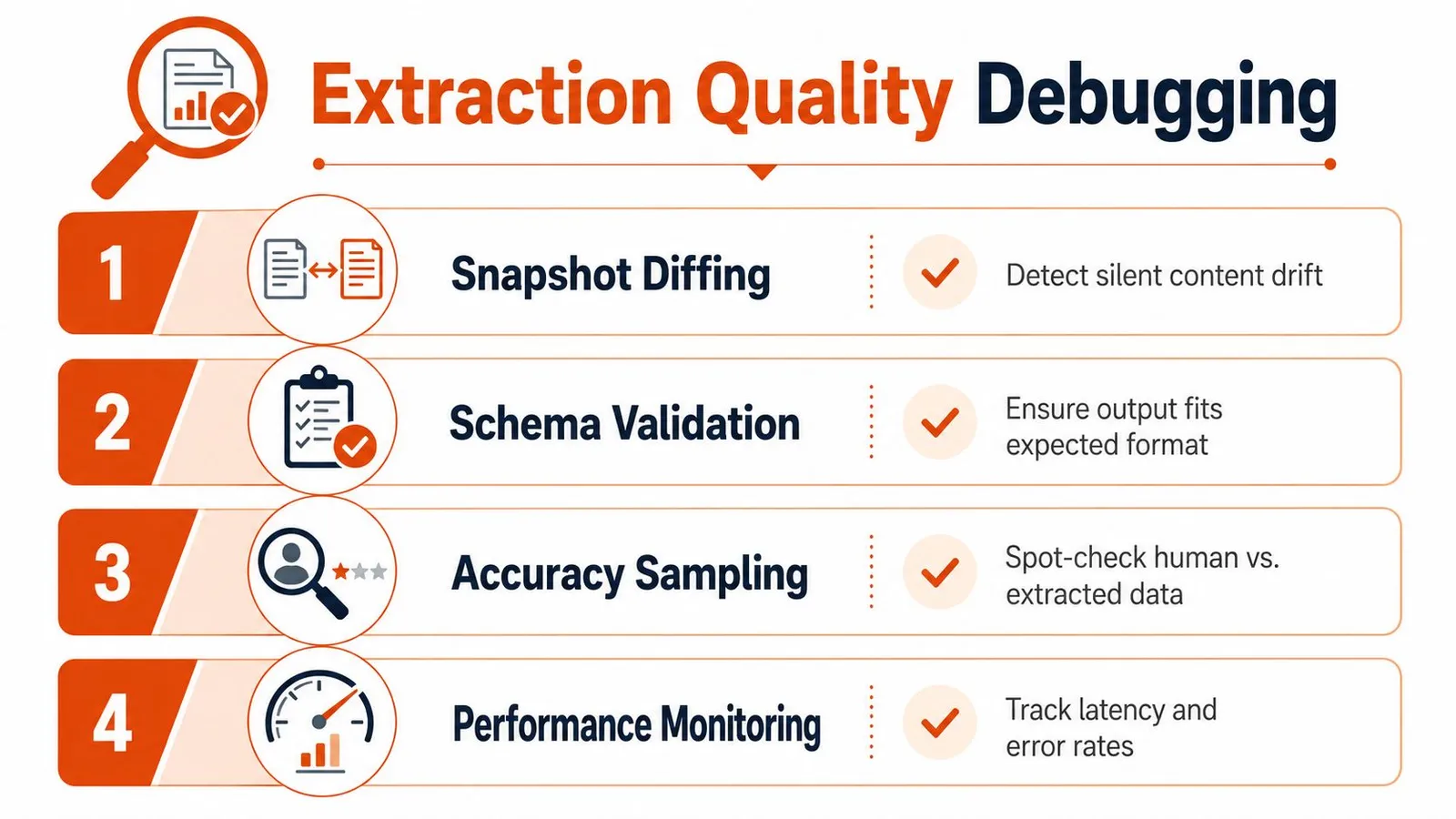
Snapshot diffing catches drift
Store the cleaned output, a content hash, selected metadata, and the extraction mode for each page. When the next run differs, classify the change. A legitimate article update differs from a challenge page, a template redesign, or an accidental extraction of the footer.
Diff at more than one level. Raw character diffs are noisy when whitespace changes. Compare headings, paragraph blocks, links, tables, and overall content length. A sudden change in extracted token count can trigger review, but it shouldn't be treated as proof of correctness or failure.
A monitor that checks only HTTP status measures reachability. A useful monitor checks whether the answer-bearing content survived.
Sample against the page
Automated checks catch shape changes. Human sampling catches semantic mistakes. Select pages across domains and layouts, inspect the rendered source and extracted result side by side, and ask:
- Is the page title correct?
- Does the extraction begin at the main content?
- Are headings attached to the right sections?
- Did lists, tables, code, and warnings survive?
- Did navigation, consent text, and repeated footer links disappear?
- Can a reviewer identify the original URL and retrieval time?
For typed extraction, compare fields rather than prose. A product title in the description field is a schema failure even if the output looks readable.
The WCXB benchmark provides a useful evaluation model. It contains 2,008 human-reviewed pages across 7 page types and 1,613 domains, with ground-truth annotations and baselines from 14 systems. Its methodology evaluates extracted words or blocks against gold content rather than treating raw HTML as the target. That design also addresses a common weakness in article-only test sets, which can make generalization look stronger than it is.
Watch quality and unit economics together
Raw HTML is usually the most expensive representation to place in a model context because it includes markup and repeated interface material that carry little semantic value. Format selection directly affects token budgets, chunk counts, embedding volume, and model latency. A smaller output isn't automatically better, but unnecessary markup is a poor use of context.
Set alerts for:
- Token anomalies: A page suddenly becomes much larger or much smaller than its historical output.
- Content markers: Expected headings, article bodies, or schema fields disappear.
- Error mix: 403, 429, timeout, rendering, and parsing failures change independently.
- Latency: Browser and proxy paths become slower without an obvious content improvement.
- Duplicate rate: Multiple URLs produce identical or near-identical cleaned documents.
- Completion state: A crawl reports success while failed or unprocessed URLs remain.
Choose the simplest stack that meets the workload. A self-hosted open-source core can suit low-volume, controlled collection. A CLI fits one-off investigations and local scripting. A hosted API with SDKs and MCP is useful when agent-driven systems need extraction, rendering, crawling, and structured output without maintaining every browser and proxy component themselves.
The 2026 evaluation referenced in the Trafilatura evaluation results shows why this discipline matters. On a set containing 990 documents, 2,951 text segments, and 2,966 boilerplate segments, raw HTML achieved 0.528 precision and 0.906 recall. html2text scored 0.525 precision and 0.900 recall, while inscriptis reached 0.534 precision and 0.991 recall. These values aren't a promise that one extractor wins on your site. They demonstrate that extraction quality remains measurable and technically difficult, even with modern tooling.
A production decision can therefore follow four questions:
- Can a direct client retrieve complete content? If yes, parse and clean it.
- Does the page require rendering or access handling? If yes, use a browser-backed path.
- Does the downstream task need narrative context or typed fields? Choose markdown or optimized text for the former, JSON or schema extraction for the latter.
- Can you detect silent drift? If not, don't ship the pipeline without snapshots, fixtures, and content-level monitoring.
Webclaw turns URLs into markdown, plain text, JSON, or LLM-optimized context, with browser rendering for JavaScript pages, crawling and batching for larger jobs, and SDKs plus MCP for application and agent workflows. If your current pipeline is feeding models raw HTML or failing on protected pages, visit Webclaw and test the extraction path against your hardest URLs.