
Webpage to Markdown: The 2026 Guide for Easy Conversion
You paste a URL into a model expecting an article. Instead, the context fills with navigation menus, cookie notices, advertising markup, repeated links, scripts, and layout wrappers. The useful content is still there, but the model has to find it inside a document designed for browsers rather than language systems.
Webpage to Markdown conversion solves part of that mismatch by reducing a page to readable text while retaining meaningful structure, such as headings, links, lists, tables, and code blocks. The difficult part is choosing the right conversion method for the job. A browser extension can be ideal for one page, while a hosted renderer is necessary for a JavaScript-heavy site or a protected batch crawl.
Why Convert a Webpage to Markdown in 2026
Raw HTML carries far more than the article a model needs. A typical page includes navigation, footer content, tracking elements, accessibility attributes, styling hooks, embedded scripts, cookie banners, and duplicated interface text. Sending all of that into an LLM wastes context and makes retrieval less precise.
Markdown offers a compact alternative. Its syntax makes hierarchy explicit without reproducing the layers of tags and wrappers used by HTML. A heading remains a heading, a link remains a link, and a fenced code block remains distinguishable from surrounding prose. That makes Markdown useful for RAG indexes, agent tools, document stores, and prompts that need predictable structure.
The underlying idea isn't new. John Gruber created Markdown in 2004 with a Perl converter that transformed readable plain text into valid XHTML or HTML. His goal was to let people author content in a format that was easy to read and could become structurally valid HTML when necessary, as documented in this history of Markdown and its original design. Webpage-to-markdown reverses that relationship, turning presentation-heavy HTML back into a readable intermediate format.
The scale of modern documentation makes the pattern practical rather than theoretical. In 2021, the Open Web Docs team converted all 11,000 MDN Web Docs pages from HTML to Markdown, a migration described in the same historical reference. That kind of operation requires more than a convenient text export. It requires repeatable structure, link handling, code preservation, and a workflow maintainers can use over time.
Practical rule: Treat Markdown as a context-management format, not merely a different file extension.
The value is clearest when the output feeds another system. Cleaner input can simplify chunking, reduce irrelevant matches, and give an agent more room to reason about the content that matters. A website-to-markdown workflow is therefore a pipeline decision involving extraction quality, rendering, token usage, and downstream structure.
The Direct API Path for Webpage to Markdown
For a single public HTML page, try the free Website to Markdown tool. Preview, copy or download the result without an account. It shares three attempts per network per UTC day with Webclaw’s other free tools; JavaScript rendering is outside this converter.
For production systems, the direct API path is usually the shortest route from a URL to a controlled document. Your application sends the target URL, authenticates with a bearer token, chooses an output format, and receives the extracted result. That separation matters because your application doesn't need to maintain browser automation, HTML parsing, boilerplate rules, and output normalization itself.
A basic request looks like this:
curl -X POST "https://api.webclaw.io/v1/scrape" \
  -H "Authorization: Bearer $WEBCLAW_API_KEY" \
  -H "Content-Type: application/json" \
  -d '{
    "url": "https://example.com/article",
    "formats": ["markdown"]
  }'
The authentication header identifies the caller. The JSON body identifies the page and asks for Markdown. Keep the first request deliberately small. Once the basic response works, add rendering, extraction instructions, or structured output only when the target page requires them.
Choosing the response shape
Raw Markdown is useful when you want a portable document for indexing, review, or storage. Plain text removes more formatting and can work for simple classification, but it loses hierarchy that often helps a model understand the page. JSON is better when you need fields rather than a general document. An LLM-optimized format applies more aggressive cleanup, removing navigation and other page noise while retaining content that supports model reasoning.
| Format | Best for | Typical size |
|---|---|---|
| Markdown | RAG documents, readable archives, general model input | Smaller than raw HTML |
| Plain text | Simple classification and full-text processing | Often smaller, with less structure |
| JSON | Field extraction and schema-based workflows | Depends on the selected fields |
| LLM-optimized output | Agent context and prompts where irrelevant markup is costly | Usually the most compact content-oriented option |
The exact payload shape depends on the SDK and endpoint version, so inspect the response before wiring it into a parser. A practical API integration should also record the source URL, fetch timestamp, response format, and extraction status alongside the content. That metadata helps you diagnose changes when a site redesign alters the result.
TypeScript keeps the request close to the application code:
import { Webclaw } from "@webclaw/sdk";

const client = new Webclaw({
  apiKey: process.env.WEBCLAW_API_KEY,
});

const result = await client.scrape({
  url: "https://example.com/article",
  formats: ["markdown"],
});

console.log(result.markdown);
Python follows the same model:
from webclaw import Webclaw

client = Webclaw(api_key="YOUR_API_KEY")

result = client.scrape(
    url="https://example.com/article",
    formats=["markdown"],
)

print(result.markdown)
Don't treat “Markdown returned” as proof that extraction succeeded. Check for a meaningful title, expected headings, non-empty body content, and links that point to the intended destinations. Engineers comparing providers may also find the ScrapeCreators guide to scraping APIs useful for understanding authentication, request design, and operational differences between scraping services.
For a direct implementation, the HTML-to-Markdown API is the relevant pattern: send a URL, select the representation your pipeline needs, and preserve the result with enough metadata to reproduce or audit the fetch.
CLI Tools, Browser Extensions, and Local Scripts
You don't need an API account for every conversion. If the page is static and you're working with a small number of URLs, local tools are often faster to install than a service is to integrate. They also give you direct control over files, shell pipelines, and post-processing.
Pandoc is the familiar local option for an HTML file:
pandoc saved-page.html \
  -f html \
  -t gfm \
  --wrap=none \
  -o page.md
It works well when the saved HTML already contains the article body. Its failure mode is predictable: Pandoc doesn't execute the page's JavaScript. On a React or Vue application, the file may contain a shell with almost no article content, so Pandoc faithfully converts an empty structure.
For static pages, wget and Pandoc form a simple pipeline:
wget -qO page.html "https://example.com/article"
pandoc page.html -f html -t gfm --wrap=none -o page.md
That pipeline can't see content loaded after the initial response. It also won't automatically understand whether a navigation block, related-content module, or consent panel is boilerplate. The converter receives HTML, not the visual interpretation a browser presents.
Browser extensions are more convenient for a human who needs one page. MarkDownload and Copy as Markdown can turn the current tab into Markdown while preserving useful links and headings. Their limitation is session scope. They operate inside a single logged-in browser session, so they aren't a dependable foundation for unattended crawling, shared ingestion, or repeatable agent calls.
A CLI tool occupies the middle ground. It can fit into shell scripts and scheduled jobs without requiring you to build request handling from scratch. The Webclaw CLI, for example, is suited to one-off extraction and scripting when you want Markdown output without writing an SDK integration.
| Method | Good fit | Exact weak point |
|---|---|---|
| Pandoc | Saved, mostly static HTML | Doesn't render JavaScript or identify every boilerplate region |
wget plus Pandoc | Simple static URLs and local repeatability | The initial HTTP response may omit client-rendered content |
| Browser extension | One page in a human's active session | Bound to one browser context and difficult to automate reliably |
| CLI extractor | Shell workflows and small scripts | A basic command may still need rendering or protection handling for difficult sites |
Use local tools when you can inspect the input and tolerate manual correction. Move to a rendering-aware service when the page is dynamic, protected, or part of a pipeline that must run without supervision.
Token Economics and the LLM-Optimized Output
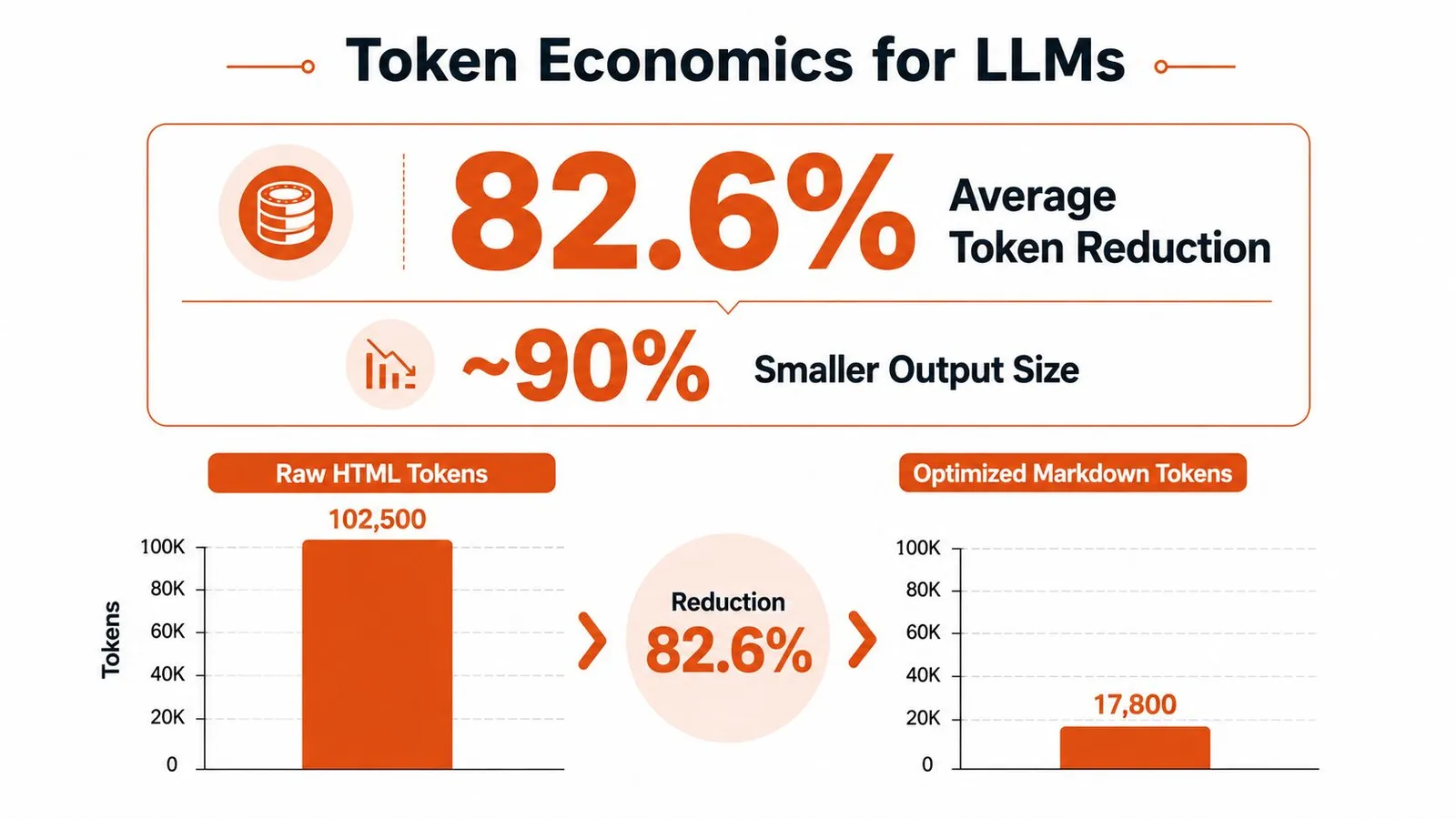
The important measurement isn't file size. It's how much irrelevant material reaches the model. A benchmark covering 200 mixed webpages reported an average of 18,400 HTML tokens per page, compared with 3,200 tokens after webpage-to-markdown conversion, an average reduction of 82.6% according to the benchmark's webpage-to-markdown token analysis.
That changes the shape of a model request. A page that consumes most of a context window as raw HTML may become manageable after boilerplate removal. The reduction also affects every later operation, including embedding, reranking, summarization, answer generation, and agent calls. The saving isn't only financial. Less irrelevant text gives retrieval and generation fewer opportunities to confuse navigation labels with document content.
The LLM-optimized output goes further than a basic HTML-to-Markdown transformation. It typically removes:
- Navigation and footer repetition, which rarely answers a page-specific question.
- Advertising and consent content, which can distract retrieval.
- Duplicate links and interface labels, especially on sites with repeated cards.
- Formatting noise, including wrappers that don't add semantic meaning.
It should preserve the parts a downstream system needs:
- Headings and paragraphs, so chunks retain hierarchy.
- Lists and tables, where relationships depend on layout.
- Code blocks, ideally with language hints.
- Meaningful links and image references, so citations and document context survive.
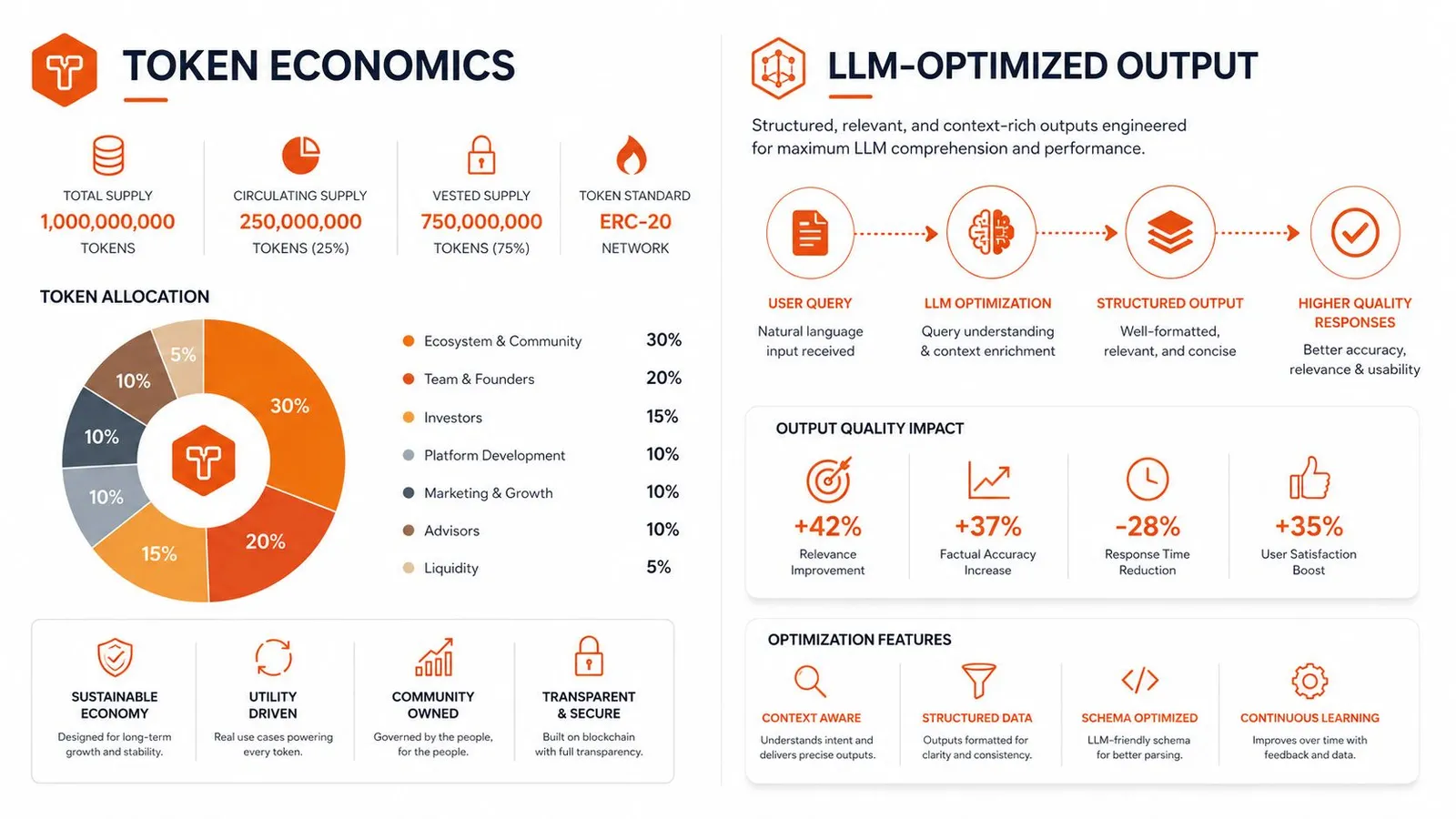
The reduction isn't uniform. A comparative evaluation of five web-to-markdown tools across 50 pages found scores ranging from 72% to 94%, with results varying across news, documentation, blogs, academic pages, and e-commerce content, as reported in this comparison of web-to-markdown tools. Conversion quality depends on whether the parser recognizes the main content, handles unusual layouts, and removes noise without deleting meaning.
Why Markdown isn't always the final format
Markdown is a strong general-purpose document representation, but it isn't automatically the best output for every task. A long product catalog, a directory, or a multi-page research crawl may be easier to process as structured JSON with explicit fields. If the downstream task asks for product names, prices, authors, or dates, extracting those fields directly avoids making a model rediscover structure from prose.
Token economics should therefore guide format selection:
A smaller document is useful only if it still contains the fields and relationships your task requires.
For general RAG ingestion, use cleaned Markdown and validate its structure. For schema extraction, prefer JSON when the page supports reliable field mapping. For an agent deciding what to read next, a concise Markdown representation can be the right first pass, followed by targeted extraction.
The HTML-to-Markdown guidance for LLM workflows captures the practical distinction: optimize for content that a model can use, not for conversion that merely produces syntactically valid Markdown.
Handling JavaScript-Rendered Pages and Anti-Bot Protections
The most common failed conversion starts with a correct HTTP request. The server returns a valid page, the parser runs, and the output is nearly empty because the useful content was never in the initial response. A single-page application may deliver a root element and JavaScript bundles first, then fetch the article through client-side requests.
A browser renderer changes the sequence. It loads the page, executes JavaScript, waits for the relevant content, and passes the resulting DOM to the extraction layer. That approach is more expensive operationally than a simple GET, but it addresses the actual failure rather than trying to parse a shell with missing content.
Use rendering only when the page needs it
Start with a normal fetch for static documentation and server-rendered articles. Add browser rendering when the response contains a skeleton, when important text appears only after interaction, or when the page's HTML source lacks content visible in a real browser. Rendering every URL by default can add latency and resource usage, so it should be a deliberate fallback or a route selected by domain.
JavaScript introduces other complications. Content may appear only after scrolling, a tab click, an accordion expansion, or an authenticated session. A renderer must know what state to reach before conversion. Waiting for a generic page-load event isn't enough if the article arrives later through an API call.
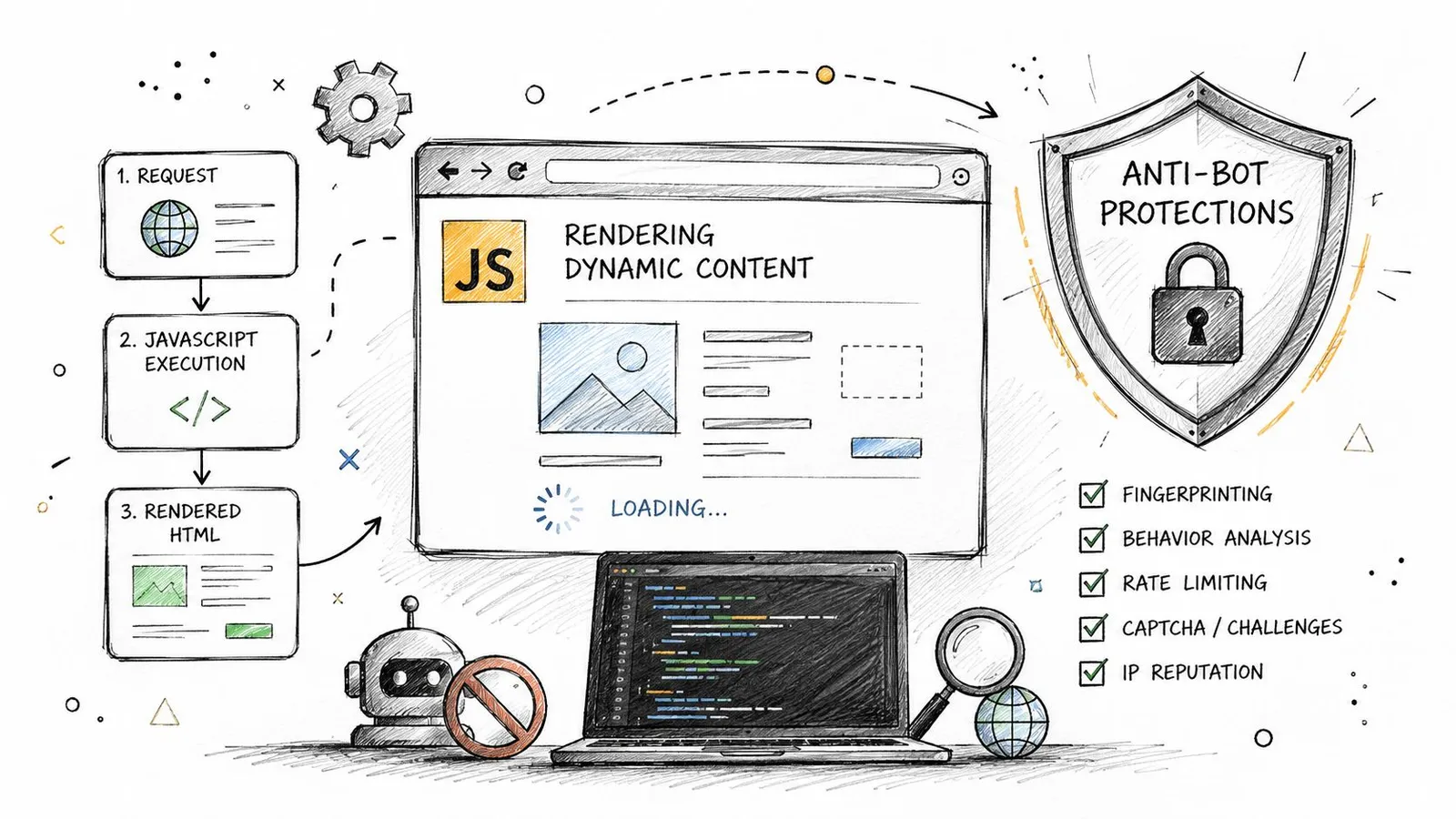
Anti-bot systems add a separate failure layer. Cloudflare Turnstile and similar challenges may prevent the browser from reaching the content at all. A parser can't fix a response that contains a challenge page instead of the document.
Puppeteer-stealth can help with basic detection, but it isn't a universal answer. Harder sites combine browser signals, behavior analysis, rate controls, session reputation, and network reputation. Repeated retries often make the situation worse, while random delays don't create a trustworthy browsing identity.
Decide whether proxy infrastructure is justified
Bring your own proxy when geography, network reputation, or crawl volume is part of the requirement. Residential, ISP, and datacenter networks have different operational characteristics, and the right choice depends on the target's restrictions and your legitimate access pattern. Proxy rotation also creates new responsibilities, including session continuity, error classification, observability, and compliance review.
Don't add proxies to compensate for a broken selector or an unrendered page. First confirm that the browser reaches the intended content, then determine whether the network is being challenged. This guide to JavaScript rendering and browser fallback is useful for separating a rendering problem from an access problem.
For production, record which path succeeded. A useful result says whether the page came from a direct response, a rendered browser, or a retried network route. Without that signal, a later empty Markdown document looks like a parser regression when the cause was a challenge page.
Preserving Images, Links, Code Blocks, and Frontmatter
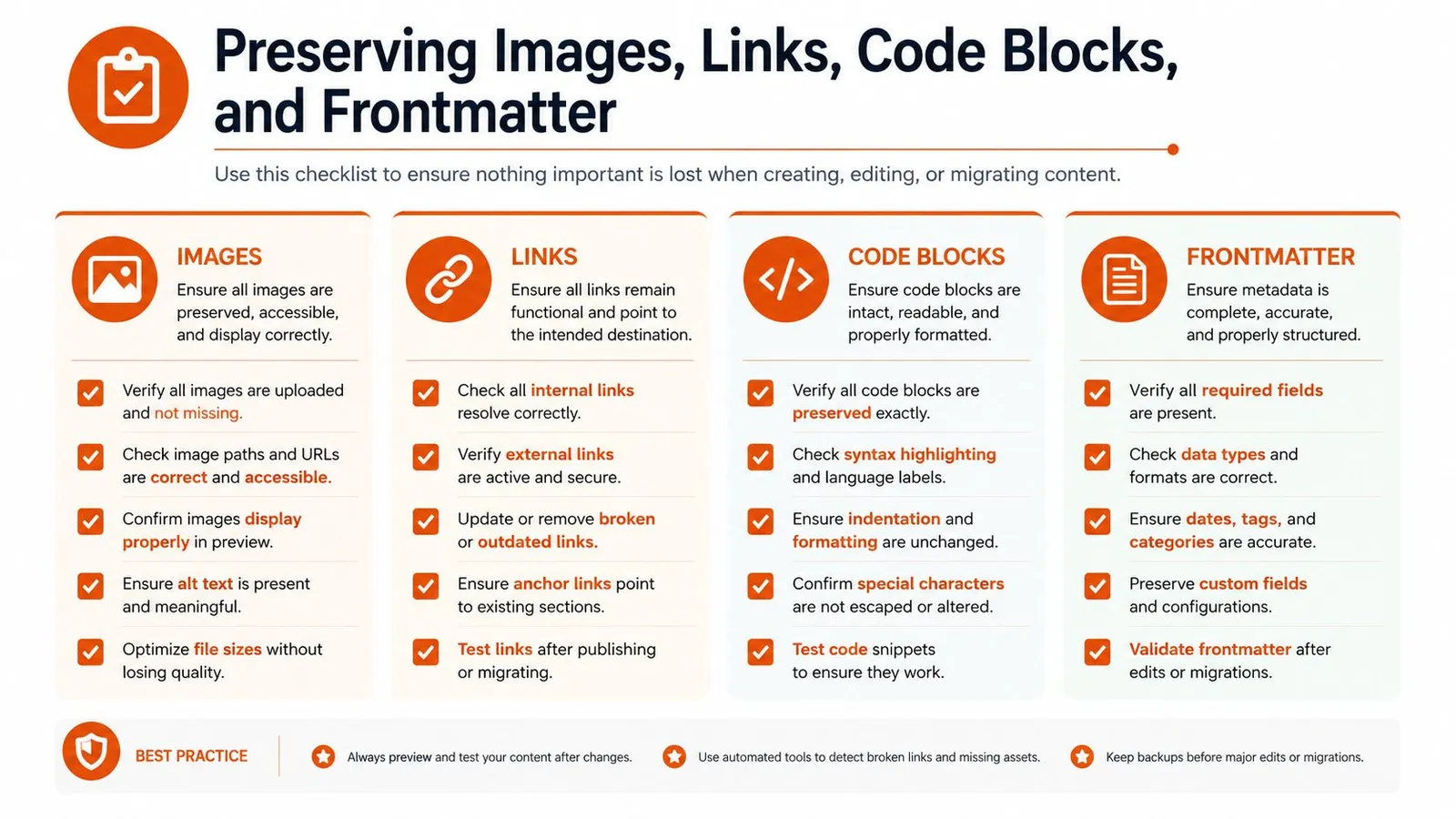
A conversion can look clean in a text editor and still fail downstream. Relative links may break outside the source domain. An image may survive as a URL but lose its alt text. A code sample can absorb the next paragraph if the converter mishandles fences.
Start with URLs. Prefer absolute links in stored Markdown, especially when documents will be moved into a vector store or displayed in a separate application. Preserve link text because it often carries the context a bare URL lacks. For images, retain the source URL, alt text, and caption when available. Those fields help accessibility, citation, and multimodal workflows.
Code needs stricter validation than ordinary prose. Every fenced block should have a closing fence, and a language hint should remain attached when the source provides one. Test pages containing nested backticks, inline code, syntax highlighting wrappers, and long examples. A single unclosed fence can make the rest of a document appear to be code.
Frontmatter gives the document an explicit metadata envelope. A practical record might contain the title, canonical URL, author, publication date, and retrieval timestamp. Don't invent missing values. Leave unavailable fields empty or omit them, because fabricated metadata is worse than incomplete metadata in an indexed corpus.
A compact quality check
- Structure: Confirm heading levels follow a sensible hierarchy.
- Content: Check that the title and main body are present, not just navigation.
- Links: Resolve relative URLs and preserve descriptive anchor text.
- Images: Keep image references, alt text, and captions where available.
- Code: Verify balanced fences and language identifiers.
- Tables: Check that columns and header rows remain understandable.
- Metadata: Store source and document fields without guessing missing values.
- Noise: Remove repeated menus, consent panels, and unrelated recommendation blocks.
- Citations: Keep links close to the claims or passages they support.
Run these checks before chunking. Fixing malformed Markdown after embeddings are created means reprocessing the corpus and potentially invalidating retrieval results.
Choosing the Right Method for Your Workflow
Webpage-to-markdown work becomes easier when you separate three jobs that are often treated as one.
For a single URL fetch, use a browser extension or a local CLI when you can see the page, the content is static, and manual inspection is acceptable. This is the right shape for saving an article, checking a competitor page, or preparing a document for a prompt. A local script is also reasonable when you need repeatability but don't need browser rendering.
For a batch pipeline, use an SDK or hosted API with explicit retries, output validation, and metadata storage. A RAG ingestion job pulling documentation needs stable handling for links, headings, code blocks, and changed pages. It also needs a way to distinguish a valid short page from an extraction failure. Batch research benefits from concurrency controls, URL deduplication, and a format choice that matches the extraction task.
For a hard site with JavaScript or anti-bot controls, start with browser rendering and add proxy support only when the evidence points to a network-access problem. A direct HTTP fetch won't reveal client-rendered content, and a local parser won't bypass a challenge page. The operational cost is justified when the target is central to the product and the access pattern is legitimate, repeatable, and observable.
Three practical matches
A documentation RAG pipeline usually wants cleaned Markdown because headings and code examples help chunking and retrieval. An AI agent calling a scrape tool at runtime needs a concise response and a clear failure signal, with JSON preferable when the agent needs specific fields. A batch research process may use Markdown for reading-oriented pages, then structured extraction for records that need consistent fields.
Don't choose based only on convenience. Compare the target's rendering behavior, the downstream format, the required reliability, and the cost of carrying irrelevant tokens through every later model call.
The decision rule is simple: use a local tool for a visible static page, an API for repeatable batches, and a rendering-capable service when the page or its defenses defeat ordinary HTTP extraction.
Webclaw provides URL scraping that returns Markdown, plain text, JSON, or LLM-optimized content, with rendering and proxy options for pages that simple fetchers can't reach. If your pipeline needs clean webpage context for RAG, agents, or batch research, visit Webclaw and test the extraction path against the pages that currently fail.