Web Scraping in R: A Practical 2026 Guide
You've probably hit one of these two states already. Either rvest worked in minutes and made web scraping in R feel easy, or it returned an empty shell and sent you into browser devtools, network tabs, and vague forum posts about JavaScript.
That split is why most scraping advice feels incomplete. The basic tutorials are fine for static HTML, but they usually stop right where real projects start getting interesting. Production scraping isn't about memorizing one package. It's about choosing the right level of tooling for the site in front of you, then keeping the job stable when pages change, requests fail, or a target starts pushing back.
R is a strong fit for this work because scraping and analysis live in the same workflow. You can pull a page, extract fields, turn them into a tibble, clean them with dplyr, and move straight into modeling or monitoring. If you want a broader look at how teams use scraping as a data source, this guide to scraping websites for data is a useful companion.
Your Starting Point for Web Scraping in R
If you already work in R, scraping is usually the shortest path between “that data exists on a website” and “that data is ready for analysis.” The appeal isn't just collection. It's that you can collect and analyze in one environment without bouncing between languages or tools.
Why R became a practical scraping language
Web scraping in R became mainstream when rvest fit naturally into the tidyverse workflow. The common pattern is simple: read a page with read_html(), target elements with CSS selectors, and extract the text or attributes you need. That familiar flow made scraping accessible to people who were already comfortable with tibbles, pipes, and tidy data work, as described in the R for Data Science web scraping chapter.
That matters in day-to-day work. A scraped page doesn't stay “web data” for long. In R, it quickly becomes a tibble you can filter, join, plot, or model.
Practical rule: Don't pick a scraper first. Identify what the page actually delivers. Static HTML, browser-rendered content, and protected targets each need a different approach.
The decision that matters first
Most scraping failures come from using the wrong tool level for the site.
A simple way to think about web scraping in R is this:
| Site type | Typical signal | Best starting tool | Why |
|---|---|---|---|
| Static HTML | Data appears in page source | rvest | Fast, clean, low overhead |
| JavaScript-rendered | Browser shows content, raw HTML doesn't | RSelenium or hidden API inspection | Browser executes page scripts |
| Protected or brittle | Blocks, CAPTCHAs, repeated failures | Scraping API or official API | Less local maintenance |
That escalation path saves time. Too many people jump straight to browser automation for a page that plain HTML parsing could handle. Others stay with rvest too long, trying to coerce data out of a page that never sends the content in the initial response.
A few checks usually tell you where to start:
- View source first: If the data is in the HTML response, use
rvest. - Inspect network requests: If the page loads content later, there may be a JSON endpoint worth calling directly.
- Watch for interaction requirements: Infinite scroll, login walls, and click-triggered panels push you toward browser automation.
- Notice blocking behavior: Frequent retries, challenge pages, or inconsistent output mean your problem is no longer just parsing.
R handles all three layers. What changes is how much of the browser stack you need to simulate.
The Foundation Scraping Static HTML with rvest
Most useful scraping scripts still start with rvest. When the page is static and reasonably well structured, it's hard to beat for speed and clarity.
The core workflow
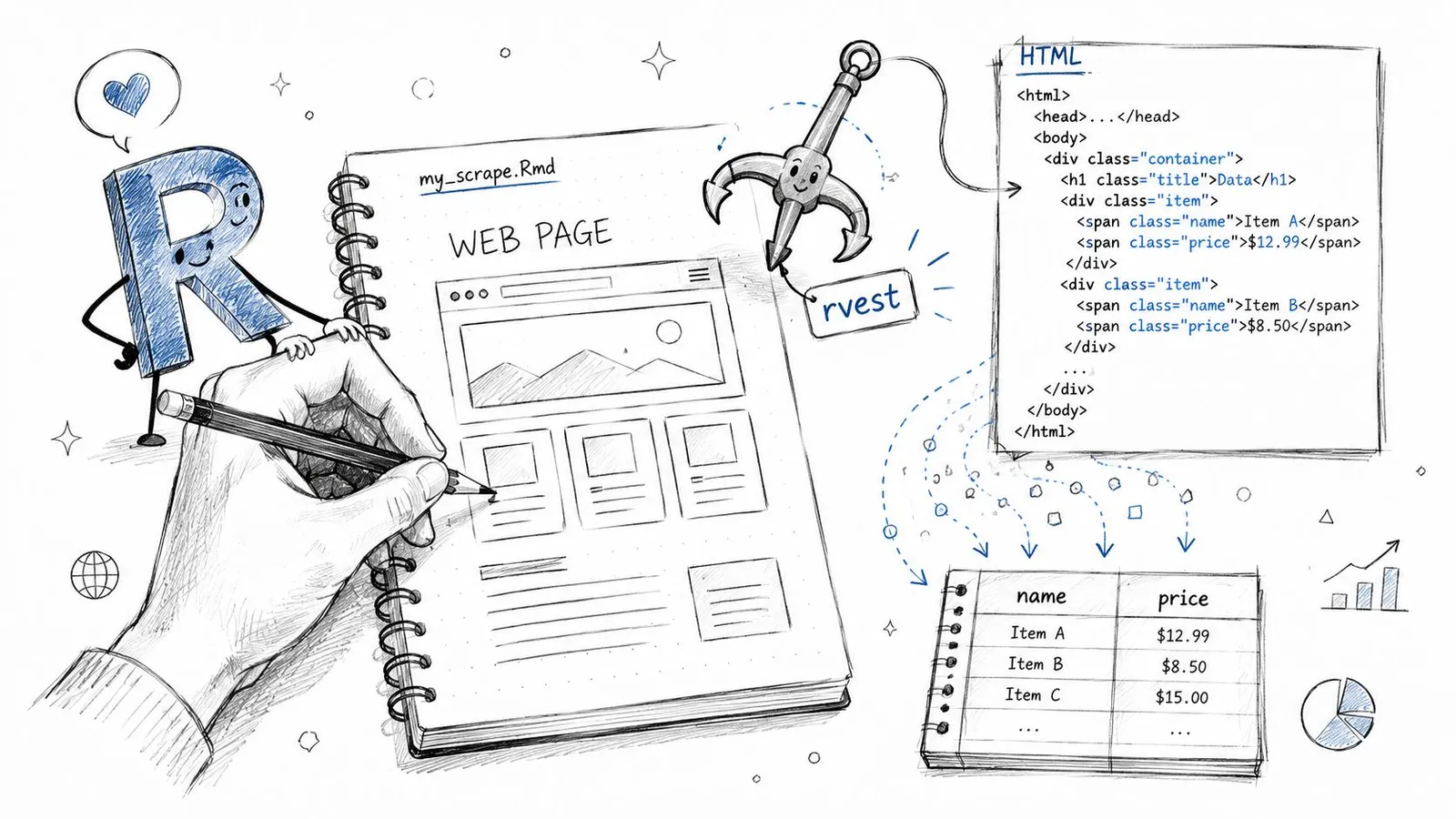
The pattern is stable across most static pages:
- Fetch the page with
read_html() - Select nodes with
html_elements() - Extract values with
html_text2()orhtml_attr() - Assemble the results into a tibble
Here's the shape of that workflow:
library(rvest)
library(dplyr)
library(tibble)

url <- "https://example.com/articles"
page <- read_html(url)

titles <- page |>
  html_elements(".article-title") |>
  html_text2()

links <- page |>
  html_elements(".article-title a") |>
  html_attr("href")

dates <- page |>
  html_elements(".article-date") |>
  html_text2()

articles <- tibble(
  title = titles,
  link = links,
  date = dates
)

articles
This style works because the page already contains the information in its HTML. rvest doesn't need to act like a browser. It just needs to parse a document and let you target the right nodes. If you want a separate walkthrough on turning page elements into structured fields, this guide to extracting structured data from any webpage is worth keeping nearby.
A simple example you can adapt
The hard part usually isn't the R code. It's choosing selectors that survive minor frontend changes.
Good selectors tend to be tied to structure, not presentation:
- Prefer stable classes:
.article-titleis usually better than a long nested path. - Use attributes when needed: Product links, image URLs, and IDs often live in
href,src, ordata-*attributes. - Keep parallel vectors aligned: If titles and dates come from different parts of the page, check that their lengths match before binding them into a tibble.
If your extracted vectors have different lengths, stop there. Don't patch the mismatch after the fact unless you know exactly why it happened.
That one habit prevents a lot of silent bad data.
How to find selectors without guessing
Browser developer tools do most of the work. Right-click the element you want, inspect it, and look for a class, ID, or parent container that cleanly identifies the repeated item.
A practical checklist helps:
- Start from the repeated unit: article card, product tile, table row
- Work inside that unit: extract title, price, date, link from the same container
- Avoid brittle selectors: long chains like
div:nth-child(4) > span > a - Clean text early:
html_text2()is often better than raw text extraction because it trims whitespace more cleanly
When a page exposes a proper HTML table, scraping gets even easier:
tables <- page |> html_table()
That's the happy path. It won't cover modern interactive sites, but when it works, it keeps your script small, readable, and easy to maintain.
When rvest Fails Handling JavaScript with RSelenium
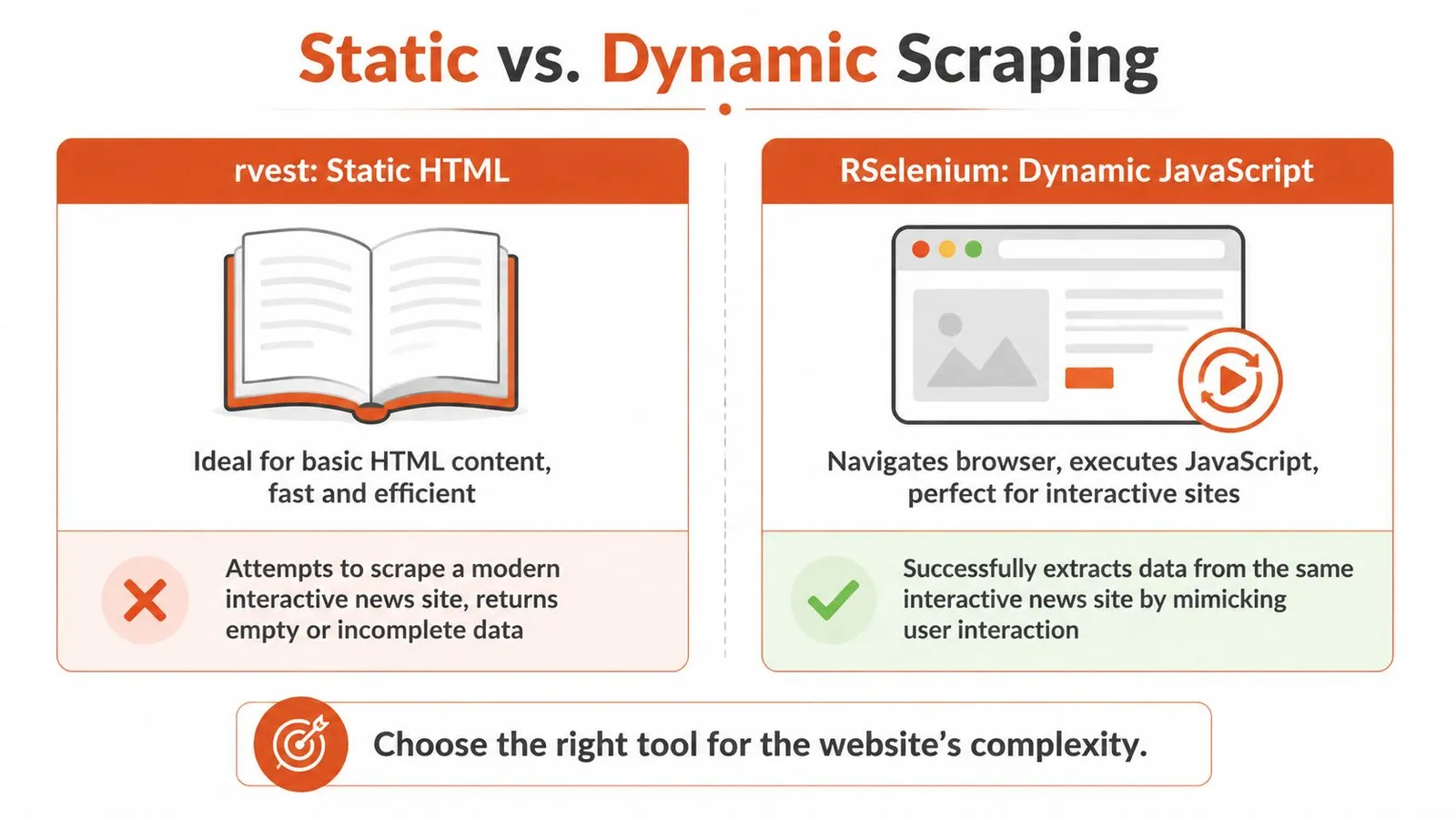
The most common symptom is a script that runs without errors and returns almost nothing useful. You inspect the browser, see the data on screen, then inspect the raw response and find a thin HTML shell.
That's not an rvest bug. It's a different class of website.
How to recognize a dynamic site
Many modern pages rely on JavaScript frameworks, which is one reason basic HTML scraping often breaks. The 2025 Web Almanac figures cited by R-Squared Academy report React on 4.6% and Vue.js on 2.5% of analyzed home pages. You don't need those frameworks to dominate the web for this to matter. You only need your target site to depend on one.
Typical signs you need something beyond rvest:
- Empty node sets: your selector is valid, but no data comes back
- Placeholder HTML: the initial document contains containers, not content
- Interaction dependency: content appears only after clicking, scrolling, or waiting
- Asynchronous loading: XHR or fetch requests populate the page after load
A lot of developers stop at “use Selenium” without checking whether the page is calling a hidden JSON endpoint. That's a miss. If the browser is fetching structured data behind the scenes, calling that endpoint directly is often cleaner than automating clicks.
For hard client-rendered pages, a JavaScript rendering API with browser fallback is another route when you want rendered output without running and managing a full browser locally.
What RSelenium changes
RSelenium controls an actual browser session. That means JavaScript runs, the DOM updates, and your script can wait for the page to settle before extracting content.
The trade-off is complexity.
| Tool | Strength | Weakness |
|---|---|---|
rvest | Fast, simple, low resource use | Can't render client-side content |
RSelenium | Handles interactive and rendered pages | Slower, heavier, more moving parts |
That extra machinery is often necessary. It's also why Selenium scripts fail in ways static scrapers don't. Browser versions drift. Timing becomes part of the job. Elements appear later than expected. Clicks get intercepted by banners or overlays.
Here's a useful video if you want to see the browser-driven approach in action:
A minimal browser automation pattern
A basic pattern in R looks like this:
library(RSelenium)
library(rvest)

rD <- rsDriver(browser = "chrome")
remDr <- rD$client

remDr$navigate("https://example.com/app")

Sys.sleep(5)

page_source <- remDr$getPageSource()[[1]]
page <- read_html(page_source)

titles <- page |>
  html_elements(".article-title") |>
  html_text2()

titles
A few practical notes matter more than the code itself:
- Use explicit waits when possible: fixed sleeps are blunt, but still common in prototypes.
- Extract page source after render: that lets you return to the cleaner
rvestparsing model. - Expect more maintenance: browser automation breaks more often than direct HTML parsing.
Browser automation is a rendering tool first and a scraper second. Use it when the browser is part of the data path.
Scaling Up Scraping Multiple Pages Responsibly
The jump from one page to many is where scraping turns from a script into a system. The code doesn't get much longer, but the operational mistakes get more expensive.
From one URL to a repeatable job
R scraping tutorials have long shown that the same HTML-parsing workflow can extend across repeated URLs and pagination patterns, replacing manual copying with repeatable collection. That shift from one-off extraction to programmable batch work is what made web scraping in R useful for research and monitoring rather than just demos, as illustrated in this multi-page scraping tutorial.
The mechanics are straightforward. Discipline is the differentiator.
For larger jobs, the main failure modes are bot blocking, request overloading, and unstable collection. Guidance from the University of Wisconsin's SSCC stresses checking robots.txt, adding delays, and using error handling because aggressive scraping can trigger blocks and lower data quality on multi-page runs, especially in production-like workloads, as noted in their guide to production-grade scraping practices in R.
A safe loop scaffold
Here's a simple pattern that behaves better than a bare for loop firing requests as fast as possible:
library(rvest)
library(tibble)
library(dplyr)
library(purrr)

urls <- c(
  "https://example.com/page1",
  "https://example.com/page2",
  "https://example.com/page3"
)

scrape_one <- function(url) {
  tryCatch({
    Sys.sleep(2)

    page <- read_html(url)

    tibble(
      url = url,
      title = page |> html_element("h1") |> html_text2()
    )
  }, error = function(e) {
    tibble(
      url = url,
      title = NA_character_
    )
  })
}

results <- map_dfr(urls, scrape_one)
results
A few parts are doing real work here:
Sys.sleep()slows the request rate: that reduces the chance of looking like a hammering bot.tryCatch()keeps the job alive: one bad page doesn't kill the entire batch.map_dfr()returns a single data frame: that makes downstream cleaning much easier.
Slow down before the site forces you to. A scraper that finishes a bit later is more useful than one that gets blocked halfway through.
When scale changes the architecture
At some point, loops stop being the only question. You also need to think about retry logic, logging, and whether your network setup matches the target's sensitivity.
That's where infrastructure considerations enter the picture. If you're running recurring jobs across many pages or regions, this guide on leveraging proxies for data acquisition gives practical context on when proxy routing becomes part of a stable collection setup rather than a workaround.
For R users, batch design usually improves when you separate concerns:
- Discovery layer: gather URLs first
- Fetch layer: request pages with pacing and retries
- Parse layer: extract fields into a common schema
- Storage layer: save intermediate outputs so you can resume jobs
If you're thinking in those terms already, batch processing for scraping workloads is the right mental model. It's much easier to debug a scraping pipeline when fetching and parsing aren't tangled together.
For Protected Sites The API-Driven Approach
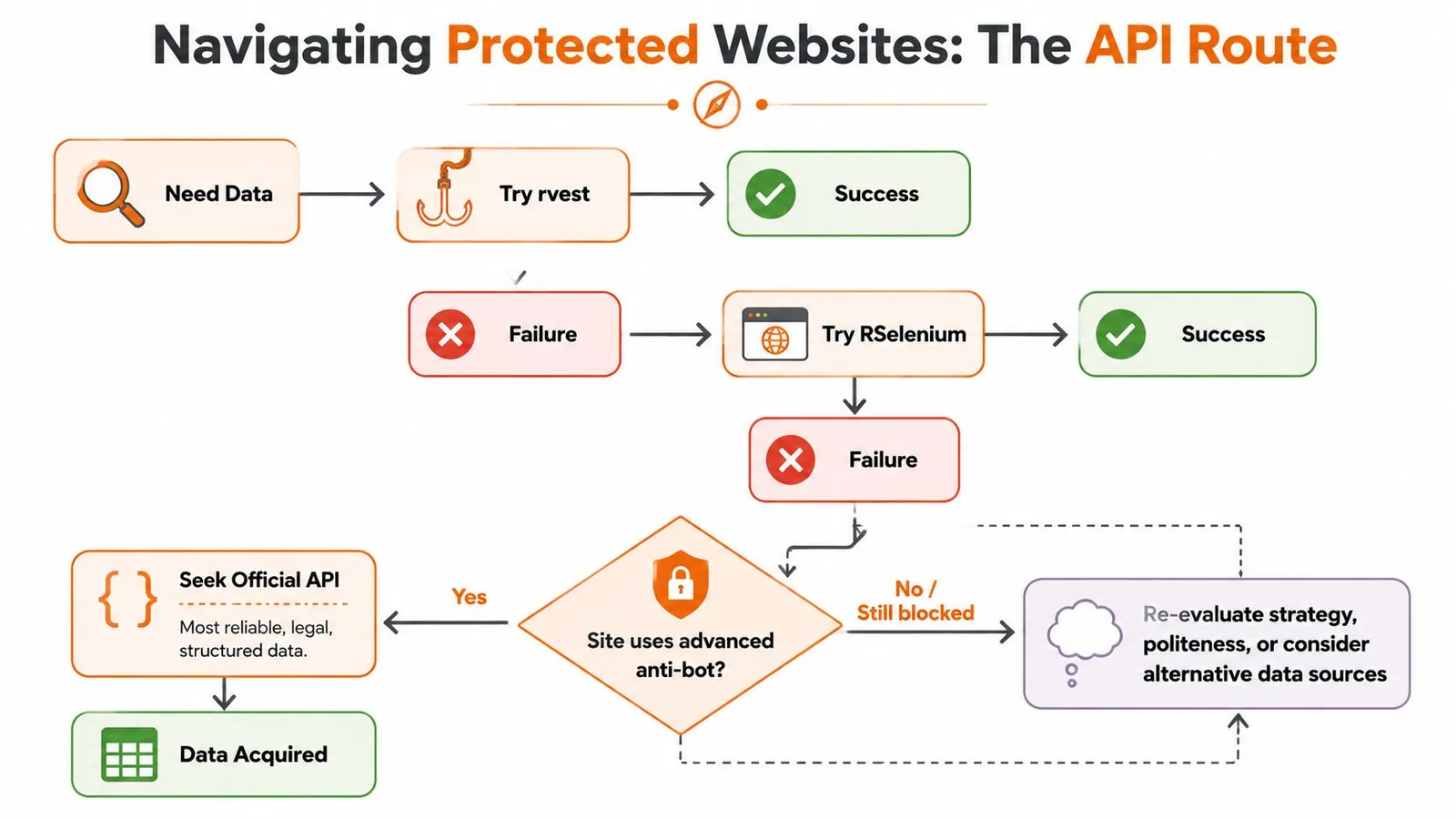
Some targets don't fail because your selector is wrong or your browser wait is too short. They fail because the site is actively screening automated access.
That's the point where DIY scraping often turns into a maintenance tax.
When DIY scraping stops paying off
Protected sites change the economics of the task. Instead of spending most of your time on extraction logic, you spend it on browser fingerprints, intermittent challenge pages, session handling, and brittle reruns. If the data matters more than the scraping mechanics, that's often the wrong place to invest effort.
A scraping API can make sense here because it shifts the hard part outward. You send a URL, choose an output format, and work with the returned content instead of managing a defensive browser stack yourself.
I'd treat an API as an engineering choice, not a convenience feature. You're buying abstraction over infrastructure.
Calling a scraping API from R
From R, that usually means an httr request with a bearer token and a URL payload. For example, Webclaw's scrape endpoint accepts a target URL and returns extracted content in formats such as Markdown, JSON, or plain text, which can fit better into analysis or LLM workflows than raw HTML.
A typical call pattern looks like this:
library(httr)
library(jsonlite)

resp <- POST(
  url = "https://api.webclaw.io/v1/scrape",
  add_headers(Authorization = paste("Bearer", Sys.getenv("WEBCLAW_API_KEY"))),
  encode = "json",
  body = list(
    url = "https://example.com/protected-page",
    format = "markdown"
  )
)

content <- content(resp, as = "text", encoding = "UTF-8")
parsed <- fromJSON(content)
The benefit is obvious when local scraping has turned into repeated operational cleanup. You don't need to manage a browser grid or local driver stack just to get page content back in a machine-friendly format.
What you trade for that abstraction
You do give up some direct control. Browser APIs, third-party services, and managed extraction layers can hide the exact mechanics of how they reached the page. For some teams, that's fine. For others, especially when auditing or reproducing every detail matters, a local browser setup is still preferable.
There's also the security side. If you use any external scraping or data API, treat credentials carefully. This guide on preventing API key leaks and breaches is a good reminder to keep keys out of scripts, notebooks, and shared repos.
A practical decision rule works well here:
- Use
rvestwhen the page is static. - Use
RSeleniumwhen the browser must render or interact. - Use an API when access is the main problem and local tooling is consuming more time than the data is worth.
That last move isn't giving up. It's recognizing that scraping and access are different problems.
From Raw HTML to Tidy Data and Analysis
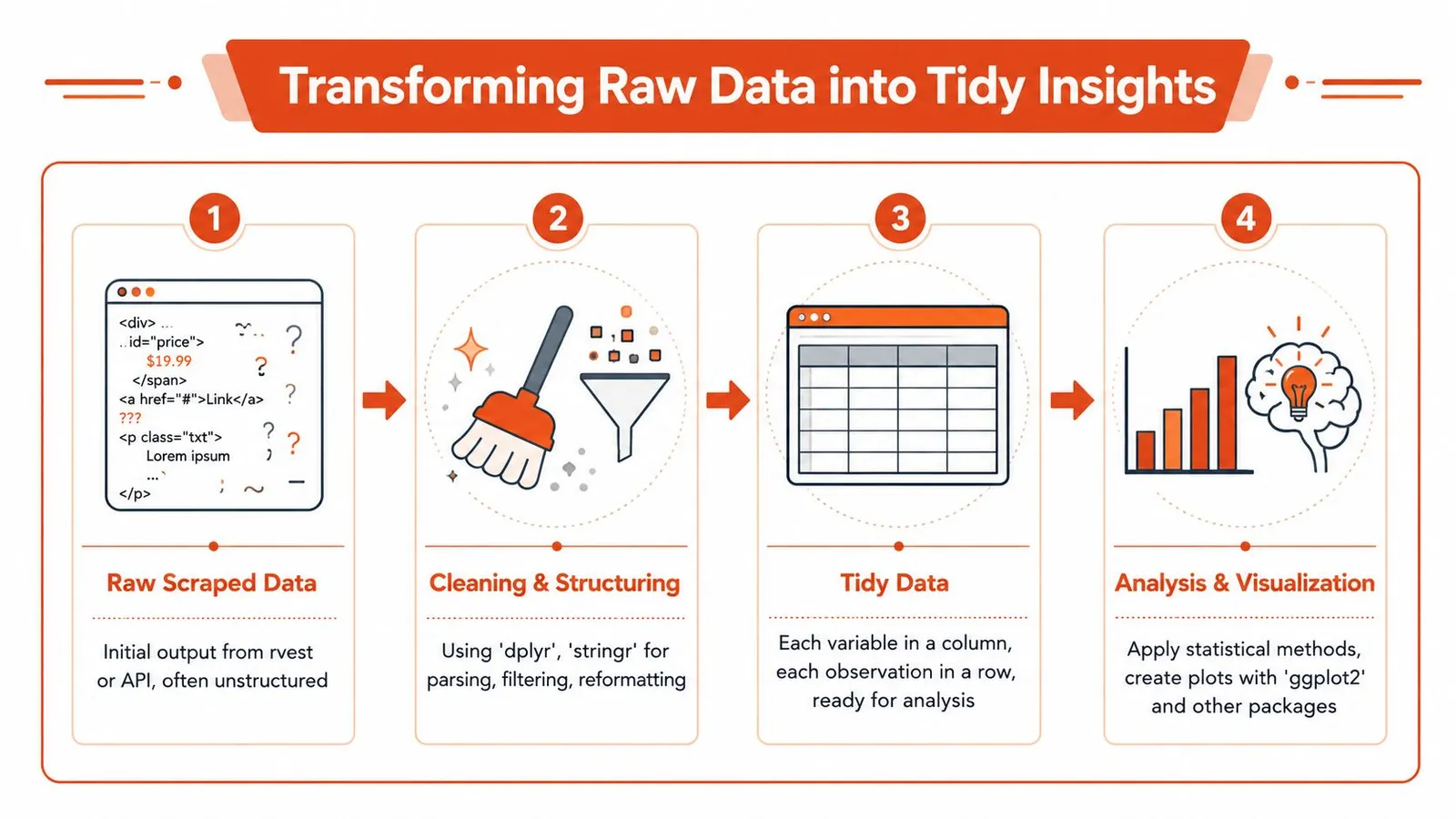
Scraping is only useful when the output becomes analysis-ready. Raw vectors, nested lists, and half-clean strings don't help much until you shape them into rows and columns.
Build rows from extracted pieces
Most scraped content starts fragmented. You may have one vector for titles, another for dates, and another for URLs. The first cleanup pass involves making those pieces coherent.
library(dplyr)
library(stringr)
library(tibble)
library(readr)

titles <- c(" First item ", "Second item", "Third item")
dates  <- c("2026-01-05", "2026-01-06", "2026-01-07")
links  <- c("/a", "/b", "/c")

df <- tibble(
  title = str_squish(titles),
  date = as.Date(dates),
  link = links
) |>
  mutate(
    link = str_c("https://example.com", link)
  )

df
That's the payoff of web scraping in R. The extraction step feeds directly into the same cleaning grammar you already use for CSVs, databases, and APIs.
A few habits help a lot:
- Normalize text immediately: trim whitespace, decode obvious artifacts, standardize casing where appropriate
- Convert types early: dates should become dates, not stay character strings
- Keep raw fields when needed: if parsing rules may change, save the original extracted text alongside cleaned columns
Clean once and analyze many times
Good scraping workflows separate acquisition from analysis. Save a clean intermediate file, then do your downstream work from that stable dataset rather than re-scraping every time you tweak a chart.
write_csv(df, "scraped_articles.csv")
That one step makes the rest of your analysis reproducible. It also makes failure recovery much easier when a site changes later.
The strongest reason to do web scraping in R isn't that R can fetch pages. It's that R can turn scraped output into tidy analytical data with very little friction.
Once the data is in a tibble, the broader R stack takes over. dplyr handles transformations, tidyr reshapes awkward fields, stringr cleans text, and ggplot2 gives you a fast path from collection to insight.
If you've outgrown static scraping and don't want every difficult site to become a browser-maintenance project, Webclaw is one practical option to evaluate. It exposes scraping through an API, returns content in formats such as Markdown or JSON, and fits well when your R workflow needs clean extracted output more than raw HTML.