Advanced Crawling in Python: Techniques for 2026
You have a Python script open, a seed URL ready, and a simple goal. Crawl a site, extract the useful content, feed it into a search index, a monitoring job, or an LLM pipeline. The first version feels easy. A requests.get() call works, BeautifulSoup finds the nodes you want, and for a moment it looks like crawling in Python is just another afternoon task.
Then the substantial work starts. The site has duplicate paths, thin HTML shells, random 403 responses, and selectors that break as soon as the frontend team ships a redesign. If the target matters, you also inherit rate controls, retry logic, browser rendering, storage decisions, and anti-bot friction. The code is only the visible part. The maintenance bill shows up later.
That's the part most tutorials skip. They show how to fetch pages. They don't help you decide whether you should own the crawler at all. For AI and LLM workflows, that question matters even more because raw HTML isn't just messy. It's expensive, noisy context.
Crawler Fundamentals Before You Code
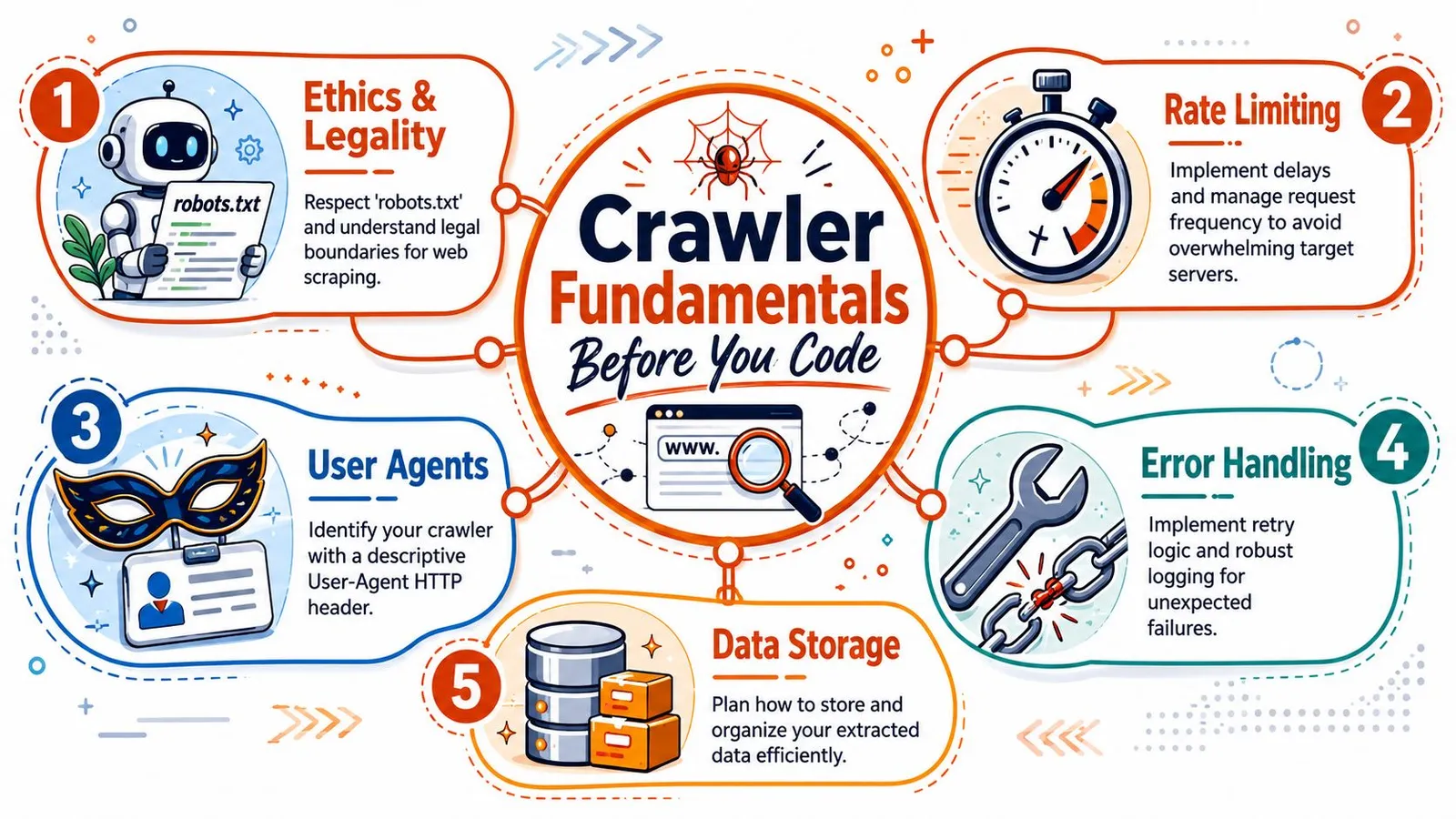
Professional crawling starts before the first line of Python. The teams that skip this part usually end up debugging the wrong thing. They blame parsing, networking, or concurrency when the core problem is that the crawler has no operating rules.
Start with permission and scope
Read robots.txt first. That won't answer every legal or contractual question, but it does tell you how the site wants automated agents to behave. It also gives you a practical boundary. If a path is disallowed, don't make your crawler “smart” enough to ignore it.
Set scope in writing before you code. That means domain limits, path limits, stop conditions, and storage rules. A crawler without scope turns a straightforward extraction job into a site discovery project, and those are different systems.
A preflight checklist should include these basics:
- Allowed paths: Confirm what the target permits through
robots.txtand any public site guidance. - Identity: Send a descriptive
User-Agentthat explains who the crawler is. - Request pacing: Decide how quickly you'll fetch and when you'll slow down.
- Exit rules: Define page budgets, depth limits, or completion criteria.
- Data plan: Decide whether you need raw HTML, cleaned text, or structured fields.
If you want to test assumptions before launching a larger run, tools that simulate AI crawler behavior can help you inspect how a target might respond to automated fetching. For broader extraction design patterns, this guide on scraping websites for data is useful context.
Practical rule: If you haven't written down crawl scope and rate rules, you don't have a crawler yet. You have a script that can become a liability.
Treat HTTP responses as operational signals
Crawlers live and die by response handling. A 200 is success. A 404 tells you the URL is stale or discovered badly. A 403 often means access is denied or the request profile looks wrong. A 503 usually means back off, not retry forever.
This sounds obvious, but many early crawlers flatten every failure into “request failed.” That's a mistake. Different responses require different actions.
A simple response policy looks like this:
| Response pattern | What it usually means | Better action |
|---|---|---|
200 | Content is available | Parse and continue |
403 | Access denied or bot suspicion | Pause, inspect headers, scope, and fetch method |
404 | Missing or removed page | Mark dead and stop retrying |
503 | Temporary overload or active defense | Reduce pressure and retry later |
Politeness isn't just etiquette. It's uptime strategy. The practical workflow described in ScrapingBee's Python crawling guide starts with robots.txt and rate controls, then adds retries with exponential backoff, realistic User-Agent headers, and per-domain concurrency limits.
A Quick Start with Requests and BeautifulSoup
A lot of crawler projects start the same way. You need content from a site with predictable HTML, the page count is limited, and shipping something today matters more than designing a full crawl system. In that situation, requests plus BeautifulSoup is still a practical starting point.
It is also where teams often make an expensive mistake. A fetch script can solve a narrow extraction job fast, but it does not stay cheap once you add URL discovery, retry policy, state, and long-running maintenance. For AI and LLM pipelines, that cost shows up later as inconsistent coverage, stale content, and a growing pile of crawl logic nobody planned to own.
The baseline fetch and parse loop
Here's the smallest useful pattern:
import requests
from bs4 import BeautifulSoup

url = "https://example.com"
headers = {
    "User-Agent": "MyCrawler/1.0"
}

response = requests.get(url, headers=headers, timeout=10)

if response.status_code == 200:
    soup = BeautifulSoup(response.text, "html.parser")
    headlines = [el.get_text(strip=True) for el in soup.select("h1, h2, h3")]
    for item in headlines:
        print(item)
else:
    print(f"Request failed with status {response.status_code}")
This is enough to prove three things quickly. The site returns usable HTML. Your selectors match the content you care about. The extraction logic is simple enough that you can test it without introducing a framework too early.
That matters. If a site is static and your URL list is already known, starting with a full crawler stack is often wasted effort.
If you want to keep that local prototype compatible with a hosted path later, the Webclaw Python SDK documentation is a useful reference. It shows the kind of interface teams use when they stop owning fetch infrastructure themselves but want to preserve their parsing workflow.
When this approach is enough
Use this stack when the problem is bounded.
Good fits include internal docs, public blogs with server-rendered pages, changelog archives, or one-time audits where another system already supplies the URLs. In those cases, requests and BeautifulSoup keep the code readable and the failure modes obvious.
A short script is also easier to debug than a framework project. You can inspect headers, print raw HTML, adjust selectors, and rerun in seconds.
Where the lifecycle cost starts rising
The trouble starts when the task subtly shifts from extraction to crawling.
A few warning signs show up early:
- You need discovery: links, pagination, sitemaps, or category traversal now matter.
- You need memory: visited URLs, deduplication, and checkpoints become necessary.
- You need resilience: timeouts, retries, and partial reruns stop being optional.
- You need repeatability: the script has to run on a schedule and produce stable output.
- You need scale for downstream AI use: missing pages or duplicate content now affect embeddings, retrieval quality, or fine-tuning data.
At that point, the cheap script stops being cheap. You are building scheduling, state management, and operational controls by hand. Some teams should do that. Many should not.
A single successful fetch proves extraction logic. It does not prove you should own a crawler in production.
The practical decision rule
Stick with requests and BeautifulSoup if the crawl is small, the HTML is stable, and failure has a low business cost.
Reconsider the approach if the crawler needs to run repeatedly, support changing site structure, or feed an LLM workflow that depends on freshness and coverage. The code is still simple. The system around the code is what gets expensive.
That is the trade-off. requests and BeautifulSoup are excellent tools for a controlled job. They are a poor substitute for crawl infrastructure once the job becomes ongoing, high-volume, or operationally important.
Building a Production Crawler with Scrapy
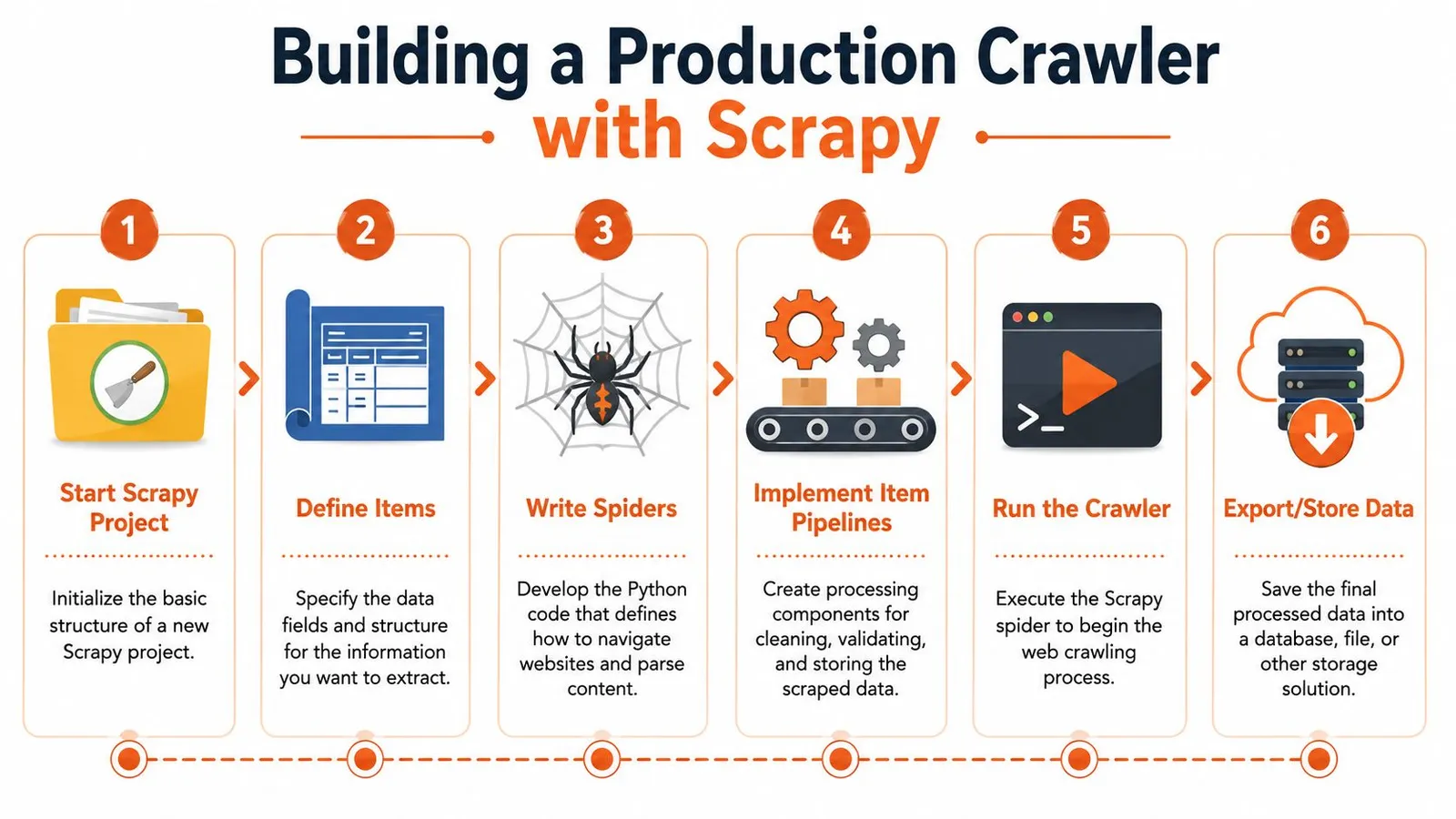
A crawler usually becomes a systems problem before it becomes a parsing problem. The first version works on a few pages. The production version needs URL discovery, retries, backpressure, structured exports, failure recovery, and enough discipline that another engineer can maintain it six months later. Scrapy earns its place here because it gives you those pieces in one framework instead of pushing you toward a growing pile of custom loops and cron jobs.
Why Scrapy changes the shape of the project
Scrapy is opinionated in the right places. Spiders define how to discover and parse pages. The scheduler manages what gets fetched next. Pipelines handle validation and storage. Middleware gives you a place to shape requests and responses without burying that logic inside parsing code. The official Scrapy architecture overview is worth reading because these boundaries are what keep a crawler maintainable once the target site changes.
That separation matters more than the framework itself. Discovery logic tends to change for different sections of a site. Extraction rules drift as templates evolve. Storage requirements change when the crawl starts feeding search indexes, analytics, or LLM pipelines. Scrapy lets you change one part without rewriting the rest.
A typical spider looks conceptually like this:
import scrapy

class DocsSpider(scrapy.Spider):
    name = "docs_spider"
    start_urls = ["https://example.com/docs/"]

    def parse(self, response):
        for href in response.css("a::attr(href)").getall():
            if "/docs/" in href:
                yield response.follow(href, callback=self.parse_doc)

    def parse_doc(self, response):
        yield {
            "url": response.url,
            "title": response.css("title::text").get(),
            "headings": response.css("h1::text, h2::text").getall(),
        }
That example is small, but the production pattern is already there. One callback discovers links. Another extracts records. The framework handles request scheduling and item flow. You can export to JSON for a quick test, then move the same items through validation, deduplication, and storage once the crawl starts mattering.
A short video walkthrough helps if you want to see that workflow in action:
The controls that matter in production
The defaults are fine for learning. They are rarely fine for a recurring crawl.
In practice, a few settings do most of the operational work:
DOWNLOAD_DELAYsets pace. Use it to reduce burstiness and avoid creating avoidable load spikes.CONCURRENT_REQUESTS_PER_DOMAINcaps parallelism against one host. This matters when one spider can otherwise saturate a small site.AUTOTHROTTLE_ENABLEDadjusts request rate based on observed latency. It is one of the simplest ways to make a crawler less brittle.- Retry and timeout settings determine whether transient failures become data gaps or short-lived noise.
- Job persistence and feeds decide whether an interrupted run can resume cleanly and whether downstream systems receive stable output.
These are operational controls, not polish. A crawler that feeds an AI retrieval system has different failure costs than a one-off research script. Missed pages reduce coverage. Duplicate pages pollute embeddings. Unstable runs force expensive cleanup later.
What Scrapy does not solve for you
Scrapy gives you crawl orchestration. It does not give you rendering, proxy management, fingerprint rotation, or regional fetch coverage out of the box. If the target serves empty HTML and fills the page in the browser, you need a rendering path. If the target rate-limits aggressively, you need request strategy and often external infrastructure. If the site changes templates weekly, you need monitoring and tests, not just a clever selector.
That lifecycle cost is where teams misjudge the build decision. The framework itself is free. Operating it is not. Someone still owns deployments, crawl health, blocked requests, parser drift, data quality checks, storage growth, and on-call fixes when a target site changes overnight.
For a team that needs fine-grained control, Scrapy is a strong self-hosted baseline. For a team whose real goal is fresh content for search, analytics, or LLM ingestion, it is worth pricing the full system before you commit. Browser fallback alone can change the cost profile fast. If your targets regularly require rendering, read this guide on browser fallback for JavaScript-heavy pages before you assume a standard Scrapy stack will be enough.
Use Scrapy when you need custom crawl behavior, repeatable jobs, and engineering control over the pipeline. Reconsider self-hosting when the hard part is no longer parsing HTML, but keeping the crawler running reliably at the quality bar your downstream systems require.
Handling JavaScript and Modern Web Apps
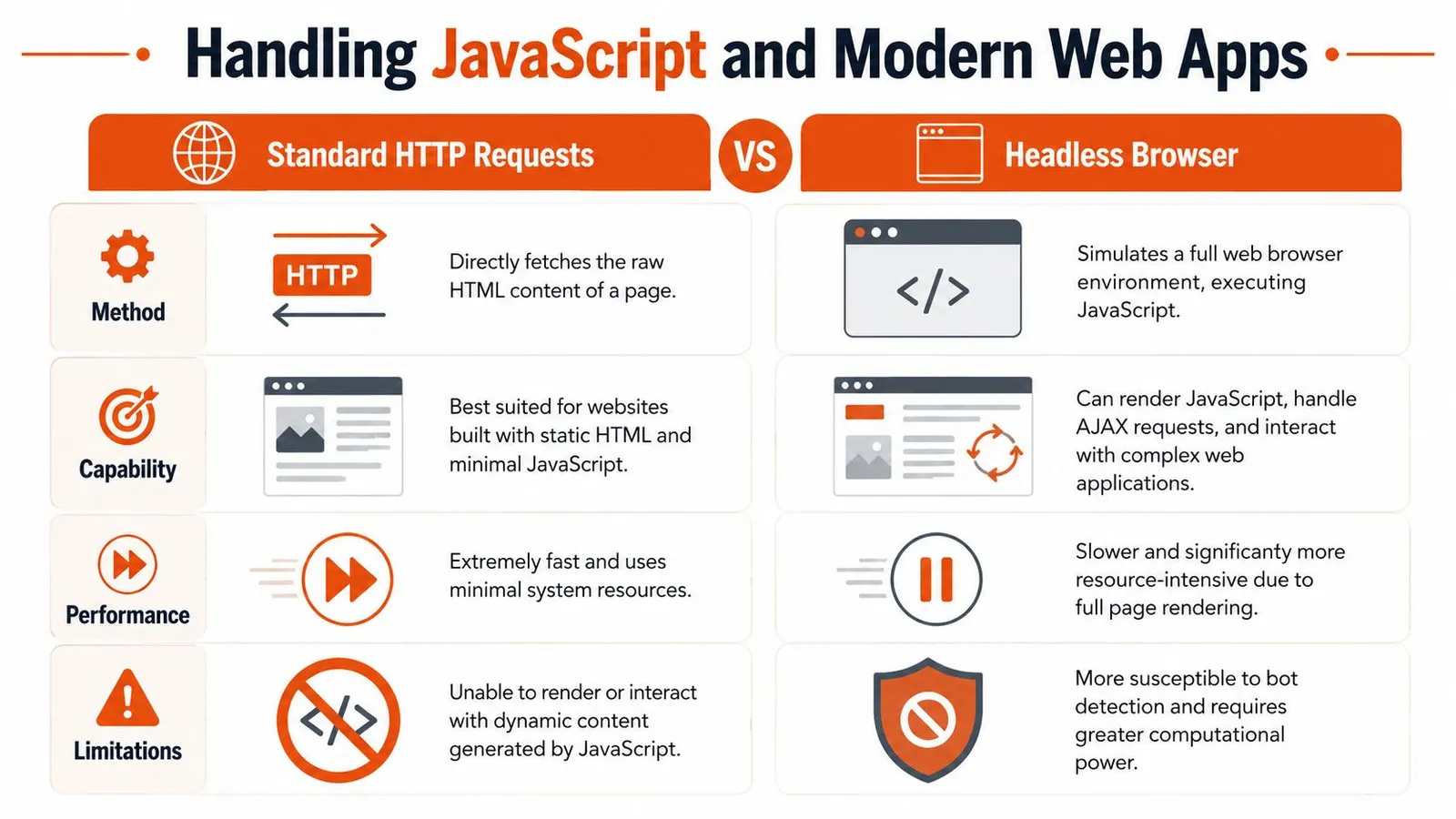
A crawler can look healthy and still return useless pages. The request succeeds, logs stay green, and your parser finds nothing because the site builds the content in the browser after load. That is the point where a simple Python crawler turns into a browser automation system, with higher compute cost, slower jobs, and more operational work.
How to tell whether rendering is required
Start by proving that JavaScript is the problem. Teams often send every hard page through a browser because it feels safer. In production, that decision gets expensive fast.
Use a short triage process:
- Fetch the page with plain HTTP first: Save the raw HTML and inspect it directly.
- Search for the actual fields you need: Product text, article body, prices, table rows, and metadata should be visible in the response if rendering is unnecessary.
- Inspect browser network requests: Many single-page apps pull JSON from internal APIs that are easier and cheaper to call than a full browser session.
- Render only after you confirm the gap: If the data appears only after client-side execution, switch to a browser path for that page type.
This decision matters more than many Python guides admit. Browser rendering is not just a coding choice. It affects queue design, retry policy, concurrency limits, infrastructure spend, and how much quality monitoring you need. If you need a practical decision framework, this guide to a JavaScript rendering API with browser fallback for web scraping is a useful reference.
Playwright versus Selenium
For new crawler builds, Playwright is usually the cleaner choice. Its waiting model is more predictable, multi-browser support is straightforward, and interactions with modern front-end apps tend to require less glue code. Selenium still has a place, especially in organizations that already run it for testing or have older automation built around WebDriver.
The trade-off is not subtle. Both tools increase failure modes compared with plain requests. You now own browser startup time, memory pressure, timeout tuning, crash recovery, and DOM states that change between runs.
| Tool | Where it fits | Main downside |
|---|---|---|
| Playwright | New browser-based crawlers, SPAs, interactive flows | Higher CPU and memory use than plain HTTP |
| Selenium | Existing WebDriver environments, compatibility with older automation stacks | More setup and maintenance friction for many scraping tasks |
A practical rule works well here. Use direct HTTP for pages that expose the data. Use a browser for login flows, client-rendered detail pages, or interactions you cannot reproduce with requests alone.
Regional delivery can complicate the decision further. Some targets load different assets, scripts, or content depending on where the request originates. If you are testing access constraints or regional fetch behavior, this piece on bypassing China's internet blocks gives useful context on why a page can behave differently across networks.
Render because the page proves it needs rendering. Every browser session you can avoid makes the crawler cheaper, simpler, and easier to keep reliable.
Navigating Anti-Bot Defenses
Many developers still treat crawling as a parser problem. On difficult targets, it's an acquisition problem first. If you can't get the right bytes back consistently, your extraction code doesn't matter.
Blocking usually starts before your parser runs
A modern target can reject your crawler based on request shape, header consistency, TLS behavior, IP reputation, geography, session flow, or simple rate anomalies. That's why a crawler that works on one domain can fail instantly on another with the exact same parsing code.
A newer perspective on Python crawling is that it's increasingly less about HTML traversal and more about acquisition under defense: reliable fetches, geo-targeted access, and deciding whether the page even needs rendering before you spend browser compute, especially for AI and LLM pipelines, as discussed in this recent video on modern crawling realities.
The same shift shows up in practical production guidance. Recent coverage emphasizes reliability and efficiency, including async scaling, throttling tied to response latency, circuit breakers on repeated 503 responses, and minimizing headless-browser use unless raw HTML proves rendering is required, as noted in this DigitalOcean Scrapy tutorial.
What actually improves resilience
You don't beat anti-bot systems with one trick. You stack small improvements and escalate carefully.
Here's what tends to work better than brute force:
- Header realism: Send consistent headers and an honest
User-Agent. Random junk often looks worse than a stable identity. - Rate discipline: Most blocks are self-inflicted. Spiky behavior gets noticed.
- Proxy selection: Use proxy types that match the target's sensitivity and geography.
- Session continuity: Some sites expect cookies and navigation sequences that look human.
- Render selectively: Browser traffic is heavier and more detectable. Use it when the target requires it.
If your target varies by region or operates behind network restrictions, operational concerns can look more like access engineering than scraping. For teams dealing with cross-border availability issues, this overview of bypassing China's internet blocks is useful background. For a crawler-focused perspective, this piece on anti-bot scraping APIs and browser fallback signals maps the practical decision points well.
What doesn't work well is pretending every site needs the same setup. Copying a giant proxy and browser stack into every crawler makes maintenance worse. Start with the lightest fetch that returns the right content, then escalate.
Extracting Storing and Using Crawled Data
A crawl is only useful if the output survives contact with downstream systems. That's where many teams lose time. They fetch successfully, parse loosely, and dump inconsistent records into files nobody trusts.
Write selectors for change tolerance
Extraction breaks more often than fetching. Frontend teams rename classes, reorder containers, or insert promotional blocks that shift your selectors just enough to poison the data.
Good selectors are anchored to stable structure, not styling noise. Prefer semantic containers, repeated content patterns, and clear field boundaries. If CSS becomes too fuzzy, XPath is often better for expressing structural relationships.
A practical extraction checklist:
- Prefer stable anchors: Titles, article containers, schema-like blocks, and repeated card structures tend to last longer than utility classes.
- Normalize text early: Strip whitespace, collapse line breaks, and resolve relative URLs before storage.
- Validate required fields: Drop or flag items missing the fields your application needs.
- Keep raw context when stakes are high: For important workflows, save enough source material to debug selector drift later.
Quiet extraction failures are worse than loud request failures. A
403gets noticed. Empty or wrong fields can flow downstream for days.
Choose output based on downstream use
The output format should match the job. If a data analyst needs tables, structured JSON or CSV makes sense. If a search or retrieval pipeline needs text, cleaned content is usually more useful than raw DOM.
Scrapy examples often export directly to structured files such as books.json or headlines.json. That pattern matters because it treats extraction as a data product, not just console output.
A simple decision table helps:
| Downstream use | Better output |
|---|---|
| Analytics and dashboards | Structured JSON or CSV |
| Archival and debugging | Raw HTML plus metadata |
| Search indexing | Clean text or normalized document format |
| LLM and RAG ingestion | Minimal, boilerplate-reduced content |
Storage is part of crawler design
Small crawls can write to local JSON files. That's fine for testing and throwaway jobs. Ongoing crawls need stronger guarantees around deduplication, updates, retries, and schema evolution.
The storage choice affects crawler behavior more than people expect. If you need re-crawl detection, change tracking, or resumable runs, the storage layer has to support that. Otherwise you end up using your crawl code as a state database, which gets messy fast.
A sensible progression looks like this:
- File output first for local development and selector checks.
- Database storage next when records need updates, querying, or job resumability.
- Normalized content pipelines when the data will feed search, alerts, or AI systems.
The extraction layer should produce records that another system can trust without rereading the original page every time.
The Final Mile Scaling for AI and When to Use an API
The hard part isn't getting one crawler to work. The hard part is keeping a fleet of crawlers reliable when the output must be clean enough for AI systems and cheap enough to run often.

AI changes what good crawling output looks like
Traditional scraping pipelines often tolerate noisy output because a later transformation step can clean it. LLM workflows are less forgiving. Navigation menus, cookie text, duplicated links, and template clutter all consume context and dilute the signal.
That's why the last mile matters. Python crawling is increasingly less about HTML traversal and more about acquisition under defense, reliable fetches, geo-targeted access, and deciding whether the page even needs rendering before spending browser compute, especially for token-sensitive AI and LLM pipelines, as discussed in the earlier linked video.
If the end goal is retrieval, summarization, or agent execution, your real product isn't HTML. It's useful context.
A production-ready AI ingestion output should usually have:
- Boilerplate reduction: Navigation, footer junk, and repeated blocks removed.
- Stable chunking boundaries: Sections that can be indexed or passed to models cleanly.
- Metadata: URL, title, timestamps, and crawl provenance.
- Predictable failure handling: Clear empty states, not silent partial parses.
The hidden cost centers of self-hosted crawling
Self-hosted crawling gets expensive in ways teams underestimate. Not just financially. Operationally.
The maintenance cost usually shows up in five places:
- Fetch reliability: Proxies, retries, browser orchestration, and site-specific workarounds.
- Selector drift: The target changes, and your extraction degrades.
- Crawl state: URL queues, deduplication, resumability, and recrawl policy.
- Output normalization: Converting messy pages into content your application can use.
- Incident response: Someone has to notice when a crawl starts succeeding technically but failing semantically.
For a narrow, stable target, owning that stack can still make sense. If you crawl a small set of predictable pages and the output schema is simple, a self-hosted Python pipeline is often the cleanest option.
If the target set is large, hostile, dynamic, or AI-facing, the break-even point moves fast. You're no longer maintaining code. You're maintaining acquisition infrastructure.
A practical build versus buy decision
Use your own crawler when all of these are true:
- The scope is tight
- The target structure is stable
- The content is mostly server-rendered
- Failures are visible and low risk
- Your team is comfortable owning ongoing maintenance
Use a managed API when the crawl becomes infrastructure work:
- You need browser fallback often
- Blocked fetches are common
- Output must be cleaned for LLM use
- You're crawling many domains with different behaviors
- The team's time is going into maintenance instead of using the data
One practical option in that second category is Webclaw's crawl API, which exposes crawling as an API and returns extraction-oriented output rather than forcing you to operate the full fetching and rendering stack yourself. That's relevant when the goal is not “learn how crawling works” but “deliver reliable content into an AI pipeline.”
The gap in most crawling advice is that it rarely answers the strategic question. Not how to follow links. Whether following links yourself is still the cheapest reliable path for the job in front of you.
If you're experimenting, build it. You'll learn a lot. If you're operating a critical pipeline across difficult sites, be honest about the lifecycle cost. The crawler you write in a day is not the crawler you maintain six months later.
If you need clean, structured web content for AI systems without owning the full crawler stack, Webclaw is one option to evaluate. It handles crawling, rendering, and extraction with output formats designed for downstream model use, which can be a better fit when your bottleneck isn't writing Python but keeping acquisition and content quality reliable over time.