Render JavaScript Pages: When You Need a Browser, When Not
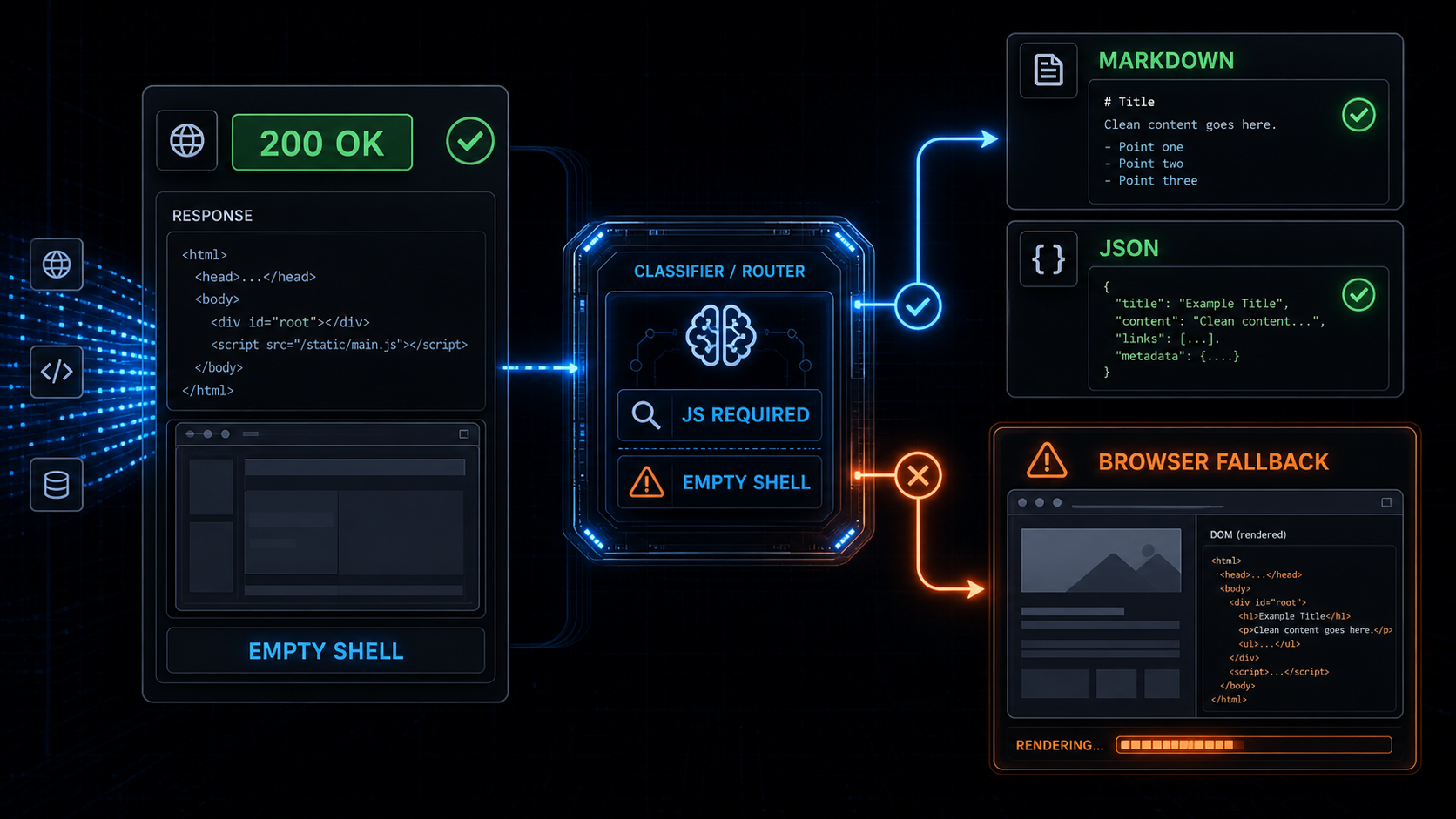
Your scraper got 200 OK.
The HTML was valid.
The extractor ran.
The output was empty.
That is not always an anti-bot problem.
Sometimes the page just never existed until JavaScript ran.
This is where a lot of scraping systems make the wrong call. They see one failed extraction from a JavaScript-heavy page, then make headless Chrome the default for everything. The next scrape works, but now every article, docs page, product listing, and pricing page pays the browser tax.
That is not a rendering strategy.
It is panic with a browser pool attached.
When we built Webclaw, the rule stayed the same as the one behind our anti-bot browser fallback architecture:
Fetch first.
Classify the response.
Render only when the page proves it needs JavaScript.
This post is about the rendering side of that decision.
Not every empty scrape is Cloudflare.
Not every React site needs Chrome.
Not every 200 OK contains content.
If you are comparing this against other extraction tools, read How to evaluate web scraping APIs for AI agents first. Most bad evaluations miss this exact distinction because they test static toy pages instead of dynamic sites, blocked sites, and pages with messy extraction output.
Quick answer
A JavaScript rendering API is needed when the initial HTML is only an app shell and the target content appears after client-side execution.
The strongest signals are:
empty root nodes
missing article or product content
missing expected JSON-LD
hydration-only payloads
client-side route placeholders
required XHR or fetch data calls
low extracted token count
If those signals are not present, a scraper should avoid browser rendering and return clean markdown or structured JSON from the initial response.
That is the difference between browser fallback scraping and browser-first scraping.
For the neighboring parts of this cluster, see TLS fingerprinting in 2026, Puppeteer stealth vs Cloudflare, and Cloudflare Turnstile scraping.
The three problems people confuse
Most "my scraper returned nothing" bugs are actually one of three different problems:
blocked page
JavaScript-rendered empty shell
bad extraction
They look similar downstream.
The output is empty or useless.
But the fix is different.
1. Blocked page
The site did not give you the target page.
It gave you a defensive artifact:
403
429
503
challenge page
WAF interstitial
Turnstile page
bot cookie loop
That is an anti-bot problem.
The right response is not "parse harder." The right response is to classify the block and choose the correct fallback path.
For that layer, read Anti-Bot Scraping API 2026: signals that force browser fallback, Cloudflare Web Scraping: What Works in 2026, Cloudflare scraping checklist, and Cloudflare error codes for scrapers.
2. JavaScript-rendered empty shell
The site did give you a page.
The page just did not contain the content yet.
You might see:
<div id="root"></div>
<script src="/assets/app.js"></script>
Or:
<main id="__next"></main>
<script src="/_next/static/chunks/app.js"></script>
The HTTP request succeeded.
The HTML parser succeeded.
The extractor had nothing real to extract.
That is a rendering problem.
The fix is JavaScript execution, but only for this URL class.
This is why "scrape React website" is too broad as a diagnosis. React hydration attaches client behavior to a DOM tree, but some React and Next.js sites still ship useful server-rendered HTML. Others ship almost nothing until the client runs. The scraper has to inspect the response, not guess from the framework name.
3. Bad extraction
Sometimes the content is already in the HTML, but the extraction layer misses it.
Common causes:
main content selector is wrong
content is inside JSON-LD
content is inside script state
article body uses unusual markup
product data is split across tables
boilerplate removal is too aggressive
That is not an anti-bot problem.
It is not necessarily a rendering problem either.
It is an extraction quality problem.
This is why Webclaw checks the output after extraction instead of treating extraction as the final step. For the LLM side, see HTML to Markdown for LLMs, Web scraping for AI agents, and Extract structured data from any URL in one call.
What a JavaScript rendering API should detect
The rendering decision should happen before launching a browser.
Launching Chrome is expensive:
startup time
memory
browser pool contention
timeouts
network idle ambiguity
more moving parts
lower concurrency
Rendering is useful.
Rendering everything is the expensive part.
The classifier should inspect the raw response and the first extraction result, then decide whether browser fallback is justified.
This also matters when choosing a vendor. A web scraping API for LLMs should not only fetch URLs. It should distinguish static content, client-rendered content, anti-bot artifacts, and extraction misses.
Signal 1: empty app roots
This is the classic React, Vue, Svelte, Angular, or Next.js shell problem.
You fetch the page and get:
<div id="root"></div>
or:
<div id="app"></div>
or:
<main id="__next"></main>
The page has scripts, styles, and route metadata, but no meaningful text.
That is a strong rendering signal.
The right move is not to immediately treat the domain as browser-only forever. The right move is to mark this response as JavaScript-required and render this class of page.
For search indexing, Google documents the same broad risk from the other side: JavaScript content may need rendering before it is visible to a crawler. Scraping pipelines hit the same shape of problem, but the consequence is bad data instead of missed indexing.
Signal 2: missing expected content blocks
A scraper usually knows what type of page it is trying to extract.
For a product page, you expect:
title
price
availability
variants
reviews
product schema
For an article, you expect:
headline
body text
author
publish date
article schema
For docs, you expect:
main heading
section headings
code blocks
navigation links
If those blocks are missing from the initial HTML, the classifier should ask why.
Maybe the page is blocked.
Maybe the content hydrates client-side.
Maybe the extractor missed it.
The important part is that missing expected content is a signal, not a final result.
This is the point where schema-aware extraction helps. If you need exact fields rather than the whole page, use a schema and compare the result against what you expected. That pattern is covered in Extract structured data from any URL.
Signal 3: hydration-only payloads
Some pages ship enough state to render client-side, but not enough semantic HTML to extract cleanly.
You might see:
__NEXT_DATA__
window.__INITIAL_STATE__
window.__APOLLO_STATE__
Nuxt payloads
Remix loader data
serialized route manifests
This is not automatically bad.
Sometimes the useful data is inside those payloads and can be extracted without a browser.
Sometimes the payload is only routing state and the real content comes from later API calls.
The classifier should distinguish between:
state contains target content -> parse without browser
state does not contain target content -> render or fetch dependent data
That distinction saves a lot of unnecessary browser sessions.
Next.js, React, and other modern frameworks make this especially easy to misread. A payload can be useful content, routing metadata, cache state, or just enough information for the client to request something else. Treating every payload as "needs browser" leaves performance on the table.
Signal 4: client-side data dependencies
Many dynamic pages are not empty because of anti-bot.
They are empty because the browser must make a second request:
/api/products/123
/graphql
/search?q=
/inventory
/reviews
The initial HTML is just a bootloader.
If the target data only arrives through XHR, fetch, or GraphQL after hydration, a rendering API can capture the final DOM. A smarter extraction system can sometimes call the data endpoint directly, but that depends on the site and request shape.
The safe default is:
detect the dependency
render if needed
return the final clean content
Signal 5: low content quality after extraction
The final rendering signal comes from the extraction result.
If the cleaned output looks like this:
12 tokens
no title
no article body
no product fields
mostly navigation
mostly cookie text
mostly script noise
then the scrape did not produce useful content.
That does not mean every bad extraction should launch a browser.
It means the system should classify the failure:
blocked
JavaScript-required
extraction missed content
unsupported page shape
Returning empty markdown as success is the worst option.
This is where agent pipelines get fragile. If your LangChain or LlamaIndex workflow receives empty context, the model usually does not know the fetch layer failed. See LangChain web scraping in 2026, LlamaIndex web scraping, and Build a RAG pipeline with live web data for the downstream side.
Browser fallback beats browser-first
A browser-first scraper has a simple pipeline:
URL -> browser -> DOM -> extraction
It works.
It is also wasteful when the content was already available in the initial response.
This is also why browser fallback beats browser-first. Rendering is a fallback path. It should be available, reliable, and expensive only when the site forces the cost.
A browser fallback scraper looks more like this:
URL
-> browser-like fetch
-> response classification
-> extraction
-> content quality score
-> browser fallback only if needed
-> markdown or JSON
This is the path Webclaw uses from the outside:
curl -X POST https://api.webclaw.io/v1/scrape \
  -H "Authorization: Bearer $WEBCLAW_API_KEY" \
  -H "Content-Type: application/json" \
  -d '{
    "url": "https://example.com",
    "formats": ["markdown"],
    "only_main_content": true
  }'
For typed output, use the Extract API. For the full scrape endpoint, see the Scrape API docs. If you are migrating an existing crawler or Firecrawl-compatible workflow, see Migrating from Firecrawl and the API endpoint docs.
The API stays boring.
The decision layer does the work.
Why this matters for AI agents
AI agents amplify bad extraction.
If a scraper returns an empty shell, the model may reason from nothing.
If a scraper returns navigation text, the model may treat navigation as content.
If a scraper returns a challenge page, the model may summarize the challenge.
For RAG and agent workflows, "we got HTML" is not enough.
The output needs to be:
clean
source-linked
deduplicated
structured when requested
honest when it failed
That is why JavaScript rendering should not be a separate manual mode bolted onto the side.
It should be part of the extraction decision.
The user should not have to guess whether a URL needs Chrome.
The API should figure it out.
For agent integrations, the same idea applies through MCP web scraping for Claude Code and Cursor, LangChain web scraping, and LlamaIndex web scraping. The model should receive clean context, not a framework shell.
The rule
Use JavaScript rendering when the page proves it needs JavaScript.
Do not use it because the site looks modern.
Do not use it because one naive HTTP client returned empty HTML.
Do not use it because the tutorial used Puppeteer.
Use it when the response classification says:
the page is clean but empty
the target content is client-rendered
the extracted output is below quality threshold
browser execution is the cheapest correct fallback
That is the practical version of a JavaScript rendering API for web scraping.
Fetch first.
Classify.
Render only when needed.
Return clean markdown or JSON.
Everything else is just paying browser costs early.
Sources and references
These are the external references I would keep nearby when debugging JavaScript-rendered pages:
- React
hydrateRootdocumentation explains the hydration model behind many client-rendered apps. - Next.js data fetching documentation is useful for understanding which data can be available before render and which data may arrive later.
- MDN Fetch API covers the browser-side request layer behind many dynamic page data dependencies.
- Google Search Central JavaScript SEO basics documents how JavaScript rendering affects content visibility for crawlers.
- Google dynamic rendering documentation is useful historical context for why rendering is a workaround, not the default architecture you want everywhere.
Frequently asked questions
What is a JavaScript rendering API for web scraping?
A JavaScript rendering API executes a webpage in a browser or browser-like environment so client-side content can load before extraction. It is useful for React, Next.js, Vue, Angular, and other dynamic pages where the initial HTML does not contain the target content.
When should a scraper use browser fallback?
A scraper should use browser fallback when the initial response is clean but does not contain the expected content, when the page is an empty app shell, when useful data only appears after client-side requests, or when extracted markdown or JSON falls below a content quality threshold.
Is an empty HTML page always an anti-bot block?
No. Empty HTML can be a bot challenge, but it can also be a normal JavaScript app shell. The scraper should classify the response using status codes, headers, cookies, content structure, hydration payloads, and extraction quality before choosing an anti-bot or rendering fallback.
Should I scrape React websites with headless Chrome every time?
No. Some React and Next.js pages include useful content or structured data in the initial HTML. Use browser rendering when the page proves the target content is client-rendered, not simply because the site uses a modern frontend framework.
How does Webclaw handle JavaScript-rendered pages?
Webclaw starts with a fast browser-like fetch, classifies the response, extracts content, scores the output quality, and escalates to browser fallback only when the page requires rendering or another expensive fallback path.