Master Web Scraping in Python: 2026 Guide
You wrote a scraper in Python, pointed it at a real site, and got one of three outcomes. Empty HTML. A page that looked fine in your browser but not in your script. Or a burst of success followed by blocks, 403s, and 429s.
That failure pattern isn't a beginner mistake anymore. It's the default state of web scraping in Python on modern sites. A lot of tutorials still teach requests.get() plus BeautifulSoup as if the web were mostly server-rendered HTML with light JavaScript on top. In 2026, that assumption breaks fast. Client-rendered apps, bot defenses, TLS fingerprint checks, and noisy page output have changed the job.
There's another problem most scraping guides still ignore. Even when you do get the page, the output often isn't useful for AI workflows. Raw HTML full of nav links, cookie banners, repeated footers, and ad slots is a bad input for retrieval, summarization, and agent pipelines. Clean extraction now matters as much as access.
Why Your Python Scraper Broke in 2026
The old playbook was simple. Send a request, parse the HTML, loop over elements, save to CSV. That still works on some sites. It fails on many of the ones people care about.
Plain HTTP clients can fail on targets that require JavaScript execution, browser state, or stronger request validation.
What changed is not just JavaScript rendering. Sites inspect behavior across layers. Headers, timing, cookies, browser APIs, TLS fingerprints, and navigation flow all matter. A naked requests client looks wrong before your parser even gets a chance.
Practical rule: If a target uses modern frontend tooling and serious bot protection, assume plain
requestsis your baseline for debugging, not your production solution.
There's also a bad habit in scraping culture. People keep patching symptoms. Add one header. Add a retry. Sleep for two seconds. Maybe throw in a proxy. Sometimes that buys time. It doesn't fix a scraper that's structurally mismatched to the site.
If you want a fast way to diagnose what's failing, this Cloudflare scraping diagnostic checklist is useful because it forces you to separate rendering problems, transport fingerprint issues, and challenge failures instead of treating every block like the same problem.
The fix is usually one of three things. Use a simple parser stack for static pages. Use a browser when the page is rendered in the client. Or stop owning every hard part yourself and move up a layer when the target mix gets ugly.
Scraping Static Sites with Requests and BeautifulSoup
There are still plenty of places where the classic stack is the right tool. Internal sites. Docs pages. Older blogs. Product catalogs that render content on the server. For those, web scraping in Python is still clean, fast, and easy to maintain with requests and BeautifulSoup.
When this stack still works
Use this approach when the response HTML already contains the data you want. The simplest test is blunt and effective. Open DevTools, load the page, inspect the response body, and see whether the data is present before any client-side code runs.
A few signs you can stay simple:
- The page source contains the content: Titles, prices, descriptions, or table rows appear directly in the server response.
- There is no loading shell: You don't just see placeholders, skeleton screens, or an empty root element.
- The page behaves the same without script execution: Your target data doesn't depend on browser events, async fetches, or client hydration.
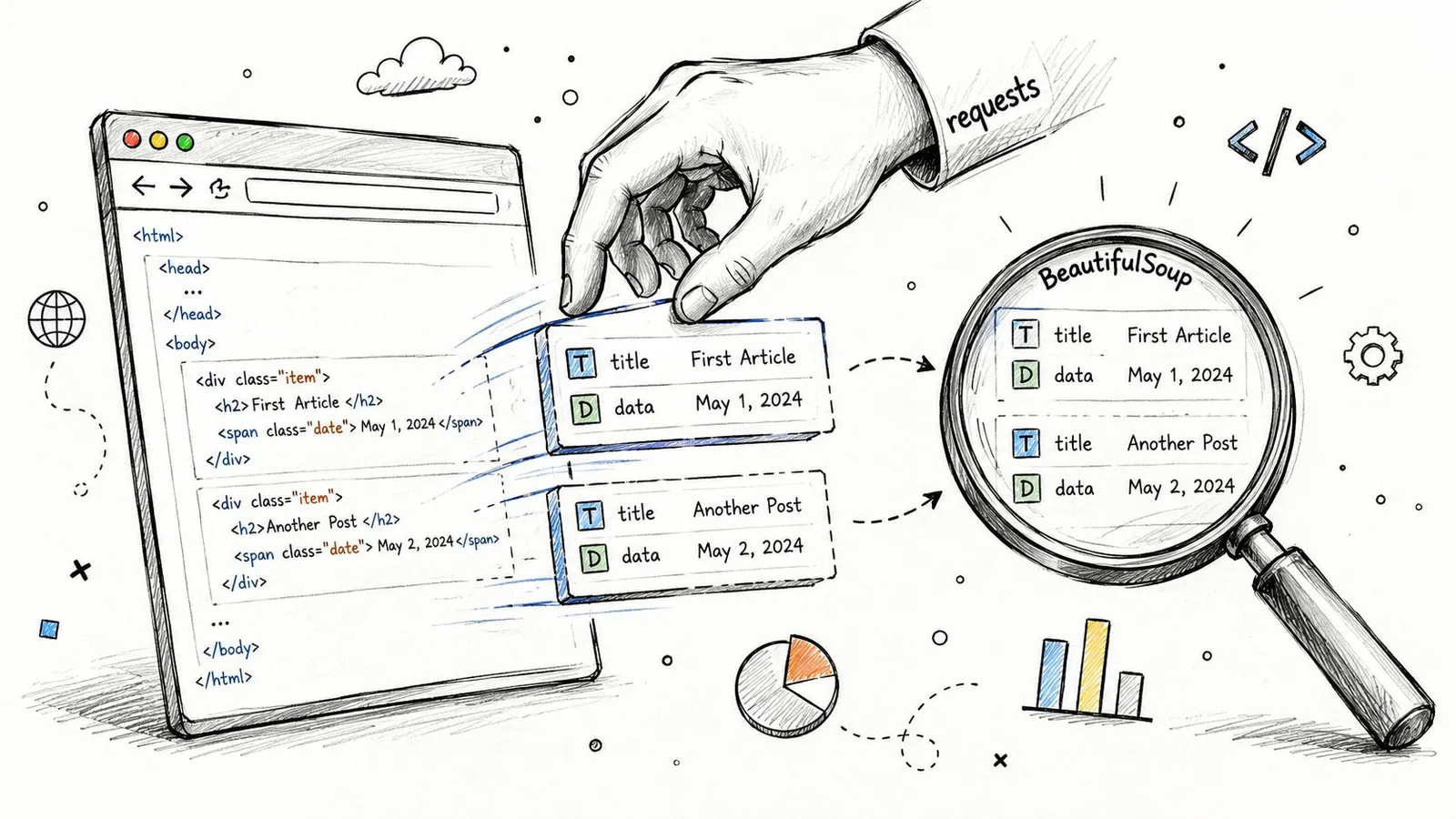
If you're unsure whether you're looking at the right document, it helps to save and inspect the raw response. This guide on downloading HTML files is a practical way to verify what your script received instead of what the browser assembled later.
A minimal working example
Here's the baseline pattern:
import requests
from bs4 import BeautifulSoup

url = "https://quotes.toscrape.com/"
headers = {
    "User-Agent": "Mozilla/5.0"
}

response = requests.get(url, headers=headers, timeout=30)
response.raise_for_status()

soup = BeautifulSoup(response.text, "html.parser")

for quote in soup.select(".quote"):
    text = quote.select_one(".text").get_text(strip=True)
    author = quote.select_one(".author").get_text(strip=True)
    print({"text": text, "author": author})
This stack is good at a few things:
| Task | Requests + BeautifulSoup |
|---|---|
| Static HTML retrieval | Strong |
| Fast iteration while developing | Strong |
| Low memory usage | Strong |
| JavaScript-heavy pages | Weak |
| Anti-bot resilience | Weak |
That trade-off matters. On cooperative sites, this code is hard to beat. On anything with client rendering or serious defenses, it becomes a trap because it keeps failing in ways that look like parser bugs but aren't.
What to look for in the HTML
When people say BeautifulSoup "doesn't work," the parser usually isn't the problem. The selector is wrong, the response isn't complete, or the target classes are unstable.
Use a disciplined extraction pass:
- Start with stable selectors. IDs, semantic containers, and predictable attributes beat random CSS classes generated by frontend tooling.
- Print small fragments. Don't dump the whole page unless you need to. Print the first matching node and verify the structure.
- Strip text deliberately.
get_text(strip=True)avoids carrying whitespace junk into your output.
Static scraping is less about clever code and more about proving the data exists in the response before you write selectors.
If the target is static, this approach stays maintainable for a long time. If the page gives you an empty container, a spinner, or a giant JavaScript app shell, stop forcing it. That's where browser automation earns its keep.
Winning the Fight Against JavaScript-Rendered Content
You open DevTools, copy a selector that works in the browser, run your Python script, and get an empty list. The selector is fine. The problem is timing and execution. The page you see is the result of JavaScript, API calls, and client-side state. requests only gets the initial shell.
A lot of 2026 scraping pain starts here. Traditional tutorials still assume the HTML response contains the data you want. On many React, Vue, and Next.js apps, it does not. The server sends a bootstrapping document, then the browser hydrates components, fetches JSON, and patches the DOM after load. If you're scraping pages built this way, Bridge Global on building Reactpy apps is useful context because it shows why visible content often exists only after client execution.
A minimal response often looks like this:
<div id="app"></div>
<script src="/assets/app.js"></script>
That HTML is technically valid and practically useless for extraction.
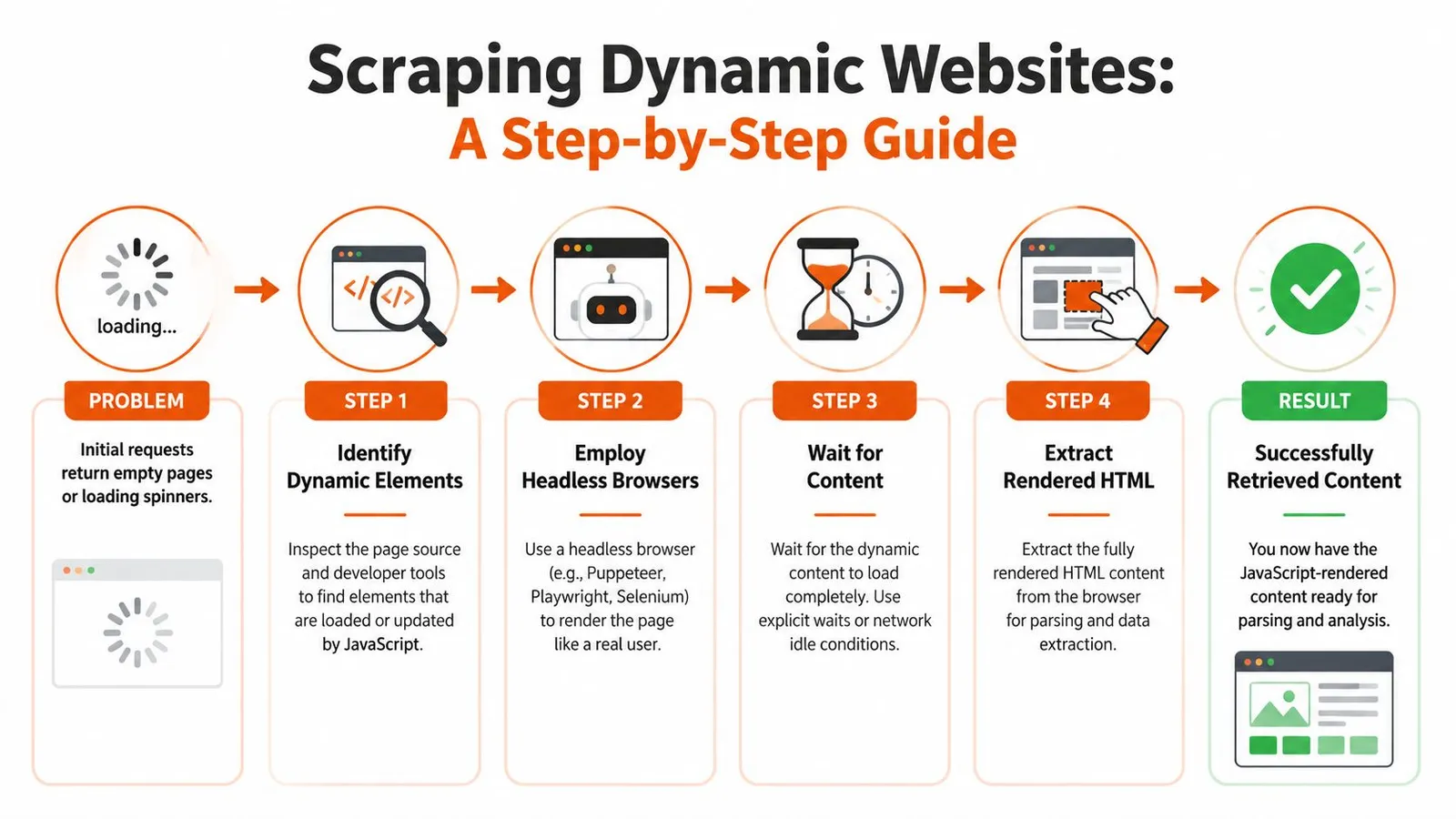
The reliable workflow is simple:
- Open the page in a real browser context
- Wait for a signal tied to actual data
- Read from the rendered DOM, or intercept the underlying API response
Step two decides whether the scraper is stable or flaky. Waiting for load or networkidle helps sometimes, but neither guarantees the specific table, price block, or review list is ready. SPAs often keep background requests open, lazy-load sections on scroll, or replace placeholders after the main page event fires.
A Playwright pattern that actually works
Playwright is a good default because its locator model maps well to how modern pages behave, and its auto-waiting reduces a lot of timing bugs.
from playwright.sync_api import sync_playwright

with sync_playwright() as p:
    browser = p.chromium.launch(headless=True)
    page = browser.new_page()

    page.goto("https://quotes.toscrape.com/scroll")

    page.wait_for_selector(".quote")

    quotes = page.locator(".quote")
    for quote in quotes.all():
        text = quote.locator(".text").text_content().strip()
        author = quote.locator(".author").text_content().strip()
        print({"text": text, "author": author})

    browser.close()
That pattern works because it waits on the element that proves the content exists.
A few rules save a lot of wasted debugging time:
- Wait for evidence, not for page chrome. A price cell, product card, or review row is meaningful.
bodyis not. - Prefer stable attributes over build-generated classes.
data-testid, ARIA labels, and semantic structure usually survive deploys longer than hashed class names. - Develop in headed mode first. Watch the page scroll, click, expand, and fail. Headless mode hides useful clues.
- Capture the network tab when a page feels inconsistent. If the browser fetches clean JSON, scraping the API is often cheaper than parsing the DOM.
That last point matters more now because many teams scrape for downstream LLM use, not just CSV exports. Raw rendered HTML is expensive to clean and noisy to send into a model. If you can capture the structured payload behind the page, you get cleaner fields, lower token use, and fewer hallucination-inducing scraps of template text.
If you're deciding between browser stacks, this comparison of Playwright vs Puppeteer for web scraping is a useful reference, especially if debugging workflow and selector ergonomics matter.
Before you keep reading, this video gives a practical browser-automation walkthrough:
What usually breaks dynamic scrapers
The failures are usually mundane.
- The scraper reads the DOM before the data arrives.
- The page needs interaction. Scroll, click, hover, dismiss a modal, switch a tab.
- The target content lives inside an iframe or shadow DOM.
- The selector matches a placeholder skeleton instead of the final content.
- The visible page is hydrated from an API your scraper never inspected.
The fix is to tie extraction to the page's real behavior. I usually inspect three things before writing any parser: which request returns the data, what user action triggers it, and what DOM change proves it finished. That discipline beats adding random sleeps.
Browser automation costs more CPU, more memory, and more engineering care than plain HTTP. It also gets you correct data from pages that static scrapers will never read properly. On mixed targets, the practical setup is a hybrid one. Use lightweight requests for pages that return usable HTML. Escalate to Playwright only where rendering or interaction is required.
Navigating Anti-Scraping and IP Blocks
A scraper can render the page correctly and still get shut out by the access layer. That is the part older Python tutorials usually skip. In 2026, many failures come from traffic scoring, fingerprint checks, session anomalies, and soft blocks that return HTML without returning the data you wanted.
Anti-bot systems rarely rely on one signal. They correlate request rate, IP reputation, cookie continuity, TLS and header fingerprints, geolocation consistency, and whether a browser session behaves like an actual user journey. A simple requests loop from one IP works on low-friction sites. It fails fast on consumer platforms, search-heavy properties, and anything that has spent the last few years training on scraper traffic.
Why brute force burns good infrastructure
Before changing parsers, inspect the response. The site may be serving challenge pages, degraded responses, or partial payloads. Sending more requests from the same blocked setup can make access problems worse.
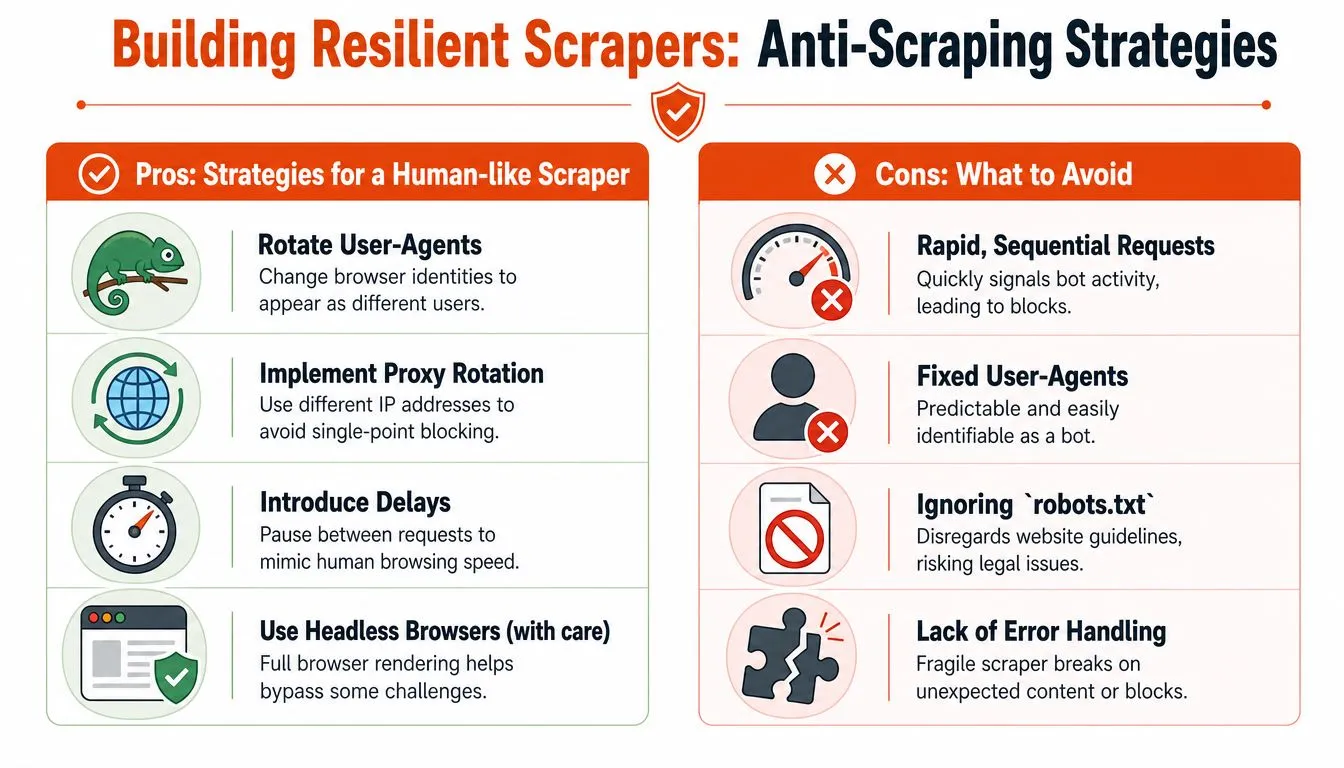
That changes how the scraper should be designed. Rate limits, retries, proxy rotation, session handling, and fingerprint consistency belong in the first version, not as cleanup work after production starts dropping rows.
The minimum hardening that actually helps
For plain HTTP scraping, the baseline is boring but effective:
- Throttle on purpose: Add jitter between requests and cap concurrency per domain. Fixed intervals are easy to fingerprint.
- Retry selectively: Retry transient failures and throttling responses. Do not blindly replay every
403. - Rotate IPs by target type: Datacenter IPs are cheaper and often good enough for low-defense sites. Residential pools fit tougher public targets where reputation matters more. If you're comparing options, this guide to a residential backconnect proxy is a practical reference.
- Keep sessions coherent: Cookies,
Accept-Language, user agent, timezone, and geo should make sense together. - Detect block pages, not just status codes: A
200 OKcan still be a CAPTCHA, interstitial, or empty shell.
Here is a basic retry sketch for plain HTTP work:
import requests
from requests.adapters import HTTPAdapter
from urllib3.util.retry import Retry

session = requests.Session()

retry = Retry(
    total=5,
    backoff_factor=2,
    status_forcelist=[403, 429, 500, 502, 503, 504],
    allowed_methods=["GET"]
)

adapter = HTTPAdapter(max_retries=retry)
session.mount("http://", adapter)
session.mount("https://", adapter)

response = session.get(
    "https://example.com",
    headers={"User-Agent": "Mozilla/5.0"},
    timeout=30
)
That example is a starting point, not a production policy. On defended targets, retries need circuit breakers, per-domain budgets, and content validation. Otherwise the scraper politely retries its way into a larger block.
Soft blocks are the expensive failure mode
Hard failures are obvious. Soft failures cost more because they look successful in logs. The request returns 200, the HTML parses, and your pipeline keeps running while product pages lose prices, search pages return fewer results, or article pages swap real content for consent walls.
Log more than status codes:
| Signal | Why it matters |
|---|---|
| Response time | Sudden latency spikes often mean throttling, challenge checks, or upstream queueing |
| Error rate | Clusters of 403s and 429s usually mean the current fingerprint is burned |
| Content shape | Missing key nodes, shorter bodies, or repeated templates often signal block pages |
| Completion rate | Partial extraction exposes business impact faster than raw request totals |
I also track hash changes on known-good pages and alert on unexpected template drift. That catches challenge pages earlier than waiting for the parser to fail.
Platform scraping needs tighter controls
High-friction platforms care about account safety, behavior patterns, and session trust far more than basic blogs or ecommerce catalogs. LinkedIn is a good example. If the job involves that surface area, this guide on how to safely scrape data from LinkedIn is worth reading because it treats access strategy as part of the scraper, not as an afterthought.
This matters even more if the output feeds LLM pipelines. Dirty capture from challenge pages, consent flows, or truncated responses creates noisy datasets and wastes tokens downstream. Clean extraction starts with reliable access. If the fetch layer is contaminated, every later cleanup step gets harder and more expensive.
The practical goal is simple. Use the lightest setup that returns stable, complete data, and treat anti-bot handling as an engineering constraint, not a bag of tricks.
Beyond Raw Data LLM-Friendly Extraction with an API
Getting HTML is not the same as getting useful content. That gap matters more now because a lot of scraping output goes straight into retrieval, summarization, classification, and agent pipelines.
Dirty web data can hurt retrieval and model output. Cleanup can reduce token use, but aggressive compression may remove facts; measure both token reduction and fact retention on your corpus.
Why clean content matters more than raw capture
Most traditional scraping tutorials stop too early. They show you how to fetch a page and extract nodes. They don't deal with what happens next when that content becomes model input.
Typical raw HTML problems:
- Boilerplate dominates the payload: Navigation, repeated menus, and legal text crowd out the page's actual meaning.
- Token waste gets expensive: The model burns context on irrelevant page chrome.
- Structured extraction gets brittle: If you pass noisy content into downstream parsing, everything gets harder.
A professional workflow for AI-facing scraping usually wants one of these outputs:
- Clean markdown for retrieval and summarization
- Typed JSON for extraction tasks
- Plain text when layout doesn't matter
- Crawled site content with duplication and boilerplate removed
What an API-first approach changes
When a project needs JavaScript rendering, anti-bot handling, and clean AI-ready output at the same time, many teams stop hand-assembling every layer. They use an extraction API and keep Python focused on orchestration.
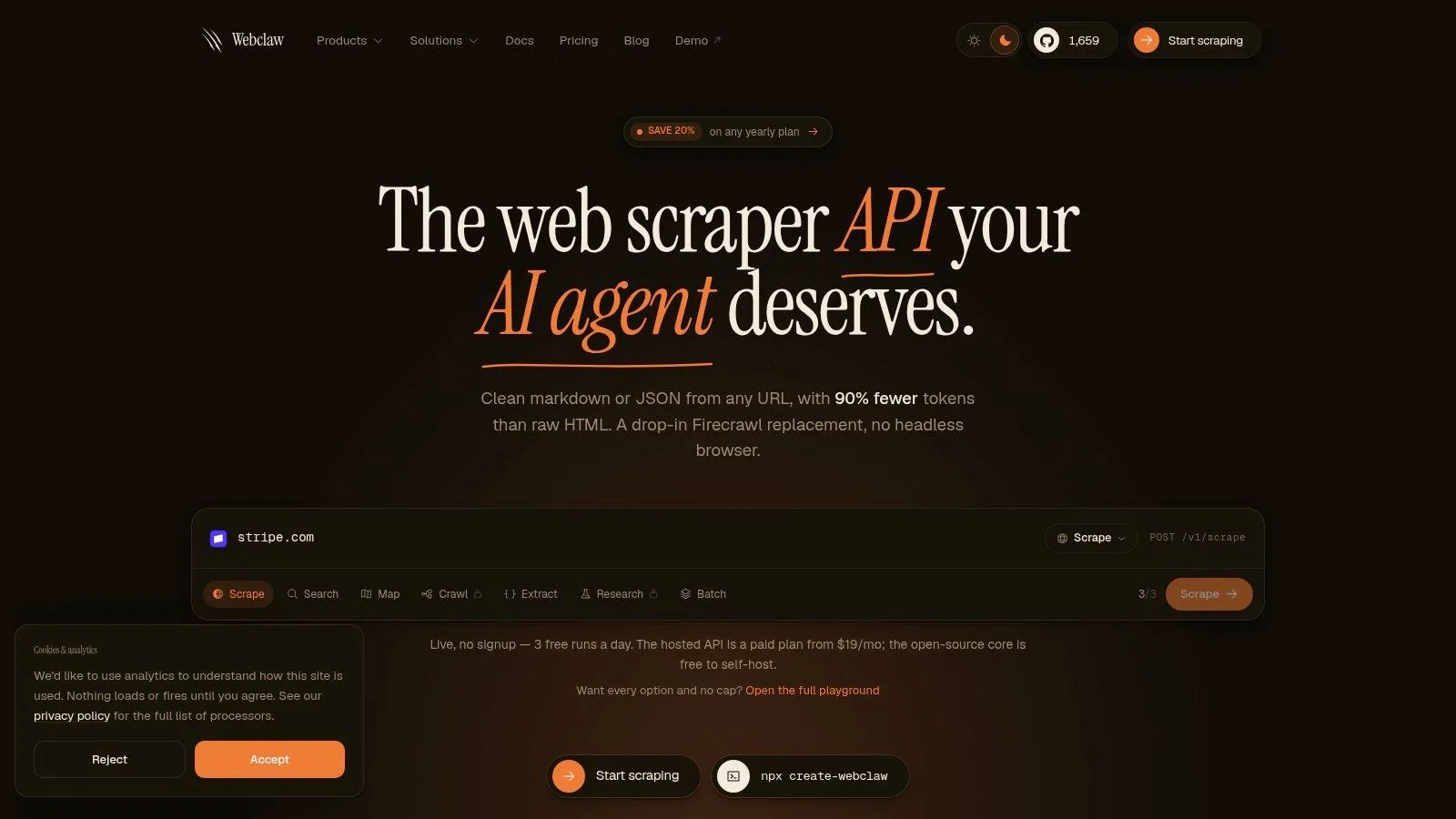
One option is Webclaw's API for LLM-oriented scraping. Its role is different from BeautifulSoup or Playwright. Instead of just fetching the page, it handles rendering and hard-site access, then returns cleaner markdown or structured JSON that is meant for model consumption rather than raw pipeline storage.
That changes the trade-off:
| Need | Hand-built stack | API-first stack |
|---|---|---|
| Full control over parsing | Strong | Medium |
| Fast setup for difficult sites | Weak | Strong |
| Clean AI-ready output by default | Weak | Strong |
| Maintenance burden | High | Lower |
This isn't about replacing Python. It's still web scraping in Python. You're just moving the brittle parts out of your codebase when they stop being worth owning.
If your real target is "give my model the page's meaning," not "I want the original HTML at all costs," then cleaner extraction is often the more important win.
Choosing the Right Python Scraping Approach
There's no single correct stack. There is only the stack that matches the site, the scale, and how much maintenance you want to own.
Use requests and BeautifulSoup when the page is static, the selectors are stable, and speed matters more than browser realism. This is still the fastest way to get from URL to structured data on cooperative sites.
Use Playwright or Selenium when the page is client-rendered, interaction-driven, or impossible to parse from the initial response. Browser automation is heavier, but it solves a different class of problem. That's often the price of accuracy.
Use an API-first approach when the project has one or more of these traits:
- Mixed hard targets: Some pages need rendering, others need anti-bot handling, and some need clean post-processing.
- AI-facing output: You care more about token-efficient context than raw markup.
- Maintenance fatigue: Your team is spending too much time on fingerprints, retries, waits, and proxy orchestration.
If you're building agent workflows around scraping, tools like the Flaex.ai webscraping server are also worth looking at because they push extraction into an MCP-compatible service layer, which can simplify tool use inside AI systems.
The practical decision is simple. Stay low-level when the target is easy and control matters. Move up the stack when the target mix gets hostile or the output needs to be model-ready from the start.
If you're tired of stitching together browser automation, proxy handling, and post-cleaning just to get usable page content, Webclaw is a straightforward option to test. It lets Python workflows scrape URLs into clean markdown or JSON, with JavaScript rendering and hard-site access handled upstream.