
Amazon Scrape API: A Guide to Building Reliable Pipelines
You probably started with a simple scraper. A requests call, a few selectors, maybe BeautifulSoup or Playwright. It worked on a couple of product pages. Then Amazon changed the response shape, the page came back half-empty, pricing stopped matching what users saw, or your requests started landing on CAPTCHA screens.
That's the point where Amazon scraping stops being a parsing problem and becomes a systems problem.
A production-grade Amazon scrape API setup isn't just about getting HTML or even structured JSON. It's about building a pipeline that can fetch the right regional page, render what Amazon serves to browsers, survive anti-bot friction, and produce output clean enough for downstream analytics or LLM workflows. If you're feeding raw Amazon pages into a model, you're also paying for a lot of junk you never wanted.
Why Scraping Amazon in 2026 Is a Hard Problem
The common failure mode is boring. Your script returns a 200 response, but the content is wrong. The title is missing, price selectors don't exist, and the HTML looks like a shell instead of a real product page. A day later, the same script gets challenged, throttled, or blocked completely.
That happens because Amazon isn't a static target. It's a massive marketplace with over 1.7 million third-party sellers and 300 million active products globally as of 2024, which forces scraping systems to operate at marketplace scale and handle real-time changes in pricing, availability, and reviews data, as noted in Scrapingdog's overview of Amazon scraping APIs. If your data is even slightly stale, your downstream logic can make the wrong decision.
Why simple scripts fail fast
The first problem is rendering. Naive HTTP fetchers often fail on JavaScript-rendered pages and return incomplete or empty responses. That's a known pitfall in Amazon scraping, especially when the page depends on client-side execution before key content appears.
The second problem is anti-bot enforcement. A generic stack that only rotates IPs won't hold up for long. Amazon can block inconsistent sessions, detect bad request patterns, and force CAPTCHA or challenge flows when requests don't behave like normal browser traffic.
Practical rule: If your system depends on raw requests plus ad hoc proxy rotation, assume it will fail under production load.
Regional variation makes this worse. Price, stock, seller offers, and shipping context can depend on storefront and delivery location. If your scraper doesn't preserve that context, you can easily collect data that looks valid but doesn't match what a buyer in that market sees. For a good grounding in why Amazon pricing shifts so often, Market Edge's Amazon pricing guide is useful background.
A lot of teams try to patch this with bigger proxy pools. That helps, but only as one layer. The transport layer, browser behavior, session flow, and geo-targeting all matter. If you want a concise breakdown of how residential rotation fits into that stack, this piece on residential backconnect proxies is worth reading.
Why scale makes everything worse
Amazon data decays quickly. Product positions move. Deals expire. Inventory flips. Seller offers change. That means a working scraper isn't enough. You need a system that can keep collecting fresh data continuously without spending your engineering time on block recovery.
Specialized APIs exist because they package the ugly parts into one managed layer. The hard work is not the GET request. The hard work is rendering, retries, CAPTCHA handling, regional routing, and returning something your application can use immediately.
Most Amazon failures don't come from bad parsing logic. They come from fetching the wrong page, at the wrong location, with the wrong session state.
Architecting Your Amazon Scraping Pipeline
A reliable Amazon pipeline is simpler when each part has one job. Keep your business logic in your app, delegate retrieval and anti-bot handling to a scraping API, and store normalized output in a data layer built for reprocessing.
A clean separation of concerns
Use a three-part architecture:
- Application logic handles scheduling, target generation, deduplication, and downstream decisions.
- Scraping API handles the hard retrieval layer, including proxy routing, rendering, retries, and challenge mitigation.
- Storage layer keeps raw responses, normalized fields, and any LLM-ready derivative outputs.
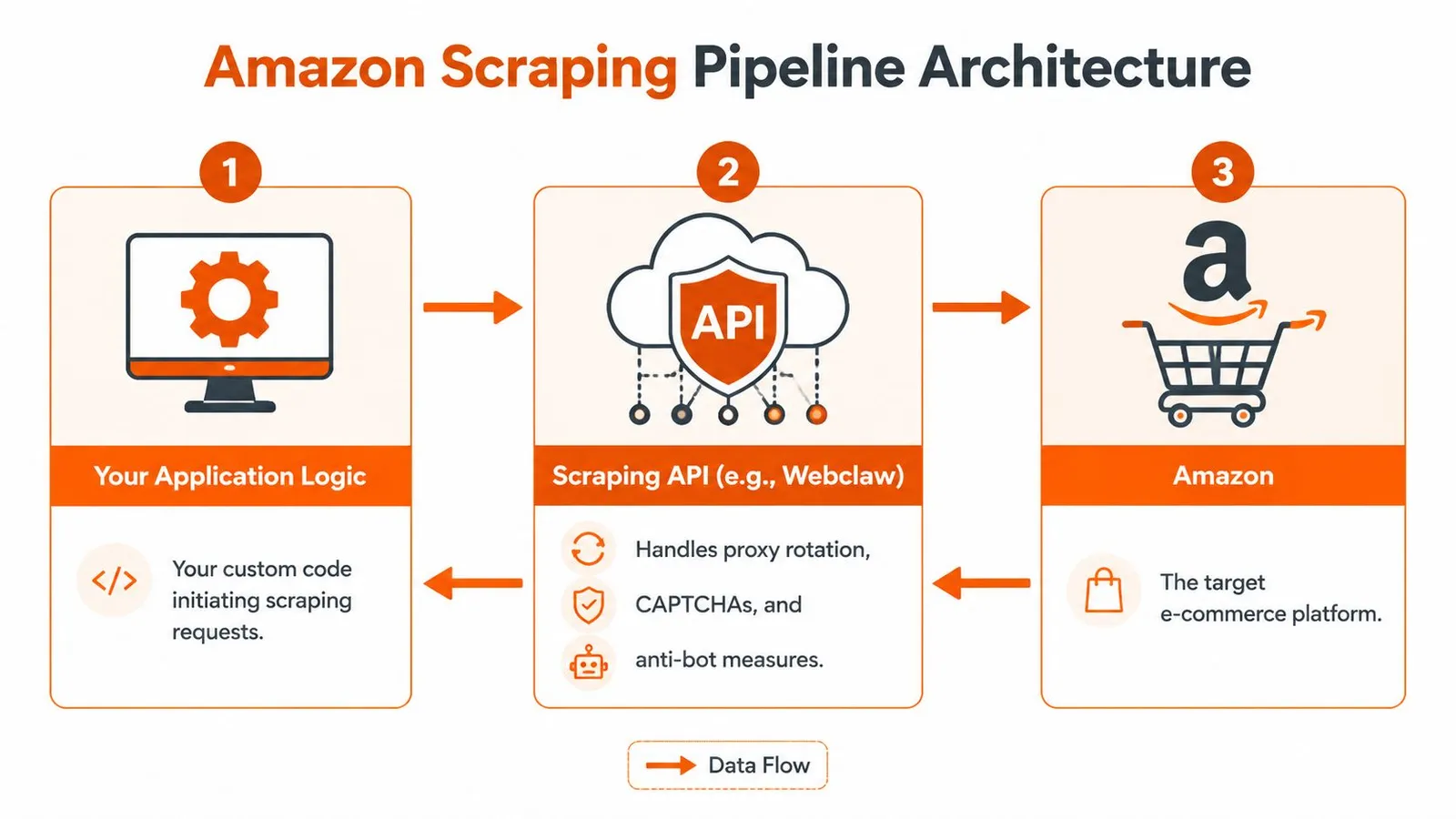
This separation matters because your application shouldn't know how to beat Amazon's front end. It should know what products to fetch, when to refresh them, and what to do with the results. That's the difference between a tool you can maintain and a scraper you're constantly babysitting.
For teams designing broader ingestion workflows, NanoPIM's writeup on optimizing data flows for eCommerce is a useful companion read. The core lesson carries over cleanly to scraping systems. Keep extraction, transformation, and consumption loosely coupled.
A practical request flow
The strongest API designs expose dedicated endpoints instead of one generic fetch primitive. According to Pangolinfo's discussion of Amazon scraper APIs, the most capable APIs support Bearer token authentication and official SDKs for Python, TypeScript, and Go, and APIs with dedicated endpoints for product pages, search results, and seller offers outperform generic scrapers.
That pattern is exactly what you want in production. A product-detail request shouldn't look like a search request. Seller offers shouldn't be parsed from the same shape as a listing page. Different page types have different volatility and failure modes.
A simple flow looks like this:
| Layer | Responsibility | Failure if omitted |
|---|---|---|
| App | Chooses ASINs, keywords, marketplaces, cadence | Duplicate work, stale jobs |
| Scraping API | Fetches rendered, geo-correct page data | Blocks, empty pages, CAPTCHA loops |
| Store | Preserves normalized and reusable output | No audit trail, hard reprocessing |
If you expect large refresh runs, build around batches rather than one request at a time. This overview of batch processing maps well to Amazon jobs where you refresh thousands of ASINs or search pages on a schedule.
A minimal Python example
The retrieval layer should feel boring from your side. That's the point.
Here's a minimal Python pattern using a Bearer token and a typed request payload:
import requests

API_TOKEN = "YOUR_TOKEN"

resp = requests.post(
    "https://api.webclaw.io/v1/scrape",
    headers={"Authorization": f"Bearer {API_TOKEN}"},
    json={
        "url": "https://www.amazon.com/dp/B0EXAMPLE",
        "formats": ["json", "markdown"]
    },
    timeout=60
)

resp.raise_for_status()
data = resp.json()

print(data)
That example is intentionally plain. Your code should stay focused on targets and outputs. The retrieval service should absorb the mechanics of browser rendering and anti-bot friction.
The right abstraction is the one that removes scraper maintenance from the application code, not the one that gives you the most knobs.
Navigating Amazon Defenses with an API
Amazon blocks brittle clients in several different ways. You don't solve that with one trick. You solve it with a coordinated stack that handles location, rendering, and session behavior together.
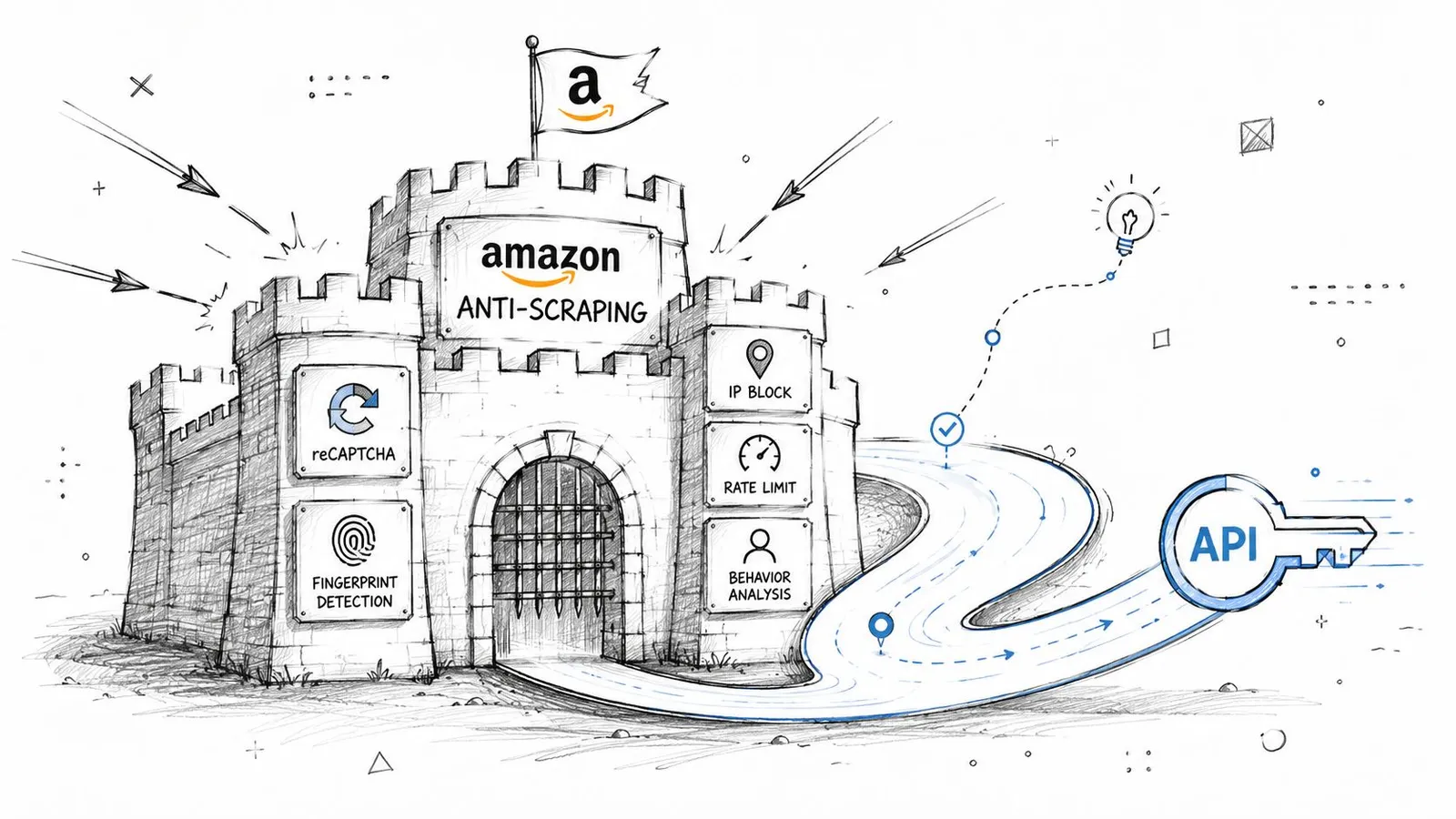
Proxy type changes the result
Amazon scraping depends heavily on geo-targeting through residential, ISP, and datacenter proxies, which advanced APIs use to access localized marketplace data across storefronts like amazon.com, amazon.co.uk, and amazon.de, as described in SerpApi's Amazon product scraping tutorial.
That matters because proxy choice isn't only about getting through. It changes what you see.
- Residential proxies are useful when you need pages that look like normal consumer traffic and when localized results matter.
- ISP proxies can be a good middle ground for stable sessions that still resemble consumer connectivity.
- Datacenter proxies can work for lighter tasks, but they're more likely to produce generic or challenged responses on harder pages.
If your workload includes marketplace comparisons, seller offers, or location-sensitive stock checks, use the proxy tier that matches the target behavior. Don't treat all page fetches as equivalent.
For teams comparing API-based approaches with retail automation patterns, Zinc's explainer to explore Amazon API on Zinc is useful context because it highlights how much operational complexity sits between a request and a meaningful Amazon result.
Rendering matters because Amazon doesn't always ship complete HTML
A basic GET request often isn't enough. Common Amazon scraping failures include inconsistent handling of JavaScript-rendered content, and naive fetchers can return empty responses when they don't execute the page properly.
That's why capable APIs render JavaScript and return structured data instead of forcing you to reconstruct the page state yourself. When you need a concrete fetch interface, a managed endpoint like Webclaw's scrape API gives you one way to request rendered output directly.
A browser-backed retrieval layer is doing more than opening a page. It's managing timing, executing scripts, preserving a believable environment, and waiting for the right content to stabilize before extraction.
Here's a useful visual primer before going deeper:
Session consistency beats random retries
The hardest failures are intermittent. A request works, then the next one fails, then a retry works from a different IP but returns the wrong regional page. That's usually not a parser problem. It's a session coherence problem.
The better systems keep request identity consistent across related fetches. That includes coherent headers, stable fingerprinting, cookie continuity when needed, and the right delivery-location parameters. Pangolinfo notes that failure to implement delivery ZIP code parameters leads to generic pricing rather than location-accurate values. That's a frequent mistake in non-specialized scrapers.
Random retries can reduce failure counts. They can also increase bad data if each retry lands in a different context.
When you debug Amazon scraping, always ask two questions before you touch selectors: did I fetch the right page, and did I fetch it in the right market context?
Extracting Data from Search Pages and Product ASINs
A common failure mode looks like this: the search scraper collects titles and prices, but skips stable identifiers. Two weeks later, the ranking layout changes, sponsored blocks shift organic positions, and the team can no longer tell whether a product drop is real or just a matching error. Search scraping without identifier capture creates noisy data fast.
Amazon collection usually splits into two pipelines. One pipeline discovers products from search results. The other refreshes known products by ASIN. Keep them separate, because they fail differently, scale differently, and produce different kinds of data for downstream systems.
Search pages are discovery endpoints
Search result pages are for coverage, not truth. They tell you which products appeared for a query, in what order, under which marketplace and query parameters. They are a discovery layer.
The main artifact to extract from search is the ASIN. Amazon uses ASINs as product identifiers, and in practice they are the key you use to revisit the same item across refresh cycles, ranking checks, and enrichment jobs. Titles, prices, badges, and review snippets are still useful, but they are secondary if your goal is a pipeline that stays stable after the page layout changes.
A search workflow that holds up in production usually does four things:
- Submit the query with explicit marketplace context.
- Paginate with a stored page number or cursor so runs are reproducible.
- Capture ASINs as early as possible instead of tying product identity to page position.
- Store rank position with the ASIN when visibility tracking matters.
If you want to define extraction rules at the API layer instead of maintaining page-specific parsers, a structured field extraction endpoint for Amazon pages can return the fields you care about directly.
Search pages also need more context than many teams store on the first pass. Query text, applied filters, sort order, marketplace, zip code context, sponsored status, and scrape timestamp all affect interpretation later. If you plan to feed this data into an LLM workflow, that metadata matters because it explains why two near-identical products appeared in different positions or why the same ASIN showed a different price in separate runs.
ASIN lookups are the stable core
Once you have ASINs, product-detail fetching becomes the durable part of the pipeline. Search pages are good at discovery. Product pages are where you build the record you trust.
For each ASIN, collect the fields that support both operational use and later normalization:
| Field | Why it matters |
|---|---|
| ASIN | Stable key for joins and refreshes |
| Title | Human-readable product identity |
| Price | Core signal for monitoring |
| Rating and review summary | Buyer trust signal |
| Bullet points and specs | Product understanding and categorization |
| Best Sellers Rank | Competitive context |
| Seller offers | Availability and merchant landscape |
That table is the minimum useful shape. In practice, the hard part is not getting one successful response. It is getting the same field set consistently across variants, seller states, mobile and desktop templates, and partial page loads.
For LLM-facing systems, raw capture is not enough. Bullet points often contain duplicated marketing text. Specs may be split across tables, expandable modules, and image captions. Offer sections can mix the featured merchant with secondary sellers and warehouse deals. If you pass that output downstream without cleanup, the model has to infer structure from noisy fragments, which raises token cost and lowers answer quality.
What to request and what to store
Storage design decides how expensive future fixes will be.
Store three layers:
- Canonical identifiers such as ASIN, marketplace, parent or child variation context, and scrape timestamp.
- Normalized product fields such as title, current price, rating summary, category path, and seller state.
- Raw or semi-raw payloads kept for audit, parser repair, and reprocessing into cleaner LLM-ready documents.
If you only keep final parsed fields, extractor bugs become permanent history. There is no clean way to rebuild past records when you later discover that a price parser grabbed a coupon string or merged two specification blocks.
Keep the search discovery job independent from the ASIN refresh job as well. Search tells you what appeared for a query and where it ranked at that moment. ASIN refresh tells you what the product page says now. Separating those concerns makes retries cleaner, deduplication simpler, and downstream data easier to trust.
Structuring Output for Humans and LLMs
A lot of Amazon tooling stops at “we return JSON.” That's useful, but it's not the end of the problem. For AI workflows, the output format determines both cost and accuracy.
JSON is necessary but not sufficient
The baseline requirement is structured JSON with fields already parsed. That's better than shipping raw HTML and hoping downstream code can infer price, title, rating, and offers from changing selectors.
The gap is what happens after that. According to Nimbleway's review of Amazon scraping APIs, most APIs still return structured JSON or raw HTML without stripping navigation, ads, and boilerplate, even though 90% of raw Amazon HTML is noise and 7 of 9 top Amazon scraper APIs reviewed in 2026 lacked LLM-specific output formats.

That's the hidden cost often overlooked. Your model doesn't care about top-nav links, cookie banners, ad modules, carousel clutter, or duplicated footer text. But if you feed raw page output into RAG or summarization pipelines, you still pay to process it.
Why LLM-ready output changes the economics
A good LLM-ready Amazon document should preserve meaning, not markup. It should keep the product title, seller context, core specs, bullet points, visible pricing, review summary, and other meaningful sections. It should discard boilerplate.
Here's the practical comparison:
| Output type | Good for | Main problem |
|---|---|---|
| Raw HTML | Archival debugging | Huge noise load |
| Structured JSON | Analytics and app logic | Often too verbose for direct model input |
| LLM-ready markdown or minimal text | RAG, summarization, agents | Requires deliberate cleaning at extraction time |
This matters even if you already have JSON. Verbose JSON often contains nested fragments, duplicate content, irrelevant UI labels, and residual page chrome. That still hurts retrieval quality.
A useful supporting read here is Webclaw's comparison of CSV vs JSON, especially if your team is deciding what belongs in analytics storage versus model-facing context.
Clean output is not a convenience feature for AI systems. It's part of the model quality stack.
A practical output split
For Amazon pipelines, keep two parallel outputs:
- Operational JSON for machines. Use it for pricing monitors, dashboards, and joins.
- LLM-ready text or markdown for retrieval and summarization. Keep only the content a model should reason over.
A practical shape for LLM-ready output might include:
- Product identity with title, brand, and ASIN
- Pricing block with visible price and availability notes
- Feature bullets with duplicates removed
- Review summary with rating context
- Seller section for merchant and fulfillment clues
- Specification section in readable key-value form
If you skip this cleanup stage, you'll spend the difference elsewhere. Usually in prompt engineering, post-processing, and debugging hallucinated answers caused by noisy context.
Building Production-Ready Scraping Systems
Once the fetches work, the actual work starts. Production scraping is operations, not heroics.
Operational rules that prevent fragile pipelines
The basics matter more than cleverness:
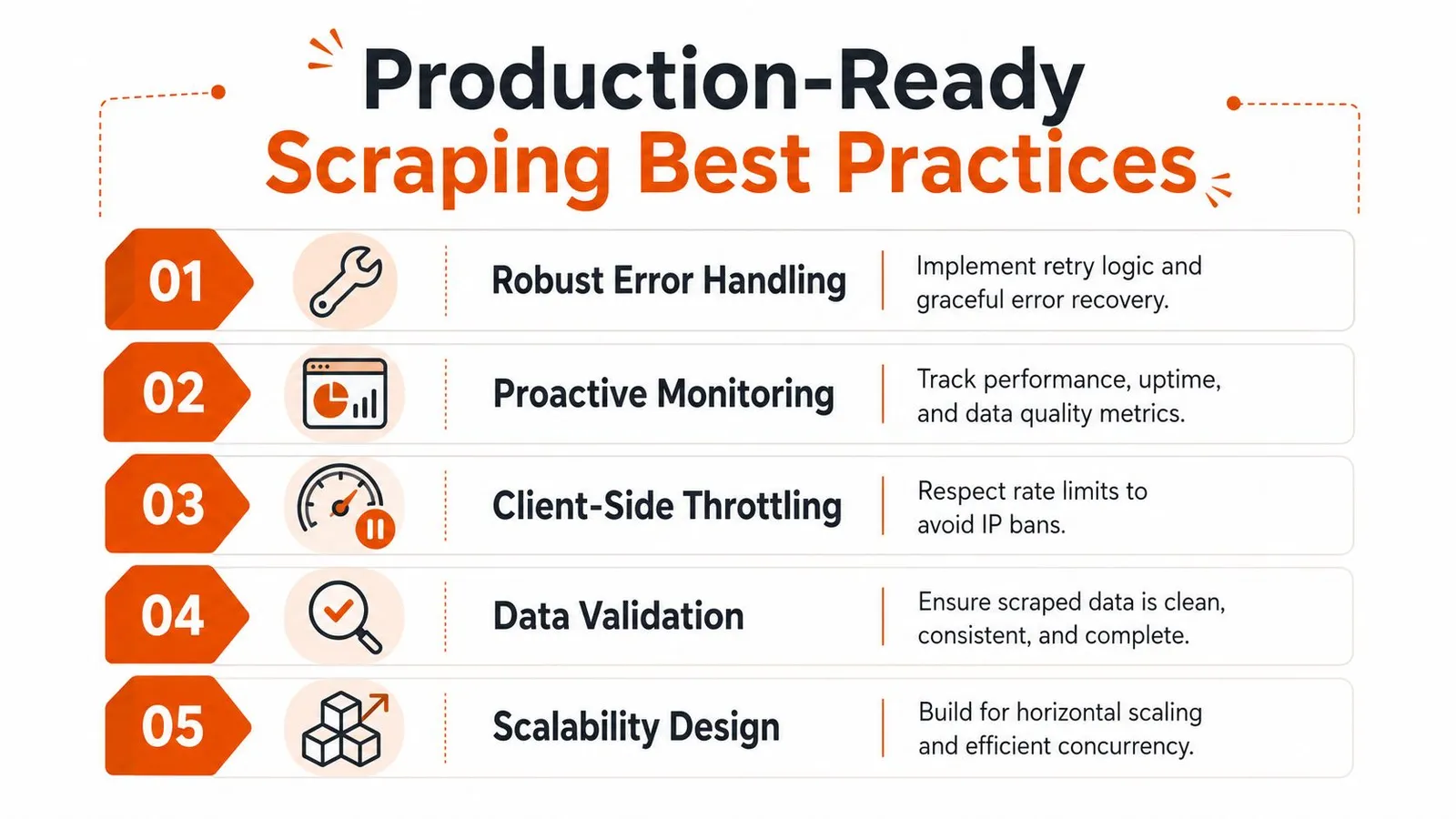
- Throttle on the client side: Respect provider rate limits and spread work across queues instead of firing uncontrolled bursts.
- Retry with intent: Use bounded retries and exponential backoff. Don't blindly retry context-sensitive failures that may return different regional results.
- Validate payloads: Check for missing ASINs, empty titles, generic pricing, or obviously incomplete responses before data lands in your warehouse.
- Log enough context: Store marketplace, delivery context, endpoint type, response class, and parse status. Otherwise you won't be able to explain bad data later.
- Design for reprocessing: Keep inputs and intermediate outputs so you can rerun extraction logic without recollecting everything.
Monitoring should focus on correctness, not just uptime. A request that returns the wrong region or a generic fallback page is a bad result even if the HTTP status looks fine.
Healthy scraping systems watch data quality signals, not just response codes.
The legal and ethical line
Scraping public product data is one thing. Crossing into login-protected, personal, or clearly restricted content is another. Keep your collection limited to publicly accessible pages, and involve legal review if your use case carries real commercial or compliance risk.
Terms of service, robots directives, jurisdiction, and business risk all matter. So does basic restraint. Don't hit pages harder than your workflow needs. Don't collect data you can't justify. Don't assume technical access equals operational permission.
A resilient Amazon scrape API setup is really an abstraction choice. You either own rendering, proxies, blocking, session control, normalization, and AI cleanup yourself, or you delegate parts of that stack and concentrate on the data product you're trying to build.
If you're building Amazon data pipelines for analytics, RAG, or agent workflows, Webclaw is one option for handling the retrieval and cleanup layer. It supports rendered extraction, structured outputs, and LLM-oriented formats so you can spend more time on downstream logic and less time fighting blocked pages and noisy HTML.