R Programming Web Scraping: The 2026 Practical Guide
You're probably in one of two situations right now. Either you have an R workflow that's already solid for cleaning, modeling, and plotting data, and you just need to pull source material from the web. Or you tried a few rvest examples, they worked on a demo page, and then your real target returned empty nodes, partial text, or a login wall.
That gap frustrates a lot of people because the problem usually isn't R. The problem is that most web pages worth scraping today aren't simple server-rendered HTML anymore. They're JavaScript-heavy applications, they load content after the first request, and they often push back against automated access.
R programming web scraping still works well. But it only works well when you choose the right approach for the site in front of you. On static pages, rvest is still excellent. On dynamic pages, you need browser automation or an API. For production pipelines, especially anything feeding analytics systems or LAG and RAG workflows, reliability matters more than elegance.
Why Scrape with R and What Breaks Most Scripts
You pull a page into Chrome, see the prices, reviews, and stock status, then run read_html() in R and get a page full of empty containers. That mismatch is the failure that trips up a lot of otherwise solid scraping code.
R is still a strong choice for web scraping when the goal is more than raw extraction. It keeps collection, cleaning, analysis, and model prep in one place. If the end product is a tibble, a report, a feature table, or text prepared for an LLM pipeline, staying in R cuts handoffs and keeps the workflow easier to audit.
That is why rvest remains useful. For static pages, it is fast, readable, and easy to combine with dplyr, stringr, purrr, and tidyr. The problem is not that rvest is weak. The problem is that many tutorials still teach a version of the web where the first HTML response contains the data you want.
Modern sites often render key content in the browser with JavaScript, fetch records through background API calls, or gate access behind login flows and bot checks. In those cases, rvest is often the wrong first tool, even if your CSS selectors are correct.
What usually goes wrong
The most common failure mode is simple. The browser shows data that never appears in the raw HTML returned to R.
rvest only parses what the server sends in that initial response. If the page fills in product cards, article bodies, or search results after JavaScript runs, you will see symptoms like these:
- Empty selector results because the target nodes are missing from the initial document
- Placeholder content only because R captured the loading shell rather than the final page state
- Pagination failures because the site loads the next batch through an XHR request or scroll event instead of a normal link
- Debugging confusion because DevTools shows the rendered DOM, while
read_html()sees the original server response
A quick check saves time. If the content appears in the browser but not in View Page Source, treat the page as dynamic until proven otherwise.
The bigger workflow mistake is starting with selectors before diagnosing the delivery method. For each target, decide whether you are dealing with static HTML, client-rendered content, authenticated pages, or an API hiding behind the front end. That decision determines the tool. Use rvest for static HTML. Step up to RSelenium or another browser automation tool when the page depends on JavaScript interactions. Skip both and call the API directly when the network panel shows clean JSON responses. For teams building repeatable collection jobs, especially for scraping websites for data into downstream analytics or LLM systems, that decision point matters more than any individual selector trick.
Basic R scraping works well. It just breaks fast when the site is modern, stateful, or actively defensive.
Scraping Static HTML with rvest and the Tidyverse
A good static page can save hours. You fetch the HTML once, parse predictable nodes, and move straight into cleaning data instead of debugging a browser session.
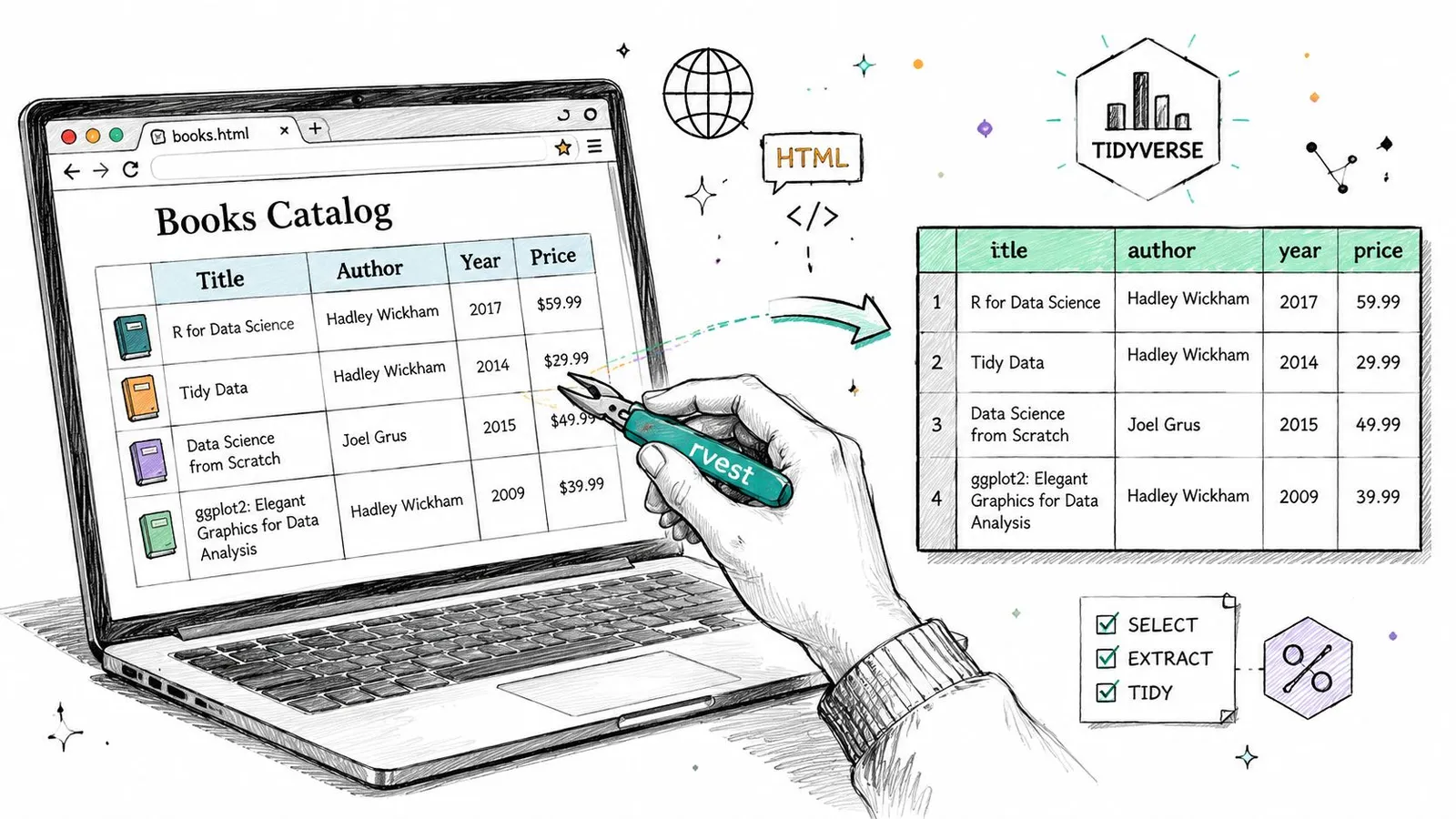
rvest works best when the server returns the actual content in the initial response. Product listings, archive pages, documentation tables, press release indexes, and many blog pages still fit that pattern. In those cases, R gives you a fast workflow from request to tibble with very little ceremony.
The core rvest workflow
The usual pattern is simple:
read_html()fetches and parses the pagehtml_elements()targets nodes with CSS selectors or XPathhtml_text()orhtml_attr()extracts the values you need
That simplicity is the main reason rvest remains useful. For static HTML, it is often the fastest path from page to structured dataset, especially when the next step is analysis in dplyr, feature generation, or content preparation for an LLM pipeline.
A practical static page example
Here's the kind of pattern I use for list pages that expose titles, links, and short metadata in plain HTML:
library(rvest)
library(dplyr)
library(stringr)
library(tibble)

url <- "https://example.com/articles"

page <- read_html(url)

titles <- page |>
  html_elements(".article-card .title") |>
  html_text(trim = TRUE)

links <- page |>
  html_elements(".article-card .title a") |>
  html_attr("href")

summaries <- page |>
  html_elements(".article-card .summary") |>
  html_text(trim = TRUE) |>
  str_squish()

articles <- tibble(
  title = titles,
  link = links,
  summary = summaries
) |>
  mutate(
    link = if_else(str_detect(link, "^http"), link, paste0("https://example.com", link))
  )

articles
This pattern holds up well when the HTML is regular and the page template is stable. The output is already in a shape you can filter, join, deduplicate, or push into a downstream storage layer.
A few habits make static scraping less fragile:
- Normalize text early with
str_squish()so whitespace noise does not break joins, clustering, or prompt construction later. - Extract text and attributes separately because visible labels and URLs often live on different nodes.
- Check lengths before building a tibble so you catch missing cards, sponsored blocks, or lazy-loaded fragments that throw columns out of alignment.
- Resolve relative URLs immediately because broken links are easy to miss until much later in the pipeline.
Selector work matters here. I use browser DevTools first, then a visual helper when the page is straightforward. In practice, SelectorGadget often cuts the time needed to get to a working CSS selector, but treat that as a convenience estimate, not a benchmark. It is helpful for quick extraction jobs, though I still verify selectors against the raw HTML because autogenerated choices can be too broad or depend on brittle class names.
One trade-off is easy to miss. rvest feels clean enough that teams keep using it after the page has outgrown it. For static HTML, that instinct is correct. For JavaScript-heavy sites, it leads to partial datasets and false confidence. The right move is to use rvest aggressively where it fits, then stop forcing it onto pages that only become complete after scripts run.
If your goal is not just extraction but creating cleaner text artifacts for retrieval, labeling, or prompt input, this guide to converting scraped HTML into Markdown for downstream processing is a practical next step.
When rvest Fails Tackling JavaScript with RSelenium
You load a product page in Chrome, see 60 listings, then run read_html() and get six empty nodes plus a lot of layout markup. That is the normal failure mode on modern sites. rvest fetches the server response. It does not wait for JavaScript to populate the page, trigger a search request, expand a lazy list, or click away a modal before the actual content appears.
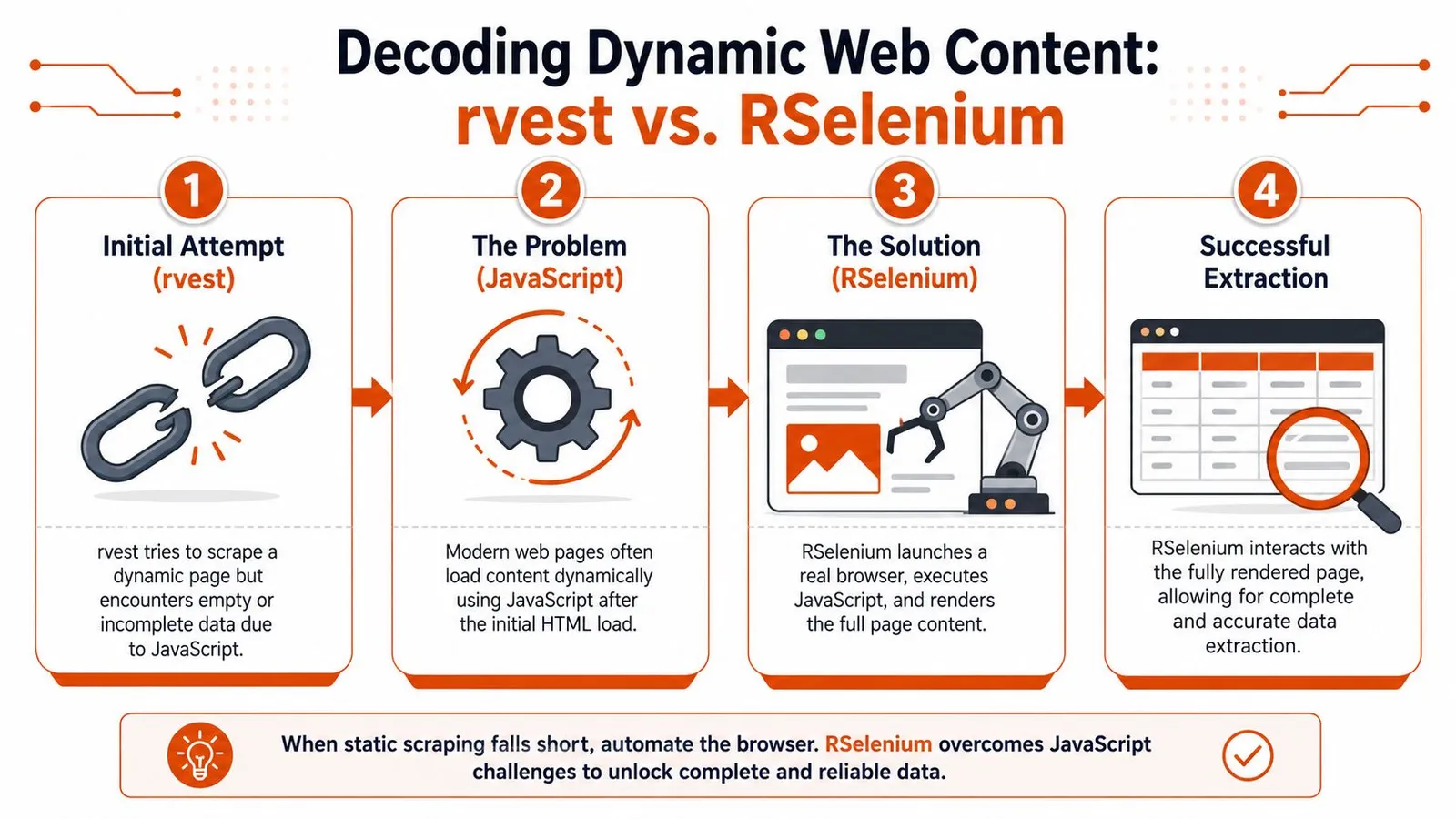
That difference matters more now than it did a few years ago. Many high-value targets are React, Vue, or Next.js apps that ship a thin HTML shell and fill it in through API calls after load. On those pages, forcing rvest to work usually produces partial data, inconsistent row counts, and a false sense that the scraper is stable because it returns something.
The practical decision is simple. Use rvest if the first response already contains the records you need. Switch to browser automation when the page must render, scroll, click, or submit input before the data exists in the DOM. If your end goal is an LLM pipeline, this decision matters early because incomplete extraction creates poor text chunks, missing metadata, and retrieval noise later.
How to confirm JavaScript is the problem
Before adding Selenium, verify that the content is client-rendered. I usually check a few concrete signals:
- View Source vs Elements panel. If the data appears in DevTools after render but not in the raw page source, the browser is building the page after load.
- Network requests after the initial document. XHR or fetch calls that return JSON often reveal where the actual data comes from.
- User actions that trigger content. Filters, pagination buttons, infinite scroll, and tab clicks often drive requests that
rvestnever performs on its own. - Loading states. Skeleton cards, spinner components, and placeholder text usually mean the first HTML response is incomplete.
One extra check saves time. Open the Network tab and inspect the API calls directly. If the page requests clean JSON from an endpoint you can access legitimately, skip Selenium and call the API from R instead. Browser automation should be the fallback, not the default.
A repeatable RSelenium setup
For R users, RSelenium is the standard escalation path. It is slower and heavier than rvest, but it gives you a real browser session that can render JavaScript and interact with the page. The useful pattern is not replacing rvest. It is combining them. Let Selenium render the page, then pass the resulting HTML back into rvest for parsing.
library(RSelenium)
library(rvest)
library(dplyr)
library(stringr)

rD <- rsDriver(
  browser = "chrome",
  chromever = NULL,
  verbose = FALSE
)

remDr <- rD$client
remDr$navigate("https://example.com/products")

Sys.sleep(4)

page_source <- remDr$getPageSource()[[1]]
page <- read_html(page_source)

products <- page |>
  html_elements(".product-card .name") |>
  html_text(trim = TRUE)

prices <- page |>
  html_elements(".product-card .price") |>
  html_text(trim = TRUE) |>
  str_squish()

tibble(product = products, price = prices)
That workflow holds up well for medium-complexity jobs. You still write selectors in the tidy style, but you stop depending on the initial server response. The trade-off is maintenance. Browser sessions break more often, need waits, and consume more memory. They are also much slower at scale than direct HTTP requests or clean API access.
If you are comparing browser automation stacks more broadly, this comparison of Playwright and Puppeteer for browser automation is a useful reference point. In practice, many teams outgrow Selenium for larger scraping systems and move toward Playwright-based tooling or a dedicated scraping API. In R, though, RSelenium is still a practical bridge when rvest stops being enough.
A short demo can help if you haven't worked with browser automation from R before:
Handling infinite scroll
Infinite scroll breaks a lot of otherwise decent scrapers because the page looks populated before most records are loaded. A browser session lets you trigger the same scroll events a user would.
library(RSelenium)

remDr$navigate("https://example.com/feed")
Sys.sleep(3)

last_height <- 0

for (i in 1:10) {
  remDr$executeScript("window.scrollTo(0, document.body.scrollHeight);")
  Sys.sleep(2)

  new_height <- remDr$executeScript("return document.body.scrollHeight;")[[1]]

  if (identical(new_height, last_height)) {
    break
  }

  last_height <- new_height
}
This pattern works, but it is still the simple version. Some sites load more results only after a button click. Others virtualize the list and remove older nodes from the DOM as you scroll, which means getPageSource() can miss records unless you extract data during the interaction loop. For long feeds, I often capture each batch as it appears instead of waiting until the very end.
Decision rule: Use
rvestwhen the first HTML response contains the data. Escalate toRSeleniumwhen the page must be rendered or interacted with before the data exists.
That is the core workflow in R scraping today. Start with plain HTTP and rvest. Check for a direct API. Use RSelenium when the browser is part of the data path. If the target is large, heavily defended, or central to a production LLM pipeline, that is usually the point where a dedicated scraping service becomes easier to maintain than a growing pile of browser scripts.
Navigating Logins and Anti-Scraping Defenses
A scraper can render JavaScript correctly and still fail the moment it hits authentication, rate limits, or bot checks. That is the part many R guides gloss over. In practice, this is often where a quick rvest script stops being a data pipeline and starts becoming an operations problem.
Login walls are the simplest example. If your account is permitted to access the data, RSelenium can replay the same form submission a user performs in the browser.
library(RSelenium)

remDr$navigate("https://example.com/login")
Sys.sleep(2)

email_el <- remDr$findElement(using = "css selector", "#email")
password_el <- remDr$findElement(using = "css selector", "#password")
submit_el <- remDr$findElement(using = "css selector", "button[type='submit']")

email_el$sendKeysToElement(list("your_email@example.com"))
password_el$sendKeysToElement(list("your_password"))
submit_el$clickElement()

Sys.sleep(4)
After login, the browser keeps the authenticated session cookies, local storage, and request context that the site expects. That is useful for member dashboards, research portals, and publisher archives. It is also brittle. A minor UI change, an added consent screen, or a one-time passcode step can break the flow overnight.
Store credentials in environment variables, not in the script. Plan for session expiry. Expect selectors to drift. If the target uses SSO, CAPTCHA, device verification, or frequent MFA prompts, browser automation may be too fragile for scheduled jobs. At that point, the better option is often an official API, exported data feed, or a managed scraping service that handles session state and browser identity more reliably.
Blocking usually starts before a hard ban. You see intermittent 403s, empty responses, truncated HTML, or pages that load fine manually but fail in a loop. Those failures are rarely random. The site is responding to request frequency, header patterns, cookie state, IP reputation, or browser fingerprints.
Start with the controls you can justify and maintain.
- Respect
robots.txtwhere it applies to your use case and the site's terms. - Reduce request speed so the host sees a human pace instead of a tight polling loop.
- Send realistic headers so requests do not look like a default library call.
- Retry selectively on transient failures instead of repeating the same blocked pattern.
- Log status codes and page snapshots so you can tell the difference between parsing bugs and active blocking.
With httr, you can set request headers more explicitly:
library(httr)

resp <- GET(
  "https://example.com/page",
  add_headers(
    "User-Agent" = "Mozilla/5.0",
    "Accept-Language" = "en-US,en;q=0.9"
  )
)
That will not get past serious anti-bot systems by itself, but it removes one easy signal. Timing matters too:
Sys.sleep(runif(1, min = 2, max = 5))
For small jobs, that level of care is often enough. For high-value targets, it usually is not. Modern defenses look at TLS signatures, browser APIs, canvas and WebGL fingerprints, interaction timing, IP rotation patterns, and whether your browser session behaves like a real device. If you are evaluating that class of problem, this overview of an undetectable browser setup for anti-bot detection is a useful reference point.
The trade-off is straightforward. rvest and direct HTTP requests are easier to debug and cheaper to run. RSelenium gets you through login flows and rendered pages, but maintenance costs rise fast. If the scraper feeds a production LLM pipeline and uptime matters, repeated break-fix work in browser scripts is often a sign to switch to an API or a dedicated scraping platform.
Cleaning and Structuring Data for Analysis and LLMs
Extraction is only half the job. Raw scraped output is usually messy enough to hurt analysis quality if you pass it straight through.
Navigation labels, duplicated links, cookie text, formatting artifacts, and irregular whitespace all inflate the dataset without adding meaning. In ordinary analysis work, that creates noisy categories and brittle joins. In LLM pipelines, it wastes context and makes retrieval less precise.
Turn raw extraction into tidy data
A practical cleanup pass in R usually combines stringr, dplyr, and a bit of domain judgment.
library(dplyr)
library(stringr)
library(tidyr)

cleaned <- raw_results |>
  mutate(
    title = str_squish(title),
    body = str_squish(body),
    body = str_remove_all(body, "Read more|Share this article|Cookie Policy"),
    date = str_squish(date)
  ) |>
  filter(!is.na(title), title != "") |>
  distinct(link, .keep_all = TRUE)
That kind of pipeline does more than make the data pretty. It defines the unit of analysis. Are you storing one row per article, per product, per forum post, or per content block? If you don't decide that early, your downstream work gets inconsistent fast.

A simple comparison helps frame the output choices:
Data Output Comparison
| Output Type | Example | Use Case Fitness |
|---|---|---|
| Raw HTML | Full page source with scripts, navigation, and markup | Useful for debugging and DOM inspection. Poor for direct analysis |
| Clean text | Main article or product text with whitespace normalized | Good for search indexing, text mining, and lightweight NLP |
| Structured table | Tibble with fields like title, date, author, body, URL | Best for analysis, dashboards, and joins |
| Markdown | Clean content with headings and links preserved | Strong fit for knowledge bases and document ingestion |
| JSON schema output | Explicit fields such as title, price, rating, description | Best when downstream systems expect consistent structure |
Why raw HTML is bad LLM input
For LLM use cases, raw HTML is often the wrong artifact. It contains too much boilerplate and too little hierarchy that the model can use cleanly.
The most common failure patterns are easy to spot:
- Token waste from menus, footers, cookie banners, and repeated link blocks
- Weak retrieval chunks because the text includes irrelevant fragments
- Schema drift when every page type gets dumped into the same unstructured field
- Lower answer quality because the model sees too much noise around the facts you wanted
If you're building retrieval or agent workflows, the output format matters as much as the extraction itself. This guide on web scraping for LlamaIndex workflows is a good reference for thinking about web data as model input rather than just text to store.
Scaling Your Scraper and Ethical Best Practices
A scraper that behaves well on 20 pages can fail badly at 20,000. The failure usually is not parsing. It is volume, retries, duplicate work, session churn, and target sites deciding your traffic is no longer welcome.
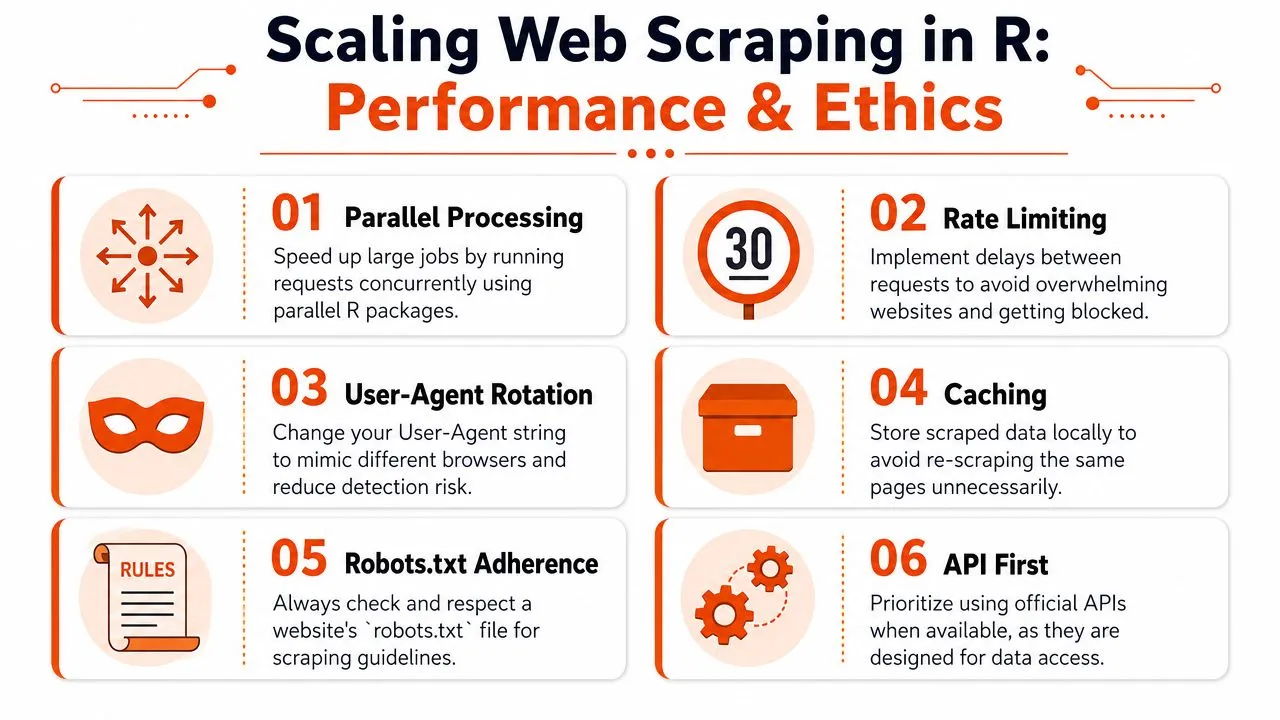
In R, the first instinct is often to add concurrency. That can help for static HTML, but it is only one part of scaling. If each worker retries aggressively, ignores caching, and requests pages faster than a human could reasonably browse them, parallelism just turns a small scraper into a noisy one.
Parallelize carefully
For static pages, parallel requests can improve throughput a lot. In R, future and furrr are practical choices when you want to fan out URL fetches and keep the code readable.
library(furrr)
library(purrr)
library(rvest)

plan(multisession)

urls <- c(
  "https://example.com/page1",
  "https://example.com/page2",
  "https://example.com/page3"
)

results <- future_map(urls, \(u) {
  page <- read_html(u)
  page |>
    html_elements("h1") |>
    html_text(trim = TRUE)
})
That pattern is a good fit for modest jobs on stable, server-rendered pages. It is a poor fit for browser automation. RSelenium sessions are heavier, slower to start, and harder to run in parallel without exhausting memory or drawing more anti-bot scrutiny. On modern JavaScript-heavy sites, scaling often means reducing wasted browser work before adding more workers.
Useful habits include batching URLs by page type, reusing sessions where possible, storing raw responses for debugging, and separating fetch failures from parse failures. Those choices make reruns cheaper and incident handling much easier.
Build for durability and restraint
Production scrapers need controls from day one.
- Use
politefor permissions checks so your scraper respects published crawling guidance. - Add backoff logic after transient failures instead of retrying instantly.
- Cache completed fetches so reruns do not request the same pages again.
- Identify your client clearly when the use case calls for transparency.
- Prefer official APIs when the site provides one. They are usually more stable than scraping the front end.
- Set stop conditions for repeated 403s, 429s, or login failures so the scraper backs off instead of escalating the problem.
A compact retry wrapper can improve reliability without adding much complexity:
safe_read_html <- function(url, max_attempts = 3) {
  for (attempt in seq_len(max_attempts)) {
    out <- tryCatch(read_html(url), error = function(e) NULL)
    if (!is.null(out)) return(out)
    Sys.sleep(attempt * 2)
  }
  NULL
}
Caching matters as much as retries. If you are collecting content for analytics or LLM pipelines, repeated fetches add cost and create version drift. Saving the raw HTML, response metadata, and extraction timestamp gives you a reproducible record when the page changes later.
Choose the right scaling path
There is a practical decision point that many R scraping tutorials skip. If rvest can fetch and parse the page cleanly, use it. It is faster, cheaper, and easier to maintain. If the content depends on JavaScript, authenticated flows, or API calls made after page load, forcing rvest to keep up usually wastes time.
At that point, move to one of two options. Use RSelenium when you need true browser behavior such as clicking, scrolling, waiting for client-side rendering, or stepping through a login flow. Use an API or managed scraping service when the main problem is reliable collection at scale, not browser interaction itself. That trade-off matters for LLM ingestion work, where consistency, metadata, and clean failure handling usually matter more than hand-built browser scripts.
A fast scraper that burns through rate limits, creates duplicate records, and breaks every time the front end changes is not a production system. A slower scraper with caching, backoff, audit logs, and a clear escalation path usually wins over time.
Ethical scraping and durable scraping are closely related. Respectful request pacing reduces bans. Caching reduces unnecessary load. API-first choices reduce maintenance and legal risk. Good scraping hygiene is not separate from engineering quality. It is part of it.
FAQ R Programming Web Scraping
Is R or Python better for web scraping
For R programming web scraping, R is excellent when your extraction step sits close to analysis, reporting, or statistical workflows. rvest is clean, expressive, and easy to combine with the Tidyverse.
Python still has the broader scraping ecosystem, especially for browser automation and production crawler tooling. If your work centers on large scraping systems first and analysis second, Python is often the easier operational choice. If your team already lives in R, it usually makes more sense to keep static and moderately complex scraping there and only escalate when the site forces you to.
Why does my scraper return empty content even though I can see the page in my browser
The page is probably rendered client-side. Your browser runs JavaScript and builds the visible content after the initial load. A plain rvest request only sees the initial HTML response.
That's the point where you should inspect the source, check network activity, and decide whether to switch to RSelenium or use an API that renders the page for you.
Can R handle CAPTCHAs
Not in any simple, reliable way through basic scraping code alone. CAPTCHAs are designed to interrupt automation.
If a target uses them heavily, the practical options are usually to use an official API, reduce the behaviors that trigger blocking, or move the extraction problem to a service built to handle harder sites. Treat CAPTCHAs as a product and access problem, not a selector problem.
How do I avoid getting my IP banned
Slow down, respect the site's rules, avoid naive request bursts, and make your client behavior look deliberate rather than mechanical. Use retries with backoff, cache results, and don't parallelize blindly.
Most bans come from poor operational hygiene, not from the fact that a request came from R.
If your R workflow keeps running into JavaScript-heavy pages, anti-bot defenses, or noisy output that's bad for model pipelines, Webclaw is worth a look. It's built for turning hard-to-scrape URLs into clean, token-efficient content that's ready for analysis, retrieval, and AI applications.