MCP Servers Explained: How They Work and When to Use Them
You're in the middle of a normal workday, and the agent on your screen is already hitting the same wall every team hits. It can read a repo, but it can't query your database cleanly. It can fetch a web page, but the output is noisy. It can call a tool, but only after you wire up another custom adapter, another auth path, and another brittle integration that breaks the next time your model provider changes its format.
That mess is exactly where MCP servers became useful. The protocol gives agents a standard way to discover capabilities and call them without every integration becoming a one-off project. In practice, that means the same tool can be reused across clients like Claude, Cursor, and self-hosted agents, instead of being rewritten for each environment.
The Problem MCP Servers Actually Solve
A good way to understand the value of MCP servers is to watch an agent try to do real work. It needs to inspect a GitHub repo, query Postgres, and pull a live web page in the same turn. Without a shared protocol, each of those capabilities becomes a custom adapter, each adapter carries its own auth model, and each one breaks differently when you swap the model provider or the client.
That's the operational pain. The model doesn't care whether the tool came from a browser automation layer, a database connector, or a scraper. The developer does, because every new integration means more glue code, more permissions to audit, and more places where a production workflow can fail for reasons that have nothing to do with the task itself. For a practical example of how brittle web access can get outside a protocol layer, the crawler patterns in Webclaw's website crawler guide show why clean, reusable integration points matter.
A protocol layer, not a product
MCP is easiest to think of as a contract between a client and a capability provider. The server exposes what it can do, the client discovers those capabilities dynamically, and the agent calls what it needs without hard-coding every integration path. That's why the same server can be attached to different clients without rewriting the underlying capability.
Practical rule: if you keep copying the same tool wiring into new agent apps, you don't have an agent problem, you have an integration contract problem.
The official spec defines MCP servers as services that expose resources, prompts, and tools over JSON-RPC 2.0, with stateless, self-contained requests and per-request capability negotiation in the current specification. That combination is what makes tools portable. The client doesn't need to know everything upfront, and the server doesn't need to bake in assumptions about a single model provider.
Why portability matters in production
Portability sounds abstract until a team has to move from one desktop agent to another, or from a local workflow to a hosted one. At that point, the details of the integration become expensive. A server that speaks one standard protocol can move across clients with much less rewrite work than a pile of function-call wrappers.
That's why MCP is showing up as infrastructure rather than a feature. It standardizes how agents ask for capabilities, how those capabilities are described, and how the result comes back. The useful part isn't the acronym, it's the reduction in custom surface area.
The Three Primitives Inside Every MCP Server
An MCP server is built around three primitives, and each one maps cleanly to a different kind of agent need. Resources are read-only data the agent can fetch. Prompts are reusable templates the server exposes. Tools are callable functions the agent can invoke with arguments.
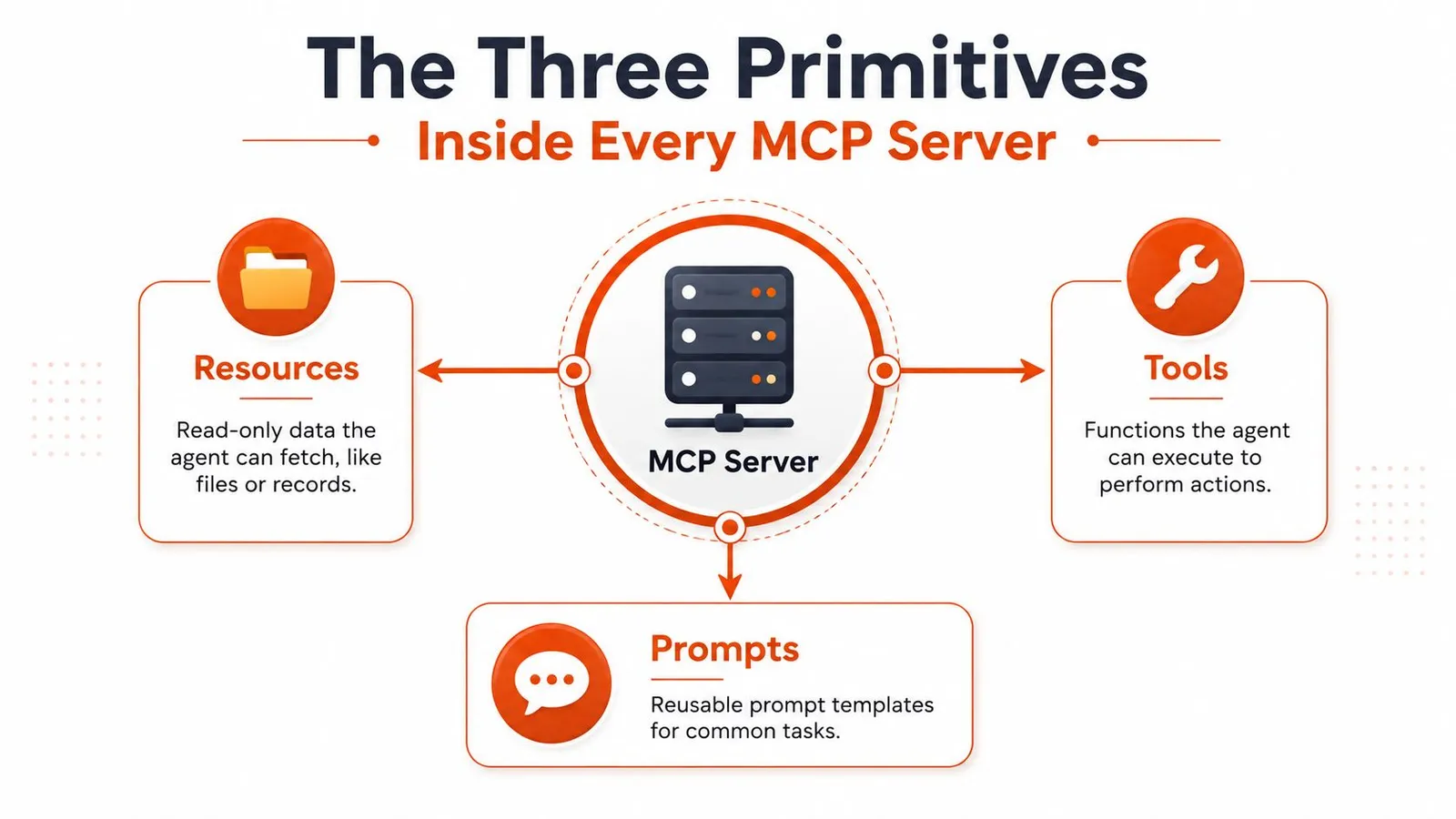
Think of resources like a library's reading room. The agent can inspect files, records, or documents, but it isn't supposed to mutate them. That makes resources a good fit for lookups, reference data, and context gathering when you want the model to read rather than act. The internal docs in Webclaw's MCP documentation fit this pattern well, because the server can expose structured access points without forcing the client to know the raw extraction mechanics.
Prompts and tools are not the same thing
Prompts are more like saved search templates. The server can hand the client a reusable instruction pattern for a common task, which keeps repetitive prompt engineering out of the application layer. That's useful when the workflow is stable but the inputs change.
Tools are different. They're the librarian who can fetch, file, or request an inter-library loan on demand. When the agent needs an action with arguments and side effects, a tool is the right primitive. A search tool, a database lookup, or a crawler all fit here because the server is doing work, not just returning text.
A server with too many tools stops feeling like a protocol and starts feeling like a junk drawer. In production, small tool surfaces are easier for the model to choose from and easier for humans to review.
How the wire format keeps things predictable
Under the hood, MCP uses JSON-RPC 2.0. That means every request carries its own method name and parameters, and the server replies with a result or an error. There's no hidden shared session state to corrupt, which keeps the interface simpler to reason about when multiple clients are talking to the same capability provider.
The other important piece is capability negotiation. During initialize, the server declares what it supports, so the client doesn't have to hard-code assumptions. If a server offers a resource today and a tool tomorrow, the client can discover that at runtime instead of shipping a brittle integration matrix.
If you can sketch the server on a napkin, you probably understand it well enough to ship it: a name, a list of resources, a list of prompts, a list of tools, and a transport.
Transport Choices and Why They Change Everything
The transport choice determines whether an MCP server is easy to operate or a constant source of friction in production. The spec supports stdio for same-machine process communication and Streamable HTTP for remote use, with optional Server-Sent Events streaming for live responses, plus authentication through bearer tokens, API keys, custom headers, and OAuth for token acquisition in the architecture docs.
The practical split is straightforward. stdio is for a client that launches the server as a child process and talks over standard input and output. Streamable HTTP is for a server that runs as a network service, possibly behind a proxy, with auth, logging, and shared access requirements that have to be handled up front.
stdio is local, fast, and easy to debug
With stdio, there is no network hop, no remote endpoint to secure, and no separate deployment target to manage. It inherits the local user's permissions, which makes it a good fit for a desktop agent calling local tools. It is also easier to debug because you can run the process in a terminal and inspect the exchange directly.
The trade-off is just as important. stdio does not cross machines. It does not support multi-client reuse, and it does not help when you want an agent in one environment to talk to a capability hosted somewhere else. For a single developer setup, that is fine. For a team, it often becomes a dead end.
Streamable HTTP is what makes sharing possible
Streamable HTTP adds reach. The server can sit on a machine or behind infrastructure that many clients can reach, and the operational model changes with it. You now have to think about auth, proxy behavior, request tracing, and how the service will be consumed by more than one agent.
| Dimension | stdio | Streamable HTTP |
|---|---|---|
| Deployment shape | Child process on the same machine | Remote service or shared endpoint |
| Latency profile | No network overhead | Network latency and proxy cost |
| Authentication | Inherits local user context | Explicit auth model required |
| Debugging | Terminal-friendly | Proxy and server logs |
| Sharing | Usually single-client | Built for multiple clients |
For browser-facing or remote extraction workflows, the trade-off is familiar. The same way a JavaScript-rendered page can force you toward a more capable fetch layer, a shared MCP deployment pushes you toward a transport that can handle the operating conditions. If you are building that kind of web access path, the fallback patterns in Webclaw's browser rendering article show why a remote-capable transport often matters more than it first appears. The same operational logic shows up in the Head of Agents use cases examples, where the server boundary has to survive client variation instead of a single local process.
The decision rule I use
If one developer on one machine is using the tool, stdio is the default. If the server will be shared, exposed to a network, or consumed by a hosted agent, Streamable HTTP is the right move. The moment you pick the remote transport, you also pick your observability model, because logs now belong in the proxy and the service layer instead of disappearing into a local process tree.
Real Use Cases That Justify an MCP Server
A useful MCP server solves a repeated job that benefits from a stable boundary, a small tool surface, and predictable output. Search, extraction, and read-only data access are the cases that usually hold up in production, because the agent needs a capability, not a full application.
Codebase search is the clearest example. Expose a tool like search_repo, pass a query such as "middleware", a path like src/, and maybe a file pattern. The server can run ripgrep or another index-backed search, return matched paths and line snippets, and let the agent decide what to inspect next. That keeps the model from dragging an entire repository into context just to answer a local question.
Web extraction follows the same pattern. A research agent can call a tool like fetch_clean_page, pass a URL, and get markdown back instead of raw HTML. That matters because the agent wants the article content, not cookie banners, navigation chrome, or script noise. For teams building retrieval pipelines, the RAG pipeline use case in Webclaw's examples is a practical shape to copy, fetch, clean, transform, then feed downstream.
The agent call flow should stay boring
The strongest MCP servers usually expose only a few tools. That keeps the surface area small, gives the model a short list to choose from, and avoids turning the prompt into a catalog. It also fits the pattern seen across many servers, which tend to stay narrowly scoped rather than becoming sprawling platforms as measured in the ecosystem analysis.
Operational rule: if you cannot describe the server in a sentence, you probably need another server, not more tools.
A database server is the third common case. Expose read-only SQL tools with row limits and timeout controls, and the agent can answer business questions without write access. A typical call might look like query_readonly, with a parameterized SQL string and a limit. The server runs it safely, returns rows, and the agent can summarize the result without holding direct credentials to the database.
The same design shows up in the Head of Agents use cases examples, where each agent task maps to a discrete tool instead of a large, generic interface. That pattern is the point. MCP makes the most sense when the capability is reusable, scoped, and naturally expressed as a small set of actions rather than one monolithic API response.
When MCP Servers Are the Wrong Tool
MCP is not the right answer every time. If you have a single API and a single consumer, MCP can be pure overhead. You add a server, JSON-RPC, capability negotiation, another deployment target, and another failure mode, only to call an endpoint you could have hit directly.
That critique deserves to be taken seriously. A recent public discussion argued that many MCP servers add latency and operational overhead without improving agent performance, and the broader ecosystem still looks early enough that a lot of servers are thin wrappers around existing APIs rather than mature production integrations in the critique linked here. That doesn't make the protocol bad. It means the default answer should be earned, not assumed.
Use direct API calls when the shape is simple
If the agent only needs to hit one endpoint once, a direct HTTP call or a function-calling wrapper is usually cleaner. You'll debug fewer layers, you'll expose fewer surfaces, and you won't spend time building a server whose only job is to forward a request. That's especially true when the action is deterministic and already well served by existing application code.
The point of MCP is not abstraction for its own sake. It's portability, discovery, and reuse. If none of those are buying you something concrete, the protocol is just extra ceremony.
When MCP starts paying for itself
MCP becomes worth it when the capability has to be reused across sessions, shared by multiple hosts, or exposed as a true tool with arguments and side effects. If the same action needs to be available to several agents, or if you need a stable contract across clients, a server earns its keep quickly. The moment you need scoped permissions, dynamic discovery, and a standardized call surface, the protocol starts doing real work.
Checklist: if the answer is “one consumer, one request, one endpoint,” skip MCP. If the answer is “shared capability, explicit permissions, repeated use,” build the server.
The practical rule is blunt. Direct API calls are better for narrow, local, one-off work. MCP is better when you're publishing a capability for agents, not just wiring a request for a single app.
Security and Exposure in the Wild
The uncomfortable part of MCP is that the convenience can hide a real attack surface. Independent security research found roughly 1,000 exposed MCP servers with no authorization in place in the BitSight report. That is enough to turn the topic from an architecture preference into an operational risk.
A public tool that accepts paths, queries, or URLs can be abused in predictable ways. A path argument can drift outside its intended directory. A URL fetcher can be pushed toward internal services. A tool that looks read-only on paper can still leak data if the agent is tricked into selecting it with the wrong parameters.
Effective defenses are boring and necessary
Authentication should be explicit, even for servers that start local-only. The bearer token authentication guide on Webclaw is a useful reference point because the deployment logic is the same. Decide who can call the server, what they can invoke, and how those calls are logged.
The authentication mechanism itself is only part of the job. Every tool should be scoped with allowlists for arguments and resources, and every call should be observable. If a server can touch sensitive data, treat it like a production service, not a convenience script.
That applies to partner-facing incidents too. The risk is not abstract once exposed data is in play, as shown by Craftrise account data exposed. A remote MCP server deserves the same review bar as any other deployed service that can reach customer data.
Exposure changes the trust model
MCP changes how trust flows through an agent. A tool description, a schema, or a resource name becomes part of the model's decision context. If the server is overly broad or publicly reachable, the blast radius grows quickly, especially when the agent can act autonomously.
A safe default is to assume any tool can be prompt-injected into doing the wrong thing unless you have constrained it otherwise.
That is why exposure matters as much as the code. A narrowly scoped server with tight inputs and visible logs is manageable. A broad server with weak auth and open-ended arguments turns a model mistake into an incident.
The lesson is simple. If a server will ever touch real data, review it like a production service, constrain it like a production service, and monitor it like a production service.
Choosing and Configuring an MCP Server
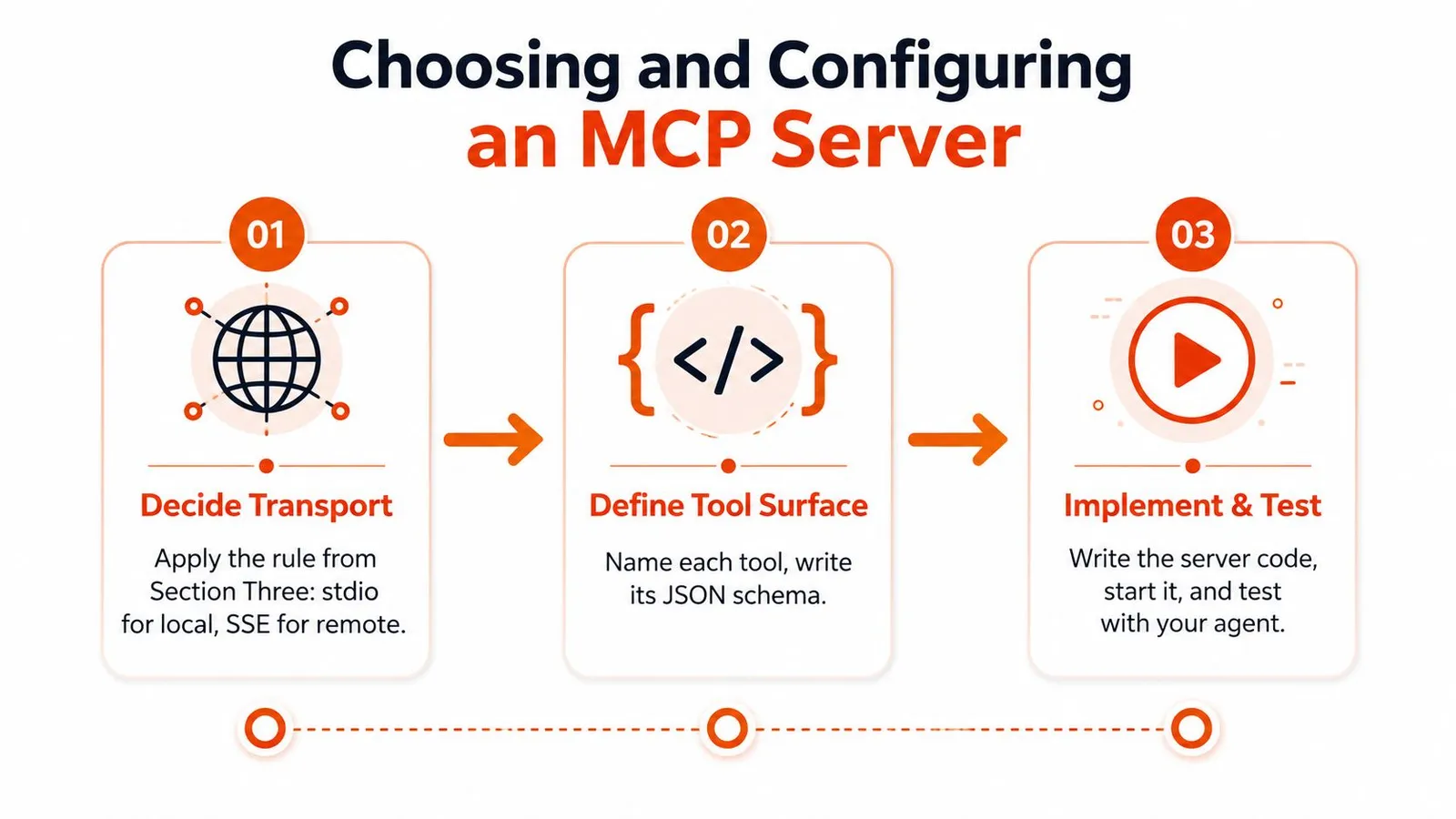
The fastest way to choose an MCP server is to start with transport, then force discipline on the tool surface. If the server is local and single-user, stdio usually wins. If it's shared or remote, choose Streamable HTTP and plan for authentication and logging from day one.
Step one is transport
Pick the transport before you write the server logic. That decision determines how the client connects, how the server is deployed, and where the logs will live. If you're building for a desktop agent, stdio keeps the setup simple. If the capability will be reused by more than one client, move straight to remote transport.
Step two is the tool surface
Name each tool clearly, write the JSON Schema carefully, and decide whether the tool is read-only or mutating. Keep the total count low, because tool sprawl hurts both the model's selection quality and your own ability to review what the server can do.
Step three is observability and test flow
Add structured logs for every request, metrics for tool latency, and traces that connect an agent turn to the tool calls it triggered. Then test the agent, not just the server. A server can be technically correct and still fail if the model chooses the wrong tool under context pressure.
For readers who want a concrete build path, the MCP server guide from Flaex.ai is a useful companion because it keeps the implementation steps grounded. If you want a hosted option instead of building everything yourself, the one Webclaw exposes as an MCP server is a practical example of a capability package that already bundles extraction, crawling, and structured page handling into a small surface area. That kind of packaged server is often easier to adopt than assembling the same workflow from scratch.
Practical rule: when a server starts growing beyond a handful of tools, split it before the model has to learn a mini platform.
The best rollout pattern is deliberate, not ambitious. Start with one capability, one transport, one auth model, and one observability path, then expand only when the agent proves it can use the server reliably.
The Short Version and a Decision Heuristic
Use an MCP server when the capability will be reused across agents or hosts, needs authentication and rate limiting, and has to be discovered dynamically instead of being hard-coded. If those conditions hold, MCP is the better primitive. If the capability is single-purpose, private to one app, or simpler to invoke directly, call the API and keep the stack smaller.
That matches how the ecosystem is evolving. Public server counts have grown quickly, and ecosystem trackers show broad adoption, but the field still skews toward small, narrowly scoped servers, with auth often handled inconsistently as the published ecosystem data shows. In practice, that means MCP is advancing faster than the operational habits around it, which is why transport choice, auth setup, and tool scoping matter so much.
Treat MCP servers as deployments, not dependencies. A server is a live surface area that can be exposed, rate-limited, misconfigured, or overextended. Keep the tool set tight, lock down auth, and measure what the agent does, because the protocol does not compensate for a sloppy design.
If the workflow is stable, narrow, and only used in one product, a plain API call is usually easier to maintain. If the workflow needs discovery, shared access, and policy controls across different agents, MCP is worth the extra operational work.