Bearer Token Authentication: 2026 Guide to Security
You're probably here because an API call that looked perfectly fine came back with 401 Unauthorized, and the error message told you almost nothing useful. The endpoint exists. The JSON body validates. Your network tab shows the request went out. But the server still won't talk to you.
In many organizations, that moment is when bearer token authentication stops being an abstract security term and becomes a delivery blocker. You don't need a lecture on auth theory. You need to know what the token represents, where it belongs in the request, how the server evaluates it, and why treating it as “user identity” can inadvertently lead to poor security choices.
That confusion is common because bearer tokens sit in the middle of authentication and authorization flows. A user or client often authenticates first to obtain a token, but the token itself usually functions as a credential for access. If you miss that distinction, you end up with APIs that appear protected while still making poor trust decisions.
Your First 401 Unauthorized Error
The usual first mistake is simple. The request doesn't include an Authorization header at all, or it includes the token without the Bearer prefix. The second mistake is subtler. The token is there, but it's expired, malformed, scoped incorrectly, or signed by something the API doesn't trust.
That's why bearer token authentication shows up everywhere from SaaS APIs to internal microservices. It gives the server a standard way to decide whether the caller may access a protected resource without creating a server-side session for every client. If you're wiring up a new integration, the fastest sanity check is often comparing your request against the provider's getting-started example, such as the Webclaw quickstart docs.
The thing the server is actually checking
A bearer token is a credential presented in an HTTP request. Under the IETF standard, whoever presents the token gets the associated access, which is why the term “bearer” matters. RFC 6750 standardized this scheme in 2012 and requires clients to use TLS (HTTPS) when transmitting tokens because sending them without transport security exposes them to attacks that can grant unintended access, as defined in RFC 6750.
That has a practical consequence developers sometimes miss. If your token leaks in transit, logs, or browser-exposed storage, an attacker doesn't need to crack anything. They can often just replay it.
Practical rule: If possession of the token is enough for access, treat token exposure the same way you'd treat credential exposure.
Why the error message feels unhelpful
A 401 usually means one of four things:
- Missing token: The request never included
Authorization: Bearer <token>. - Bad formatting: The header name or prefix is wrong.
- Failed validation: The API rejected the token's signature or claims.
- Expired token: The token was valid earlier and isn't valid now.
A lot of debugging time gets wasted on payloads and query params when the problem is the request headers. When an endpoint is protected, the header is often the whole story.
What a Bearer Token Is And Is Not
A bearer token is easier to understand if you stop thinking about login screens and start thinking about access passes.
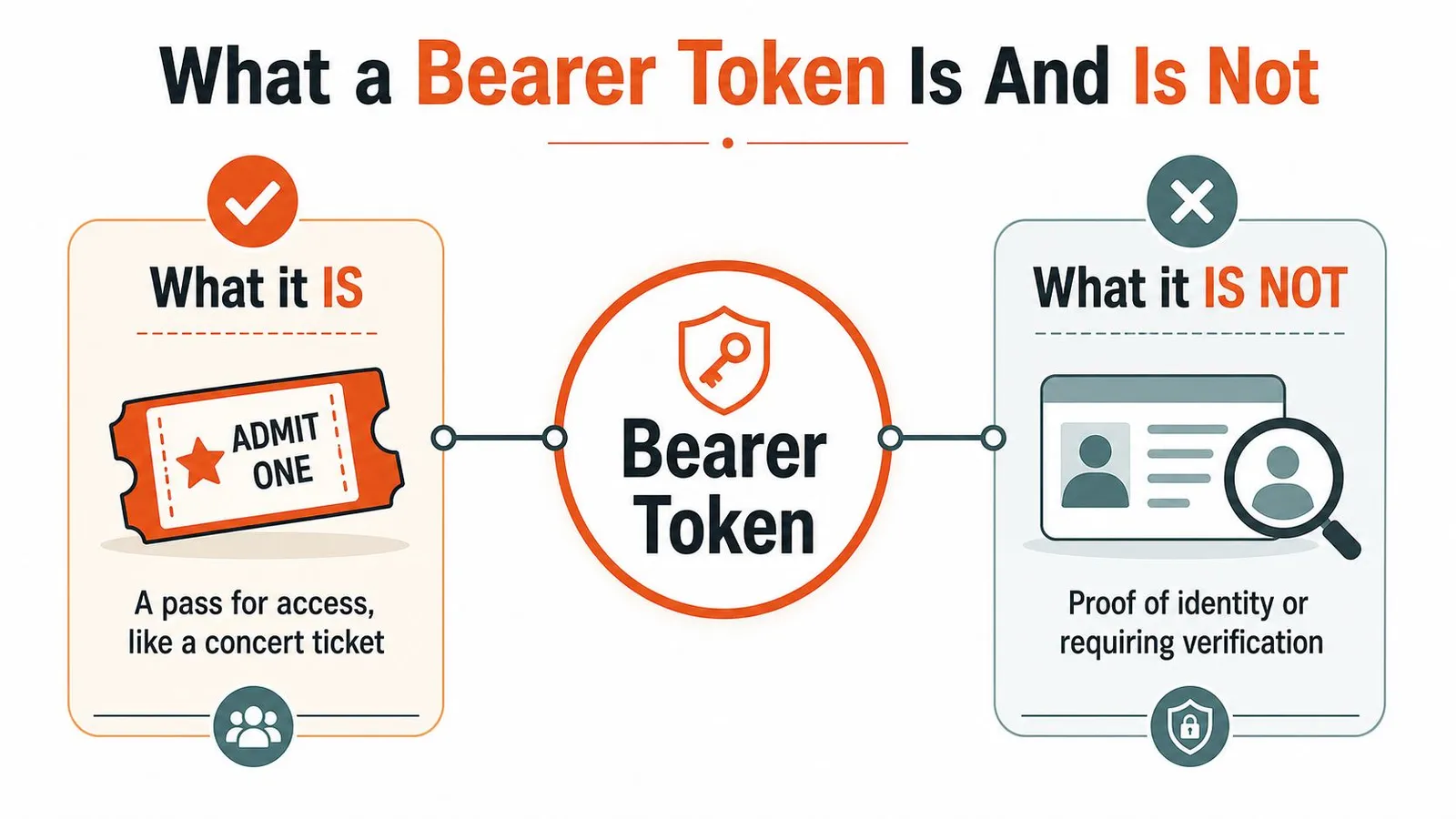
The concert ticket model is closer than the login form model
At a venue gate, staff don't need your life story. They need a valid ticket. If you have it, you enter. If you don't, you don't. Bearer token authentication works the same way.
That's why the token itself should be thought of as an access credential, not automatically as proof of who a human user is. In practice, a client gets the token after some earlier step, maybe a username and password flow, maybe an OAuth exchange, maybe issuance of an application credential. But once the token is in the request, the API is usually evaluating the token, not re-running human identity verification.
If you test APIs with curl and want a quick reminder of how headers should be formed alongside JSON payloads, this curl POST JSON walkthrough is the kind of reference that saves time during integration work.
Why developers mix up authentication and authorization
The confusion comes from the full flow. A user may authenticate first, then receive a token, then use that token to access resources. That sequence makes it tempting to say “the bearer token authenticates the user.”
That statement is often sloppy. Unless identity information is explicitly and securely bound to the token, a bearer token primarily acts as an authorization credential, meaning what the bearer can do, not necessarily an authentication credential, meaning who the bearer is, as explained in Akto's bearer token explanation.
This distinction matters in real systems:
- User token case: The token may represent a user session and granted scopes.
- Service token case: The token may represent an application or machine client.
- API key used as bearer token: The token may only identify a calling system and its permissions.
If your authorization policy assumes “token present” means “human user identity verified,” you can build the wrong access controls on top of a valid transport mechanism.
A good design question is not “Do I have a bearer token?” It's “What exactly does this token assert, and what trust decisions am I making because of it?”
The Bearer Token Lifecycle Explained
Bearer token failures usually start with a bad assumption. A team gets token issuance working, sees successful requests in Postman, and treats the token like proof of identity plus permission plus session state. In production, those are separate concerns, and the lifecycle only makes sense if you keep them separate.
What happens before the first protected request
The lifecycle starts before the API sees a bearer token at all. A user signs in, a service authenticates with client credentials, or a backend exchanges one credential for another. After that step succeeds, an authorization server issues a token that represents a specific set of claims and permissions for a limited time.
Many teams use JWTs for this because the API can verify a signed token locally instead of querying session state on every request. That trade-off improves performance and simplifies horizontal scaling, but it also pushes more responsibility onto the resource server. The API must interpret the token correctly. It cannot assume that a signed token automatically means "this is a user" or "this caller may do anything."
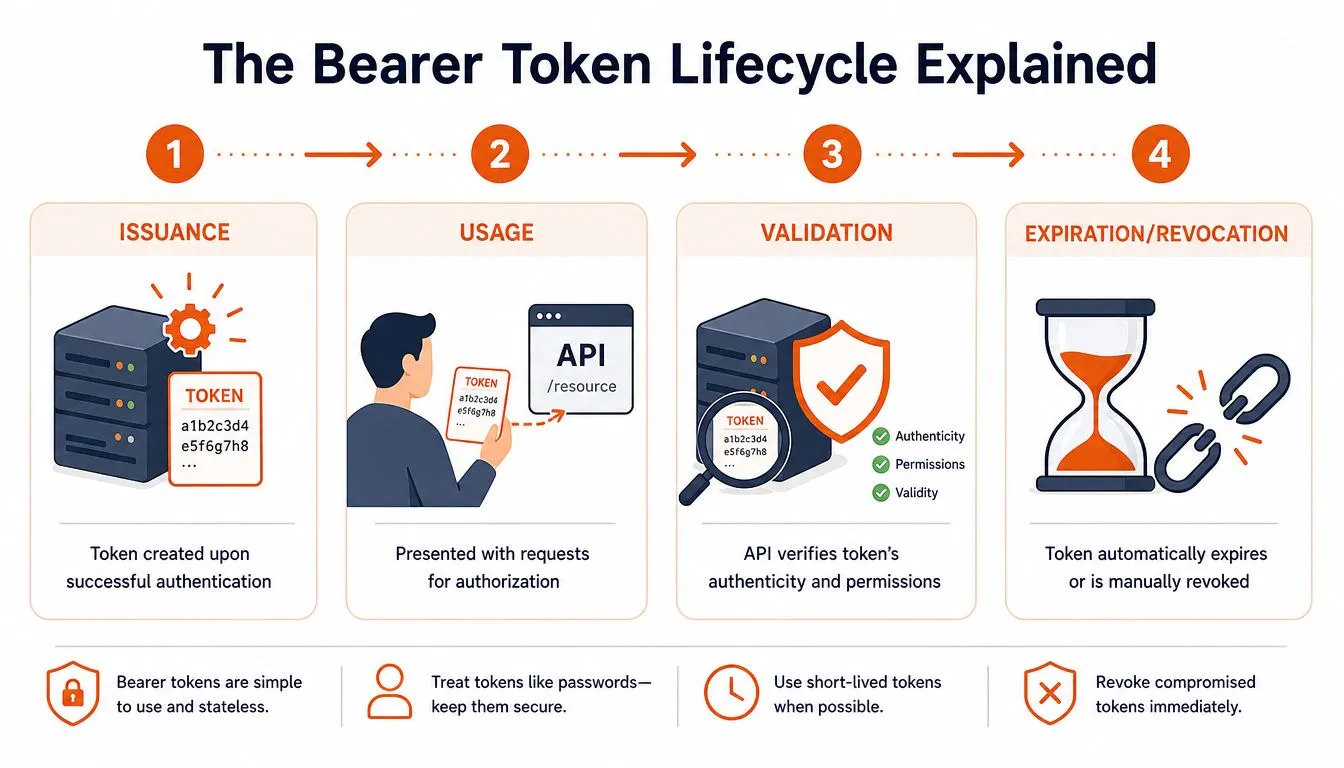
In practice, the flow looks like this:
- Issuance: The client authenticates to a trusted authority and receives an access token.
- Storage: The client stores the token in a place that matches its risk profile.
- Usage: The client sends
Authorization: Bearer <token>with each protected request. - Validation: The API verifies that the token is authentic and valid for this API and this action.
- End of life: The token expires, or the system revokes it earlier.
If you want to see the client side of that flow in a real SDK, the Webclaw Python SDK documentation shows how authenticated requests are typically structured.
A short visual walkthrough also helps:
What the API must validate every time
The API has one job at request time. Decide whether this token should authorize this request right now.
That requires more than parsing the header and checking whether the token looks well-formed. A signed token can still be wrong for the endpoint being called. A valid token for one API can be invalid for another. A token with expired time claims or insufficient scope is still a denial case, even if signature verification passes.
Check these fields on every protected request:
- Signature: Was the token issued by a trusted signer?
- Issuer: Did it come from the authorization server you trust?
- Audience: Was it minted for this API?
- Expiration and not-before: Is it valid at the current time?
- Scope or permissions: Does it allow this operation?
- Subject or client context: Who or what does this token represent, if your policy depends on that distinction?
That last check is where many authorization bugs come from. A bearer token may represent a user, a machine client, a delegated app, or a token exchange result. If your route assumes every token maps to a human user, your access rules can pass technical validation and still be wrong.
Signature verification answers whether the token is genuine. Authorization checks answer whether it should work for this request.
Expiration and revocation are different jobs
Expiration limits how long a stolen token stays useful. Revocation lets you shut access off before that clock runs out.
Short-lived access tokens reduce exposure, but they do not solve logout, credential theft, role changes, or incident response by themselves. If an employee loses access to a system, waiting for natural expiry may be too slow. If a token is tied to a compromised client, the server needs a way to reject it immediately.
This is the main trade-off in bearer token design. Stateless validation is fast and easy to scale, but operational control often requires extra machinery such as revocation lists, token introspection, key rotation, or short-lived access tokens paired with refresh tokens. The right choice depends on the system. Internal service-to-service traffic can tolerate different controls than a public API used by browsers and mobile apps.
Treat the lifecycle as an operational model, not just an auth diagram. Issue narrowly scoped tokens, validate them rigorously, expire them aggressively, and have a plan for invalidating them before expiry when the situation changes.
Server and Client Implementation Examples
The easiest way to make bearer token authentication click is to see both ends of the request.
Express middleware for a protected route
On the server, the mistake to avoid is trusting the mere presence of the header. Parse it, enforce the scheme, then validate the token before the route handler runs.
import express from "express";
import jwt from "jsonwebtoken";

const app = express();

function requireBearerToken(req, res, next) {
  const auth = req.headers.authorization;

  if (!auth || !auth.startsWith("Bearer ")) {
    return res.status(401).json({ error: "Missing or invalid Authorization header" });
  }

  const token = auth.slice("Bearer ".length);

  try {
    const payload = jwt.verify(token, process.env.JWT_PUBLIC_KEY, {
      algorithms: ["RS256"],
      issuer: "https://auth.example.com",
      audience: "https://api.example.com"
    });

    req.auth = payload;
    next();
  } catch (err) {
    return res.status(401).json({ error: "Invalid or expired token" });
  }
}

app.get("/api/private", requireBearerToken, (req, res) => {
  res.json({
    ok: true,
    subject: req.auth.sub,
    scope: req.auth.scope
  });
});
A few production notes matter more than the snippet:
- Fail closed: Missing or malformed headers should stop at middleware.
- Don't trust decoded payloads without verification:
jwt.decode()is not validation. - Keep trust rules explicit: Issuer and audience checks prevent accepting tokens meant for something else.
If your stack includes Python services alongside Node, the Webclaw Python SDK docs are a useful example of how API clients typically organize authenticated requests around a reusable client object.
Client requests with fetch
On the client, the implementation is usually simple. The part that breaks is token sourcing and refresh logic.
const token = getAccessTokenSomehow();

const response = await fetch("https://api.example.com/api/private", {
  method: "GET",
  headers: {
    "Authorization": `Bearer ${token}`,
    "Accept": "application/json"
  }
});

if (response.status === 401) {
  // trigger refresh or re-auth flow
}

const data = await response.json();
console.log(data);
That request only works if the token is current, intended for that API, and still trusted. The fetch code is easy. The surrounding lifecycle is where real systems get complicated.
A clean client pattern looks like this:
- Acquire: Get a token through the approved auth flow.
- Attach: Add it only to requests that need it.
- Refresh or re-authenticate: Handle expiry deliberately.
- Clear: Remove it when the session ends or the app detects compromise.
Critical Security Best Practices and Pitfalls
A bearer token leak usually does not look dramatic at first. It looks like a token copied into a support ticket, left in a client-side log, or hardcoded during a late-night test and committed by accident. From the API's perspective, that leaked value is still a valid credential until it expires or you revoke it.
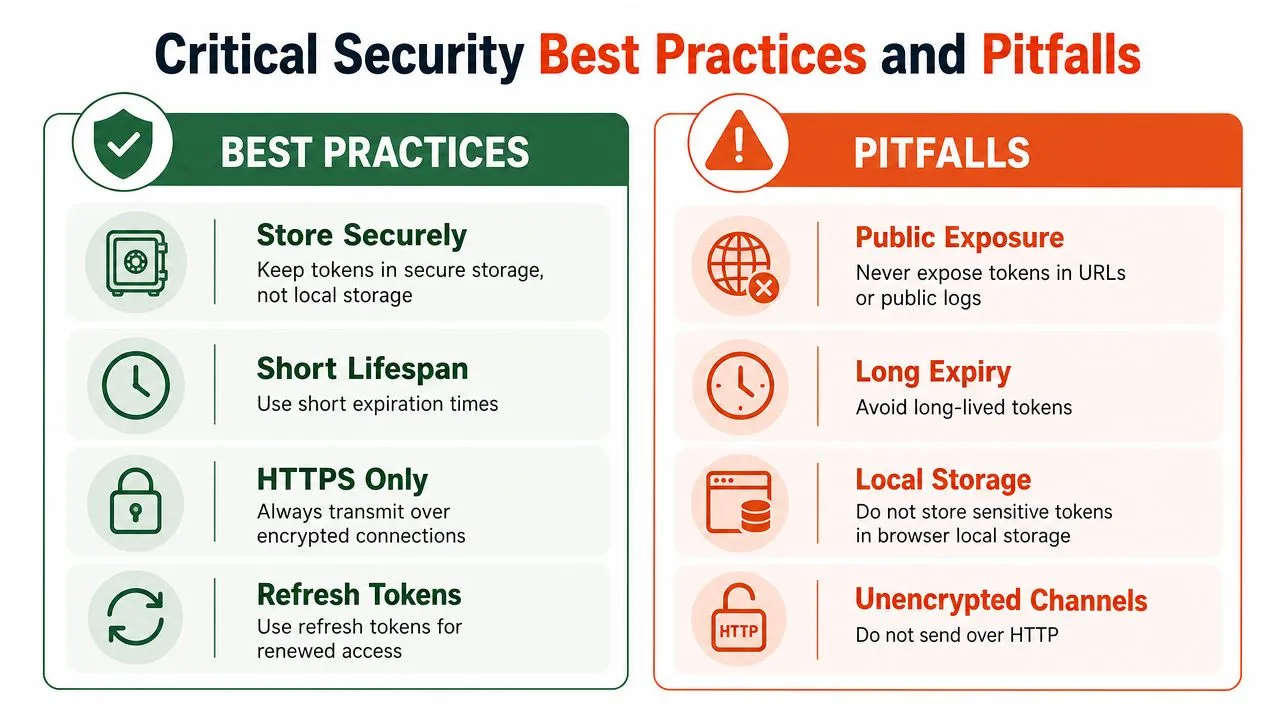
The practical rule is simple. Treat bearer tokens as transferable proof of access. The server is not checking who is holding the token in that moment. It is checking whether the presented credential is still trusted, still valid for this API, and still allowed to do the requested work. That distinction matters because developers often talk about bearer tokens as if they are identity themselves. They are not. They are a way to present granted access.
What works in production
Good token handling is mostly discipline and consistency.
- Use HTTPS everywhere: Any token sent over plaintext can be captured and replayed.
- Keep access tokens short-lived: Short expiration limits the blast radius when one leaks.
- Store tokens carefully: On the server side, keep them out of source code, chat threads, and build artifacts. In browser apps, choose storage with XSS risk in mind instead of defaulting to convenience.
- Validate more than the signature: Check expiry, issuer, audience, and scopes or permissions relevant to the route.
- Design for revocation and rotation: Logout, credential compromise, and key rotation should have an operational path before an incident happens.
- Log safely: Redact authorization headers and avoid dumping raw tokens into traces or error logs.
Teams running internal platforms make this mistake too. A private network does not reduce the need for token hygiene. If you manage your own infrastructure, the same rules apply to self-hosted Webclaw deployments and any other internal service that accepts bearer credentials.
One useful habit is reading breach writeups with a token-handling lens. Exposure often starts in ordinary places such as logs, screenshots, CI output, or copied request examples. The roundup on 2023 data breaches and response is useful for that reason.
What keeps causing incidents
The recurring failures are boring, which is why they keep happening.
- Hardcoded tokens in source code: A secret checked into Git stops being a secret.
- Tokens in URLs: Query strings leak through browser history, proxy logs, analytics systems, referrers, and support captures.
- Long-lived access tokens: They reduce friction for developers and increase recovery time during incidents.
- Overbroad scopes: A token that can read everything or write everywhere turns a small leak into a wider breach.
- Unsafe browser storage choices: If injected script can read the token, any XSS bug becomes an account or session takeover path.
- Assuming "decoded" means "trusted": Parsing a token for debugging is fine. Using unverified claims for authorization decisions is not.
Treat a leaked bearer token as an active credential, not as a harmless identifier.
The failure pattern is consistent. Teams implement bearer auth, then stop one layer too early. The header format is easy. The hard part is deciding what the token represents, limiting what it can do, storing it safely, and responding fast when trust changes.
Bearer Tokens vs API Keys and OAuth2
These terms get mixed together because they often appear in the same integration, but they answer different questions.
Bearer is the presentation scheme.
OAuth2 is the framework for obtaining delegated access.
JWT is a token format.
API key is a credential, sometimes used as a bearer token in practice.
Here's the side-by-side view.
| Concept | Role | Typical Lifespan | Primary Use Case |
|---|---|---|---|
| Bearer token | HTTP authorization scheme for presenting a credential | Often short-lived in modern API designs | Accessing protected API resources |
| API key | Credential identifying a client or application | Often longer-lived than access tokens | Server-to-server access, app identification, simple integrations |
| JWT | Token format carrying signed claims | Depends on issuer policy | Stateless token validation |
| OAuth2 | Authorization framework for obtaining tokens | N/A, framework not token | Delegated access and third-party authorization flows |
A few practical distinctions matter:
- API keys are often simpler: They can work well for backend integrations but are commonly broader and longer-lived.
- Bearer tokens are a transport pattern: The header says how the credential is presented, not what issuance model produced it.
- JWT is about structure: A bearer token can be a JWT, but not every bearer token has to be one.
- OAuth2 is the larger system: It governs how a client gets a token, not how the API header is spelled.
If you're reviewing an API doc and it says “use your API key as a bearer token,” that usually means the key is being sent with the bearer scheme. It doesn't mean the system is implementing the full OAuth2 authorization framework.
Using Bearer Tokens with the Webclaw API
A concrete example makes the pattern stick. Webclaw's API uses bearer token authentication for request authorization, so every protected call needs your token in the Authorization header.

The request format that matters
The useful mental model is simple. Your API credential acts as the bearer token for the request. The server checks that credential before allowing scraping, crawling, or extraction operations.
You'll want the endpoint reference nearby when testing headers and payloads. The Webclaw API endpoints documentation is the place to confirm the exact path and request body for the operation you're calling.
If you're comparing approaches, it can also help to look at adjacent tooling such as Donely's OpenClaw solution, especially when you're deciding between hosted APIs and open implementations for scraping workflows.
A practical curl example
A typical authenticated request looks like this:
curl -X POST "https://api.webclaw.io/v1/scrape" \
  -H "Authorization: Bearer YOUR_API_KEY" \
  -H "Content-Type: application/json" \
  -d '{
    "url": "https://example.com"
  }'
Three details matter more than the rest:
- The header name must be
Authorization - The scheme must be
Bearerfollowed by a space - The token must be the credential the service expects
If that request fails with 401, check the header first, then the token value, then whether you copied an expired or revoked credential from the wrong environment.
Webclaw is a REST API for web scraping, crawling, and content extraction that uses bearer-token auth for authorized requests. If you're building retrieval pipelines, data products, or agent workflows that need clean page content instead of raw HTML, you can review the platform at Webclaw.