
Website Crawler: How It Works & Why It Matters
You probably know the feeling. A crawler worked last quarter, then the same script starts returning a blank shell, a login wall, or a page that looks complete until you realize the useful text never arrived. In 2026, that usually means the problem isn't just fetching a URL, it's getting content that a search index or model can use.
The web crawler has always been a discovery tool, but the job has changed. Early crawling turned the web into something searchable, starting with World Wide Web Wanderer in 1993 and the first crawler-based search tools that appeared alongside it, including JumpStation, the World Wide Web Worm, and the RBSE spider (Stanford crawling survey). Today, the hard part is less about reaching pages and more about extracting usable, token-efficient context from sites that are dynamic, defensive, and noisy.
If you want a quick companion guide on the basics of site-level crawling, the overview at Webclaw's crawl website guide is a useful reference point. For a broader signal on how bot-facing sites are evolving, the March notes in AI Website Detector March insights are also worth reading.
Why Website Crawlers Behave Differently in 2026
A script that worked six months ago can look broken for reasons that have nothing to do with your code quality. The server may still answer the request, but the page body is now a thin HTML shell, content loads later in JavaScript, and a bot defense system may challenge the connection before your parser even sees meaningful markup. That's why the old mental model of “download HTML, extract links, repeat” feels incomplete now.
The page you get is not always the page you need
Many modern sites split what humans see from what a plain HTTP client receives. Search engines and extraction pipelines still care about the text, links, and metadata, but those fields may no longer live in the first response. Google and Search Engine Land both emphasize that important content needs to be available in HTML, not hidden behind client-side rendering, if you want reliable discovery and indexing, and Elastic's crawler guidance keeps the same focus on making content crawlable and reducing noise.
The second change is that anti-bot checks moved earlier. A crawler can be rejected on fingerprinting signals before any meaningful rendering work happens, so the failure mode is no longer just “page didn't load.” It can be “the connection looked wrong,” which is a very different debugging problem.
Practical rule: if your crawler sees empty pages on a site that clearly has content in the browser, assume rendering or bot defense first, not parsing.
The consumer changed too
Older crawlers mostly served search indexes or downstream databases. In 2026, a crawler often feeds an LLM or retrieval layer, and that consumer punishes messy input. Raw HTML with navigation, banners, duplicated links, and repeated boilerplate is not just ugly, it wastes context and lowers answer quality. That's why the true unit of value is no longer “page downloaded,” it's “clean context delivered.”
The operational lens matters here. The gap between server response and usable output is now the main design constraint, especially for teams building AI agents, research pipelines, or internal search. That's also why a crawler that “works” in development can still fail in production, even if the HTTP status code looks fine.
What a Website Crawler Actually Is
A website crawler is a system that starts with one or more URLs, fetches a page, extracts links and content, and feeds the newly found URLs back into the system so it can continue. A good mental model is a librarian with a trolley, a notebook, and a set of rules about pace and order. The trolley is the queue of places to visit, the notebook is the record of what's already been seen, and the rules decide what gets priority next.
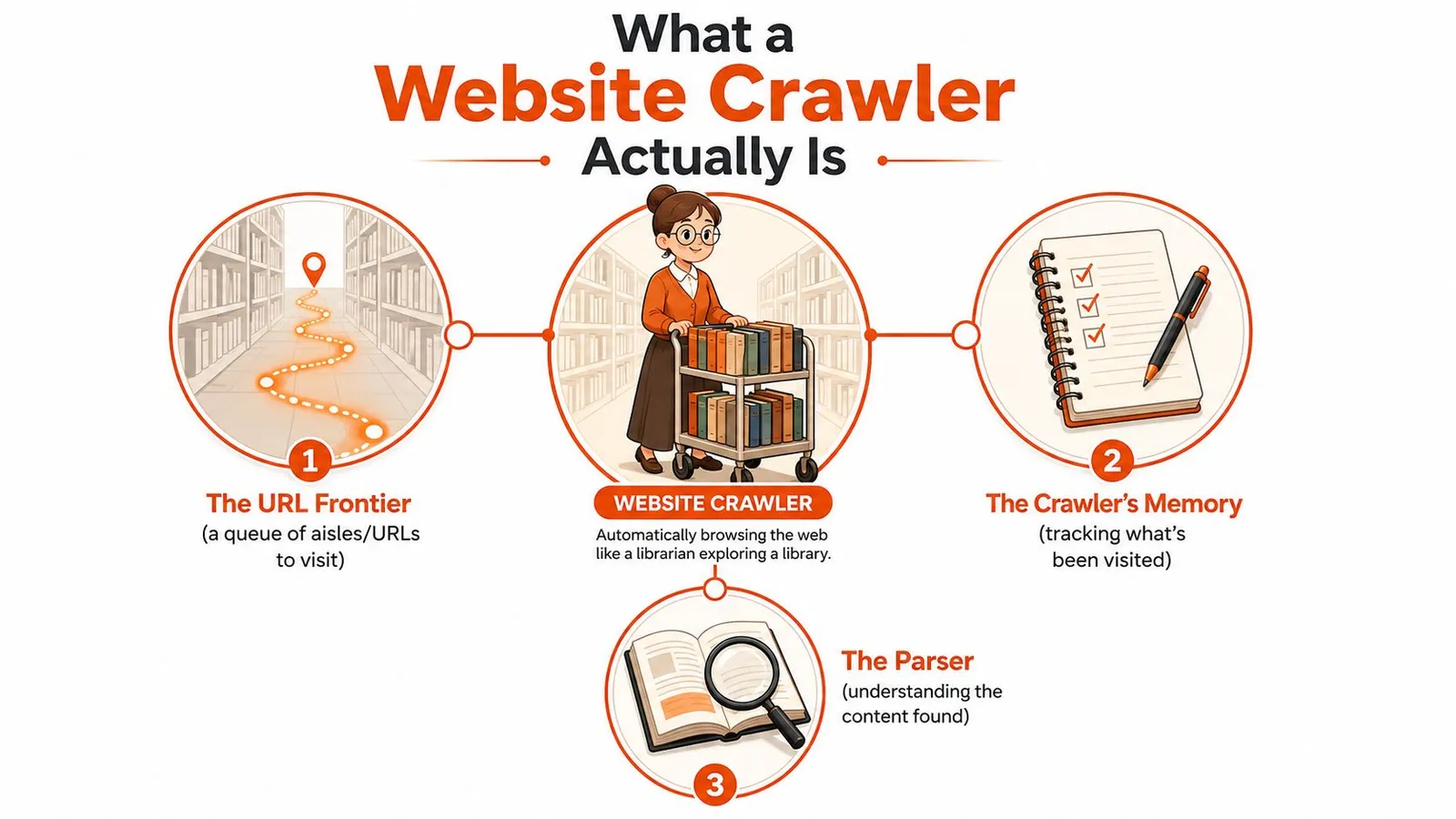
The librarian version that actually maps to production
The librarian doesn't wander randomly. They pick the next aisle from a queue, scan the shelf, write down what was found, and return newly discovered references to the queue. That is the closed loop that makes crawling different from a one-off fetch. The parser discovers a new page, and the frontier decides when that page gets visited.
That loop shows up in search engines, topical crawlers, and AI-oriented retrieval systems. Search crawlers care about broad coverage. Focused crawlers stay inside a niche, such as one product category or one domain. AI-oriented crawlers care less about bulk indexing and more about clean output that can feed a model without wasting tokens.
Three contexts where you'll see it
- Search engines: crawl broadly so results stay fresh and complete.
- Focused discovery tools: stay inside a topic, category, or site section.
- AI retrieval pipelines: extract pages into compact context for models and agents.
If you remember one thing, remember this. A crawler is not just a downloader. It's a discovery loop with rules, memory, and output shaping.
The useful question isn't “did it fetch the page?” It's “did it turn that page into something the next system can use?”
The Four Core Components of a Crawler
A production crawler usually has four moving parts: a URL frontier, a fetcher, a parser, and a content store. The cleanest way to see them is to follow one page from start to finish. The frontier chooses the next URL, the fetcher downloads it, the parser extracts links and text, and the store keeps the result in a usable format.
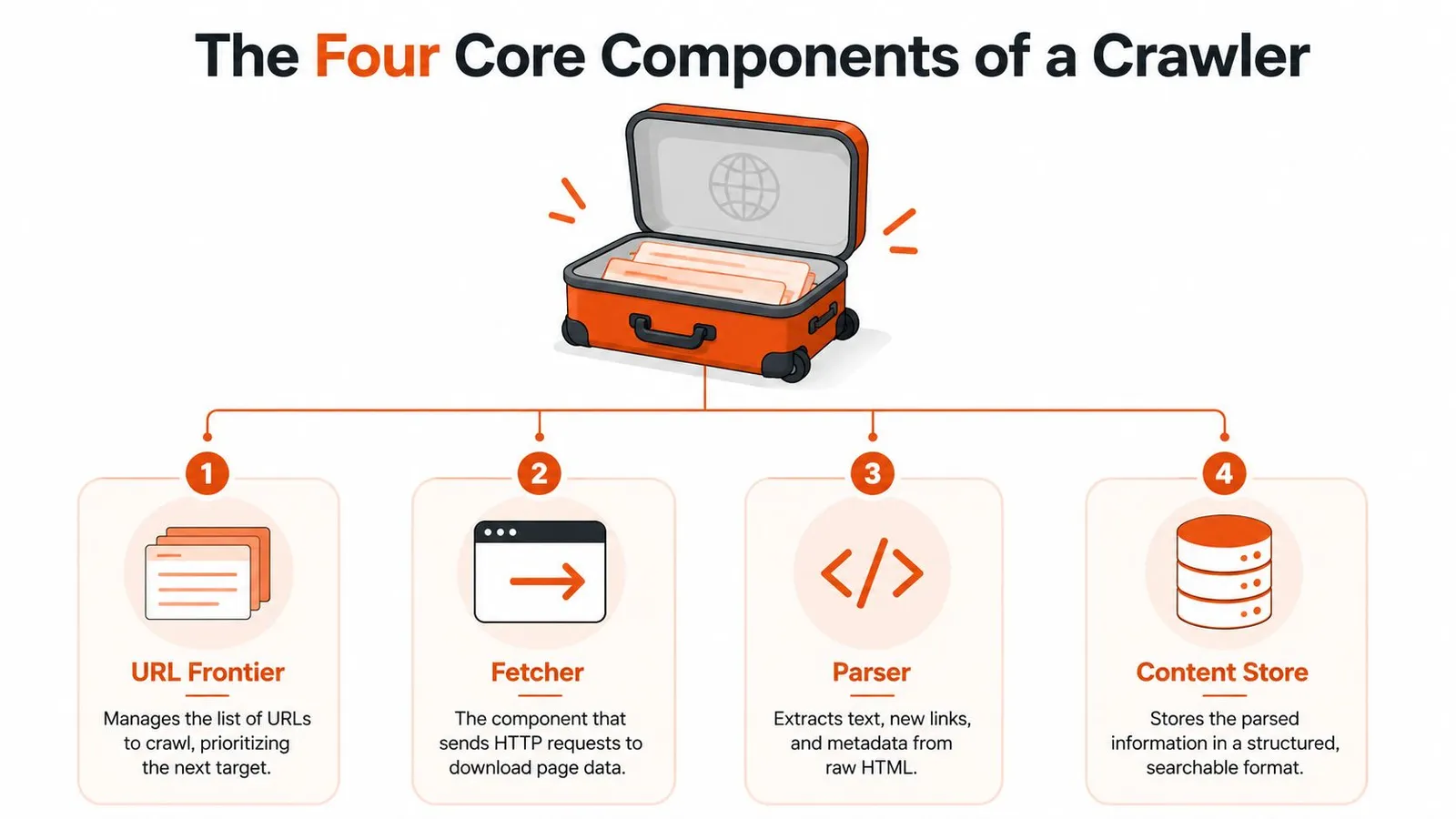
The frontier is the strategic brain
The frontier is a priority queue, and it matters more than beginners expect. It decides what gets crawled next, which directly affects freshness, coverage, and bandwidth efficiency (crawler architecture overview). If you prioritize the wrong URLs, important pages can starve while low-value pages keep getting attention.
That's why large crawlers add normalization, duplicate detection, and scheduling on top of the queue. URLs with tracking parameters, trailing slashes, or repeated paths can point to the same content, so a crawler needs rules that collapse variants into a canonical form before they consume more crawl budget.
Each stage can fail differently
The fetcher fails when requests are blocked, throttled, or too expensive to maintain in memory on large responses. The parser fails on malformed HTML, strange DOM structures, or pages that only make sense after rendering. The content store fails when it fills with duplicates, boilerplate, or inconsistent records that downstream systems can't compare cleanly.
Production systems strip boilerplate, normalize URLs, and often store the page in more than one shape, such as raw response plus cleaned output. That separation matters because raw content is useful for debugging, while canonical content is what the next system consumes.
Webclaw's Web Crawler API is one example of a managed interface that exposes this kind of site discovery flow without making you build every queue and retry layer yourself. The important point isn't the brand, it's the structure: once the four components are clear, every crawler diagram becomes much easier to read.
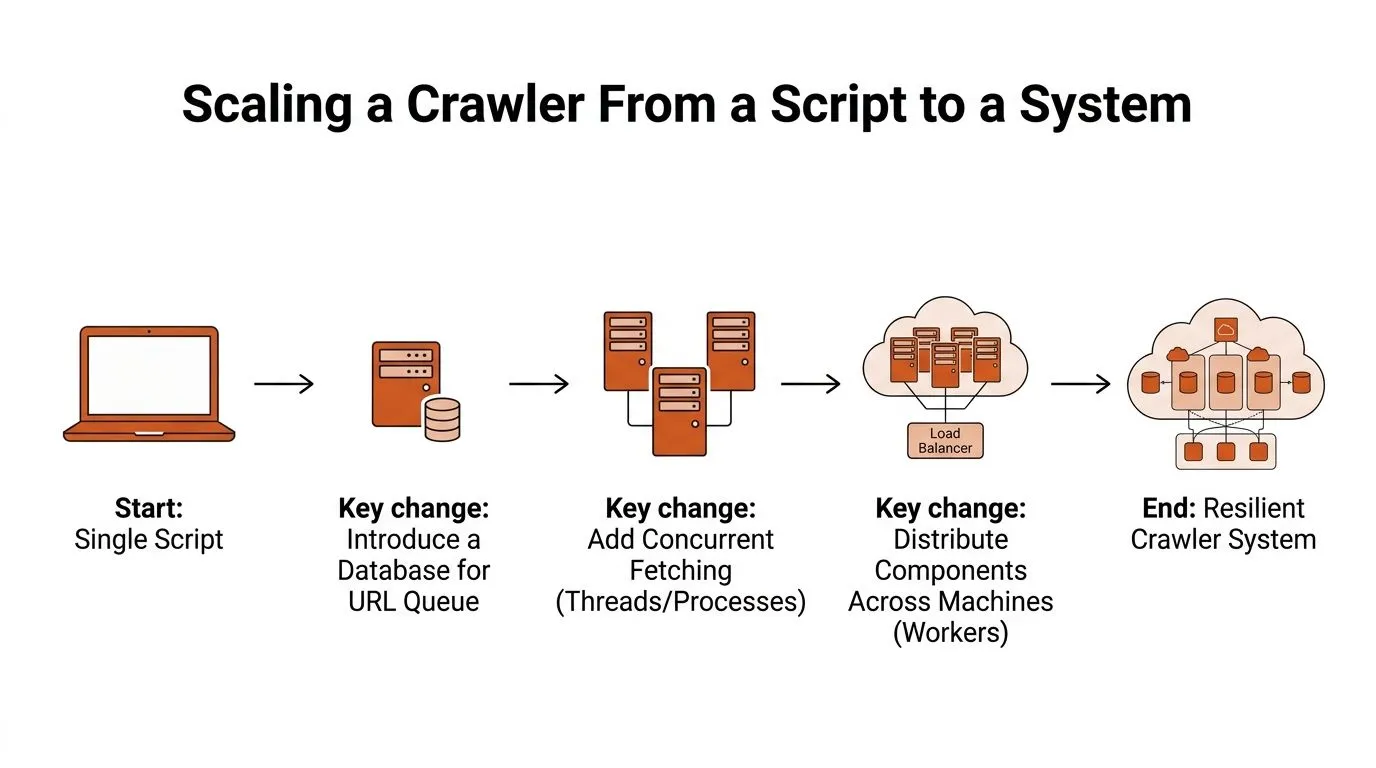
Scaling a Crawler From a Script to a System
A single script can crawl a handful of pages. Once the target becomes thousands or millions of pages, the problem changes from “how do I fetch this page?” to “how do I schedule, revisit, and avoid wasting time across a site?” That shift is where most beginner crawlers start to wobble.
The first thing that changes is pacing
At scale, crawlers need politeness. That means respecting robots.txt, checking site terms or policies, and applying rate limits so one domain doesn't get hammered. They also need concurrency control so the fetch layer doesn't outrun the parser or fill memory faster than the system can process it.
The scheduling question matters just as much as raw speed. A design target sometimes used in large-scale systems assumes roughly 2 billion crawlable pages and a target of 1 billion pages per month, which implies a refresh cycle of about two months (system design handbook). That isn't a weekend job. It's a planning problem about what to revisit, when, and at what pace.
The second thing that changes is what gets skipped
Deduplication is not a nice-to-have. Without it, the crawler wastes time revisiting the same content through multiple URLs, especially on sites that expose query strings, filter parameters, or alternate paths to the same page. Recrawl policy is the companion problem, because a crawler that never revisits pages gets stale, and one that revisits too often burns bandwidth.
- Politeness: check directives, rate-limit by domain, and stop when asked.
- Deduplication: normalize URLs and collapse repeated content.
- Recrawl policy: decide what to refresh and how often.
The production diagnosis is usually simple. If the crawl is slow, it's often not the network alone. It's the queue, the duplicate set, or the revisit policy forcing the system to do more work than it should.
How Crawlers Handle JavaScript and Modern Sites
A plain HTTP request can fetch the shell of a modern app and still miss the content a person sees in the browser. That's the core reason naive crawlers fail on client-rendered sites. The HTML arrives, but the useful text lives in JavaScript-rendered state, API responses, or DOM fragments assembled after load.
The empty shell problem
Single-page apps often return minimal markup. If your crawler only reads the initial response, it may see headings, empty containers, or placeholders instead of article text, product data, or listings. That's not a parsing bug. It's a rendering gap.
The usual fix is one of two patterns. You can render server-side for crawlers so the HTML already contains the useful content, or you can execute the page in a headless browser and extract after the DOM settles. Both work, and both have costs. Rendering increases latency and memory use, while browser execution adds complexity and makes fingerprints easier to inspect.
Bot defense starts before the page does
Modern defenses often inspect TLS handshakes, HTTP/2 behavior, client hints, and other request signals before any JavaScript runs. That means the crawler can be rejected before it reaches the rendering stage. If the fingerprint looks off, the site may serve a challenge page, a partial response, or nothing useful at all.
That's why the debugging path has changed. You're no longer just checking selectors. You're checking whether the request itself looks like a normal browser session. If a crawler keeps getting blocked on a site that works in Chrome, the issue is usually in transport behavior, headers, or browser emulation, not just in HTML parsing.
Webclaw's JavaScript rendering and browser fallback guide is a practical reference for the rendering side of this problem. The broader lesson is simple, though. Modern crawlers don't just need access. They need credible access, then they need a rendering path that can still hand the parser useful content.
Turning Crawled Pages Into Clean Model-Ready Context
Most crawler explainers stop after the page is fetched. That's where the useful work starts for an AI pipeline. The next question is how to turn noisy page output into compact context that a model can use without wasting tokens on menus, banners, and repeated boilerplate.
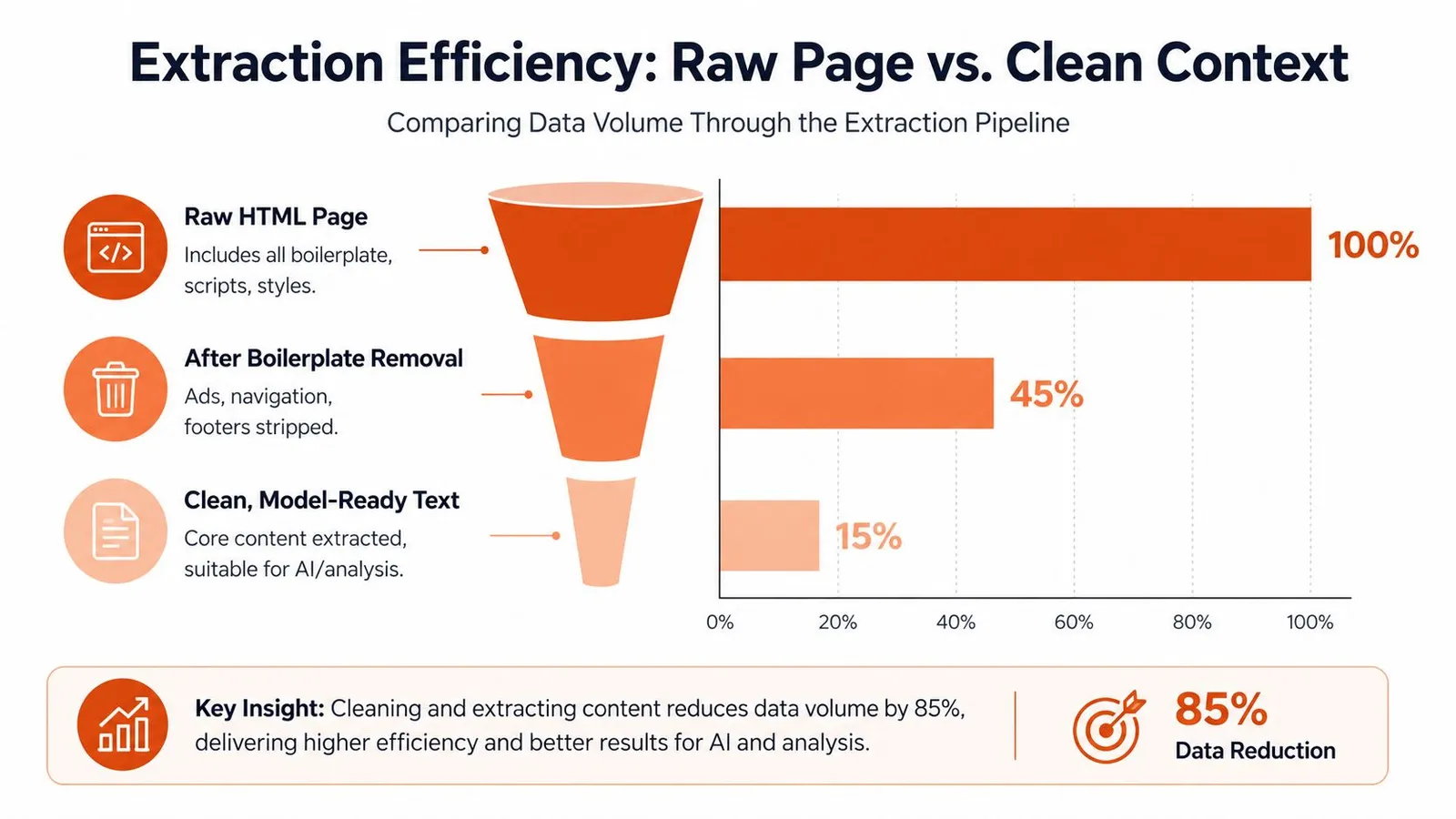
Raw pages are not model-ready
Raw HTML includes navigation, scripts, styles, and repeated interface text. Extraction can remove some of this material. Webclaw offers Markdown and LLM-oriented output, but the retained content should be checked against the source.
That smaller output matters for two reasons. First, it reduces cost when the next step is a model call. Second, it lowers the chance that the model answers from noise instead of the page's core meaning. For retrieval systems, smaller often means better.
Extraction is a design choice, not a cleanup chore
Good crawlers increasingly produce shaped outputs. A vertical extractor can return typed JSON for a specific site category, while a change tracker compares snapshots so you can notice what changed between crawls. Site mapping can also combine sitemap discovery with link graphs so the crawler knows where content lives before it starts spending requests on extraction.
Webclaw's link-to-text converter guide fits into that same workflow because it treats pages as a source of clean text rather than a pile of markup. The important idea is broader than any one tool. The crawler should not just deliver bytes, it should deliver the smallest context that still preserves meaning.
A good crawler in 2026 is judged by how much useful context it preserves, not by how much raw HTML it can collect.
Build Your Own Crawler or Use a Managed Crawler
Building your own crawler gives you full control. You decide the frontier strategy, the rendering stack, the anti-bot posture, the storage shape, and the retry logic. That makes sense when you need sensitive data handling, very high volume, or custom routing that no vendor can reasonably support.
The honest cost of building
The trade-off is maintenance. Once a crawler has to survive JavaScript rendering, bot defenses, extraction changes, and recurring site layout shifts, you're not just building a script anymore. You're running an ongoing system with moving parts, and every one of those parts can fail in a different way.
A managed crawler shifts that burden. Webclaw, for example, offers a REST API, SDKs in TypeScript, JavaScript, Python, and Go, plus an MCP server for AI agents and a CLI for one-off runs. Its stack also includes crawling across a site, sitemap and robots discovery, JavaScript rendering, proxy support, and extraction formats aimed at model-ready output. That doesn't remove every hard problem, but it does absorb a lot of the infrastructure that teams tend to rebuild.
When the managed route is the cleaner fit
If your real goal is clean retrieval, not crawler engineering, a managed layer is often the more direct path. That's especially true when you need structured output, pages that survive client-side rendering, or reliable access on sites that block naive fetchers. If your main need is to crawl and extract without owning every render or retry edge case, a managed crawler is usually easier to fit into an AI pipeline than a custom stack.
Use self-hosting when control matters most. Use a managed crawler when the business value is in the data you'll consume next.
A Practical Checklist Before You Ship a Crawler
Before you ship, verify four things. Ethics, check robots.txt, site terms, opt-out handling, and a stop path like the one discussed in the Robotomail domain troubleshooting guide. Freshness, define recrawl rules and change detection. Reach, test JavaScript rendering, bot defenses, and proxy behavior, using the Webclaw Cloudflare scraping diagnostic checklist if challenge pages appear. Output shape, confirm deduplication, payload size, and whether the next system wants markdown, JSON, or LLM-ready text.
Webclaw gives you a crawler and extraction pipeline built for AI use cases, with clean output, JavaScript rendering, and site discovery in one place. If you're deciding whether to build that stack yourself or hand off the hard parts, visit Webclaw and compare it against the crawler workload you're shipping today.