
How to Crawl Website in 2026: A Stress-Free Guide
Teams only notice the crawl problem after the crawl has already “worked.” The job ran, the queue emptied, and the dashboard shows thousands of fetched URLs, but the pages are empty, blocked, slow, duplicated, or missing the content the model or indexer needed. That gap between fetched and usable is where crawl projects fail.
A sane way to crawl website infrastructure is to treat it like operations first and discovery second. If you can't reliably get the right content back, URL discovery is just an expensive way to collect failures. The useful question isn't how many URLs you can touch, it's how many of them produce complete, timely, and reusable content.
What Goes Wrong When You Crawl a Website
A crawl often looks healthy right until you inspect the output. The job returns a long list of URLs, but half of the payloads are boilerplate, some are soft-block pages, and others are the same template wrapped around different tracking parameters. The operator feels like the crawler is “finding the site,” when the actual issue is that it's not collecting the content that matters.
The failure mode is usually upstream of extraction
A lot of crawl tooling assumes the hard part is discovering URLs. In production, the breakage starts earlier, with fetches that succeed at the transport layer and fail at the business layer. You can get a 200 OK and still end up with a consent wall, a login gate, a script shell, or a page that's effectively empty until the browser executes client code.
That's why crawl operations should be measured by fetch success rate, content completeness, and freshness, not raw URL count. Google's own Crawl Stats report exists because the crawler's behavior is one of the few authoritative first-party signals a site owner has for what search engines are doing, and it surfaces crawl requests, download size, response time, and host status in a 90-day view Google Crawl Stats documentation. The report matters because crawl behavior determines whether pages get discovered, revisited, and eventually indexed.
Practical rule: if the fetch looked successful but the extracted content is unusable, count it as a failure. A crawler that “gets the page” but not the content is still broken.
The seven-part path is operational
A durable crawl pipeline has to cover discovery, crawl control, rendering, anti-bot handling, proxy selection, extraction, and post-crawl storage. Miss any one of those and the failure shows up later as bad data, not a clean error. That's why the rest of the pipeline should be designed to shrink the gap between what was requested and what was useful.
Google's Crawl Stats report also became more useful after the improved version launched in November 2020, because it expanded visibility into the crawl totals and time-series trends for the core metrics above Google Crawl Stats documentation. That kind of trend view is exactly what operators need when the question is not “did I crawl?” but “did I get usable coverage?”
Discovery with Robots.txt, Sitemaps, and Link Graphs
A crawl often fails before extraction starts. The crawler may fetch a URL, then miss the page the team needed because discovery was incomplete, polluted, or too broad. The cleanest way to reduce that gap is to treat discovery as an operations step first, then a coverage problem second.
Start with robots.txt, because it tells you what the site operator has already declared about access. Then use sitemaps as the maintained list of URLs the owner thinks matter. Only after that should you let the link graph fill in the gaps, because it's the broadest source but also the noisiest.
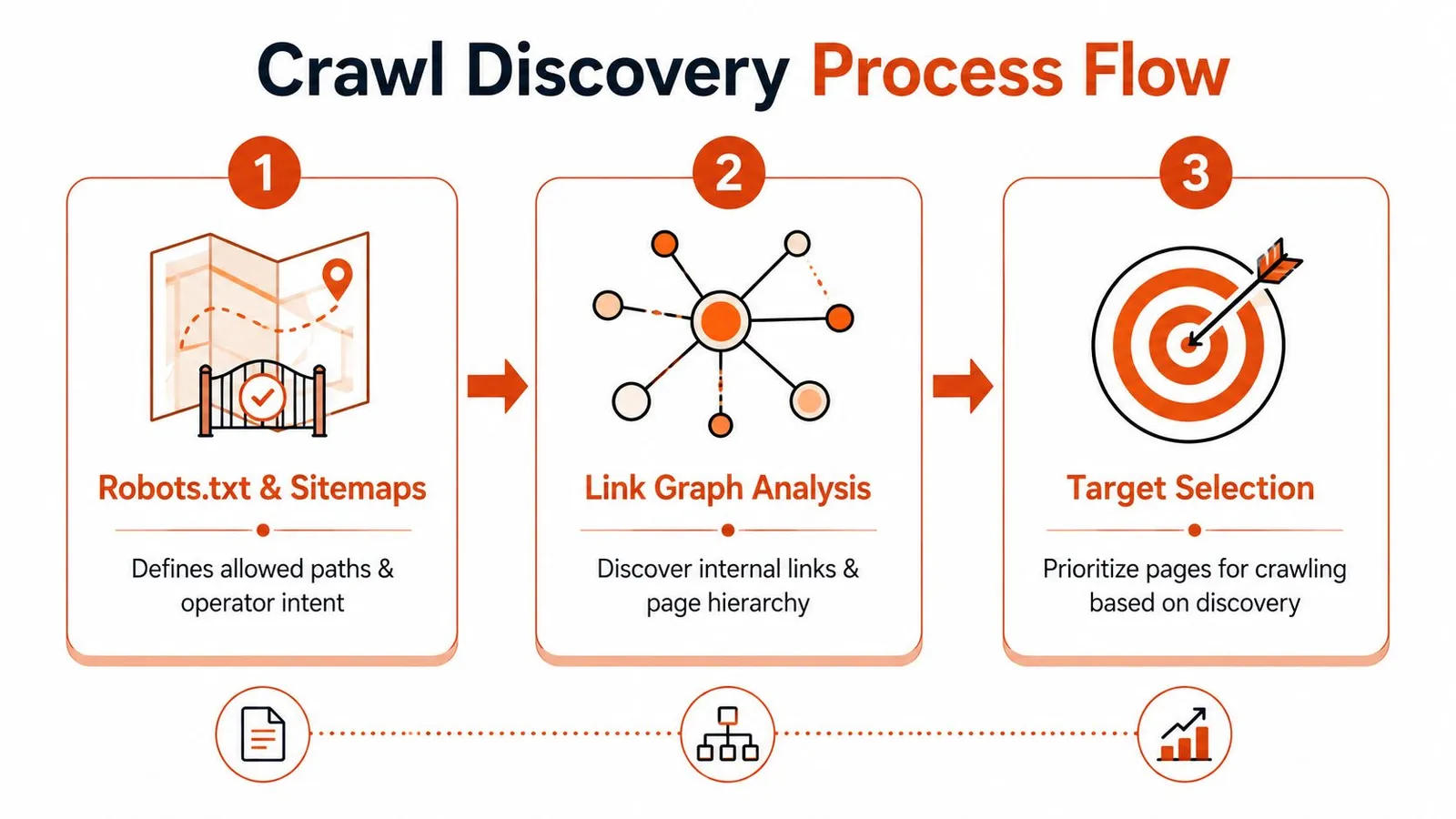
Robots.txt tells you where not to waste time
A crawl that ignores robots policy creates avoidable problems for everyone involved. Even when a site doesn't publish a crawl-delay directive, the file still gives you a strong signal about disallowed paths, preferred behavior, and how the operator expects bots to behave. Treat it as the first filter, not a suggestion.
Sitemaps come next because they encode intent. A URL that appears in a sitemap is often a page the operator wants surfaced, recrawled, or indexed. That is not the same thing as a guarantee of freshness, but it is a strong clue about priority.
Sitemaps are curated, the link graph is exhaustive
The link graph catches what the sitemap misses, which is usually where crawl coverage starts to improve. It also exposes orphaned pages, deep content, and internal pathways that no one remembered to add to the sitemap. The trade-off is scale, because link traversal grows quickly and can explode into duplicated paths unless you constrain depth.
Independent guidance recommends comparing sitemap URLs against URLs found through internal-link mapping, because pages may exist in one source but not the other, which makes sitemap coverage gaps and link-orphans easier to diagnose. That same guidance also notes that some sites are effectively uncrawlable when they require multiple logins, MFA, CAPTCHAs, non-Basic authentication, or browser constraints beyond Chrome, which is a reminder that discovery can't fix access control problems on its own Aeyescan guidance on difficult-to-crawl sites.
Useful default: combine sitemaps and internal-link mapping, then apply a depth limit. That gives you better coverage than either source alone without letting traversal run wild.
One practical workflow is to map the site first, then crawl from the overlap of sitemap URLs and internally linked pages. Tools built around sitemap discovery, like Webclaw's sitemap API, can save time when you need the operator-maintained set before the full crawl starts.
The biggest mistake is treating all discovered URLs as equal. Some are explicit priorities, some are merely reachable, and some are only technically present. Sorting those into different buckets before you fetch anything keeps the rest of the crawl cheaper and more accurate.
Configuring Depth, Concurrency, and Rate Limits
Depth, concurrency, and rate limits are not three separate knobs. They're one control system. Depth decides how far you reach, concurrency decides how much you do at once, and rate limits decide whether the target site still accepts you after the first burst.
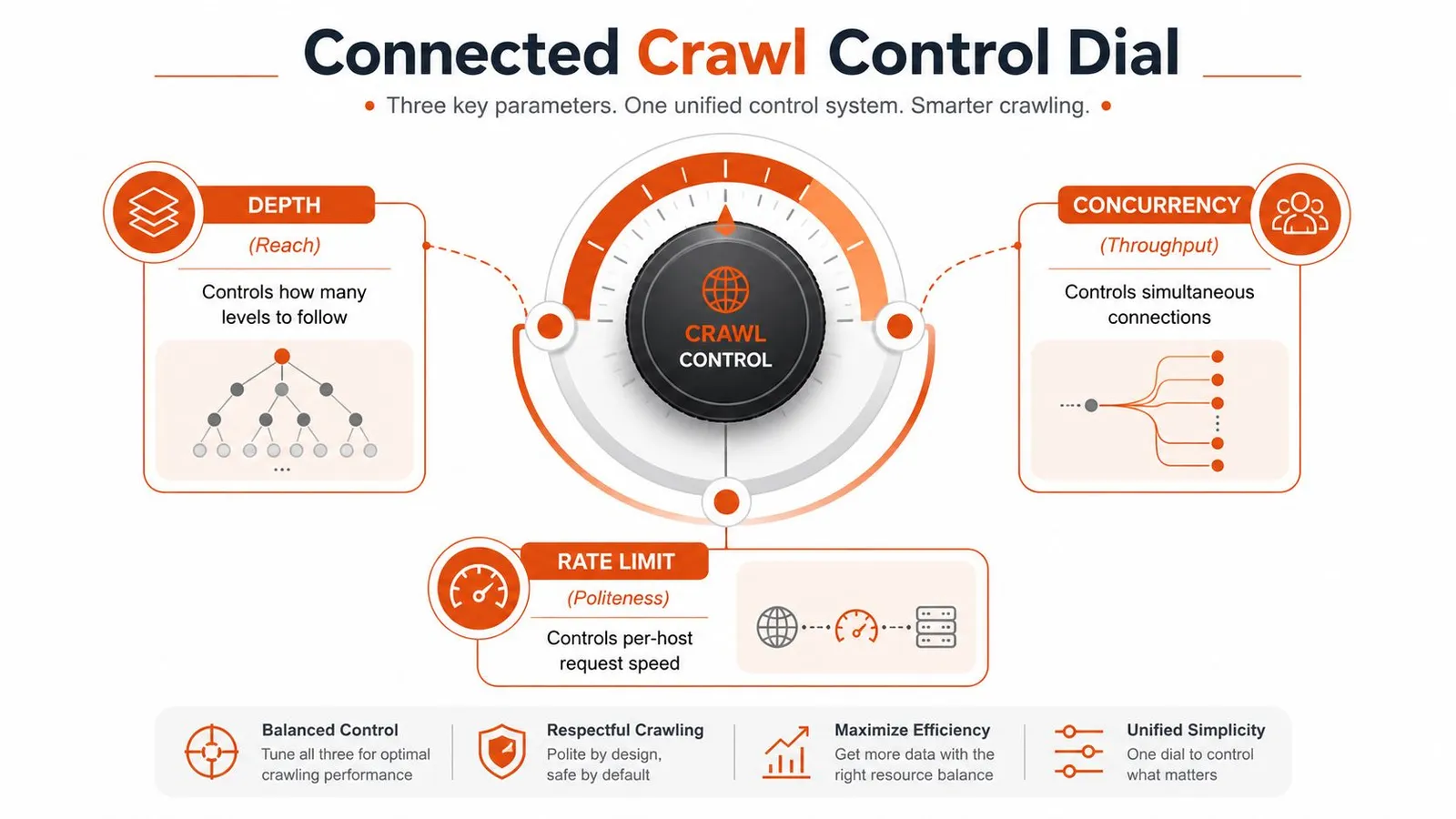
Start low, then turn one dial at a time
If you raise concurrency first, the failure mode is obvious. The site starts returning 429s, slow pages, stale caches, or pages that look fine on the surface but arrive incomplete. That's not a reason to avoid concurrency, it's a reason to stop treating throughput as disconnected from politeness.
A better starting point is modest depth, low concurrency, and a conservative delay per host. Stanford's web-crawling guidance gives a concrete load-reduction example of no more than one request to the same server every 10 seconds Stanford crawl-budget slide guidance. Even if your actual policy is less strict, that example captures the right instinct, which is to leave breathing room between requests to the same origin.
Practical rule: depth controls reach, concurrency controls speed, and per-host delay controls whether you stay welcome. If one of those is too aggressive, the others won't save you.
Turn the dial based on evidence, not optimism
The signals that matter are boring and operational. Watch for stable response times, normal content lengths, and a consistent rate of usable extraction before you expand the frontier. If the pages you want are being fetched cleanly and the content quality stays high, then increase one variable, not all three.
A common mistake is using concurrency as a substitute for better discovery. You can blast more requests and still miss the important pages if your frontier is shallow or your internal link mapping is weak. The right order is deeper coverage first, then throughput, then polite scaling.
Keeping requests spaced out also reduces the chance that your own crawler becomes the reason a site slows down. That matters more on shared infrastructure, where a surge from a single bot can look like abusive behavior even when the intent is legitimate.
JavaScript Rendering and Anti-Bot Handling
Most “rendering failed” tickets are detection failures wearing a different label. The browser loaded the page, but the site delivered a challenge, an empty shell, or a redirected flow that never exposed the content. If you separate rendering from anti-bot handling too early, you end up debugging the wrong layer.
A real browser gives you more than HTML
A browser session gives you post-JS DOM, cookies, storage state, and a more believable client fingerprint. That's the difference between a static fetch and a usable browse-and-extract flow. On modern sites, a plain HTTP client can grab the shell and still miss the content that appears only after hydration or client-side navigation.
The hard part is that “just run Puppeteer” is no longer a universal fix. Friendly sites work fine with a browser runtime, but more hostile targets watch for headless patterns, unusual timing, and missing browser behaviors. If a site requires multiple logins, MFA, CAPTCHAs, or WebSocket-driven steps, it can be effectively uncrawlable without a more complete browser or a service that already handles that layer Aeyescan guidance on difficult-to-crawl sites.
For teams that hit the classic “unusual traffic” wall, this resolve computer network traffic error article is a useful field note because it frames the problem as detection, not just connectivity.
Choose the lightest tool that still works
A small internal scraper with predictable sites can run a browser directly. A broader crawl against mixed targets usually needs a layer that can handle rendering, retries, and detection together. Webclaw's JavaScript rendering API browser fallback is one example of that pattern, where the fetch layer is expected to deal with the browser side of the problem instead of leaving it to the caller.
If the page looks fine in your browser but empty in your crawler, the issue is usually not the DOM. It's the path you took to get there.
That distinction matters because a lot of teams keep tuning request headers while the primary blocker is a challenge page or a browser-state requirement. Once that's true, the fix is not a nicer parser, it's a different crawl path.
Effective Proxy Selection and Geo-Targeting
Proxy choice should follow target difficulty, not vendor marketing. Datacenter proxies are fast and cheap, but they are also the easiest to detect. ISP proxies sit in the middle, often looking like normal hosting traffic. Residential proxies are the hardest to spot and the slowest, which is why they are usually the last stop for aggressive targets.
Start clean, then escalate only when the site forces you to
The least fragile crawl starts without proxies. If the site blocks you, sends challenge pages, or returns inconsistent content, add an ISP layer before jumping straight to residential. That keeps cost and operational complexity down while still giving you a path forward when origin behavior changes.
Geo-targeting is not an edge case. Pricing pages, regulatory content, local inventory, and search results often vary by country or region, which means a single US-only crawl can miss what users in another market see. If your product, SEO, or research use case depends on regional content, you need a crawl path that can present itself from the right location.
A practical example is content that changes by local regulations or merchant availability. If your crawler only appears from one geography, you may collect a page that exists technically, but not the version the target market gets. That creates false confidence in downstream analysis.
Operational truth: proxies are not about “making scraping possible.” They are about making the request look like the right kind of request for the page you need.
A useful planning heuristic is simple. Start without proxies, add ISP when you see blocks or noisy responses, and reserve residential for the targets that still refuse to behave. Anything more aggressive than that wastes money and makes debugging harder.
The other part of this problem is getting the data you came for, not just the page. Some crawls need structured output, some need cleaned text, and some need enough fidelity to support an LLM. That is where extraction format becomes a design choice instead of an afterthought.
| Approach | Best for | Trade-off |
|---|---|---|
| Markdown | Human-readable content and lightweight downstream processing | Loses some structure |
| JSON | Repeatable structured extraction and pipelines | Requires schema discipline |
| Plain text | Quick indexing, search, or summaries | Strips layout and hierarchy |
| LLM-optimized output | Model input with minimal noise | Less suitable when you need the full page structure |
Schema-based extraction works when the target shape stays stable. A JSON schema like this is easy to validate and rerun:
{
  "title": "string",
  "price": "number",
  "availability": "string",
  "last_updated": "string"
}
Prompt-based extraction is different. You describe the target in natural language when the structure shifts a lot, the page mix is messy, or you want a one-off summary instead of a fixed pipeline. The right choice depends on repeatability, not taste.
Webclaw's LLM-oriented output removes some boilerplate and repeated links. Check both token count and retained information before using it as model input.
For businesses standardizing proxy deployments, proxy setup for businesses is a decent reference point for the operational side of the decision. Webclaw's residential backconnect proxy guidance is the kind of material you read when the targets stop responding to simpler infrastructure.
Deduplication, Storage, and Change Detection
A crawl pipeline gets expensive fast when every repeated URL is treated like a new event. The practical fix is to deduplicate at the URL layer, then deduplicate again at the content layer, then store only what still adds value. That is not three separate chores, it is one operations pipeline with three checkpoints.
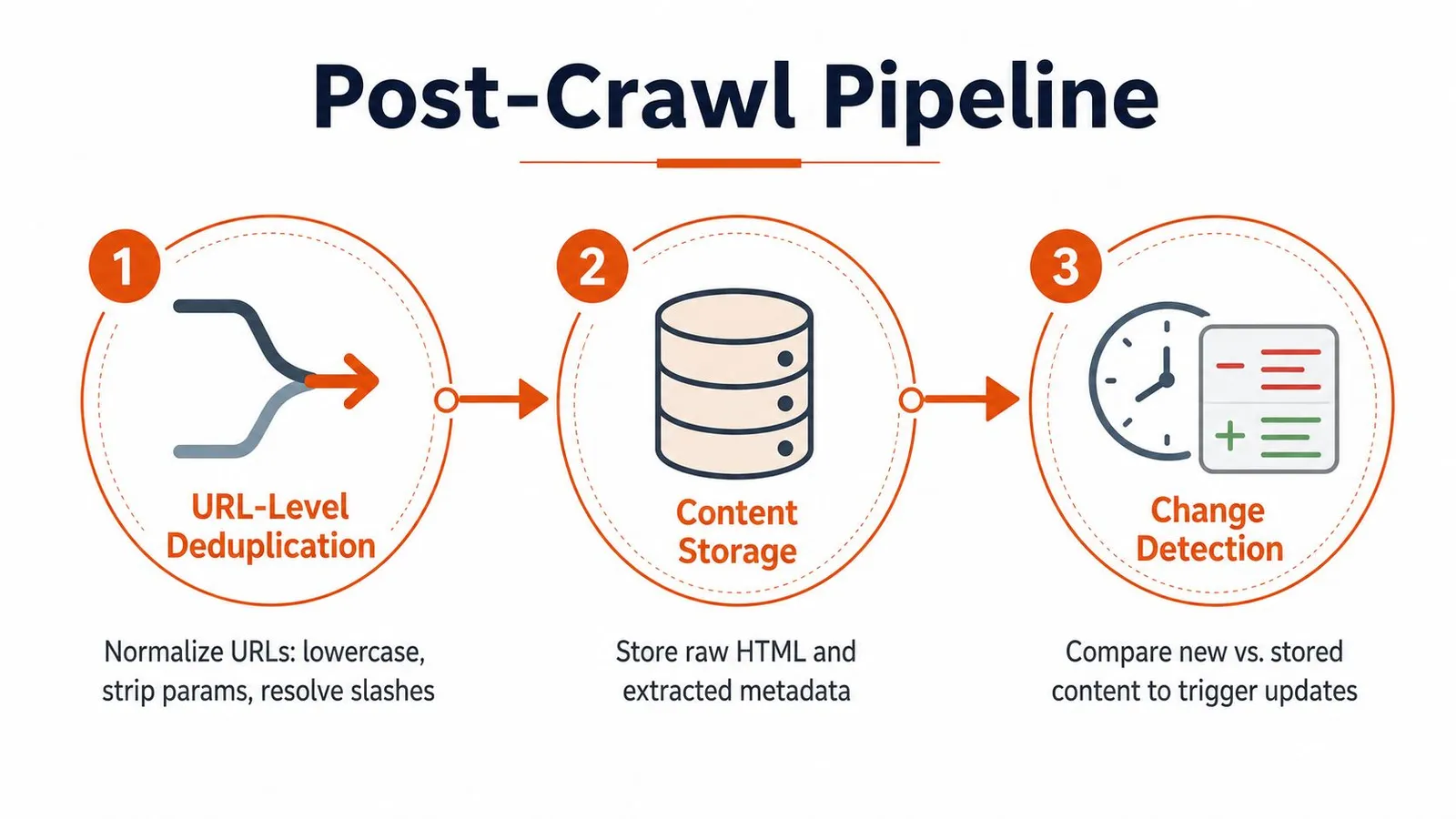
Normalize before you store
URL-level dedup starts with normalization. Lowercase the host, strip obvious tracking parameters, resolve trailing slashes, and collapse obvious variants before they hit storage or downstream queues. If you skip that step, the same page gets fetched, stored, and indexed as if it were multiple pages.
Content-level dedup is where hashes pay off. If the extracted body has not changed, there is no reason to re-store the same payload just because a URL was revisited. That matters on template-heavy sites, near-duplicate category pages, and syndicated content, where the crawler often sees the same substance under slightly different addresses.
A practical storage pattern stays simple. Raw HTML goes to object storage, normalized content and metadata go to a lightweight store, and a queue sits between fetch and persistence. That keeps the raw artifact available for debugging, while the downstream system queries a compact representation that is easier to compare over time.
Change detection is the reason to crawl again
Crawling once tells you what exists. Crawling repeatedly tells you what changed. That second problem is usually the one the business cares about, because it keeps product catalogs, pricing pages, docs, and search surfaces fresh.
Analysts in a web crawler strategy study found that greedy and adaptive schemes achieved an average ChangeRatio of about 75%, compared with about 40% for round-robin, proportional, and frequency-based schemes. The operational lesson is direct. If freshness matters, prioritize URLs that have recently yielded new or changed content instead of giving every frontier URL equal treatment.
Monitoring rule: log status, content length, hash, render mode, and proxy tier for every request. URL count will not tell you why a crawl is failing, but those five fields usually will.
For teams building streaming or repeated pipelines, remove duplicate streaming data is a useful mental model. The same discipline applies here. You do not want the system to spend money re-ingesting identical records just because they arrived again.
Webclaw's duplicate detection guidance fits naturally into that workflow, especially when repeated crawls need to keep only meaningful changes. Managed systems start to make sense here, because the cost of maintaining the dedup and change logic often exceeds the cost of using a layer that already handles it.
Putting It Together with Webclaw
A practical crawl usually starts with one URL and one question. The rest is just choosing how much control you want to keep. For a single page, a call to a scraping API can return LLM-optimized output directly, which is cleaner than taking raw HTML and stripping boilerplate yourself.
The same pattern scales to a site crawl with depth control and page caps. That's the difference between a one-off fetch and a bounded traversal, and it's why crawl tools need to expose both page limits and frontier rules instead of pretending every crawl should run until exhaustion. If you're wiring that into a larger workflow, the Webclaw getting started docs show the basic API, CLI, and SDK entry points without forcing you into one integration style.
Three ways the same crawl shows up in real work
- REST API: best when a service needs to fetch one page, normalize it, and hand the result to another system.
- CLI: useful when you want a one-off crawl in a shell script, a cron job, or a quick debugging session.
- Python SDK: the right fit when crawling becomes part of a larger pipeline, especially if you need retries, logging, or post-processing in code.
The monitoring view is the part teams often underinvest in. Watch fetch success rate, content completeness, and freshness, because those three signals predict whether the crawl is helping or just consuming budget. If they drift, the problem is usually one of the earlier layers, not the final parser.
One clean way to think about the whole stack is this: discovery finds the candidates, crawl control protects the target and your budget, rendering and anti-bot handling get you the content, proxies help with access and geography, and dedup plus change detection keep the output useful over time. If a tool can handle those parts without turning every crawl into an infrastructure project, it's worth serious attention.
If you need a crawl stack that starts from a URL, gets through noisy pages, and returns content that's usable by humans or models, Webclaw is built for that workflow. It handles single-page extraction, site crawling, and clean output formats so you can spend less time patching fetch failures and more time using the data.