
AI Web Scraping Guide for Modern Data Extraction
You send a URL to a traditional scraper and get back a mountain of HTML—nav bars, footer links, script tags, cookie banners, the works. Then you spend half your pipeline cleaning it up before a model can even look at it.
AI web scraping flips that. Instead of dumping raw markup, it turns messy pages into model-ready meaning. Think of it as hiring someone who walks into a cluttered room and tells you what the room is actually used for, rather than listing every piece of furniture.
Understanding the Key Concepts
AI web scraping isn't just a language model duct-taped onto a regular scraper. It's a stack built around semantic needs and token budgets—designed from the ground up to feed clean, useful context into downstream models.
- It moves away from brittle CSS and XPath selectors toward semantic comprehension—finding content by what it means, not where it sits in the DOM.
- It converts raw HTML into token-efficient context so models get what matters without the navigation noise.
- It replaces one-off scripts with resilient pipelines that render JavaScript, rotate proxies, and handle bot defenses without constant babysitting.
Good AI scraping focuses on meaning over markup. That's what cuts errors and keeps model costs down.
How This Helps in Practice
Semantic extraction can reduce dependence on exact selectors, but site changes can still break output. Test returned Markdown or structured data against the source and measure its token count.
Core Architecture Elements
Every solid AI scraping pipeline has a few pieces working together:
- Rendering Engine — handles client-side JavaScript so single-page apps return their full content, not empty shells.
- Proxy Layer — rotates residential or datacenter IPs to match whatever defenses the target site throws at you.
- Bot Mitigation Handling — integrates challenge solving, backoff logic, and retries so one blocked request doesn't kill the run.
- Formatter — strips boilerplate and emits LLM-friendly text or typed JSON instead of raw markup.
For a broader look at extraction techniques and defensive practices, it helps to understand the fundamentals. At its core, AI web scraping is a sophisticated method of data extraction—for a comprehensive overview of how data is generally extracted from the web, avoid IP blocks when scraping.
AI Scraping vs Traditional Scraping at a Glance
The differences aren't subtle. Here's how the two approaches stack up across the dimensions that matter:
| Dimension | Traditional Scraping | AI Web Scraping |
|---|---|---|
| Extraction Method | CSS/XPath rules prone to breakage | Semantic extraction that tolerates layout changes |
| Maintenance | High | Lower with adaptive parsers |
| Rendering | Often fails on JS pages | Renders client code reliably |
| Output Quality | Raw HTML or CSV | Token-efficient markdown/JSON for LLMs |
Traditional scraping gets the markup. AI scraping gets the meaning—and formats it so your model can actually use it.
Read also: Learn more about AI web scraping in our guide at Webclaw AI Scraper Overview.
How Production Scraping Pipelines Function
Think of a production AI web scraping pipeline as a restaurant kitchen. The chef—your model—expects perfectly plated dishes, not a pile of raw groceries. A request comes in like an order ticket, and each stage in the kitchen converts those ingredients into something ready to serve.
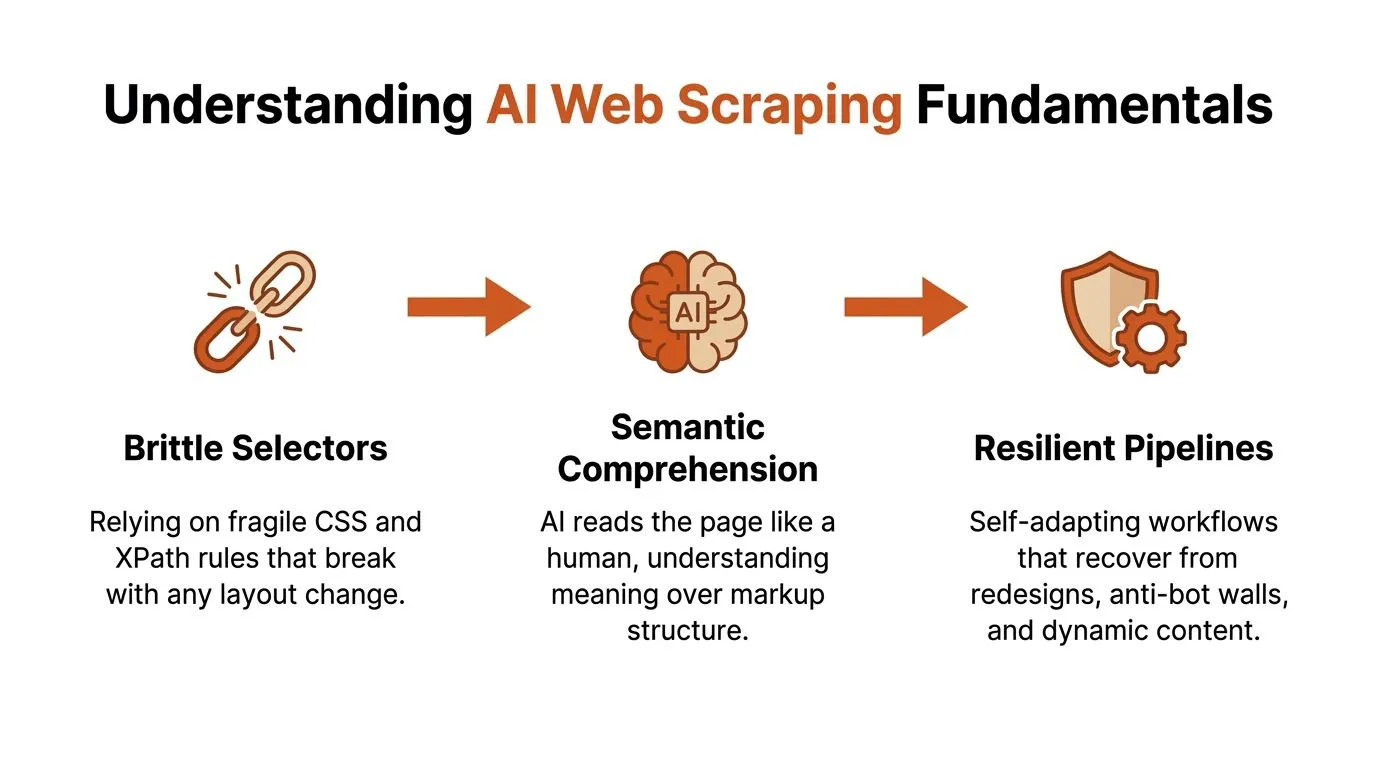
The diagram above shows the shift from brittle selectors to resilient pipelines and why semantic extraction matters for AI workflows.
It starts with fetching. You open the URL and pull back an initial response. For static pages, a simple HTTP fetch does the job. But most modern sites run on client-side frameworks, so the server hands you a shell—an empty container that fills in only after JavaScript runs. That's where rendering enters the chain.
Rendering Matters for Single-Page Apps
Rendering executes JavaScript to produce the final DOM. It's like baking raw dough into bread. Skip it and you miss product listings, lazy-loaded comments, dynamic prices—anything that loads after the initial page paint. Rendering engines range from full headless browsers to lightweight JS runners that emulate a real browser environment without the overhead.
After rendering comes proxy management, which decides how your request appears on the network. Residential proxies mimic home users. Datacenter proxies give you speed and scale. Residential routes tend to reduce blocks on guarded sites, while datacenter pools keep costs down for bulk crawls. Your proxy mix depends on the target's defenses and how much throughput you need.
A good proxy strategy is like choosing delivery routes—some require backroads to avoid checkpoints, others need highways for volume.
Next up is bot mitigation handling. This is where the system detects and solves anti-bot challenges. Retry logic, exponential backoff, CAPTCHA solving, human-in-the-loop escalation—these are the common tools. The goal is making sure one blocked request doesn't tank an entire job.
Then you hit parsing and extraction, where the rendered DOM gets transformed into structured outputs. Traditional scrapers rely on fixed CSS or XPath rules. AI web scraping adds semantic layers that find content by intent and meaning. That difference lets extractors survive redesigns and unexpected markup shifts without breaking.
- Output formats matter for downstream models
- Markdown for readable summaries
- Typed JSON when you need specific fields like price or date
- LLM-optimized payloads that strip boilerplate and save tokens
A practical pipeline usually looks something like this:
- Enqueue the URL with metadata and priority.
- Fetch and render using a headless browser pool.
- Route through the chosen proxy and run bot mitigation.
- Parse the DOM and apply semantic extractors.
- Format into JSON or markdown and return.
Most developers integrate these pipelines behind a REST API or an agent protocol so the calling pattern stays simple: send a URL, receive cleaned context. For a concrete example focused on job boards, see the Job Board Scraper Workflow.
Once you understand each stage—the fetcher, renderer, proxy layer, mitigation, and formatter—you can tell a simple fetcher apart from a full production system built to handle real-world complexity and keep your models fed with high-quality, token-efficient context.
Optimizing Output For Large Language Models
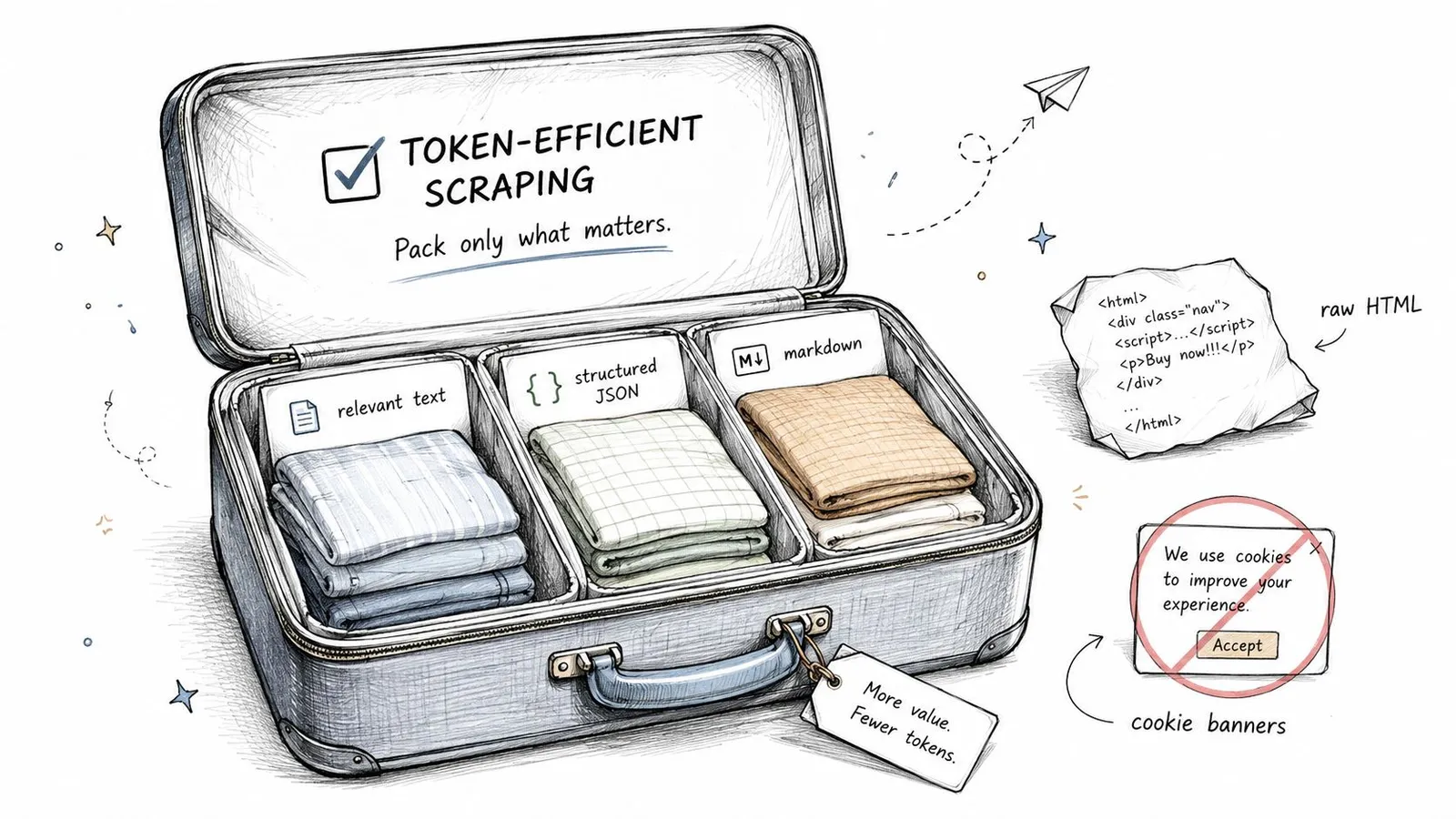
Think of preparing data for an LLM like packing a suitcase for a flight. Bringing the whole closet wastes space and adds weight; packing only outfits you'll actually wear saves room and avoids luggage fees. AI web scraping works the same way — you want to extract only the text the model will actually use, not every navigation link, script tag, or cookie banner that inflates token counts.
Raw HTML is like throwing your entire bedroom into a bag. Sure, the useful stuff is in there somewhere, but it's buried under noise that confuses retrieval systems and burns through tokens. That means higher cost per API call and more chances for the model to hallucinate because irrelevant boilerplate competes with the actual signal.
Cleaner context reduces hallucinations and cuts model bills by focusing attention on meaning rather than markup.
Why Output Format Matters
Different downstream tasks need different packing strategies. Three formats tend to work well:
- Markdown for readable summaries that preserve headings and emphasis while stripping layout noise.
- Plain text for minimal, linear context when structure isn't needed.
- Structured JSON when you need typed fields like price, date, or author to be machine-readable.
Each format strips unnecessary chrome. Converting a product page into JSON with fields like {title, price, description, sku} is like folding clothes into compartments — the model finds what it needs fast.
Practical Comparison Example
Feeding a model raw HTML versus optimized content produces tangible differences.
-
Raw HTML example
- Contains navbars, inline scripts, and repeated links.
- Token count balloons and the model may attend to repeated menu items.
-
Optimized markdown example
- Keeps headings, key paragraphs, and lists.
- Token count drops dramatically and summary quality improves.
The result: LLM accuracy increases and costs fall because fewer irrelevant tokens get processed.
Token-Efficient Strategies
- Extract semantic blocks, not DOM paths. Target the article body, product spec table, and last-updated date rather than fixed XPaths.
- Deduplicate repeated content like pagination or tag clouds.
- Normalize whitespace and strip tracking parameters before storage.
- Use short, informative anchors and include source metadata separately to avoid mixing provenance into the prompt.
Tip: Measure token count and retained facts together; no single compression target fits every page.
Tooling and Integration Patterns
Use an extractor that emits markdown or JSON directly so the formatter becomes part of the scraper. Add a small post-processing step to convert to token-count-friendly snippets and include only the top-N most relevant sections.
Example workflows:
- Scrape → Render → Semantic Extract → Emit Markdown
- Scrape → Render → Field Extraction → Emit Typed JSON
Read also: Learn more about converting HTML into LLM-friendly content in our guide on HTML to Markdown for LLMs.
By designing pipelines that output model-ready payloads, AI web scraping shifts from dumping pages to delivering distilled meaning — and that's what keeps both model answers and costs under control.
Integration Patterns And Developer Tooling
Getting AI web scraping into a real project means making it a dependable piece of your stack, not a throwaway script you rewrite every month. The integration pattern you pick should match what your team actually needs and where things tend to break.
REST API Integration
REST endpoints are the most straightforward path. You send a URL, you get back an LLM-ready payload—Markdown or Typed JSON—that drops straight into a prompt or a database.
The basic flow looks like this:
- Your app hits
POST /scrapewith a URL and extractor type. - The API returns cleaned content plus metadata.
- That content goes into a prompt or gets stored.
Calling a REST API for scraping is like ordering takeout. You don't run the kitchen, but you're counting on the food being consistent every time.
The upside is fast iteration with minimal engineering effort. The catch? When sites push back with bot detection, you're relying entirely on the provider's proxy network and mitigation stack to handle it.
Model Context Protocol Servers
MCP servers let AI agents call scraping tools as native actions inside model-driven workflows. This fits well when an agent needs synchronous, tool-like access to web content without you wiring up async REST calls.
What makes this pattern work:
- The agent invokes scraping as a built-in tool, not an external service.
- Less glue code sitting between the model and the scraper.
- Cleaner security boundaries around what the agent can access.
Picture an assistant that grabs a product page, pulls out the price, and responds in a single turn—no callback chains, no polling.
Command Line Interfaces And Scripting
For one-off tasks, CI pipelines, or scheduled cron jobs, a CLI is hard to beat. You can batch through URL lists, pipe results into fine-tuning datasets, or run periodic checks against a set of pages.
A typical CLI script:
- Reads a list of URLs.
- Calls the scrape command with a typed extractor.
- Dumps results to S3 or a vector database.
It's flexible enough to slot into existing build pipelines without much fuss.
Code Examples
Here's how quick it gets with the Python SDK:
from webclaw import Webclaw

wc = Webclaw(api_key="API_KEY")
res = wc.scrape("https://example.com/product", formats=["markdown"])
prompt = f"Summarize this product:\n{res.markdown}"
And the same thing in TypeScript:
import { Webclaw } from "@webclaw/sdk";

const wc = new Webclaw({ apiKey: process.env.WEBCLAW_API_KEY! });
const res = await wc.scrape({ url: "https://example.com", formats: ["markdown"] });
In both cases, scraped content becomes model-ready in a couple of lines.
Build Versus Buy Trade-Off
Building from scratch gives you full control. It also eats engineering time and sticks you with ongoing maintenance for rendering, proxy rotation, CAPTCHA handling, and bot mitigation.
- Build: Full control and customizability, but high engineering cost and brittle upkeep.
- Buy (purpose-built APIs): Fast integration, reliability on difficult targets, and typed extractors out of the box. The trade-off is depending on someone else's SLAs and pricing.
Advanced Tooling Features
Modern scraping APIs ship features that cut down on friction and help things scale:
- Typed extractors for job boards, product pages, or recipes so fields come back validated.
- Batch endpoints for parallel processing with concurrency controls.
- MCP servers so agents treat scraping as a native tool.
For production RAG or agent workflows, lean on typed JSON and batch endpoints. They keep prompts token-efficient and responses predictable.
Read also: Check out our guide on integrating scrapers with LangChain at Webclaw LangChain Integration for concrete connector patterns and SDK samples.
Scaling Reliability and Market Growth Trends
Moving from a single scraper to a production fleet isn't just an upgrade—it's a completely different job. It's the difference between owning a car and running a logistics company. A car needs gas and a driver. A fleet needs dispatch systems, maintenance schedules, and reroute plans when something breaks.
This shift changes the questions you're asking. Not "does it work" but "how does it fail gracefully" and "how do we keep data flowing when things go sideways."
Concurrency Controls
Concurrency is one of your primary levers. Limit parallel requests per domain so you don't trip rate throttles. Use token buckets to smooth out bursty traffic spikes.
Practically, this means building per-target queues and global worker pools. When one site gets slow or unresponsive, the rest of your pipeline keeps moving instead of drowning in retries.
Rate Limits and Backoff
Polite pacing reduces your block rate significantly. Backoff should be exponential with jitter—randomizing the retry window prevents thundering herd problems when a site recovers.
Every retry should record why the request failed. That failure metadata feeds into snapshot tracking, letting you compare page versions over time and catch layout drift before it corrupts your data pipeline.
Crawl Depth and Prioritization
Set domain-specific depth and page limits. Without these guardrails, discovery runs wild on large sites and eats resources fast.
Prioritize seed lists and sitemaps. Focus your crawl budget on high-value pages instead of trying to exhaustively map every corner of a domain.
Snapshot Tracking for Graceful Degradation
Store rendered DOM snapshots and diff them over time. This catches content shifts, regional variants, and A/B test branches without manual oversight.
When a layout change is detected, route that site to a semantic extractor retrain job rather than blindly retrying the same failing pattern.
Geo Differences and Proxy Diversity
Scaling isn't just about throughput. Regional content variations, A/B tests, and localized paywalls mean the same URL can return different data depending on where you're requesting from.
Proxy pools need to mix residential, ISP, and datacenter endpoints with health checks and automatic fallbacks. Read also: Learn more about choosing resilient proxy strategies in our article on Residential Backconnect Proxy Best Practices.
Operational Telemetry
Track per-request latency, success rate, retry budget, and tokenized output size. This ties your infrastructure costs directly to model spend.
Smaller payloads can reduce model input costs. Validate answer quality before treating compression as an improvement.
Reliable scraping is an operational discipline more than a one-off script.
Why This Investment Matters Now
AI-driven scraping accounts for a growing share of web traffic as model-driven applications demand cleaner context at scale. The stakeholders who sign off on tooling care about ROI: fewer outages, lower model bills, and predictable data freshness.
Practical Next Steps
Capacity planning, proxy contracts for geographic coverage, and adding snapshot diffing to your CI pipeline. These are the moves that separate a hobby setup from something that survives contact with production traffic.
Navigating Legal and Ethical Boundaries

Think of scraping like visiting someone's home to borrow a recipe. You knock, you ask, you don't rearrange the furniture. That mindset is what keeps your pipeline running long-term—compliance as practical risk management, not a checkbox exercise.
Start with the obvious signals. Respect robots.txt when it reflects a site's actual business intent. Ignoring it is the fastest way to get blocked and earn a reputation you don't want. Same goes for explicit terms of service that prohibit automated access—honoring them saves you from contract disputes and escalation down the line.
Honest identification matters more than most teams expect
Identify your agent clearly. Use a truthful user agent string and publish contact information so site owners can reach you if something goes wrong. When your scraper causes unexpected load, a visible contact email turns a potential legal threat into a quick conversation. Transparency reduces conflict and builds the kind of relationship that keeps your access intact.
Keep data collection minimal. Don't scrape personal data you don't need. Collect only what your downstream LLM actually requires for the task at hand. This cuts privacy risk dramatically and simplifies compliance with data protection frameworks like GDPR and CCPA.
-
Rate limit thoughtfully
- Use polite pacing and exponential backoff to avoid overwhelming publishers
- Limit parallel requests per domain and add jitter to retries
- Track per-site quotas and honor them before you're asked to
-
Operational respect practices
- Rotate proxies responsibly and disclose networks when required
- Expose a clear opt-out route for site owners who want out
- Monitor block signals and back off when publishers defend their content
Harmonize scraper behavior with publisher realities. Publishers see automated clients as significant traffic sources. Plan for throttling, CAPTCHAs, and legal pushback. Treat these defenses as signals to slow down or request permission—not bugs to hack around.
Numbered steps for a respectful scraping policy:
- Map legal obligations: check ToS, copyright rules, and local privacy law
- Implement technical courtesy: robots.txt check, UA transparency, rate limits
- Minimize collection: avoid PII, store only required context, retain provenance
- Respond to complaints: maintain a contact channel and honor takedown requests
For teams feeding LLMs, transparency is increasingly required by regulators. Build audit trails showing what you fetched, when, and why. This documentation answers future inquiries and demonstrates good faith if questions arise.
Practical takeaway: Use ethical scraping as an access-preservation strategy. Being a respectful guest keeps doors open, reduces legal exposure, and protects your brand—all while ensuring your AI web scraping pipeline remains reliable.
Practical Applications and Common Questions
AI web scraping only matters when it solves a real problem. Here are the patterns we see most often—what goes in, what comes out, and who actually benefits.
RAG Chatbot Pipeline
- Input: URLs or search results for domain-specific documentation
- Output: LLM-ready snippets, citations, and embeddings stored in a vector database
- Who uses it: Product and AI teams building retrieval-augmented assistants
- Example: Scrape product manuals, emit typed JSON like
{title, section, summary}, then index for fast retrieval
Competitive Price Intelligence
- Input: Product pages across multiple retailers with geo-specific variants
- Output: Typed price records with currency, timestamp, and region metadata
- Who uses it: Pricing, growth, and operations teams
- Example: Run parallel batch scraping through proxies, return normalized price fields that feed directly into alerting systems
Multi-Source Research Agent
- Input: News articles, regulatory pages, and blogs across different domains
- Output: Consolidated markdown summaries with provenance tracking and change snapshots
- Who uses it: Research, legal, and strategy teams
- Example: An agent scrapes multiple sources, deduplicates the content, and produces an executive brief with source links attached
When you're dealing with the realities of AI web scraping, understanding how modern services defend against automated access is essential. See LLMrefs on AI crawl blocks for concrete examples of what you're up against.
Common Developer Questions and Practical Answers
Is it legal to scrape for commercial projects?
Short answer: it depends on your jurisdiction and the site's terms of service. Treat this as risk management, not a yes-or-no question.
Practical stance: favor permission where you can get it, track your data provenance, avoid collecting personal data you don't need, and keep logs of your fetching behavior for audits.
How do I handle blocked sites?
Use adaptive proxy mixes and backoff heuristics, but treat blocks as a signal to pause and request permission. If you absolutely must proceed, go with provider-grade mitigation rather than stealth tactics that erode trust and can trigger legal or reputational fallout.
How do I choose a tool in 2026?
Prioritize token-efficient output, rendering fidelity, transparent bot mitigation, and typed extractors. Compare per-request token savings and uptime SLAs instead of chasing vanity features that look good in demos but don't hold up in production.
Verification Checklist Before You Commit
- Does the tool emit LLM-ready formats (markdown/JSON) that actually reduce token usage?
- Can it render client-side JavaScript and return consistent DOM snapshots?
- Does it provide proxy flexibility and honest bot-mitigation logs?
- Are legal and ethical behaviors documented and auditable?
- Can it scale with batch endpoints and concurrency controls?
Practical Steps to Validate
- Run a pilot on 50 high-variance pages and compare raw HTML against optimized output token counts.
- Simulate regional requests to confirm geo fidelity and proxy health.
- Trigger common anti-bot responses to verify mitigation workflows and retry logic actually work.
The bottom line: match the use case to the capability. RAG needs clean snippets and provenance. Price intelligence needs typed fields and geo proxies. Research agents need multi-source deduplication and snapshots. These concrete checks keep your AI web scraping project grounded and production-ready.
Webclaw https://webclaw.io