YouTube Transcript Scraper: A 2026 Developer's Guide
Most advice about a YouTube transcript scraper is stuck at the demo stage. Paste a URL, run a script, print some text, done. That works right up until the transcript becomes a production dependency for search, summarization, retrieval, moderation, or analytics.
The core problem isn't “how do I get words off a video page.” It's how to build a pipeline that returns reliable, structured, citation-friendly transcript data that an LLM can effectively use. A transcript that arrives late, arrives malformed, or suddenly disappears after a frontend change is worse than no transcript at all, because downstream systems trust it.
That's why transcript extraction belongs in the same category as any other brittle web data problem. It needs the same thinking you'd apply to scraping websites for data: interface volatility, retries, normalization, metadata design, and operational cost.
Why You Need More Than a Simple Script
A YouTube transcript scraper looks simple when the only requirement is “get me the text.” That's not how teams use transcript data.
They feed transcripts into RAG systems, classify topics across channels, enrich research datasets, generate summaries, extract quotes, and align transcript segments with timestamps so users can jump back into the source video. In each of those workflows, the transcript isn't the final output. It's an upstream dependency.
That changes the engineering standard. You don't just need text. You need text that is:
- Consistently available across many videos, not just a hand-picked sample
- Structured for retrieval with timestamps, segments, and metadata
- Cheap enough to process without wasting compute on noisy markup
- Stable enough to maintain when YouTube changes frontend behavior
Practical rule: If the transcript will feed an AI system, treat extraction and post-processing as one pipeline, not two separate tasks.
There are four broad ways people approach this problem.
One group uses a quick reverse-engineered script that pulls internal data from the video page. Another group depends on open-source helpers that wrap the same logic. A third group runs full browser automation with Playwright or Puppeteer. The last group uses a managed scraping API that handles rendering, extraction, and blocking issues behind a single endpoint.
Each method can work. Each method also fails in a predictable way.
The main mistake is choosing based on how quickly the first transcript appears, instead of how reliably the next thousand will arrive.
The Core Challenge Why Scraping Transcripts Is Hard
Start by checking whether you have permission to edit the video. The official API is a suitable path for authorized caption downloads, but it is not a general transcript service for arbitrary public videos.
The YouTube Data API provides a captions.download endpoint. It requires authorization and permission to edit the video. When those permissions are unavailable, public transcript extraction relies on a different, less stable interface.
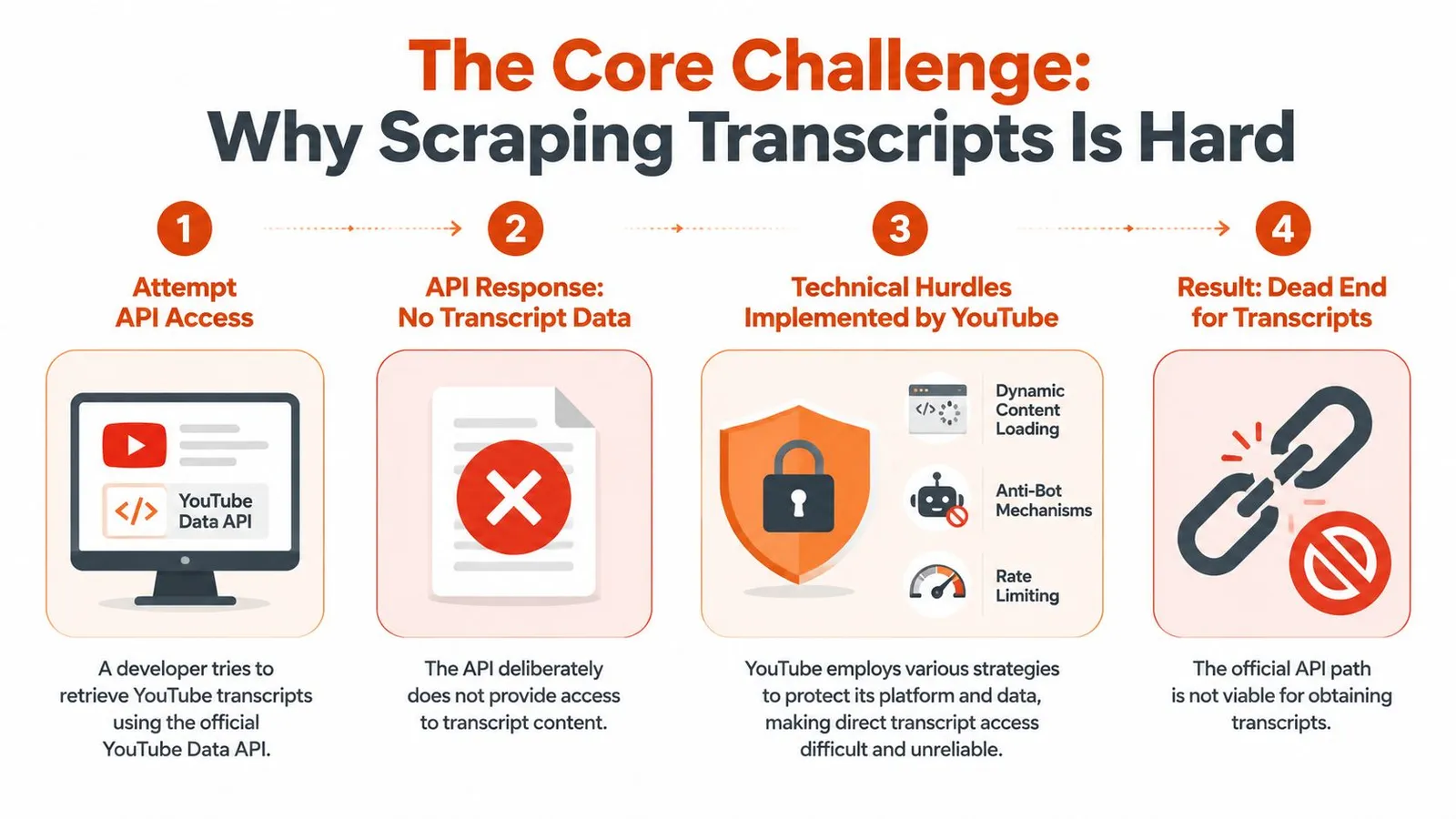
The official API requires permission
A fundamental change occurs in the class of problem you're solving. When transcript extraction isn't available through the official API, you're no longer integrating with a stable contract. Instead, you're interacting with a moving web application.
That means your scraper depends on private behavior: page HTML, embedded data structures, client-side requests, tokens, UI actions, and whatever assumptions the current frontend happens to expose.
The page doesn't behave like a static document
A lot of failed transcript scrapers share the same flaw. They treat the YouTube watch page like a static HTML page that can be fetched once and parsed with a few selectors.
That doesn't hold up. The transcript interface is tied to client-rendered behavior, and the useful data often appears only after JavaScript initializes the page and the browser performs additional requests.
In practice, developers end up choosing between two imperfect options:
- Simulate a user session: Open the page in a real browser context, click through the UI, and capture the transcript panel output.
- Reverse engineer internal requests: Inspect the page and network traffic, recover the token flow, and call the same internal endpoints directly.
Both approaches are brittle for different reasons.
The hard part isn't extracting one transcript. It's building something that survives private frontend changes without waking someone up at midnight.
This is why brittle scrapers fail in production
The browser path is expensive because it needs JavaScript execution, page rendering, and anti-bot handling. The direct request path is lighter, but it relies on internal request formats that can change without warning.
There's also a data quality problem that single-video tutorials mostly ignore. “Transcript available” and “transcript usable” are not the same thing. Some videos have creator-provided captions. Others depend on auto-generated captions, and quality can vary by language and audio conditions. If your downstream system assumes every transcript is equally trustworthy, retrieval quality drops fast.
The result is a pipeline problem, not a parsing problem. You need extraction logic, retries, validation, normalization, and storage design that all assume the source is unstable.
DIY Methods Reverse Engineering and Open Source Tools
A single Python script can pull a transcript today and still be the wrong design choice.
The core decision is what kind of failure mode you want to own. Reverse engineering YouTube's request flow is cheap and fast when the page structure stays stable. Open-source wrappers reduce setup time, but they add a dependency on someone else keeping up with private frontend changes. For production AI systems, that trade-off matters more than the first successful extraction.
Reverse engineering the transcript request
The reverse-engineering path starts with the watch page, not the visible transcript panel. In practice, developers inspect the HTML and network activity, look for objects such as getTranscriptEndpoint, extract continuation data, then reproduce the request with the right client context. If that request succeeds, the response still needs cleanup because the transcript is usually buried inside extensively nested renderer structures rather than returned as a clean caption document.
The workflow is usually:
- Fetch the watch page HTML
- Locate
getTranscriptEndpointor related continuation data - Extract the token, params, and required request context
- Send the follow-up request to the internal endpoint
- Parse nested JSON to find transcript segments
- Normalize segments into text, timestamps, and metadata
This path is attractive for one reason. It avoids browser rendering, so it is lighter on CPU, memory, and cost.
It is also brittle in ways that tutorial code often hides. The field names are private. The nesting can shift. A request that works for one class of videos can fail on another because the caption track, language metadata, or transcript availability is represented differently. For AI ingestion, that means extraction logic and normalization logic have to be designed together. Getting raw text is not enough if timestamp alignment or language labeling is inconsistent.
Where open source helpers fit
Open-source libraries are useful for prototypes, analyst workflows, and internal tools where an occasional failure is acceptable. They package the request discovery and parsing logic so teams can test ideas quickly instead of spending the first day in DevTools.
The cost is maintenance indirection. If the package breaks, your team either waits for a fix, forks it, or replaces it. That is manageable for a side utility. It is harder to justify when transcripts feed retrieval, summarization, or compliance workflows with uptime expectations.
Teams that plan a browser-based fallback should choose that stack deliberately. The differences between request interception, browser startup cost, and DOM interaction patterns become operational concerns once transcript extraction runs at volume. This comparison of Playwright vs Puppeteer for web scraping is useful if you expect to support both direct-request and browser-based extraction paths.
What breaks first
DIY transcript scrapers usually fail in a few predictable places:
- Token discovery fails: The script no longer finds the expected key path in the page payload.
- Request context changes: The endpoint still works, but it now expects different client fields or params.
- Parser assumptions drift: The transcript is present, but your code targets the wrong renderer path or segment shape.
- Access controls appear: Repeated requests trigger throttling, temporary blocking, or inconsistent responses.
Retries help with transient failures. They do not fix a parser built on stale assumptions.
That distinction matters in data pipelines. A temporary request failure should be retried and logged. A structural parse failure should be quarantined, sampled, and reviewed, because storing partial transcripts unmonitored will degrade downstream chunking, embeddings, and answer quality.
Reality check: DIY extraction makes sense when low cost matters more than uptime, or when your team is willing to own parser maintenance as part of the system.
That is why I treat open-source transcript tools as accelerators, not foundations. They are a good way to validate demand and learn the shape of the data. They are a weak contract for a production pipeline that needs stable, auditable transcript output.
Production Grade Scraping Headless Browsers vs Managed APIs
A lot of transcript guides stop at "make the request" or "click the transcript button with Playwright." That is enough for a demo. It is not enough for a production AI pipeline that has uptime targets, cost limits, and downstream consumers that expect consistent text and metadata.
Once direct extraction becomes unreliable, the decision usually shifts to two operating models. Run your own browser fleet, or buy that capability as a service. The primary question is not which method feels more technical. It is which failure modes your team wants to own.
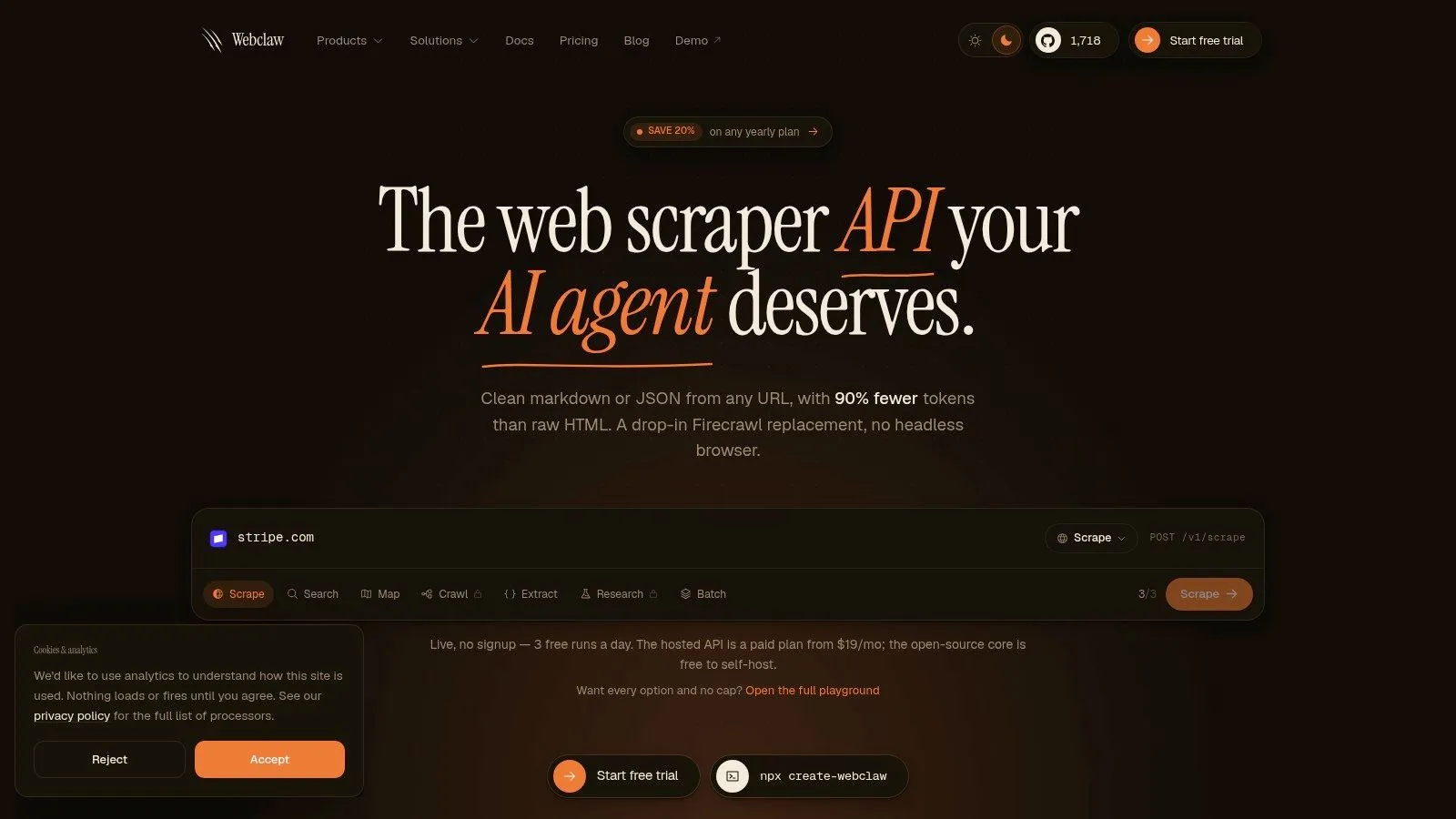
Near the start of that evaluation, it helps to look at what a browser-based extraction product returns in practice.
Running your own browser fleet
Headless browsers give you the highest page fidelity. They execute client-side code, load the full watch page, and let you extract either from the rendered DOM or from network traffic generated during page load. That flexibility matters when YouTube changes the surface area exposed to unauthenticated requests.
The trade-off is operational drag.
A browser worker that succeeds in staging can still fail in production for reasons that have nothing to do with your parser. Containers run out of memory. Browser versions drift. Proxy pools get burned. A transcript panel loads too slowly and your timeout policy turns a recoverable page into a hard failure. None of that shows up in a toy script.
A self-hosted browser setup usually needs:
- Worker orchestration: Queueing, concurrency limits, browser pooling, and crash recovery
- Capacity planning: CPU, memory, and network budget for JavaScript-heavy pages
- Request hardening: Proxy rotation, geo controls, retry policies, and challenge detection
- Stable extraction paths: DOM selectors, network interception, or both, with tests for each
- Observability: Failure tagging that separates page-load issues from parser issues from blocking events
That is infrastructure, not scraping glue code.
The upside is control. Teams with strict data residency rules, custom authentication flows, or unusual extraction requirements may want that control badly enough to justify the cost. If transcript extraction is a core platform capability, not a support task, owning the browser layer can make sense.
What a managed API changes
A managed API moves browser execution, proxy management, and breakage handling behind a normal request-response contract. That changes the shape of the problem for your team. You spend less time keeping browser workers alive and more time validating output quality, throughput, and schema stability.
That is why managed APIs are often the better fit for LLM applications. The value is not just convenience. The value is a narrower operational surface area. If the provider absorbs frontend changes and anti-bot churn, your ingestion pipeline becomes easier to reason about.
The comparison is less about "build vs buy" ideology and more about where you want your on-call pain to land.
YouTube Transcript Scraper Method Comparison
| Method | Reliability | Scalability | Maintenance Cost | Best For |
|---|---|---|---|---|
| Reverse-engineered HTTP script | Low to medium | Limited | High | Prototypes and internal experiments |
| Open-source transcript library | Medium at first | Limited to moderate | Medium to high | Small tools and non-critical workflows |
| Self-hosted headless browsers | High when well run | Moderate to high | Very high | Teams that need control and can own infra |
| Managed scraping API | High | High | Low to medium | Production AI pipelines and bulk extraction |
The strongest argument for a managed route is consistency at the output boundary. In production, transcript text alone is rarely enough. Pipelines usually need timestamps, language, title, channel metadata, video identifiers, and clear error states in one schema. If those fields arrive in a predictable response, storage, chunking, and retrieval stay much simpler.
One factual example is the Webclaw YouTube Transcript API, which exposes transcript extraction through a standard API instead of requiring you to operate a browser worker layer yourself.
If your end goal is summarization rather than raw ingestion, you can also use Cramberry to summarize videos after extraction. That split is worth keeping clear. Transcript collection and transcript consumption are different parts of the stack, and they fail for different reasons.
Here's a short demo to make the workflow concrete:
Choosing by failure tolerance
The right choice depends on the cost of bad data and the cost of downtime.
If a missed transcript only delays an internal experiment, a lighter approach is usually fine. If transcript output feeds retrieval, evaluation datasets, customer-facing summaries, or analytics jobs, reliability has to outweigh script simplicity. A cheap extractor that fails without notice is expensive once low-quality text enters embeddings, search indexes, or generated answers.
Own the browser layer only if that control solves a real business requirement. Otherwise, buy the interface and spend your engineering time on validation, normalization, and pipeline quality.
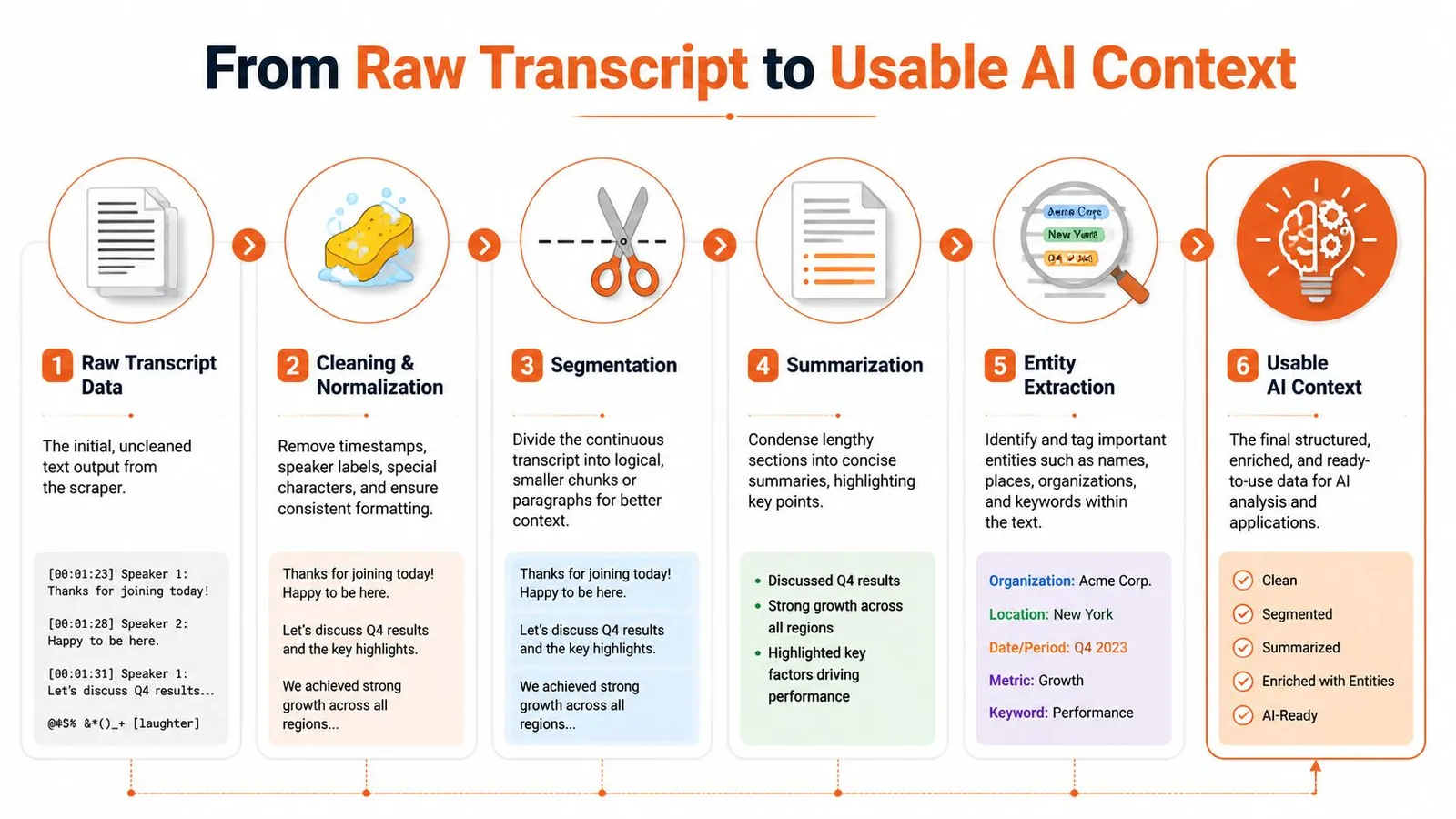
From Raw Transcript to Usable AI Context
A transcript is not ready for AI use when extraction finishes. It is raw input to a text pipeline, and raw input is where retrieval quality usually starts to break.
What hurts production systems is rarely the obvious failure of getting no transcript at all. It is the quieter failure of getting text that looks usable, then poisons chunking, embeddings, citations, and summaries because nobody normalized it first.
Normalize before you embed
Transcript cleanup should be treated like any other ingestion transform. Define a canonical schema early, and keep both the untouched source and the cleaned version.
Useful cleanup steps include:
- Remove presentation noise: Strip filler markers, repeated fragments, speaker artifacts, and formatting residue that add tokens without adding meaning.
- Standardize whitespace and punctuation: Consistent text produces more stable chunk boundaries and more predictable downstream processing.
- Preserve provenance fields: Keep timestamps, segment IDs, language, and raw caption text even if you generate a cleaned prose field for LLM use.
Quality checks belong here too. Auto-generated captions can drift on names, domain terms, accents, and language switching. Firecrawl's review of transcript extractor limitations points out the uneven quality across tools, but the bigger production lesson is architectural. Never assume caption text is uniformly trustworthy. Add validation rules, fallback extraction paths, or a low-confidence flag that stops bad text from reaching your vector store.
If the goal is study notes or quick comprehension instead of retrieval and citation, you can use Cramberry to summarize videos after cleanup. That still works better when the transcript has already been normalized.
Chunk by meaning and timestamp
Fixed-size chunking is easy to ship and easy to regret. Video transcripts are sequential, timestamped, and often fragmented by caption timing rather than by idea. If you split purely by token count, you lose semantic boundaries and make answer verification harder.
A better pattern is to start with transcript segments, merge adjacent segments until each chunk contains one coherent idea, and retain the start and end time for every merged block. That gives the model enough context to answer questions while keeping a path back to the source video.
In practice, the chunking rules usually look like this:
- Start from timestamped transcript segments rather than one flattened text blob.
- Merge short adjacent segments to avoid tiny chunks with no standalone meaning.
- Split on topic shifts or speaker changes when those signals are available.
- Attach start and end timestamps to every final chunk.
- Create a readable display field so users see clean text instead of raw caption fragments.
Good chunks support two jobs at once. They improve retrieval quality, and they make answers auditable.
Store transcript and metadata together
Transcript text without metadata becomes expensive to use later. Ranking, filtering, freshness checks, and citation all depend on context outside the caption stream.
Store cleaned transcript data with the video title, channel name, upload date, language, transcript source, extraction timestamp, and any confidence or quality flags your pipeline generates. Some extractors also return engagement or channel-level fields. Those can help for analytics, but they should be optional enrichment, not part of the core transcript contract.
For LLM systems, keep two representations:
- Raw archival form for debugging, reproducibility, and reprocessing
- LLM-ready form with normalized text, stable chunk boundaries, and attached metadata
That is the same discipline used in a good text extraction pipeline for web content. The engineering goal is not just to collect words. It is to produce context that stays traceable, consistent, and useful after the first demo.
Scaling Your Scraping and Staying Compliant
Ten videos can hide every architectural mistake. Bulk workloads expose all of them.
Scale changes the economics
At volume, a YouTube transcript scraper becomes a scheduling and reliability system. You need queueing, retries, timeout control, deduplication, and some form of request distribution that avoids turning a healthy pipeline into a bursty bot signature.
A few practices matter more than people expect:
- Throttle intentionally: Smooth request rates beat aggressive bursts followed by blocks.
- Retry with policy: Not every failure deserves an immediate retry. Temporary blocks and transient rendering errors should follow explicit backoff rules.
- Separate acquisition from processing: Don't tie transcript extraction, cleanup, embedding, and indexing into one fragile synchronous job.
- Plan for proxy strategy: If you're self-managing, proxy quality and routing policy become part of your cost model.
That last point is usually underestimated. Guides about scaling transcript extraction to large monthly volumes often skip the actual cost of proxy rotation and failed requests, even though those two factors shape the complete cost per transcript for self-managed systems, as noted in this discussion of large-scale transcript extraction gaps.
If you do manage your own browser fleet, the trade-offs around a residential backconnect proxy are worth understanding early because blocking behavior and geographic routing show up quickly at scale.
Compliance is part of the architecture
Legal and ethical constraints don't sit outside the system. They affect what you store, how long you keep it, and how you expose it internally.
A professional setup should account for:
- Terms of service review: Know what the platform permits and where your risk sits.
- Copyright boundaries: A transcript may be easier to process than video, but it still maps to copyrighted content.
- Data minimization: Keep the fields you need for the product or analysis. Don't collect extra material by default.
- Human review paths: If transcript output is used for decisions or publication, preserve a way to verify against the source video.
The biggest scaling mistake is assuming that if extraction works technically, the problem is solved. It isn't. Reliable bulk scraping needs operational discipline, and compliant bulk scraping needs policy discipline. Teams that treat both as first-class requirements build systems that last.
Webclaw exposes YouTube extraction through its content API. Availability depends on the video, caption availability, and access restrictions. Handle unavailable results explicitly and validate transcript text and metadata before using them in search, summaries, or retrieval.