JA4 Fingerprints Decoded: Format, Bot Score, curl 403s
You wrote a scraper in Python. You set a real Chrome User-Agent. You added the same Accept-Language header your browser sends. You opened the URL in Chrome and it loaded fine. You ran your scraper and got a 403.
This post is about why. The short answer: Cloudflare scored your TLS handshake before it ever read your User-Agent. The cipher order, the extensions, the GREASE values, the HTTP/2 SETTINGS, all of those tell Cloudflare you are not Chrome. The User-Agent says "Chrome." The connection itself says "Python."
This is the layer below most scraping advice. For the wider playbook see the pillar on bypass Cloudflare bot protection. This post is the deeper version: what a TLS fingerprint actually is, why every default HTTP client has a unique one, and how to match a real browser without paying the cost of launching one.
TLS fingerprint vs Cloudflare: quick answer
If Chrome loads a page and curl, Python requests, Go net/http, or Node fetch gets a 403, the User-Agent is probably not the problem.
- Cloudflare sees the TLS ClientHello before it reads headers.
- JA3 and JA4 fingerprints expose the real client family.
- HTTP/2 SETTINGS and header wire order add another fingerprint.
- A fake Chrome User-Agent on a library TLS stack is an inconsistency, not a disguise.
The practical fix is a browser-grade HTTP client for the first fetch, then a browser fallback only when the page really needs JavaScript. For the full decision tree see bypass Cloudflare bot protection and Cloudflare error codes.
What a TLS fingerprint actually is
When a client connects to a server over HTTPS, the first thing it sends is a ClientHello message. The ClientHello announces, in order:
All of those fields are observable to the server before any byte of HTTP is sent. Cloudflare sees them. So does every other CDN and WAF.
A JA3 fingerprint is a hash of the ClientHello fields concatenated in a fixed order. Two clients that build the ClientHello differently will produce different JA3 hashes. Python requests has a JA3 hash. Chrome 142 has a different JA3 hash. They are not the same string and they cannot be made the same by changing a header.
JA4 is the newer fingerprint family. It captures more of the handshake plus ALPN context, and is more stable across modern protocol behavior. Cloudflare uses JA4 in production. Their public JA4 Signals post says they analyze more than 15 million unique JA4 fingerprints per day.
Past the TLS layer, HTTP/2 has its own fingerprint surface:
INITIAL_WINDOW_SIZE, MAX_HEADER_LIST_SIZE, and so on.:method, :authority, :scheme, :path).Two HTTP/2 clients that "look the same" at the application level can still send completely different SETTINGS and header order. Cloudflare reads that too.
The handshake is scored before User-Agent
This is the part most scrapers get wrong. The diagnostic chain is roughly:
- Client opens TCP connection.
- Client sends TLS ClientHello.
- Cloudflare hashes the ClientHello (JA3, JA4) and compares to known browser fingerprints.
- TLS handshake completes.
- Client sends HTTP/2 SETTINGS, opens stream, sends HEADERS frame.
- Cloudflare hashes the HTTP/2 fingerprint and the header wire order.
- Only now does Cloudflare read the
User-Agentheader.
- Cross-check: does the User-Agent match the fingerprint?
If steps 3 or 6 already classified you as bot, step 7 is just confirmation. The User-Agent never had a chance.
That is why your "real Chrome user agent" did nothing. The decision was made three steps earlier.
What every default client looks like
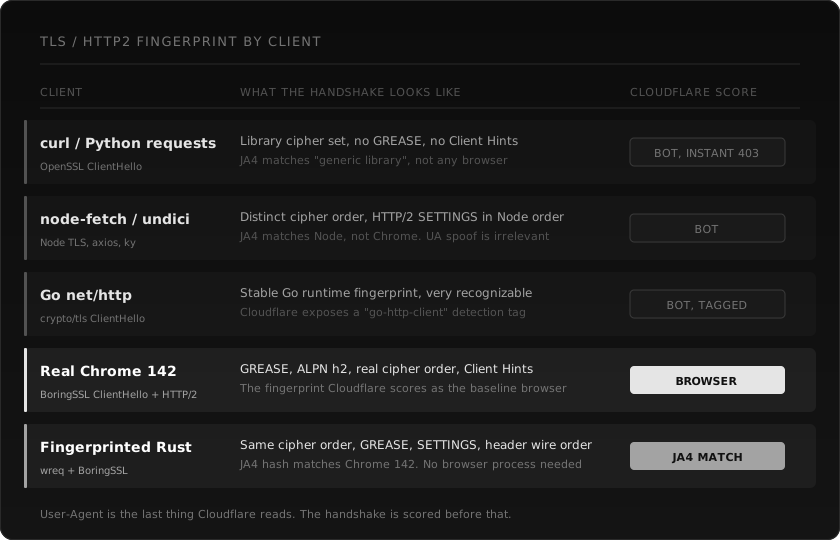
Same URL, six different clients, six different fingerprints.
curl, Python requests, httpx. All built on top of OpenSSL or its variants. The cipher set is the OpenSSL default, not Chrome's order. No GREASE values. No Client Hints. The JA4 hash matches "generic library", not any browser. Some sites flag this immediately.
node-fetch, axios, undici. Built on Node's TLS stack. Distinct cipher order. HTTP/2 SETTINGS in Node order. The JA4 hash matches Node, not Chrome. UA spoofing is irrelevant because the handshake already lost.
Go net/http. Stable Go runtime fingerprint, very recognizable. Cloudflare even exposes a public detection tag for it. Spoofing the UA does nothing because Cloudflare flags Go traffic at the transport layer.
Real Chrome 142. BoringSSL ClientHello, real cipher order, GREASE inserted, ALPN h2, Client Hints attached. HTTP/2 SETTINGS in Chrome's order. This is the baseline that Cloudflare's bot management considers normal browser traffic.
Headless Chromium driven by Puppeteer. The TLS fingerprint is technically Chrome (BoringSSL), but Linux container Chromium plus the driving process often mangles the HTTP/2 SETTINGS or the header wire order. Result: a "Chrome-like" fingerprint that does not quite match real Chrome. Some sites pass it. Aggressive Cloudflare configs do not. See why Puppeteer stealth stopped working for the full story.
Fingerprinted Rust client (wreq, BoringSSL). Built specifically to ship the same ClientHello as Chrome. Same cipher order, same GREASE, same extensions, same HTTP/2 SETTINGS, same header wire order. JA4 hash matches Chrome 142. No browser process. Around 20x faster than headless Chrome on the same URL.
The pattern: every general-purpose HTTP library has a fingerprint that screams "library." Only clients explicitly built to match a browser produce a browser fingerprint.
Why User-Agent rotation is theatre
A lot of scraping tutorials still recommend "rotate your User-Agent through a list of real browsers." This was useful in 2018. It is mostly noise in 2026.
User-Agent rotation does fix one specific problem: Cloudflare WAF rules that match on the literal string python-requests/2.x or Go-http-client/1.1. Default library UAs trigger 1020 errors on a non-trivial fraction of sites. Changing the UA to a real Chrome string clears those rules.
It does not fix:
Cloudflare's Detection IDs docs call out exactly this case: a request where the headers were sent in a different order than expected for the claimed browser. They built a detection ID for it.
If your stack lies at one layer and tells the truth at another, the inconsistency itself becomes the signal.
The matrix of options
You have three architectural choices. They have different cost, speed, and pass-rate trade-offs.
| Option | Pass rate on Cloudflare | Latency | Operational cost |
|---|---|---|---|
| Default HTTP library + UA rotation | Low | 50-200ms | None |
| Headless browser + stealth plugin | Medium | 4-8s per page | Chrome process, Docker, residential IP |
| Fingerprinted HTTP client (wreq, curl-cffi, tls-client) | High on most CF pages | 100-300ms | Library install |
| Fingerprinted HTTP + browser fallback for JS-only pages | Highest | Mixed | Both layers |
Option 3 is the one most teams underuse. It buys you 80% of browser-grade pass rate at 1/30th the latency, with no Chromium process to manage. The remaining 20% (sites that need real JavaScript execution after a Turnstile token) need option 4.
For comparing scraping APIs head to head, see Best web scraping APIs for LLMs.
How webclaw uses TLS fingerprinting
The fetch path inside webclaw is built on wreq, a Rust HTTP client that uses BoringSSL and ships browser emulation profiles by default. wreq matches Chrome's ClientHello, GREASE, ALPN, and HTTP/2 SETTINGS down to the byte. The webclaw-fetch crate wraps it and adds:
Accept-Language based on the URL's TLD.The fast path is a single fingerprinted HTTPS request. No DevTools. No Chromium. No 300 MB of memory per page. For most Cloudflare-protected URLs that is enough, because the score the page wants is "Chrome-like client, coherent across all layers." A wreq request with the right profile produces exactly that.
When the page actually needs JavaScript, the router escalates to a headless Chrome session over CDP. That session also runs through a residential exit so the IP and ASN signals match. The browser is the exception, not the default.
import { Webclaw } from "@webclaw/sdk";

const client = new Webclaw({ apiKey: process.env.WEBCLAW_API_KEY });

const page = await client.scrape({
  url: "https://target.example/product/123",
  format: "llm",
});

console.log(page.markdown);
You do not pick a TLS profile. You do not configure a proxy. You ask for the URL and you get the markdown. The fingerprint matching is the default behavior.
curl -X POST https://api.webclaw.io/v1/scrape \
  -H "Authorization: Bearer $WEBCLAW_API_KEY" \
  -H "Content-Type: application/json" \
  -d '{"url": "https://target.example/product/123", "formats": ["llm"]}'
Same call over HTTP. Full reference in the scrape API docs. Get started in the dashboard, API key when you are ready.
The trade-off you actually pay
A fingerprinted HTTP client is 20 to 100 times faster than a browser. That is the speed gain. The trade-off is that it does not execute JavaScript.
For server-rendered pages (most blogs, most product pages, most documentation, most news, most listings), this is a non-issue. The HTML you fetch contains the content. You parse it and move on.
For client-rendered pages (some SPAs, some dashboards, pages that hydrate the real content from XHR after the shell loads), a fingerprinted fetch returns the shell. You see a hollow <div id="root"></div> and you are missing the content.
Two strategies work here:
- Inspect the page once in DevTools and find the underlying API. Most SPAs make their content visible through a JSON endpoint. Hit that endpoint directly with the fingerprinted client. You skip the rendering step entirely.
- Escalate to a real browser only when needed. Run the fingerprinted fetch first. If the response body is missing the marker you expect (a price field, an article body, a product title), then escalate.
webclaw does the second one in routing. You do not pay the browser cost on the 80% of URLs where you do not need it.
A worked example
Same target URL, three clients. The shape of the failure tells you which layer broke.
Client 1, Python requests with a real Chrome UA.
HTTP/1.1 403
cf-ray: 8a1c4d6a9f3e1234-FRA
Body: "Sorry, you have been blocked." Cloudflare branded page.
The User-Agent did nothing. Cloudflare scored the JA3 hash of OpenSSL and rejected the connection. No JavaScript involved.
Client 2, curl-cffi impersonating Chrome 116.
HTTP/2 200
Content-Type: text/html
Body: real product page HTML.
The TLS fingerprint matches Chrome 116. JA4 hashes match. HTTP/2 SETTINGS match. The page renders server-side, so the fetch is enough. Same URL, different fingerprint, different outcome.
Client 3, plain Python requests again, but this time on a different page on the same site.
HTTP/2 200
Body: HTML shell with no product data.
The site has bot protection only on certain paths. The shell-only response is the SPA case. You need the underlying API or a browser to get content.
This is the kind of debugging session that gets faster once you know what fingerprint each client produces. You stop blaming "Cloudflare hates Python" and start reading the actual signal.
Frequently asked questions
What is the difference between JA3 and JA4?
JA3 is the older TLS fingerprint, a hash of the ClientHello field values. JA4 is the newer family that also captures HTTP/2 metadata and ALPN context. JA4 is more stable across modern protocol behavior and harder to fake because it covers more of the handshake. Cloudflare uses both but JA4 is the one mentioned in their newer bot management docs.
Can I change my JA3 in Python requests?
Not directly. requests uses OpenSSL via urllib3. The ClientHello is built by OpenSSL with its default cipher order, which produces a fixed JA3 hash. To get a different fingerprint you need a library that builds the ClientHello differently. curl-cffi and tls-client are the common Python options.
Why does Chrome ship GREASE values?
GREASE (Generate Random Extensions And Sustain Extensibility) is Chrome's mechanism to prevent middleboxes from ossifying around specific extension values. Chrome inserts dummy extension and cipher values that any compliant server should ignore. Real browsers send GREASE. Most default libraries do not. Cloudflare reads the presence of GREASE as a strong "real browser" signal.
Does User-Agent rotation help against Cloudflare?
Only against the simplest WAF rules that string-match python-requests or Go-http-client. Against bot management with JA4 scoring, UA rotation does nothing. The handshake is scored before the UA is read.
What is the fastest way to scrape Cloudflare-protected pages?
A fingerprinted HTTP client (curl-cffi, tls-client, wreq, primp). One round-trip, no browser process, around 100-300ms per page. Browser-based scraping is 4-8 seconds per page minimum due to Chrome startup, navigation timing, and JavaScript execution. The speed gap is roughly 20x.
Why do some libraries call themselves "Chrome impersonation"?
Because they specifically build the ClientHello to match a recent Chrome version's exact byte sequence: cipher order, GREASE values, extensions, ALPN protocols, signature algorithms. They also match Chrome's HTTP/2 SETTINGS frame and header wire order. The result is a JA4 hash that matches Chrome rather than the underlying language runtime.
How often does Chrome's TLS fingerprint change?
Roughly with every major Chrome release (every six weeks). Cipher list changes, GREASE rotation, occasional extension reorders. A fingerprinted client built for Chrome 130 will not match Chrome 142. Libraries that take fingerprinting seriously ship updates every release cycle.
Can Cloudflare detect "Chrome-impersonating" libraries?
Sometimes. If the library matches the JA4 but does not match the HTTP/2 SETTINGS or the header order, the inconsistency itself is detectable. The libraries that win are the ones that match every layer. The libraries that get caught are the ones that match TLS only and ignore HTTP/2.
What is Cloudflare's bot score made of?
Per Cloudflare's public Bot detection engines docs, the score combines a heuristics engine (request fingerprint matches), JavaScript Detections (browser environment checks), machine learning over header and session features, and a __cf_bm cookie that smooths the score across a request pattern. JA4 is one input among several. A coherent client is one that matches across all of them, not just the fingerprint.
Does webclaw expose the JA4 it sends?
Yes. The webclaw bench CLI subcommand prints the negotiated TLS profile and the JA4 hash for the request. Useful for verifying that the profile you selected is actually what got sent.
Read next: Bypass Cloudflare bot protection | Cloudflare error codes for scrapers | Why Puppeteer stealth stopped working