Bypassing Web Blocks: Expert Strategies for 2026
You send a request that works in Postman, then fails in production. You add proxy rotation. It still gets blocked. You switch to a headless browser, and now the page loads, but half the runs hang on a challenge page and the other half return an empty shell because the data only appears after a client-side fetch. That's the point where it becomes evident that bypassing web blocks isn't a single trick. It's an architectural choice.
The mistake is treating every target the same. A product catalog with stable HTML, a React storefront behind Cloudflare, and a logged-out news site with aggressive bot heuristics need different stacks. If you start with the wrong architecture, you spend months tuning around a mismatch instead of solving the actual problem.
The useful question isn't “how do I bypass this block?” It's “what level of browser, network, and maintenance complexity does this target justify?” That framing changes everything. It helps you decide when raw HTTP is enough, when you need full browser automation, and when operating your own stack stops making economic sense.
Understanding the Modern Web Blocking Landscape
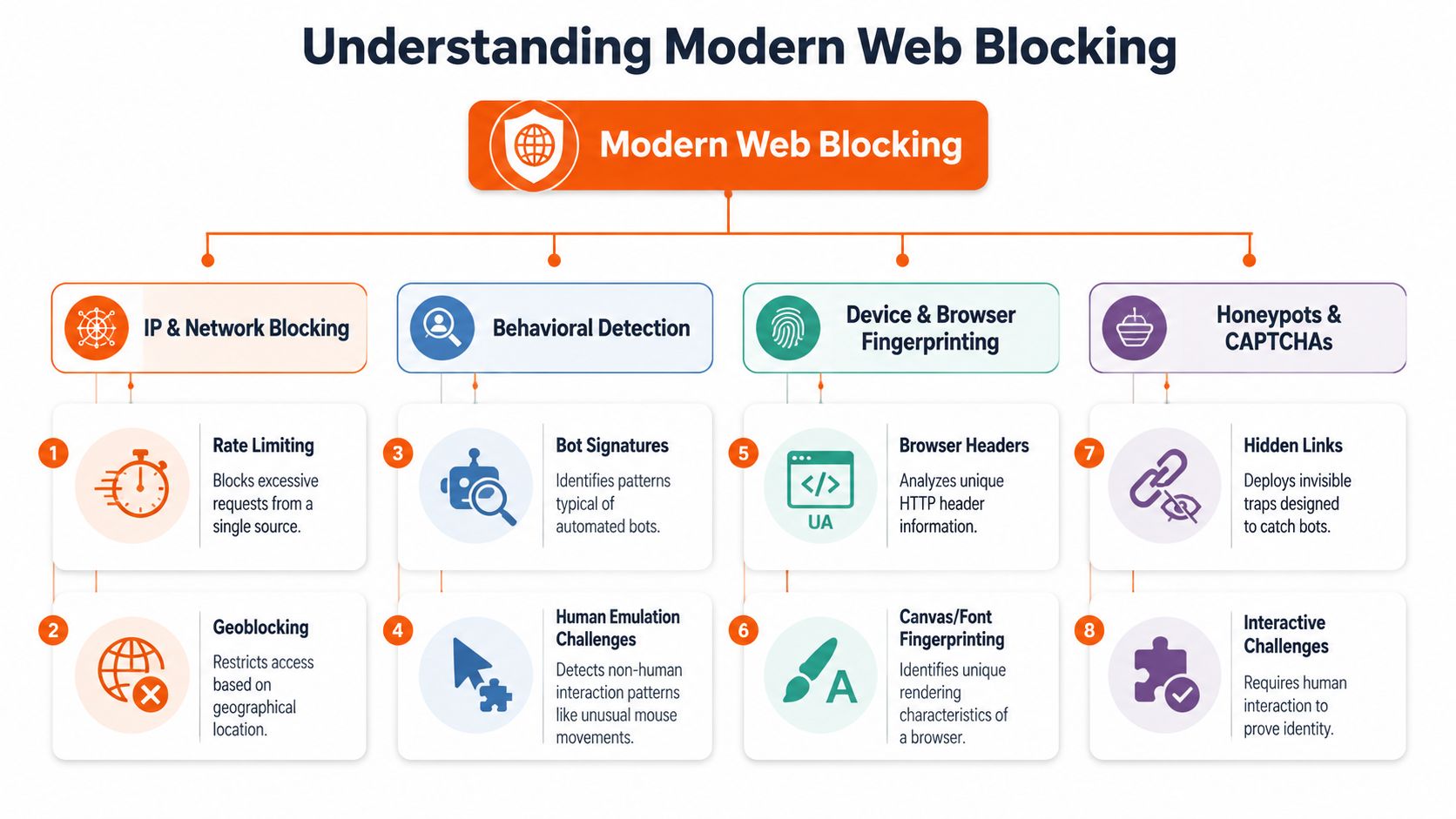
Simple IP blocking still exists, but it's no longer the main story. Modern defenses score traffic across layers: network reputation, request structure, browser behavior, storage state, JavaScript execution, and interaction patterns. If your mental model is still “I'll rotate proxies and swap user agents,” you're debugging the wrong system.
Why IP rotation stopped being enough
WAFs such as Cloudflare, AWS WAF, Azure WAF, Google Cloud Armor, and ModSecurity don't just inspect whether a request came from a “good” or “bad” address. They inspect whether the whole request looks like something the protected application expects. That includes headers, cookie progression, fetch timing, and whether JavaScript completed the page's anti-bot flow.
Some blocks are explicit. You get a challenge page, a CAPTCHA, or a hard deny. The harder failures are quiet. The server returns a normal status code with a degraded page, missing data, poisoned markup, or a script that never reveals the content.
Practical rule: If the page renders for a real browser but your scraper gets partial content, assume layered detection before assuming parser bugs.
Teams also underestimate how many controls now sit above DNS and basic network policy. The rise of DNS-over-HTTPS moved name resolution into encrypted HTTPS traffic, which can bypass DNS-based filtering in some environments. CurrentWare describes how browsers with DoH support can route around DNS web filters and notes Firefox's use-application-dns.net canary-domain mitigation in managed environments, which is a good reminder that blocking has shifted from pure network controls toward browser policy, endpoint control, inspection, and traffic analysis in practice (CurrentWare on DoH and web filter bypass methods).
How request shape became a detection surface
A lot of engineers think bypasses come from changing the payload. Sometimes they come from changing everything around the payload. An arXiv study found 1,207 unique bypasses across five major WAFs by fuzzing parsing discrepancies in non-malicious request components such as header structure, XML namespaces, and multipart boundaries, rather than changing the attack payload itself (arXiv paper on WAF parsing discrepancy bypasses).
That matters beyond security research. It tells you why “works in browser, blocked in script” can happen even when your URL, cookies, and body are correct. The WAF and backend may parse the same request differently. Your scraper may be losing before the application code ever sees a normal request.
For practitioners, the takeaway is blunt:
- Headers are part of the contract. A minimal client that omits browser-like request context can fail even when the endpoint is public.
- Session continuity matters. If the site expects a sequence of requests, isolated fetches look suspicious.
- Transport details leak identity. The browser stack isn't just a rendering engine. It's part of your fingerprint.
If you're diagnosing that kind of failure, a structured workflow helps more than random tweaks. A Cloudflare scraping diagnostic checklist is useful because it forces you to separate IP reputation problems from JavaScript challenges, cookie state issues, and browser-fingerprint mismatches.
Choosing Your Scraping Architecture
A scraper that works in a one-off test can still fail in production because the architecture is wrong for the target. The real decision is not which bypass trick to try first. It is which execution model gives you the highest success rate at an acceptable operating cost.
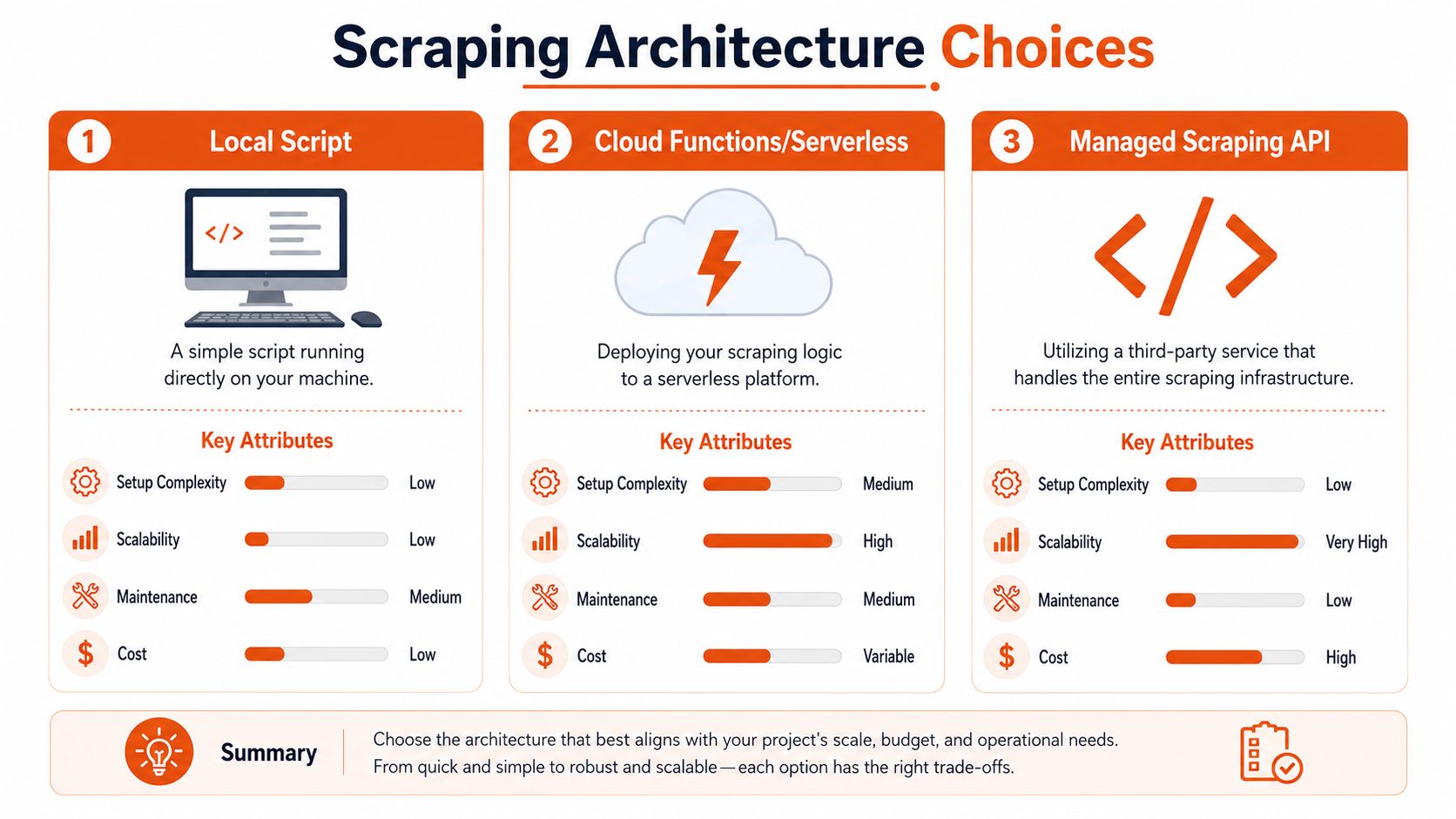
A common failure pattern is underbuilding for a JavaScript-heavy target, or overbuilding and paying browser overhead for pages that plain HTTP could fetch all day. Both mistakes hurt. One collapses your success rate. The other multiplies infrastructure cost, retry volume, and maintenance work.
Raw HTTP when the site is simpler than it looks
Start with raw HTTP when the target returns useful HTML or predictable JSON without heavy client-side execution. curl, Python requests, httpx, Go net/http, and Node undici are fast, cheap, and easy to scale compared with a browser fleet.
This is the best fit when the site behavior is mostly deterministic.
| Target pattern | Raw HTTP fit | Main risk |
|---|---|---|
| Server-rendered pages | Strong | Basic rate limiting or cookie gating |
| Public JSON endpoints | Strong | Hidden anti-bot headers or token flow |
| Static documentation sites | Strong | Burst traffic causing throttling |
Use raw HTTP if you can replay the browser's request sequence with a small number of stable calls and get the same data. That usually means the browser is just a client shell, not a required runtime. In practice, this architecture wins on cost and throughput, and it is easier to debug because each failure sits at the request level instead of inside a full page session.
It also has a hard ceiling. If the target computes tokens in the browser, binds state to client-side execution, or only reveals data after scripted interaction, raw HTTP turns into a long series of brittle imitations.
Headless browsers when the browser is the application
Some targets only make sense once you accept that the browser is part of the app. For React, Vue, Next.js, and similar front ends, Playwright, Puppeteer, or Selenium may be the simplest way to reproduce user flow.
A browser is usually the right choice when you need to:
- Execute anti-bot JavaScript before content is released
- Trigger client-side navigation across SPA routes
- Preserve state across cookies, local storage, and in-page requests
- Interact with controls such as infinite scroll, modal gates, or “load more” buttons
The trade-off shows up in operations. Browsers consume more CPU and memory. They introduce more timeout classes, more session cleanup problems, and more ways to fail halfway through a workflow. They also increase your fingerprinting surface, which means the maintenance burden is not just about rendering pages. It is about keeping the whole runtime believable and stable over time.
Use a browser because the target requires browser behavior, not because it feels safer than understanding the network calls.
Managed Infrastructure for High-Reliability Scraping
There is a third path for teams that need dependable extraction without owning every layer of the stack. A managed service can handle request orchestration, rendering, proxy routing, anti-bot adaptation, and normalized output while your team stays focused on extraction logic and downstream use.
This option usually fits well when:
- Your target mix is uneven. Some pages work over HTTP, others require rendering or fallback logic.
- Data delivery matters more than scraper infrastructure ownership
- Your team can write parsers but does not want to run browsers, proxies, and retries at scale
- You need stable output formats for search, analytics, or AI pipelines
The main trade-off is control. You give up some low-level tuning in exchange for less operational drag. For many teams, that is the right deal. Infrastructure work accumulates fast once you are managing browsers, session pools, proxy health, observability, and failure recovery across multiple sites.
If you are deciding what to own versus what to outsource, Webclaw's self-hosting documentation is a useful reference because it shows the actual components you would need to run yourself. That makes the architecture boundary concrete instead of abstract.
The practical rule is simple. Match the architecture to the target's complexity and to your team's tolerance for ongoing maintenance. Raw HTTP gives the best efficiency when the site allows it. Browsers cover richer applications at a higher operating cost. Managed infrastructure reduces platform work when reliability and delivery deadlines are driving the decision.
Strategies for Detection Avoidance and Politeness
The goal isn't to look invisible. The goal is to look consistent, low-impact, and unsurprising. Most bot defenses flag traffic that is internally contradictory long before they flag traffic that is merely automated.
Look consistent before you try to look clever
A common mistake is randomization everywhere. Random user agents, random header order, random viewport sizes, random delays. That often produces a stranger fingerprint than a stable scraper would.
Do the basic things well:
- Keep header sets coherent. If you claim to be Chrome, send the kind of requests Chrome would plausibly send for that flow.
- Preserve cookies across related requests. Don't treat each page fetch as stateless unless the site does.
- Follow navigation logic. If a detail page is normally reached from a listing page, jumping directly can change the site's risk score.
- Retry with intent. A timeout, a soft block, and a malformed response should not all trigger the same retry behavior.
Researchers at UC San Diego reported that UID smuggling appeared in about 8% of the navigations measured by their CrumbCruncher tool, showing that identifier-passing techniques that bypass privacy protections are embedded in ordinary browsing behavior, not just edge cases (UC San Diego on UID smuggling in web navigations). For scraping, that's a reminder that session and identifier handling on the web is messy. If your bot drops state too aggressively or creates impossible state transitions, it stands out.
Politeness is part of your bypass strategy
Aggressive scraping is usually self-defeating. It increases block rates, burns IPs faster, and creates exactly the behavioral signature detection systems are designed to catch.
Use a policy, not vibes:
- Back off on friction signals. If latency spikes, challenge pages appear, or responses degrade, reduce concurrency instead of brute-forcing.
- Respect crawl boundaries.
robots.txtisn't the whole legal story, but it is a useful operational signal about what the operator expects automated access to touch. - Cache aggressively. If a page or feed changes slowly, don't re-request it on every run.
- Separate discovery from extraction. A lightweight discovery pass can reduce repeated browser work on pages that haven't changed.
Operational advice: The cleanest bypass is often fewer requests, better caching, and stricter scheduling.
If your target sits behind Cloudflare or similar protection, this guide to bypassing Cloudflare bot protection for web scraping is worth reading for the mechanics, but use that knowledge carefully. Solving a challenge once is not the same as building a stable, low-noise system that keeps working next month.
Handling JavaScript-Rendered Content and SPAs
A lot of “scraping failures” are really rendering misunderstandings. You fetch the page and get HTML, but it contains almost no useful content because the application expects JavaScript to bootstrap the interface, fetch data, and paint the DOM after load.
Why empty HTML is often a normal response
Single-page applications frequently serve a shell first. That shell may contain a root element, a few bundled scripts, and not much else. The actual product grid, article body, or reviews load later through API calls or client-side route transitions.
That changes the extraction model. You're not downloading a finished document. You're driving a program that eventually creates the document you want.
This is why scraper design often improves when you split the problem into two questions:
- Can I call the underlying data endpoint directly?
- If not, what browser event or network condition tells me the content is ready?
What stable extraction looks like in a browser
Stable browser scraping is less about “wait five seconds” and more about waiting for the right evidence.
Use waits tied to application behavior:
- Wait for a specific selector that only appears when the target data has rendered.
- Watch network activity and identify the XHR or fetch response that carries the data.
- Trigger the UI deliberately. Click consent banners, open tabs, expand accordions, and paginate the way a real user would.
- Extract from the final DOM or API response, depending on which is more stable.
For SPAs, I usually prefer network interception when the payload is clean and the endpoint is stable. I switch to DOM extraction when the client heavily transforms the data, when auth tokens are short-lived, or when the browser state is part of access control.
A JavaScript rendering API with browser fallback is useful here because it matches how many production systems operate: start lightweight, render when needed, and don't pay browser cost on every page if you don't have to.
From DIY to Done When to Use a Scraping API
Build-versus-buy decisions usually get framed around feature lists. That's too shallow. The core question is whether scraping infrastructure is where you want your engineers spending time.

The hidden cost is ongoing operations
A DIY scraper looks cheap when you count only the first successful run. It gets expensive when you include browser updates, proxy quality drift, challenge flow changes, parser maintenance, retry policy tuning, and all the alerting you need when extraction degrades unnoticed.
That's the point where a scraping API starts to make sense. Not because it's magical, but because it packages work you'd otherwise keep redoing across projects.
A managed API is often a better fit when:
- Your application depends on consistent access, not occasional best-effort scraping
- The output needs to be normalized into markdown, JSON, or clean text for downstream systems
- Your team has product deadlines that matter more than owning anti-bot infrastructure
- Blocked targets are only part of a broader retrieval pipeline
What gets abstracted away
The useful abstraction isn't just “fetch this URL.” It's “fetch this URL using the minimum viable complexity needed to get complete content.” That can include retries, rendering, proxy handling, and content cleanup.
One option in that category is Webclaw, which exposes a scraping API for URL extraction and can return formats like markdown, JSON, plain text, HTML, and LLM-oriented output while handling JavaScript-rendered pages and hard-to-fetch targets. If you want to see the request shape directly, the scrape API documentation shows the contract clearly.
Buy when scraping infrastructure keeps stealing time from the system you actually meant to build.
If scraping is core IP for your business, DIY may still be right. If scraping is a dependency for search, AI retrieval, monitoring, or market data enrichment, managed infrastructure is often the cleaner engineering call.
Navigating the Legal and Ethical Tightrope
Bypassing web blocks is not just a technical problem. It's a permission, privacy, and risk problem. A lot of teams convince themselves they're safe because the data is public and the page loads in a browser. That's too narrow.
Public access is not the same as unrestricted use
A publicly reachable page can still come with Terms of Service restrictions, copyright implications, and privacy obligations. The risk increases when you collect user-generated content, profile data, or any information that can identify a person.
That's why robots.txt is only one signal. It tells you something about crawl preference. It doesn't answer whether you should collect the data, how you can store it, whether you can republish it, or what happens when the site changes its terms.
WCAG's guidance on bypass blocks is a good example of why language matters here. In accessibility, bypass blocks means mechanisms like skip links, landmarks, headings, or region links that help users move past repeated page content. That is a completely different concept from bypassing network or anti-bot controls (WCAG understanding bypass blocks). Mixing those meanings leads to bad policy conversations and bad engineering assumptions.
Later in your review, it helps to compare that with Silktide's explanation of the distinction between accessibility bypass blocks and filtering bypass, especially if your stakeholders are conflating product accessibility work with web-filter evasion language.
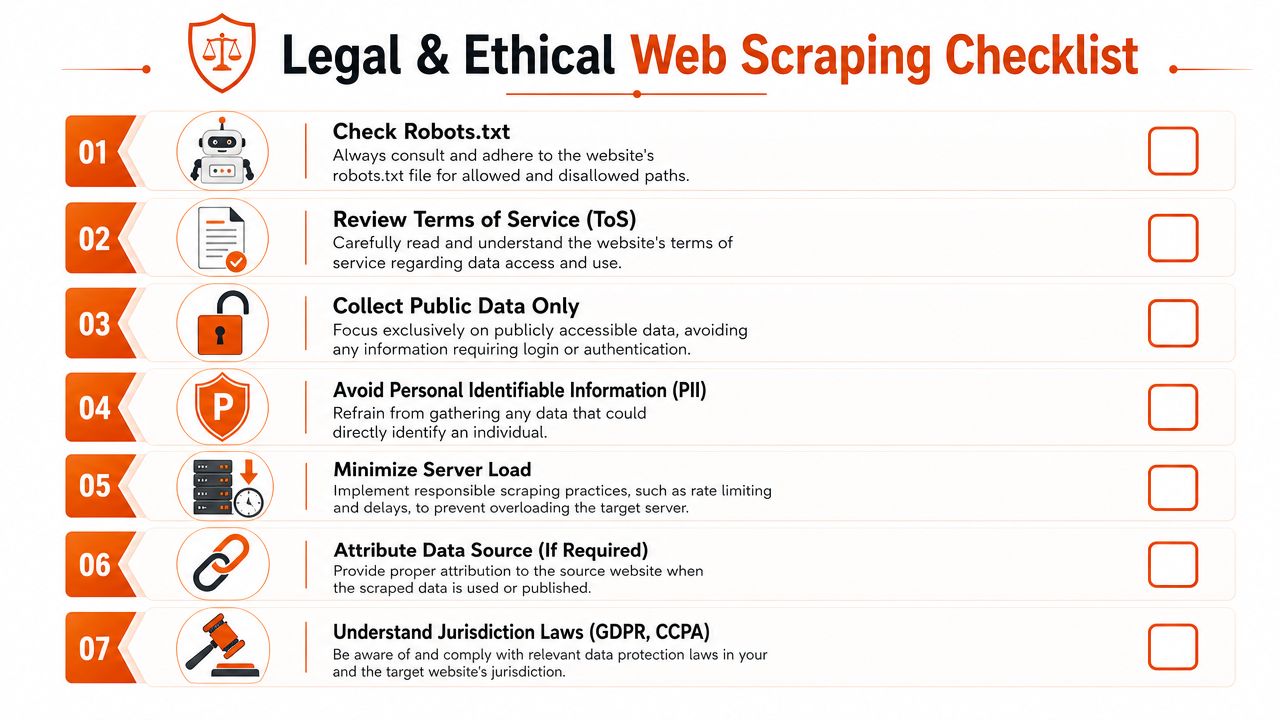
A practical risk filter
Use a simple checklist before you scrape:
- Access boundary. Is the data public, or does it sit behind login, paywall, or account-specific state?
- Data sensitivity. Does the page expose personal data, even if technically public?
- Use case. Are you analyzing, indexing, enriching, or republishing?
- Operational impact. Could your collection load disrupt the target?
- Jurisdiction. Do privacy or consumer data rules affect collection, storage, or downstream use?
This video is a useful general prompt for responsible thinking before you ship an extractor:
Ethics here isn't abstract. It's applied risk management. The teams that stay out of trouble aren't just better at bypassing web blocks. They're better at deciding when not to.
Conclusion A Framework for Responsible Access
The right approach depends on target complexity and on how much maintenance your project can absorb.
Use raw HTTP when the site gives you stable server-rendered HTML or predictable public endpoints. It's the fastest option and the easiest to operate. But it only works when the target is simple.
Use a headless browser when the browser is part of access. That includes client-rendered apps, JavaScript challenges, stateful navigation, and interactions that reveal content. You gain realism, but you also inherit more failure modes.
Use a managed scraping API when reliability, normalization, and team focus matter more than owning the stack. That's usually the right move once blocked sites become a recurring dependency instead of a one-off engineering task.
A practical decision path looks like this:
- Probe with HTTP first and inspect what comes back.
- Escalate to browser automation if the page depends on rendering or challenge execution.
- Stop building in-house when the ops burden starts outgrowing the value of direct control.
That's the core lesson behind bypassing web blocks in production. Success rarely comes from one clever trick. It comes from choosing the right layer of abstraction, keeping your traffic consistent, and treating access as a systems problem instead of a scripting problem.
Long-term reliability comes from restraint as much as technique. Fetch less. Cache more. Render only when necessary. Respect boundaries. Build for change, because the target will change.
If you need a practical way to extract blocked or JavaScript-heavy pages into clean model-friendly output, Webclaw is worth evaluating as part of your stack. It's built for teams that need web data in formats like markdown, JSON, or plain text without spending their engineering cycles on scraper infrastructure.