
Competitor Price Tracking: A Developer's Guide 2026
You already know the symptom. A competitor drops price on a high-velocity SKU, your team notices too late, conversion dips, and the postmortem ends with the same conclusion: the data was stale, incomplete, or wrong. The hard part usually isn't deciding that competitor price tracking matters. It's building a system that can collect, normalize, match, and interpret price data reliably enough that pricing decisions don't create new problems.
Most guides stop at “monitor prices automatically.” That's not enough for a CTO or a data engineer. A real price tracking system is a production data pipeline with brittle inputs, changing front ends, anti-bot controls, ambiguous product identity, and business users who will act on whatever the dashboard says. If the data is wrong, the pricing decision is wrong.
Why Competitor Price Tracking Is a Core Business System
Many organizations first treat competitor price tracking like a lightweight reporting task. A few spreadsheets. A few bookmarked product pages. Maybe a junior analyst checks Amazon and key retailer sites every morning. That setup works until pricing starts moving faster than the team can observe it.
Then the problem changes. You're no longer asking, “What does Competitor A charge today?” You're asking whether a rival is discounting selectively, whether a stockout changed the competitive set, whether a promotion is temporary, and how often price moves before your own sales soften. That's not ad hoc monitoring. It's a business system.
One reason this shifted from a niche tactic to a mainstream capability is scale. The global competitor price monitoring market is estimated at $1.2 billion in 2024, and is projected to rise to $2.5 billion by 2033 at a 9.2% CAGR, according to Tendem's competitor price monitoring guide. That growth tracks a broader operational reality: pricing teams need continuous monitoring, historical context, and visibility into regular prices, sale prices, loyalty prices, and volume discounts.
It supports revenue, margin, and response time
A CRM stores customer state. An ERP stores operational state. Competitor price tracking stores market state. If you sell across multiple categories or channels, that market state changes often enough that missing it becomes expensive.
A usable system answers questions like these:
- Revenue protection: Are we losing traffic because a direct rival undercut us on the products buyers compare first?
- Margin protection: Are we discounting against competitors who are out of stock or not comparable?
- Promotion timing: Is a competitor running a short sale, repeating a known pattern, or resetting a category baseline?
- Execution speed: How quickly can the pricing team move from signal to action?
Competitor price tracking matters when pricing stops being a static benchmark and becomes a moving operational input.
That's why teams often end up investing in dedicated price monitoring workflows instead of treating this as analyst overhead. Once the catalog grows and channels multiply, the system has to do more than collect pages. It has to preserve trust in the downstream decision.
Defining Success with Price Tracking KPIs
A lot of price tracking projects fail for a simple reason: they measure collection volume instead of business usefulness. “We scraped more pages” isn't a KPI. “We can explain where we're overpriced, underpriced, or reacting too slowly” is.
Pick KPIs that reflect decisions
The strongest KPI set usually combines market position, change velocity, promotional behavior, and availability context.
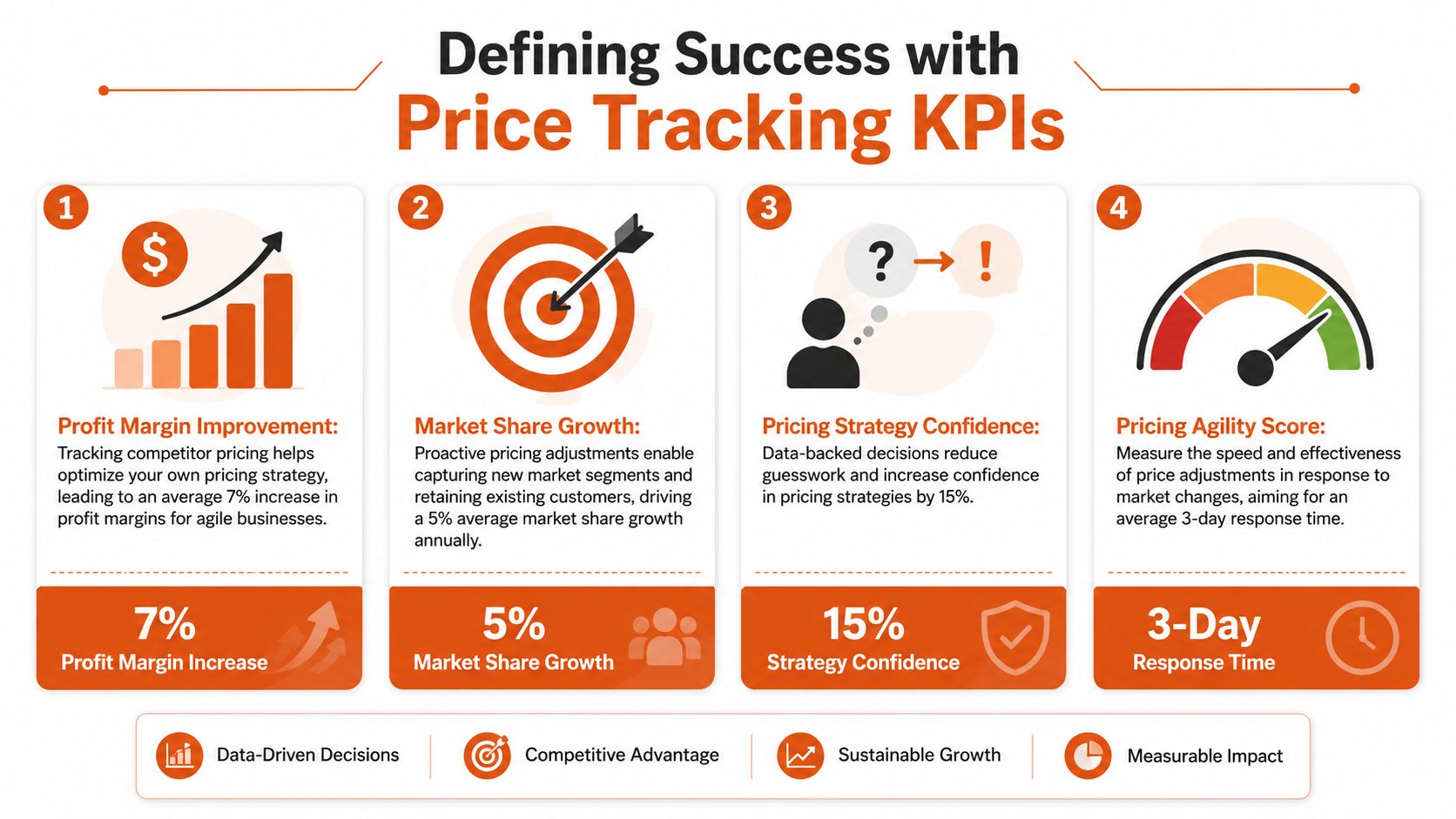
Use a dashboard that tracks signals like these:
- Price index: Your price relative to a selected competitor set or category baseline. This tells pricing leaders where they're positioned, not just what others charge.
- Promotion frequency: How often a competitor shifts into sale mode on matched products. Repeated short discounts tell a different story than stable everyday pricing.
- Price change cadence: Frequency and direction of changes by competitor, category, or SKU cluster.
- Stock-aware competitiveness: Whether you're expensive relative to sellers who are in stock and actively competing.
- Coverage confidence: Share of monitored products with strong matching confidence and valid latest observations.
Practical rule: If a KPI can't support a pricing action, it belongs in an engineering ops dashboard, not an executive one.
The point is to distinguish monitoring from reflexive matching. A good system helps teams decide when to respond, when to hold price, and when a signal is noisy enough to ignore.
Later in the workflow, teams often pair extraction with change alerts. That's where APIs such as Webclaw's change monitoring endpoint fit. They're useful when the business wants to know not only the latest observed price, but exactly when a page changed and what field moved.
A quick visual walkthrough helps show how KPI design ties into operations:
Build dashboards that preserve context
The common dashboard mistake is flattening everything into one table of latest prices. That destroys the context needed for decisions. A better layout uses separate views:
| Dashboard view | What it should answer |
|---|---|
| Executive summary | Where are we broadly overpriced or underpriced? |
| Category view | Which competitors are moving most often in this category? |
| SKU detail | Is this a clean match, a temporary promo, or a stock-driven anomaly? |
| Data quality panel | Can users trust the comparison enough to act? |
Keep the business and technical views distinct. Merchandising and pricing teams need interpretability. Engineers need freshness, extraction success, and matching confidence. Combining both into one screen usually helps neither audience.
Comparing Data Collection Approaches
There are only a few ways to collect competitor price data, but significant differences show up in maintenance burden, freshness, and control over quality. Teams usually choose between manual review, third-party feeds, or web scraping.
The trade-offs are operational, not theoretical
Manual collection looks cheap until the catalog expands. Data feeds look attractive until they don't cover the sites or fields you need. Scraping gives control, but only if you're willing to own extraction logic and breakage.
Here's the practical comparison.
| Method | Scalability | Data Freshness | Maintenance | Cost |
|---|---|---|---|---|
| Manual checking | Low | Low to moderate | High human effort | Low direct spend, high labor cost |
| Third-party data feeds | Moderate to high | Depends on provider cadence | Moderate vendor management | Moderate to high vendor cost |
| Web scraping APIs or in-house scraping | High | High if scheduled correctly | Moderate to high technical maintenance | Variable, tied to infrastructure and volume |
Manual checking still has a place for narrow catalogs, edge-case validation, or executive spot checks. It does not work as the primary collection layer once you care about historical movement, broad SKU coverage, or multiple marketplaces.
Feeds are useful when the provider has dependable access to relevant catalogs and already solves product mapping well in your vertical. Their weakness is rigidity. If you need a hidden price component, a specific promotion banner, or a custom extraction rule, you depend on the vendor roadmap.
Scraping is what teams choose when they need control. You define target pages, extraction fields, schedules, geographies, and retry logic. You also inherit rendering issues, anti-bot problems, changing templates, and the need to validate output continuously.
When each method fits
A simple decision framework usually works better than abstract architecture debates.
- Use manual checking when the catalog is small, the stakes are limited, and you need a temporary process while validating use cases.
- Use feeds when a vendor already covers your target sources well and your team values operational simplicity over deep customization.
- Use scraping when you need broad market coverage, custom fields, or faster adaptation than a vendor can offer.
For teams building custom pipelines, a scraping interface such as Webclaw's scrape API is one path to avoid maintaining every browser, parser, and anti-bot layer internally.
Don't choose a collection method by asking which one is “most advanced.” Choose the one that gives the business sufficient freshness and sufficient control at an acceptable maintenance cost.
One more warning. Collection method and data quality are not the same thing. A pristine scraper that pulls the wrong product is still a bad system. That's why architecture and matching deserve separate attention.
Building a Scalable Price Tracking Architecture
The moment a team moves from dozens of pages to broad catalog coverage, architecture starts deciding outcome. A production price tracking system isn't one scraper. It's a coordinated pipeline that schedules fetches, handles rendering, extracts structured fields, stores snapshots, and triggers alerts without overwhelming target sites or your own infrastructure.
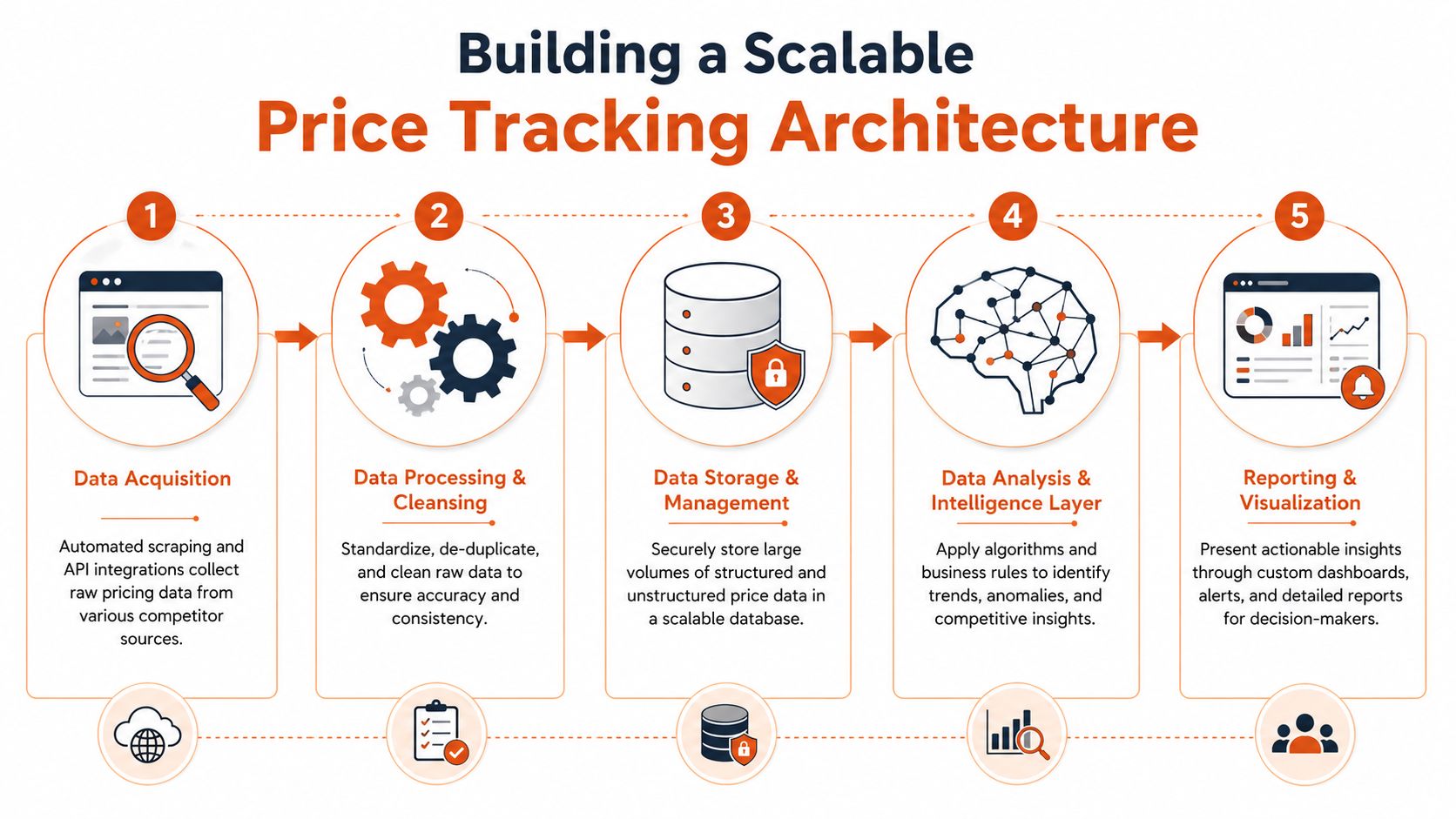
One industry example describes monitoring 1,000+ SKUs across 6+ competitors every 30 minutes while reducing manual work by 90%, and notes that reliable systems must handle client-side JavaScript rendering, pagination, and rate limits because simple fetchers often fail on modern storefronts, as described in GroupBWT's overview of competitor price monitoring.
The pipeline components that matter
At a minimum, the architecture needs these layers:
-
Target registry and scheduler
Store product URLs, competitor mappings, market or locale, crawl priority, and refresh cadence. The scheduler shouldn't treat every page equally. Best sellers, volatile categories, and promotional windows need different priority. -
Acquisition workers
Some pages can be fetched directly. Others need full browser rendering because the price is injected through JavaScript, hidden behind interaction, or loaded after initial page paint. -
Proxy and geo layer
Price and stock can vary by region. The system has to request from the right geography and distribute load sensibly to reduce blocks and false observations. -
Extraction layer
Convert a rendered page into fields such as current price, original price, sale flag, stock state, shipping indicator, seller identity, and timestamp. This is where selectors, schema extraction, and fallback rules matter. -
Snapshot storage
Save raw page evidence plus normalized extracted output. If you only keep the latest value, you lose auditability and historical pattern analysis. -
Change detection and alerting
Trigger on meaningful changes. A clean system distinguishes a price move from cosmetic page churn.
Design for failures first
Most breakage doesn't come from your code being “wrong.” It comes from target sites changing their structure, adding bot defenses, delaying content until the browser executes scripts, or splitting price data across multiple DOM states.
That's why failure handling should be explicit:
- Retry by failure class: Timeout, block page, render failure, selector miss, and parse error should not all use the same retry path.
- Separate fetch from parse: Store the page artifact first, then run extraction. That makes debugging much faster.
- Add template monitoring: If extraction starts failing for one retailer template, quarantine affected jobs before they poison the dashboard.
- Version your parsers: Retail sites redesign often. Parser versioning keeps historical interpretation stable.
A cloud execution layer such as Webclaw Cloud can cover browser rendering and difficult target retrieval, but the broader architectural responsibility still sits with your team. You need queueing discipline, storage design, observability, and quality gates around every stage.
A price tracking system should fail visibly, not silently. Silent failure is how stale data turns into pricing policy.
Turning Raw Data into Actionable Intelligence
Raw extraction is only the start. What lands in storage is usually inconsistent, incomplete, and not yet comparable. Two pages can describe the same product with different titles, different units, different promotion language, and different implied final cost.
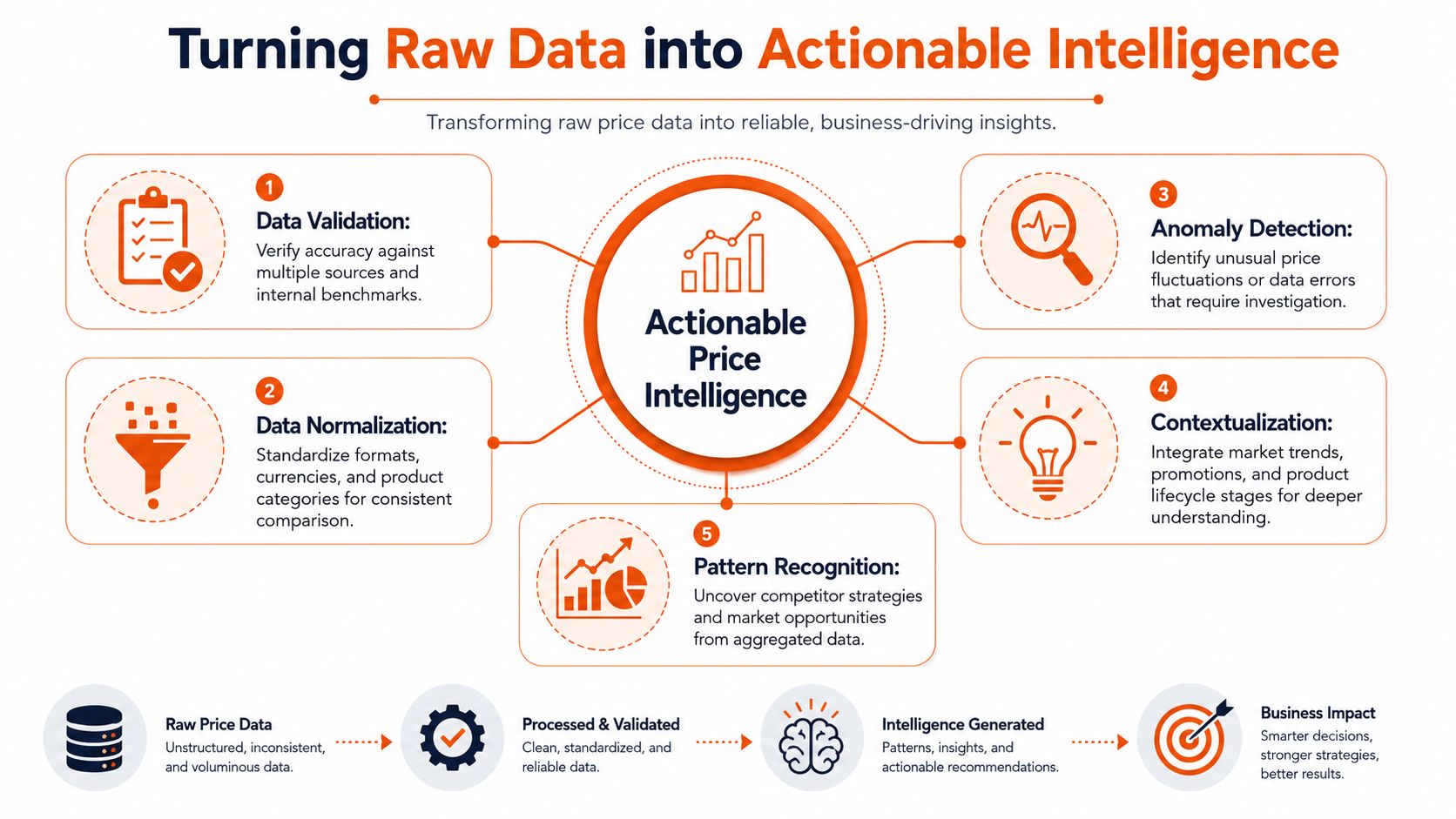
That's why competitor price tracking is often a data-quality problem, not just a price problem. The hardest part is accurate product matching across SKUs, and incorrect matches can lead to misleading alerts and margin-eroding decisions, as explained in Profitmind's guide for enterprise retailers.
Normalization comes before analytics
Before anyone computes price index or promotion rates, the pipeline should standardize what “price” means.
That usually includes:
- Unit normalization: A pack of two isn't comparable to a single unit.
- Currency normalization: Multi-market monitoring needs a common analytical representation.
- Promotion parsing: “Buy more save more,” member pricing, and crossed-out list prices need separate fields.
- Availability interpretation: Out of stock, backorder, preorder, and marketplace seller churn shouldn't be lumped together.
If you skip this work, the dashboard will look precise while being wrong in the ways that matter most.
Product matching decides whether the system is trustworthy
Matching is where most naive builds break. UPCs and GTINs help when they exist and are accurate. In practice, they're often missing, inconsistent, or absent on competitor pages. Then the system has to rely on a combination of title similarity, brand, model number, pack size, attributes, and sometimes image-based clues.
The right pattern is layered matching:
| Matching layer | Use case |
|---|---|
| Exact identifiers | Fast path when UPC, GTIN, or manufacturer part number aligns |
| Attribute rules | Brand, size, color, quantity, variant filtering |
| Similarity scoring | Title and description comparison with weighted fields |
| Human review queue | Ambiguous or high-value items where confidence is too low |
Confidence scoring matters. So does exception handling. A useful system doesn't force every candidate into a yes or no match. It allows “uncertain” and routes those records differently.
For teams using language models downstream, summarization can help explain anomalies or page differences for analysts. A page-to-summary workflow such as Webclaw's summarize API can be useful for internal review, especially when a page contains confusing promotional text around the displayed price.
The business should only automate pricing actions on records the data pipeline can defend.
That line sounds conservative, but it prevents the classic failure mode: a machine compares near-duplicates, flags a fake undercut, and the pricing team gives margin away on the wrong basis.
Best Practices for Frequency and Legal Compliance
A lot of teams overfocus on extraction code and underfocus on operating policy. That creates two common failures. They crawl everything at the same cadence, and they treat compliance as an afterthought.
Set cadence by category behavior
Refresh rate should follow market velocity, not engineering convenience. According to PriceShape's explanation of competitor price monitoring, fast-moving consumer goods may require hourly updates, while durable goods might only need daily checks. The operational point is simple: refresh quickly enough to catch promotions and price drops before they distort your own conversion and margin outcomes.
A good cadence policy usually looks like this:
- High-velocity categories: Check more frequently during trading hours or active campaign periods.
- Stable categories: Use a slower baseline schedule and increase only during promotional events.
- Strategic SKUs: Give best sellers and price-sensitive anchor products priority over long-tail items.
- Exception-based boosts: If a competitor starts changing often, temporarily increase frequency for that set.
Treat compliance as part of system design
Legal review depends on jurisdiction and context, so teams should involve counsel early. From an engineering standpoint, a few operational rules are essential:
- Respect published access expectations: Review robots directives and the site's public terms before scaling collection.
- Control request rate: Don't hammer target infrastructure. Good scheduling is part of responsible access.
- Avoid deceptive access patterns: Don't create brittle workflows that rely on impersonation or questionable account behavior.
- Keep audit trails: Store when, where, and how data was collected so legal and security teams can review process, not guess at it.
The best long-term systems are boring in this respect. They collect public data carefully, at a measured pace, with enough observability to prove what happened.
Frequently Asked Questions
Is scraping competitor prices legal
It depends on jurisdiction, site terms, access method, and what data is being collected. Publicly accessible data is generally lower risk than gated content, but legal review should happen before you scale. Engineering teams should design for restraint, traceability, and documented collection practices.
What about prices hidden behind logins
That's a separate risk tier. Once pricing is gated, your legal and security teams need to review both access rights and acceptable collection methods. From a systems standpoint, don't blur public monitoring and authenticated workflows into the same pipeline.
Can AI help with competitor price tracking
Yes, but mostly in supporting roles. AI can help classify promotion language, explain page changes, assist with product matching review, and summarize noisy content. It does not remove the need for deterministic extraction, strong schema design, or confidence scoring.
What's the difference between price monitoring and dynamic pricing
Price monitoring collects and interprets competitor signals. Dynamic pricing uses those signals, along with your own business rules, to change prices automatically. They're related, but they're not the same system and shouldn't share the same risk tolerance.
What's the first thing to build
Start with a narrow slice: a defined competitor set, a controlled list of important SKUs, structured extraction, snapshot storage, and a human-reviewed matching workflow. Broad coverage too early usually creates a large volume of low-trust data.
If you're building competitor price tracking and need a reliable extraction layer for hard retail pages, Webclaw is one option to evaluate. It can extract structured page data, handle JavaScript-rendered storefronts, and compare snapshots for change detection, which fits the collection side of a price monitoring pipeline.