AI Web Scraper: Architectures, Tools, & Best Practices 2026
Your scraper works. Your RAG pipeline still fails.
You fetch a page, pass the HTML to an embedding step, and suddenly your chunks are full of menu labels, footer links, cookie notices, hidden tabs, and “related articles” blocks. The model answers with half-right summaries because the actual substance of the page is buried inside noise. Then a front-end redesign lands, your CSS selectors break, and the pages that used to scrape cleanly return empty shells because the site now renders with JavaScript.
An AI web scraper combines content acquisition with extraction intended for model inputs. Evaluate access, output quality, and validation separately: a page that loads successfully can still produce incomplete or misleading data.
If you're already building search, retrieval, or agent workflows, it helps to also understand how a web search API fits into AI data collection.
Introduction to AI Web Scraping
An AI web scraper is what teams reach for when a normal scraper can fetch pages but can't reliably deliver the right content in the right shape.
A common failure pattern looks like this: a developer crawls documentation pages, stores raw HTML, strips tags with a quick parser, chunks the result, and feeds it into a vector database. Retrieval quality drops because the cleaned text still contains duplicated navigation, promotional banners, and page furniture. The model isn't confused because the source is weak. It's confused because the context is messy.
That's where AI-based extraction changes the workflow. Instead of only asking “can I download this page,” it asks “what on this page matters?” On dynamic sites, it can render the page first. On noisy pages, it can identify the primary content semantically instead of trusting brittle selectors. For LLM systems, that difference matters more than many teams expect.
Raw HTML is often technically correct and operationally useless.
An AI web scraper sits between browser automation and LLM ingestion. It helps with rendering, content selection, structured extraction, and output formatting so your downstream model sees the article, product details, or job posting instead of the entire chrome around it.
Understanding AI Web Scraper Fundamentals
The easiest way to understand the difference is to compare traditional scraping with adaptive extraction.
What makes it different
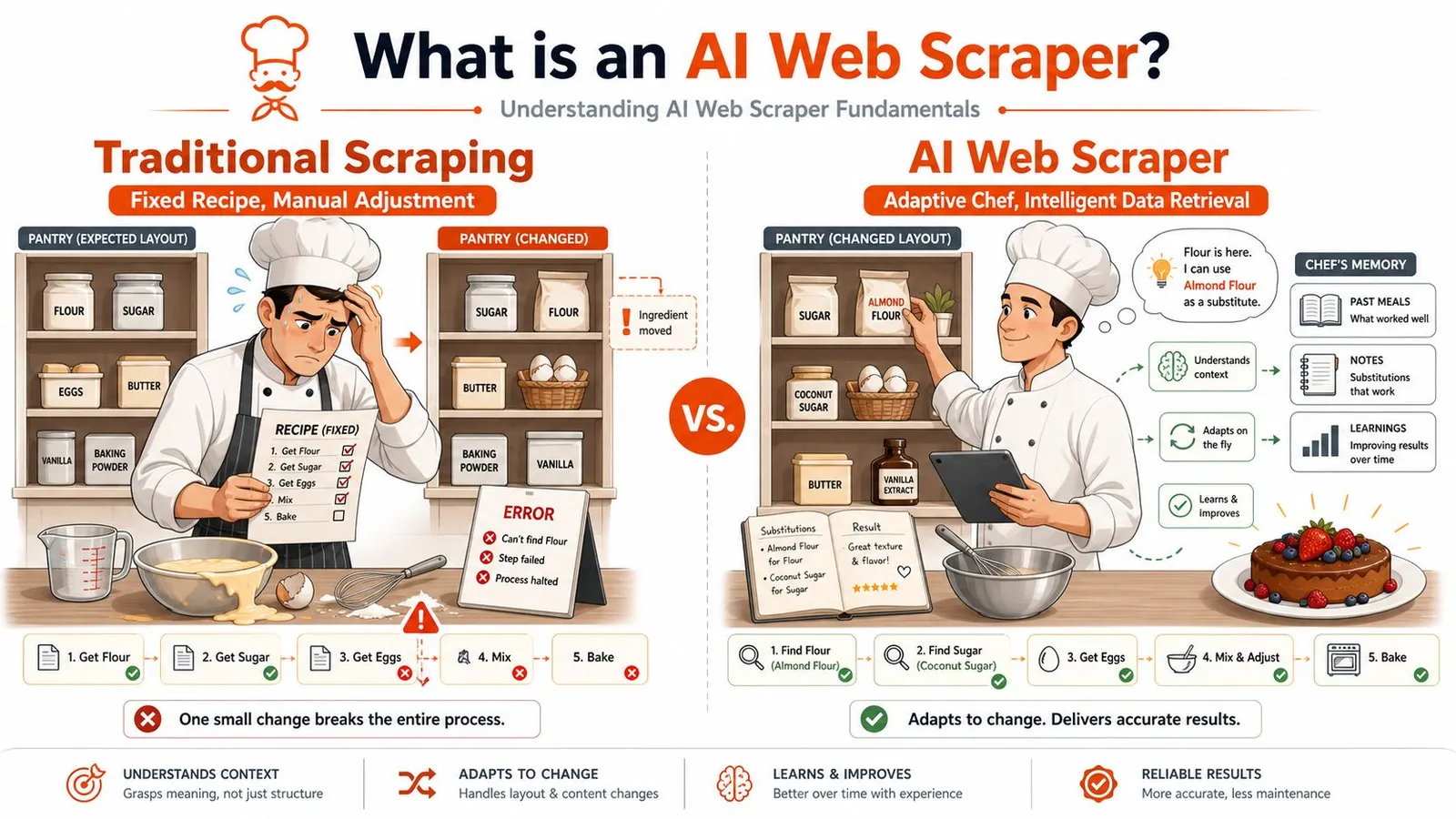
A traditional scraper is like a cook following a printed recipe word for word. It says, “take the third ingredient from the left shelf, then mix it in bowl two.” If the kitchen changes, the recipe fails. In web terms, that means your scraper depends on a fixed CSS selector or XPath. Change one class name and the extraction breaks.
An AI web scraper behaves more like a chef who understands the dish. If the sugar moved to another shelf, the chef still finds it. If the bowl changed, the chef still knows what step comes next. In scraping, that means the system identifies content by meaning and role, not only by exact position in the DOM.
That approach matters because modern pages aren't static documents. They're applications. Menus expand after scripts run. Product details load after an API call. Reviews appear inside client-rendered components. A rigid parser may see a sparse shell. An AI-aware stack can render the page, inspect the resulting content, and extract the useful parts.
Semantic extraction can tolerate some layout variation, but accuracy depends on page type, schema, and evaluation criteria.
If you want a broader primer on practical extraction workflows, this guide to scraping websites for data is a helpful companion.
Why developers switch
Developers usually switch for three reasons.
- Dynamic pages break old assumptions: A plain HTTP fetch often misses content on JavaScript-heavy sites.
- Maintenance eats engineering time: Selector updates turn into endless patch work.
- LLM pipelines punish noisy input: Even when extraction “works,” raw output can still be bad context.
Here's a short comparison:
| Approach | What it depends on | Typical failure mode | Output quality for LLMs |
|---|---|---|---|
| Traditional scraper | CSS/XPath rules | Layout changes, client rendering | Often noisy |
| AI web scraper | Rendering plus semantic extraction | Edge cases, schema ambiguity | Usually much cleaner |
Practical rule: If your downstream system is a language model, judge the scraper by context quality, not just whether it returned text.
Another point trips people up. “AI scraper” doesn't have to mean “send every page to an LLM and hope for the best.” Many systems mix deterministic steps with semantic extraction only where it helps. That hybrid pattern is often more reliable than either extreme alone.
Exploring AI Scraper Architectures and Components
A production scraper is less like a single script and more like a small factory.
The pipeline as an assembly line
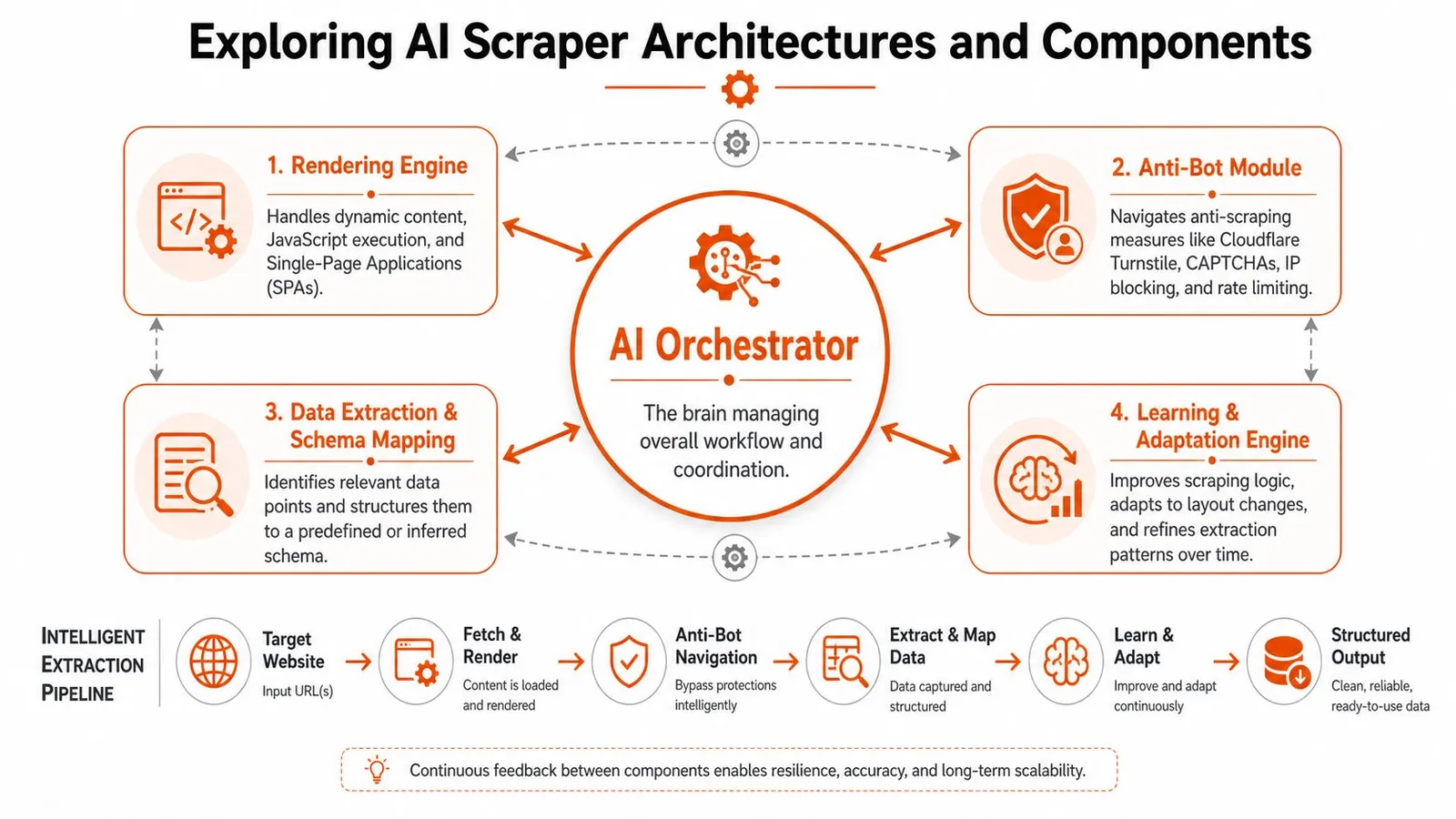
Think of the architecture as four stations passing work to one another.
-
Rendering engine
This station turns a URL into a fully loaded page. It runs JavaScript, waits for client-rendered content, and captures what a user would see. Without this step, SPA pages often look empty or incomplete. -
Anti-bot layer
This station handles the transport problem. Some sites rate-limit, fingerprint browsers, challenge requests, or block obvious automation. A scraper that ignores this layer may look fine in testing and fail in production. -
Extraction layer In this layer, the system identifies the useful content. Sometimes that means pulling structured fields like title, price, author, and availability. Other times it means isolating the main article body, preserving headings, and discarding boilerplate.
-
Normalization layer
This station reshapes the output into something downstream systems can consume. Typical outputs include markdown, structured JSON, or plain text with metadata.
A lot of teams lump steps three and four together. That's a mistake. Extracting content and formatting it for a model are related tasks, but they aren't the same. You can extract the right body text and still deliver poor LLM context if the output keeps repetitive labels, navigation fragments, or UI leftovers.
For a concrete look at an API-first approach to this layer, see this overview of an AI web extraction API.
Later in the pipeline, it helps to visualize the orchestration in motion:
Why token shaping belongs inside the scraper
This is the part many articles skip.
Most scraping tutorials stop after “I got the page text.” For RAG systems, that's not enough. You need to decide what should survive into the prompt budget. Modern AI web scrapers can reduce tokens substantially by turning noisy pages into cleaner markdown or structured output. Data Impulse notes that modern AI web scrapers achieve an average token reduction of about 67 percent compared with raw HTML when they produce LLM-ready markdown or JSON, in its review of best AI web scrapers for token-efficient extraction.
That reduction matters because retrieval cost and answer quality both depend on context density. A page with ten thousand characters of mostly layout noise is worse than a shorter page containing only the primary content. Less boilerplate means less distraction for the model.
Here's the architecture decision that usually pays off:
- Use rendering before extraction when pages are dynamic.
- Use semantic extraction before chunking when page layout is inconsistent.
- Use LLM-ready formatting before embeddings when token waste is a problem.
- Keep raw snapshots separately for debugging and audit trails.
A clean scraper pipeline doesn't just collect pages. It creates model-ready documents.
Integration Patterns for Retrieval Pipelines and Agents
The integration pattern depends on whether your system works in batches or thinks in real time.
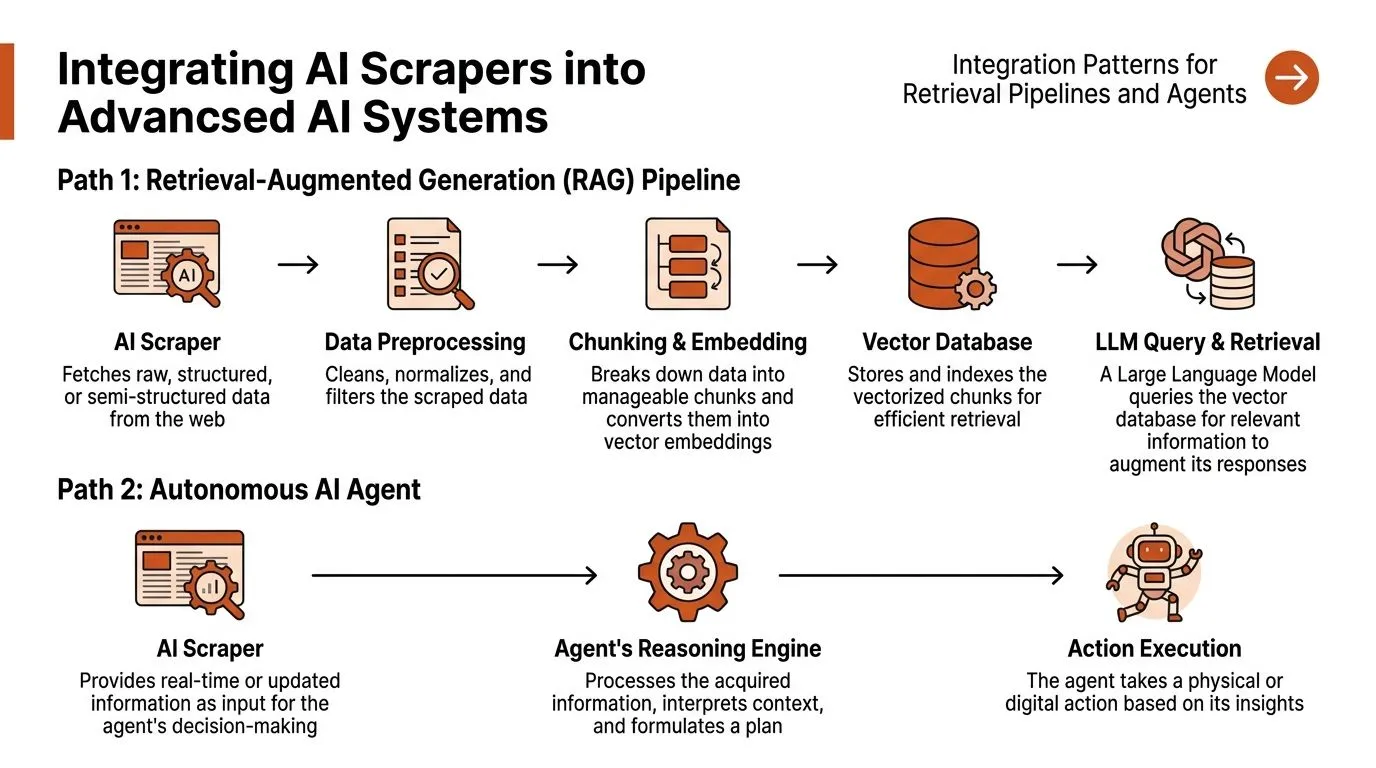
Pattern one for batch retrieval systems
A retrieval pipeline usually wants stable, repeatable ingestion.
The flow often looks like this:
| Step | What happens | Why it matters |
|---|---|---|
| Fetch | Scraper renders and retrieves page content | Handles dynamic pages |
| Clean | Main content gets isolated | Removes irrelevant text |
| Chunk | Long documents split into retrievable segments | Improves retrieval precision |
| Embed | Chunks become vectors | Enables similarity search |
| Store | Metadata and vectors go into an index | Supports updates and filtering |
In pseudocode:
urls = discover_urls(seed_pages)

for url in urls:
    doc = scrape(url, format="markdown")
    clean_doc = normalize(doc)
    chunks = chunk(clean_doc)
    vectors = embed(chunks)
    upsert(vectors, metadata={"url": url})
This pattern works well for documentation sites, news collections, product catalogs, and research corpora. The scraper runs as an ingestion tool, not as part of the live user request. That gives you room for retries, validation, and deduplication.
If you're designing retrieval around external web sources, this walkthrough on RAG pipelines using web data is worth reading.
Pattern two for live agent tools
Agent systems treat scraping differently. They don't always want a pre-indexed corpus. Sometimes they want to inspect the web during reasoning.
The flow is closer to this:
- Agent chooses a URL or search result
- Scraper fetches and cleans the page
- Agent reads the result as tool output
- Agent decides whether to follow links, extract fields, or act
That makes the scraper a runtime tool, like search or code execution.
A stripped-down example:
const page = await scrapeTool({
  url: targetUrl,
  output: "markdown"
})

const decision = await agent.reason({
  pageContext: page.content,
  objective: "find pricing and refund policy"
})
The challenge here isn't just extraction. It's latency, consistency, and bounded output. Agents get worse when tools return giant blobs of markup. They do better when the tool returns clean, compact context.
When an agent uses a scraper, the scraper becomes part of the reasoning loop. Tool output quality shapes the agent's next decision.
If you're building that kind of system, DOM Studio's developer's guide to AI agents offers useful context on tool use, traces, and runtime behavior.
A practical way to choose between the two patterns:
- Use batch retrieval when content changes on a schedule and search quality matters most.
- Use live tool access when freshness matters or the agent must browse beyond a fixed corpus.
- Use both when you want a durable knowledge base plus on-demand web checks.
Use Cases and Practical Examples
The value of an AI web scraper becomes clearer when you stop thinking in abstractions and look at everyday jobs teams run.
SEO monitoring and SERP capture
An SEO team often wants more than rank positions. They want the result title, snippet, visible URL, page changes, and maybe the cleaned landing-page content behind each result.
A simple flow looks like this:
const serpPage = await scrape({
  url: searchResultsUrl,
  output: "markdown"
})

const landingPage = await scrape({
  url: targetArticleUrl,
  output: "markdown"
})
The first scrape captures the search page as rendered. The second captures the destination page in a cleaner format for comparison or summarization. That combination helps when ranking changes are tied to content edits, title rewrites, or shifting SERP layouts.
Market research and multi-site crawling
Market research teams usually work across many sources with inconsistent page templates. One vendor publishes pricing in tables. Another hides it in FAQs. A third loads product specs only after scripts run.
That's where crawling plus semantic extraction helps. You can map the site, filter to relevant page patterns, and pull only the fields your research workflow needs.
Example pseudocode:
site_urls = crawl("https://example-vendor.com")

for url in site_urls:
    record = extract_structured(
        url=url,
        fields=["product_name", "pricing_notes", "target_customer", "key_features"]
    )
    save(record)
A similar pattern works for hiring intelligence, partner tracking, or competitor landing pages. If you need a domain-specific example, this walkthrough of a job board scraper workflow shows how structured extraction can fit a recruiting data use case.
Don't start by scraping everything. Start by defining the smallest schema that answers your actual business question.
Price tracking and news aggregation
Price tracking is a classic scraping task, but AI-based extraction changes one detail that matters: it can often recover when a product card layout shifts or when the page contains several competing price-like values.
A lightweight extraction request might look like this:
{
  "url": "https://shop.example/item/123",
  "schema": {
    "name": "string",
    "price": "string",
    "availability": "string"
  }
}
The same idea carries over to news aggregation. Instead of storing full article HTML, you can pull the article body, title, publication metadata, and a concise summary-ready text block. That makes downstream clustering, deduplication, and topic labeling easier.
Common adaptations across use cases:
- For SEO: focus on rendered content and content-change comparison.
- For pricing: preserve source metadata and timestamps for audits.
- For news: prioritize article-body extraction and duplicate filtering.
- For research: attach source URLs and extraction confidence checks from your own validation layer.
These examples all share the same lesson. Scraping isn't the end product. The end product is a clean, task-ready document or record.
Evaluating Performance and Ethical Considerations
A scraper should be measured like infrastructure, not admired like a demo.
What to measure
Start with four questions.
-
Did it reach the page?
A scraper that fails on login walls, JavaScript rendering, or anti-bot checks won't help your pipeline. -
Did it extract the right content?
Accuracy matters more than volume when your downstream consumer is a model. -
Did it produce compact context?
Retrieval systems care about token efficiency, not just scraped bytes. -
Can you operate it repeatedly? The true test is what happens after site changes, retries, and long-running jobs.
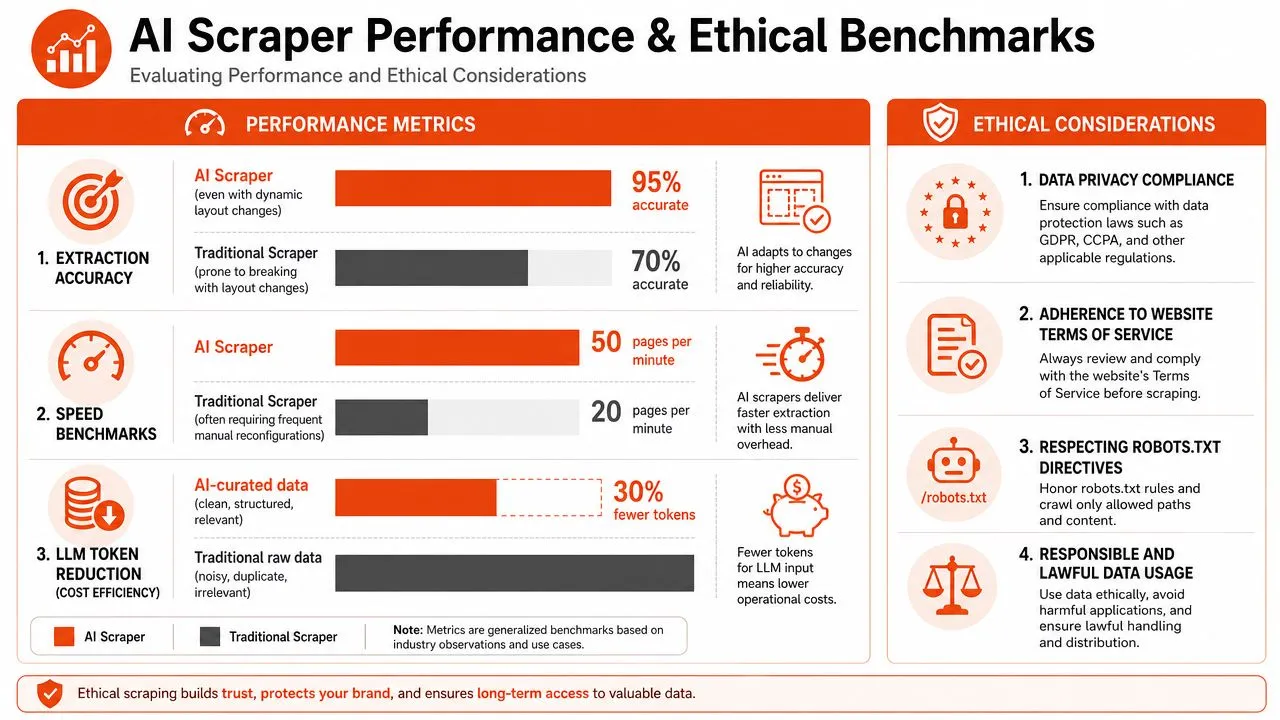
Technical benchmarks reported by ScrapeGraphAI show 95 percent accuracy and 57 percent faster extraction speeds compared with selector-based parsers, according to its published AI scraping benchmark comparison. That benchmark doesn't mean every AI system will perform the same way. It does show why semantic understanding can outperform rigid parsing on changing layouts.
A practical scorecard can be simple:
| Metric | What to inspect |
|---|---|
| Reachability | Can it access rendered and protected pages consistently? |
| Content fidelity | Does the output preserve the page's meaningful content? |
| Structure quality | Is the JSON or markdown shaped for downstream use? |
| Token discipline | Does it remove navigation, ads, and boilerplate effectively? |
| Recovery behavior | What happens after a layout change or partial failure? |
What to do responsibly
Good scraping is also about restraint.
- Respect robots directives: Treat them as part of your operating policy, not an afterthought.
- Review terms of service: Teams should know what a site allows before building at scale.
- Rate-limit politely: The goal is collection, not disruption.
- Handle personal data carefully: User-generated content and profile pages raise privacy issues fast.
- Store provenance: Keep source URLs and timestamps so people can trace where data came from.
A strong ethical posture also improves engineering. It forces better logging, better source tracking, and clearer decisions about what your system should and shouldn't collect.
Responsible scraping isn't separate from production readiness. It's part of it.
Implementing Your AI Web Scraper with Tools and Examples
The simplest implementation starts with a decision: do you need browser rendering, schema extraction, LLM-ready markdown, or all three?
A simple implementation path
A practical stack might include Playwright for direct browser control, a schema validator for typed output, and an API-based extractor when you don't want to manage rendering and anti-bot infrastructure yourself. One option is Webclaw, which exposes REST and SDK-based extraction for markdown, JSON, and LLM-oriented outputs. That's useful when your priority is feeding agents or retrieval systems with cleaner context rather than storing raw page markup.
At the request level, the script can stay short:
result = scrape(
    url="https://example.com/article",
    output="markdown"
)
print(result["content"])
The important detail isn't the syntax. It's the output contract. You want content that's already stripped of navigation and boilerplate so your chunker and embedding step don't inherit junk.
Adaptive extraction can reduce selector maintenance when layouts change, but the savings depend on target diversity and validation requirements.
Production habits that save pain later
Two habits make a small scraper much easier to operate later:
- Keep retries separate from extraction logic: Network failures and parsing failures aren't the same problem.
- Log raw and cleaned outputs during development: When extraction looks wrong, comparing both saves time.
If you need to supply your own network layer for geo-targeting or higher-volume collection, this roundup of reliable proxies for data collection gives a useful overview of proxy options and tradeoffs.
A good first milestone is modest: render a page, extract clean markdown, validate a few fields, and store both the source URL and the cleaned document. Once that loop is stable, scaling is mostly an operational problem.
If you're building retrieval systems, agent tools, or web data pipelines that need cleaner model-ready output, Webclaw is worth a look. It's built to turn hard-to-scrape pages into markdown, JSON, and LLM-optimized context without forcing you to manage the full rendering and anti-bot stack yourself.