Agent Tools Explained: Building Reliable AI Toolchains
You can tell an agent is healthy when it gets the right answer fast, and you can tell it's brittle when a simple lookup turns into a long chain of guesses. The failure mode usually starts the same way. A customer asks for account history, the agent calls a tool, the tool returns a giant blob of raw data, and the model spends its next turn trying to sort through noise instead of solving the task.
That's the part teams miss when they treat agent tools like ordinary integrations. Tools aren't just APIs with a new label. They're the operational boundary between a language model and the systems it's allowed to touch, and that boundary has to be designed for model consumption, not human consumption. The difference shows up in latency, context use, error recovery, and whether the agent can act safely without collapsing into nonsense.
What Agent Tools Actually Are
A tool failure usually looks boring at first. The agent asks for a customer record, the tool returns a 50 KB JSON blob, and the model uses the wrong field because the important fields are buried in noise. The operator sees a confident answer, but the confidence came from overload, not understanding.
The Core Contract
An agent tool is a structured interface where the model supplies input, the tool does some work, and the result comes back in a shape the model can use on its next reasoning step. That contract matters more than the implementation detail. A search endpoint, a database query, and a browser fetch can all be tools if they are wrapped for model-driven execution.
Modern agent frameworks treat tools as distinct runtime objects, not just helper functions. Hosted tools can run alongside the model, local function tools can wrap arbitrary code, and one agent can even invoke another agent as a tool in a hierarchical setup. In production, that changes latency, security boundaries, and control surfaces in ways that matter more than the model choice itself. OpenAI Agents tools documentation
Practical rule: if the output isn't shaped for the model's next move, the tool isn't finished.
That is why tool design is a first-class engineering task. A well-built tool returns the smallest useful slice of truth, not the largest possible payload. High-signal fields, pagination, filtering, truncation, and response shaping all help the model make better decisions without burning context on junk. Anthropic tool-writing guidance
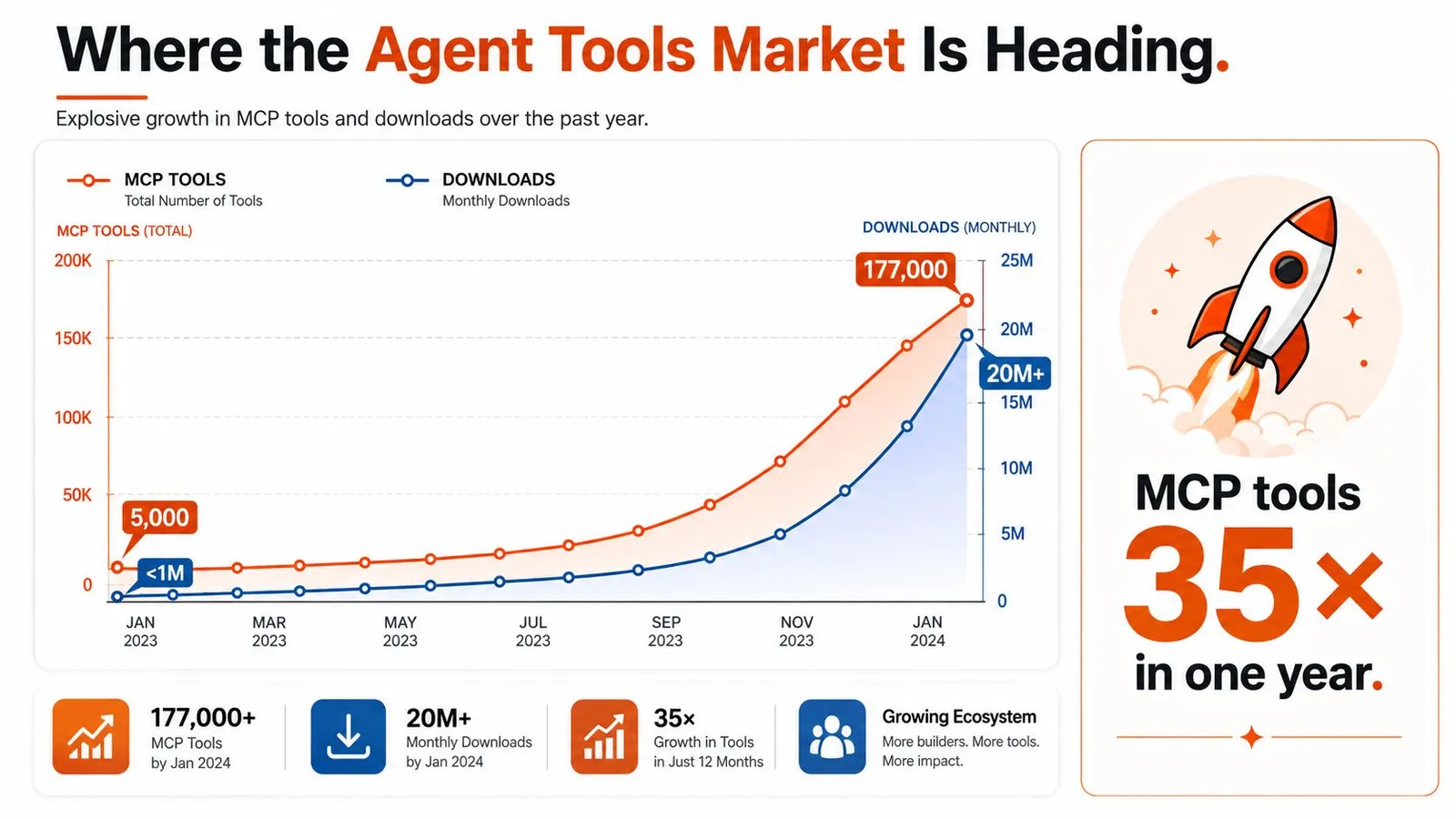
The operational shift matters too. Agent ecosystems are moving from isolated demos to a shared tool layer, and the scale is no longer theoretical. An independent UK government analysis reported that publicly released MCP tools grew from about 5,000 to 177,000 in roughly a year, with downloads rising from 80,000 to 14 million over the same period. That growth is a sign that toolchains, not prompts alone, are becoming the main surface area of agent engineering. AISI analysis of 177,000 AI agent tools
For retrieval-heavy workflows, the shape of the tool matters as much as the source behind it. Webclaw fits best when the agent needs structured extraction from pages, sources, or documents and cannot afford to spend context on raw HTML or noisy browser output. In those cases, the goal is not just to fetch content, it is to return a compact result that the agent can rank, compare, and act on without another cleanup step.
A Working Taxonomy of Agent Tool Types
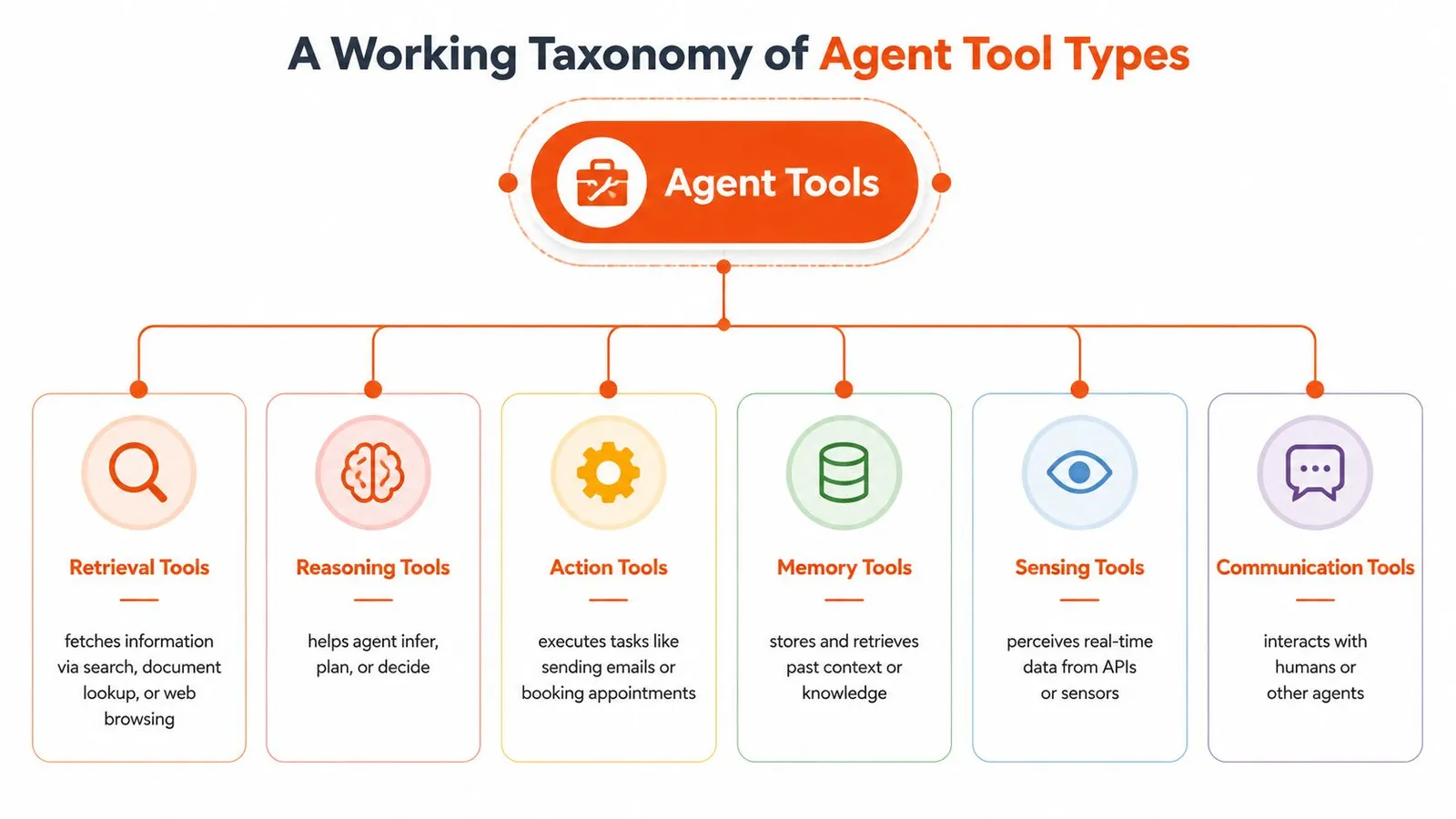
The cleanest way to think about tools is by what they do for the agent, not by whether they happen to be an API, a browser, or a runtime hook. That framing makes it easier to see gaps in an architecture, especially when multiple tools have to cooperate in one loop.
Retrieval tools and action tools
Retrieval tools fetch information. Search, document lookup, and web browsing all belong here. They answer the model's question, “What's true?” A support agent pulling policy pages or a research agent gathering sources both start with retrieval.
Action tools change state or trigger workflows. Sending email, updating a database, deploying code, or issuing a refund are all action tools. These are the ones that force you to think about permissions, reversibility, and audit logs, because the model can do real damage if the wrapper is too loose.
Extractors, wrappers, and orchestration
Scrapers and extractors pull structure out of messy pages. A raw web page is rarely useful to a model, but structured output from a product page, article, or job listing can feed downstream reasoning cleanly. The quality difference between “HTML dump” and “fielded extraction” is often the difference between a reliable report and a hallucinated one.
Tool-APIs are the model-friendly wrappers around external services. They expose the business operation the model needs instead of forcing it to understand internal backend shape.
Orchestration and runtime tools manage the loop itself. Scheduling, memory management, and agent-as-tool patterns live here. Hierarchical workflows become possible, especially for complex jobs that need planning, delegation, and retry logic.
Observability tools show what the agent did and why. Logs, traces, and decision records let you debug when the model took the wrong branch or called a tool with the wrong arguments.
If you need a concrete map of the MCP layer inside that stack, browse MCP integrations is a useful reference point for how tool discovery and agent calling fit together in practice.
As a working architecture, these categories usually chain together. A retrieval tool finds the source, an extractor cleans it, an action tool writes the result somewhere, and observability tells you which step broke when the agent drifted. If one layer is weak, the whole loop starts to wobble.
You can also use Webclaw's MCP server overview as a useful mental model for how retrieval-oriented tools surface clean content to agents instead of raw web noise.
How to Evaluate Agent Tools for Production
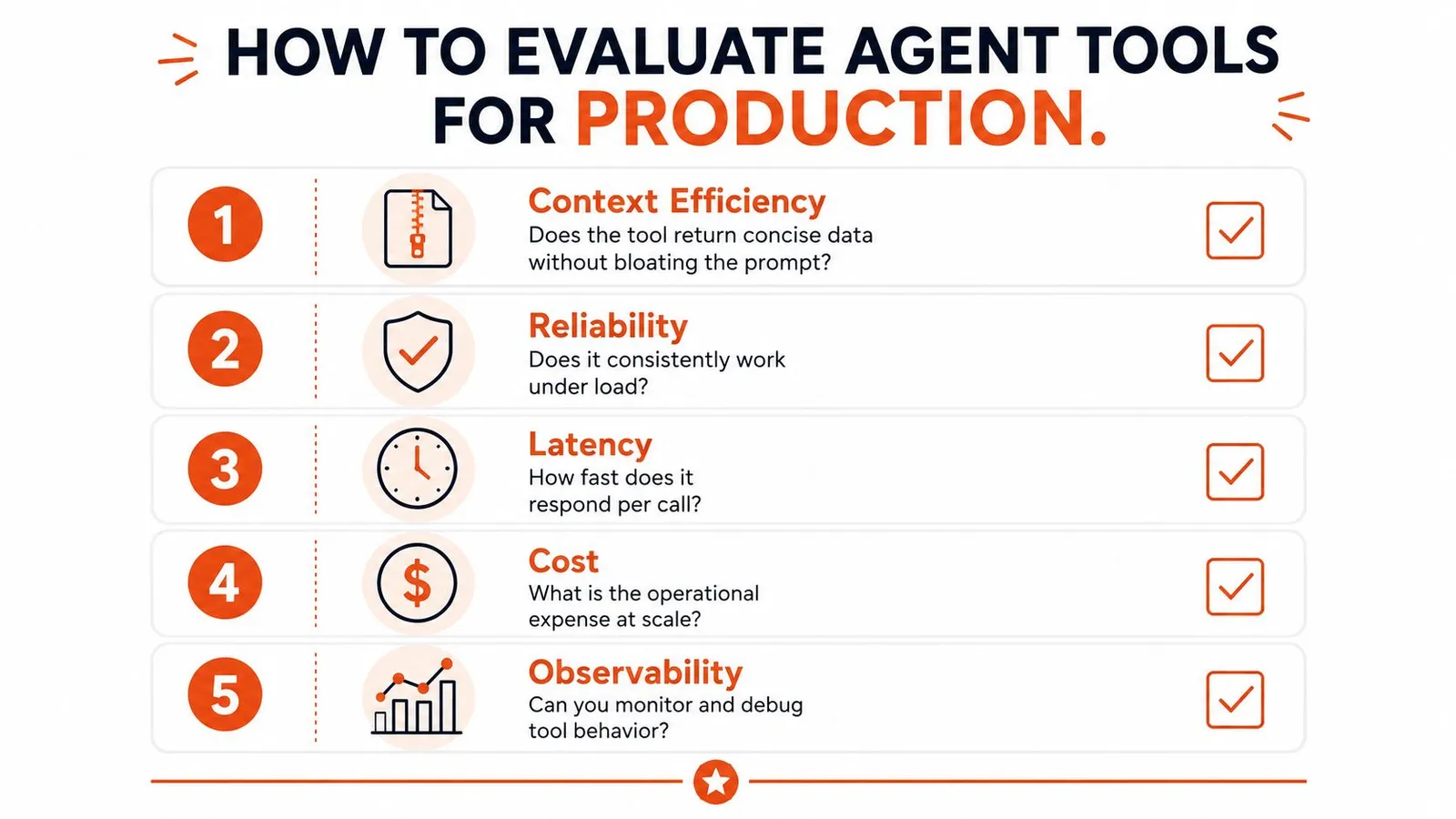
A tool can look solid in a demo and still fall apart the first time it hits rate limits, malformed responses, or a context budget that is already close to full. The question is not whether it works once. It is whether it keeps working under the conditions your agent runs in.
What breaks first
Context efficiency is the first filter. If a tool dumps everything it found, the model has to wade through low-value text before it can act, which adds cost and increases the chance of a bad decision. A production tool should return only what the next step needs, not a full archive of the underlying object.
Reliability under messy conditions matters just as much. Tools need to handle rate limits, bot protection, malformed payloads, and partial failures without sending the agent into a dead end. If the wrapper falls over on the first strange page or stale API response, the agent is just a fragile script with better wording.
The fastest way to lose trust is to let a tool fail noisily and ambiguously.
Latency profile is about where the waiting shows up. A slow tool can stall the reasoning loop, especially when the agent needs to call it more than once. Even if the final answer is correct, long pauses make the system feel broken to the user.
Security and composability
Security boundaries define what the model can touch. If a tool exposes too much data or can trigger destructive actions without a clear permission model, you have given the model a sharp edge with no guardrail. That may be acceptable in a sandbox, and risky in production.
Composability is the hidden failure mode. A tool that works on its own but breaks when chained with retrieval, validation, and action steps will create brittle workflows. The output should be usable as the input to the next call without manual cleanup or special-case parsing.
Anthropic's guidance on writing tools for agents is useful here because it favors decision utility over raw completeness. If the model cannot use the output quickly, the tool is too verbose. For a concrete look at how retrieval-heavy workflows stay clean enough for downstream reasoning, this Webclaw RAG pipeline note is a good reference.
If you need a map of how tool discovery and agent calling fit together in practice, browse MCP integrations is a useful reference point.
Integration Patterns and Agent Architecture
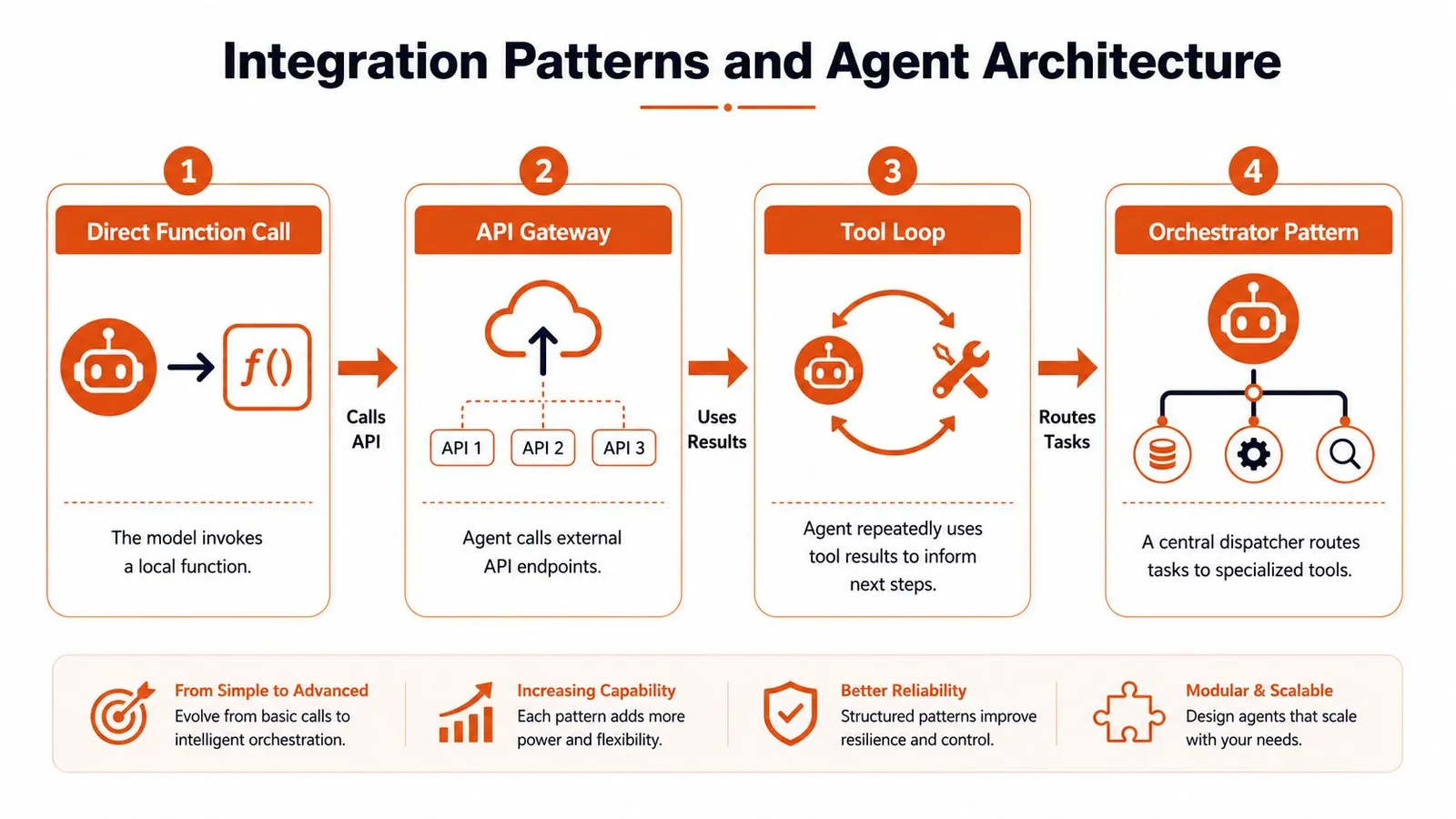
The integration pattern you choose determines how much control stays in your stack, how much latency you introduce, and how much risk the model can take on. There is no universal pattern, only the one that fits the workflow, the failure modes, and the blast radius you are willing to accept.
From local calls to orchestrated systems
The direct function call pattern is the lightest-weight option. The model invokes code in the same process, which keeps latency low and debugging simple. It works well for narrow helpers, but once you need retries, isolation, or separate scaling, the convenience starts to fade.
The hosted tool service pattern moves the tool behind an API boundary. That adds network overhead, but it gives you a clearer security boundary and more predictable operations. Retrieval tools often fit here because they can scale separately, return concise payloads, and keep the agent runtime free from crawling or index maintenance.
The tool loop pattern is the core of many production agents. The model calls a tool, inspects the result, reasons about it, and calls again until the task is complete. Search, extraction, validation, and action become one workflow instead of a pile of disconnected endpoints, but only if the tool outputs stay compact and machine-readable.
The orchestrator pattern adds a central dispatcher that routes tasks to specialized tools, retries failed steps, and hands work between sub-agents. That structure helps once the workflow grows beyond one model pass, yet it also creates another system to observe, tune, and keep from drifting. In practice, the orchestrator often becomes a product in its own right.
Where each pattern fits
Use a local function when the logic is simple and the data already sits near the model. Use a hosted service when the tool needs its own runtime, authentication, or crawling infrastructure. Use agent-to-agent composition when the workflow is too large for one pass and benefits from delegation.
Retrieval-heavy systems are where these choices become concrete. A service such as Webclaw fits best when you need to fetch, normalize, and return web data without stuffing the model context with raw pages. For teams wiring that kind of retrieval into an agent stack, the LangChain integration notes from Webclaw show how to keep the tool boundary clean while still making the output easy for downstream reasoning.
If you need a map of how tool discovery and agent calling fit together in practice, browse MCP integrations is a useful reference point.
Rule of thumb: keep the model close to the data it needs, and keep the dangerous parts behind a boundary you can control.
Security, Latency, and Cost Tradeoffs
Every serious tool choice sits in the same triangle. Stronger security usually means more isolation. More isolation usually means more network hops. More network hops usually mean more latency, and that latency compounds when the agent loops.
A hosted scraping API is easier to operate than a homegrown browser farm, but you inherit a dependency and a new trust boundary. Running your own browser stack gives you control, though you also own maintenance, proxy management, and failure handling. Neither is universally better. The right choice depends on how much surface area you're willing to manage.
Caching helps with latency, but cached output can drift from reality. That's acceptable for static documentation and dangerous for live account data or stock-sensitive pages. Batching can reduce overhead, but it also makes failures harder to localize because one bad item can poison a whole group of calls.
The hidden cost is context
Token cost is often the quietest problem. A tool that sends back unnecessary text on every turn wastes context and pushes the model closer to truncation. That doesn't just raise billable usage, it also degrades answer quality because the useful signal competes with the extra noise.
Authentication is part of this tradeoff too. Bearer-token auth gives you a simple control point for API access, but access control only helps if the tool output itself is constrained enough to keep the model from seeing more than it needs.
The operating principle is simple. Optimize one dimension deliberately, not by accident. If you lower latency by widening access, you may increase risk. If you improve cost by batching aggressively, you may hurt debuggability. Good agent systems make those tradeoffs explicit instead of hiding them inside a wrapper.
Real-World Agent Tool Use Cases
The most useful agent systems tend to be the ones where the tool mix matches the job cleanly. The failure mode starts when teams ask a single pattern to do too many things, then blame the model when the architecture is the actual problem.
Research, support, code review, and pipelines
A research agent typically requires retrieval, extraction, and citation formatting. It gathers information from web sources, filters irrelevant content, and compiles findings into a report. If the scraping layer returns redundant boilerplate and duplicate links, the report's reliability suffers quickly. When the extraction layer provides clean source text, the agent can reason over evidence instead of speculating.
A customer support agent combines retrieval tools, account lookups, and action tools. It checks policies, loads the customer's situation, and then updates a ticket or issues a refund when the rules allow it. The common failure is over-permissioned action, where a mistaken call can change state before a human has a chance to verify it.
A code review agent reads pull requests, runs static analysis, and posts comments. It works best when the tools expose precise diffs and focused diagnostics, not entire repositories dumped into context. Review quality drops as soon as the agent spends more tokens re-reading code than assessing it.
A data pipeline agent extracts structured records from documents, validates them against schemas, and loads them into databases. Predictable output matters more than clever reasoning here. If the extractor is noisy, the validator gets flooded with exceptions and the pipeline stops being autonomous.
For deeper grounding in web-heavy workflows, Webclaw's scraping guide for AI agents is a relevant example of how retrieval and extraction quality shape the final agent outcome.
Clean tools don't make the model smarter. They make the model's mistakes smaller and easier to catch.
Integrating Webclaw into Agent Toolchains
Webclaw fits cleanly into the retrieval and extraction part of an agent stack. It's useful when the hard problem is not “Can I fetch the page?” but “Can I return something the model can use without wasting context?”
The main difference from generic scraping is the shape of the output. Webclaw is built to strip navigation, ads, boilerplate, duplicate links, and emphasis noise, then return content in a format a model can consume directly. That matters because raw HTML forces the model to spend attention on junk before it reaches the useful text. Webclaw also supports single URL extraction in markdown, JSON, plain text, or an LLM-optimized format, plus site crawling, web search, batch processing, structured extraction, and automatic YouTube transcript handling.
Where it fits in practice
Use Webclaw as the retrieval and extraction layer when the agent needs clean web content, not raw source code from a page. In retrieval-heavy workflows, that keeps the prompt smaller and the reasoning cleaner. It also helps on hard sites because JavaScript rendering and bot protection handling reduce the number of empty or blocked responses that break naive fetchers.
The integration options are straightforward. You can call it through a REST API with bearer-token auth, use the official SDKs for TypeScript, Python, and Go, attach it through an MCP server for native tool calling, or script it from the command line when you want a simple one-off extraction path. For teams already wiring tools into a model loop, that flexibility matters more than feature breadth.
If you're choosing where to place it architecturally, put Webclaw in front of the model when the model needs clean web evidence, then hand the extracted content to downstream reasoning or action tools. That keeps the retrieval boundary separate from the action boundary, which is where production systems usually stay healthier.
Where the Agent Tools Market Is Heading
The market is moving from novelty integrations to infrastructure people build around. As noted earlier, public MCP tool ecosystems have expanded quickly, and the download side has grown even faster, which is a strong sign that teams are starting to rely on these tools in real workflows. A separate arXiv study using the same corpus found that 67% of published tools were software-related and accounted for 90% of MCP server downloads, which shows how heavily the ecosystem still depends on developer workflows (arXiv analysis of MCP tool usage).
That growth is not evenly distributed. Independent market mapping points to underserved verticals like education, government, agriculture, construction, and real estate, along with infrastructure gaps in agent-to-agent communication, cross-platform orchestration, testing frameworks, and regional or non-English use cases (agent market mapping). Security, finance, and observability also remain thinly covered in many tool directories, which is a good indicator that the market is still early and fragmented.
The next opportunities are less crowded than the generic horizontal layer. The tools that matter will be the ones that handle real workflow constraints, return the right context, stay reliable under load, and fit cleanly into existing systems without making the agent slower or harder to secure.
What that means for builders
The crowded space is generic tooling that does not need domain depth. The open space is everything that ties agents to real workflows, real policies, and real data quality constraints. If you are building tools, the winner will not just be the one with the most features. It will be the one that returns the right context, keeps latency under control, respects security boundaries, and integrates without forcing teams to rebuild their stack.
If your agent systems keep failing on noisy web data, brittle extraction, or prompts that run out of room, Webclaw gives you a retrieval layer built for clean context instead of raw HTML. Visit Webclaw if you want to plug web scraping, search, crawl, and extraction into an agent toolchain that can hold up in production.